Cold email and email marketing both land in an inbox, so people treat them as the same thing. This blog helps you understand that they are not.
I have run both, and the moment you blur the line, it is the deliverability that suffers.
The two methods use different audiences, different rules, different tools, and different infrastructure.
This guide breaks down where they split, when to use each, and what setup each one actually needs.
So, let's begin.
A cold email is a targeted message sent to someone who has no prior relationship with your business. They never filled out a form, downloaded a guide, or subscribed to anything.
You found them through prospecting tools, LinkedIn, or a lead database because they fit your ideal customer profile. The goal is simple: start a conversation, qualify interest, and book a meeting.
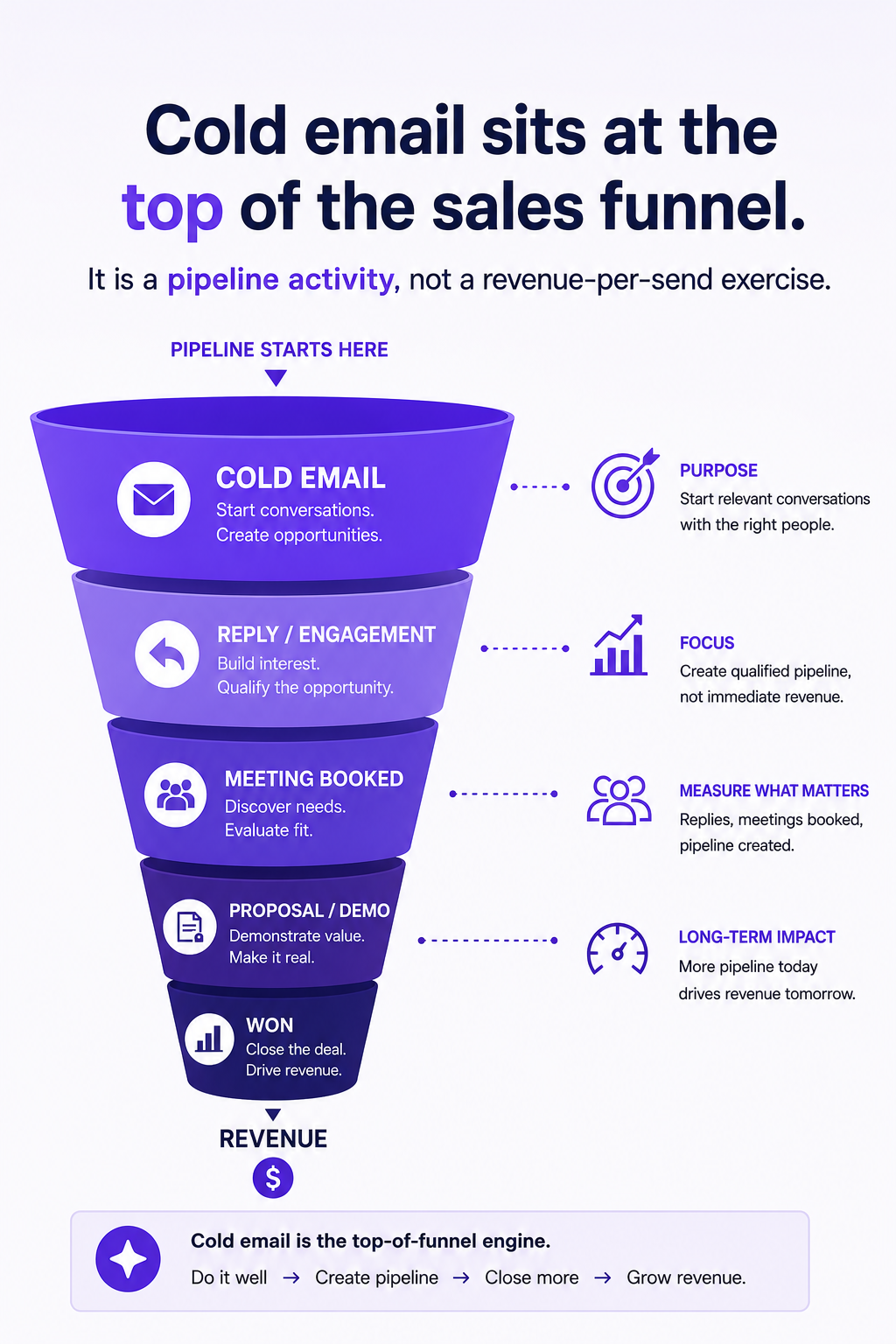
Cold email sits at the top of the sales funnel. It is a pipeline activity, not a revenue-per-send exercise.
At the same time, cold emailing is also not spam. Spam is untargeted bulk mail with no personalization.
A good cold email is relevant, personal, and signals why you are reaching out in the first few lines.
Email marketing is permission-based. You send to subscribers, customers, or leads who actively opted in to hear from you.
These people signed up through a form, made a purchase, or downloaded a resource. They already know your brand and expect to hear from you.
The goal here is to nurture. You educate subscribers, promote products, reduce churn, and move existing contacts further along the buyer journey.
Campaigns usually go out as branded HTML emails with images, buttons, and a clear visual layout. Think newsletters, product updates, and promotional offers.
Most comparisons stop at "they use different tools." That single line hides the most important split, so I want to go deeper here.
Email marketing runs through your main brand domain. That is intentional. Subscribers know you, your domain has trust, and the volume goes to people who want it.
Cold email cannot work this way. Sending unsolicited outreach from your primary domain puts your whole business reputation on the line.
When you send a cold email, some recipients will not engage, and a few will mark it as spam. That feedback hits the sending domain's reputation directly.
If that domain is your main one, the damage spreads. Your invoices, client replies, and password resets can start landing in spam folders, too.
So serious cold senders use separate sending domains, kept apart from the brand domain. If one domain takes a hit, the primary stays clean and recovery is contained.
The math forces this, too. A single domain tends to cap out around 200 to 300 quality sends a day before reputation slips.
To send more, you distribute. The common pattern is several domains, a few mailboxes per domain, and roughly 40 to 50 emails per inbox each day.
A working cold email setup usually includes a few moving parts:
This is exactly the layer that Mailforge handles. I use it to spin up sending domains and mailboxes at scale with DNS configured automatically, so I am not setting SPF and DKIM by hand across dozens of domains.
If you want the deeper version of this argument, the Mailforge breakdown on secondary domains versus primary domains for scaling covers the risk isolation logic in detail.
For very high volume or full control over IP reputation, dedicated IPs are the next step up. That is where Infraforge fits, while Mailforge's shared IP setup keeps things affordable for small and mid-size teams.
If you specifically want real Google Workspace or Microsoft 365 mailboxes for outreach, Primeforge provides those configured for deliverability.
Learn cold email infrastructure in less than 5 minutes.
Email marketing relies on opt-in consent. Subscribers chose to be on the list, which is the foundation of the whole channel.
Cold email has no prior opt-in, but it is still regulated. In the US, CAN-SPAM applies. In the EU, GDPR sets the bar.
These rules require a valid reason for contact, accurate sender details, and an easy way to opt out. Getting them wrong is expensive, with CAN-SPAM penalties reported in the tens of thousands of dollars per violation.
The takeaway is practical. Cold email is allowed, but it is not a free-for-all, and the legal framing differs from a permission-based newsletter.
This is where teams talk themselves out of cold email for the wrong reasons.
Marketing emails report strong open and click rates because the audience already likes you. Industry benchmarks for 2026 put average marketing open rates in the high-thirties percent range.
Cold email reply rates look small next to that, often around 3 to 4 percent on average, with well-targeted campaigns climbing into double digits. Those numbers are not comparable because they measure different actions.
So track each on its own terms. For marketing, watch open rate, click-through rate, and unsubscribes. For cold email, watch deliverability, reply rate, and positive reply rate.
Use cold email when you are opening new relationships. It fits B2B prospecting, AI sourcing, agency lead generation, recruiting outreach, and entering a new market segment.
Use email marketing when you already have an audience. It fits nurturing subscribers, onboarding customers, and driving repeat purchases.
Most growing teams run both. The flow looks like this in practice:
Cold email opens the door. Email marketing keeps the relationship warm once someone opts in.
If you are starting the outbound path, the order matters more than the tools.
First, register sending domains separate from your brand domain. Second, create a handful of mailboxes per domain and configure DNS correctly. Third, warm them up for around two weeks before the first campaign.
Mailforge covers the first two steps, with infrastructure ready in minutes rather than days. You can size your setup with the Mailbox Calculator before committing.
Get started: spin up your cold email infrastructure with Mailforge, ready in about 5 minutes.
Plan first: use the Mailbox Calculator to work out how many mailboxes your volume needs.
See it live: book a demo to watch Mailforge set up domains and mailboxes.
Is cold email part of email marketing? Not really. Cold email is a sales prospecting activity aimed at new contacts, while email marketing nurtures an opted-in audience. They share the inbox as a channel, but the audience, goals, and rules differ.
Is cold email legal? Yes, when done correctly. In the US it must follow CAN-SPAM, and in the EU it must follow GDPR. That means honest sender details, a real reason for contact, and a clear way to opt out.
Can I send cold email from my main company domain? It is risky and not recommended. Spam complaints or bounces from cold outreach can damage your primary domain's reputation, which then hurts your everyday business email. Separate sending domains keep that risk contained.
Can I run cold email through Mailchimp or another ESP? No. Marketing platforms are built for opted-in lists and often prohibit cold outreach. Cold email needs dedicated infrastructure with separate domains and mailboxes, which is what Mailforge provides.
How many cold emails can I send per inbox per day? A common guideline is around 40 to 50 emails per inbox per day. To send more, you distribute volume across multiple mailboxes and domains rather than pushing one inbox harder.
Do I need to warm up a cold email domain? Yes. A fresh domain with no sending history looks suspicious to inbox providers. A warmup period of roughly two weeks, using a tool like Warmforge, builds reputation before real campaigns start.
Which has a higher response rate, cold email or email marketing? They are measured differently, so a direct comparison is misleading. Email marketing shows higher open rates because the audience opted in, while cold email is judged on reply rate from people who did not.