
If your LinkedIn connection requests get accepted but don't lead to sales conversations, you're probably wondering what to do next.
Many outreach campaigns lose momentum after the first message. A direct pitch often comes too soon, before you've built any interest or trust.
A good LinkedIn outreach strategy starts with finding the right prospects, building a credible profile, and sending messages that feel natural. You also need a follow-up plan to keep conversations going and turn them into sales opportunities.
In this guide, I'll walk you through the entire process, from finding prospects and writing LinkedIn outreach messages to combining LinkedIn with cold email.
Let's get started.
LinkedIn outreach is the process of contacting potential customers on LinkedIn to start relevant business conversations. It can include connection requests, direct messages, InMail, and follow-ups based on a prospect’s role, activity, or business needs.
The goal is to build a connection with the right person and start a conversation that could lead to a meeting or sales opportunity.
The main types of LinkedIn outreach include:
Choosing the right type of LinkedIn outreach depends on your target audience, campaign goals, and relationship with the prospect.
You can also combine different approaches to start relevant conversations and build stronger business relationships.
Cold email serves a similar purpose, but the two channels work in different ways.
LinkedIn helps you establish context before starting a conversation.
Cold email gives you another way to reach a prospect when an email address is available and outreach is appropriate.
Using both channels in one sequence can help you reach prospects through the channel they prefer.
The key is to keep the messages relevant and avoid sending the same pitch everywhere.
LinkedIn gives you access to professional information that can help you understand a prospect before reaching out.
You can review their role, company, recent posts, career changes, and shared connections. These details give you a reason to start a conversation beyond simply pitching your product.
Here are a few situations where LinkedIn outreach can work well:
LinkedIn outreach still takes research and patience. A prospect may accept your request without wanting to buy anything.
The aim is to start a relevant conversation, not push every new connection toward a sales call.
Your LinkedIn profile is part of your sales outreach. Prospects may check it before accepting a request or replying to your message.
A profile that explains what you do and whom you help gives prospects a reason to take you seriously.
Your headline should explain your role and the value you offer. Avoid using only your job title if it does not tell prospects what you help them achieve.
For example:
Helping B2B sales teams improve outbound prospecting and generate more qualified conversations.
Keep the wording specific to your role and audience. Do not claim results you cannot support.
Use your banner to reinforce what you do. It could mention your service, target audience, or a clear value proposition.
Keep the design simple. The banner should support your profile rather than compete with the information in it.
Explain your work, the problems you help solve, and the people you work with. Use simple language and focus on what a potential customer would want to know.
For example:
if you work with B2B sales teams, explain how you help them improve prospecting, manage follow-ups, or build an outbound process.
Use the Featured section to share relevant work, case studies, reports, or useful resources. Choose examples that support your expertise.
Make sure you have permission to share any customer information or results.
Share useful insights, comment on relevant posts, and take part in discussions related to your industry.
You do not need to publish every day, but your profile should reflect your current work and interests.
When a prospect checks your profile, they should understand what you do and why connecting with you could be useful.
A strong LinkedIn outreach strategy helps you build relationships that lead to sales opportunities.
You would be surprised to know this fact. According to LinkedIn Sales Solutions, social selling leaders create 45% more opportunities and are 51% more likely to hit quota than their peers.
Here’s how to build a LinkedIn outreach strategy in seven steps.
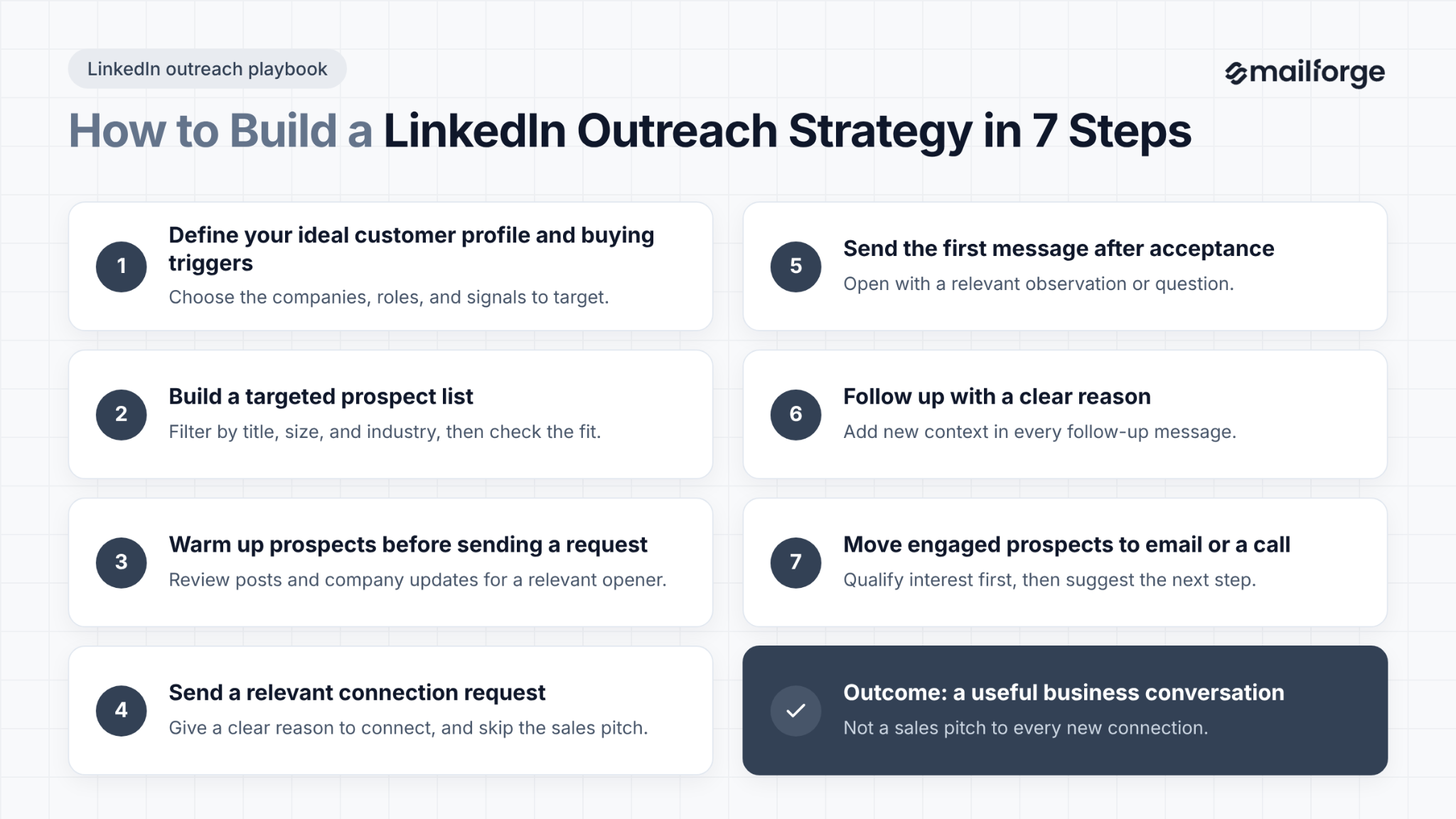
Start by defining the companies and people you want to reach.
Consider factors such as:
Then identify buying triggers that give you a reason to reach out.
For example, a company hiring several sales development representatives may need help managing its outbound process. A business entering a new market may need support with prospecting and lead generation.
Use these signals to decide whom to contact and what to discuss. Do not assume every company with a particular job opening or announcement needs your product.
Once you have defined your audience, build a list of people who fit your criteria.
LinkedIn Sales Navigator can help you filter prospects by job title, company size, industry, geography, and other professional details.
You can use these filters to narrow your list before reviewing individual profiles.
You can also use prospecting tools such as Leadsforge to find relevant B2B contacts.
Before adding someone to your campaign, check that their role and company match your ideal customer profile. Keep contact information accurate and follow the privacy and marketing rules that apply to your outreach.
A smaller list of relevant prospects is more useful than a large list of people who have little reason to respond.
Before reaching out, spend a little time understanding the prospect.
You can review their recent posts, look at company updates, or leave a thoughtful comment when you have something useful to add. These interactions can help you understand their interests and identify a relevant conversation starter.
Do not comment on posts just to get noticed. Avoid generic comments that could apply to any post.
The goal is to learn enough about the person to make your outreach relevant. A genuine interaction can provide useful context, but it does not guarantee a reply.
Your connection request should give the prospect a clear reason to connect.
When you have a specific reason, include it in your note. If you do not have anything useful to add, a simple request may be better than a generic sales pitch.
The message refers to a relevant detail and explains why you want to connect. It does not ask for a meeting before the prospect knows you.
Avoid long introductions, product pitches, and requests for a demo in your connection note.
Once the prospect accepts your request, start with a relevant observation or question.
Do not treat an accepted request as permission to send a long sales pitch. Your first message should open a conversation.
The question connects to a business signal and gives the prospect an easy way to respond.
You can use a similar approach for other triggers, such as a new role, product launch, or expansion into another market.
Make sure the detail is accurate before using it.
Tip: Watch this below video to learn how to send LinkedIn DMs to your prospects that get you replies.
Many prospects will not reply to your first message. They may be busy, have other priorities, or simply miss it.
A follow-up can give them another chance to respond, but each message should add context or value. Do not keep sending the same question.
Here is a starting cadence you can test:
Treat this as a starting point, not a universal rule. Adjust the timing based on your audience, the prospect’s behavior, and the type of offer.
If someone declines, asks you to stop, or indicates that they are not interested, respect their response.
When a prospect shows interest, continue the conversation in the channel that makes sense for them.
You could ask a few qualifying questions, share a relevant resource, or suggest a short call. If email is a better option, use a verified address and follow the applicable marketing rules.
Do not move every connection to a sales call. First, understand whether the prospect has a relevant problem and whether your product or service can help.
The goal is to move from a LinkedIn interaction to a useful business conversation.
Templates can save time, but they work best when you adapt them to the prospect. Replace placeholders with accurate details and remove anything that does not fit the situation.
When to use it: You have identified a relevant company update, hiring trend, or business change.
When to use it: You have a genuine professional connection, shared group, or relevant community.
Only mention a shared group or connection when it is accurate.
When to use it: You have read a post and have something specific to discuss.
Avoid sending this message if you have nothing meaningful to add to the discussion.
When to use it: The prospect has accepted your request, and you have a relevant reason to contact them.
Keep the question focused on one topic. Avoid adding a product pitch before the prospect has shown interest.
When to use it: You have a resource that addresses a problem relevant to the prospect.
Share the resource because it is useful, not just to create another touchpoint.
When to use it: You have sent an initial message but have not received a reply.
This gives the prospect an easy way to respond without creating pressure.
When to use it: You have followed up without a response and want to close the conversation.
After sending the final message, stop following up unless the prospect responds or a new, relevant reason to contact them arises.
When to use it: You have a relevant reason to contact someone you are not connected with and can use InMail.
I thought it might be worth comparing notes on how your team handles [topic]. Would you be open to a short conversation?
Keep the message focused on the prospect’s situation. Do not use InMail as a reason to send a longer, generic pitch.
LinkedIn has rules around invitations, account activity, data collection, and third-party automation. The platform can restrict accounts that engage in activity it considers abusive or that violates its terms.
There is no single weekly invitation number that guarantees every account will remain safe.
Limits and restrictions can depend on LinkedIn’s current policies and account-specific factors.
Keep these practices in mind:
New or inactive accounts should be especially cautious about sudden changes in activity. There is no guaranteed safe sending volume, and following a fixed daily number does not remove the risk of restrictions.
Manual outreach gives you more control over each interaction. If you use a third-party tool, review its features and make sure your use complies with LinkedIn’s current rules.
LinkedIn and cold email can work together to reach B2B prospects and start sales conversations.
Use LinkedIn to build connections and understand a prospect’s business needs, then use email to share relevant information or explain how your solution can help.
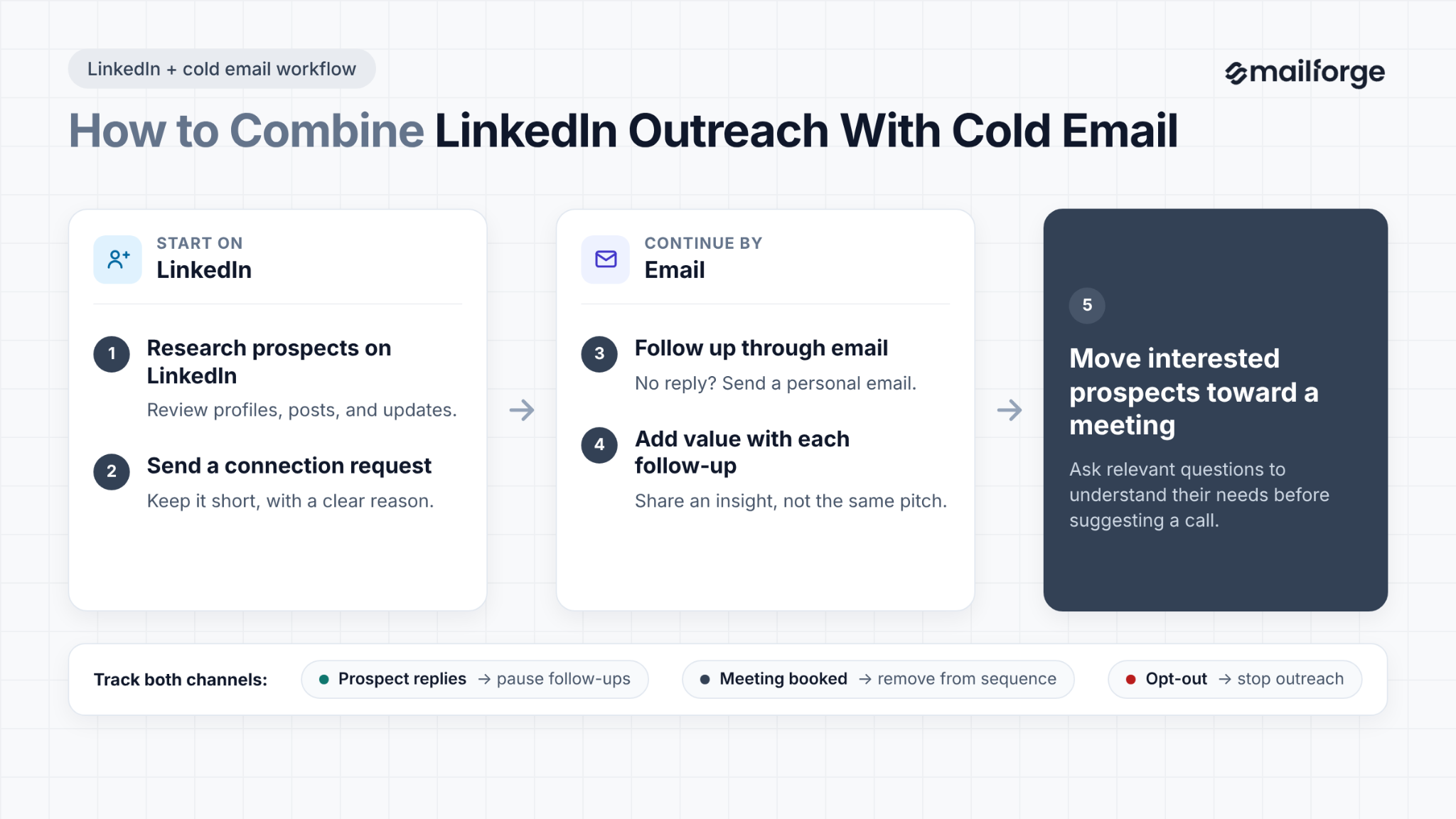
Use a shared CRM or outreach platform to track LinkedIn messages, emails, and replies. Pause follow-ups when a prospect responds, remove them from the sequence when they book a meeting, and stop outreach if they opt out.
Review which messages generate positive replies and qualified meetings.
Use those results to improve your targeting and messaging, and make sure every touchpoint gives the prospect a relevant reason to engage.
Track metrics that show whether your outreach reaches relevant prospects and starts useful conversations. A high number of sent requests does not mean your campaign is working.
Do not judge a campaign by one metric alone. Review the full path from invitation to qualified opportunity and test one change at a time.
Even a well-built campaign can struggle if the messages feel generic or the prospect list is poorly targeted. Avoid these common mistakes when planning your outreach.
The right LinkedIn outreach tool depends on how you prospect, how many people manage outreach, and whether you need email in the same workflow.
The table below compares seven tools across their primary use cases, supported channels, cloud setup, pricing, trials, and G2 ratings.
Pricing and product features can change, so confirm the current details on each provider’s website before making a decision.
LinkedIn outreach works best when you target the right prospects, personalize your messages, and follow up with a clear purpose.
Combining LinkedIn with cold email gives you more ways to start conversations and build relationships with potential customers.
Track your results, learn which messages get responses, and refine your approach based on what works.
If you want to manage both channels in one place, Salesforge lets you coordinate LinkedIn and email sequences based on prospect behavior.
Explore its plans to find the features that fit your team’s outreach needs
There is no universal acceptance rate for every LinkedIn outreach campaign. Results depend on your audience, profile, targeting, and connection request, so compare similar campaigns and review your approach if acceptance rates decline.
There is no single weekly number that guarantees your account will remain unrestricted. Check LinkedIn’s current guidance, avoid sudden increases in activity, and focus on relevant prospects rather than maximizing invitation volume.
Add a note when you have a specific reason to connect, such as a relevant post, role, or business trigger. If you have nothing useful to say, a simple request may be better than a generic pitch. Check LinkedIn’s current note limits before sending invitations.
No third-party automation tool can guarantee that your account will remain unrestricted. LinkedIn prohibits certain forms of unauthorized automation and data collection, so review its current rules before using a tool and consider which activities you can manage manually.
No, you can conduct LinkedIn outreach with a standard account. Sales Navigator offers additional prospecting filters and search features, which can help you find relevant prospects. Whether you need it depends on your targeting requirements, prospect list size, and budget.
Start with a small number of relevant follow-ups over one or two weeks and review the results. Give each message a clear purpose, and stop when the prospect declines, opts out, or asks you to stop. If there is no response after your final follow-up, move on.
Yes, some platforms support LinkedIn and email outreach in the same workflow. Salesforge, for example, combines both channels and supports sequences that adapt to contact behavior. Check the current plan details to confirm the features and sender limits you need.
