Creating an email inbox for an AI agent is easy with AgentMail. But what happens when you need 50, 100, or even more inboxes?
AgentMail lets AI agents send emails, receive replies, manage threads, and process attachments through an API.
However, its $20/month Developer plan includes only 10 inboxes and 10,000 emails per month. To increase that limit to 150 inboxes, you need the $200/month Startup plan. Dedicated IPs are also available only through its custom Enterprise plan.
These limits may push you to look for an AgentMail alternative, especially if you need more inboxes or greater control over your email infrastructure.
I've shortlisted five AgentMail alternatives covering AI agent inboxes, email APIs, and private email infrastructure. I'll compare their features, pricing, and differences from AgentMail to help you find the right option for your email setup.
Infraforge – Best for private email infrastructure with dedicated IPs, bulk mailbox creation, automated DNS setup, and API, MCP, and CLI access.
OpenMail – Ideal for AI agent email inboxes with API-based inbox management and two-way email communication.
Resend – Great for developers who need email sending and receiving APIs, webhooks, SDKs, and custom domains.
Mailgun – Best for email sending and inbound routing through REST APIs, SMTP relay, inbound message processing, and delivery tracking.
Mailtrap – Ideal for email testing and API-based sending with sandbox testing, email sending APIs, and delivery monitoring.
Why Users Look for an AgentMail Alternative
AgentMail makes it easy to create inboxes for AI agents and manage email conversations through an API. However, its pricing limits, infrastructure options, and some user-reported issues may lead you to consider alternatives.
Here are the main reasons.
Limited inboxes on lower plans. The $20/month Developer plan includes 10 inboxes. To get 150 inboxes, you need the $200/month Startup plan.
Monthly and daily sending limits. The Developer plan allows 10,000 emails per month and 1,000 per day. The Startup plan increases these limits to 150,000 per month and 15,000 per day.
Dedicated IPs require Enterprise pricing. Standard plans use shared IPs. Dedicated IPs are available through the custom Enterprise plan.
Custom domains are not available on the free plan. You need at least the $20/month Developer plan to connect your own domains.
Private deployment requires an Enterprise plan. Bring-your-own-cloud deployment and EU cloud hosting are listed under AgentMail's custom Enterprise offering.
Delivery reporting could be clearer. One Capterra reviewer reported difficulty interpreting delivery status, bounce messages, and automated replies.
Dashboard and inbox management need improvements. Some Capterra reviewers mentioned limitations with the console, onboarding, and managing multiple inboxes.
AgentMail has a 4.7/5 rating from 7 Capterra reviews, so these reported issues do not represent every user's experience.
If you need more control over email infrastructure, different sending limits, or better delivery reporting, these are reasonable factors to compare before choosing an AgentMail alternative.
5 Best AgentMail Alternatives in 2026: Quick Comparison
Feature
Infraforge
OpenMail
Resend
Mailgun
Mailtrap
AI agent inboxes
No
Yes
Yes
No
Yes
Threads and replies
No
Yes
Yes
Built in your app
Yes
Extra inbox cost
From $4/mailbox
€1/inbox
$1/inbox
N/A
Not publicly listed
Inbound email
Via connected tools
Webhooks + WebSockets
Inbox API
Inbound routes
API + webhooks
Email testing
No
No
No
Mailgun Inspect
Email Sandbox
Transactional email
No
No
Yes
Yes
Yes
Dedicated IPs
Yes
Enterprise
Scale add-on
Scale plan
Business plan
Starting paid price
From $4/mailbox
€9/month
$20/month
$15/month
$15/month*
1. Infraforge – Best AgentMail Alternative for Private Email Infrastructure
AgentMail lets you create inboxes through an API, but dedicated IPs are only available through its custom Enterprise plan. If you need dedicated IPs and want to manage a large number of mailboxes programmatically, Infraforge is an alternative to consider.
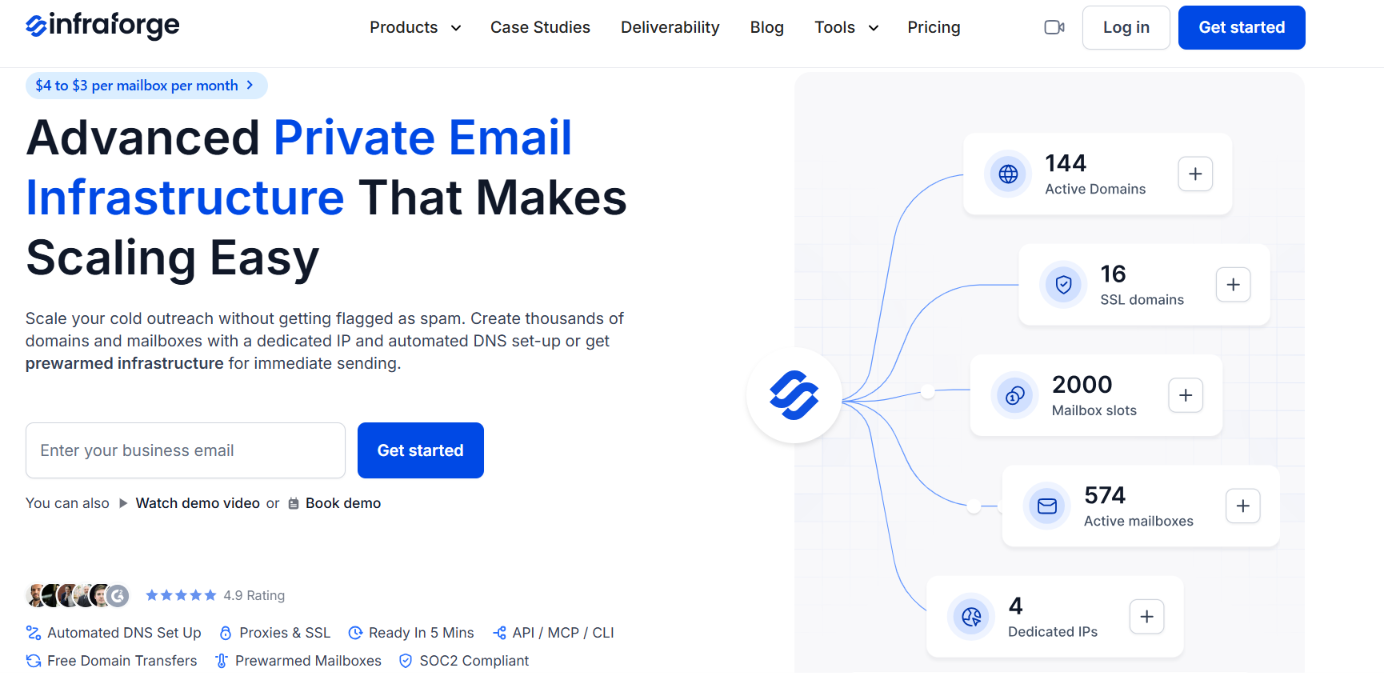
This image shows the Infraforge homepage
Infraforge provides private email infrastructure built for cold outreach. It supports bulk mailbox creation, automated DNS setup, dedicated IPs, and API, MCP, and CLI access.
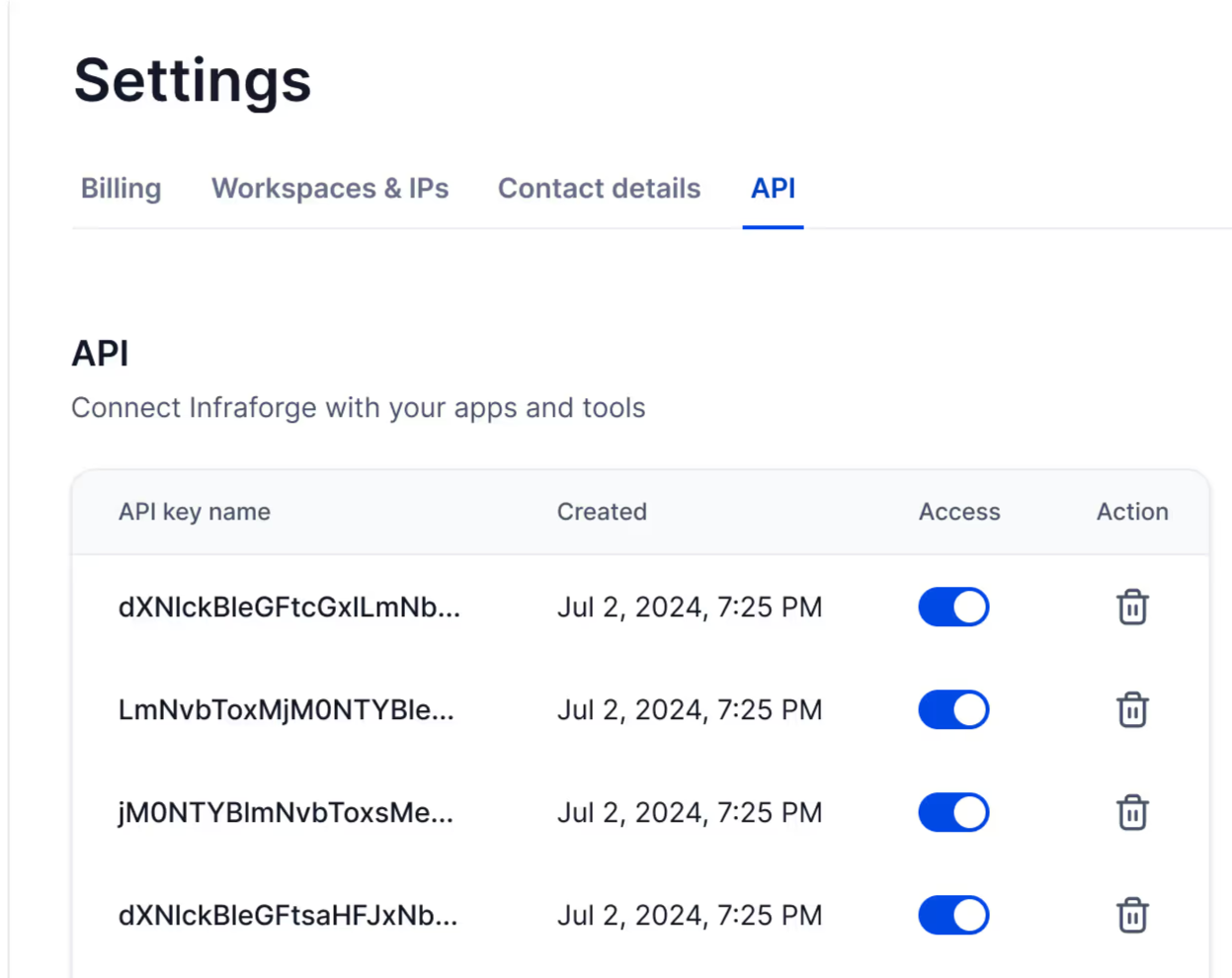
This image shows the Infraforge API
The main difference is what their APIs manage. AgentMail lets AI agents send emails, receive replies, and handle conversations. Infraforge focuses on provisioning and managing the email infrastructure used for cold outreach.
Infraforge is therefore an alternative for businesses that need private cold email infrastructure with programmatic management, rather than an API built specifically for AI agent conversations.
Infraforge vs AgentMail: Quick Comparison
Feature
Infraforge
AgentMail
Best for
Private cold email infrastructure
AI agent email inboxes
API access
Infrastructure management
Inbox and conversation management
MCP support
Supported infrastructure operations
Supported agent email operations
Dedicated IPs
Available with private infrastructure
Custom Enterprise plan only
Mailbox creation
Bulk provisioning with mailbox slots
API-based creation within plan limits
DNS setup
Automated SPF, DKIM, and DMARC
Supports SPF, DKIM, and DMARC
Email conversations
Works with external sending tools and email clients
Built-in threads, replies, and attachments
Starting price
From $4/mailbox/month
Free plan; paid plans from $20/month
Pros of Infraforge
Greater control over sending infrastructure with dedicated IPs available without requiring a custom Enterprise plan.
Strong programmatic management options through API, MCP, and CLI access for supported infrastructure tasks.
Easy bulk mailbox setup with automatic SPF, DKIM, and DMARC configuration for new domains.
Flexible mailbox slots that let you delete and replace mailboxes without purchasing new slots.
Useful multi-workspace support for managing separate client domains and mailboxes.
Cons of Infraforge
No equivalent built-in agent inbox API for managing conversations, threads, and attachments like AgentMail.
Higher minimum purchase requirement of 10 mailbox slots, even if you need fewer accounts.
No free trial for testing its paid email infrastructure.
Additional IP costs of $99 per IP per month.
Infraforge Pricing
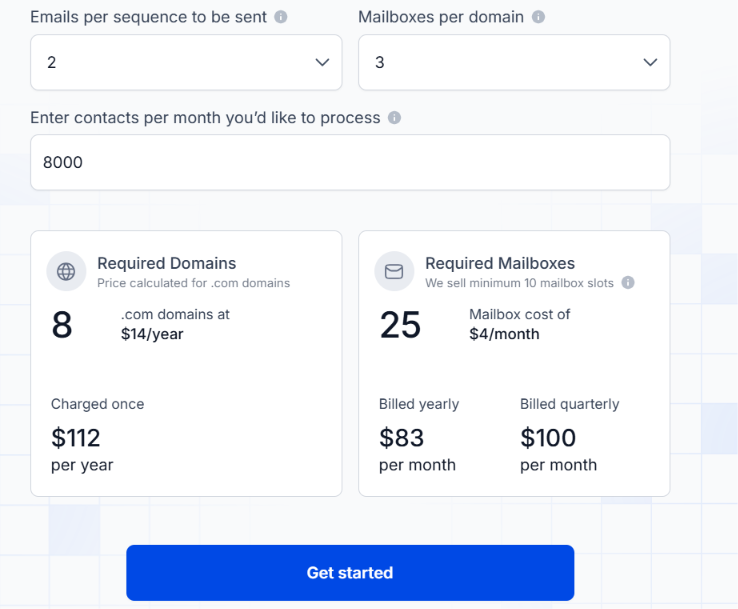
This image shows the Infraforge pricing
Infraforge mailbox pricing starts at $4 per mailbox per month and can decrease to $3 depending on volume and billing terms. You must purchase at least 10 mailbox slots. The subscription includes automated DNS setup, mailbox hosting, maintenance, and API access.
Additional charges include:
.com domains cost $14 per year.
Additional dedicated IPs cost $99 per IP per month, billed quarterly.
SSL and domain masking cost $2 per domain per month with quarterly billing or $6 per domain annually.
Masterbox costs $7 per workspace per month with annual billing or $9 with quarterly billing.
Infraforge's main advantage over AgentMail is access to private sending infrastructure with dedicated IPs and bulk mailbox management. However, it does not provide the same built-in API functions for AI agents to manage email conversations.
Personalized Outbound Strategy
Get The Right Outbound Strategy In Minutes
Enter your email to get a custom plan & stack recommendation for your
business
It's being carefully crafted by AI
Please check your mailbox in 5 minutes
2. OpenMail – Best AgentMail Alternative for Affordable AI Agent Inboxes
AgentMail's $20/month Developer plan includes 10 inboxes. To get more, its next plan costs $200/month. OpenMail offers more flexible pricing, starting at €9/month for 10 inboxes, with additional inboxes costing €1 each per month.
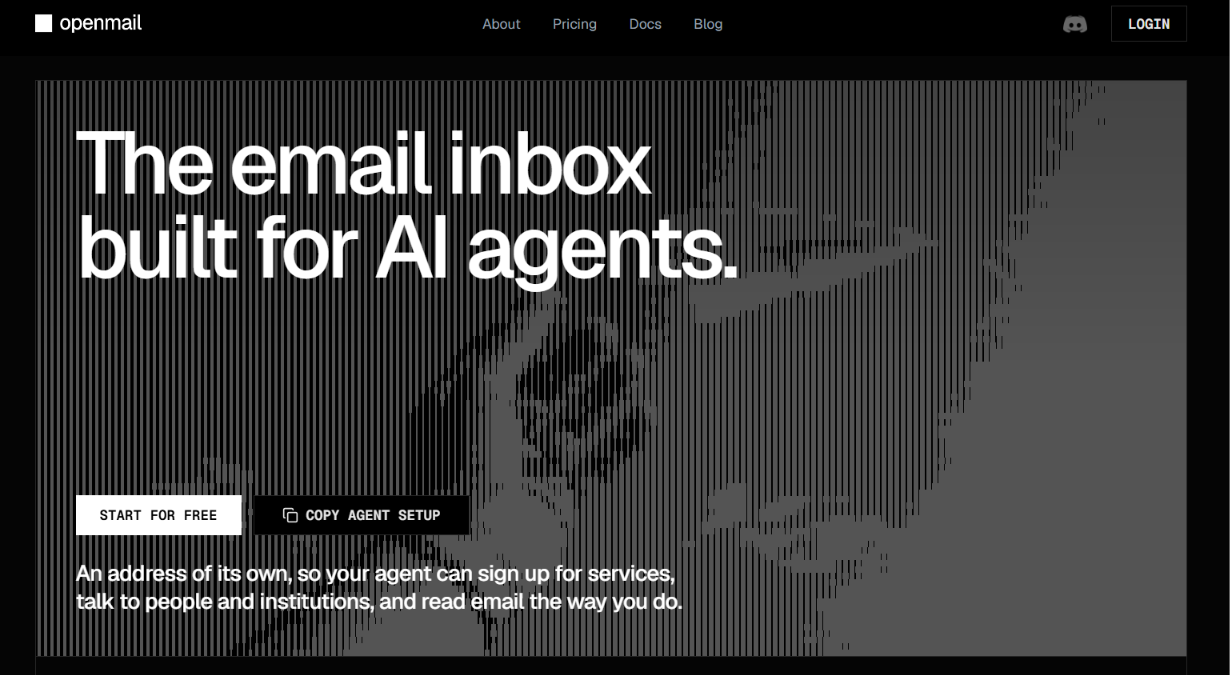
This image shows the OpenMail homepage
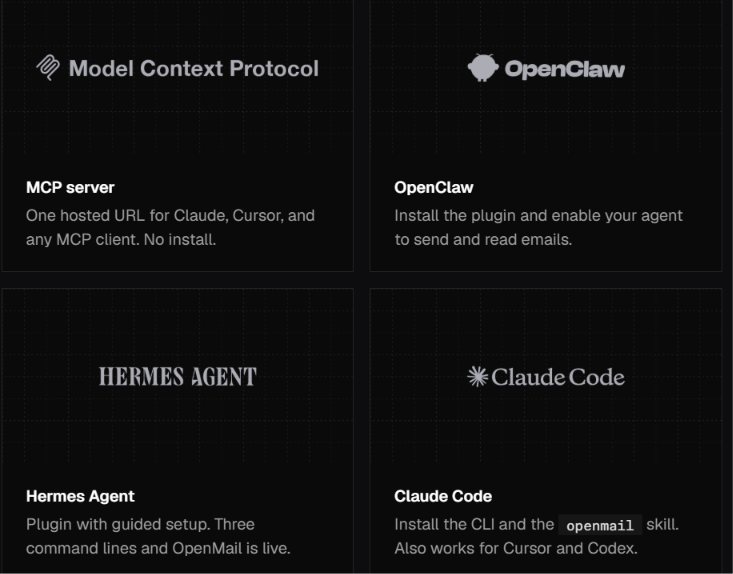
Like AgentMail, OpenMail lets AI agents send emails, receive replies, manage threads, and process attachments through an API. It also supports webhooks and WebSockets for incoming messages, sender allow/block rules, and direct integrations with OpenClaw, Hermes, and Claude Code.
This image shows the Direct integrations with OpenClaw, Hermes, and Claude Code
The main advantage over AgentMail is the ability to add inboxes individually without moving to a higher-priced plan.
OpenMail vs AgentMail: Quick Comparison
Feature
OpenMail
AgentMail
Best for
AI agent inboxes with usage-based pricing
AI agent inboxes with fixed plan allowances
Starting paid price
€9/month
$20/month
Included inboxes
10 on Pro
10 on Developer
Additional inboxes
€1/inbox/month
Higher plan required under published pricing
Email allowance
10,000/month on Pro
10,000/month on Developer
Daily sending limit
No daily cap on Pro
1,000/day on Developer
Incoming replies
Webhooks and WebSockets
Webhooks and WebSockets
Agent integrations
OpenClaw, Hermes, Claude Code, LangChain
OpenClaw, Hermes, Claude Code, LangChain
Dedicated IPs
Enterprise only
Enterprise only
Pros of OpenMail
Lower starting price of €9/month for 10 inboxes, compared with AgentMail's $20/month Developer plan.
Flexible inbox pricing at €1 per additional inbox per month on Pro.
No fixed daily sending cap on Pro, with additional monthly email usage billed separately.
Useful sender controls that allow or block email addresses and domains at the account or inbox level.
Direct OpenClaw integration with tool, notify, and channel modes for controlling how agents handle email.
EU-based data hosting across all plans.
Cons of OpenMail
Additional usage charges of €0.001 per email beyond the Pro plan's 10,000 monthly allowance.
Limited free-plan sending of 100 emails per day.
No custom domains on Free, requiring a Pro or Enterprise subscription.
Dedicated IPs restricted to Enterprise, similar to AgentMail.
Extra attachment processing costs may apply when converting files into text for AI agents.
OpenMail Pricing
This image shows the OpenMail pricing
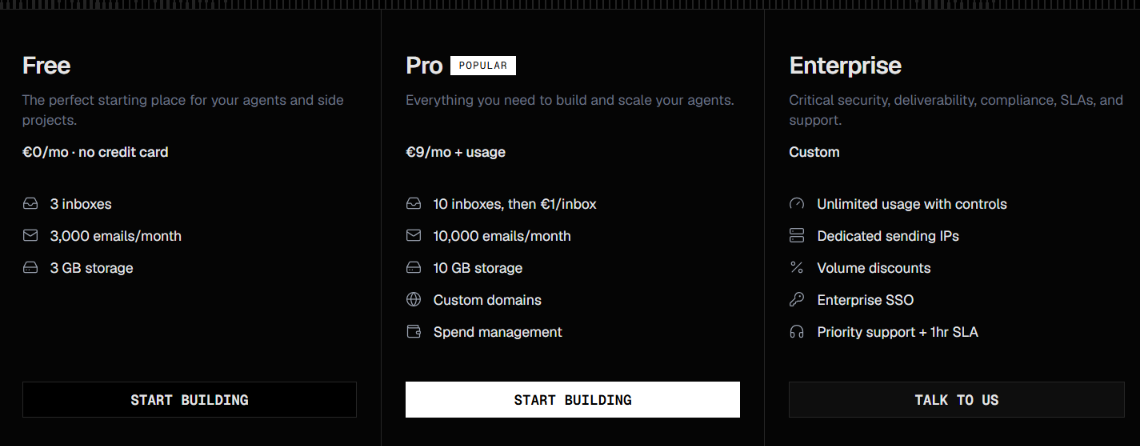
OpenMail offers three plans.
Free – €0/month. Includes 3 inboxes, 3,000 emails per month, 3 GB storage, and a daily sending limit of 100 emails.
Pro – €9/month + usage. Includes 10 inboxes, 10,000 emails per month, 10 GB storage, custom domains, and no fixed daily sending cap.
Enterprise – Custom pricing. Includes custom usage allowances, dedicated IPs, enterprise SSO, volume discounts, and priority support.
Additional Pro usage costs:
Extra inboxes cost €1 per inbox per month.
Extra emails cost €0.001 per email.
Extra storage costs €0.10 per GB per month.
Pro also includes spending controls to manage additional charges. OpenMail is a better fit if you want to add AI agent inboxes one at a time and pay for the extra usage. However, if you need dedicated IPs, you'll still need a custom Enterprise plan, just like with AgentMail.
3. Resend – Best AgentMail Alternative for Email APIs and Automations
This image shows the Resend homepage
Resend is a good AgentMail alternative if you want AI agents to handle emails alongside your application's regular email needs. Like AgentMail, Resend lets you create inboxes, receive messages, manage threads, and send replies through an API. But Resend goes further with features that AgentMail doesn't focus on.
Transactional emails let you send password resets, receipts, and notifications through an API or SMTP.
Event-based automations let you send emails when users sign up, make purchases, or complete other actions.
Marketing tools let you manage contacts, send newsletters, and track opens and clicks.
Delivery monitoring helps you track bounces, failed deliveries, and other email events.
Resend is better suited to developers who want agent inboxes and application email sending in the same platform.
Resend vs. AgentMail: Quick Comparison
Feature
Resend
AgentMail
AI agent inboxes
Yes, through the Inbox API
Yes, through its API
Receiving and replying
Supports incoming emails, threads, and replies
Supports incoming emails, threads, and replies
AI agent connections
MCP and agent skills
MCP, SDKs, and agent integrations
Transactional emails
Dedicated API and SMTP support
Not a core offering
Marketing emails
Broadcasts, contacts, and campaigns
Not a core offering
Delivery tracking
Delivery events, bounces, opens, and clicks
Email events and webhooks
Pros of Resend
AI agent inbox support with APIs for receiving emails, managing threads, and sending replies.
Built-in email automations for sending messages based on user actions.
Dedicated transactional email API for password resets, receipts, and notifications.
Marketing email features for managing contacts, newsletters, and campaigns.
Detailed delivery tracking with logs, bounce events, and open and click tracking.
Cons of Resend
Only 3 inboxes included in the Pro and Scale plans.
Additional inbox charges of $1 per inbox/month on paid plans.
Separate marketing email pricing adds to the cost if you need campaigns.
Dedicated IPs cost extra and are intended for senders meeting volume requirements.
Resend Pricing
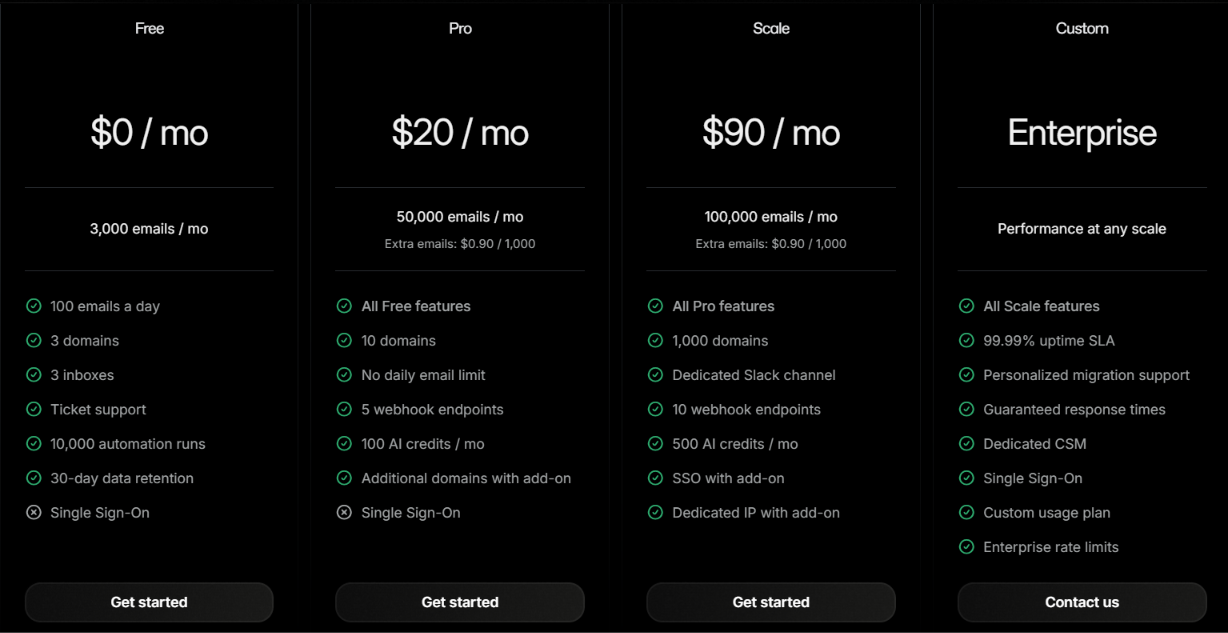
This image shows the Resend pricing
Free – $0/month, includes 3,000 emails, 3 inboxes, and a 100-email daily limit.
Pro – $20/month. Includes 50,000 emails, 3 inboxes, 10 domains, and 5 webhook endpoints.
Scale – $90/month, includes 100,000 emails, 3 inboxes, 1,000 domains, and 10 webhook endpoints.
Additional costs: Extra inboxes cost $1 each per month on paid plans. Additional emails cost $0.90 per 1,000. Marketing email plans are priced separately.
Resend is a stronger choice for application email workflows, while AgentMail remains more focused on AI agents managing email conversations.
4. Mailgun – Best AgentMail Alternative for Transactional Email Infrastructure
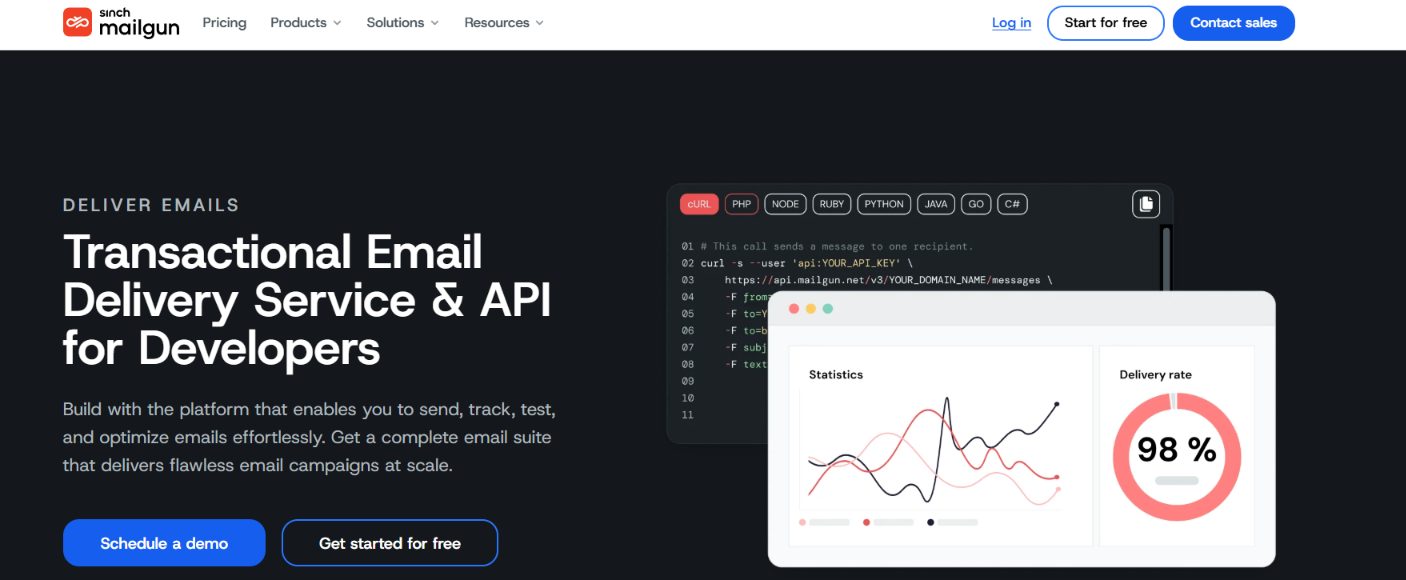
This image shows the Mailgun homepage
Mailgun is an AgentMail alternative for developers who don't need to create a separate inbox for every AI agent. Instead, it provides the email infrastructure behind an application. Your app can trigger messages such as password resets, order confirmations, verification emails, and account notifications without running its own mail servers.
The difference is mainly in how the two products treat email. AgentMail makes the inbox the starting point, while Mailgun makes your application the starting point.
That makes Mailgun more relevant when you need email infrastructure for an application rather than dedicated, programmatic inboxes for individual AI agents.
Mailgun vs AgentMail: Quick Comparison
Feature
Mailgun
AgentMail
Programmatic agent inboxes
No inbox-per-agent model
Yes
Email sending
REST API and SMTP
API and SMTP relay
Incoming email
Routes, parsing, forwarding, and storage
Dedicated inboxes with messages and threads
Conversation handling
Must be built around inbound routes
Built-in threads, replies, drafts, and labels
Real-time events
Webhooks
Webhooks and WebSockets
AI integration
MCP Server available
MCP, SDKs, CLI, and agent integrations
Pros of Mailgun
Volume-based sending plans cover 10,000 to 100,000 emails per month before Enterprise.
Flexible inbound routing for passing received emails into your application.
Detailed email logs for tracking sent, delivered, bounced, dropped, opened, and clicked emails.
Strong domain support with up to 1,000 custom sending domains on Foundation and Scale.
Dedicated IP options for higher-volume senders.
Cons of Mailgun
No inbox-per-agent model like AgentMail.
More development work for conversations because inbound emails need to be handled through routes and your application.
Short log retention on lower plans with only 1 day on Free and Basic.
Separate deliverability costs if you need Mailgun Optimize for inbox placement and reputation monitoring.
Mailgun Pricing
This shows the Mailgun pricing
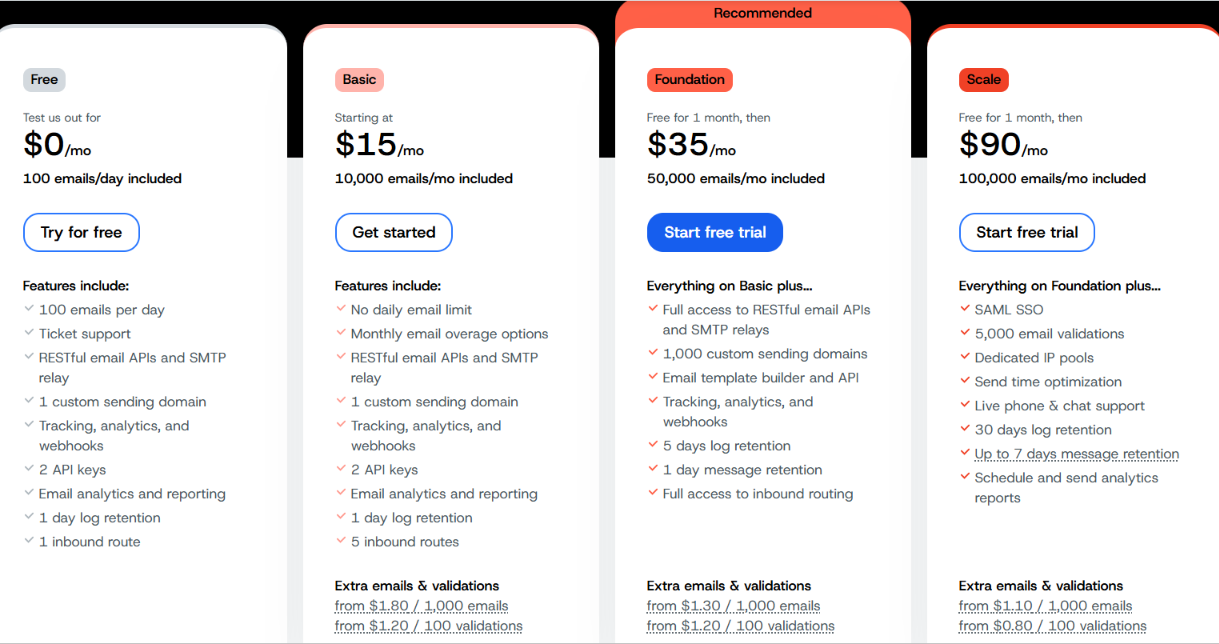
Free – $0/month with 100 emails per day, 1 custom sending domain, and 1 inbound route.
Basic – $15/month with 10,000 emails per month, 1 custom sending domain, and 5 inbound routes.
Foundation – $35/month with 50,000 emails per month, up to 1,000 custom sending domains, 5-day log retention, and full inbound routing.
Scale – $90/month with 100,000 emails per month, 5,000 email validations, dedicated IP pools, and 30-day log retention.
Enterprise – Custom pricing for higher-volume sending, custom features, Deliverability Services, and Rapid Fire Burst Sending SLA.
Extra emails start at $1.80 per 1,000 on Basic, $1.30 per 1,000 on Foundation, and $1.10 per 1,000 on Scale. The trade-off is that Mailgun gives you more control over how application email is handled, but you have to build the agent inbox experience yourself.
5. Mailtrap – Best AgentMail Alternative for Testing Agent Emails
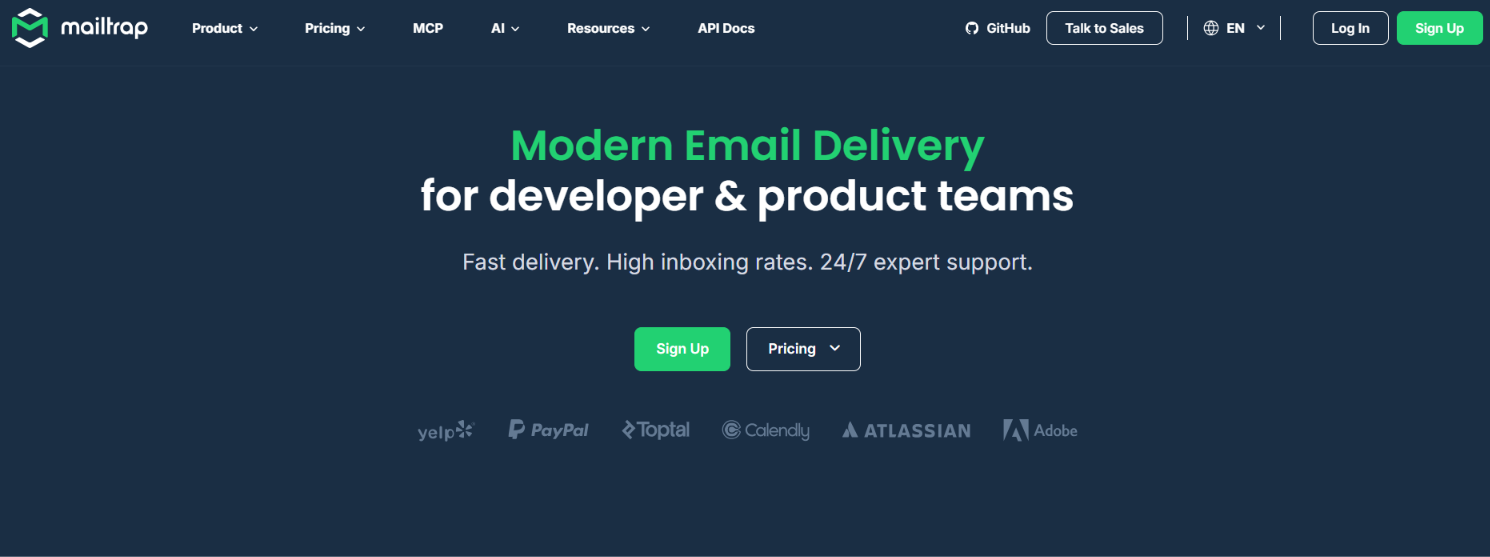
This image shows the Mailtrap homepage
Mailtrap is a direct AgentMail alternative if your AI agents need their own inboxes, but you also want to test their emails before they reach real recipients. Like AgentMail, you can create inboxes for individual agents, receive incoming emails, keep replies in threads, process attachments, and respond through an API.
The difference is that Mailtrap also gives you Email Sandbox. During development, an agent's outgoing replies can be sent to the Sandbox instead of a real recipient. You can then check the email content, HTML, spam score, recipients, and threading before moving the workflow to production.
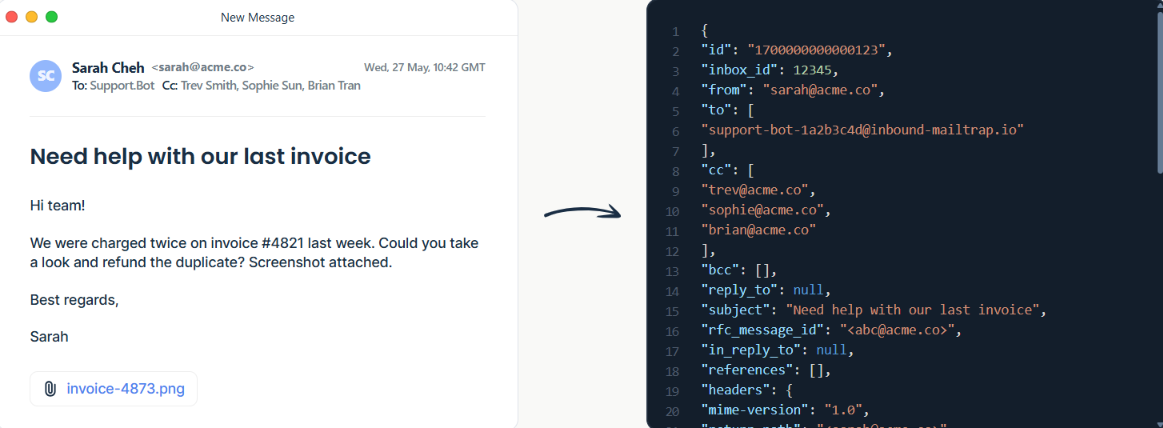
This image shows the Turns raw email into clean JSON
Mailtrap also parses incoming emails into structured JSON, so your agent gets the sender, subject, headers, text, HTML, and attachment links without having to parse the raw email itself. For AI agents that need both a working inbox and a safe place to test email behavior, Mailtrap covers both in the same platform.
Mailtrap vs AgentMail: Quick Comparison
Feature
Mailtrap
AgentMail
Agent inboxes
Programmable hosted or custom-domain inboxes
Programmable inboxes for AI agents
Conversation handling
Threads with in-thread API replies
Threads with API replies
Incoming email parsing
Structured JSON with headers, text, HTML, and attachment URLs
Messages and attachments accessible through the API
Real-time events
Webhooks
Webhooks and WebSockets
Agent connections
API, MCP, and SDKs
API, MCP, SDKs, and agent integrations
Pros of Mailtrap
Safe agent testing keeps test emails inside the Sandbox instead of delivering them to real recipients.
Structured email parsing returns the sender, recipients, headers, text, HTML, and attachment links as JSON.
Built-in conversation threads keep related messages together so agents can access the full exchange.
Instant hosted inboxes let you start receiving emails without setting up DNS or MX records.
Custom-domain inboxes remove the 20-reply limit that applies to Mailtrap-hosted inboxes.
Cons of Mailtrap
Hosted inbox replies are capped at 20 total until you connect your own custom domain.
Email Sandbox has separate plans from Mailtrap's Email API/SMTP plans.
Lower Sandbox plans have small testing allowances, with 50 test emails on Free and 500 on Basic.
Dedicated IP access starts higher up the sending plans, with Business including one while Basic does not.
Mailtrap Pricing
I. Email API/SMTP
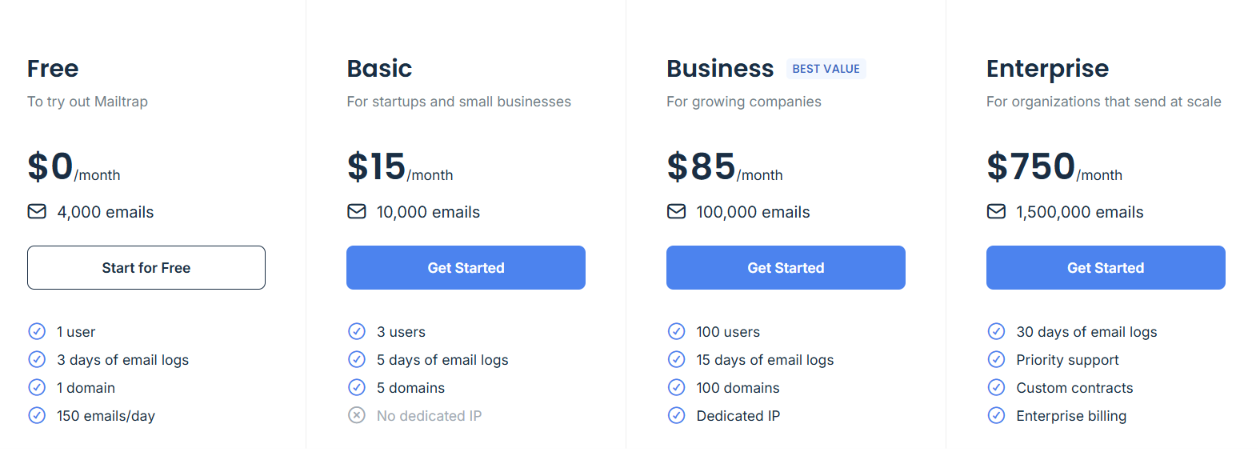
This image shows the Mailtrap Email API pricing
Free – $0/month for 4,000 emails, 1 domain, and up to 150 emails per day.
Basic – $15/month for 10,000 emails, 5 domains, and 5-day email logs.
Business – $85/month for 100,000 emails, 100 domains, 15-day logs, and a dedicated IP.
Enterprise – $750/month for 1.5 million emails and 30-day email logs.
II. Email Sandbox
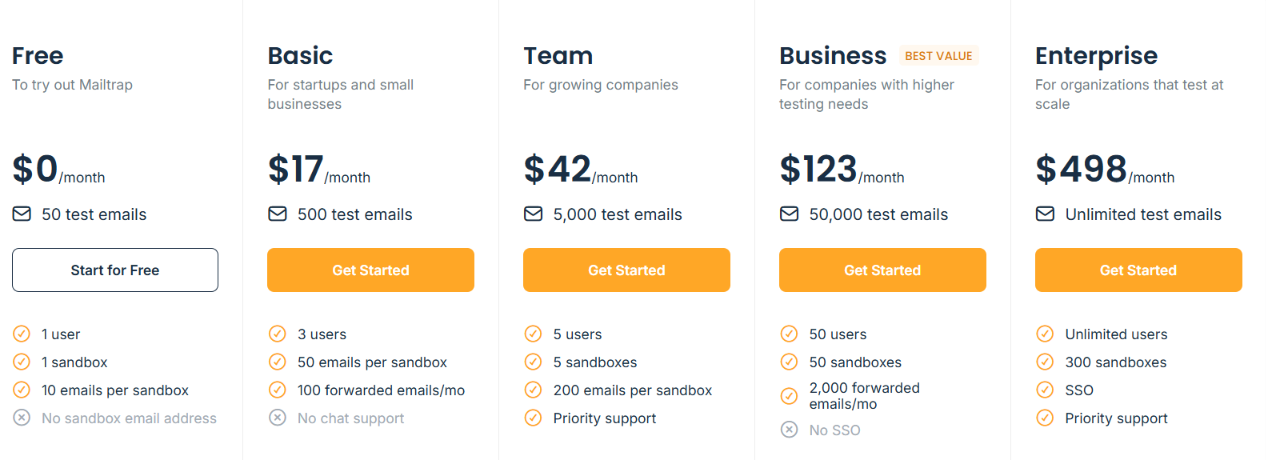
This image shows the Mailtrap email sandbox pricing
Free – $0/month for 50 test emails and 1 sandbox.
Basic – $17/month for 500 test emails and 1 sandbox.
Team – $42/month for 5,000 test emails and 5 sandboxes.
Business – $123/month for 50,000 test emails and 50 sandboxes.
Enterprise – $498/month for unlimited test emails and 300 sandboxes.
With annual billing, the paid Sandbox plans drop to $14/month for Basic, $34/month for Team, $99/month for Business, and $399/month for Enterprise. Mailtrap does not list a separate public per-inbox price for Agent Inbox, so these Email API/SMTP and Sandbox prices should not be presented as the price of an individual agent inbox.
Mailtrap is the better fit if you want to test how an agent handles email before letting the same workflow interact with real recipients.
Which AgentMail Alternative Should You Choose?
You should start with the reason AgentMail does not fit your setup. If you still want inboxes for AI agents, OpenMail, Resend, and Mailtrap stay closer to that model. Infraforge and Mailgun are better suited to different email setups.
If you need...
Choose
Private cold email infrastructure with dedicated IPs
Infraforge
AI agent inboxes with €1 extra inboxes
OpenMail
Agent inboxes plus transactional emails and automations
Resend
Transactional email with inbound routing
Mailgun
Agent inboxes plus a Sandbox for testing emails
Mailtrap
If your main problem is AgentMail's jump from 10 to 150 inboxes, OpenMail is the closest match to compare first. For infrastructure, app emails, or email testing, choose based on the specific use case above.
Personalized Outbound Strategy
Get The Right Outbound Strategy In Minutes
Enter your email to get a custom plan & stack recommendation for your
business
It's being carefully crafted by AI
Please check your mailbox in 5 minutes
Conclusion
AgentMail works well when AI agents need their own inboxes and built-in email conversations. But its jump from 10 inboxes on the $20 Developer plan to 150 on the $200 Startup plan may not fit every setup.
OpenMail is the closest option if you still want agent inboxes with more flexible pricing. Resend adds transactional email and automations, Mailgun focuses on application email, and Mailtrap adds a testing Sandbox.
If your reason for moving away from AgentMail is more control over cold email infrastructure, Infraforge is a better fit. It gives you dedicated IPs, bulk mailbox setup, automated SPF, DKIM, and DMARC, plus API, MCP, and CLI access.
For businesses that need to manage cold email infrastructure at scale rather than give each AI agent its own inbox, Infraforge is the option I'd start with.