
If you're already here, you want to understand multichannel outreach and how AI can make it work better for your sales team.
Reaching prospects through email, LinkedIn, phone calls, and other channels gives you more ways to start a conversation. But managing these channels, personalizing messages, and planning follow-ups takes time.
AI multichannel outreach helps you coordinate email, LinkedIn, phone calls, and other touchpoints. It can personalize messages, automate follow-ups, and help you plan the next step based on how prospects respond.
The real question is which channels to use, how to combine them, and which tools can make the process easier without making your outreach feel robotic.
In this guide, I'll explain how AI multichannel outreach works, which tools are worth considering, and how to build a strategy that helps you reach prospects and start more meaningful conversations.
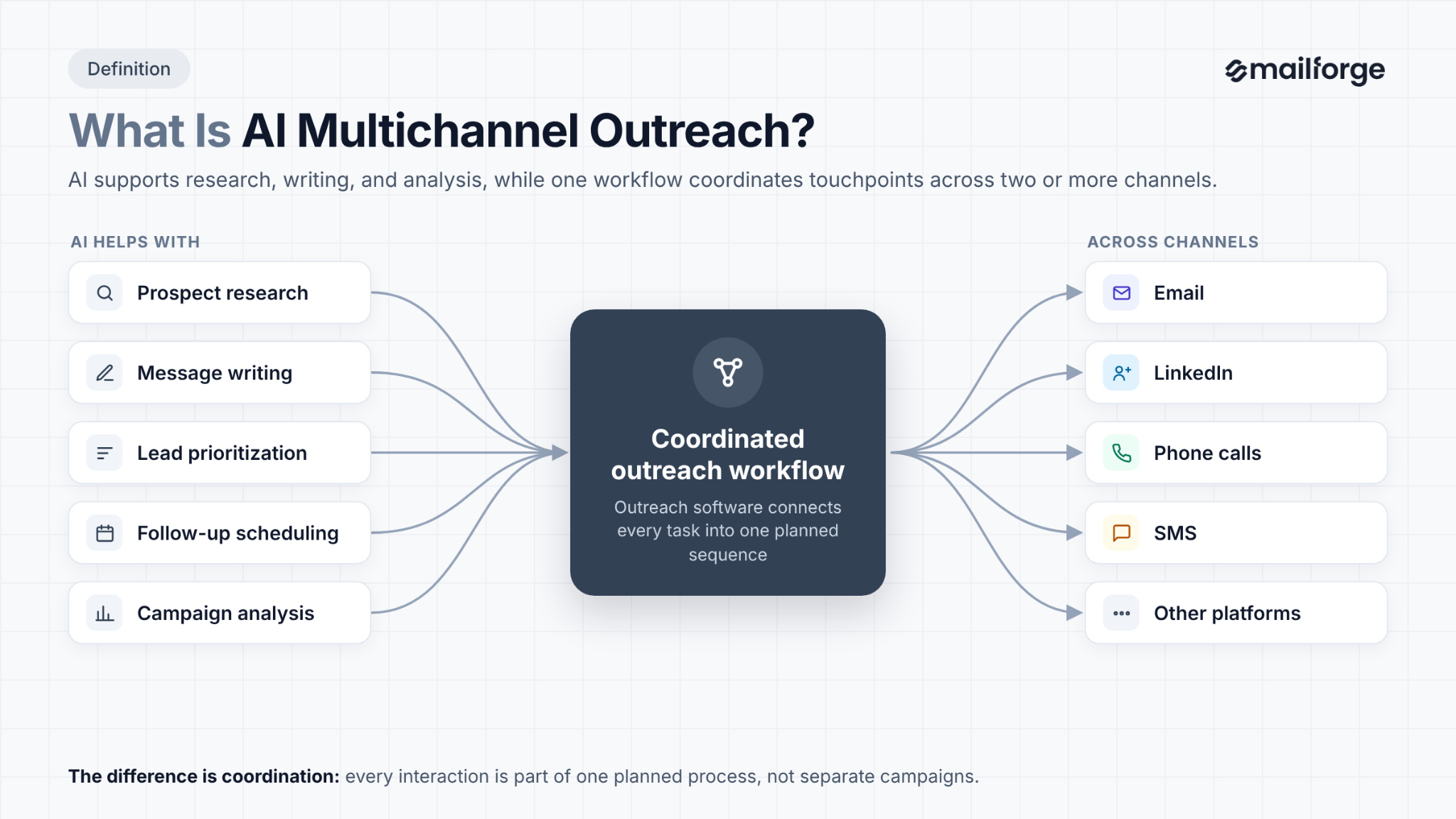
AI multichannel outreach is a sales approach that uses artificial intelligence to coordinate communication with prospects across two or more channels. These channels can include email, LinkedIn, phone calls, SMS, and other platforms.
AI helps with prospect research, message writing, lead prioritization, follow-up scheduling, and campaign analysis. Outreach software connects these tasks so your team can manage multiple touchpoints through a coordinated workflow.
For example, imagine you're selling email outreach software to B2B sales teams. Your target prospect is a sales director at a growing SaaS company.
Your outreach sequence might look like this:
AI can help research the prospect and draft messages. An outreach platform can schedule the steps and apply rules based on prospect activity.
Traditional outreach often requires sales representatives to research contacts, write messages, schedule follow-ups, and track responses across separate tools.
AI multichannel outreach can automate parts of this process. It can help teams prepare personalized messages, coordinate touchpoints, and identify which prospects need attention.
AI doesn't replace sales judgment. Teams still need to verify prospect information, review messages, set campaign rules, and handle important conversations.
The main difference is coordination. Sending emails and LinkedIn messages from separate tools doesn't automatically create a connected strategy.
AI multichannel outreach aims to make each interaction part of a planned process.
AI multichannel outreach combines prospect research, personalization, automation, and performance analysis. The exact process depends on the platform, but most workflows follow these steps.
For example, an outreach platform might send an introductory email and wait for a response. If the prospect replies, the system can stop the remaining steps and notify the sales representative. If there is no reply, it can continue with the next planned touchpoint.
These actions depend on the platform's capabilities and the rules you configure. AI may recommend the next step without executing it automatically.
By connecting prospect data, messages, and follow-ups, AI multichannel outreach helps sales teams reduce manual work and manage prospect communication more consistently.
The channels you choose depend on your audience, offer, and sales process. B2B sales teams often start with email and LinkedIn, then add phone calls or other channels when they serve a clear purpose.
Email works well for introductions, product explanations, case studies, and follow-ups. AI can help research prospects, draft subject lines, personalize messages, and plan sequences.
For example, you can use AI to draft an email that addresses a sales team's challenges with lead follow-ups. An outreach platform can then send the message and schedule subsequent emails.
Email also gives you room to explain your value proposition and share relevant resources. However, inaccurate contact data, irrelevant messages, and excessive sending can harm deliverability.
Best for: B2B prospecting, product demos, business proposals, and ongoing sales conversations.
LinkedIn helps sales teams connect with decision-makers, engage with professional content, and start business conversations.
AI can assist with prospect research, message drafting, and identifying relevant professional context. Some outreach platforms also support LinkedIn actions within multichannel sequences.
For example, after emailing a sales director, you might engage with a relevant LinkedIn post before sending another email.
LinkedIn works best when the interaction fits the professional context. A generic connection request followed by an immediate sales pitch can undermine the relationship.
Automated activity must comply with LinkedIn's rules and account restrictions.
Best for: Reaching decision-makers, building professional connections, and supporting B2B outreach.
Phone calls are useful when a conversation requires immediate clarification or a prospect has shown interest in your offer.
AI can help prioritize call lists, prepare talking points, summarize previous interactions, and analyze call recordings where permitted. Some platforms integrate with dialers, while others create call tasks for sales representatives.
For example, if a prospect has requested pricing information, a sales representative might call to understand their requirements and answer questions.
AI can prepare the representative for the conversation, but it shouldn't make unsupported claims or replace human judgment during important negotiations.
Best for: High-value prospects, lead qualification, and direct sales conversations.
Personalized video can help explain a product, demonstrate a feature, or introduce a sales representative.
AI can assist with scripts and talking points based on the prospect's role or business needs. A representative can then record a tailored video for a high-value prospect.
For example, a sales representative might record a short walkthrough showing how a product addresses a specific problem in the prospect's workflow.
Video takes more effort than a standard email, so it is usually better suited to qualified prospects or accounts where a tailored explanation can add value.
Best for: Complex products, product demonstrations, and account-based outreach.
SMS and messaging apps can support appointment reminders, service updates, and other communication when the recipient has given the required consent or the communication otherwise complies with applicable rules.
AI can help draft short messages, categorize responses, and route inquiries to the right person.
For example, a business might send a permitted appointment reminder after a prospect books a product demo.
These channels are more intrusive than email in many contexts. Don't assume that having someone's phone number gives you permission to send promotional messages.
Best for: Opted-in audiences, appointment reminders, and time-sensitive communication.
Choose channels based on your audience and campaign goals. You don't need to use every available channel. Start with two or three and add more only when they improve the buyer experience or campaign results.
AI multichannel outreach can help sales teams manage more prospects, reduce repetitive work, and make better use of campaign data. The actual results depend on targeting, messaging, execution, and channel selection.
A prospect might overlook an email but notice a relevant LinkedIn message. Another might prefer email and ignore social messages.
Using multiple channels gives you more opportunities to start a conversation. It also reduces your dependence on one communication platform.
However, every touchpoint should serve a purpose. Repeating the same pitch across several channels can frustrate prospects rather than encourage them to respond.
Writing individual messages for hundreds of prospects takes time. AI can use contact data and company research to prepare tailored message drafts.
You can personalize messages based on job titles, company size, industry, business challenges, relevant company developments, and previous conversations.
For example, a message to a sales director might focus on improving prospect follow-ups, while a message to a revenue operations leader might discuss workflow visibility.
Sales representatives should review the drafts, correct errors, and ensure the messages address each prospect's needs. Personalization based on inaccurate information can damage credibility.
Sales teams often spend hours switching between prospecting tools, spreadsheets, email clients, and social platforms.
Automation can reduce repetitive tasks such as scheduling follow-ups, assigning sequence steps, and updating contact records. A connected workflow also makes it easier to see which action comes next.
This gives sales representatives more time to research important accounts, handle qualified conversations, and work on deals.
Prospects may need several interactions before they respond. Manual follow-up management makes it easy to forget a contact or send a message at the wrong time.
AI-powered outreach tools can schedule follow-ups and apply conditions based on prospect activity.
For example, if a prospect replies or books a meeting, the system can stop the remaining steps when configured to do so. This helps prevent unnecessary messages after a conversation has started.
Multichannel campaigns generate data across different touchpoints. AI can help identify patterns in replies, meetings, conversions, and other metrics.
For example, you may find that a particular industry responds better to emails focused on business challenges than emails that lead with product features.
You can test that finding in future campaigns and adjust your messaging based on the results.
AI-generated recommendations should be checked against actual campaign data. A pattern in a small sample may not hold when you contact a larger audience.
A coordinated workflow helps sales representatives see outreach activity and responses in one place. It reduces the need to check several inboxes and manually reconcile campaign data.
Managers can also review performance reports to identify training needs, compare campaigns, and allocate resources to efforts that generate qualified opportunities.
The value comes from better coordination and decision-making, not from sending the highest possible number of messages.
An effective AI multichannel outreach strategy starts with a clear audience, a relevant offer, and a coordinated plan for contacting prospects. AI can help execute the plan, but it needs accurate data and clear rules.
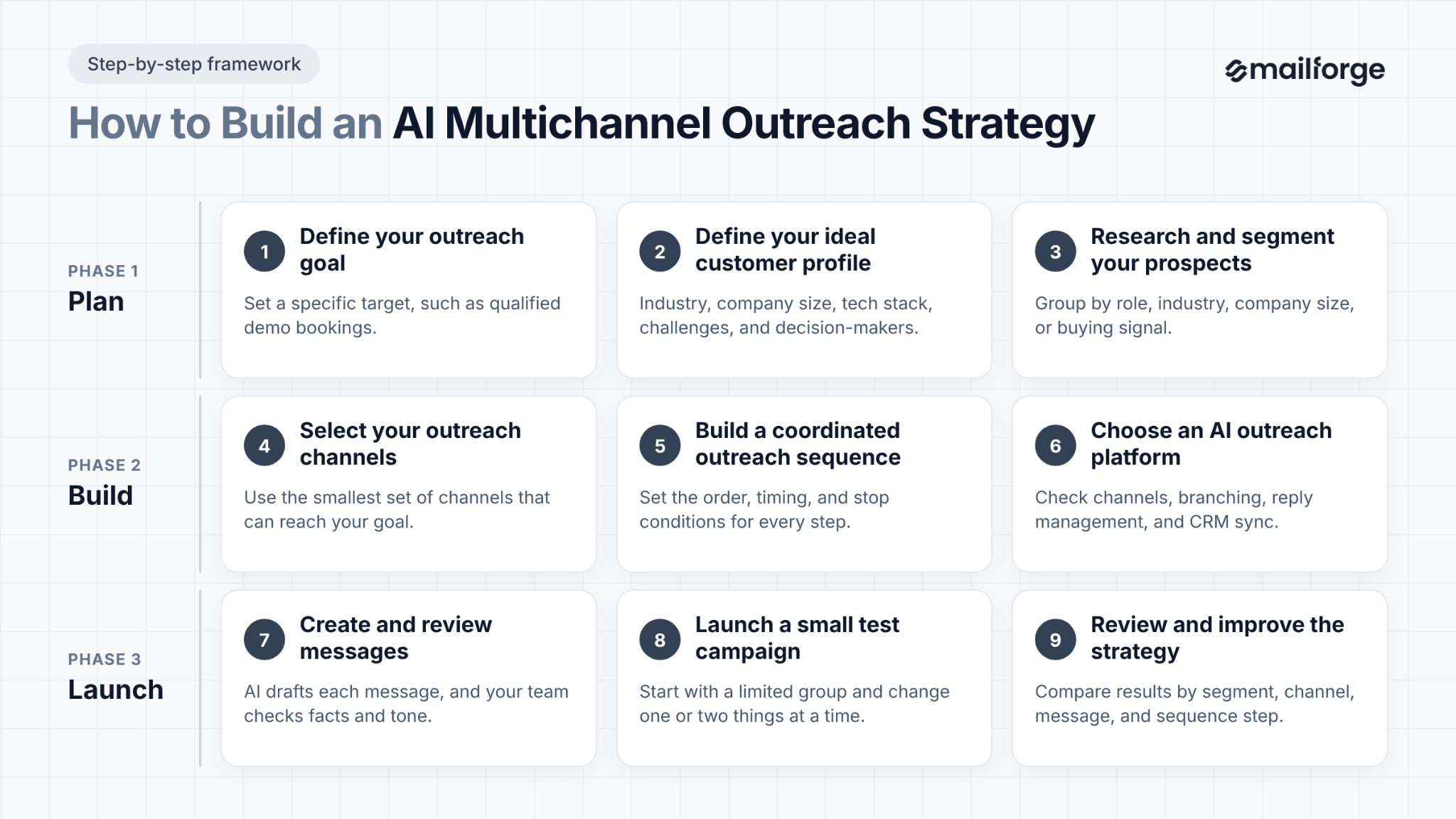
Decide what you want your campaign to achieve. Your goal might be to book product demos, generate qualified leads, promote a new service, reconnect with inactive prospects, or start conversations with decision-makers.
Keep the goal specific. For example, you might aim to generate qualified demo bookings from SaaS companies that match your ICP.
Your goal will guide your channel selection, messaging, sequence, and performance metrics. If you want qualified meetings, measure meeting quality rather than relying on the total number of messages sent.
Your ICP describes the type of company most likely to benefit from your product or service.
For B2B outreach, define criteria such as:
Next, identify the people within those companies who influence or make purchasing decisions.
For example, if you're selling sales engagement software, your target contacts might include heads of sales, sales development managers, and revenue operations leaders.
AI can help classify companies and prioritize contacts based on these criteria. Review the results before launching your campaign.
Divide your prospect list into meaningful groups. You might segment contacts by industry, job role, company size, buying signal, or the problem your product solves.
Segmentation gives you a better starting point for personalization.
Consider two prospects:
Both might be interested in sales software, but their priorities differ. Sending them the same generic message may fail to address their needs.
AI can help summarize prospect information and recommend messaging angles. Verify the research before using it, and avoid treating a potential buying signal as proof that a company is ready to purchase.
Choose channels based on how your target audience communicates and what your campaign requires.
For many B2B campaigns, email and LinkedIn are practical starting points. Email gives you room to explain your offer, while LinkedIn can support professional networking and engagement.
Phone calls can help with high-value accounts. Video can be useful when a product needs explanation or a prospect has shown interest.
Before adding a channel, ask:
Use the smallest set of channels that can achieve your goal. More channels create more work and more opportunities to annoy prospects if the sequence is poorly planned.
An outreach sequence defines the order of actions, the time between them, and the conditions that control what happens next.
Here's an example of a B2B outreach sequence:
The schedule is an example, not a universal formula. Adjust the intervals to your audience, offer, and previous campaign results.
Also define what happens when a prospect responds. A positive reply might trigger a meeting workflow, while an unsubscribe should stop further promotional emails. A bounced address should be removed from the email path until the contact data is corrected.
Look for a platform that supports the channels you need and coordinates actions across them.
Compare the following capabilities:
Check which functions are genuinely automated and which require a representative to take action. A tool may offer AI-generated call notes without placing calls, for example.
Also review the platform's usage limits and pricing model. Some tools charge per user, while others charge per sender identity or offer different limits for contacts, messages, and AI credits.
Use AI to draft the first version of each message. Give it a clear audience, the purpose of the outreach, verified prospect details, your value proposition, and the action you want the recipient to take.
For example, you could ask an AI tool to draft a short email for sales directors at SaaS companies that struggle to manage follow-ups. Tell it to use simple language, avoid unsupported claims, and finish with a relevant question.
Review the output before sending. Check facts, tone, personalization, and whether the message suits the channel.
Build different cold email message templates for different prospect segments rather than relying on one prompt for your entire list.
Start with a limited group of qualified prospects. Test the sequence before using it across your full list.
Monitor delivery failures, replies, positive responses, opt-outs, and meetings booked. Ask sales representatives whether the replies are relevant and whether the conversations match the campaign's goal.
If the results are poor, investigate the cause. Your audience might be too broad, your offer may not address a pressing need, or your sequence may contain too many touchpoints.
Make one or two changes at a time so you can understand what affects performance.
Review campaign performance at regular intervals.
Compare results by audience segment, channel, message, and sequence step. Identify which combinations produce qualified conversations and which create unnecessary work.
Use those findings to refine your ICP, update message templates, adjust follow-up timing, or remove channels that add little value.
AI can help analyze these results, but decisions should reflect actual campaign outcomes and the quality of the opportunities generated.
Personalization is one of the main uses of AI in multichannel outreach. The aim is to make each message relevant to the recipient, not simply to insert their name into a template.
Good personalization connects a prospect's context to a business problem your product can address.
Start with useful, accurate information.
You might use a prospect's job title, company industry, team structure, or a recent company announcement. AI can summarize those details and suggest a relevant opening line.
The second message refers to a specific business context and asks a relevant question. Only use the company expansion detail if you've verified it.
A personalized message should fit the platform where it appears.
Avoid copying the same message across every channel. Repeating an identical pitch can make your outreach feel automated and disconnected.
Buying signals are events or behaviors that suggest a company may have a need for your product.
Examples include a new executive joining, a team expanding, a company entering a new market, or a prospect requesting product information.
AI can help find and summarize these signals from available sources. It can also suggest which signals relate to your offer.
However, a signal doesn't prove buying intent. A company hiring sales representatives, for example, doesn't necessarily mean it needs new sales software. Treat the signal as a reason to research further, not as proof that the prospect is ready to buy.
Follow-ups should reflect what happened earlier in the sequence.
If a prospect asks about pricing, the next message should address pricing. If they requested a case study, send the relevant resource. If they declined, stop the sales sequence rather than generating another pitch.
AI can help summarize previous conversations and draft suitable responses. The outreach platform must also have access to reliable interaction data and the right rules to use it.
AI-generated messages can sound repetitive when they rely on the same structures, phrases, and calls to action.
To avoid that problem:
The best personalization shows that you understand the prospect's situation. It doesn't need to mention every detail you can find about them.
Automation connects your prospect data, messages, channels, and follow-up rules into one workflow. AI can help with research and message creation, while the outreach platform executes the steps you configure.
The level of automation varies by tool. Some platforms generate drafts and recommendations for human review. Others support conditional sequences, automated follow-ups, and AI-assisted replies.
Start by connecting your prospecting process to your outreach workflow.
You can use a lead database, CRM, or research tool to collect contact and company information. AI can help summarize that information, classify prospects, and identify missing fields.
For example, you could create a workflow that:
Set rules for missing or uncertain data. Don't let a workflow invent details to fill gaps.
Use an outreach platform to combine email and LinkedIn actions in one sequence, where supported.
For example, a sequence could send an email, wait a few days, and check whether the prospect has a LinkedIn profile. The next step might depend on whether a connection request is accepted or whether the prospect has replied.
A simplified workflow looks like this:
Add qualified prospect → Send personalized email → Check for a reply
The important part is the condition between steps. A fixed schedule sends the next message after a set delay. A conditional sequence checks whether that action still makes sense.
Follow-ups are easier to manage when you define the rules in advance.
Set a delay between messages, specify which conditions allow the next step to run, and determine when a sequence should stop.
For example:
These rules reduce repetitive work and help prevent irrelevant messages from reaching prospects.
AI can help sales teams respond to common questions, summarize conversations, and prepare replies based on a prospect's message.
For example, if a prospect asks whether your product integrates with Salesforce, an AI assistant can prepare a draft based on verified product documentation.
For sensitive questions, pricing negotiations, or complex objections, human review is important. The system should not promise a feature, price, or outcome that your company cannot deliver.
If your platform offers automated replies, define which types of messages it can handle and when it must hand the conversation to a person.
Your CRM should reflect the status of each prospect and the outcome of the outreach.
A connected workflow can update contact records, log replies, record meetings, and send qualified leads to the appropriate sales representative.
This prevents teams from relying on separate spreadsheets to understand what happened during a campaign.
It also helps AI tools work with more complete information, provided the CRM data is accurate and the integrations are configured correctly.
Set up reports that show performance across channels and sequence steps.
You might track the number of eligible prospects contacted, email delivery and bounce rates, LinkedIn connection acceptance, positive reply rate, meetings booked, opportunities created, opt-outs, and complaints.
AI can help summarize trends and suggest areas to investigate. For example, it might flag a sequence step with a high bounce rate or a message that receives few positive responses.
Use those insights to guide testing. Don't let an AI-generated recommendation replace a review of the underlying data.
The right tool depends on your target audience, the channels you need, the size of your sales team, and how much automation you want. Some tools focus on outbound sequences, while others provide broader sales engagement and revenue workflows.
The following table compares five options by channel support, AI features, starting price, and use case. Pricing is based on the listed plan details available at the time of review; billing terms, regional pricing, and feature availability can change.
Compare tools against your actual workflow rather than choosing the one with the longest feature list.
Salesforge is worth considering if your team focuses on coordinated email and LinkedIn outreach.
If you need phone calls, SMS, or WhatsApp within the same workflow, compare platforms that support those channels and confirm which features are included in the relevant plan.
AI multichannel outreach can reduce manual work, but it also creates challenges around data quality, message relevance, deliverability, compliance, and campaign management.
Understanding these issues before launch helps you build a workflow that supports your sales goals.
AI depends on the information available to it. If your contact list contains outdated job titles, incorrect email addresses, or incomplete company details, your outreach can miss the mark.
AI may also generate incorrect information when researching prospects. A personalized message that refers to a product launch that never happened can damage your credibility.
How to address it: Validate contact information, use reliable data sources, and verify important research before sending messages. Create rules that prevent contacts with missing or uncertain information from entering a sequence.
AI can produce hundreds of messages in minutes, but speed doesn't guarantee relevance.
If every message follows the same structure and uses superficial personalization, prospects may recognize the pattern and ignore the outreach.
How to address it: Give AI a clear ICP, relevant product information, and verified prospect context. Create separate messaging approaches for different segments. Review sample messages before launching a campaign.
Sending too many emails, using invalid addresses, receiving spam complaints, or contacting people who don't expect your messages can harm email deliverability.
Adding more channels doesn't solve these problems. Poor sending practices can affect the performance of your entire campaign.
How to address it: Maintain clean contact lists, configure email authentication, monitor bounces and complaints, and follow reasonable sending schedules. Use relevant messages and honor opt-outs. Don't rely on open rates alone to judge inbox placement.
Running separate email and LinkedIn campaigns can create a poor experience when both contact the same prospect with similar messages at the same time.
The problem gets worse when one system doesn't know that the prospect has already replied through another channel.
How to address it: Use a coordinated sequence with shared contact records and clear stop conditions. Review activity across channels before scheduling the next touchpoint.
Automating every interaction can make your outreach feel impersonal. It can also lead to inappropriate follow-ups when a prospect asks a complex question or raises an objection.
How to address it: Keep human review for important conversations, commercial negotiations, and sensitive questions. Define when AI can draft or send a response and when a representative must take over.
Email, phone, SMS, and social platforms have different rules. The requirements also vary by recipient location, message type, and how the contact information was obtained.
Using AI doesn't remove these obligations. A prospect's publicly available business email, for example, doesn't automatically mean every type of marketing message is permitted.
How to address it: Review the laws that apply to your audience and the rules of each platform. Maintain suppression lists, honor opt-outs, use appropriate consent where required, and limit access to personal data.
A prospect may see an email, visit a LinkedIn profile, and then reply to a follow-up email.
It can be difficult to determine which interaction influenced the response. Tracking gaps between tools can make the problem worse.
How to address it: Use consistent campaign identifiers, connect your CRM, and track outcomes across channels. Compare overall results with channel-level performance instead of assigning every conversion to the last recorded touchpoint.
Track these five metrics to understand whether your outreach strategy generates meaningful sales results.
Review these metrics across channels and sequence steps.
Use the results to identify where prospects engage, which messages generate qualified conversations, and where your campaign needs improvement.
AI multichannel outreach helps sales teams coordinate prospect communication across email, LinkedIn, phone, and other channels. AI can assist with research, personalization, follow-up scheduling, and campaign analysis, while automation connects these tasks into a single workflow.
The best results come from combining relevant messages with accurate data and a clear outreach plan.
Start with a well-defined ICP, choose channels that suit your audience, and build sequences that respond to prospect activity.
Tools such as Salesforge can help coordinate email and LinkedIn outreach, personalize messages, and automate follow-ups. Other platforms may be better suited to teams that need calling, SMS, broader CRM workflows, or enterprise sales management.
Choose a platform that fits your workflow, test it with a small prospect group, and measure success through positive replies, qualified meetings, and conversions.
Most importantly, use AI to make outreach more relevant and manageable. Don't use it as a reason to send more messages to people who have no reason to hear from you.
Multichannel outreach uses multiple channels, such as email and LinkedIn, to reach prospects. Omnichannel outreach connects these channels to provide a consistent customer experience across marketing, sales, and support.
Start with email and LinkedIn for B2B outreach. Add phone calls or video when they suit your audience and offer. Choose channels based on where your prospects are most active.
AI can help improve reply rates through relevant messaging, timely follow-ups, and better channel coordination. Results depend on targeting, data quality, message relevance, and your offer.
AI can personalize messages using contact details, company information, and prospect research. Review the content to catch errors, irrelevant details, and unsupported claims.
The right tool depends on your needs. Salesforge supports email and LinkedIn outreach, while lemlist, Reply.io, and Outreach offer different multichannel capabilities. Compare features, integrations, automation, and pricing before choosing.
There is no fixed number of touchpoints for every campaign. Start with a manageable sequence, track engagement, and adjust based on results. Stop outreach when prospects reply, decline, or opt out.
