
Personalized Outbound Strategy
Get The Right Outbound Strategy In Minutes
Enter your email to get a custom plan & stack recommendation for your business
It's being carefully crafted by AI
Please check your mailbox in 5 minutes

If you are evaluating AirMail by Instantly, the first thing to understand is that this is not a normal email inbox product.
AirMail is Instantly's done-for-you cold email infrastructure layer. It helps you buy secondary domains, create sending mailboxes, configure authentication, warm up those mailboxes, and send from inside Instantly without stitching together a separate mailbox provider, DNS setup, warmup tool, and sequencer.
That sounds convenient. And for the right user, it is.
But I would not treat AirMail as a magic deliverability fix. Cold email infrastructure is only one layer of inbox placement. Domain age, DNS, mailbox behavior, sending volume, bounce rate, list quality, offer, copy, link strategy, and reply signals still matter. AirMail can make infrastructure easier, but it cannot rescue a bad outbound motion.
Table of Contents
AirMail is Instantly's native email sending infrastructure for cold outreach.
Instead of buying domains manually, setting up Google Workspace or Outlook accounts, configuring SPF/DKIM/DMARC, connecting mailboxes into Instantly, and then enabling warmup, AirMail bundles that workflow inside Instantly.

The basic flow looks like this:
The key difference is that AirMail is not just connected to Instantly. It is built into Instantly. There are no API keys, no external inbox UI, and no separate sequencer connection step.
AirMail is not for every sender. It is built for B2B outbound teams that already use Instantly and want to scale sending infrastructure without dealing with mailbox operations.
| Good Fit | Poor Fit |
|---|---|
|
|
The last point is important. AirMail can reduce setup friction. It cannot bypass the rules of sender reputation.
AirMail pricing is straightforward:
So if you create 10 domains with 5 inboxes each, you are looking at 10 domains x $15/year, plus 50 inboxes x $4/month. That means $150/year for domains and $200/month for inboxes, before your Instantly subscription and any other modules.
On paper, $4 per mailbox is reasonable for cold email infrastructure. The real question is not whether the mailbox price is cheap. The real question is whether you want those mailboxes tied directly to Instantly's ecosystem.
I've gone through multiple review platforms, communities groups, and Reddit itself. In this section, I'd sharing what users say about the tool.
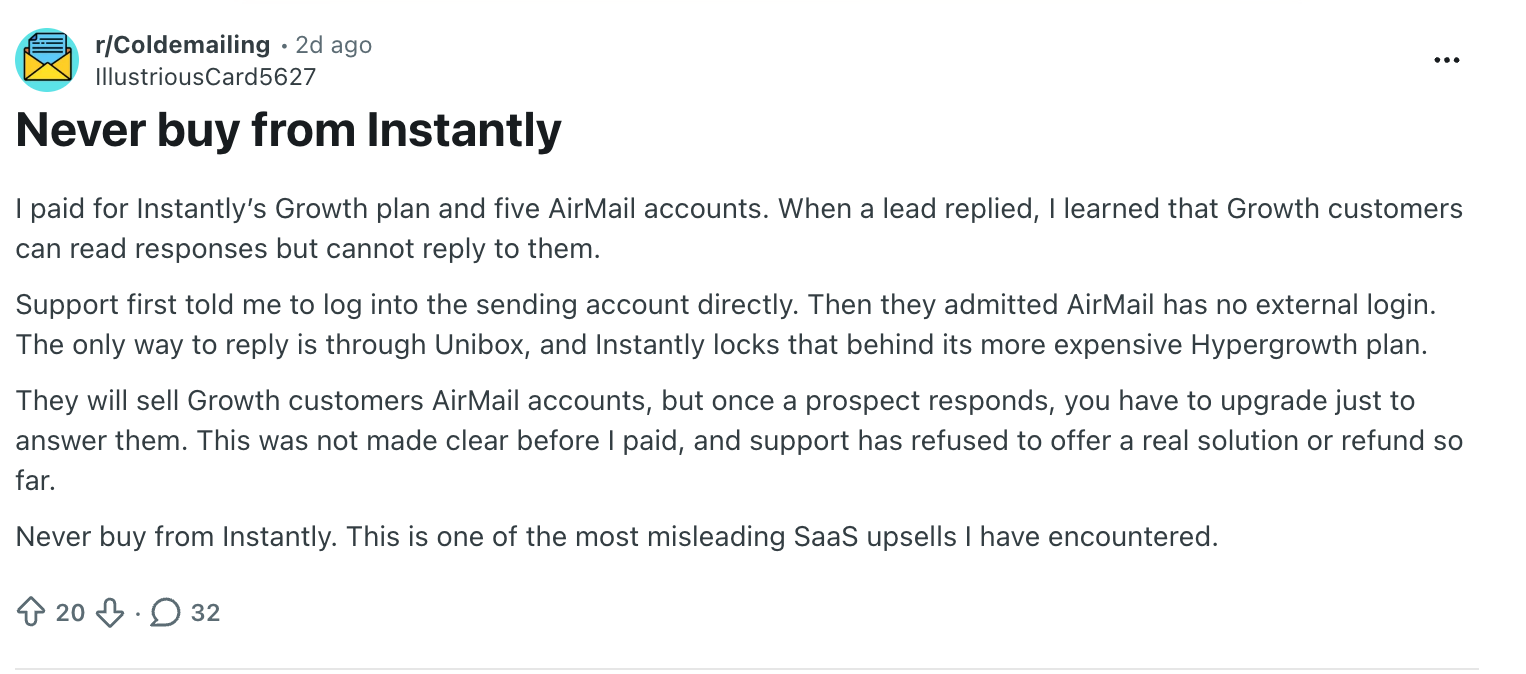
While going through multiple communities, one of this message caught my attention.
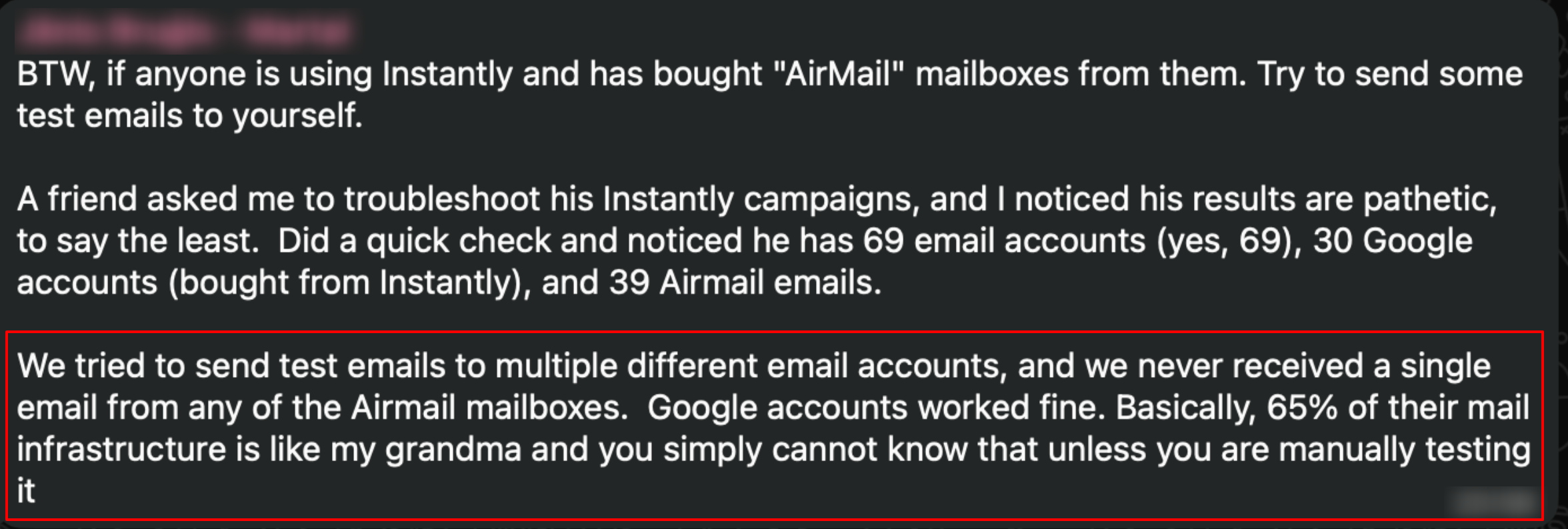
Overall, I'd say that people are not that much happy with AirMail by Instantly. However, before making decision, you must check all the information. So, you make the right decision.
The biggest advantage is simplicity. AirMail mailboxes appear directly inside Instantly once provisioned. You do not need to copy SMTP credentials, connect API keys, authenticate Google accounts, or troubleshoot mailbox sync.
From an operator's point of view, that is valuable. The fewer moving parts you have, the fewer things can break before a campaign even starts.
AirMail automates email authentication setup. That matters because SPF, DKIM, and DMARC are table stakes for cold email now. If these records are missing, misaligned, or inconsistently configured across secondary domains, you are already starting from a weak position.
But authentication is the floor, not the ceiling. Passing SPF/DKIM/DMARC does not mean you will land in the inbox. It just means you are not failing the first basic test.
Every AirMail inbox is auto-enrolled into Instantly's premium warmup pool. This is convenient because users do not need to buy a separate warmup tool. Warmup begins as part of the mailbox lifecycle, and the inbox appears in the same system where campaigns will eventually run.
Instantly recommends warming up AirMail accounts for 3 weeks before using them in campaigns. I like that recommendation because it sets a more realistic expectation than "ready instantly."
Instantly says AirMail uses smarter pod isolation based on sending pattern, volume, and domain behavior. The idea is that your mailboxes should be grouped with senders that behave similarly, instead of being exposed to random senders with completely different patterns.
Pod isolation is a good concept. The question is how well it works in practice over time. I would still monitor bounce rate, blocked rate, inbox placement by provider, spam placement, reply rate by domain, warmup errors, and domain-level reputation.
I look at cold email deliverability in layers:
AirMail helps most with layers 2, 3, 4, and 5. It can help you avoid broken DNS, poorly configured mailboxes, and inconsistent warmup. It can also reduce the number of tools needed to get started.
But it does not fully control layers 6 through 10. AirMail will not fix scraped lists full of invalid contacts, high bounce rates, spammy subject lines, too many links, weak personalization, irrelevant offers, aggressive follow-ups, or poor reply handling.
My rule: I would never scale an AirMail campaign purely because the warmup dashboard looks healthy. I would run external inbox placement tests, send seed tests, monitor real replies, and ramp gradually.
The biggest drawback is ecosystem dependency. AirMail is designed to work inside Instantly. That is the point. But if you use another sequencer, want to test other outbound tools, or prefer infrastructure independence, this becomes a limitation.
I generally prefer separating infrastructure from sequencing once a team gets serious about outbound. Sequencers are campaign layers. Infrastructure is a deeper layer. When you separate them, you get more freedom to test, migrate, recover, and scale.
AirMail does not have a separate inbox login or standalone mailbox UI. For pure outbound, that may be fine. But it can be limiting if you want direct mailbox access, independent QA, manual inspection, or more control over how inboxes behave outside the sending workflow.
A warmup health score tells you how mail behaves inside a warmup network. It does not fully prove how your real cold emails will perform against actual prospects across Google Workspace, Outlook, enterprise filters, Proofpoint, Mimecast, Barracuda, and custom corporate gateways.
AirMail is designed strictly for B2B communication and does not support personal inbox providers. If your campaigns target creators, freelancers, solopreneurs, coaches, consultants, or local businesses using Gmail addresses, you need to be careful.
AirMail abstracts complexity. That is useful until you want control over infrastructure provider, IP strategy, domain distribution, tracking domain architecture, mailbox routing, sending tool flexibility, recovery strategy, API-level provisioning, or workspace-level management.
This is the comparison I would actually make. AirMail is best understood as managed cold email infrastructure inside Instantly. Mailforge is best understood as a cold email infrastructure that can support a broader outbound stack.
| Category | Instantly AirMail | Mailforge |
|---|---|---|
| Best for | Instantly users who want native DFY setup | Teams that want infrastructure flexibility |
| Product type | Built-in Instantly infrastructure | Cold email infrastructure platform |
| Sequencer dependency | Tied to Instantly | More stack-independent |
| Setup speed | Fast inside Instantly | Fast infrastructure provisioning |
| Control | Lower | Higher |
| Flexibility | Lower | Higher |
| Main risk | Ecosystem lock-in | Requires more infrastructure thinking |
If I were a founder running a simple Instantly campaign and I wanted inboxes live quickly, I would consider AirMail.
If I were building an outbound engine for the long term, especially across multiple clients, tools, domains, and sending strategies, I would lean toward Mailforge.
Why? Because infrastructure should not be trapped inside the sequencer forever.
Sequencers are campaign layers. Infrastructure is a deeper layer. When you separate them, you get more freedom to test, migrate, recover, and scale. That is the subtle but important advantage of Mailforge.
| Week | What I Would Do |
|---|---|
| Week 1 | Provision domains and inboxes. Confirm SPF, DKIM, DMARC, and forwarding. Let warmup run. Do not send campaigns. |
| Week 2 | Continue warmup. Check warmup health. Run external placement tests. Prepare clean lead lists and low-risk plain-text copy. |
| Week 3 | Continue warmup. Send tiny test campaigns. Start at 5 to 10 cold emails per inbox per day. Watch bounces, replies, and spam signals. |
| Week 4 | Increase gradually only if metrics look clean. Move toward 15 to 20 emails per inbox per day. Pause weak inboxes and replace bad lists. |
This is boring. That is why it works. Most cold email deliverability problems come from impatience.
Enter your email to get a custom plan & stack recommendation for your business
Please check your mailbox in 5 minutes

Instantly AirMail is worth it for the right Instantly user.
If your bottleneck is setting up domains, inboxes, DNS, authentication, warmup, and campaign-ready sending accounts, AirMail solves a real operational problem. It is convenient, native, and priced in a way that makes sense for teams already committed to Instantly.
But I would not overrate it. AirMail is not a guaranteed inbox placement machine. It is not a replacement for good list hygiene, careful ramping, strong copy, low bounce rates, and external placement testing. It also creates ecosystem dependency because the infrastructure is built directly into Instantly.
My honest recommendation:
Use AirMail if you want the easiest path to Instantly-native B2B sending infrastructure.
Use Mailforge if you want more control, more flexibility, and an infrastructure-first setup that is not locked inside one sequencer.
For beginners and Instantly-only teams, AirMail is convenient. For serious outbound operators building a scalable cold email engine, I would rather build on Mailforge.