Cold email campaigns can generate up to $36 for every $1 spent, but only if your emails actually reach inboxes. Key deliverability metrics like Inbox Placement Rate (IPR), bounce rates, and spam complaint rates are essential to track for success. Tools like Mailforge and Warmforge simplify this process by improving sender reputation, automating warm-ups, and monitoring email performance.
For better results, combine both platforms to ensure emails are delivered and seen.
Cold Email Deliverability Metrics Benchmarks and Target Ranges
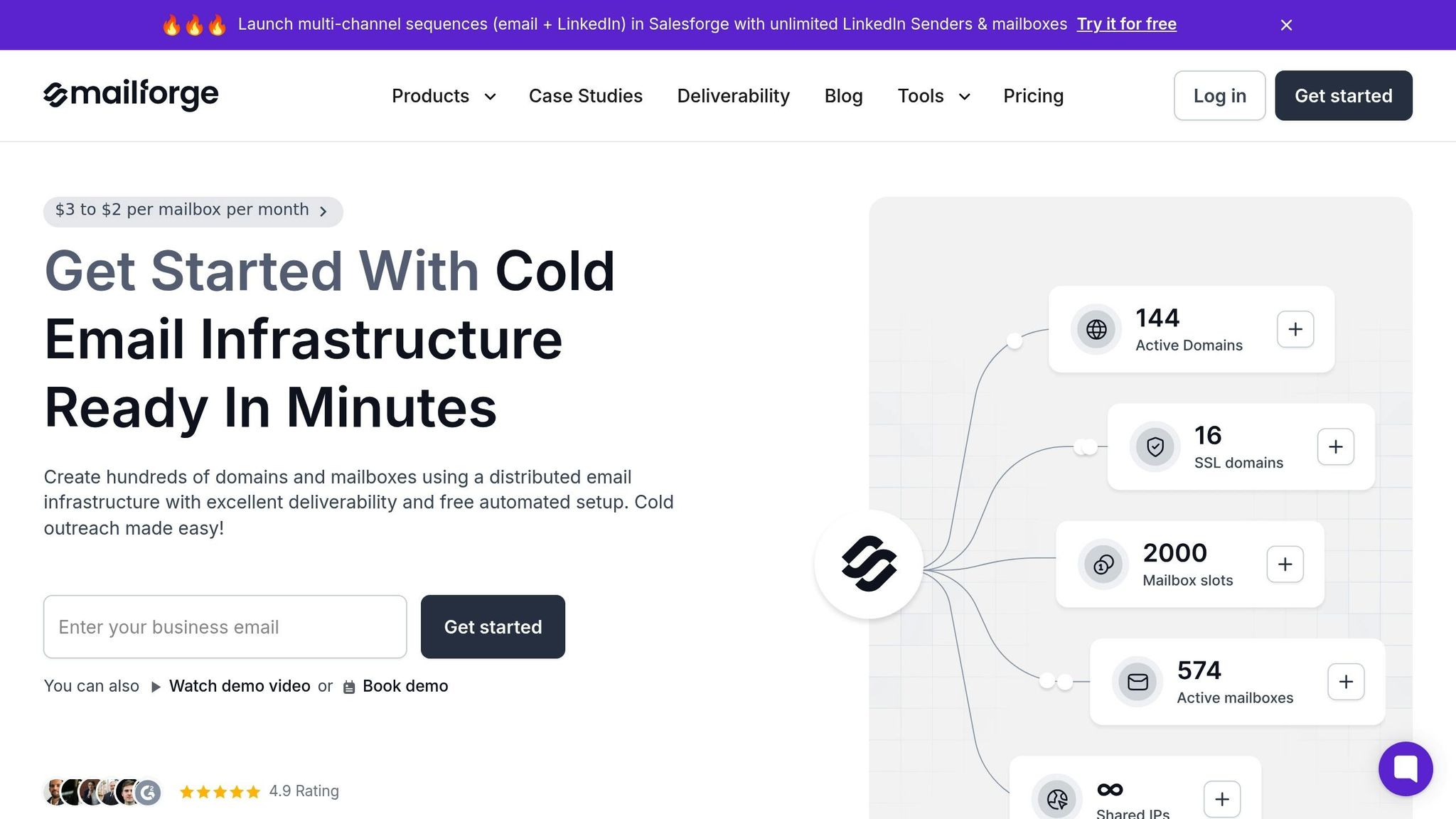
Mailforge is designed specifically for cold outreach professionals, offering a shared infrastructure model that prioritizes sender reputation, making it one of the top cold email tools for growing teams. Unlike standard email providers where you share IPs with random senders, Mailforge ensures that only outreach professionals use its platform. This focus helps protect your sender reputation. Plus, the platform simplifies complex tasks like DNS setup, SSL integration, and domain masking, getting you up and running in just five minutes.
Mailforge provides 200 mailboxes for $484/month - about one-third the cost of Google Workspace or Microsoft 365. Danny Goff, Director of Sales at Propeller, highlights its efficiency:
"Procedures that usually took hours (setting DKIM, SPF, etc. records) for multiple domains, now take a few minutes. Mailforge is also cost-efficient since you spend per mailbox ~3 times less than with Gmail."
This combination of cost savings and streamlined setup directly boosts your campaign's deliverability metrics.
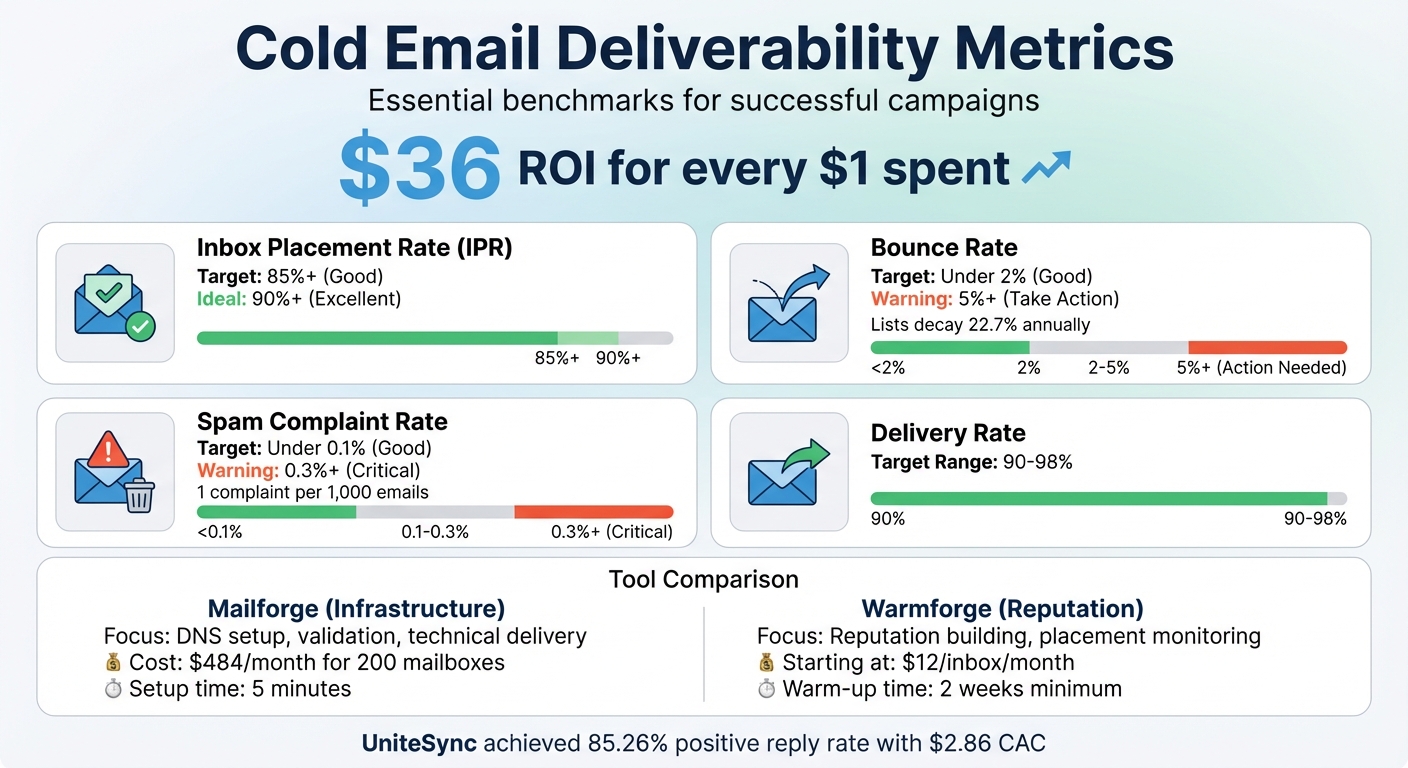
A strong delivery rate typically falls between 90% and 98%. With Mailforge's shared infrastructure, you benefit from an established reputation right from the start. This eliminates the need for a lengthy warm-up period, which is often required for new IPs. Additionally, Mailforge features built-in validation to remove invalid email addresses, reducing the likelihood of bounces.
That said, the shared model comes with some risk, sometimes referred to as the "apartment effect", where the actions of other users could potentially impact your reputation.
Inbox Placement Rate (IPR) tracks whether your emails land in recipients' inboxes or spam folders. A strong IPR is 85% or higher, with rates above 90% being ideal. For example, UniteSync - a company that identifies unclaimed royalties for music creators - achieved an 85.26% positive reply rate by using Mailforge alongside Salesforge and Warmforge. This approach helped them achieve a Customer Acquisition Cost of just $2.86.
Mailforge also offers a free Placement Test Tool, giving you real-time insights into where your emails are landing across different providers.
To maintain a good sender reputation, your bounce rate should stay below 2%, with anything over 5% requiring immediate attention. Since email lists naturally decay by about 22.7% annually, regular list maintenance is critical. Mailforge addresses this with integrated email validation, ensuring invalid addresses are removed before they can cause bounces. If your bounce rate does exceed 5%, it's essential to investigate potential issues, such as outdated or incorrect email addresses.
Spam complaint rates should remain under 0.1%, with anything above 0.3% signaling a serious problem. Mailforge helps keep these rates low by restricting its platform to cold outreach professionals and integrating with Warmforge for a structured warm-up process. Carlos Palop Moliner, CEO of UniteSync, underscores the importance of a reliable deliverability system:
"Our tech identifies music creators with unclaimed royalties... but cold email only works when it lands. That's where Salesforge and Mailforge have made the difference."
Next, we'll dive into how Warmforge further supports these deliverability benchmarks.
(function(d,u,ac){var s=d.createElement('script');s.type='text/javascript';s.src='https://a.omappapi.com/app/js/api.min.js';s.async=true;s.dataset.user=u;s.dataset.campaign=ac;d.getElementsByTagName('head')[0].appendChild(s);})(document,372145,'bgla6zdvtvvykvmfmifs');

Warmforge takes the reliable foundation of Mailforge and adds automated warm-up features paired with ongoing monitoring to safeguard your domain reputation. It keeps tabs on inbox placement across major providers like Gmail and Outlook, aiming to keep your emails in the primary inbox rather than the dreaded promotions or spam folders. As Iga Wójtowicz from Warmforge puts it:
"Email deliverability monitoring matters because good targeting and copy mean nothing if your emails never get seen."
In internal tests, domains that were monitored and warmed by Warmforge achieved 100% inbox placement within just two weeks, compared to less than 40% for domains without monitoring. On top of that, Warmforge’s technical checks enhance key deliverability metrics.
Warmforge ensures strong delivery rates by validating SPF, DKIM, and DMARC protocols while continuously monitoring DNS and MX records to prevent delivery failures. The platform also keeps an eye on your domain and IP health, sending instant alerts if any blacklisting occurs. This hands-on approach helps you address issues quickly, keeping your delivery performance on track.
A healthy inbox placement rate is 85% or higher, and Warmforge helps you hit that mark by tracking performance across Gmail, Outlook, and other major providers. The platform uses automated warm-up processes that mimic human interactions - like opening emails, replying, and marking messages as "not spam" - to build trust with ISPs before you scale up your email volume. Iga Wójtowicz highlights its importance:
"If you can monitor and fix these signals in real time, your outreach scales without the constant fear of being filtered out."
With optimized deliverability tools, top campaigns can achieve open rates between 70% and 88%, far surpassing the average B2B benchmark of 36%. For deeper insights, Warmforge offers placement test add-ons starting at $39 per month, showing exactly where your emails land.
While inbox placement is critical, keeping bounce rates low is just as important.
Warmforge helps you maintain a bounce rate under the crucial 2% threshold by using automated technical validation, including DNS and MX checks. It also emphasizes the importance of regular list cleaning. If your bounce rate exceeds 5%, Warmforge’s instant alerts ensure you can take immediate action to resolve the issue.
To avoid being flagged as spam, it’s essential to keep complaints below 0.1% (1 per 1,000 emails). Warmforge’s automated warm-up simulates natural human engagement patterns, strengthening your sender reputation with ISPs. Plus, its blacklist monitoring feature notifies you instantly if your domain is flagged, helping you maintain smooth campaign performance. Pricing starts at $12 per inbox per month, with discounts available for higher volumes.
Mailforge and Warmforge work hand in hand, each addressing different aspects of email deliverability. Mailforge lays the groundwork by providing essential infrastructure - mailboxes and automated DNS configuration - to ensure emails are technically ready to send. Meanwhile, Warmforge focuses on protecting and enhancing reputation through automated warm-up processes and ongoing monitoring. Essentially, Mailforge handles the sending, while Warmforge ensures those emails arrive with a strong reputation.
When it comes to deliverability metrics, their approaches are distinct yet complementary. Mailforge automates critical DNS settings like SPF, DKIM, and DMARC to secure email delivery and improve inbox placement. Warmforge takes it a step further by actively enhancing inbox rates through its automated warm-up system and placement tests. It also provides a real-time health score (ranging from 0–100) for each mailbox, with scores above 97% indicating a strong reputation.
| Feature | Mailforge (Infrastructure) | Warmforge (Deliverability) |
|---|---|---|
| Primary Role | Mailbox creation and DNS setup | Reputation building and health tracking |
| IP Setup | Shared IP infrastructure | Premium internal warm-up pool |
| Metric Focus | Bounce rate and technical delivery | Inbox placement and spam prevention |
| Key Features | SSL, Domain Masking, Unlimited mailboxes | Reputation scoring, Placement tests, Alerts |
| Setup Time | ~5–10 minutes | Continuous/automated once connected |
Mailforge’s shared IP infrastructure means your reputation is partially tied to other users. While the system filters for quality, it doesn’t offer the same level of control as private solutions like Infraforge. On the other hand, Warmforge requires a minimum two-week warm-up period to be effective. Rushing through this process can lead to spam filters flagging your emails prematurely.
A real-world example of these tools in action comes from UniteSync, which combined Mailforge and Warmforge to scale their outreach to music creators. The result? An impressive 85.26% positive reply rate while keeping their Customer Acquisition Cost (CAC) at just $2.86. CEO Carlos Palop Moliner summed it up perfectly:
"cold email only works when it lands"
Together, Mailforge and Warmforge create a well-rounded deliverability system. Mailforge provides a strong technical foundation, while Warmforge ensures reputation stays intact. By addressing each other’s limitations, the two tools drive consistent and reliable campaign performance.
Deliverability metrics are the backbone of successful cold email campaigns. Keeping your bounce rates below 2%, spam complaints under 0.1%, and inbox placement rates above 85% ensures your emails land where they should - your recipients' inboxes - not their spam folders. Falling short of these benchmarks can harm your sender reputation, and recovering from blacklisting could take weeks or even months.
Choosing between Mailforge and Warmforge comes down to your specific deliverability needs. Mailforge lays the groundwork by ensuring your emails pass essential security checks before leaving your infrastructure. It’s all about getting the technical details right from the start. Check out our technical guides for more on infrastructure setup.
Warmforge, on the other hand, focuses on boosting your sender reputation. It uses automated warm-up sequences and real-time monitoring to keep your domain health in check. For teams managing large email volumes, combining both platforms offers a well-rounded solution. As Tim Kauble, Senior Director of Deliverability & Compliance Operations at Salesforce, puts it:
"A conversion comes after a click, a click comes after an open, an open comes after delivery. If you focus on optimizing for delivery, you inherently maximize your opportunities for ROI."
For businesses with more advanced needs, Infraforge provides a dedicated IP solution. This option isolates your sender reputation from shared infrastructure risks, making it ideal for those sending over 100,000 emails monthly. Starting at $33 per month for 10 mailbox slots, with additional dedicated IPs available at $99 per month, it’s a practical choice for high-volume senders.
To maintain strong deliverability, keep a close eye on your bounce and spam rates. If you notice any spikes, pause your campaigns and reassess your list hygiene and warm-up strategies. When your infrastructure and reputation management work together, cold email campaigns can yield impressive results - up to $36 in ROI for every $1 spent. The key is ensuring your messages consistently reach the inbox.
To gauge how well your cold emails are performing, keep an eye on these critical metrics:
Regularly monitoring these metrics can help you spot problems, fine-tune your campaigns, and boost performance. Tools like Mailforge can make this task easier by offering reliable deliverability tracking and streamlined infrastructure management for your outreach initiatives.
Mailforge takes sender reputation seriously by using a shared IP pool tailored specifically for cold email outreach. This setup ensures emails are sent through a reliable infrastructure, reducing the chances of being blacklisted.
On top of that, it handles essential technical setups automatically, including DNS configurations like SPF, DKIM, and DMARC, as well as SSL-enabled domain masking. These features help authenticate and secure your sending domains. Designed with cold email campaigns in mind, Mailforge's infrastructure works to maintain strong IP and domain trust scores, boosting deliverability and overall campaign performance.
A low bounce rate plays a key role in safeguarding your sender reputation, which is crucial for ensuring your emails make it to recipients' inboxes. If your bounce rate climbs too high, it can set off spam filters or even get you blacklisted - both of which can severely hurt the success of your email campaigns.
Keeping your bounce rate in check helps boost inbox placement, increases engagement, and ensures your outreach efforts hit the mark. To minimize bounces, stick to verified email addresses, maintain clean email lists, and rely on dependable infrastructure to keep your campaigns running smoothly.