Cold email has been declared dead more times than I can count.
Every year, someone claims inboxes are too crowded, spam filters are too strict, or buyers simply don't respond anymore.
Yet businesses continue to book meetings, generate leads, close deals, and build partnerships through cold email every single day.
The reality is that cold email hasn't stopped working.
In this guide, I'll walk through everything you need to know about cold email in 2026.
You'll learn
By the end, you'll have a clear understanding of how cold email works and what it takes to make it an effective part of your outbound strategy.
So, let's get in!
Cold email is an email sent to someone you've never interacted with you before and what your your business does.
Businesses use cold email for many different reasons.
The goal isn't to make an immediate sale. It's to start a relevant conversation with the right person.
A good cold email is sent to a carefully selected audience and addresses a specific problem, opportunity, or reason for reaching out.
Instead of trying to sell immediately, it aims to create enough interest to earn a response.
Also Read: Cold Email Benchmarks
Cold email is often associated with sales prospecting, but that's only one of its many use cases.
At its core, cold email is simply a way to start a conversation with someone you haven't interacted with before. The key is having a relevant reason to reach out.
This is the most common use case. Sales teams use cold email to connect with decision-makers, introduce their solution, and start conversations that may eventually lead to a sale.
Common goals include:
Many agencies rely on cold email to consistently generate new business. Instead of waiting for referrals or inbound leads, agencies can proactively reach out to companies that fit their ideal client profile.
Common goals include:
Not every cold email is about selling. Companies frequently use cold email to explore partnerships with complementary businesses, influencers, technology providers, and industry experts.
Common goals include:
Recruiters and hiring managers often use cold email to contact candidates who may be a strong fit for an open role. This approach is especially common when targeting highly skilled professionals who aren't actively applying for jobs. Recruiters can use recruiting email templates examples from Recruit CRM as a reference when adapting outreach to different roles and candidate profiles.
Common goals include:
Cold email is also widely used in public relations. Brands, startups, and founders regularly reach out to journalists, podcast hosts, bloggers, and industry publications to share news, stories, or expertise.
Common goals include:
By now, you know what a cold email is and where it can be used. The next question is how the process actually works. While every business has its own approach, most successful cold email campaigns follow the same basic framework.
Before sending a single email, you need to know who you're targeting.
Ask yourself:
The clearer your ICP is, the easier it becomes to write relevant emails.
Once you've identified your ideal customer, the next step is finding people who match that profile.
A strong prospect list typically includes:
Remember, quality matters more than quantity. A smaller list of qualified prospects will usually outperform a massive list of random contacts.
Even the best prospect list is useless if you can't reach people.
That's why most teams verify email addresses before launching campaigns.
This helps:
This is where many beginners make mistakes.
Instead of sending cold emails from a primary business inbox, most businesses use dedicated domains and mailboxes for outreach.
This helps:
New mailboxes don't instantly have a strong reputation.
Before sending campaigns at scale, they need time to build trust with email providers.
Mailbox warmup helps:
Skipping this step often leads to poor results.
Now it's time to create the actual outreach.
A typical cold email campaign includes:
The goal isn't to close a deal in one email. The goal is to start a conversation.
Once your campaign goes live, pay attention to how prospects interact with your emails.
Track metrics such as:
These numbers can help identify what's working and what needs improvement.
Cold email is rarely perfect on the first attempt.
The best teams continuously:
Small improvements can compound into significantly better results over time.
Many people think cold email starts when you hit "send."
In reality, most of the work happens before that. Finding the right prospects, setting up proper infrastructure, and creating relevant messaging are often the biggest factors behind a successful campaign.
Now that you understand the process, let's look at one of the most important pieces of the puzzle: how to write a cold email that actually gets replies.
Writing a cold email can feel intimidating at first. You have only a few seconds to capture someone's attention, communicate why you're reaching out, and give them a reason to respond.
The good news is that successful cold emails usually follow a simple structure. They aren't overly creative, packed with buzzwords, or filled with long sales pitches. Instead, they're relevant, concise, and focused on the recipient.
Let's break down the elements that matter most.
The subject line is the first thing a prospect sees. If it doesn't catch their attention, the rest of the email won't matter.
A good subject line should:
Examples:
Avoid subject lines that look promotional or overly sales-focused. If it feels like marketing, there's a good chance it will be ignored.
Once someone opens your email, they're immediately looking for one thing: whether this message is relevant to them. That's why the opening matters so much.
You don't need deep personalization, but you should demonstrate that you understand who you're contacting and why you're reaching out.
You could reference:
The goal is to answer the unspoken question: "Why are you emailing me?"
Many cold emails fail because they talk too much about the sender.
Prospects generally care less about your company and more about the challenges they're facing.
Instead of leading with features, focus on:
For example, rather than saying:
"We offer an AI-powered sales platform."
You could say:
"Many sales teams struggle to manage email and LinkedIn outreach from separate tools."
The second approach immediately feels more relevant because it starts with the prospect's reality.
Once you've identified a problem, connect it to the value you provide. This doesn't need to be a lengthy pitch.
A few sentences are usually enough to explain:
Keep it simple: If a prospect can't understand your value within a few seconds, they're unlikely to continue reading.
People are naturally cautious when receiving emails from strangers. A small credibility statement can reduce that hesitation.
This might include:
For example:
The goal isn't to brag. It's to give the prospect confidence that you're worth talking to.
One of the most common cold email mistakes is writing too much. Most decision-makers skim emails on mobile devices between meetings, calls, and other tasks.
That's why shorter emails generally perform better.
A good cold email should:
If a sentence doesn't help move the conversation forward, consider removing it.
The CTA is where many otherwise good emails go wrong. Some people ask for a 60-minute demo, a detailed proposal, or multiple next steps in the very first email.
That's a lot to ask from someone who has never interacted with you before. Instead, keep the CTA simple and low-friction.
Examples include:
The easier it is to respond, the more likely you'll receive a reply.
To know the process in detail read this guide
By now, you know what a good cold email looks like. But writing a decent email is only half the battle.
The reality is that two companies can send nearly identical emails and get completely different results. One generates replies and meetings. The other gets ignored. The difference usually comes down to execution.
Let's look at the practices that consistently separate successful cold email campaigns from unsuccessful ones.
One of the biggest misconceptions in cold email is that more personalization automatically leads to better results.
That's not always true.
Many senders spend hours mentioning a prospect's recent LinkedIn post, favorite podcast, or company milestone. While that can sometimes help, it doesn't matter if the core message isn't relevant.
Imagine receiving this email:
"Congratulations on your recent funding round. By the way, would you like to buy our accounting software?"
The email is personalized.
But it isn't necessarily relevant.
Now consider:
"I noticed your team recently expanded into three new markets. Many companies at that stage struggle to maintain outbound efficiency as sales teams grow."
This email may contain less personalization, but it's far more relevant to the recipient's situation.
Before adding personalization, ask yourself:
If the answer is no, personalization won't save the campaign.
Most beginners obsess over email copy. Experienced senders obsess over targeting.
Why?
Because even the best email can't create interest where none exists.
If you're reaching out to the wrong people, changing subject lines and CTAs won't fix the problem.
Before launching a campaign, make sure you know:
The more precise your targeting becomes, the easier writing becomes. In fact, many cold email problems are actually targeting problems disguised as copywriting problems.
When people first start cold emailing, they often feel the need to explain everything.
They describe every feature, every service, every customer success story, and every reason the prospect should care.
Unfortunately, prospects don't have time for that. Most decision-makers scan emails in seconds. That's why shorter emails tend to perform better.
A good cold email should answer three questions quickly:
If a sentence doesn't help answer one of those questions, consider removing it.
Many cold emails fail because responding feels like work.
For example:
"Would you be available for a 45-minute discovery session next Tuesday at 2 PM?"
That's a big commitment for someone who doesn't know you.
Compare that to:
"Worth a conversation?"
The second CTA requires very little effort.
As a general rule, the lower the friction, the higher the likelihood of a response.
Your first email isn't trying to close a deal.
It's trying to start a conversation.
A common mistake is sending the same message to every prospect. The challenge is that different audiences care about different things.
For example:
The more your message aligns with a prospect's priorities, the stronger your results become. Even small adjustments to messaging can significantly improve reply rates.
When a campaign underperforms, many people change everything at once. They rewrite the email, change the subject line, target new industries, and update the CTA.
The problem is that they never learn what actually caused the improvement. Instead, test methodically.
Examples include:
Over time, these small experiments reveal patterns that can improve campaign performance.
This is one of the biggest mindset shifts in modern cold email. Many senders measure success solely by booked meetings.
But prospects rarely go from stranger to customer after reading one email. Instead, think of cold email as the first step in a relationship.
A reply often comes before a meeting. A conversation often comes before a deal.
When you focus on starting conversations rather than forcing meetings, your messaging naturally becomes less salesy and more effective.
Many businesses spend weeks trying to write the perfect cold email. The truth is that perfection doesn't exist. Every campaign provides data.
Every campaign teaches you something. The teams that succeed with cold email aren't necessarily the ones with perfect messaging.
They're the ones that consistently test, learn, and improve over time.
How to Measure Cold Email Success
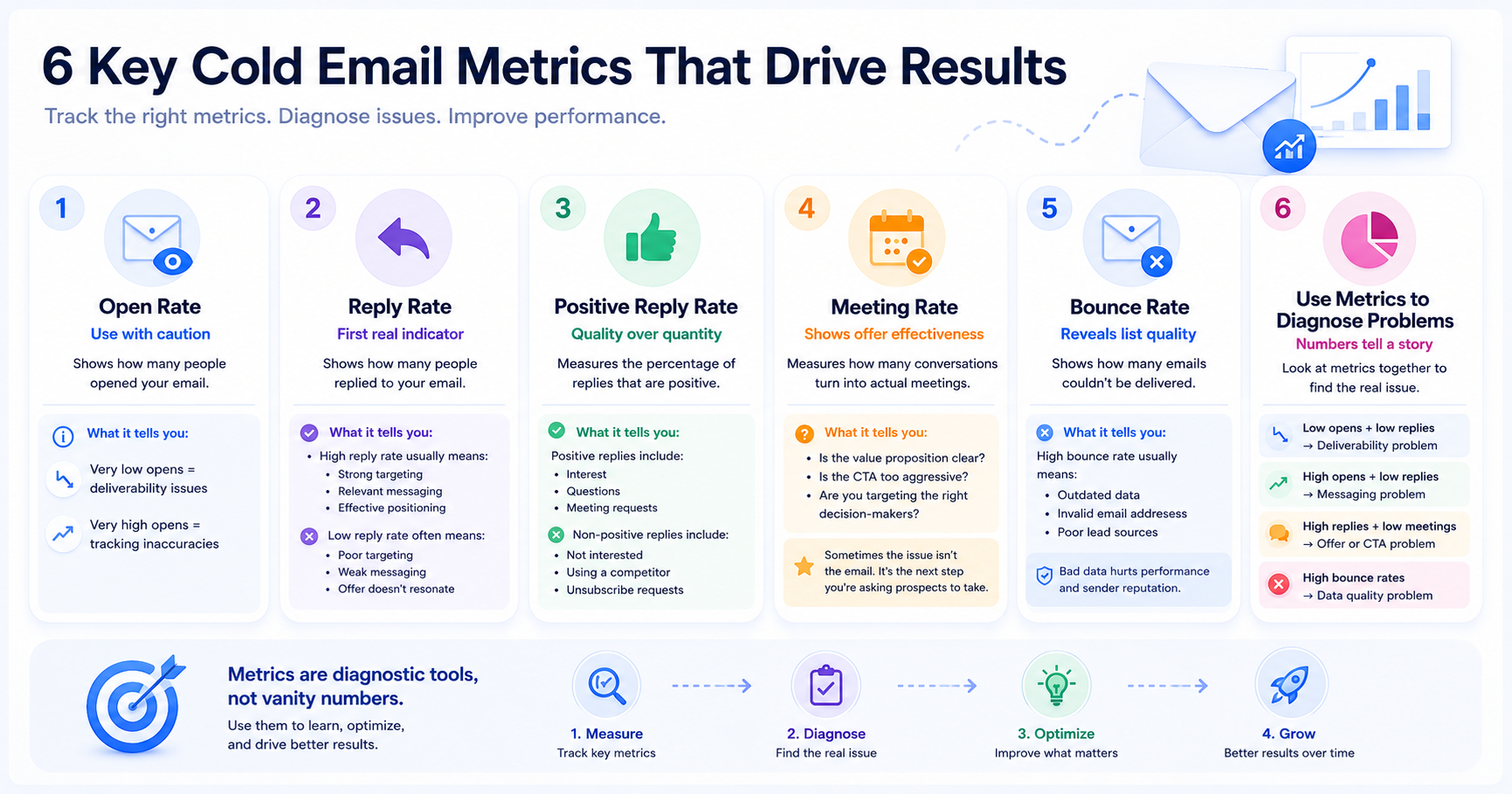
By now, you understand the principles behind effective cold emails.
Let's look at a few examples and break down why they work.
Although the emails target different goals, they all follow a similar structure:
That's because successful cold emails aren't built around clever tricks.
They're built around relevance.
The more relevant your message is to the person receiving it, the better your chances of getting a response.
If there's one lesson to take away, it's this: successful cold email is built on relevance, personalization, and consistency. The better you understand your audience, the easier it becomes to write emails they actually want to read and respond to.
Once you've mastered those fundamentals, the right tools can help you scale your outreach without sacrificing quality.
That's where Salesforge comes in.
Salesforge helps modern sales teams automate and personalize cold email outreach at scale while maintaining strong deliverability. From AI-powered email personalization and sequence generation to mailbox management and campaign optimization, it provides everything you need to run effective outbound campaigns from a single platform.
Whether you're just getting started with cold email or looking to scale an existing outbound motion, Salesforge can help streamline the process and improve results.
Start your 14-day free trial today and see how Salesforge can help you book more meetings, generate more opportunities, and grow your pipeline with smarter cold outreach.
Cold email isn't dead. It's simply evolved.
Businesses that adapt to those changes will continue to use it as one of the most effective ways to generate opportunities, build relationships, and drive predictable growth.
In many countries, cold emailing is legal when done responsibly and in compliance with local regulations. Laws such as CAN-SPAM in the United States and GDPR in Europe set rules around transparency, consent, and unsubscribe options.
Cold emails are targeted and sent with a legitimate business purpose. Spam emails are usually sent in bulk with little relevance to the recipient. The biggest difference is that cold emails focus on value and relevance, while spam focuses on mass promotion.
Most successful cold emails are short and easy to read. As a general rule, focus on communicating your message clearly rather than making the email longer. If you can explain your point in a few concise paragraphs, that's usually enough.
Reply rates vary by industry, audience, and offer. However, reply rate is often a better indicator of success than open rate because it shows that prospects found your message relevant enough to respond.
There are several possible reasons:
Reviewing your targeting, messaging, and deliverability can help identify the root cause.
There isn't a universal number that works for every business. Sending volume depends on your infrastructure, mailbox health, and campaign goals. It's generally better to focus on quality outreach and gradually increase volume rather than sending large numbers of emails immediately.
Personalization can help, but relevance is more important. Mentioning a prospect's company, role, or challenges can make the email feel more tailored. However, personalization alone won't improve results if the message isn't relevant to the recipient's needs.
The most important part is relevance. If your email addresses a problem, opportunity, or goal that matters to the recipient, you're far more likely to get a response. Everything else—from subject lines to CTAs—works best when the message itself is relevant.
The best CTAs are simple and low-friction. Instead of asking for a large commitment, focus on starting a conversation.
Examples include:
Yes, AI can help generate ideas, create drafts, and personalize outreach at scale. However, AI-generated emails still need human review to ensure they're relevant, accurate, and aligned with your audience.