GMass has three product limits that shape everything at scale.
It runs only inside Gmail, which is an ecosystem choice, not a workaround.
Personalization stops at spreadsheet mail merge, with no AI-generated copy from a prospect's LinkedIn or company context.
And there is no spintax or advanced variation, which experienced cold email operators use to keep sending patterns natural.
Inside those limits, the tool works as advertised. Send a few hundred personalized emails per day from a single Gmail inbox, using mail merge from a Google Sheet with follow-ups and basic open/click tracking.
That is the buyer GMass serves, and it serves them well.
GMass carries a 4.7/5 on G2 from 1,307 reviews, dominated by solo senders inside the sweet spot.
Trustpilot sits at 3/5 from 36 reviews, most describing what happens when teams try to scale past those limits:
Billing they can't cancel
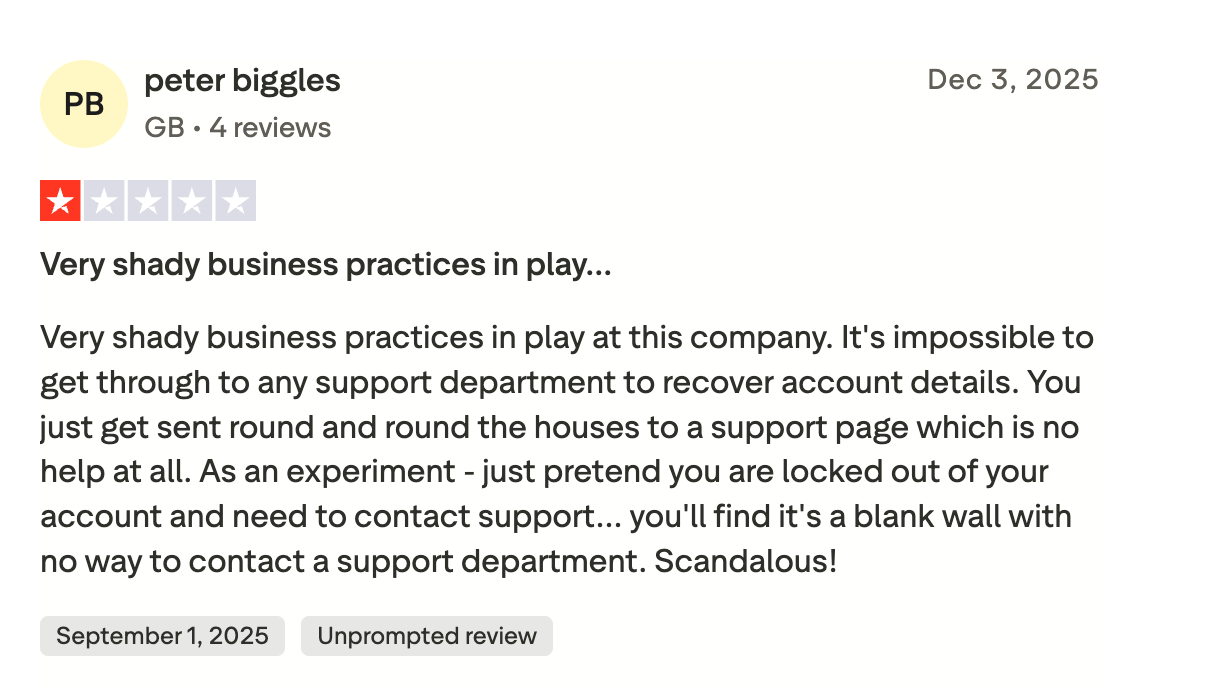
Support they can't reach
Gmail accounts restricted after MultiSend rotates sends
This review covers what GMass does well, where it breaks at volume, what real users say across G2, Trustpilot, Capterra and r/coldemail, and the platform that replaces it at scale.
TL;DR: GMass Review at a Glance
GMass is the best Gmail-native mail merge tool, but Gmail is also its ceiling: It works inside your inbox as a Chrome extension built for Gmail users, pulls personalization from Google Sheets, and runs campaigns from the Gmail interface. Under 200 emails per day per inbox, the experience is hard to beat, and you can schedule emails and send follow up emails without leaving Gmail.
Pricing in 2026: Standard $20.75/month, Premium Plan $29.08/month, Professional around $49/month (all billed annually): Team plans start around $120/month for five users (billed annually). Annual saves roughly 30% versus monthly. The free plan was discontinued in December 2023; new accounts get a 7-day trial capped at 50 emails per day.
Warm-up, DNS control, and multichannel are missing: GMass does not handle mailbox warm-up, SPF, DKIM, DMARC setup, domain rotation, or any LinkedIn channel. Scaling means stacking more Gmail accounts, and each one carries its own restriction risk.
For senders outgrowing Gmail's ceiling, Salesforge is the multichannel outreach platform that replaces what GMass can't do: Unlimited mailboxes on a flat monthly rate, AI personalization in 21+ languages, free Warmforge warm-up included, and email plus LinkedIn in one conditional sequence. Pro is $40 per month (billed annually), Growth is $80 per month (billed annually).
GMass has been in the Gmail-extension category since 2015, and it is one of the more focused email marketing tools for Gmail-based outreach, doing one thing well - getting you from "I have a Google Sheet of contacts" to "the first emails are out the door" in about fifteen minutes.
The table below compares GMass to Salesforge, the multichannel outreach platform in the Forge Stack, because that's the real switch most GMass users make when they outgrow Gmail.
Native HubSpot, Pipedrive, LinkedIn Sales Navigator, API, Zapier, webhooks. MCP CLI for AI agents.
Google Sheets and Gmail native. API on Professional plan. No CRM integration.
Free Trial
14 days, full feature access, no credit card required.
7 days, capped at 50 emails per day. Free tier discontinued December 2023.
What Real Users are Saying About GMass in 2026
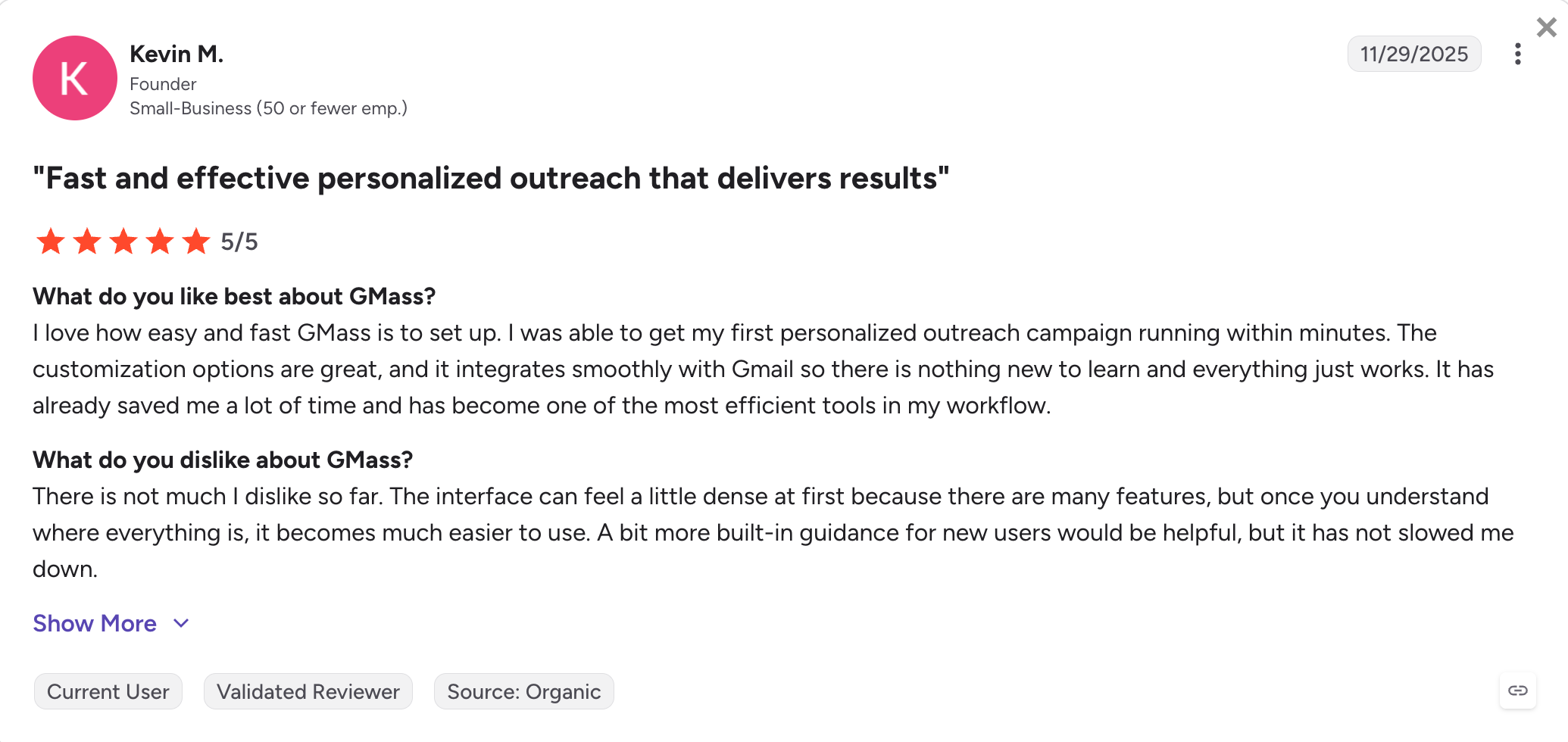
Reviews split sharply by platform. The G2 and Capterra reviews are mostly happy users running low volume out of Gmail.
The Trustpilot reviews are mostly unhappy users who tried to scale, got billed in ways they didn't expect, or watched their Gmail accounts get restricted.
The recurring patterns are billing problems, support tickets that went unanswered, and Gmail accounts getting restricted after higher-volume sends.
One critical review reads, "Very shady business practices in play at this company. It's impossible to get through to any support department to recover account details."
A Capterra reviewer in the construction industry wrote, "GMass saved me hours of manual follow-up. I set up my first cold email campaign in under 20 minutes, and it performed better than any tool I've used before."
I tested GMass on a Workspace mailbox over two weeks, using a 480-row Google Sheet of internal warm contacts so the deliverability story stayed honest.
I wanted to evaluate the workflow rather than push the daily limit, so volume stayed at around 80 emails per day with two follow-up steps, mail merge from the sheet, and a Spam Solver run before every campaign launch.
Setting Up a Campaign Inside Gmail
Setup is where GMass earns most of its G2 reviews.
After installing the gmass chrome extension, the Compose window picks up a new red GMass button and a small panel of campaign settings.
From there, the workflow is mostly the same as sending a normal email: write the message, connect a Google Sheet for the recipient list and personalization fields, and click the red button instead of Send.
This straightforward campaign setup is one reason gmail users can quickly send campaigns from their normal workflow.
What I tested: a 480-contact mail merge with three personalization variables, pulled live from a Google Sheet kept open in another tab.
What I liked: the Compose-window UX really is the entire learning curve. The personalization picker is where you'd expect it, and the sheet-to-merge mapping works without copy-pasting CSVs or learning new variable syntax.
What could be better: the schedule-send confirmation is confusing, exactly as that G2 reviewer described. After picking a date and time, there's no "scheduled" badge on the campaign, which made me wonder more than once whether the campaign was queued or already running.
My take: for a one-message, one-list, one-follow-up workflow, the UX is excellent. The 4.8 G2 score makes sense within the first ten minutes.
Mail Merge with Google Sheets
The Google Sheets integration is the single feature most users mention in five-star reviews.
GMass pulls every column from the sheet at send time, supports rich personalization fields for personalized campaigns, and helps you personalize messages across a live contact list.
It also has seamless Sheets syncing, so new contacts added as new rows are picked up automatically and emails go out without extra steps.
Campaign results sync back to Google Sheets in real-time.
The watch-for-new-rows mode covered a common automation use case without a Zap or any middleware.
What I tested: live merge with a Google Sheet I updated mid-campaign to confirm the watch-row behavior.
What I liked: no CSV juggling. Edit a cell in the sheet and the change shows up in the next send.
What could be better: personalization is locked to whatever's in the sheet. There's no second-layer logic for conditional content beyond "if column X is empty, fall back to Y."
My take: if your personalization model is "spreadsheet columns become merge fields," this is the cleanest implementation I have used. If you want logic that adapts to prospect behavior or AI-generated openings, you'll want a different tool.
Follow-Ups and Auto-Sequences
GMass lets you string up to eight follow-up stages on a single campaign, and its automated follow ups are the cleanest I've used in a Gmail-native tool.
Each follow-up pauses automatically the moment a recipient replies, opens (if you configure stop-on-open), or clicks, so automatic follow up emails don't keep going after engagement. The eight-step ceiling is fine for cold outreach in practice, though it does get in the way if you want to add a longer nurture sequence on the same campaign.
What I tested: a three-step sequence with reply detection on the first follow-up and click detection on the second.
What I liked: reply detection is accurate. I didn't see GMass send an awkward follow-up to someone who had already responded, even when the reply came in through the Gmail mobile app.
What could be better: you can't pause or rewrite scheduled follow-ups mid-flight cleanly. Once a sequence launches, the easiest fix for a typo you spot afterwards is to stop the whole campaign.
My take: the follow-up engine is the single best cold-email-specific feature in GMass. It alone justifies upgrading from Standard to Premium, since Standard doesn't include sequences.
Spam Solver, Email Verification, and Deliverability Tooling
If you've sent a cold email and immediately wondered whether it landed in spam, the pre-send hygiene tools are where GMass earns its keep, especially if you're aiming for better inbox placement.
Two tools do most of the work. Spam Solver scores the body copy against known spam triggers and suggests rewrites that can help you avoid spam filters.
An inbox tester sends to roughly 15 seed addresses across Workspace accounts filtered by Barracuda, Mimecast, and Sophos, so you get a placement read before you send.
Email verification is built in and bounces invalid addresses automatically, which also helps protect sender reputation.
What I tested: Spam Solver and the inbox tester against three subject-line variants and one body draft with a single suspicious phrase deliberately inserted.
What I liked: both are fast, and the recommendations are practical rather than generic. The inbox tester picked up the placement difference between two of my subject lines, which was useful before scaling.
What could be better: the verification step doesn't catch catch-all domains as cleanly as a dedicated verifier.
My take: the deliverability tools inside GMass are better than I expected. They aren't a substitute for proper infrastructure hygiene, but they catch the obvious mistakes before send.
MultiSend (Inbox Rotation)
MultiSend is the feature that turns GMass from a Gmail extension into something closer to a cold email tool, and it's also where most of the Trustpilot complaints come from.
It distributes a single campaign across multiple connected Gmail accounts, which sidesteps the 2,000-per-day Workspace cap by spreading volume across inboxes. It's often marketed as a way to run high volume campaigns with multiple accounts.
The downside is what happens when something goes wrong.
What I tested: I did not run MultiSend across multiple inboxes for this evaluation. The risk to Gmail accounts is real enough that an editorial test isn't the right place to try it.
My take: if you use MultiSend, use it with Workspace inboxes that aren't your primary business email, with clean verified lists, and keep volume well below the daily caps even with rotation in play; Gmail's sending limits still apply when you spread volume across inboxes. The Trustpilot reviewer who lost 59 inboxes wasn't making it up.
GMass Pricing in 2026 (All Plans, Annually Quoted)
GMass raised prices on January 1, 2026, the third price increase in the company's ten-year history.
The new pricing applies to all new subscribers, and existing subscribers were given the option to lock in 2025 rates by switching to annual billing before January 1.
Plan
Annual price
Monthly equivalent (billed annually)
Monthly billing
Standard
$249 / year
$20.75 / month (billed annually)
$29.95 / month
Premium
$349 / year
$29.08 / month (billed annually)
$39.95 / month
Professional
~$589 / year
~$49 / month (billed annually)
$59.95 / month
Standard includes the GMass core: unlimited contacts, unlimited campaigns, personalization, the Chrome extension, the Spam Solver, basic email verification. It does not include sequences, which is the single biggest reason most cold email users skip it and go straight to Premium.
Premium Plan adds sequences, A/B testing via spintax, higher-priority support, and behavior-based campaigns. This is the realistic entry point for anyone running cold outreach because the follow-up engine is where reply rates come from.
Professional adds MultiSend (inbox rotation across multiple Gmail accounts), API access, and the full feature set, with SMTP integration also part of the scaling story if you want to move beyond relying only on Gmail. This is where most agencies and high-volume senders end up if they choose to scale GMass rather than move to dedicated infrastructure.
Team Plans
Team plans are priced per seat with the Professional feature set, and they had similar percentage increases at the January 2026 reset.
Pricing scales from around five seats up to one hundred:
Team size
Annual monthly equivalent (billed annually)
5 users
~$120 / month (billed annually)
10 users
~$220 / month (billed annually)
25 users
~$500 / month (billed annually)
50 users
~$916 / month (billed annually)
100 users
~$1,495 / month (billed annually)
GMass Pros and Cons
✅ Pros
❌ Cons
Zero learning curve if you already use Gmail. Install the extension, open Compose, click the red button, and schedule mass emails from the same workflow.
Hard-capped by Gmail's daily sending limits. 500/day personal, 2,000/day Workspace, with behavioral throttling kicking in much earlier.
Google Sheets mail merge is the cleanest implementation in the category.
No native warm-up. Sender reputation is the user's responsibility.
The follow-up engine has accurate reply detection and clean sequence pausing.
Email only. No LinkedIn channel, no multichannel sequencing, no phone or SMS layer.
Spam Solver and the inbox placement tester are useful pre-send hygiene tools.
MultiSend can trigger Gmail account restrictions at higher volumes, with the worst Trustpilot reports describing 59 inbox restrictions within 48 hours.
Affordable for solo senders at $20.75/month on the Standard plan (billed annually).
Billing friction is the recurring complaint on Trustpilot. Cancellation and refund issues dominate the 2.3/5 rating.
Strong G2 and Capterra ratings (both 4.8/5 from 1,200+ reviews) indicate high day-one user satisfaction.
Trustpilot's 2.3/5 rating (36 reviews) highlights issues experienced by some users as they scale.
Who GMass is Built For (and Who Should Look Elsewhere)
GMass is a good fit when:
You are a solo founder, freelancer, recruiter, or small team sending fewer than 200 personalized emails per day from a single Gmail or Workspace inbox.
Your data lives in Google Sheets and the workflow does not need a CRM.
You want to stay inside Gmail and avoid learning a new dashboard.
Your sending pattern is real personalized outreach, not high-volume cold blasts, and your bounce rate stays under 2%.
Mail-merge use cases (invoices, event invitations, personalized newsletters, recruiter outreach, PR pitches) describe most of what you send.
GMass is the wrong tool when:
You're running cold outreach at 500+ emails per day across multiple domains and need real infrastructure underneath.
You need outreach across email and LinkedIn, not email alone.
You run an agency and need shared client workspaces, sender rotation across many domains, and audit trails.
You need warm-up, domain reputation monitoring, or a deliverability dashboard.
Your stack already has an outreach platform and you only need clean infrastructure underneath it.
If you fit the first list, GMass will keep doing its job. If you fit the second list, keep reading.
Why Users are Leaving GMass in 2026
Three reasons show up consistently when people on G2, Capterra, Trustpilot, and r/coldemail talk about why they switched.
Gmail Ceiling
Gmail's 500 and 2,000-per-day limits aren't GMass's fault, but they cap what GMass can do for you.
Gmail also throttles based on behavior well below those caps. Reddit threads describe accounts getting blocked at 12 to 15 emails per day from new Gmail addresses when the sending pattern looks automated.
Working around the ceiling means stacking more Gmail accounts, which means more license fees, more inboxes to manage, and more accounts that can get restricted.
Infrastructure Gap
GMass doesn't handle SPF, DKIM, DMARC, custom tracking domains, or any of the DNS work cold email depends on in 2026, and those missing authentication controls also hurt better inbox placement.
Recipient-side spam filters are getting stricter on emails that fail authentication, and sending from Gmail puts your primary business email's reputation in the path of every cold campaign.
That's fine at 50 emails per day. It gets expensive at 500.
Lack of Multichannel
Buyers don't live in one inbox. The teams getting the best reply rates in 2026 are combining email and LinkedIn in a single sequence, with logic that adapts based on what the prospect does on either channel.
GMass can't do any of that. Adding LinkedIn means a second tool, a second bill, a second integration, and a second place where data lives.
The teams leaving GMass aren't unhappy with GMass. They're unhappy with the cost of working around what Gmail can't do for them.
Best GMass alternative: Mailforge for the Infrastructure Layer
If the gaps above describe your situation, the replacement isn't another Gmail extension.
GMass is capped by Gmail: daily sending limits, no native warm-up, no DNS control, mail merge instead of AI, and no LinkedIn channel.
Salesforge fixes these by moving off Gmail entirely into a proper outreach platform that scales without stacking more Gmail accounts.
Salesforge is the multichannel outreach platform in the Forge Stack, priced at $40 per month on Pro or $80 per month on Growth (both billed annually), with a 14-day free trial and no credit card required.
Unlimited mailboxes are included at every tier, Warmforge warm-up runs free inside the subscription, and email plus LinkedIn run in a single conditional sequence.
The wider Forge Stack (Mailforge or Infraforge for dedicated cold email infrastructure, Primeforge for Google Workspace mailboxes, Leadsforge for lead data) is available under the same login as separate subscriptions when a team needs it.
Salesforge core features for senders leaving GMass
Unlimited mailboxes, users, and workspaces on a flat rate: GMass ties one Gmail account to each subscription and pushes agencies to stack Team plans to add seats. Salesforge charges one flat monthly rate no matter how many mailboxes, users, or shared workspaces you connect. Pro is $40 per month (billed annually) with 5,000 emails per month and 1 LinkedIn sender. Growth is $80 per month (billed annually) with 50,000 emails per month, unlimited users, unlimited LinkedIn senders, and unlimited shared workspaces.
AI personalization in 21+ languages, including Localized Greeting: GMass personalization stops at Google Sheets mail merge: whatever fields you have in your CSV are your variation. Salesforge generates AI-personalized copy from each prospect's LinkedIn profile, company news, and industry context, in 21+ languages natively. The Localized Greeting variable ({{localized_greeting}}) auto-generates a greeting that fits each recipient's locale (Hi, Hola, Bonjour, Guten Tag), costing 1 personalization credit per sent message that uses it.
Free unlimited warm-up via Warmforge, included: GMass shut down its warm-up product and now tells users to lean on sending discipline instead. Salesforge bundles unlimited Warmforge warm-up inside the subscription at no extra cost, targeting a heat score above 85 across every mailbox before you start real campaigns.
Dynamic ESP matching: Cold email placement improves when the sending ESP matches the recipient's ESP. Salesforge routes sends across ESPs automatically based on the recipient's mail provider, a lever GMass doesn't have because it lives entirely inside Gmail.
Text-only sending as a first-class option: HTML-heavy templates are a deliverability tax at cold-email volume. Salesforge supports plain-text-first sending, which is what most experienced cold email operators actually use. GMass technically allows plain text but its tracking wrapper still injects markup that reduces the plain-text advantage.
Sender rotation across every mailbox: GMass MultiSend rotates sends across connected Gmail accounts and is behind most of the Trustpilot complaints about account restrictions covered earlier in this review. Salesforge rotates across native SMTP mailboxes with per-mailbox pacing, without the Gmail behavioral throttling that gets Workspace accounts suspended.
Bounce Shield: Automated bounce protection pauses sends from any mailbox that crosses a bounce threshold before the reputation damage compounds. GMass has no equivalent: bounces surface in Gmail's postmaster tools after the fact.
Primebox unified inbox with Auto-Pilot and Co-Pilot modes: GMass replies stay inside each Gmail account's standard inbox, which means managing responses across five sending inboxes means five browser tabs. Primebox unifies replies from every mailbox and LinkedIn sender into one view, and supports two AI modes: Auto-Pilot (AI continues conversations autonomously) and Co-Pilot (AI drafts replies and a human approves each one before it goes out).
Multichannel: email plus LinkedIn in one conditional sequence: GMass is email-only. Salesforge runs email and LinkedIn steps in a single sequence with branching logic: if the prospect accepts a LinkedIn connect but doesn't reply, send an email; if they open the email but don't reply, send a LinkedIn message; and so on. Six LinkedIn actions are supported: connection requests, messages, InMails, post likes, follows, and withdraw requests.
LinkedIn Email Finder via Chrome Extension: The Salesforge-branded Chrome extension (free to install, shared across the Forge Stack) surfaces verified emails and phone numbers from LinkedIn profiles and pushes contacts straight into a Salesforge sequence. Email and phone lookups consume Leadsforge credits (1 credit per email, 10 credits per mobile number); new users get 100 free credits on Leadsforge signup, no credit card required.
Integrations: HubSpot, Pipedrive, LinkedIn Sales Navigator, API, Zapier, webhooks: Native two-way syncs with HubSpot and Pipedrive replace the Google-Sheets-only workflow GMass forces on you. LinkedIn Sales Navigator integration means the same prospect list you built in Sales Nav flows straight into a Salesforge sequence. API access, Zapier connectors, and webhooks cover the custom-workflow cases GMass leaves you to solve with third-party scripts.
MCP CLI for AI-agent workflows: The Forge MCP Server connects Salesforge (and the rest of the Forge Stack) to Claude, Cursor, and other AI clients for programmatic outbound. GMass has no equivalent.
Salesforge pricing (annual)
Salesforge charges a flat monthly rate rather than per-user or per-mailbox:
Solo senders running personalized outreach under 200 emails per day from one Gmail inbox get a clean Gmail-native experience at $20.75 per month on Standard or $29.08 per month on Premium (both billed annually).
For senders who need to scale, Salesforge is the outreach platform GMass switchers land on.
Salesforge offers unlimited mailboxes on a flat monthly rate ($40 Pro / $80 Growth, both billed annually), AI personalization in 21+ languages, free Warmforge premium warm-up included, email plus LinkedIn in one conditional sequence, and Primebox to unify replies across every mailbox and sender.
For agencies, Growth includes unlimited users and shared workspaces without per-seat pricing.
GMass itself is safe; the risk is Gmail's behavioral throttling and account suspension when sending patterns look automated. r/coldemail consensus is that 100-150 emails per day per Workspace inbox is the practical safe zone, well below the published 2,000-per-day cap. For higher volumes, dedicated infrastructure like Mailforge avoids the Gmail account risk entirely.
2) How much does GMass cost in 2026?
After the January 1, 2026 price increase, Standard runs $249 per year (around $20.75 per month, billed annually), Premium runs $349 per year (around $29.08 per month, billed annually), and Professional runs around $589 per year (around $49 per month, billed annually). Team plans start at roughly $120 per month for five users on annual billing. The free plan was discontinued in December 2023.
3) What is the GMass free trial and does it have limits?
GMass offers a 7-day free trial capped at 50 emails per day. That cap is enough to evaluate the workflow on a single small list, but it is not enough to test scale behavior or MultiSend. The trial does not require a credit card to start.
4) Why is GMass rated 4.8 on G2 but 2.3 on Trustpilot?
The platforms attract different reviewer profiles. G2 and Capterra reviewers tend to be solo or small-team users running low-volume personalized outreach inside Gmail, where the experience is excellent. Trustpilot gets most of its volume from users hit by billing problems, support delays, and Gmail account suspensions after MultiSend, which is where the score drops. Both are accurate for the segment of users writing them.
5) Can GMass replace a dedicated cold email infrastructure tool?
Not at scale. GMass works inside Gmail, which means Gmail's daily limits and behavioral enforcement apply to every campaign, so it is better suited to small email marketing campaigns than large scale email campaigns. There is no native warm-up, no DNS-level control, and no domain rotation outside of MultiSend (which carries its own restriction risk). For senders running more than 500 emails per day or managing multiple sending domains, a dedicated infrastructure layer like Mailforge is the right tool underneath the sending platform.
6) What is the best GMass alternative for scaling cold email?
For the infrastructure layer specifically, Mailforge replaces what GMass cannot do: automated DNS, shared-IP sending, hundreds of domains and mailboxes in five minutes, and slot-based pricing from $3 to $2 per mailbox per month (billed annually). For senders who also want multichannel sequencing across email and LinkedIn, Salesforge pairs with Mailforge under the same login as a separate subscription. The combination handles infrastructure plus sending plus reply management, and the handoff between the two products avoids any second-account or export-import friction.
7) Does GMass support LinkedIn or multichannel outreach?
No. GMass is email-only and runs inside Gmail. Multichannel sequencing across email and LinkedIn requires a different platform. Salesforge supports email and LinkedIn in a single conditional sequence with a unified inbox for replies, and pairs with Mailforge for the infrastructure layer underneath.