Did you know that nearly half of all emails are marked as spam? Even with the best technical setup, your email's content can make or break its journey to the inbox. Spam filters today use advanced AI to evaluate your email's intent, tone, and quality - so even one poorly chosen word or misleading subject line could derail your campaign.
Here are 10 common content mistakes that could land your cold emails in the spam folder:
Focus on clear, professional language, honest subject lines, and personalized content to improve deliverability. Avoid spammy words, keep formatting clean, and always include an unsubscribe option.
Want to stay out of spam folders? Craft emails that feel personal, offer value, and avoid these pitfalls.
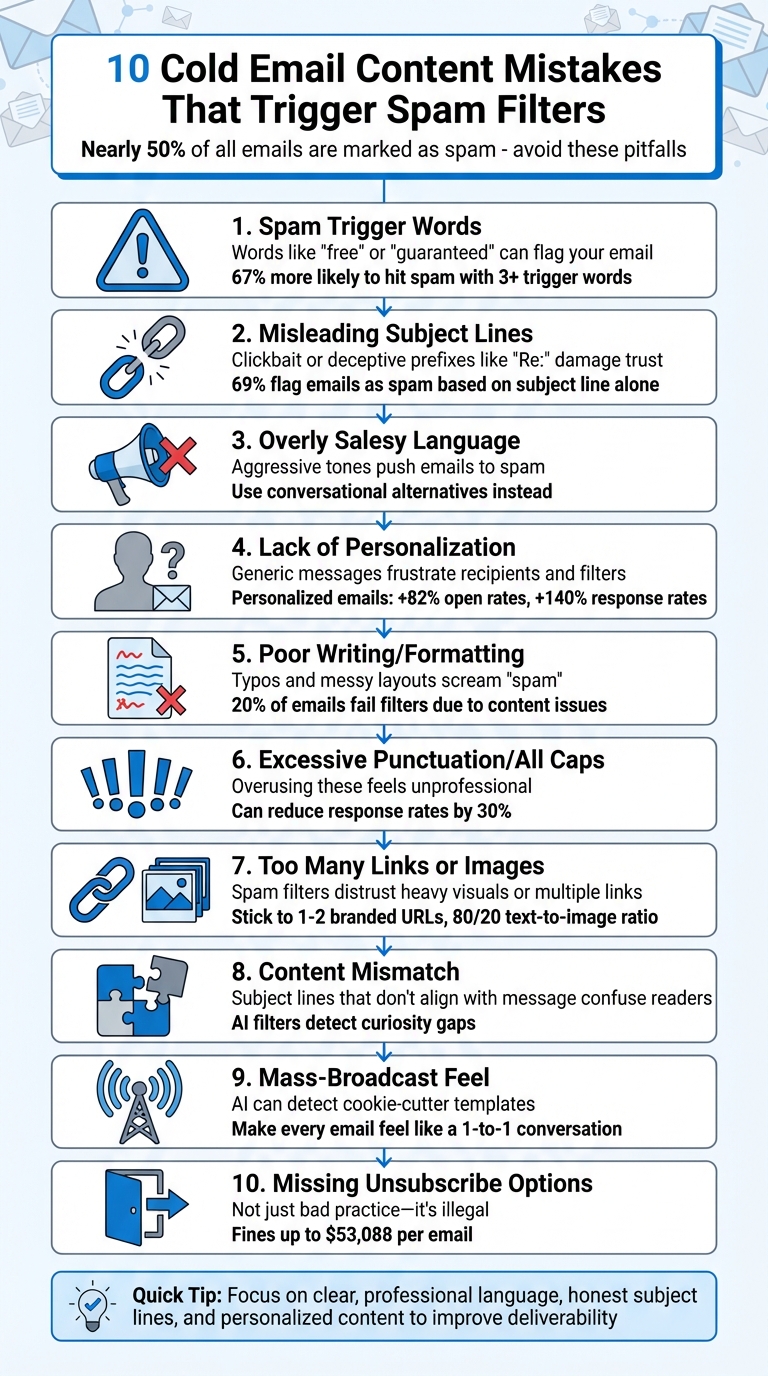
Certain words and phrases like "free", "guaranteed", "act now", and "congratulations" often trigger spam filters. These terms are frequently linked to scams, phishing attempts, or overly aggressive marketing. Research shows that emails containing three or more of these promotional trigger words are 67% more likely to end up in spam folders.
In early 2025, Vizteck Solutions encountered email deliverability problems caused by overly promotional language. To address this, owner Andrew Lee Jenkins and his team swapped high-risk phrases like "Congratulations, you've won!" with more neutral alternatives such as "Exciting news about your account." This change from a sales-heavy tone to a more informational approach significantly improved their inbox placement rates. Clearly, both tone and word choice play a crucial role in email success.
To avoid spam filters, replace aggressive, sales-driven language with professional and value-focused alternatives. For example:
Here’s a quick guide to help you make these adjustments:
100% free, guaranteed, miracle, best price
Complimentary, reliable, effective, competitive pricing
Act now, urgent, don't delete, winner
Respond by [date], time-sensitive, selected recipient
Free trial, save big money, no cost
Complimentary trial, significant savings, no initial investment
Click here, Buy now, Order now
Learn more, View details, Get started
Dear friend, This isn't a scam, No catch
[Recipient's name], Transparent offer, Straightforward terms
Additionally, formatting matters just as much as word choice. Avoid excessive capitalization and punctuation - keep subject lines to three punctuation marks or fewer. Overuse of these elements can make your email appear overly aggressive and unprofessional . By pairing clear, professional language with clean formatting, you can strengthen your sender reputation and improve the chances of landing in your recipient’s inbox.
(function(d,u,ac){var s=d.createElement('script');s.type='text/javascript';s.src='https://a.omappapi.com/app/js/api.min.js';s.async=true;s.dataset.user=u;s.dataset.campaign=ac;d.getElementsByTagName('head')[0].appendChild(s);})(document,372145,'bgla6zdvtvvykvmfmifs');
(function(d,u,ac){var s=d.createElement('script');s.type='text/javascript';s.src='https://a.omappapi.com/app/js/api.min.js';s.async=true;s.dataset.user=u;s.dataset.campaign=ac;d.getElementsByTagName('head')[0].appendChild(s);})(document,372145,'bgla6zdvtvvykvmfmifs');
Using subject lines that don't match your email content is one of the quickest ways to end up in the spam folder, damaging your sender reputation in the process.
Today’s spam filters are highly sophisticated. They analyze your subject line and compare it to the content of your email. If there’s a mismatch, the email can be flagged as deceptive or low-value. A common example is adding prefixes like "Re:" or "Fwd:" to cold emails that aren’t part of an actual conversation. Akvilė Marčiukaitytė, an email deliverability specialist, warns:
"If we use misleading subject lines, like pretending the email is a reply or forwarding something when it's not, it can lead to spam complaints and damage our reputation."
This kind of inconsistency not only irritates recipients but also draws extra scrutiny from Internet Service Providers (ISPs). ISPs monitor how recipients interact with your emails, and if misleading subject lines cause a high number of "delete without reading" actions, spam filters will start categorizing you as a spammer. Even legitimate emails you send later might get blocked as a result.
To avoid these pitfalls, transparency is key. Your subject line should align with your email's content and set clear expectations. For example, instead of using something misleading like "Congratulations! You've won", opt for honest language such as "Exciting news about your account." Replace fake urgency ("Act Now!") with genuine timeframes like "Time-sensitive update." And unless you’re replying to an actual thread, avoid deceptive prefixes altogether.
The goal is simple: craft subject lines that are clear, honest, and reflect the content of your email. This approach not only builds trust but also helps your emails reach the inbox.
Next, we’ll look at more common mistakes to avoid in cold email content.
The tone of your content is a major factor in email deliverability. If your message comes off as overly aggressive or sales-driven, it’s more likely to end up flagged as spam. Modern spam filters rely on machine learning to detect patterns often found in scams or fraudulent offers.
Using a single word like "free" might be harmless, but stacking multiple promotional phrases - like "Act Now", "Limited Time", or "100% Guaranteed" - can increase your chances of being flagged as spam by 67%. This kind of language doesn’t just annoy spam filters; it also pushes recipients to delete your emails or mark them as spam, which signals Internet Service Providers (ISPs) that your content isn’t welcome.
To avoid these pitfalls, focus on making your language feel natural and engaging. Swap out pushy phrases with conversational alternatives. For example, instead of saying, "Book your FREE estimate NOW!" you could write, "Let’s get you scheduled for a complimentary estimate". Similarly, replace "Buy Now" with softer calls to action like "See how it works" or "Get started". Andrew Lee Jenkins, Owner of Vizteck Solutions, shares his approach:
"I revised the language to be more straightforward and less promotional, like 'Exciting news about your account' or 'Here's a special offer just for you.'"
This conversational tone doesn’t just help emails avoid spam filters - it also builds trust with your audience. Take Lifesize, a B2B video conferencing company, as an example. In 2023, they ditched generic promotional templates and segmented their 300,000 leads into seven categories based on website behavior. By focusing on personalized, helpful content instead of pushy sales tactics, they saw a 57% boost in open rates, an 82% jump in response rates, and a 31% increase in year-over-year revenue.
The trick is finding the right balance. Your emails can still promote your product or service, but they should feel like they’re coming from a real person offering genuine value - not a sales robot. A good test? Read your email out loud. If it feels stiff or unnatural, it’s time for a rewrite.
Minimal personalization in your emails? Modern spam filters are all over it. AI email systems now use natural language processing (NLP) to spot the difference between tailored content and cookie-cutter templates, and they’re getting sharper by the day. Generic templates don’t just frustrate recipients - they also raise red flags with spam filters, signaling low-value content and hurting your sender reputation.
The stats don’t lie. Personalized emails can increase open rates by 82%, with response and click-through rates jumping by 140% and 81.5%, respectively. On top of that, 86% of B2B customers expect interactions tailored to their needs, not generic outreach. When recipients ignore or delete impersonal emails, it sends a message to AI filters, flagging future emails and further damaging your reputation.
But let’s be clear - personalization isn’t just about plugging in someone’s first name. Jeremy Chatelaine, Founder of QuickMail, sums it up perfectly:
"Personalization is more than slapping a name at the top of a generic message. The kind of cold email personalization that grabs attention and drives results requires more than knowing your audience's first name."
So, how do you get it right? Mention specific details like a recent LinkedIn post, a company achievement, or a relevant industry issue. Segment your audience by factors like industry, company size, or location to keep your messaging relevant. Using conversational language - think contractions like "you’ll" instead of "you will" - also helps you sound more human. And rather than immediately pushing for a meeting, try asking a thoughtful question like, "Is this a current focus for your team?" Not only does this encourage engagement, but it also sends a positive signal to spam filters.
Clear, error-free content is critical if you want to maintain a strong sender reputation. Sloppy writing doesn’t just look unprofessional - it practically screams "spam." Spam filters use natural language processing (NLP) to evaluate whether your email feels human or automated. Emails riddled with grammar mistakes or poorly structured sentences often get flagged as mass-produced, landing them straight in the spam folder.
Here’s a staggering fact: excessive punctuation can tank your response rates by up to 30%, and nearly 20% of emails fail to get past spam filters due to content and reputation issues. Worse yet, when recipients delete poorly written emails or mark them as spam, their negative reactions train AI filters to block your future messages. This creates a damaging cycle that’s tough to break. Beyond the technical impact, poor writing erodes reader trust, making it harder to engage your audience.
Sujan Patel, Founder of Mailshake, sums it up perfectly:
"Inbox providers are getting better at identifying content that feels stiff, overly formal, and lacking in human nuance. If your email reads like it was generated by a machine, it likely was, and both the AI filter and the human recipient will discount its value."
So, how do you fix this? Start by reading your email aloud. If it sounds robotic or unnatural, rewrite it with contractions to create a more conversational tone. Keep your HTML structure clean and straightforward, or better yet, stick with plain text for your initial outreach. Avoid formatting missteps that could make your email look spammy.
Run your draft through a grammar checker, but don’t stop there - review it yourself to ensure it feels authentic. Aim for concise emails under 120 words, with short sentences and plenty of white space to improve readability, especially on mobile devices. Polished, professional writing isn’t just about dodging spam filters; it shows respect for your recipient’s time and intelligence. By tightening your message, you enhance its value and reduce the chances of it being flagged as spam.
Overusing punctuation or writing in all caps is a surefire way to trigger spam filters. Tossing in multiple exclamation points or question marks can come across as overly dramatic, signaling false urgency to both spam filters and recipients. This ties back to earlier points about tone - keeping things professional and measured is key.
Here’s why this matters: 69% of people will flag an email as spam based solely on the subject line, and 47% decide whether to open it based purely on that first impression. If your subject line screams "ACT NOW!!!" or "URGENT???", spam filters might block your email before it even reaches the inbox. Plus, subject lines longer than 44 characters can get cut off on mobile devices, reducing their impact.
Consistent, clean formatting not only helps your emails pass technical filters but also builds trust. Nick Schafer, Senior Manager of Delivery and Compliance at Sinch Mailgun, explains:
"Spam filters look for more than just keywords - they also analyze elements like suspicious links, all-caps text, bright-colored fonts, broken HTML, and missing unsubscribe options. These factors, when combined, can signal spam-like behavior."
To avoid these pitfalls, stick to standard sentence case and keep punctuation to a minimum - no more than three marks in a subject line. For cold outreach, skip exclamation points entirely, or use just one if absolutely necessary.
The goal is to keep your formatting simple and approachable. If your email feels overly aggressive, tone it down. Clean and subtle punctuation not only makes your message more professional but also helps it land where it belongs - your recipient’s inbox.
When crafting emails, it's not just about the tone and structure - design choices can also make or break your deliverability. Overloading your email with links, attachments, or images is a surefire way to set off spam filters.
Spam filters are particularly wary of emails with too many images. Why? They can't read the content within images. Historically, spammers have used images to hide text from keyword filters, which is why modern spam filters flag emails with high image-to-text ratios as suspicious. Plus, heavy visuals can backfire - if images don’t load properly, your email could appear blank or broken, hurting engagement and deliverability.
Links and attachments come with their own risks. Including multiple links, especially when using shared tracking domains or URL shorteners like bit.ly, can make your email look like phishing content. Rob McEwen, Founder and CEO of invaluement.com, emphasizes this point:
"If a marketer is doing things right, he shouldn't need to hide his domain name. Instead, display your domain openly without masking it in URL shorteners."
URL shorteners obscure the destination URL, a tactic often exploited by spammers, so filters are quick to flag them - even if your intentions are good. Attachments like PDFs, ZIPs, or EXE files are another red flag, as they’re commonly associated with malware. Instead, link to trusted cloud storage platforms like Google Drive or Dropbox to keep your email lightweight and secure.
If you're doing sales outreach, consider proposal automation software like Storydoc, as they generate shareable online decks hosted on their own domains, without needing attachments.
To stay on the safe side, stick to 1–2 full, branded URLs in your email. This builds trust and avoids raising suspicion. Plain text emails are generally a safer choice, and maintaining an 80/20 text-to-image ratio ensures your message still delivers value, even if images fail to load.
In short, simplicity wins. Use one clear call-to-action, avoid attachments, and write concise, self-contained text.
Your subject line sets an expectation - your email content has to follow through. When there's a disconnect between the two, it doesn’t just frustrate your audience; it also raises red flags with spam filters. These filters rely on AI and natural language processing (NLP) to assess whether your subject line aligns with the email's body content. If they detect a gap - often referred to as the "curiosity gap", where the subject line teases but the body fails to deliver - they flag the email as low-value or deceptive. Worse yet, 69% of recipients will mark an email as spam based solely on the subject line. If the email content doesn’t live up to the subject line, that number only goes up. This not only impacts spam filtering but also damages the trust you’re trying to build.
The consequences aren’t just reputational - they can be financial. Violating CAN-SPAM regulations could cost you up to $53,088 per email. Vicky Antonenkova of Infraforge emphasizes the importance of consistency:
"Your subject line must match the content of your email. Misleading subject lines can hurt both your reputation and compliance".
One common mistake is using deceptive prefixes like "RE:" or "FWD:" without an actual prior conversation. Spam filters are programmed to catch these tactics, which trick recipients into thinking they're part of an ongoing thread. Akvilė Marčiukaitytė from Salesforge highlights this risk:
"Our headers and subject lines should clearly match the content of the email. If we use misleading subject lines... it can lead to spam complaints and damage our reputation".
The solution? Read your subject line and first paragraph out loud. Does the body flow naturally from the subject line? Does it deliver on the promise made? For example, if your subject line says "Idea for [Company Name]'s podcast", your opening sentence should dive straight into that podcast idea - not veer off into a generic pitch. This kind of alignment not only keeps spam filters at bay but also builds trust with your audience.
Mass-produced emails are a surefire way to trigger spam filters. Personalization isn't just a nice touch anymore - it's essential. In 2026, AI-powered spam filters equipped with Natural Language Processing (NLP) can easily spot cookie-cutter emails. If all you’re doing is swapping out the recipient's first name while leaving the rest of the email untouched, you’re practically inviting filters to flag your message as low-value. Sujan Patel, Founder of Mailshake, puts it plainly:
"If your email reads like it was generated by a machine, it likely was, and both the AI filter and the human recipient will discount its value".
The numbers back this up. Generic email blasts not only lead to lower open and response rates but also teach AI filters to block your future messages. It’s a lose-lose situation.
To avoid sounding robotic, take the time to include specific, relevant details about your recipient. Mention a recent LinkedIn post they shared, a company milestone they celebrated, or even a challenge they’ve spoken about publicly. Use a conversational tone - contractions like "you'll" instead of "you will" go a long way in making your email feel natural. And ditch those overused openers like "Hope you're doing well" or vague subject lines like "Quick Question."
Margaret Sikora from Woodpecker.co sums it up perfectly:
"In short: because a non-personalized email sent to a large group of recipients is just an inch away from SPAM".
The goal is simple: make every email feel like a genuine, one-to-one conversation - not a mass-produced broadcast.
Leaving out a clear opt-out option in your cold emails isn't just a bad practice - it’s a legal violation. The CAN-SPAM Act mandates that every commercial email must include a visible unsubscribe option, and any opt-out requests must be processed within 10 business days. Ignoring this could result in fines of up to $53,088 per email. And it’s not just a U.S. issue - laws like GDPR and CCPA enforce similar rules globally. Beyond compliance, failing to include an unsubscribe link can also damage your sender reputation, much like other content errors.
But the risks don’t stop at legal penalties. Modern spam filters are designed to look for unsubscribe headers and opt-out links. If they’re missing, your email is more likely to be flagged. Google even advises keeping your spam complaint rate below 0.03% to maintain good deliverability. When recipients can’t easily find an unsubscribe button, they’re more likely to mark your email as spam. As Frank Bacon from Salesforge points out:
"If they can't find the unsubscribe button, they'll do something worse: mark your email as spam".
The solution is simple. Add a one-click unsubscribe link using the "List-Unsubscribe" header, which allows recipients to opt out directly from their email client. Make sure to process these requests immediately to avoid further complaints. The link should be easy to find - avoid hiding it in small fonts or obscure footers. Additionally, include a brief permission reminder in your footer, such as: "You're receiving this because we connected on LinkedIn", to clarify why you’re reaching out.
Vicky Antonenkova from Infraforge puts it well:
"The CAN-SPAM Act isn't just about avoiding fines - it's also a way to keep your emails trustworthy and out of spam folders".
A clear unsubscribe option not only protects you legally but also helps maintain your sender reputation and keeps your emails out of spam folders. Up next, learn how Mailforge's tools can help you steer clear of these email content mistakes.
Even the most engaging email won’t succeed if the technical groundwork isn’t solid. While strong content helps dodge spam triggers, a reliable technical setup ensures your email actually lands in the inbox. That’s where Mailforge steps in, automating your email infrastructure so your carefully crafted messages reach your audience.
Mailforge takes care of essential email authentication protocols like SPF, DKIM, DMARC, and MX records - the digital stamps of approval that email providers like Google and Yahoo look for. These protocols play a key role in the technical "handshake" between your email and the recipient’s server. Setting them up manually can be tricky, with common pitfalls such as syntax errors, typos, or even exceeding SPF lookup limits. Mailforge eliminates these headaches, ensuring all authentication methods are properly configured before you send your first email.
Feature
Manual Setup
Mailforge Setup
10–30 minutes per domain
2–3 minutes total
Entered manually for each domain
Fully automated
High (requires DNS knowledge)
None (plug-and-play)
Time-consuming and repetitive
Fast and scalable
Requires manual setup per domain
Automatically provisioned
Rahul Lakhaney, CEO of Enrich.so, highlights the importance of a strong infrastructure:
"During my time at a Fortune 500 company and now across all our products, Infraforge has been my go-to solution for Email Infrastructure. Its deliverability and impact are unmatched".
Once your DNS is properly configured, Mailforge makes it easy to scale across multiple domains. With its bulk update feature, you can roll out changes to hundreds of domains in just minutes. Plus, it automatically provisions SSL certificates and includes domain masking to safeguard your sender reputation. When paired with the content strategies discussed earlier, this seamless infrastructure ensures your emails avoid both content-related and technical spam filters.
By 2026, the success of cold email campaigns will heavily depend on steering clear of common mistakes that lead to spam filters flagging your messages. Missteps like using spam-triggering words, misleading subject lines, overly promotional tones, lack of personalization, sloppy formatting, excessive punctuation, too many links, mismatched content, generic mass emails, and missing unsubscribe options can sabotage your efforts. With nearly 45.6% of emails globally being marked as spam, regularly reviewing your email content and staying updated with deliverability best practices is more important than ever.
Modern spam filters don’t just analyze the words you use - they assess your intent. To break through the noise, your emails must feel genuine, provide real value, and align with the preferences of your recipients. As Nick Schafer from Sinch Mailgun explains:
"How you are as a sender is what's going to determine where your messages go".
But great content alone isn’t enough. Deliverability also requires a strong technical backbone, like the one offered by Mailforge. This platform automates DNS setup, manages multiple domains at scale, and ensures your emails have the technical support needed to land in inboxes. When you combine thoughtful content strategies with reliable infrastructure, you create a winning formula for cold email campaigns that bypass spam filters and drive meaningful results.
Spam filters are quick to flag certain words and phrases in cold emails. Terms like "free", "act now", "limited time", "click here", "earn money", "risk-free", "winner", "guarantee", "urgent", and "money back" often trigger those filters, making your email more likely to land in the spam folder.
To steer clear of this, focus on crafting clear and professional content. Skip the over-the-top promotional buzzwords and instead highlight the value and relevance of your message. By doing so, you’ll not only avoid spam filters but also build trust with your audience.
To keep your emails out of spam folders, your subject line needs to align seamlessly with your email content. Here’s how you can achieve that:
Consistency and personalization go a long way in improving deliverability. Tools like Mailforge’s deliverability solutions can help you test your emails and optimize them for better inbox placement.
Personalization is a game-changer when it comes to keeping your cold emails out of spam folders. By creating subject lines and content that feel tailored to the recipient, you not only avoid spam-triggering words but also craft messages that feel more genuine and engaging.
This strategy sends a clear signal to spam filters that your email is legitimate, boosting its chances of landing in the recipient's inbox. On top of that, personalized emails often spark better responses, making them a double win for both deliverability and engagement.
{"@context":"https://schema.org","@type":"FAQPage","mainEntity":[{"@type":"Question","name":"What are some common words in cold emails that can trigger spam filters?","acceptedAnswer":{"@type":"Answer","text":"<p>Spam filters are quick to flag certain words and phrases in cold emails. Terms like <strong>"free"</strong>, <strong>"act now"</strong>, <strong>"limited time"</strong>, <strong>"click here"</strong>, <strong>"earn money"</strong>, <strong>"risk-free"</strong>, <strong>"winner"</strong>, <strong>"guarantee"</strong>, <strong>"urgent"</strong>, and <strong>"money back"</strong> often trigger those filters, making your email more likely to land in the spam folder.</p> <p>To steer clear of this, focus on crafting clear and professional content. Skip the over-the-top promotional buzzwords and instead highlight the value and relevance of your message. By doing so, you’ll not only avoid spam filters but also build trust with your audience.</p>"}},{"@type":"Question","name":"How can I write subject lines that match my email content and avoid spam filters?","acceptedAnswer":{"@type":"Answer","text":"<p>To keep your emails out of spam folders, your subject line needs to align seamlessly with your email content. Here’s how you can achieve that:</p> <ul> <li><strong>Keep the subject in sync with the email body</strong>: Your subject line should mirror the main message or benefit presented in the first few lines of your email. This avoids misleading your audience and keeps things natural.</li> <li><strong>Add a personal touch</strong>: Use the recipient’s name, company, or a specific detail in the subject line, and weave it naturally into the email. Personalization not only boosts open rates but also helps bypass spam filters.</li> <li><strong>Avoid spammy language</strong>: Stay away from terms like "free", "urgent", or "guaranteed." Instead, focus on clear, benefit-driven wording that feels authentic and trustworthy.</li> </ul> <p>Consistency and personalization go a long way in improving deliverability. Tools like Mailforge’s deliverability solutions can help you test your emails and optimize them for better inbox placement.</p>"}},{"@type":"Question","name":"Why is personalization important for keeping cold emails out of spam folders?","acceptedAnswer":{"@type":"Answer","text":"<p>Personalization is a game-changer when it comes to keeping your cold emails out of spam folders. By creating subject lines and content that feel tailored to the recipient, you not only avoid spam-triggering words but also craft messages that feel more genuine and engaging.</p> <p>This strategy sends a clear signal to spam filters that your email is legitimate, boosting its chances of landing in the recipient's inbox. On top of that, personalized emails often spark better responses, making them a double win for both deliverability and engagement.</p>"}}]}