Scaling cold email campaigns globally isn’t just about sending more emails - it's about building the right domain infrastructure to protect your sender reputation and maximize deliverability. Sending thousands of emails from a single domain can get flagged as spam, but spreading the load across multiple domains and mailboxes reduces risk and improves results. Here's how to do it:
getcompany.com) to protect your brand.Scaling requires careful planning and consistent monitoring to keep your emails out of spam folders and in inboxes.
Before you start scaling your email campaigns, it’s crucial to lay a strong foundation. Skipping these early steps can lead to your emails ending up in spam folders, damaging your sender reputation and undermining your entire outreach effort. Start by focusing on domain separation, authentication setup, and a proper warm-up process.
Using your primary business domain for cold outreach is a big no-no. Why? If something goes wrong, like getting flagged as spam, it could harm your brand’s main email operations. Instead, purchase secondary domains for your cold email campaigns. For example, if your main domain is company.com, you could use alternatives like getcompany.com, trycompany.com, or company.io.
Stick to .com, .co, or .io extensions when selecting your domains. These are widely recognized and trusted. Avoid extensions like .xyz, which are often linked to spam activity. Once you’ve registered your secondary domains, set them up to forward to your primary website. This simple step allows prospects to verify your legitimacy, enhancing your credibility in just a few minutes.
When it comes to sending emails, keep it limited. Each mailbox should send no more than 30–50 cold emails daily. For example, if your goal is to send 5,000 emails a day, you’ll need at least 100 mailboxes spread across multiple domains. This strategy prevents any single domain from being flagged while ensuring a steady flow of outreach.
Once your secondary domains are ready, the next step is setting up authentication. This is key to protecting your sender reputation and ensuring your emails actually reach inboxes. Authentication records, like SPF, DKIM, and DMARC, signal to mailbox providers that you’re a legitimate sender - not someone spoofing your domain.
v=spf1 format, listing the IPs or domains authorized to send emails on your behalf.p=none policy to monitor results. Once everything is stable, you can move to stricter policies like p=quarantine or p=reject.If you’re managing DNS configurations for multiple domains, it can feel like a time-consuming and error-prone process. Danny Goff, Director of Sales at Propeller, highlighted this challenge:
"Procedures that usually took hours (setting DKIM, SPF, etc. records) for multiple domains, now take a few minutes".
New domains start with zero reputation, so sending a large volume of emails right away - say, 1,000 in a single day - will likely trigger spam filters. The solution? A gradual warm-up process that mimics natural email behavior, building trust with mailbox providers over several weeks.
Warm up your domains over 2–8 weeks for the best results. Here’s a general timeline:
As of 2024, mailbox providers are placing more emphasis on domain reputation rather than IP reputation. Factors like domain history, engagement rates, and proper authentication now carry more weight. Skipping or rushing the warm-up phase may save a few weeks initially, but it could cost you months of recovery time and thousands of wasted emails down the line.
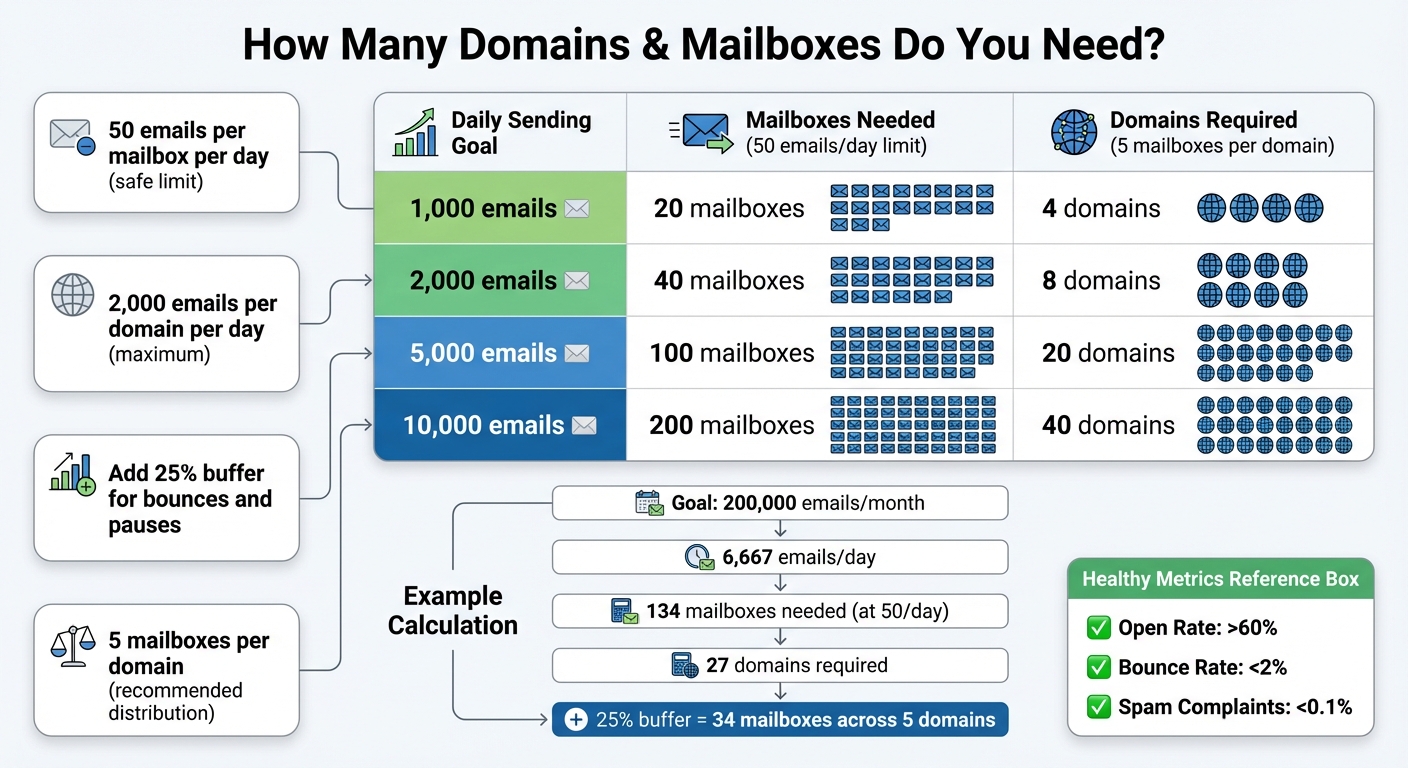
Email Domain Scaling Requirements: Daily Volume to Infrastructure Calculator
Once your domain is set up and authenticated, it’s time to figure out how much infrastructure you’ll need to hit your outreach targets.
Start by working backward from your monthly sales goals to calculate the number of emails you’ll need to send. For instance, if your close rate is 5% and you’re aiming for 10 new customers, you’d need to initiate about 200 conversations. That translates to roughly 2,000 emails per month - or about 67 emails per day.
Now, apply the “50 emails per mailbox per day” rule. For 67 daily emails, you’d need 2 mailboxes. But let’s say your campaign requires 200,000 emails per month (around 6,667 daily). At the 50-email limit, you’d need 134 mailboxes. Alternatively, raising the limit to 250 emails per mailbox reduces the requirement to just 27 mailboxes. To stay within the safe daily limit of 2,000 emails per domain, those 27 mailboxes would need to be distributed across at least 4 domains. Add a 25% buffer for bounces, pauses, and other issues, and your final setup would require 34 mailboxes spread over 5 domains.
Here’s a quick breakdown:
| Daily Sending Goal | Mailboxes (50/day) | Domains (5 mailboxes/domain) |
|---|---|---|
| 1,000 emails | 20 mailboxes | 4 domains |
| 2,000 emails | 40 mailboxes | 8 domains |
| 5,000 emails | 100 mailboxes | 20 domains |
| 10,000 emails | 200 mailboxes | 40 domains |
Once you’ve calculated your needs, distribute your email volume evenly across mailboxes and domains to maintain deliverability.
Uneven email distribution can hurt your deliverability. For example, if one mailbox sends 500 emails while another sends only 20, the overloaded mailbox could get flagged by spam filters, and the underused mailbox wastes potential. To avoid this, spread your email volume evenly across all mailboxes and domains.
During the first few weeks, keep a close eye on your metrics. Healthy infrastructure typically shows open rates above 60%, bounce rates below 2%, and spam complaints under 0.1%. If you notice any mailbox or domain underperforming - like open rates falling below 40% or bounce rates climbing above 5% - pause activity and investigate. Balancing your email load, along with proper warm-up schedules, ensures your system scales smoothly without risking your reputation.
Once you've determined your domain and mailbox requirements, the next step is to distribute your email volume effectively across them.
For example, instead of sending 10,000 emails from a single domain, you could spread that load across 40 domains and 200 mailboxes. This approach not only protects your sender reputation but also minimizes risk. If one domain gets flagged, it won’t jeopardize your entire campaign.
By spreading your email volume horizontally, each domain carries a smaller, more manageable share of the workload. This reduces the likelihood of triggering spam filters and ensures your campaigns remain resilient.
To take things a step further, consider rotating and segmenting your domains. Rotating involves cycling through subsets of your domains on a daily basis rather than relying on the same ones repeatedly. For instance, if you manage 10 domains, you could use 5 on Monday, switch to the other 5 on Tuesday, and then rotate back. This method avoids creating predictable patterns that spam filters might flag.
Segmentation adds another layer of precision to your strategy. Assign specific domains to different campaigns or audience groups. For instance, you could designate certain domains for high-engagement prospects, others for cold email tools, or even separate domains by region. For global campaigns, one set of domains could handle North America while another focuses on Europe. This not only helps tailor your messaging but also isolates potential deliverability issues to specific segments, making it easier to monitor and address performance concerns. For more technical guides on maintaining high volume outreach, check out our deliverability best practices.
Setting up DNS records manually is not only tedious but also prone to errors. Configuring SPF, DKIM, and DMARC for just one domain can take anywhere from 30 to 60 minutes - and that's assuming no mistakes are made. Now imagine scaling this process to hundreds of domains. It’s simply not practical without automation.
This is where automation tools like Mailforge come in. These tools can handle DNS configurations in just minutes. By using pre-validated templates, they ensure uniformity across your entire infrastructure, eliminating common errors like typos or missing records. With automation, you could configure 100 domains in the time it would typically take to manually set up two or three. That’s a game-changer for scaling operations.
Once DNS is automated, the next logical step is to streamline domain and mailbox provisioning.
After automating DNS, bulk provisioning allows you to create hundreds - or even thousands - of mailboxes in one go, instead of setting them up individually. For example, Mailforge offers mailbox provisioning at $2–$3 per month (with a minimum of 10 slots), and you can register five .com domains for $70 per year.
The entire setup process takes about five minutes. Just choose the number of domains you need, configure your mailbox specifications, and let the platform do the rest. This dramatically reduces the time and effort required for large-scale setups.
With your domains and mailboxes ready, the final step is integrating them with your sending platform.
To connect your infrastructure, you can use a simple CSV export. Platforms like Salesforge allow you to bulk upload mailbox credentials via CSV, enabling you to integrate hundreds of accounts simultaneously instead of connecting them one by one.
Mailforge’s automation tools for DNS and bulk provisioning work seamlessly with your sending software. Once the integration is complete, you can monitor deliverability metrics and fine-tune your sending strategies based on real-time performance data. This comprehensive approach ensures your infrastructure is optimized and ready for large-scale email campaigns.
Once your email campaigns are running at scale, keeping a close eye on their performance is essential. Are your emails landing in inboxes, or are they being flagged as spam? To find out, track key metrics like bounce rate, spam complaint rate, delivery rate, and engagement rate.
Here’s a quick reference table to help you identify healthy ranges and when to take action:
| Metric | Healthy Range | Warning Threshold | Critical Threshold |
|---|---|---|---|
| Bounce Rate | < 2% | 3–5% | > 8–10% |
| Spam Complaint Rate | < 0.1% | 0.1–0.2% | > 0.3–0.5% |
| Delivery Rate | 90–98% | < 90% | Sudden blocks |
| Engagement (Open) Rate | > 20% | Significant drop | Near zero |
Check these metrics daily. A sudden uptick in bounce rates or a noticeable dip in delivery rates could signal a problem with a specific domain or IP address. Addressing these issues quickly is crucial to safeguarding your sender reputation and ensuring email providers continue to trust your campaigns.
Your sender reputation is the backbone of successful email deliverability. A single weak or blacklisted domain can drag down your entire operation, and recovering from such setbacks can take weeks.
To keep your reputation intact, rotate domains wisely and avoid overwhelming any single domain with too much volume too soon. If a domain starts underperforming, scale back its usage or temporarily pause its activity. Tools like Warmforge help maintain steady engagement levels, ensuring your domains remain in good standing with email providers.
When setting up your infrastructure, think about your technical needs and the scale of your campaigns. For example:
Choosing the right setup ensures your emails reach their intended audience while maintaining compliance and efficiency.
Warm-up isn’t something you do once and forget about - it’s an ongoing process, especially as you scale. Even for domains that are already established, gradual warm-up is essential to prevent sudden spikes in email volume, which can trigger filters from email providers.
Regularly test your email placement, especially when adding new domains or increasing your sending volume. Check how your emails perform with major providers like Gmail, Outlook, and Yahoo. If you notice deliverability issues with a specific provider, tweak your sending patterns or adjust your content for that audience. Staying proactive helps you catch small problems before they snowball into larger issues that could impact your entire campaign.
Scaling domain infrastructure isn’t just about getting things up and running quickly - it’s about creating a system that protects your sender reputation while expanding your email reach. The key lies in balancing smart automation, steady growth, and constant oversight.
Automation simplifies the process by handling tasks like domain provisioning and DNS configuration in minutes. This ensures your emails are set up for reliable inbox placement without unnecessary delays.
When it comes to scaling, slow and steady wins the race. Start small - think 20–30 emails per mailbox daily - and increase your volume gradually by 10–20% each week. This approach helps build trust with email providers. Rushing the process can trigger spam filters or even lead to blacklisting. To spread the load, use 20–40 domains with 2–3 mailboxes per domain, and rotate sending to avoid overburdening any single sender.
Monitoring is your safety net. Keep an eye on bounce rates, spam complaints, and engagement metrics every day. If your bounce rate goes above 3% or you notice a sharp decline in open rates, it’s time to pause that domain or adjust your setup.
Using secondary domains is a smart way to protect your primary domain's reputation when running cold email campaigns. These domains act as a buffer, shielding your main brand from the negative effects of bounces, spam complaints, or low engagement rates. This helps you avoid blacklisting or filtering issues that could harm your legitimate email communications.
Another advantage of secondary domains is their ability to spread email volume across multiple domains. This reduces the chances of hitting sending limits or triggering spam filters. To maintain a strong sender reputation and improve deliverability, it's recommended to keep the daily email volume per mailbox around 200–300 messages during the warm-up phase. This approach also helps isolate potential problems before they impact your campaigns.
Platforms like Mailforge make managing secondary domains easier by allowing you to set up and oversee hundreds of domains and mailboxes with consistent DNS authentication. This ensures your email campaigns remain secure, scalable, and effective, all while improving your chances of landing in recipients' inboxes.
With Mailforge, managing DNS configurations for multiple domains becomes a breeze. Whether you're handling SPF, DKIM, DMARC, or other essential records, you can set them up for dozens - or even hundreds - of domains in just a few simple steps. All you need to do is upload your domain list, connect your DNS provider through Mailforge, and let the platform take over. It will automatically generate the correct records, push them to each domain, verify their accuracy, and flag any issues that need your attention.
This process saves you from tedious manual entry, minimizes mistakes, and ensures your email setup is ready to operate on a global scale. Plus, with optional features like scheduled updates, you can easily manage ongoing changes - like rotating DKIM keys or updating SPF IP ranges - across all your domains without breaking a sweat.
To achieve optimal email deliverability, pay close attention to key metrics like your bounce rate, spam complaint rate, inbox placement rate, open rate, and click-through rate. Additionally, make it a priority to monitor your sender reputation score, ensure your SPF, DKIM, and DMARC authentication are properly configured, and frequently review your blacklist status.
Keeping a consistent eye on these factors helps you catch problems early, protect your sender reputation, and boost the success of your email campaigns.