
SMTP is the backbone of cold email success, often requiring the top cold email tools to manage effectively. It ensures your emails are delivered securely and land in inboxes, not spam folders. To get started:
With proper setup, you can reduce bounce rates, protect your sender reputation, and scale campaigns efficiently. For example, companies like UniteSync achieved an 85.26% reply rate and a $2.86 customer acquisition cost by optimizing their SMTP setup. Let’s dive into the details on how to make SMTP work for your cold email campaigns.
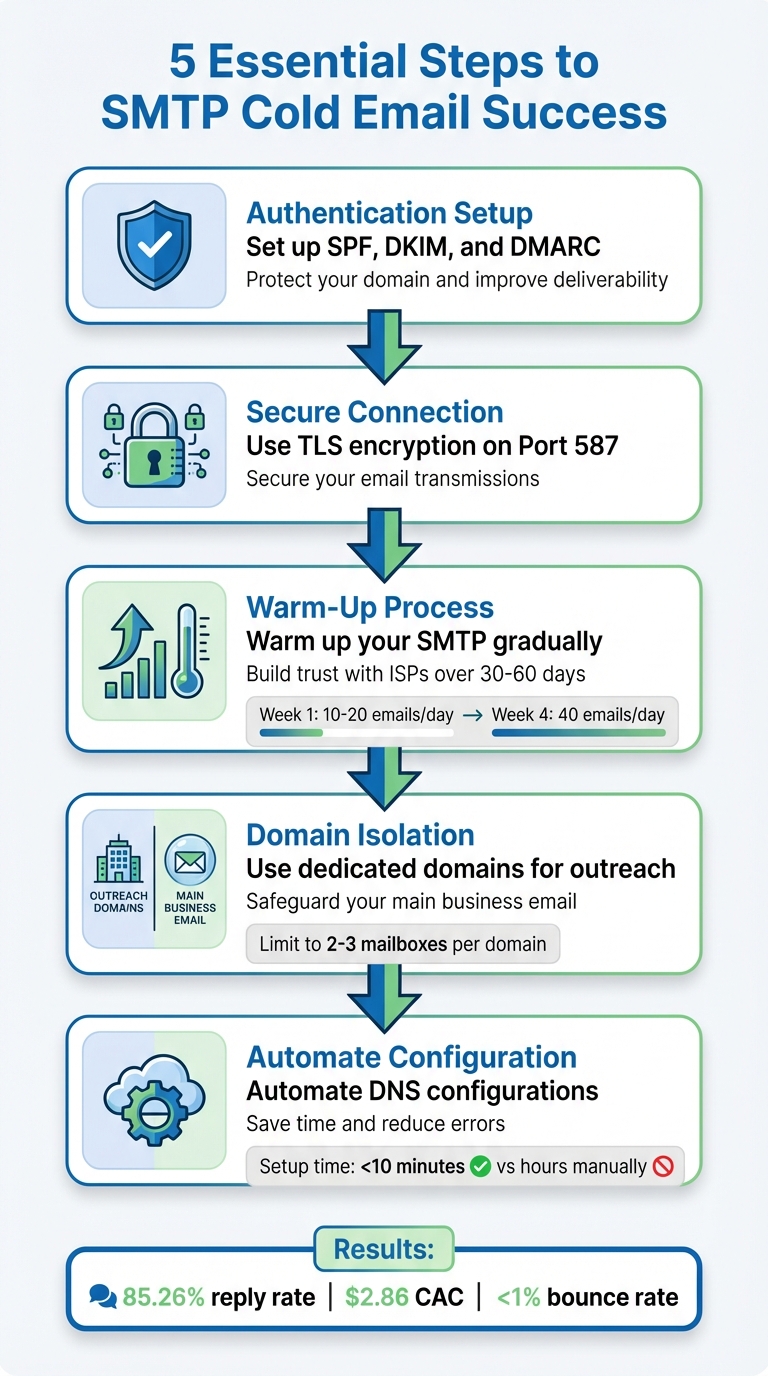
SMTP Setup Process for Cold Email Campaigns: 5 Essential Steps
Simple Mail Transfer Protocol (SMTP) is the backbone of email delivery, ensuring messages travel securely between servers. Think of it as the engine that powers your emails from sender to recipient. It connects your email client to a mail server and uses authentication to verify that only authorized users can send messages. To keep everything secure during transit, SMTP relies on TLS (v1.2 or higher), which protects your content, credentials, and recipient information. For best results, always use port 587 with STARTTLS encryption - steer clear of port 25, as many ISPs block it to combat spam.
Getting SMTP right is a game-changer for cold email campaigns. A properly set up SMTP connection ensures a secure handshake between your tools and the mail server, which helps protect your sender reputation. This, in turn, can significantly improve your open rates - some reports show increases of up to 75% compared to generic email blasts.
Real-world data backs up the importance of SMTP for cold outreach. For instance, in Q1 2024, OptinMonster achieved a bounce rate of just 0.92%, far below the industry average of 10.29%. Their success was due to strict email verification processes and a well-configured SMTP setup. These measures demonstrate how critical SMTP is for keeping bounce rates low and ensuring your emails actually reach inboxes.
Custom SMTP servers offer a major advantage: they give you full control over your sender reputation. By isolating your email-sending practices from shared IP pools, you can avoid being affected by the bad habits of others. For teams that need transactional or marketing sending outside the cold-outreach use case, this roundup of the best smtp service options is worth a look too. If you're sending more than 10,000 emails per month, switching to a dedicated IP address becomes essential.
Take Mailforge, for example. Their custom SMTP infrastructure simplifies the process with automated DNS configuration, cutting setup time to under 5 minutes. While the service costs $484 per month for 200 mailboxes, it delivers efficiency and reliability. This streamlined approach helped UniteSync achieve an impressive 85.26% positive reply rate and a Customer Acquisition Cost of just $2.86.
Up next, we’ll walk you through how to set up this configuration for your cold email campaigns.
Setting up SMTP correctly is key to succeeding with cold email campaigns. Follow these steps to ensure your configuration is optimized for deliverability.
SPF (Sender Policy Framework) helps receiving servers verify which IP addresses are allowed to send emails on behalf of your domain. To set this up, add an SPF record to your DNS. For example, use: v=spf1 include:_spf.yourdomain.com ~all. The tilde (~) indicates a soft fail for unauthorized senders, allowing them to pass temporarily while still being flagged.
DKIM (DomainKeys Identified Mail) ensures email integrity by using a public-private key system. Your email provider signs messages with a private key, while the public key stored in your DNS verifies the signature. This process helps ISPs authenticate your emails and prevents tampering.
DMARC (Domain-based Message Authentication, Reporting, and Conformance) builds on SPF and DKIM by specifying how to handle emails that fail authentication. Start with a p=none policy to gather reports without impacting delivery. Once you’re confident in your setup, switch to p=quarantine or p=reject to block spoofed emails and protect your domain from abuse.
Reverse DNS (rDNS or PTR records) links your IP address back to your domain name. This step is crucial because many spam filters reject emails from IPs without proper rDNS configuration. Ensure your PTR record resolves your sending IP to the domain used in your email headers, confirming legitimacy to ISPs.
Using dedicated IPs gives you full control over your sender reputation. Unlike shared IPs, where other users’ activity could harm your deliverability, a dedicated IP isolates your reputation to your own practices. But don’t skip the warm-up phase - gradually increase your sending volume to build trust with ISPs.
Additionally, enabling TLS 1.3 encryption ensures secure email transmission, safeguarding your credentials and content. For optimal results, use Port 587 with STARTTLS, as Port 25 is often blocked by ISPs.
Once your DNS and IP configurations are in place, automating these processes can save time and reduce errors.
Manually configuring DNS records can be time-consuming and error-prone, especially when managing multiple domains. A single mistake, such as a syntax error in your SPF record, can significantly impact deliverability. This is where Mailforge simplifies the process. The platform automates SPF, DKIM, and DMARC setup across all your domains in less than 10 minutes.
Mailforge is designed to handle bulk DNS updates with just one click, eliminating the need for repetitive, per-domain configurations. At an estimated cost of $2 to $3 per mailbox per month, it’s an affordable option for streamlining cold email outreach. As Danny Goff, Director of Sales at Propeller, puts it:
"We often hear 10x improvement as a target among startups, when it comes to cold email infrastructure setup, Mailforge provides 100x improvement!"
Here’s a quick comparison of manual setup versus Mailforge automation:
| Feature | Manual Setup | Mailforge Automation |
|---|---|---|
| Technical Skill Required | High (requires DNS and syntax expertise) | Low (fully automated) |
| Time to Configure | Hours or days per domain | Less than 10 minutes for multiple domains |
| Bulk Management | Slow and repetitive | One-click bulk updates |
| Error Risk | High (syntax errors are common) | Minimal (automated validation) |
For teams that need even more control, Infraforge offers private setups with multi-IP provisioning and API access. Starting at $40 per month for 10 mailbox slots (billed quarterly), Infraforge allows you to segment reputation profiles across campaigns or departments. This prevents issues in one area from affecting your entire operation.
Next, we’ll dive into improving SMTP deliverability through warm-up strategies and tracking key metrics.
After setting up your SMTP infrastructure, the next hurdle is ensuring your emails actually land in recipients' inboxes. Even with flawless DNS records, skipping critical steps like warm-up or ignoring key metrics can sabotage your deliverability. Here’s how to keep your emails out of the spam folder and maximize inbox placement.
Warming up your SMTP is a must for establishing a solid sender reputation. Internet Service Providers (ISPs) closely monitor email-sending patterns, and any sudden spike in volume from a new account can raise red flags. The idea is to build trust gradually by mimicking natural email engagement over a period of 30–60 days.
Start by limiting your sending volume. In the first week, send just 10–20 emails per day from each mailbox, focusing on highly relevant and engaged contacts who are more likely to respond. Gradually increase your daily sends each week - 20–30 emails in week two, 30–40 in week three, and up to 40 emails by week four. Avoid increasing your daily volume by more than 100% from one day to the next. For a cautious approach, cap each mailbox at 30–50 emails per day.
To build a strong reputation, focus on positive interactions, such as replies, emails being moved from spam to the primary inbox, or messages marked as important. This is where automated warm-up tools come into play. For example, Warmforge, included with any Salesforge subscription, automates the process by simulating engagement within a network of real business mailboxes. This ensures your reputation grows steadily without the hassle of manual management.
Another key step is infrastructure separation. Always use dedicated subdomains or separate root domains for cold outreach. This way, if your cold email domain encounters deliverability issues, your main business domain remains unaffected.
| Week | Daily Sends per Account | Best Practices |
|---|---|---|
| Week 1 | 10–20 | Focus on engaged, relevant contacts |
| Week 2 | 20–30 | Introduce initial follow-up sequences |
| Week 3 | 30–40 | Refine messaging based on performance |
| Week 4 | 40 | Get ready for full-scale outreach campaigns |
Once your warm-up is complete, tracking key metrics is essential to maintaining strong deliverability.
Keeping an eye on critical metrics can help you catch deliverability issues before they escalate. For starters, aim for a bounce rate of less than 1% by using data validation tools and promptly removing any bounced contacts. This is crucial, as email lists naturally degrade over time - business addresses, for instance, decline at a rate of 3.6% per month, and overall databases shrink by about 28% annually.
Your inbox placement rate should consistently hit 85% or higher. If it dips, investigate potential issues like domain fatigue or problematic content. For cold email campaigns, aim for a delivery rate of 95%+ and a spam rate below 15%. Keep in mind that if more than 10% of your list is inactive, your open rates could drop significantly - from 24.8% to 15.2%.
Spam complaint rates are another critical metric - keep these under 0.1%. If complaints exceed this threshold, reassess your targeting immediately. Similarly, unsubscribe rates should stay below 10%, which can be achieved by improving your email content and ensuring it’s relevant to your audience. As Sales.co aptly states:
"Email deliverability is 80% setup, 20% copy".
However, that 20% still plays a big role in keeping your audience engaged. To maintain a high engagement rate, remove prospects who haven’t opened your last 6–10 emails. This prevents inactive contacts from dragging down your sender reputation.
To keep deliverability strong, it’s equally important to avoid common configuration mistakes.
Even with proper setup and warm-up, certain missteps can hurt your deliverability. Here are the most common pitfalls and how to steer clear of them:
Once you've nailed down strong deliverability practices, the next step is expanding your SMTP setup to handle larger-scale outreach. Growing from 10 mailboxes to 100 - or even 1,000 - requires careful planning to manage volume, optimize infrastructure, and automate processes effectively.
Manually managing dozens of domains can quickly become a time sink. Tasks like configuring DNS, setting up SSL, and provisioning mailboxes take 2–3 hours per domain. At scale, managing 50 domains could take weeks.
Enter Mailforge. This tool slashes that setup time to just 3–5 minutes per domain by automating DNS settings, SSL certificates, and mailbox creation. With Mailforge, you can roll out hundreds of mailboxes without ever touching a DNS panel. Plus, it’s cost-efficient, with pricing around $2–$3 per mailbox per month.
A key guideline to remember: limit each domain to 2–3 mailboxes. Overloading a single domain with too many accounts increases the risk of the entire domain being flagged if one mailbox performs poorly. To safeguard your outreach, distribute your volume across multiple domains and rotate both domains and IP addresses. This reduces the chances of a single issue affecting your entire operation.
"When it comes to cold email infrastructure setup, Mailforge provides 100x improvement!" - Danny Goff, Director of Sales, Propeller
As your email campaigns grow, basic setups won’t cut it. You’ll need advanced tools to maintain performance and security. For example, Infraforge offers features like dedicated IPs, API access, and the ability to segment reputation profiles - critical when sending tens of thousands of emails daily. By isolating reputation profiles, you protect your sender score from being impacted by external factors.
Security is another must-have. Configure your SMTP to use Port 587 with STARTTLS encryption and enforce TLS 1.2 or higher. This ensures your credentials and email content are protected from interception.
Another useful feature is SSL and domain masking, which hides secondary domains behind your primary brand domain. This keeps your outreach professional while separating your infrastructure. Mailforge offers this feature as an add-on for $2 per domain per month or $6 per domain per year - billed either monthly or annually, depending on your preference.
Even the best SMTP setup is only as effective as the tools you pair it with. Salesforge integrates seamlessly with Mailforge, enabling you to manage sequences, follow-ups, and even multi-channel outreach from one platform. This integration streamlines your workflow, covering everything from lead sourcing to inbox delivery.
For lead generation, Leadsforge connects directly to the same infrastructure. It lets you build verified lead lists and push them straight into your email sequences - no need for messy CSV imports or third-party connectors. This not only saves time but also reduces errors.
"Cold email only works when it lands. That's where Salesforge and Mailforge have made the difference." - Carlos Palop Moliner, CEO, UniteSync
If you prefer other tools, Mailforge works with any SMTP-enabled software. Just plug in your credentials, and you’re ready to send. This flexibility ensures you can scale your campaigns while maintaining high deliverability standards across the board.
Properly setting up SMTP is the backbone of any successful cold email campaign. By configuring SPF, DKIM, and DMARC records and using TLS 1.2+ encryption on Port 587, you can safeguard your sender reputation and boost the chances of your emails landing in inboxes instead of spam folders.
Scaling from 10 mailboxes to 200 - or even more - doesn't have to be a logistical headache. Tools like Mailforge simplify the process, reducing setup time from hours to just minutes. Tasks like DNS record updates, SSL certificate provisioning, and mailbox configuration become quick and painless. And at $2–$3 per mailbox per month, it’s a budget-friendly option that saves time and resources as your campaigns grow.
"Operating in a high-growth startup environment requires speed, scalability, and operational efficiency. We needed to build an outbound motion that didn't break as we scaled - and Mailforge gave us that foundation." - Isabella L., Founder, Let's Fearlessly Grow
The impact of a well-optimized SMTP setup is clear. For example, UniteSync achieved an 85.26% positive reply rate and a $2.86 Customer Acquisition Cost by combining robust SMTP infrastructure with smart tools. Their success hinged on ensuring emails reached primary inboxes, a result of meticulous authentication and warm-up processes.
Whether your daily email volume is 500 or 50,000, your SMTP configuration plays a critical role in your outreach success. Automate the technical setup, keep an eye on your metrics, and focus on creating messages that truly connect with your audience.
SPF, DKIM, and DMARC are essential email authentication protocols designed to enhance email deliverability and safeguard your campaigns. Here's how they work:
Using these protocols helps protect your domain from email spoofing, shields your sender reputation, and significantly boosts the likelihood of your emails reaching recipients' inboxes instead of being flagged as spam.
Using dedicated IPs for your cold email campaigns comes with several advantages. One of the biggest perks is that they give you full control over your sender reputation. This means you'll enjoy more consistent delivery rates and a better chance of landing in your recipient's inbox. With shared IPs, your reputation can be impacted by the actions of other senders, but dedicated IPs let you build and maintain a clean, trustworthy sending history.
Another benefit is the ability to customize authentication settings like SPF, DKIM, and DMARC. These settings boost email security and improve deliverability by reducing issues such as bounces or spam flags. For businesses aiming to scale their outreach while maintaining a professional image, dedicated IPs can make a big difference.
Mailforge simplifies DNS configuration by automatically creating and applying crucial DNS records such as SPF, DKIM, and DMARC for every domain you add. It takes care of bulk DNS updates behind the scenes, so you don’t have to manually edit records. This not only speeds up the setup process but also helps maintain reliable email deliverability across all your domains.
