SMTP ports determine how emails are sent and secured. Choosing the right one is critical for smooth email delivery and security. Here's a quick breakdown:
Key Takeaway: Use Port 587 for most scenarios, as it balances security, compatibility, and reliability. If unavailable, try Port 2525. Avoid Port 25 for sending emails, and use Port 465 only if necessary for specific setups.
| Port | Purpose | Encryption | Use Case |
|---|---|---|---|
| 25 | Server-to-server relay | None/Plain Text | Avoid for sending emails |
| 587 | Email submission | STARTTLS | Recommended standard |
| 465 | Email submission (legacy) | Implicit TLS | Use for legacy systems if required |
| 2525 | Alternative submission | STARTTLS | Backup for restricted networks |
Choose the right port based on your setup, security needs, and network restrictions to ensure reliable email delivery.
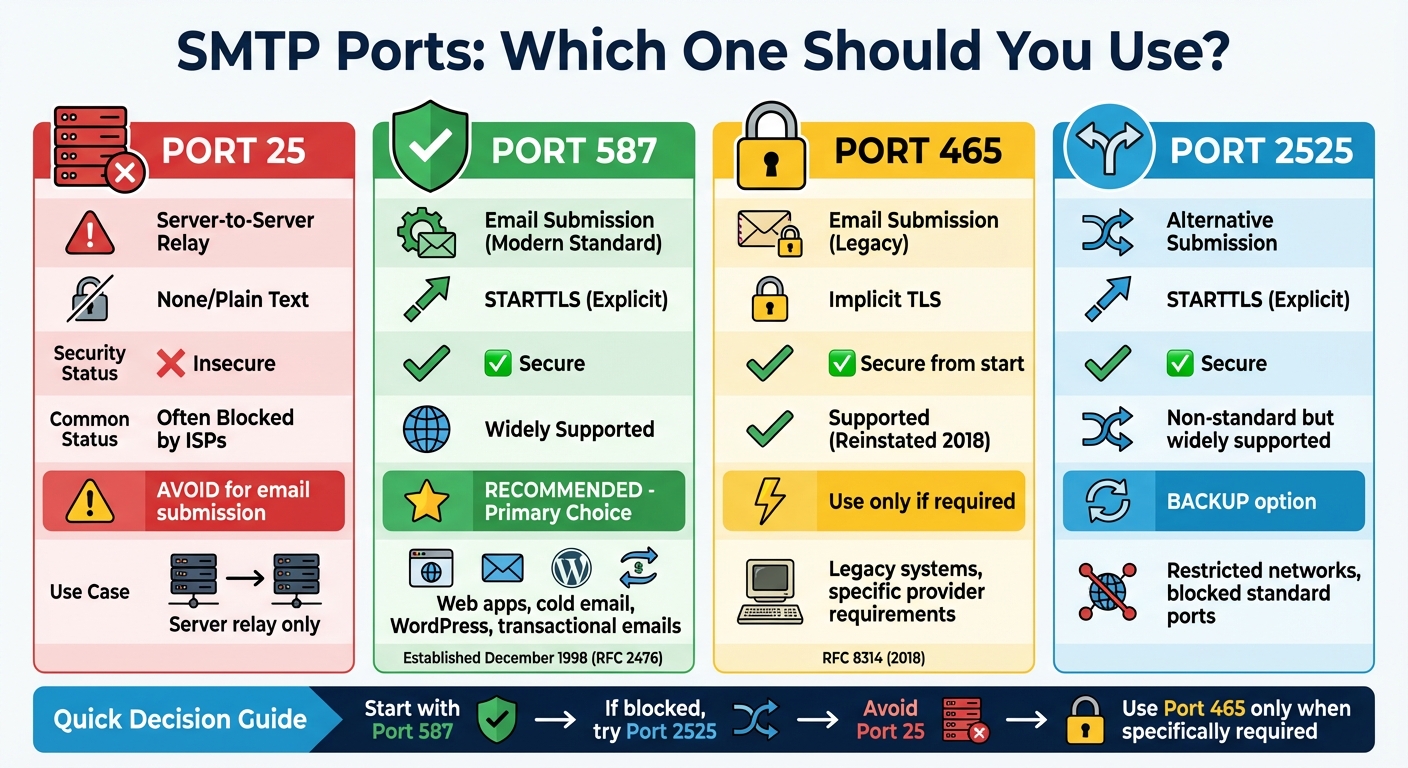
SMTP Ports Comparison: Security, Purpose, and Use Cases
Getting familiar with the four major SMTP ports can help you avoid connection issues and security vulnerabilities. Each port is designed for a specific use case, and picking the wrong one could lead to email delivery problems or even expose sensitive credentials to interception. Let’s break down what each port does and how to use them effectively.
Port 25 is the original SMTP port, primarily used for server-to-server email relay. However, it sends data in plain text, making it less secure. As a result, many ISPs and cloud providers block this port to reduce spam and abuse. If you're setting up cold email tools or website forms, skip Port 25. For secure client-to-server communication, modern configurations rely on other options.
Port 587 is the go-to port for email submission from clients to servers. Officially designated in December 1998 by RFC 2476, it has become the standard for sending emails. This port requires SMTP authentication and supports STARTTLS encryption, which starts the connection in plain text but upgrades it to a secure, encrypted tunnel. These features help block unauthorized email relays and minimize spam risks.
"Port 587 is the most up-to-date and recommended port for sending emails. Known as the submission port, it's designed to handle email transmissions from clients to mail servers."
– Lucas Dezan, Demand Gen Manager, Allegrow
Port 587 is supported by nearly all ISPs and is far less likely to face blocking compared to Port 25. Whether you're configuring cold email campaigns, WordPress sites, or any email client, Port 587 should be your default choice.
Initially assigned to SMTPS (SMTP over SSL), Port 465 was deprecated for a while but later reinstated in 2018 by RFC 8314 as a recommended option for implicit TLS. Unlike STARTTLS, implicit TLS encrypts the connection from the very start, ensuring no plain text data is ever transmitted. This port is ideal when your email provider specifically requires implicit TLS or when working with older systems that lack STARTTLS support. However, for most modern setups, Port 587 remains the preferred choice.
Port 2525 is a non-standard option that acts as a fallback for networks where traditional SMTP ports are blocked. Like Port 587, it supports STARTTLS encryption and authentication. Many cloud platforms and hosting providers block standard mail ports to protect their IP reputation, making Port 2525 a practical alternative for email relays. While not an official IETF standard, it is widely supported by most modern SMTP relay services and serves as a reliable backup.
| Port | Purpose | Encryption | Status |
|---|---|---|---|
| 25 | Server-to-Server Relay | None (usually) | Often blocked for email submission |
| 465 | Secure Submission | Implicit TLS | Recommended for SMTPS |
| 587 | Standard Submission | Explicit (STARTTLS) | Recommended modern standard |
| 2525 | Fallback Submission | Explicit (STARTTLS) | Non-standard but widely supported |
(function(d,u,ac){var s=d.createElement('script');s.type='text/javascript';s.src='https://a.omappapi.com/app/js/api.min.js';s.async=true;s.dataset.user=u;s.dataset.campaign=ac;d.getElementsByTagName('head')[0].appendChild(s);})(document,372145,'bgla6zdvtvvykvmfmifs');
Selecting the right SMTP port boils down to your security needs, network limitations, and specific use case. Start by checking whether your ISP or cloud hosting provider blocks certain ports. For example, many residential ISPs and platforms like Google Compute Engine block Port 25 to curb spam activity. If you're working behind a corporate firewall, you might find Port 587 restricted, making Port 2525 a solid alternative.
Security plays a big role here. Port 587 uses STARTTLS to encrypt your connection after the initial handshake, while Port 465 relies on implicit TLS, encrypting the connection right from the start. For tasks like cold email campaigns, proper authentication is non-negotiable. Ports 587 and 465 require SMTP credentials, which not only protect your sender reputation but also reduce the likelihood of your emails being flagged as spam. In fact, platforms that enforce robust SMTP authentication often report 10–20% better email deliverability rates.
The volume of emails you send is another factor to weigh. Business email addresses tend to change frequently - around 3.6% of them become inactive each month, and up to 37.3% may change within a year. This turnover makes it crucial to use a port configuration that supports authenticated, consistent sending, helping you maintain list hygiene and minimize hard bounces.
For most web applications and cold email campaigns, Port 587 should be your go-to option. It’s the modern standard, widely supported by ISPs, and combines STARTTLS encryption with mandatory authentication. Port 587 is also ideal for running WordPress sites or sending transactional emails, as it reduces the chances of your emails being flagged as spam when using default server mail functions.
If Port 587 isn't accessible due to network restrictions, Port 2525 is a dependable fallback. While not a standard port, it’s rarely blocked by consumer ISPs and offers the same STARTTLS encryption and authentication features, making it just as effective for email submission.
Port 465, on the other hand, should only be used for legacy systems or if your email provider specifically requires implicit TLS. For modern setups, Port 587 remains the preferred choice. Meanwhile, Port 25 is strictly for server-to-server email relays and shouldn’t be used for email submission.
These guidelines simplify the decision-making process, and this is exactly where Mailforge steps in to make things easier.
Mailforge takes the hassle out of configuring SMTP ports by automating the process across your email infrastructure. When you set up mailboxes with Mailforge, it automatically configures SPF, DKIM, and DMARC records to work seamlessly with Port 587, ensuring your emails are authenticated right from the start.
Need to make changes? Bulk DNS updates allow you to adjust port settings and security protocols across all your domains in just one step. If switching from Port 587 to Port 2525 becomes necessary, Mailforge makes it effortless. Plus, their SSL and domain masking add-on ($2/domain/month) encrypts connections and hides domain patterns that might otherwise trigger spam filters.
Mailforge also integrates smoothly with any email-sending software, so you only need to configure SMTP ports once. Whether you’re using tools like Salesforge or managing high-volume email campaigns, Mailforge’s shared infrastructure distributes your sending load across multiple IPs, helping to maintain a strong sender reputation.
Once you've chosen the right SMTP port, proper configuration is key to ensuring secure email transmission. Start by setting the port number, encryption type, and authentication method. For most modern email systems, Port 587 is the go-to option. It supports STARTTLS encryption, which starts as an unencrypted connection and upgrades to encryption during the handshake. If Port 587 is unavailable - perhaps blocked by your ISP or hosting provider - Port 2525 serves as a reliable alternative with similar security features.
When it comes to encryption, use STARTTLS (explicit) for Ports 587 and 2525. This approach begins as plain text and transitions to an encrypted connection. For those using Port 465, opt for implicit TLS, which encrypts the connection from the start. Authentication is typically handled with your email username and password, using methods like PLAIN or LOGIN. For accounts with two-factor authentication enabled (such as Gmail or Outlook), you'll need to generate an app-specific password instead of using your primary credentials.
Before finalizing your setup, test the connection to ensure everything is working correctly. You can use terminal commands like:
telnet smtp.example.com 587
or
nc -vz smtp.example.com 587
to confirm the port is open. To verify the TLS handshake, try:
openssl s_client -starttls smtp -connect smtp.example.com:587
These tests can help you identify potential issues early, saving you from email delivery headaches later.
SMTP configurations don’t always go smoothly. Here are some common problems and how to address them:
Here’s a quick reference table for common issues:
| Issue | Common Cause | Recommended Resolution |
|---|---|---|
| Connection Timeout | Firewall/ISP blocking or high server load | Check network settings and increase timeout limits |
| Authentication Failure | Incorrect credentials or wrong auth method | Verify credentials and confirm correct auth method |
| Port 25 Blocked | ISP spam prevention measures | Switch to Port 587 or Port 2525 |
| TLS Negotiation Error | Outdated TLS versions or expired certificates | Update to TLS 1.2+ and renew certificates |
By addressing these issues, you can keep your email system running smoothly.
For larger email infrastructures, centralized management is essential. Monitoring delivery rates, bounce statistics, and reputation metrics can help you detect port-related issues early and prevent larger disruptions.
Tools like Mailforge simplify this process by automating port configurations across multiple domains and mailboxes. For example, if you need to switch a domain to Port 2525, bulk DNS updates allow you to make changes across your infrastructure without manually reconfiguring each mailbox.
Regularly reviewing SMTP logs is another critical step. Look for patterns in error codes - frequent 535 errors point to authentication problems, while repeated timeouts may indicate network or firewall issues. To enhance security, rotate SMTP passwords and API keys every quarter, especially if you're managing a large volume of emails. Using unique credentials for each mailbox can also help isolate and resolve issues faster.
Organizations that implement proper email validation services often experience a 60% reduction in hard bounces. Additionally, platforms with strong SMTP authentication protocols can see deliverability rates improve by 10–20%. These practices not only improve performance but also enhance the reliability of your email infrastructure.
The SMTP port you choose plays a key role in ensuring your emails reach their intended recipients. Port 587 with STARTTLS is the go-to option for secure email submission and should be your primary choice. If Port 587 isn’t available due to restrictions from your network or hosting provider, Port 2525 offers a dependable alternative with similar security measures. On the other hand, Port 25 is meant for server-to-server relays and is often blocked by ISPs, making it unsuitable for client submissions. Use Port 465 only when your email provider specifically requires implicit TLS or if you're working with older systems.
For those managing large-scale email operations, tools like Mailforge simplify the process by automating port configurations across numerous domains and mailboxes. This reduces the risk of manual errors and ensures consistent security practices. Pairing the correct port selection with authentication protocols like SPF, DKIM, and DMARC not only strengthens your security but also signals to inbox providers that your emails are legitimate, boosting deliverability.
Port 587 is the go-to choice for sending emails, as it's specifically designed for email submission. It mandates authentication and supports TLS encryption, which ensures that your emails remain secure while being transmitted. This makes it the best fit for most email clients and services.
On the other hand, Port 25 is mainly used for server-to-server communication. However, it doesn't offer the security features required for modern email submission. Additionally, many ISPs block Port 25 to curb spam, making it an unreliable option for sending emails from personal or business accounts.
When your email server needs implicit TLS (SMTPS) for a secure connection right from the start, Port 465 is the way to go. It’s also a solid alternative if Port 587 is blocked or doesn’t support STARTTLS. While Port 465 is often labeled as a legacy SSL-only port, many providers still support it.
That said, for most modern configurations, Port 587 remains the preferred choice unless your server setup or restrictions specifically call for Port 465.
Port 2525 serves as a great alternative for email submission, particularly in networks where common SMTP ports such as 25, 587, or 465 are blocked by ISPs or firewalls. It supports STARTTLS encryption, ensuring secure and encrypted communication while navigating around these restrictions.
This makes Port 2525 a dependable option in tightly controlled network environments, offering a secure solution without sacrificing email deliverability.