Third-party email authentication services simplify securing your domain's emails by automating SPF, DKIM, DMARC, and BIMI setup. These protocols are critical for ensuring your emails aren't flagged as spam, protecting your sender reputation, and improving delivery rates - especially for cold email campaigns using specialized outreach tools. Manual DNS configuration is error-prone and time-consuming, but platforms like Mailforge streamline the process, allowing you to authenticate hundreds of domains in minutes while reducing setup errors.
Proper email authentication is critical for any business relying on email outreach. Automated tools make it easier, faster, and more reliable, ensuring your campaigns reach their intended audience. For more technical guides and industry updates, explore our latest email deliverability resources.
SPF (Sender Policy Framework) is like a guest list for your domain's email servers. It's a DNS TXT record that specifies which IP addresses and servers are allowed to send emails on your domain's behalf. When a receiving server gets an email claiming to be from your domain, it checks this record to confirm the sender is authorized.
DKIM (DomainKeys Identified Mail) adds a layer of security by attaching a cryptographic signature to your email headers. This signature ensures the message hasn’t been tampered with and verifies the sender's identity. The receiving server uses a public key, stored in your DNS, to validate the signature.
DMARC (Domain-based Message Authentication, Reporting, and Conformance) takes it a step further by telling receiving servers what to do if an email fails SPF or DKIM checks. Options include delivering the email (none), sending it to spam (quarantine), or rejecting it entirely (reject). DMARC also checks for alignment, ensuring the visible "From" address matches the domains authenticated by SPF and DKIM. This layered approach not only protects your domain but also boosts your chances of landing in the inbox rather than the spam folder, especially when you connect Mailforge to other Forge products to optimize your stack.
BIMI (Brand Indicator for Message Identification) enhances email authentication by displaying your brand’s logo in the recipient's inbox. However, to use BIMI, your domain must have a strict DMARC policy set to either "quarantine" or "reject." This makes BIMI an option primarily for organizations with well-established authentication systems.
Domain alignment is critical for passing DMARC checks. The domain in the visible "From" address must match the domains authenticated by SPF (the Return-Path domain) or DKIM (the domain in the d= tag of the signature). Without proper alignment, even emails that pass SPF and DKIM can fail DMARC, leading to deliverability issues. Major providers like Gmail and Yahoo now require SPF, DKIM, and DMARC for bulk email senders, making domain alignment essential - especially for cold email outreach.
While these protocols are indispensable, manually configuring DNS records can be tricky and error-prone, especially when managing multiple domains. A simple typo in an SPF record can disrupt your entire email authentication. Additionally, SPF records are limited to 10 DNS lookups - exceeding this limit causes automatic failures, which can easily happen when integrating multiple third-party services.
DMARC policies also require careful planning. Jumping straight to a "reject" policy without proper monitoring can block legitimate emails. DKIM keys add another layer of complexity - they need to be at least 2048 bits for strong encryption and should be rotated every 6 to 12 months. Tracking these rotations manually across several domains quickly becomes unmanageable. Even something as simple as having more than one SPF record for a domain results in immediate authentication failure.
These challenges have led many businesses to adopt automated tools like Mailforge. These platforms handle DNS configurations at scale, reducing errors and ensuring smooth email authentication across all domains.
(function(d,u,ac){var s=d.createElement('script');s.type='text/javascript';s.src='https://a.omappapi.com/app/js/api.min.js';s.async=true;s.dataset.user=u;s.dataset.campaign=ac;d.getElementsByTagName('head')[0].appendChild(s);})(document,372145,'bgla6zdvtvvykvmfmifs');
Third-party email authentication services simplify the process of securing your emails. Instead of manually setting up DNS records for each domain, these platforms handle it for you. They automatically generate and publish SPF, DKIM, and DMARC records. All you need to do is connect your domain, and the service takes care of the rest - saving you from potential errors and drastically cutting setup time from hours to just minutes.
These services also offer bulk management, allowing you to update DNS records across multiple domains at once. This ensures consistency and saves you the hassle of repetitive manual updates. Many providers even include hosted DNS management, where you point your domain's nameservers to their platform, and they handle all technical records - like CNAMEs for branded tracking links - internally.
Another key feature is DMARC monitoring. These tools transform complex XML reports into easy-to-read dashboards, showing you which emails passed, which failed, and where spoofing attempts occurred. Some platforms go a step further by offering additional security measures, such as SSL implementation and domain masking, to protect your sender identity and secure communications.
When exploring third-party authentication services, you'll encounter two main types of infrastructure: shared and private.
Shared infrastructure uses pooled IP addresses managed by the provider. This option is great for startups, agencies, and teams handling high-volume outreach. It simplifies the setup process with automated configurations and quick mailbox creation. If you're looking for a fast, low-complexity solution, shared infrastructure is a solid choice.
Private infrastructure, however, offers dedicated IP addresses, giving you complete control over your sender reputation. While this option requires more technical involvement - like provisioning IPs and managing their reputation - it’s essential for larger organizations managing sensitive transactional data or running large-scale campaigns. Private setups often come with advanced features like multi-IP provisioning and API access, allowing for more tailored integrations.
Mailforge stands out in the shared infrastructure space, offering a streamlined solution for quick and efficient deployment.
Mailforge tackles the challenges of manual DNS configuration by automating the entire process. When you create mailboxes with Mailforge, SPF, DKIM, and DMARC records are automatically set up - no manual input required. The platform even supports bulk DNS updates, allowing you to configure hundreds or thousands of domains in just a few clicks. What typically takes 2–3 hours per domain can now be completed in about 5 minutes.
Mailforge also integrates seamlessly with other tools in the Forge Stack. For example, you can use Warmforge to enhance email deliverability through automated warm-up processes or connect with Salesforge to manage cold email campaigns. For teams with specific infrastructure needs, Mailforge offers additional options: Primeforge provides Google Workspace and Microsoft 365 mailboxes with US IPs for better ESP matching, while Infraforge delivers private infrastructure with dedicated IPs and advanced capabilities.
With its shared infrastructure, Mailforge offers an affordable solution that’s easy to deploy - taking just about 30 minutes - with minimal ongoing maintenance required. It’s a practical choice for those looking to streamline email authentication without the technical headaches.
Third-party authentication services play a crucial role in determining whether your emails make it to the inbox or get flagged as spam. Key metrics like the inbox placement rate - the percentage of emails that land in the primary inbox rather than spam or promotions - improve significantly when SPF, DKIM, and DMARC are properly configured. For example, after implementing strict authentication protocols, Google began blocking millions of unauthenticated messages daily. This means senders who authenticate their emails correctly enjoy a clear advantage in reaching their audience.
Proper authentication also reduces the bounce rate by ensuring all legitimate sending IPs are authorized and DKIM signatures are consistently managed. Additionally, sender reputation scores, which mailbox providers use to evaluate your domains and IPs, benefit from high authentication pass rates and the elimination of spoofed traffic. According to Validity, a sender reputation provider, senders with strong authentication and low complaint rates can achieve inbox placement rates above 95%, while those with weak or missing authentication often struggle to surpass 80%.
Other critical metrics include the spam complaint rate (kept low when recipients don’t encounter forged or suspicious emails), blocklist listings (reduced by DMARC policies that block domain spoofing), and spam trap hits (minimized when only authenticated messages are sent). Transitioning from poorly configured or missing authentication to a properly aligned SPF, DKIM, and DMARC setup can lead to a 10–30 percentage point improvement in inbox placement, depending on your starting point.
Strong authentication doesn’t just improve metrics - it’s a game-changer for cold email campaigns. These campaigns often face intense scrutiny from mailbox providers since they involve reaching out to recipients who haven’t interacted with your brand before. By ensuring consistent authentication across multiple domains, you can avoid sudden reputation drops when introducing new domains. This also allows for higher sending limits and better inbox placement for cold outreach efforts.
For instance, authenticated domains are less likely to hit rate limits or experience temporary blocks, making it possible to send more emails per mailbox each day. Complaint rates also tend to decrease because authenticated emails are less likely to raise red flags or trigger warnings. According to Valimail’s DMARC adoption reports, over 80% of email inboxes worldwide are protected by DMARC enforcement. Organizations that shift from a "none" policy to stricter "quarantine" or "reject" settings see fewer spoofed emails, increased trust, and better inbox placement for legitimate campaigns.
Tools like Mailforge simplify the process for teams managing large-scale cold email campaigns. Features such as automated DNS setup and bulk updates make it easy to replicate high-performing authentication settings across hundreds or even thousands of domains, ensuring consistent deliverability as operations grow.

Testing your deliverability is essential to confirm the benefits of improved authentication. Warmforge, included with any Salesforge subscription, is an email warm-up and deliverability tool designed for this purpose. It runs controlled test sends across a dedicated network, simulating real-world scenarios to see how major mailbox providers - like Gmail, Outlook, and Yahoo - handle emails from your domains and IPs.
With Warmforge, you can run a baseline test before making authentication changes and then test again after updating your SPF, DKIM, and DMARC records. This allows you to compare inbox versus spam placement rates by provider and verify whether your changes have led to better inbox performance. Warmforge also tracks the pass/fail status of SPF, DKIM, and DMARC for test messages, ensuring all three protocols are consistently passing.
Beyond authentication, Warmforge monitors engagement signals like opens, replies, and actions that remove emails from spam folders. These insights confirm whether your sender reputation is improving under the new setup. If issues persist - such as a specific provider still flagging your emails as spam - Warmforge helps identify areas that may require further adjustments to your DNS records or email content.
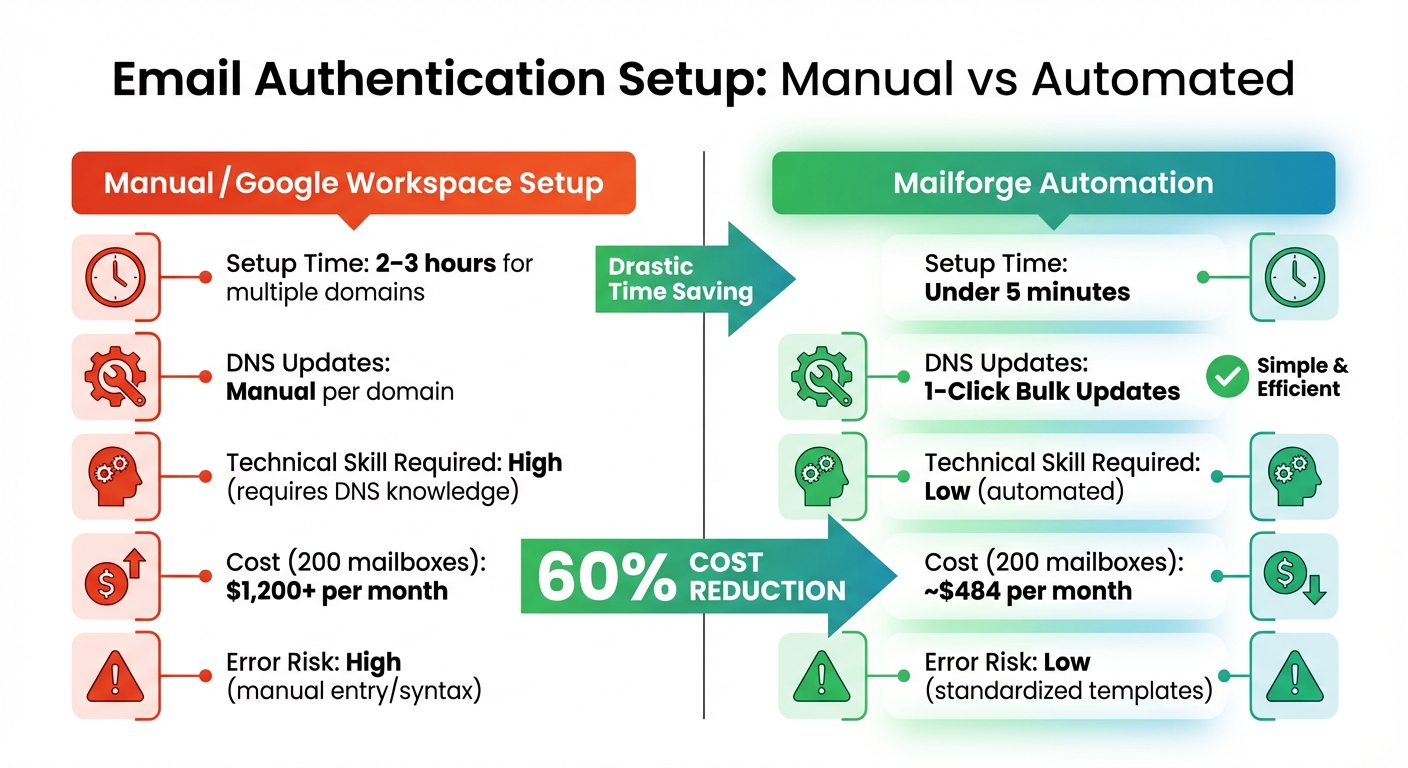
Manual vs Automated Email Authentication Setup Comparison
When selecting a third-party authentication service, automation should be a top priority. Setting up DNS manually can take anywhere from 10 to 30 minutes per domain and is prone to errors. Automated platforms simplify this process, generating SPF, DKIM, and DMARC records instantly when you add a domain, saving both time and reducing mistakes.
For cold email campaigns, scalability is another key factor. Managing dozens - or even hundreds - of domains becomes overwhelming without bulk update features. These allow you to rotate DKIM keys, modify DMARC policies, or add new sending services across multiple domains simultaneously. Services requiring manual DNS updates for each domain can quickly become impractical as your operations expand. Additionally, consider the service's infrastructure flexibility - options like shared, private, or mainstream setups (e.g., Google or Microsoft) can improve email deliverability. Sending emails through the same provider as your recipients (e.g., Gmail to Gmail) often results in better inbox placement.
Don't overlook monitoring capabilities. Real-time dashboards and automated alerts can help you track authentication health and spot issues early, avoiding disruptions to your email campaigns. Also, ensure the service integrates smoothly with your existing tools - whether you're using Salesforge, custom-built systems, or other platforms. A seamless integration avoids the need for complex API setups or technical workarounds, allowing you to focus on campaign performance. Once you've chosen a service with strong automation, scalability, and monitoring, the next challenge is maintaining it over time.
Authentication isn't something you set and forget. Start with a DMARC policy of p=none for 30 days to monitor email traffic and identify legitimate senders. During this period, review DMARC aggregate reports to confirm that no authorized emails are being blocked. Once you're confident in the setup, progress to p=quarantine for another 30 days before eventually moving to p=reject for maximum protection.
To keep your security standards high, rotate your DKIM keys every 6 to 12 months. This reduces the risk of key compromise and signals to mailbox providers that you're maintaining good security practices. Keep an eye on your SPF record to ensure it stays within the 10 DNS lookup limit. As you add more sending services, consolidate includes or use flattening techniques to avoid exceeding this threshold. For optimal performance, aim for a mailbox health score above 97% and a bounce rate below 1%.
A centralized dashboard simplifies monitoring. Instead of checking each DNS provider or hosting panel individually, you can track authentication pass rates, identify domains with propagation delays, and review any changes to DNS records that might impact deliverability. Set up alerts for critical issues like failed DKIM signatures or unauthorized SPF record modifications. For large-scale operations, tools like Mailforge can streamline these processes, as discussed in the next section.
If you're managing a large number of domains, Mailforge is designed to make authentication easier and more efficient. The platform automates the setup of SPF, DKIM, and DMARC records as soon as you add a domain, eliminating the risk of manual entry errors. For instance, managing 200 mailboxes with Mailforge can reduce setup time from 2–3 hours to under 5 minutes, saving both time and money.
Mailforge shines when it comes to bulk DNS management. With just one click, you can rotate DKIM keys, adjust DMARC policies, or add new sending services across all your domains. Its Workspaces feature lets you organize domains by project, client, or campaign, giving you precise control over authentication settings and reporting. This level of organization is invaluable when you're juggling different DMARC policies or monitoring requirements for various clients or business units.
For the most seamless experience, consider nameserver delegation. By updating your domain nameservers to Mailforge, the platform can handle all future authentication updates automatically. This eliminates the need to manually update DNS records with your registrar whenever changes are required. Mailforge also supports SSL and domain masking, ensuring your branded tracking links remain secure and professional - an essential factor for maintaining sender reputation. Best of all, Mailforge integrates easily with tools like Salesforge, Warmforge, or other email platforms, so you can incorporate it into your workflow without any technical headaches.
| Feature | Manual/Google Workspace Setup | Mailforge Automation |
|---|---|---|
| Setup Time | 2–3 hours for multiple domains | Under 5 minutes |
| DNS Updates | Manual per domain | 1-Click Bulk Updates |
| Technical Skill Required | High (requires DNS knowledge) | Low (automated) |
| Cost (200 mailboxes) | $1,200+ per month | ~$484 per month |
| Error Risk | High (manual entry/syntax) | Low (standardized templates) |
SPF, DKIM, and DMARC are essential for running successful cold email campaigns. Without these protocols in place, emails are more likely to end up in spam folders, get blocked entirely, or damage your sender reputation - all of which hurt your chances of engaging with prospects and driving conversions. Configuring DNS records manually becomes impractical as your email operations grow. That’s where third-party authentication services come in, offering automated DNS setup, instant record generation, and centralized dashboards to monitor authentication health across all domains. This removes the guesswork and minimizes errors that can disrupt email deliverability.
The benefits of proper authentication are clear. Authenticated domains typically achieve higher inbox placement rates, lower bounce rates (often under 1%), and fewer spam complaints. For U.S. sales teams, this means more responses, more meetings on the calendar, and reduced costs for acquiring new customers. Tools like Warmforge allow you to test and validate these improvements through inbox placement tests before scaling your campaigns. However, maintaining strong deliverability requires ongoing effort - regularly rotating DKIM keys, adjusting DMARC policies (progressing from "none" to "quarantine" and eventually "reject"), and continuously monitoring performance metrics. These steps ensure your campaigns remain effective over time.
To improve your email deliverability, start by auditing all your sending domains for SPF, DKIM, and DMARC compliance. Review DMARC reports to identify any unauthorized activity. Make a list of every tool or service that sends emails on your behalf - whether it’s a cold email platform, CRM, or helpdesk - and confirm that each is properly authenticated.
Consider using third-party authentication services to streamline the process. For example, Mailforge can handle the provisioning and authentication of hundreds or even thousands of domains and mailboxes in just minutes. With features like automated DNS setup, one-click bulk updates, and seamless integration with Warmforge for deliverability testing, these tools save time and reduce the risk of errors. Compare this to the challenges of manual DNS management, especially if you’re already spending hours on updates or noticing recurring deliverability issues. As your email campaigns grow, set a monthly review process to check DMARC reports, track metrics like bounce and complaint rates, and refine your authentication policies to match your evolving needs.
Third-party email authentication services play a key role in improving email deliverability by using SPF, DKIM, and DMARC protocols. These protocols work together to verify that emails come from authorized servers, add cryptographic signatures for security, and enforce rules to prevent spoofing or message tampering.
By minimizing the risk of emails being marked as spam, these services can boost inbox placement rates to as high as 98-99% deliverability. This means your emails are more likely to reach your audience, helping to maintain trust and ensure smooth communication.
Mailforge takes the hassle out of email authentication by automating the setup of SPF, DKIM, and DMARC records. This ensures your configurations are spot-on while saving you valuable time. Plus, its bulk DNS update feature makes managing multiple domains a breeze, cutting down on errors during the process.
With Mailforge, you can enjoy deliverability rates as high as 98–99%, meaning your emails are far more likely to land in inboxes where they belong. It's a smart choice for businesses aiming to scale their outreach efforts without sacrificing email performance.
Domain alignment ensures that the domain authenticated by SPF or DKIM matches the sender’s From address. This match is critical because DMARC uses it to confirm that an email genuinely comes from the domain it claims to represent. Without this alignment, emails can fail DMARC checks, increasing the likelihood of being flagged as spam or rejected entirely.
Keeping domain alignment intact not only boosts your email deliverability but also adds a layer of protection against spoofing and phishing attacks targeting your domain.