

Personalized Outbound Strategy
Get The Right Outbound Strategy In Minutes
Enter your email to get a custom plan & stack recommendation for your business
It's being carefully crafted by AI
Please check your mailbox in 5 minutes
Cheap Inboxes deliverability looks usable if your priority is getting affordable Google or Microsoft inboxes live quickly.
For a 30-mailbox setup, the math is simple: at the public 1-99 mailbox tier, 30 mailboxes cost about $105/month before domains and any extra monitoring stack.
That price is not the real test.
The real test is whether those inboxes stay usable after you connect them to campaigns, raise volume, and start seeing bounces, replies, spam signals, and domain-level drift.
Cheap Inboxes gives you pre-warmed mailboxes, workspace isolation, OAuth export, automated DNS support, and fast human support. That solves the provisioning problem.
It does not solve the operating problem: send-rate discipline, inbox placement checks, blacklist monitoring, bounce control, and knowing when a domain needs to pause before it damages the rest of the motion.
If you only need cheap inbox supply, Cheap Inboxes is a credible option. If you want a mailbox layer built around cold email infrastructure control, Mailforge is the cleaner comparison.
If you need 30 cheap inboxes fast, Cheap Inboxes is a credible option.
It is especially useful for agencies or operators who already know how to manage cold email infrastructure and only need mailboxes, domains, authentication, and sequencer connections handled quickly.
The 30-mailbox verdict:
If you want mailbox supply only, Cheap Inboxes can make sense.
If you want the mailbox layer to be part of a more controlled cold email infrastructure setup, compare it against Mailforge instead of treating "cheap inboxes" as a commodity line item.
Get Cold email infrastructure ready in minutes, with hundreds of domains and mailboxes starting at $3 to $2 per mailbox per month.

Cheap Inboxes is useful for teams that want Google and Microsoft inboxes for cold outreach without setting up every workspace, domain, DNS record, and mailbox manually.
The core workflow is simple:
That makes it helpful for teams that specifically want Google Workspace or Microsoft 365 inboxes at scale.
The useful parts are clear: Google and Microsoft inboxes, pre-warmed inboxes, one domain per isolated workspace, full admin access, OAuth export, automated DNS and domain management, API access, and support for provisioning domains, mailboxes, DNS, and sequencer connections.
That is a strong mailbox-ops product. It removes a lot of the manual work around domain purchase, DNS setup, mailbox creation, workspace management, and sequencer connection.
The important distinction is the infrastructure model. Cheap Inboxes is built around Google and Microsoft inbox provisioning.
Mailforge is built for teams that want fast, low-cost cold email infrastructure with shared-domain mailbox setup, automated technical configuration, and mailbox scaling without depending on Google Workspace or Microsoft 365 accounts.
So the choice is not simply about deliverability.
It is about the mailbox model you want to run: Google/Microsoft inboxes with admin access, or Mailforge-style cold email infrastructure built for cheaper and faster sender creation.
How to Build a Cold Email List That Gets Replies (2026 Step-by-Step Guide)
I evaluated Cheap Inboxes based on whether a 30-mailbox setup gives a cold email team enough infrastructure quality, operational control, and risk visibility to send without burning domains.
This Cheap Inboxes review focuses on the practical buying question: can this inbox provider support real outbound, or does the cheap mailbox price hide extra work elsewhere?
Get Cold email infrastructure ready in minutes, with hundreds of domains and mailboxes starting at $3 to $2 per mailbox per month.
At the 1-99 mailbox tier, the rate is $3.50 per mailbox per month. Lower volume rates as you scale: $3.25 for 100-249, $3.00 for 250-999, and $2.80 for 1,000+.
For 30 mailboxes, that means:
The total cost depends on your stack.
If your team already has a sequencer, reply workflow, deliverability monitoring, blacklist checks, and campaign controls, $105/month for 30 inboxes is clean. If you are starting from zero, the inbox bill is only one line item.
That is where a lot of teams get cheap inboxes wrong.
They compare mailbox price against mailbox price. The better question is: what does it cost to keep those inboxes usable for 90 days?
Cheap Inboxes get several infrastructure fundamentals right.
First, the one-domain-per-workspace model matters. If you run cold outbound from multiple domains, isolation is not optional.
A bad list, rushed campaign, or bad offer can damage one domain without dragging every other sending identity into the same mess.
Second, OAuth export is a better path than app-password chaos. Manual IMAP/SMTP setup creates small mistakes that are annoying at low volume and expensive at scale. OAuth connection is cleaner for teams pushing mailboxes into outbound platforms.
Third, the product is built for agencies and high-volume operators. The website talks about buying hundreds of domains and thousands of workspaces, not just adding one extra Gmail account.
That matters because cold email infrastructure becomes an operations problem once you leave the founder-led stage.
Fourth, the support positioning is unusually strong for this category. Cheap inbox providers often fail in the boring moments: DNS breaks, an account needs reconnecting, a workspace needs a fix, or a sequencer export does not behave.
Cheap Inboxes put human WhatsApp support front and center.
The most important point: Cheap Inboxes do not look like a generic commodity inbox reseller.
It has product depth around workspace isolation, domain handling, OAuth, admin access, and API provisioning.
This is where the model starts to break for less experienced teams.
Pre-warmed inboxes do not remove the need for sending discipline. If you take 30 inboxes and immediately push weak lists, generic copy, high bounce rates, or aggressive daily volume, the mailbox provider will not save you.
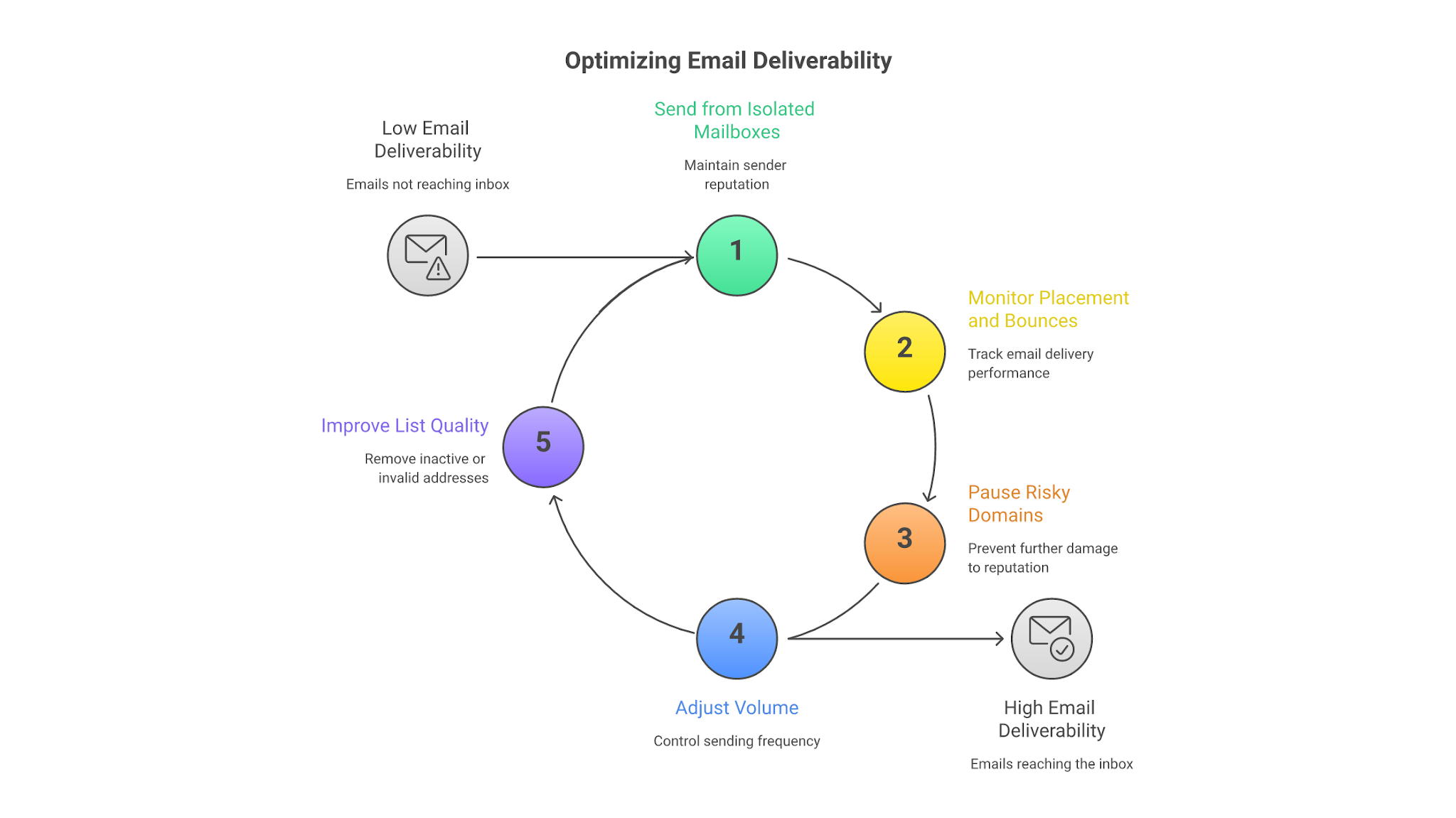
Deliverability is not a vendor setting. It is a system.
For a 30-mailbox setup, your operating model still needs:
Cheap Inboxes can provide the inboxes and supporting setup. It cannot decide whether your prospect list is clean, whether your offer is relevant, or whether your SDR team is ignoring negative signals.
That part is still on you.
Thirty mailboxes is a useful threshold because it is no longer a toy setup.
At 30 inboxes, you can run meaningful cold outbound volume without relying on one overloaded domain. You can split by segment, geography, offer, or client. You can also see whether your infrastructure process is real or just duct tape.
Here is the practical version:
At $105/month before domains and tooling, the math is attractive. But cheap mailbox supply can make bad operators move faster than their process can support.
That is the risk.
If your team sees 30 inboxes and thinks, "Now we can blast more," you will burn the setup. If your team sees 30 inboxes and thinks, "Now we can distribute volume safely, monitor each domain, and scale only the winners," the model can work.
The useful comparison is not Cheap Inboxes versus a full outbound stack.
That comparison muddies the decision. Cheap Inboxes and Mailforge both sit closer to the mailbox infrastructure layer, so the real question is about control, operating fit, and what your team needs after the inboxes are provisioned.
This is not a "Cheap Inboxes is bad, Mailforge is good" argument.
Cheap Inboxes are useful if the job is simple: get 30 cheap inboxes, connect them, and let your operator handle everything else.
Mailforge is the better fit when the mailbox layer needs to support a repeatable outbound infrastructure model instead of a one-off inbox purchase.
The better question is not "which inbox is cheaper?"
The better question is "which mailbox layer gives your team enough control to keep sending safely?"
Cheap Inboxes makes sense if your team already has cold email operators who know what they are doing.
Choose it if:
It is also a reasonable fit for agencies that build client infrastructure repeatedly. The API angle matters there. If your team needs to provision domains, mailboxes, DNS, and sequencer connections in repeatable batches, a developer-first approach can save real operator time.
Do not choose Cheap Inboxes if you expect an inbox provider to fix a broken outbound motion.
It is not the right fit if:
Competitor-wins scenario: if your only job is "give me 30 cheap Google/Microsoft inboxes quickly," Cheap Inboxes can be simpler than building a more structured mailbox infrastructure layer around Mailforge.
Mailforge is not always the cheaper path if all you want is raw inbox supply. The tradeoff is infrastructure control and repeatability.
Enter your email to get a custom plan & stack recommendation for your business
Please check your mailbox in 5 minutes

The pricing is clear. The setup model is built for cold email. Workspace isolation is the right design choice. OAuth export and automated DNS reduce manual failure points. Support appears to be a real part of the product, not an afterthought.
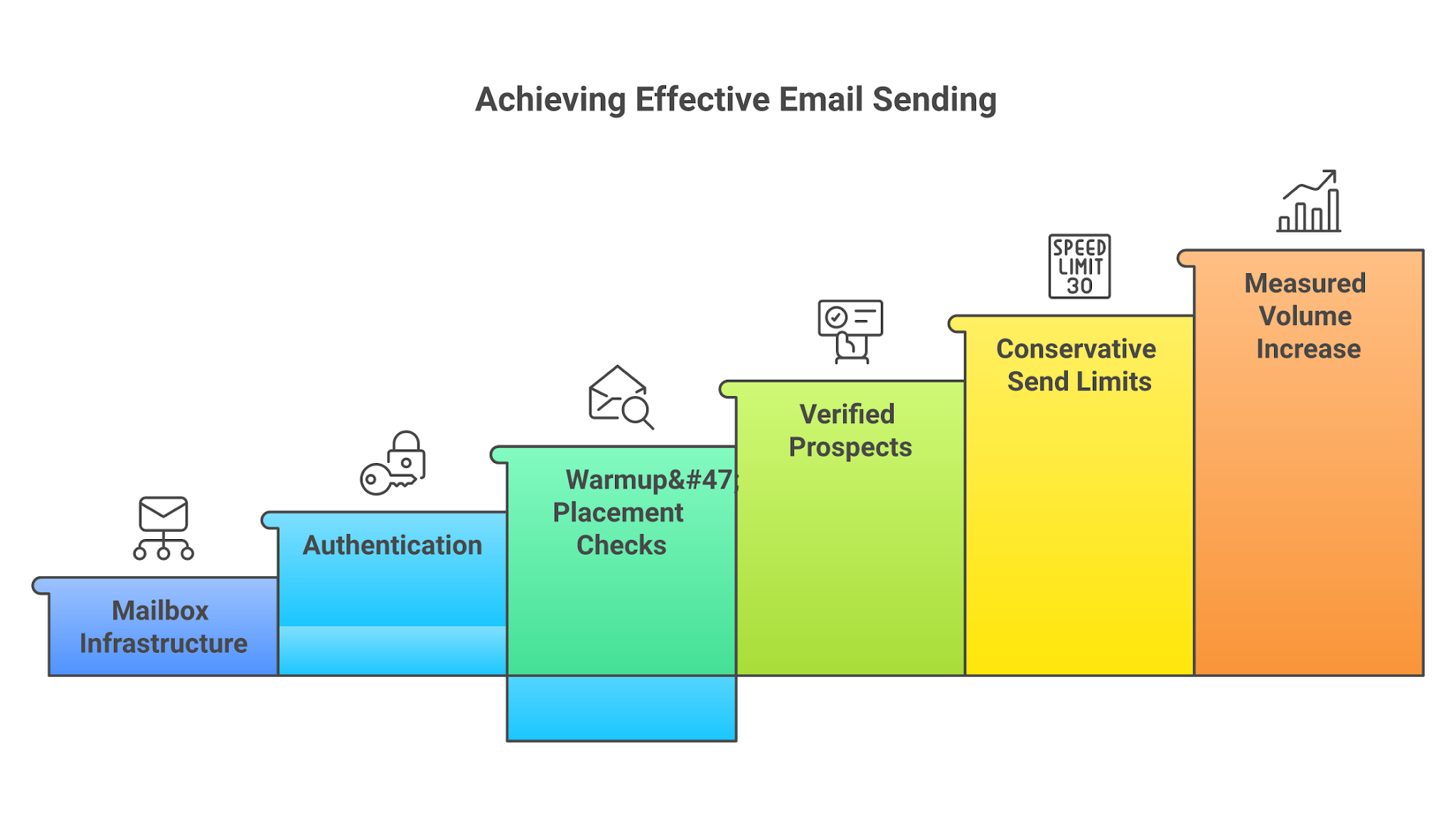
The limitation is equally clear: deliverability still depends on the operating system around those inboxes.
If your team already has strong outbound discipline, Cheap Inboxes can be a useful mailbox layer.
If your team is still stitching together lists, copy, send limits, and replies manually, buying 30 cheaper inboxes just gives you 30 ways to make the same mistake faster.
The better path is to build the send order correctly:
Cheap inboxes are not the strategy.
Safe volume is the strategy.
If your team only needs fast, low-cost inbox supply, Cheap Inboxes is a fair choice. If the real problem is building a mailbox layer your outbound team can control, repeat, and scale without treating deliverability as an afterthought, Mailforge is the cleaner next step.
Get Cold email infrastructure ready in minutes, with hundreds of domains and mailboxes starting at $3 to $2 per mailbox per month.