
Cold email AI can now research a prospect, write a decent first line, and launch a full sequence before I finish my coffee. That part got easy. What did not get easy is getting those emails into the primary inbox.
When writing became nearly free, sending volume went up everywhere. Inbox providers answered with stricter authentication rules and less patience for sloppy senders. So in 2026, the difference between AI campaigns that book meetings and AI campaigns that disappear is rarely the copy. It is the domains, mailboxes, and sending setup underneath.
In this guide, I walk through what cold email AI actually does, why AI-written outreach stopped getting replies for a lot of teams, how I set up infrastructure that can carry AI-level volume, and the three cold email AI tools I would shortlist today.
Cold email AI is no longer one feature. It is a chain of small jobs that used to need a full-time SDR.
The term covers any software that uses AI models to run parts of cold outreach.
When I map the tools I use, the work splits into five jobs:
The first two jobs get most of the attention online. The last three decide whether a campaign makes money. If you want the writing side in depth, I covered it in my guide to AI cold email personalization.
At the far end sits an AI SDR that runs all five jobs on its own. I compared those agents in my roundup of AI SDR tools. Whichever level you choose, every one of these tools still sends through mailboxes, and that is where most AI campaigns break.
The tools got better at writing, and inboxes got worse at trusting what they wrote.
When thousands of senders feed similar prompts into similar models, prospects get the same opener over and over. "Saw you are hiring for..." stopped feeling personal the tenth time a VP read it that week.
I see this complaint constantly in founder communities. A common thread on Reddit asks whether cold email is dead after hundreds of "personalized" emails get zero replies, and the most upvoted answers usually point at the flood of AI-personalized mail sitting in everyone's spam folder.
Google's email sender guidelines ask every sender to authenticate with SPF or DKIM. Senders pushing 5,000+ messages a day to Gmail also need SPF, DKIM, and DMARC, one-click unsubscribe for marketing mail, and a reported spam rate below 0.3%. Google recommends staying under 0.1%.
Microsoft went further. Since May 5, 2025, Outlook.com has required SPF, DKIM, and DMARC from domains sending over 5,000 emails a day, and non-compliant mail gets rejected with a 550 5.7.515 error.
A well-run cold email setup rarely sends 5,000 a day from one domain, and that is the point. The direction is clear: authentication is the minimum, enforcement keeps tightening, and AI volume gets you there faster.
AI makes it tempting to push 2,000 emails from a single domain because the copy is ready in minutes. When every complaint and bounce lands on one domain, its reputation drops quickly, and then every campaign on it suffers, including the good ones.
Once writing costs almost nothing, the scarce resource is sending capacity you can trust.
Here is how I think about it now. Every cold email AI tool sits on top of mailboxes. If those mailboxes live on one domain, have broken DNS, or share reputation with careless senders, the smartest copy in the world will not reach the inbox.
Most practitioners I follow cap each mailbox at roughly 30 to 40 cold sends a day, and I plan around the lower end.
Here is a quick example:
That matches what the Mailforge pricing calculator returned when I entered the same inputs. For more detail on safe limits, see my breakdown of how many cold emails to send per day.
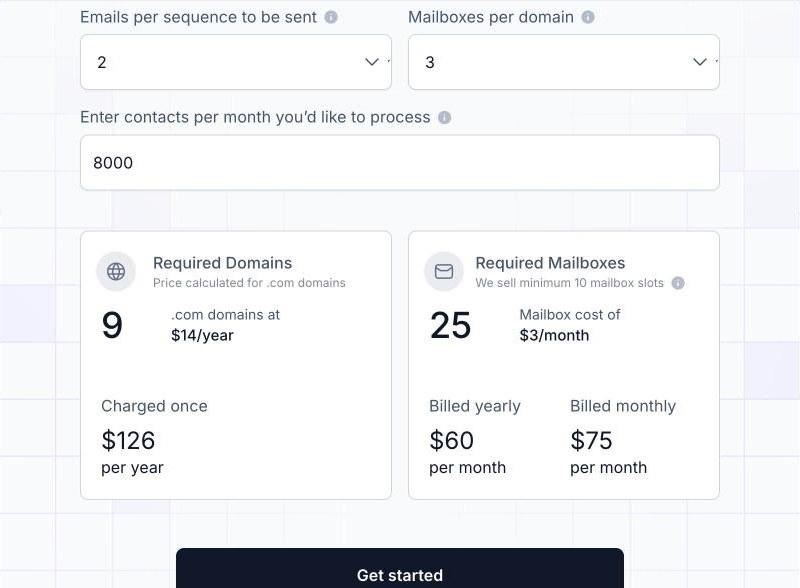
Mailforge pricing calculator: 8,000 contacts with a 2-step sequence works out to 9 domains and 25 mailboxes
Before I let any AI tool send, I check that the setup has these basics:
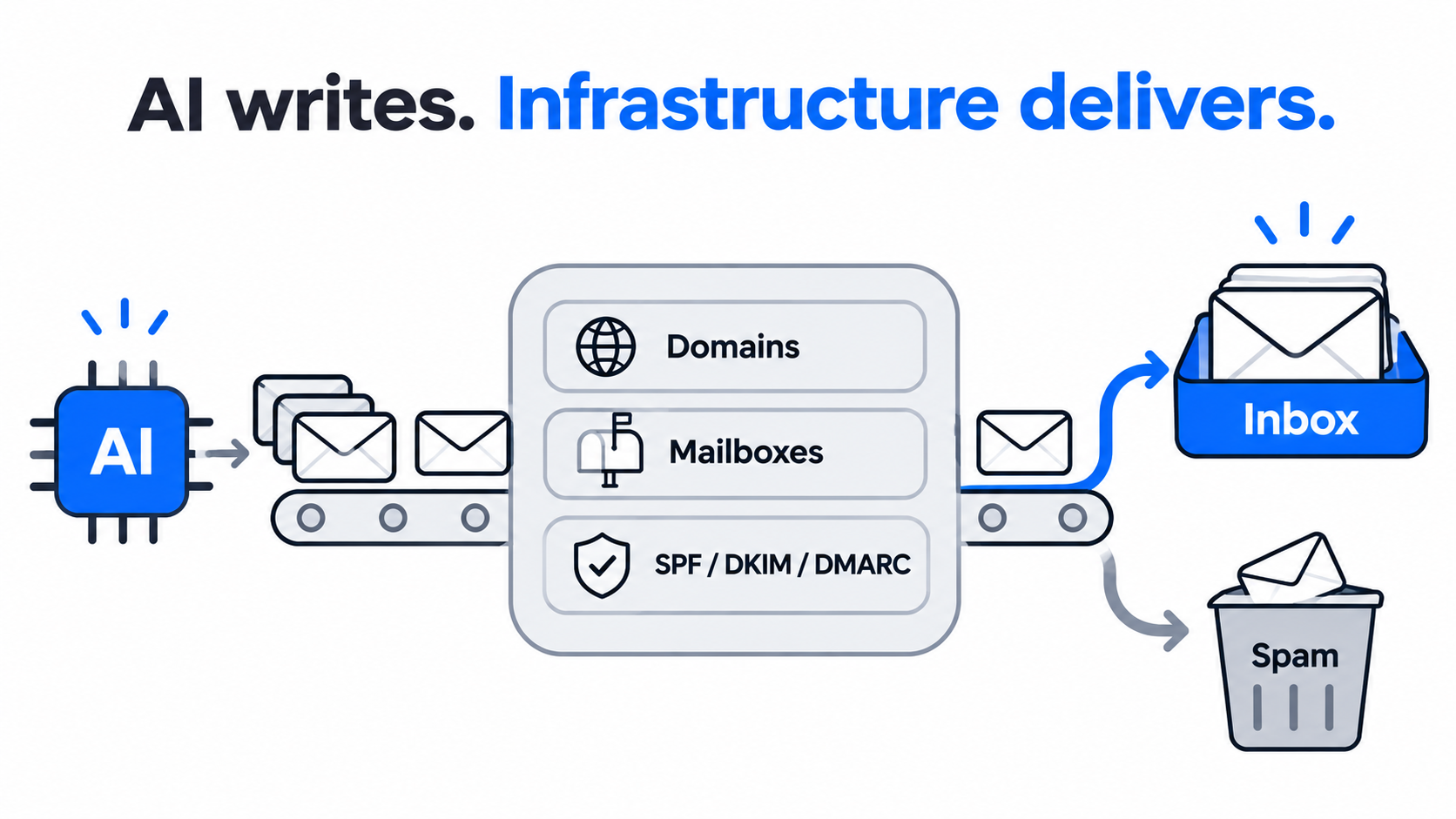
Mailforge is the infrastructure layer I use when an AI tool needs a lot of healthy mailboxes, fast.
Mailforge is shared email infrastructure built for cold outreach. It works on a shared model similar to Gmail or Outlook, but it is designed for outbound instead of everyday business email. The mailbox pool is spread across a base of 10,000+ businesses.
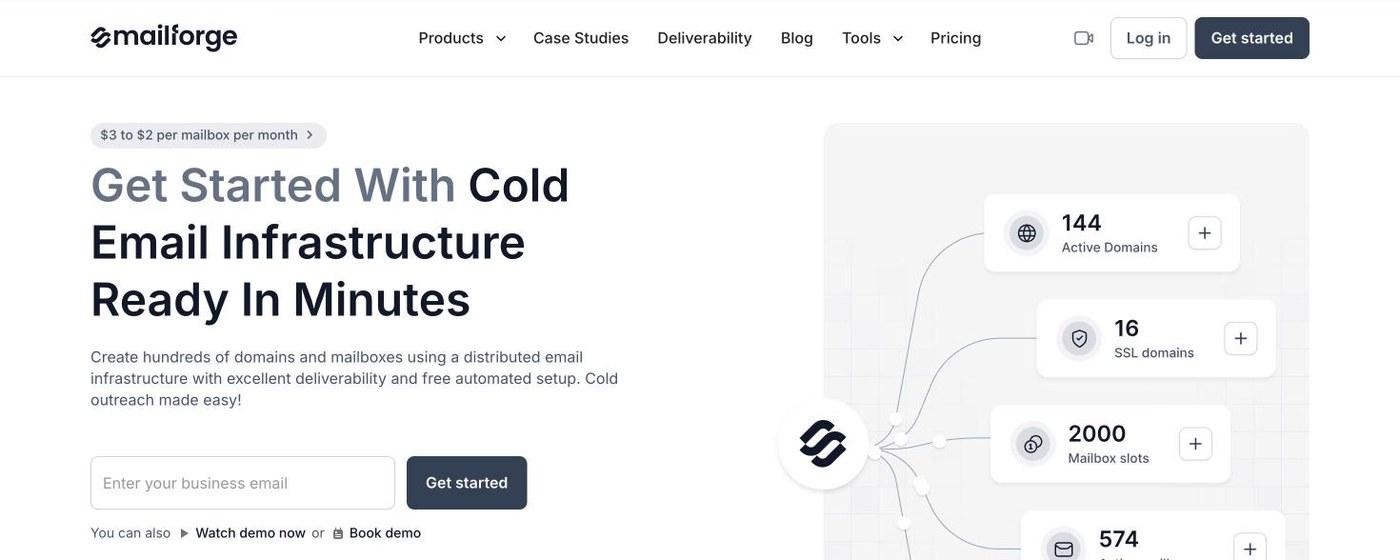
Mailforge homepage: cold email infrastructure from $3 to $2 per mailbox per month
The guided setup calculates how many domains and mailboxes I need from my target volume, then creates hundreds of them in one go. My first setup was live in about five minutes, which matters when an AI campaign is ready before the infrastructure is.
Every domain gets SPF, DKIM, DMARC, and custom domain tracking configured automatically. When I need to change records across many domains, bulk DNS updates take a few clicks. This is the part that keeps me on the right side of the Google and Microsoft rules above.
Domain forwarding sends my secondary domains to the main website or a landing page, handled inside the platform with no external registrar. If I want branded pages without revealing the primary domain, SSL and Domain Masking is available as an add-on. Domains can also be transferred in and out, so there is no lock-in.
Separate workspaces keep each client or project apart, and I can move domains and mailboxes between them freely. For agencies running AI campaigns for several clients, this keeps one client's volume from bleeding into another's.
Mailforge mailboxes connect to any cold email platform. With Salesforge, the login is shared and domains flow straight into sequences with no export step.
You can model your own numbers on the Mailforge pricing page before buying anything.
When an AI agent does the sending, it needs inboxes it can create and manage through code.
More teams now wire agents built in Claude, Cursor, or custom frameworks straight into outbound. That agent eventually needs to spin up domains and mailboxes on its own, not wait for someone to click through a dashboard.
Mailforge covers this with API access and the Forge MCP CLI, so an agent can provision and manage infrastructure from inside an AI workflow with scripted commands. I walked through the full setup in my guide to setting up an email inbox for AI agents.
One practical note: even with an agent sending, I keep a human approval step on replies until the agent has earned trust. Most experienced teams I talk to do the same.
The right infrastructure depends on volume, budget, and the inbox providers your prospects use.
The Forge Stack is the only place I know that offers all three infrastructure models under one login, so I can move between them as I scale without migrating anything.
My strongest setups run two or more ESPs at once. I use Mailforge for volume and add Primeforge mailboxes so there is always a matching provider for the prospect's inbox. If you are weighing the trade-offs, I compared shared vs dedicated email infrastructure in detail.
AI personalization is only as good as the trigger behind it.
"I came across your website" is what an AI writes when it has nothing true to say. The fix is timing. When a prospect just raised money, changed jobs, or got acquired, the AI has a real, specific reason to reach out.
Leadsforge added Signals as a sourcing path for exactly this. Instead of searching only by ICP filters, I build lists around companies and people that recently did something meaningful:
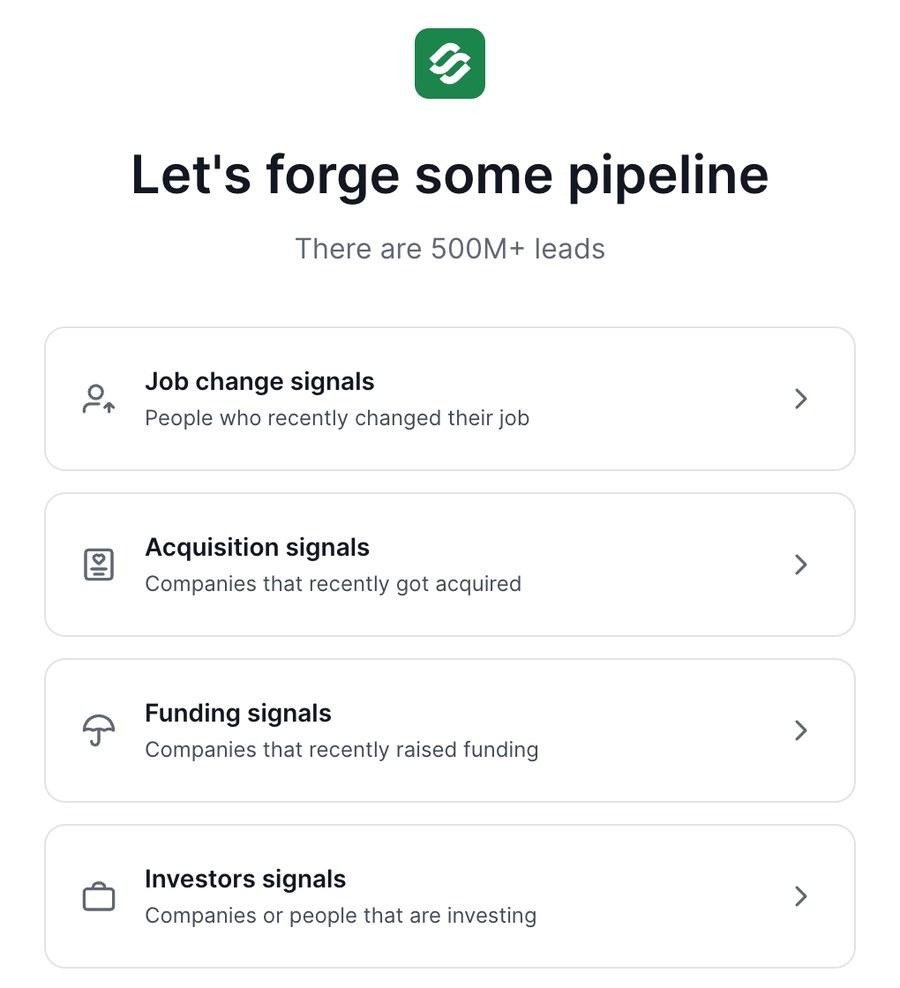
Leadsforge Signals: job change, acquisition, funding, and investor signals
For company signals, Leadsforge first finds the matching companies, then surfaces relevant employees from its 500M+ contact database. Every result has a Details view with evidence showing why it matched, which gives the AI a factual hook for the first line. Credits are charged per company or contact I select, and I can run waterfall enrichment on the list before it goes into a sequence.
For local businesses, Local Companies Search pulls companies by location and business type using Google Maps data, which works well for agencies selling to dentists, law firms, or restaurants.
This is how the pieces connect when one ecosystem owns every layer of outbound.
No other vendor I have tested offers infrastructure, deliverability, lead finding, multichannel outreach, and an autonomous AI SDR as one connected stack. Lists move from Leadsforge to Salesforge without a CSV, and mailboxes move from Mailforge into sequences without an export.
The stack also runs three ways. My own team can operate it, Agent Frank can operate it as an autonomous AI SDR, or a Forge Expert agency can run it for me. I have not seen another vendor offer that choice.
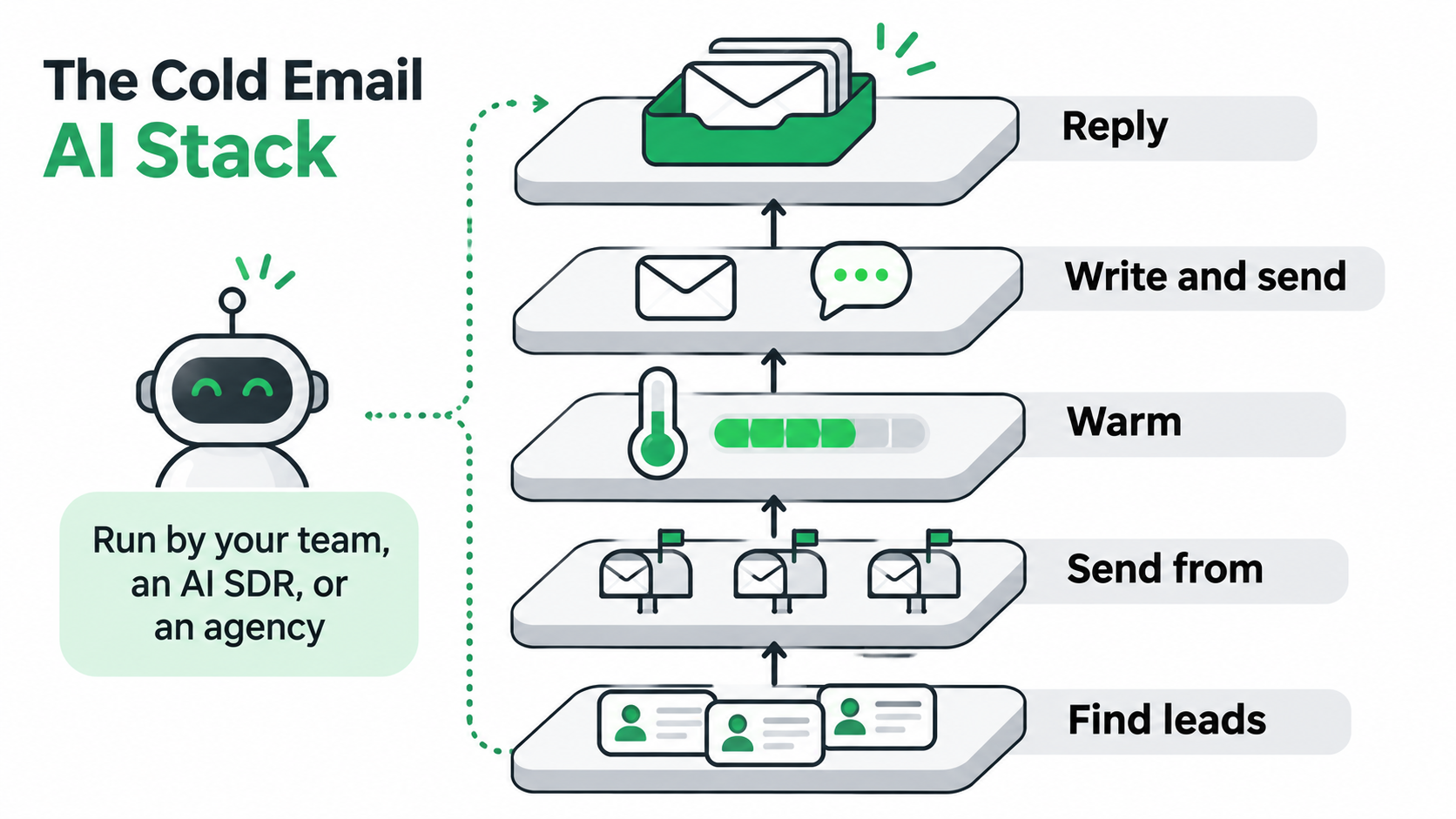
Infrastructure gets you delivered. The sending tool decides how well the AI writes, sends, and handles replies.
I picked three tools that run well on top of any infrastructure above. I judged them on AI writing, deliverability features, reply handling, LinkedIn support, and how much you pay once add-ons are counted. If you want a wider field, I also have a comparison of 8 cold email AI tools.
Ready to test the #1 pick? Start a 14-day Salesforge trial, no credit card required.
Salesforge is a multichannel outreach platform that runs cold email and LinkedIn as one workflow. What pushes it to the top for me is everything behind it: free premium warmup, three infrastructure options, a lead finder, and an AI SDR, all from the same login.
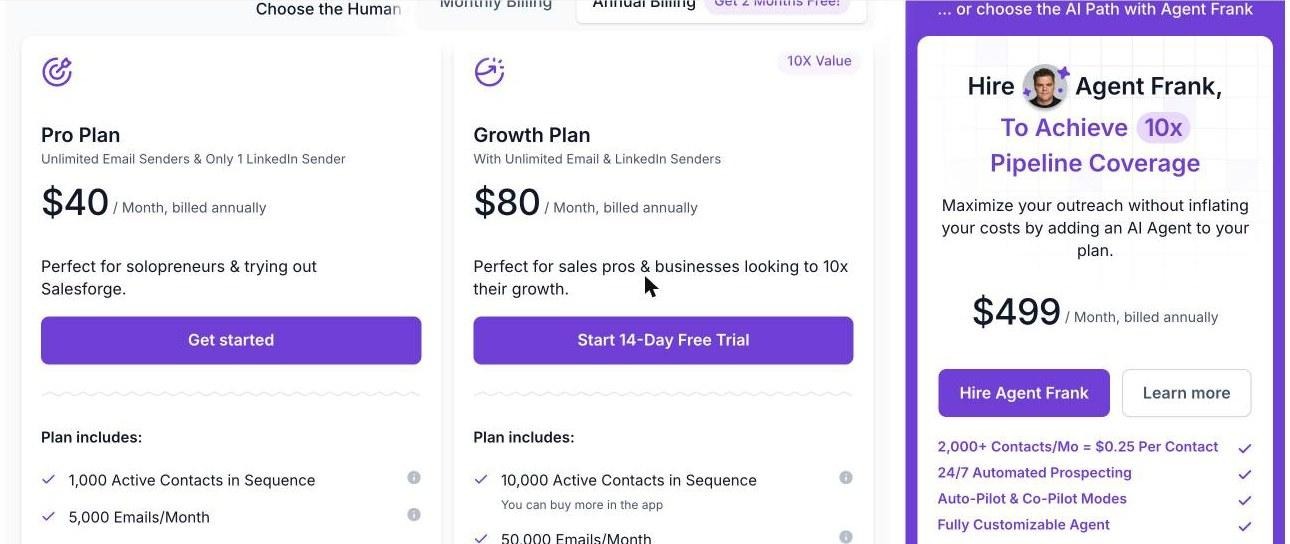
Salesforge plans: Pro, Growth, and Agent Frank side by side
Key features
Pricing: Pro starts at $40 per month billed annually ($48 billed monthly). Growth is $80 per month billed annually ($96 billed monthly). Agent Frank starts at $499 per month. Both plans include a 14-day free trial with no credit card.
What I like: one sequence for email and LinkedIn, one inbox for every reply, and warmup I do not pay extra for.
Limitations: A/B testing, ESP matching, API access, multi-language sequences, and unlimited LinkedIn senders are Growth-only. Agent Frank starts with a demo call rather than self-serve signup.
Best for: B2B teams and agencies that want AI cold email and LinkedIn in one place, with the option to hand the whole workflow to an AI SDR later.
Instantly is one of the most popular cold email platforms, and it earned that with a clean interface and unlimited email accounts on every plan.
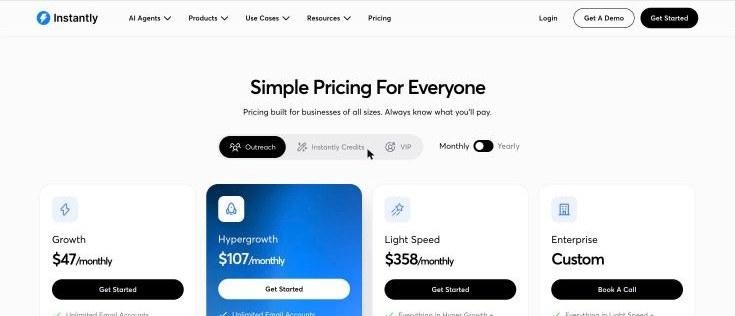
Instantly outreach plans: Growth, Hypergrowth, Light Speed, and Enterprise
Key features
Pricing: Growth starts at $47 per month billed monthly, with 1,000 uploaded contacts and 5,000 emails a month. Hypergrowth is $107 per month.
What I like: it is fast to learn, and the community content is huge if you are new to cold email.
Limitations: LinkedIn is not a native step in sequences, so multichannel means a second tool. Lead data runs on separate credits, and the entry plan caps contacts and monthly sends fairly low.
Best for: email-only teams that want a simple sender with unlimited accounts.
Smartlead is built around scale and agency use, with a long menu of add-ons you switch on as you grow.
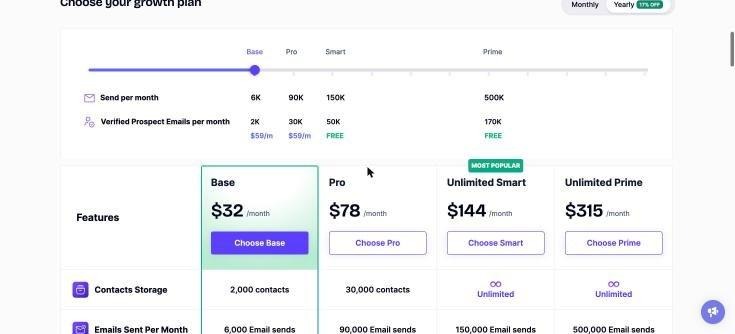
Smartlead plans: Base, Pro, Unlimited Smart, and Unlimited Prime
Key features
Pricing: Base starts at $32 per month billed yearly, with 2,000 contacts and 6,000 sends a month. Pro is $78 per month billed yearly.
What I like: agencies get a lot of control over workspaces and white-labeling.
Limitations: the real cost climbs as add-ons stack up, mailboxes come from third-party providers rather than first-party infrastructure, and the interface takes longer to learn.
Best for: agencies managing many client accounts that are comfortable assembling their own setup.
Fix the sending layer first, then choose the AI that runs on top of it.
Cold email AI solved the writing problem and created a deliverability problem. In 2026, the teams getting replies are the ones that spread volume across healthy domains, authenticate everything, and give the AI a real trigger to write about.
My order of operations is simple. I set up infrastructure with Mailforge for volume, add Primeforge for ESP matching, and move to Infraforge when I need dedicated IP control. I build lists from Leadsforge Signals. Then I run the campaigns in Salesforge, which is my top cold email AI tool because email, LinkedIn, warmup, replies, and Agent Frank live in one place.
If you only need an email sender, Instantly is a solid, simple choice. If you run an agency and like assembling add-ons, Smartlead gives you that flexibility.
Cold email AI is software that uses AI models to run parts of cold outreach: researching prospects, writing personalized emails, sending sequences, and handling replies. Some tools assist a human SDR, while AI SDRs such as Agent Frank run the full workflow on their own.
AI-written copy does not hurt deliverability by itself. Problems come from what AI makes easy: higher volume from too few domains, generic copy that draws spam complaints, and weak authentication. Spread volume across secondary domains, set up SPF, DKIM, and DMARC, and keep complaint rates low.
Divide your daily email volume by about 30 sends per mailbox. For example, 16,000 emails a month is roughly 730 a day across 22 working days, which needs about 25 mailboxes. At 3 mailboxes per domain, that is around 9 domains.
Yes. An AI SDR like Agent Frank can prospect, write, send, reply, and book meetings without manual work. The agent still needs properly authenticated domains and mailboxes, and many teams start in Co-Pilot mode so a human approves replies first.
For most B2B teams, I recommend Salesforge, because it combines AI personalization across 21+ languages, email and LinkedIn in one sequence, free Warmforge warmup, Primebox™, and Agent Frank. Instantly suits simple email-only sending, and Smartlead suits agencies that want add-ons.
Yes. Warmup builds reputation on mailboxes you already have, but it does not create domains, configure DNS, or spread volume. Infrastructure like Mailforge gives you the domains and mailboxes; warmup and the sending tool then run on top of them.