If you’re wondering whether Google Workspace is good for cold email, this review gives you a clear answer.
Workspace is great for everyday business communication, but when it comes to cold outreach, it works differently.
Your Google Inbox isn’t just a place to send messages.
It’s what decides if your emails reach someone’s inbox or go to spam. It manages your domain trust, security, and how other email systems see your activity.
That’s why we wrote this Google Workspace review, to help you understand if it’s the right choice for your outreach and how to boost your results.
What Is Google Workspace?
Google Workspace is Google’s all-in-one productivity suite that brings together Gmail, Drive, Meet, Calendar, Docs, and other collaboration tools under one roof.
It’s designed to help teams communicate, store files, and manage daily work, all within one connected system.
This image shows the Google Workspace
It’s mainly built for businesses that need a reliable email setup along with tools like Drive, Meet, and Calendar.
For email, businesses mostly use Workspace because it’s easy to set up, verified, and integrates with most outreach tools.
Why Google Workspace Is Not Recommended for Cold Email Outreach
Google Workspace is great for everyday emails, but it isn’t completely fit for cold outreach. Here are the problems you’ll run into.
You can’t send too many emails
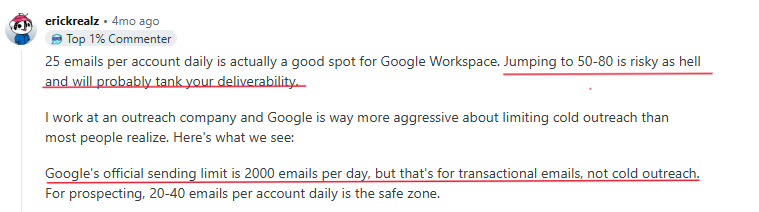
Google only lets you send around 2,000 emails a day from one account for transactional emails. For cold outreach, it's safe to send only 20-40 emails perday.
This image shows the Google Workspace user about its Limited sending
No built-in warm-up option
New mailboxes need a warm-up period to build trust. Google workspace doesn’t handle this automatically, so you’ll need to use a warm-up tool or send a few emails gradually yourself for a minimum 2 weeks.
Shared IP reputation risk
Everyone using Gmail shares the same network. If other users send spam, it can hurt your deliverability, too.
You have limited control
Google only gives basic setup options like SPF, DKIM, and DMARC. You can’t track domain health or manage IPs the way you can with dedicated cold email tools.
Manual setup for every domain
Every time you add a new domain or mailbox, you have to set up DNS records manually. Doing this for many domains can get tiring fast.
It costs more when you scale
Each mailbox costs about $6 per month, so if you’re managing 50 or 100 accounts, the price adds up quickly.
There’s a high risk of suspension
Sending too many cold emails can trigger Google’s filters. If that happens, your account, or even your main business domain might get suspended.
Google Workspace works great for normal business emails, but it’s not built for cold outreach. It lacks warm-up, control, and flexibility - things you need to send safely and at scale.
Get safely warmed cold email accounts ready in just 5 minutes withMailforge
Who Should Use Google Workspace?
Google Workspace is great for managing day-to-day business emails, but not the best option for cold outreach. Here’s where it actually fits in:
Small teams or startups Best if you send only a few emails daily and want something simple and reliable.
Freelancers or consultants Perfect for creating a clean business email like [email protected] without any complex setup.
Companies emailing existing clients Works well for updates, follow-ups, and day-to-day communication, not for reaching new leads.
Teams separating business and outreach Use Workspace for your main inbox and another setup for cold email to keep your domain safe.
Google Workspace is good for professional use, not for scaling cold email. It’s simple, secure, and best for everyday communication.
How Much Does Google Workspace Cost?
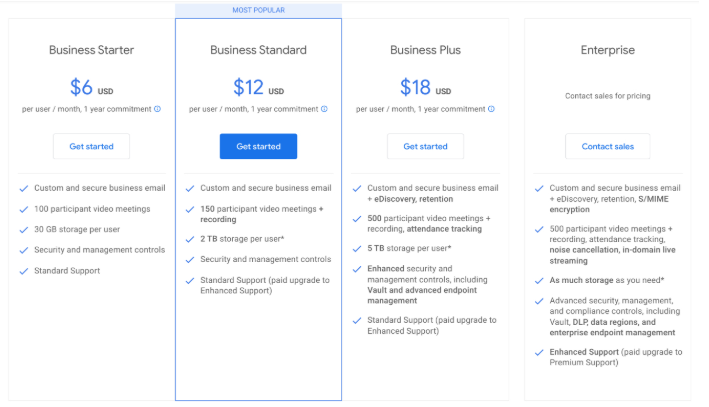
This image shows the Google workspace pricing
As of 2025, Google Workspace pricing starts at:
Business Starter: $6 per user/month
Business Standard: $12 per user/month
Business Plus: $18 per user/month
Each plan gives you one mailbox, 30 GB–5 TB storage (depending on plan), and basic tools like Gmail, Drive, Calendar and Meet.
Now, if you’re planning to use Google Workspace for cold email, here’s what it really looks like:
You can send about 2,000 emails per day per account.
To send 10,000 emails a day, you’d need at least 5 accounts, which means $30/month only for mailboxes.
Add extra domains, warm-up tools, and setup time, and the cost easily goes higher.
Plus, if you send large volumes too soon, your emails can land in spam, or worse, your accounts can get flagged or suspended.
On the other hand, dedicated cold email platform (like Mailforge) costs less at scale and already includes:
Built-in warm-up and DNS setup
Domain rotation and tracking
Centralized control for all mailboxes
So, while Google Workspace is affordable for daily business emails, it becomes expensive and impractical for cold outreach. Dedicated setups are cheaper, easier to manage, and built for scaling safely.
What are the Pros of Google Workspace?
Here are a few good things about Google Workspace when it comes to sending emails:
Let's you send from a custom domain like [email protected], which looks more professional and builds trust.
Has strong security that protects your account and keeps your sender reputation safe.
Easy to set up, you can connect a domain and start emailing in minutes.
New accounts usually deliver well at first if you send slowly and follow best practices.
Comes with useful Google tools like Drive, Meet, and Calendar for everyday work.
Google Workspace gives a clean, secure, and professional setup, good for small-scale outreach or business communication.
What are the Limitations of Google Workspace?
Here’s why Google Workspace can be hard to use for cold outreach:
You can’t control deliverability or fix spam issues since everything runs on Google’s shared servers.
Google Workspace allows 2,000 emails a day, but for cold outreach, you can safely send only around 50, making it hard to scale campaigns.
Every domain and mailbox needs to be added manually, which takes time as you grow.
There’s no built-in warm-up feature, so you’ll need another tool to protect new mailboxes.
Domains can get flagged or accounts suspended if you send too many emails.
This image shows the Google Workspace user about its reputation drop
You can’t track opens, bounces, or spam results without extra tools.
Shared IPs mean your deliverability can drop even if you send responsibly.
Google Workspace is great for normal emailing, but not for cold outreach. It’s missing the control, tools, and data you need to send safely and grow your campaigns.
The Only Way to Use Gmail for Cold Email
If you really want to use Google Workspace (Gmail) for cold outreach, it works, but only if you set it up carefully.
Gmail wasn’t made for cold emailing, so you need to protect your sender reputation from day one.
Here’s how to do it the right way
1. Use a separate domain
Never use your main business domain.
Buy a new one (like yourcompany.co or getyourcompany.com).
Connect it to Workspace and keep all outreach activity separate.
2. Set up MX records and DNS
Add SPF, DKIM, and DMARC records to your domain.
These tell email providers your messages are verified and safe.
Spread your emails across them to stay under Google’s radar.
5. Keep sending limits low
Stick to 30–50 emails per day per mailbox.
Sending too much too fast is the quickest way to get flagged.
6. Personalize every message
Avoid copy-paste templates or bulk emails.
Write short, personal lines that sound natural.
Gmail’s filters spot repetitive messages easily,useSalesforge’s free tools to personalize at scale and test deliverability with Warmforge.
7. Monitor deliverability regularly
Use a tracking or warm-up tool to see if your emails hit inboxes or spam.
If you notice drops, pause sending and check your domain reputation before continuing.
You can use Gmail for cold email, but only with a clean setup, slow warm-up, and small sending volume.
It’s fine for light outreach, but not for large campaigns or scaling fast.
Best Google Workspace Alternatives for Cold Email Outreach
Here are the best Google Workspace alternatives for cold email - tools that handle setup, warm-up, and deliverability for you, making it easy to scale outreach safely and get better inbox results.
Here’s how two of the best options compare:
1. Mailforge
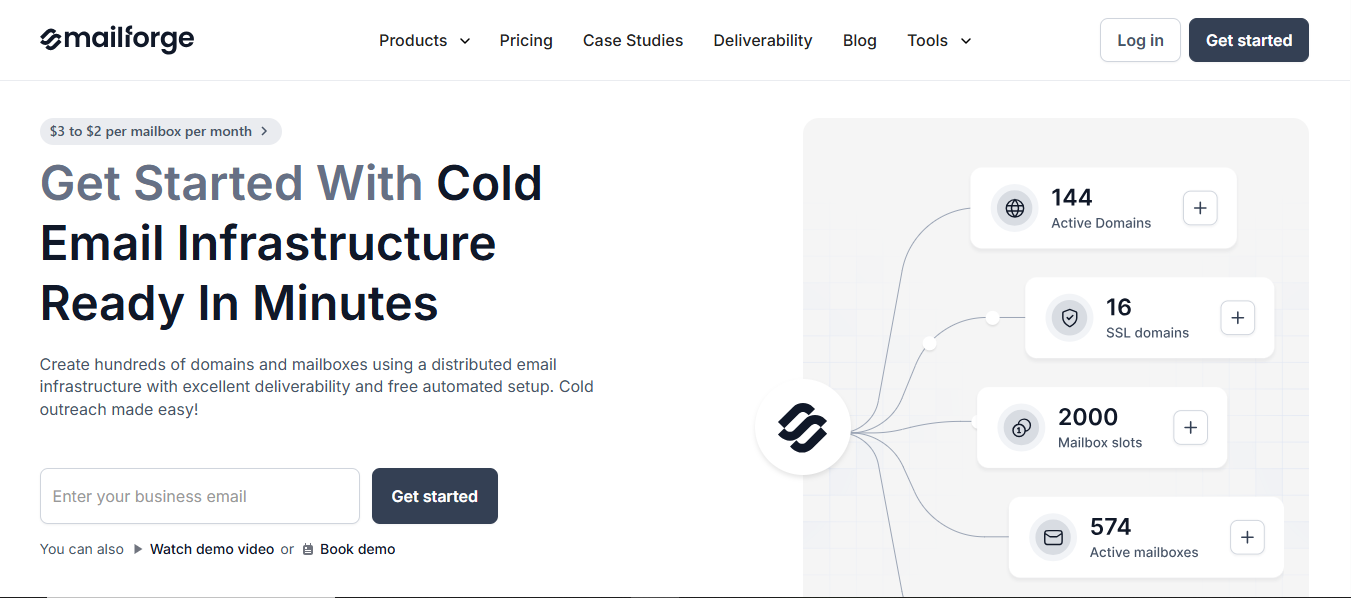
This image shows the Mailforge- Best google workspace alternative for cold email
Mailforge is an all-in-one cold email infrastructure tool that helps you create and manage hundreds of domains and mailboxes in minutes.
It automatically handles DNS setup, authentication (SPF, DKIM, DMARC), and warm-up, so you don’t have to do anything technical.
Here’s how it compares to Google Workspace.
Feature
Google Workspace
Mailforge
Purpose
Designed for regular business communication and productivity
Built for cold email outreach and deliverability
Infrastructure Type
Shared Google cloud infrastructure using the same IP pool for all users
Distributed cold email infrastructure with isolated mail servers for each user
Setup
Manual domain and DNS setup including SPF, DKIM, and DMARC
Fully automated DNS and domain setup with best-practice configurations
Warm-up
No built-in warm-up system
Automatic warm-up for all new mailboxes
Scalability
Limited to around 2,000 emails per day per account
Scales easily with multiple domains and mailbox rotation
Deliverability Control
Minimal control due to shared IP reputation
Full control with isolated infrastructure, tracking, and monitoring
Cost
$7–22 per user per month
Starts around $3 per mailbox monthly, lower with scale
2. Infraforge
This image shows the Infraforge- Best google workspace alternative for cold email
Infraforge gives you private cold email infrastructure with dedicated IPs and pre-warmed domains.
You can create unlimited domains, automate DNS setup, and monitor deliverability from one dashboard. Ideal for larger teams or agencies that care about control and consistency.
Here’s how it compares to Google Workspace:
Feature
Google Workspace
Infraforge ⚡
Purpose
Standard business email suite for teams
Private email infrastructure built for high-volume cold outreach
Infrastructure Type
Shared Google servers and global IP network
Dedicated private infrastructure with unique IPs and domains per user
Setup
Manual DNS configuration required
Automated DNS, SSL, and authentication setup in minutes
Warm-up
Not included
Pre-warmed domains and automatic warm-up for new inboxes
Scalability
Restricted by Google’s send limits (≈2,000/day)
Unlimited scalability with multi-domain setup and bulk DNS updates
Deliverability
Depends on Google’s shared network reputation
Guaranteed control with dedicated IPs, domain rotation, and real-time tracking
Cost
$7–22 per user/month
Starts at ~$4/mailbox/month, cost-effective for scaling cold outreach
Infraforge gives you total control - dedicated IPs, pre-warmed inboxes, and full visibility into deliverability. It’s built for teams that send at scale and want reliability without the risk.
If you like using Google mailboxes but still want to run cold email safely, Primeforge makes it easy.
It gives you Google Workspace and Microsoft 365 mailboxes that are already optimized for deliverability with no manual setup, no waiting days for configuration, and no guessing if your emails will land in spam.
If you rely on cold email for growth, Google Workspace isn’t enough.
Conclusion
Google Workspace just isn’t made for cold outreach. It's fine for daily business emails, but once you start scaling or adding more mailboxes, you’ll hit limits, deal with setup headaches, and struggle to keep your emails out of spam.
If you really want to make cold email work, switch to tools built for it:
Mailforge: Handles everything automatically: setup, warm-up, and deliverability, so you can focus on sending.
Infraforge: Gives you private infrastructure with dedicated IPs, perfect for larger campaigns or managing multiple clients.
Primeforge: Lets you use real Google and Outlook mailboxes already optimized for cold email - a simple, safe way to run outreach with trusted inboxes.
If you’re scaling, set up on Mailforge- it’s quick, simple, and helps your emails reach inboxes consistently.