
Are you sending 1,000 cold emails a day and getting only one or two replies?
That works out to about a 0.1% reply rate, and it happens more than you'd think. The copy looks fine, the list looks fine, yet you can't find what's wrong.
What if you could just see whether your email lands in the primary inbox before you send it?
That's what inbox placement tools do. They show you where your emails land, whether that's the primary inbox, promotions, or spam.
There are plenty of inbox placement tools on the market, so how do you pick the right one? I run cold email every day, and I test these six on live domains to help you choose.
Every tool on this list does actual inbox placement testing. Some also add warmup, email verification, or DNS and blacklist checks.
Let's get started.
Are you short on time? Check these quickly at a Glance.
Let’s understand each of the tools quickly from this table, which discusses the important aspects of each tool.
Prices are current as I write this. They all change, so check each site before you buy.
Let’s now understand each tool in detail by discussing its purpose, pros, cons, pricing, and rating from third-party platforms.
Best for: Teams that want premium warmup and inbox placement testing in one deliverability tool.
If you want warmup and inbox placement testing in one place, Warmforge is the tool for your email deliverability needs.
It's the deliverability tool in the Forge stack, and it runs premium warmup with inbox placement testing. It comes free with every Salesforge plan, with unlimited warmup slots. You can also buy it standalone if you warm mailboxes outside the stack.
It offers quick setup in one click. You connect a mailbox, click once, and warmup starts automatically. Warmforge’s AI features write the warmup emails to mimic actual human conversation, which signals legitimacy to inbox providers.

The premium warmup network primarily consists of aged Google Workspace and Microsoft 365 mailboxes, while also supporting a mix of SMTP and IMAP/SMTP connections from Infraforge (private IP) and Mailforge (rotational IP) infrastructure.
Warmup activity runs across multiple languages, so the interactions look natural to inbox providers around the world instead of English-only patterns.
There are two more features I use often. The Heat Score™ gives each mailbox a reputation number over time, so I know when a mailbox is safe to scale sending volume on.
Health Checks monitor DNS records, MX records, and blacklist status for every mailbox and alert me to any spam risks.
Inbox Placement Tests run across major ESPs to show where your emails are landing before campaigns go live: the primary inbox, promotions, or spam.
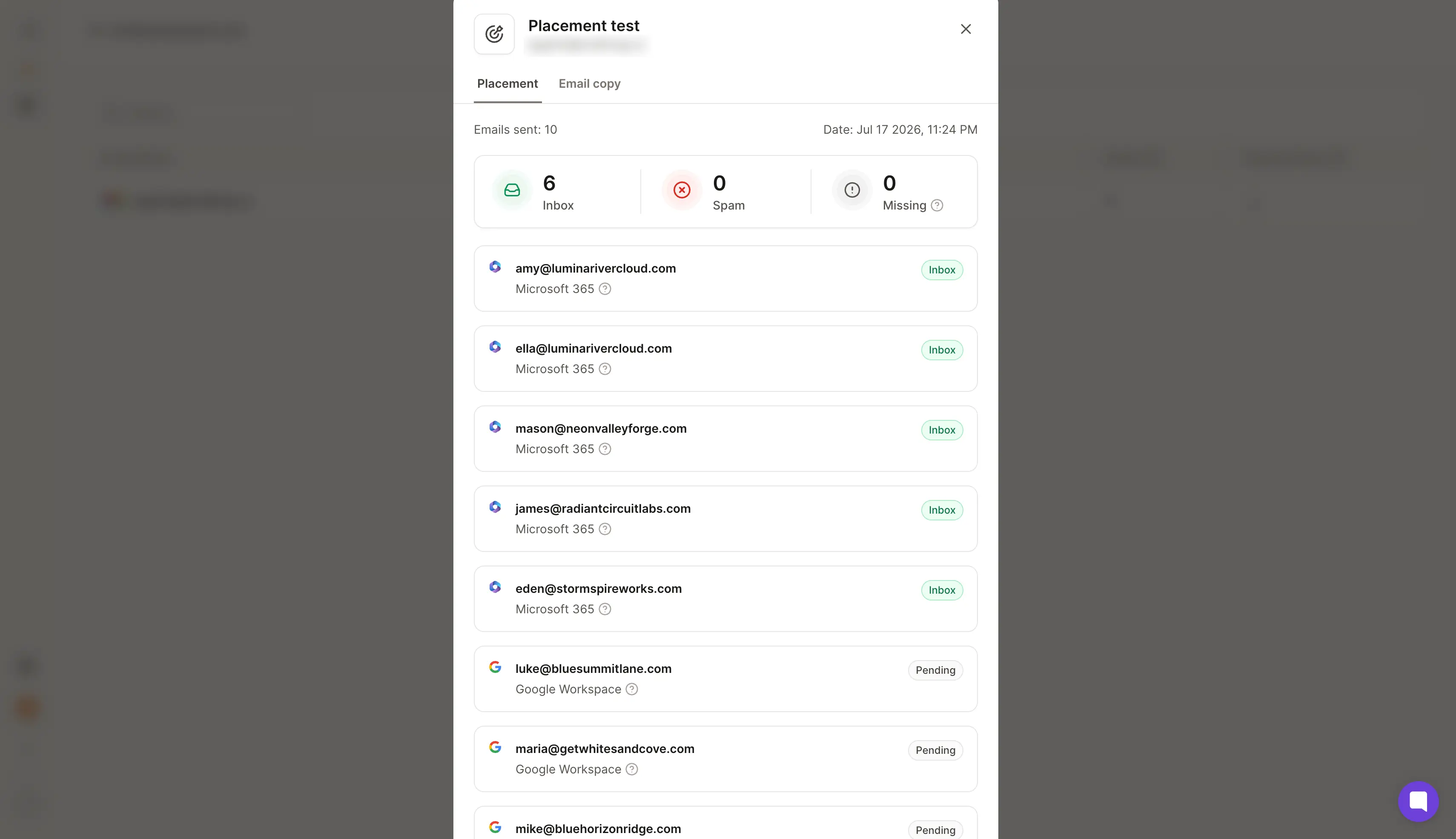
The tests cover:
It works with Google Workspace and Microsoft 365 mailboxes, and even IMAP/SMTP mailboxes from Mailforge and Infraforge.
Every warmup slot includes one free placement test a month, and you can run more through the placement test plans. There's plenty I like here, and a couple of things to keep in mind.
Here's what I like about Warmforge:
Here's what I dislike about Warmforge:
If you want the most detailed look at your spam score and per-provider placement, GlockApps is a strong tool to test email deliverability of your cold email campaigns.
It brings more than 15 years of inbox placement testing, and it shows in the reports.
You send to a seed list of 115 addresses, and it checks 5 spam filters, then tells you inbox versus spam versus promotions tab for each provider.
The seed list spans the inboxes your recipients use:
I run it on a campaign that feels fine but gets few replies. GlockApps shows the subject line is pushing me into Gmail's promotions tab while it lands primarily on Outlook.

That's the kind of detail a sending tool never surfaces, and it takes me five minutes to spot.
Past placement, it checks your SPF, DKIM, and DMARC setup, scores your content against Google, Barracuda, and SpamAssassin filters, and monitors your blacklist status across 50+ lists.
If you send email marketing campaigns at volume, it also works as a solid email spam checker.
The credit model is worth noting. Each plan comes with a set number of test credits, so heavy testers need a higher tier.
Best for: email marketers who want the most detailed per-provider spam score and placement analysis.
You paste a tracking code into your email or send to the provided seed addresses, and GlockApps checks where each copy lands.
You can run tests two ways:
You get a placement percentage for each provider. You also get a "missing" category that shows mail a server rejects outright.
That often points to a blacklist or a damaged sender reputation. There's a lot to like here, and a few actual limits.
Here's what I like about GlockApps:
Here's what I dislike about GlockApps:
If you want warmup and inbox placement testing in one budget tool, MailReach fits your email deliverability needs.
It runs an automated warmup network of actual Google Workspace and Microsoft 365 inboxes, and it adds a spam tester on top.
You warm a mailbox, then run a placement test to confirm it lands before you send to actual prospects.
I connect two mailboxes that have been warming through another tool.
After 30 days on MailReach, both show cleaner placement on my test emails than the accounts I leave elsewhere. I can't promise you the same result, but the test-as-you-warm loop is useful.
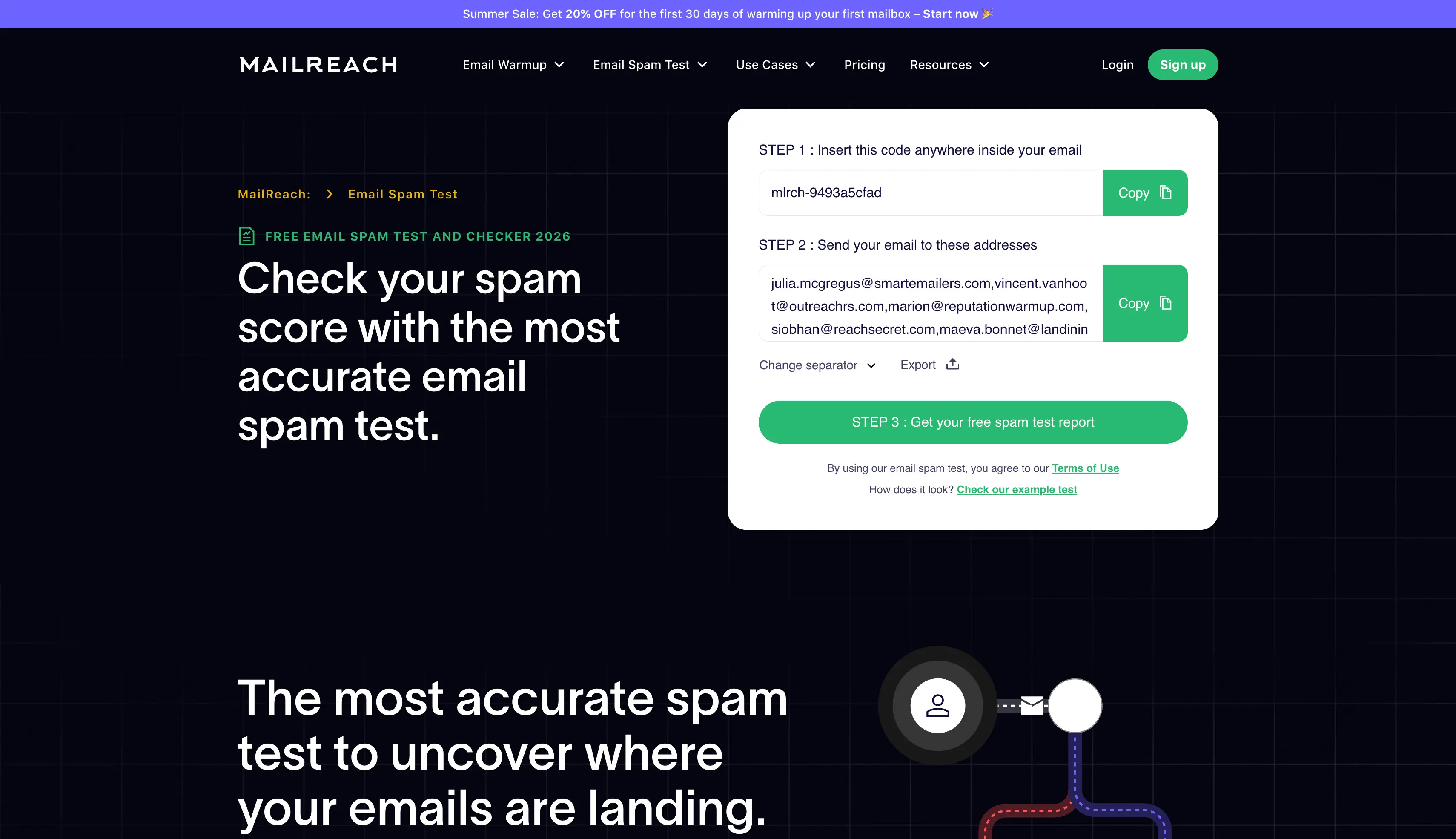
Every plan bundles the warmer and the spam tester with at least 20 test credits, plus domain and inbox health checks for blacklist, SPF, DKIM, and DMARC.
A reputation dashboard tracks your deliverability score so you can see it move week to week.
You can run a free spam test without an account.
The warmup itself has no free trial, so you pay from day one and give it a two-week warmup before you know if it works for your domain.
Cost is the main limitation, since per-mailbox pricing adds up once you run several inboxes.
Best for: Cold emailers who want warmup and inbox placement testing in one budget tool.
You send a message to MailReach's seed inboxes, and it reports where you land, primary versus spam, across:
One spam test credit equals one placement test with a full deliverability report.
MailReach suggests running a test before, during, and between campaigns, which is the habit that catches problems before they cost you replies.
Here are the pros and cons of MailReach, so you get fair information about it.
Here's what I like about MailReach:
Here's what I dislike about MailReach:
If bounces and dirty data are hurting your deliverability, MailerCheck is a smart tool for the job.
It comes from the MailerLite team, and it's built around list hygiene and deliverability.
Its Inbox Placement feature shows which folder your email lands in across a range of providers, and for Gmail it tells you whether you hit Primary, Social, Promotions, Updates, or Forums.
The seed list covers:
I like it for one simple reason. Bad data causes more spam placement than bad copy, and MailerCheck lets me verify a list and test placement without switching tools.
Its Email Insights module also scans content for spam triggers, broken links, HTML errors, and authentication issues before I hit send.
The pricing is pay-as-you-go, and you get 10 free credits on signup to try it. Credits carry over, which suits anyone who tests in bursts.
There's one limitation here. MailerCheck doesn't warm mailboxes.
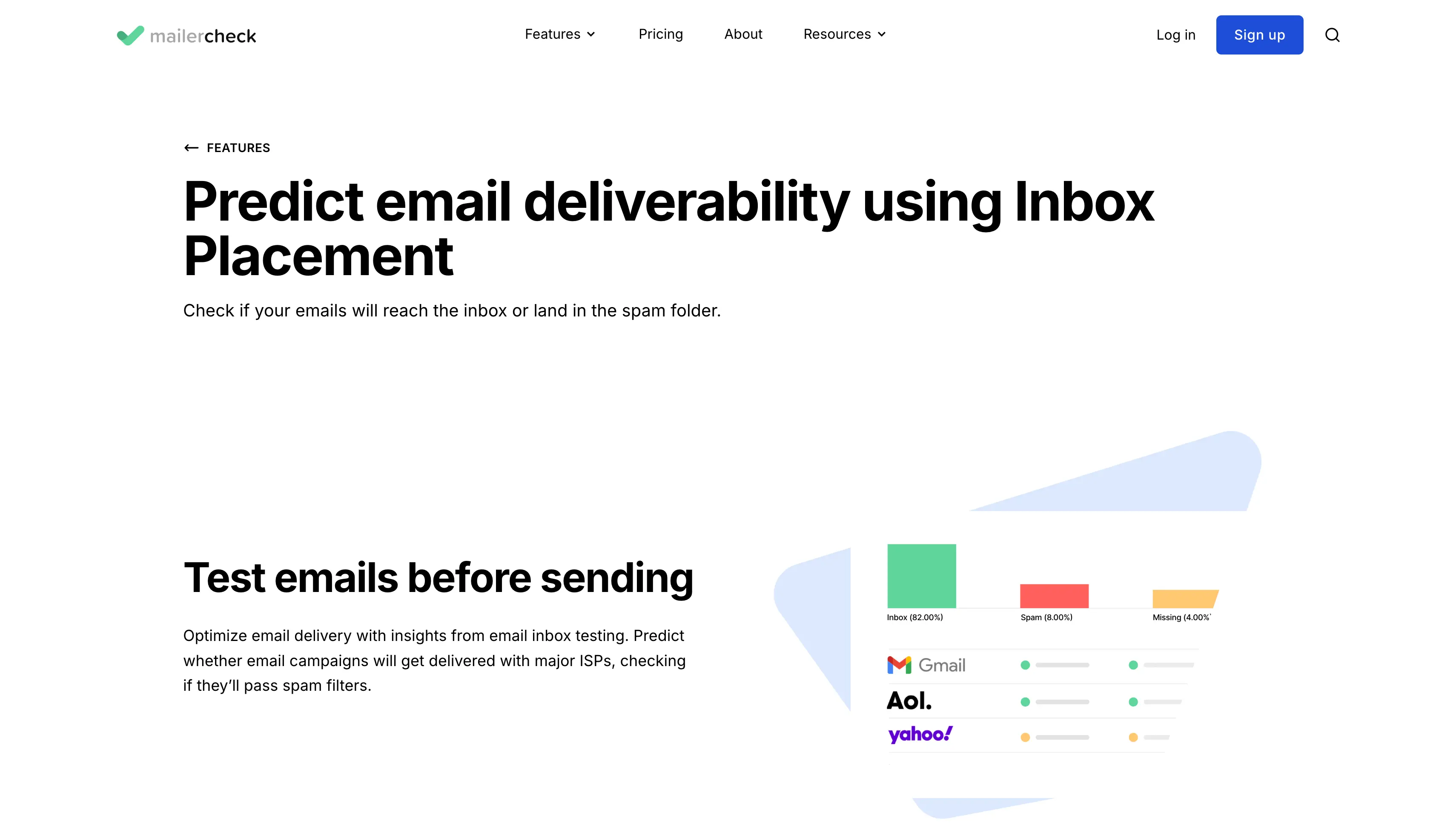
It tells you where messages land and whether your addresses are valid, but it won't build the reputation for you. You'll run it alongside a warmup tool.
Best for: teams that want to test placement and clean their list in one tool.
You send an email from your email service provider to MailerCheck, and it reports whether the message reaches the inbox or the spam folder for each provider.
Each check uses 200 credits, and the result lands inside the Inbox Insights report next to your content and authentication analysis.
There's a lot working in its favor, with a couple of gaps.
Here's what I like about MailerCheck:
Here's what I dislike about MailerCheck:
If you want hands-on diagnostics and help sorting out the cause, Folderly is created for your deliverability needs. It's less a single tool and more an email deliverability platform.
Its Inbox Insights module runs placement tests and reports where you land in Gmail, Outlook, and Yahoo, along with your SPF, DKIM, and DMARC setup.
The spam trigger detection is the feature I find most useful.
It points to the content patterns that set off spam filters and suggests what to change, which is more than most tools do. Users often report better placement after a proper Folderly setup, and the G2 reviews back that up.
Here's where I'd be careful before buying. Folderly prices per mailbox with a minimum commitment, so the cost adds up fast past 10 mailboxes.

And its placement testing, Inbox Insights, is a separate paid product on top of the platform. This is a tool built for funded teams. A solo sender will find it heavy.
If you've got the budget and you'll keep an eye on it, Folderly does a lot of work for you. For a solo sender or a lean team, it's more than you need.
Best for: funded teams that want hands-on diagnostics and reputation repair beyond a simple score.
You connect a mailbox, then send test emails to Folderly's seed list. Inbox Insights reports how many land in inbox, spam, and promotions, and checks your email authentication.
It covers:
You can run the tests two ways:
The results are easy to read, and the setup is smooth. Here's how the good and the bad shake out.
Here's what I like about Folderly:
Here's what I dislike about Folderly:
If you want technical checks like DNS and blacklist status next to placement testing, MxToolbox covers your deliverability needs.
Most people know it for its free SuperTool: DNS lookups, MX record checks, SMTP diagnostics, and blacklist status across more than 100 lists.
That free tier alone is worth saving before you spend on anything else.
What surprises me is that MxToolbox has a proper Inbox Placement product now.
You send to its test inboxes, and it reports placement across the major providers, plus a read on why an email fails.

I run it on a domain that keeps getting a low score, and the blacklist check inside the same tool points straight at the cause.
The bit to understand is the tiers. The free version is just DNS and blacklist lookups.
The seed-based inbox placement testing and continuous domain reputation monitoring live on the paid Delivery Center plans.
MxToolbox won't warm mailboxes or send campaigns either. It's a monitoring and diagnostics layer, best paired with a warmup tool and an actual sending setup.
Best for: anyone who wants technical, DNS, and blacklist checks next to placement testing.
You add MxToolbox's test email addresses to your send, and it reports where each message lands across:
Alongside the placement result, it tracks your domain reputation, authentication records, and blacklist status.
This allows you tie a poor inbox placement number to its technical cause. Here's what stands out and what to keep in mind.
Here's what I like about MxToolbox:
Here's what I dislike about MxToolbox:
The cheapest way to protect a campaign is to test placement before you send. Don't wait until the replies dry up.
Run a free inbox test to see where you stand. The Salesforge Inbox Placement Test tool is free, and Warmforge includes one free placement test a month plus Health Checks on your DNS and blacklist status.
If you want testing, warmup, and infrastructure in one place, start a free 14-day Salesforge trial, no credit card required.
Salesforge includes Warmforge with unlimited warmup slots, so you can have inbox placement monitoring across every mailbox you run.
Inbox placement tools show where your emails land: the primary inbox, the promotions tab, or spam. They send test emails to a seed list across Gmail, Outlook, and Yahoo, then report your inbox placement rate. Many also add sender reputation monitoring, blacklist checks, and SPF, DKIM, DMARC analysis.
Match the tool to your job. Warmforge or MailReach pair testing with warmup, GlockApps gives the most detailed spam score, MailerCheck adds email verification, Folderly handles hands-on reputation repair, and MxToolbox covers DNS and blacklist monitoring. Weigh it against your sending volume and budget.
There's no single best inbox placement tool. The right fit depends on how you send. For placement testing, warmup, and infrastructure under one login, I'd start with Warmforge, free with Salesforge. GlockApps wins on spam analysis, and MailerCheck is strong when clean data matters.
People look for inbox placement tools when reply rates fall but the sending tool still says every email is delivered. That usually means messages land in spam or the promotions tab instead of the main inbox. Cold email campaigns feel it worst, so teams catch authentication issues, spam complaints, and blacklist problems early.
I test all six on live domains, using fresh mailboxes with proper SPF, DKIM, and DMARC records. For each tool I run inbox placement tests across Gmail and Outlook, check how it reports spam versus primary inbox, and read what it says about domain reputation and blacklist status. Where a tool claims a result, I describe what I see.
