Distributed (shared IP pool optimized for cold email)
Scales easily across hundreds of inboxes
Built specifically for cold email with automated DNS & optimized infra
SSL & domain masking + controlled setup
Mailbox-based: $3/mailbox/month
Infraforge
Private (dedicated IPs & servers)
High scalability with full infra control
Advanced deliverability with dedicated IPs & monitoring
Full control over IPs and sending behavior
Mailbox-based: $4/mailbox/month
Inframail
Microsoft-backed dedicated hosting
Very high scaling without per-inbox cost
Stable deliverability with dedicated hosting
Moderate control
Flat pricing: ~$79–$327/month (unlimited inboxes)
Mailreef
Dedicated servers
High scaling with server-based setup
Strong deliverability with isolated servers
Full ownership of infrastructure
Usage-based: ~$240/month + $0.001/email
Mailscale
Self-hosted infrastructure
Scales fast with bulk inbox creation
Deliverability depends more on usage practices
Low infra control
Mailbox-based: ~$1/mailbox/month
1.Primeforge
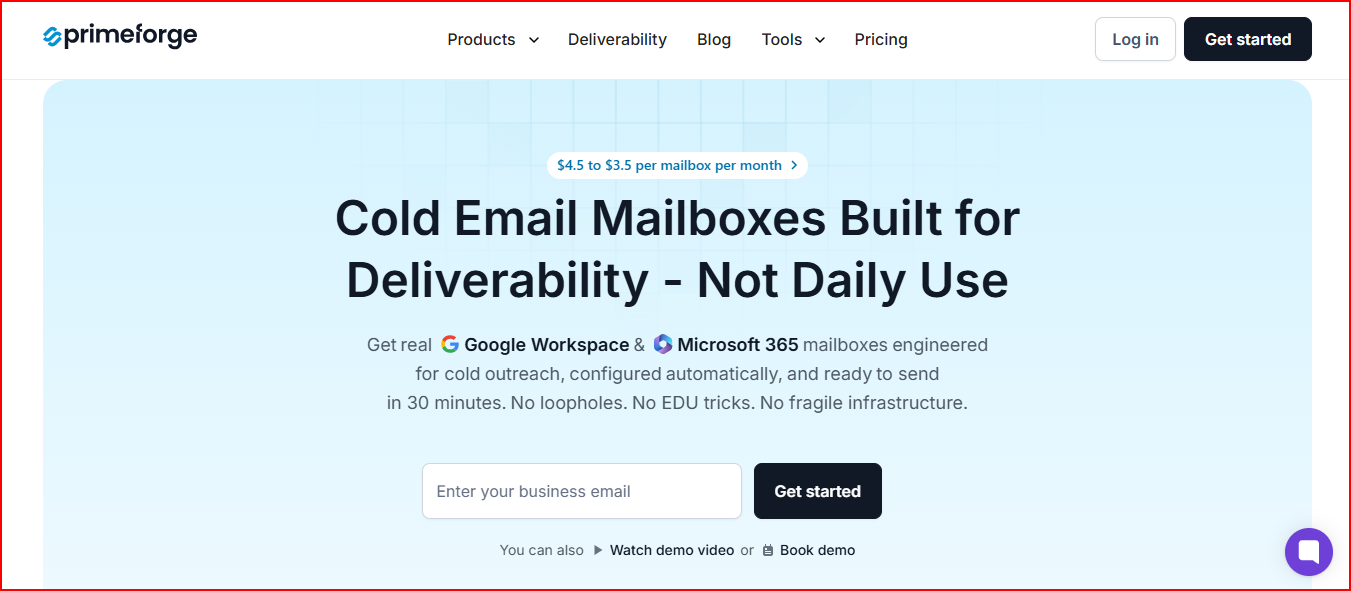
Primeforge is a cold email infrastructure tool that gives you real Google Workspace and Microsoft 365 mailboxes, already configured and optimized for cold outreach.
This image shows the Email Infrastructure with Google Workspace and Microsoft 365 mailboxes optimized for cold email
If you’re comparing it with Inboxkit, both tools use Google and Microsoft mailboxes for infrastructure.
The key difference is in how much control and readiness you get from day one.
Primeforge focuses on giving you fully set up, cold email–ready mailboxes with US-based IP addresses with automated DNS, pre-configured accounts, and a setup designed specifically for outreach workflows.
Inboxkit, on the other hand, provides access to Google, Microsoft 365, and Azure mailboxes within its own managed setup, where you still rely on its system for monitoring, protection, and configuration.
So instead of just providing mailbox access, Primeforge is built to make those mailboxes ready for outreach from day one, with setup and IP environment already aligned for better inbox placement.
With Primeforge, the approach is more straightforward:
Get real Google and Microsoft mailboxes ready for cold outreach
DNS and setup are handled automatically
Mailboxes come pre-configured, so you can start faster
So if you want provider-based inboxes that are already optimized for outreach, Primeforge fits that approach well.
Primeforge felt more practical when I wanted to use Google or Outlook inboxes but without spending time setting everything up manually.
Key Features
Uses real Google Workspace and Microsoft 365 mailboxes built for cold outreach
Sets up DNS automatically with SPF, DKIM, and DMARC
Provides pre-warmed mailboxes so you can start sending faster
Uses US-based IP addresses to keep sending environment more stable
Adds profile pictures and details to mailboxes for better email appearance
Gives API access for managing infrastructure
Pricing
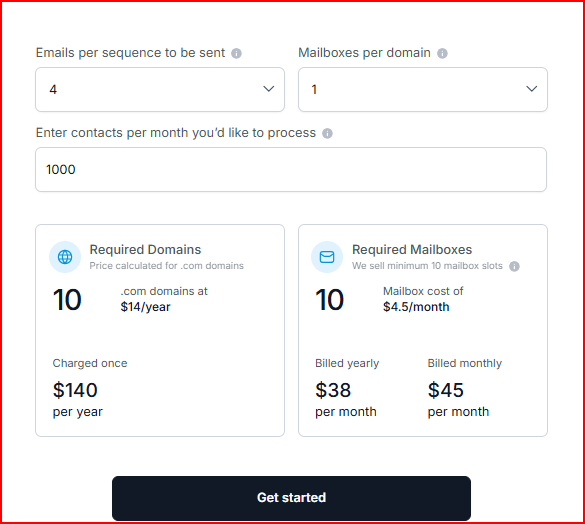
Primeforge pricing is based on per mailbox cost, where you pay for each Google or Microsoft inbox you create.
This image shows the Primeforge pricing
Mailbox Cost
Mailboxes start at $4.5 per month each
You need to take at least 10 mailbox slots
For example, 25 mailboxes would cost around $94/month (yearly billing) or $113/month (monthly)
Domain Cost
Domains cost around $14 per year each
So if you need 9 domains, that comes to about $126/year
Add-ons / Included
Automated DNS setup is included
Inbox hosting and maintenance are included
API access is included
Expert sessions cost $500 for two 1:1 calls
Primeforge pricing felt more structured since you’re paying for fully configured Google and Microsoft mailboxes with ready-to-use setup.
Pros
Helps you send from real Google and Microsoft inboxes without manual setup
Makes it easier to start outreach faster with pre-configured and pre-warmed mailboxes
Improves deliverability by using US-based IP addresses for your sending environment
This image shows the Primeforge user complimenting about its deliverability
Reduces setup effort compared to creating and configuring mailboxes manually
Works smoothly with your existing outreach tools without extra steps
Cons
Requires buying a minimum number of mailbox slots to get started
Focused only on Google and Microsoft mailboxes, limiting other setup options
Personalized Outbound Strategy
Get The Right Outbound Strategy In Minutes
Enter your email to get a custom plan & stack recommendation for your
business
It's being carefully crafted by AI
Please check your mailbox in 5 minutes
2. Mailpool
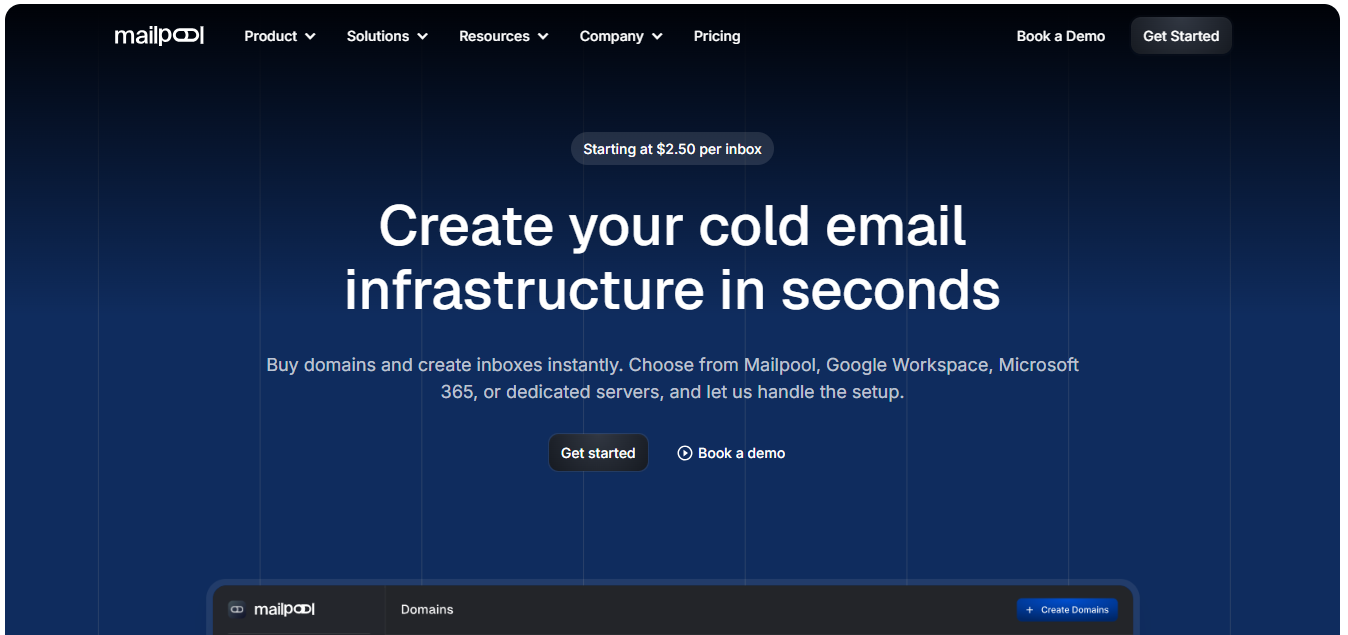
Mailpool is a cold email infrastructure tool that helps you create domains and inboxes across multiple providers from one place, with automated setup and deliverability configuration.
This image shows the Mailpool- Email Infrastructure tool for Google Workspace and Microsoft 365 or dedicated server mailboxes
If you’re comparing it with Inboxkit, both tools help you set up email infrastructure without manual work.
The difference is in flexibility across providers and how you build your setup.
Mailpool lets you create inboxes across Google Workspace, Microsoft 365, shared networks, or even dedicated servers, all within the same platform.
It also handles domain setup, DNS configuration, and deliverability settings automatically, so you can manage everything from one place.
Where Inboxkit follows a more structured setup around its system.
So instead of working within a fixed setup, Mailpool gives you more flexibility to choose how and where you create your inboxes, depending on your needs.
With Mailpool, the approach is more straightforward:
Create domains and inboxes across multiple providers
DNS and deliverability setup are handled automatically
Connect everything to your tools in one click
So if you want a setup where you can mix different providers and manage everything from one place, Mailpool fits that approach well.
For me, Mailpool felt more flexible when I wanted to manage different types of inbox setups without switching between multiple tools.
Key Features
Creates inboxes across Google, Outlook, shared network, or dedicated servers
Handles DNS automatically with SPF, DKIM, and DMARC
Lets you purchase or import domains in bulk
Supports unlimited inbox rotation for scaling
Provides AI domain generator for creating domains
Works with 300+ integrations and APIs
Allows bulk inbox creation and connection to tools
Includes blacklist monitoring and deliverability setup
Pricing
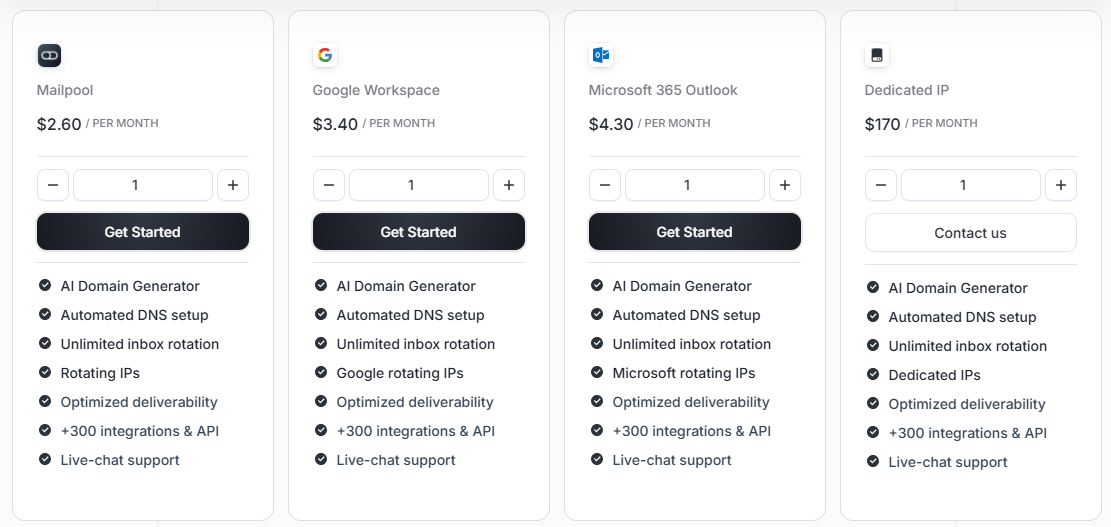
Mailpool pricing is usage-based, where cost depends on the type of inbox provider you choose and how many inboxes you create.
This image shows the Mailpool pricing
Mailbox Cost
Mailpool inboxes start at $2.60 per mailbox/month
Google Workspace inboxes → $3.40 per mailbox/month
Microsoft 365 inboxes → $4.30 per mailbox/month
Domain Cost
Domain pricing not fixed (depends on TLD and selection)
Add-ons / Options
Dedicated IP → $170/month
Dedicated infrastructure → custom pricing
Includes DNS setup, inbox rotation, integrations, and API access
Mailpool pricing felt more flexible since you can choose different providers and pay based on the type of inbox you use.
Where Inboxkit follows fixed plans with mailbox slots, and you end up paying extra as you scale beyond those limits.
Pros
Lets you create inboxes across multiple providers from one place
Makes it easier to scale with unlimited inbox rotation
Reduces setup work with automated DNS and deliverability setup
Keeps everything centralized, so you don’t need multiple tools
Gives flexibility to choose between shared, provider-based, or dedicated setups
Cons
Domain pricing is not fixed and depends on what you choose
Advanced setups like dedicated infrastructure come at higher cost
3. Zapmail
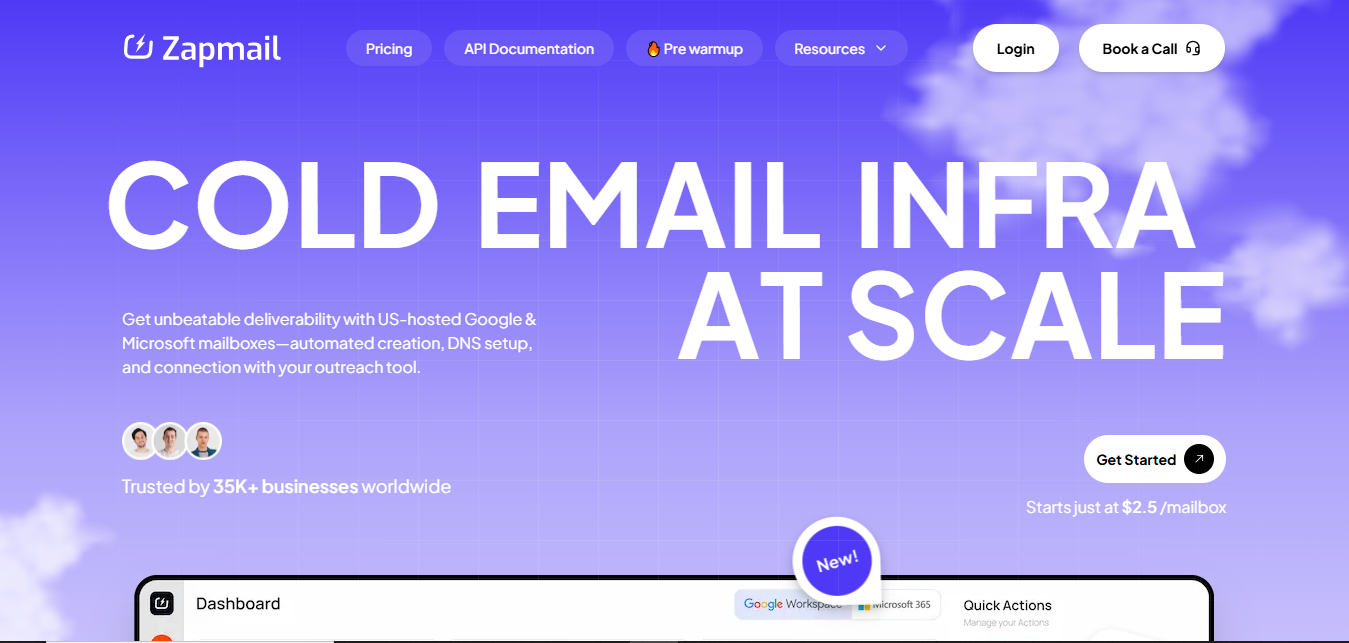
Zapmail is a cold email infrastructure tool that helps you set up Google Workspace and Microsoft 365 mailboxes with automated setup and pre-warmed accounts ready for outreach.
This image shows the Zapmail - Email Infrastructure for Google and Microsoft mailboxes
If you’re comparing it with Inboxkit, both tools use Google and Microsoft mailboxes for infrastructure.
The difference is in how quickly you can start and how the setup is structured.
Zapmail focuses on giving you pre-warmed mailboxes with US-based IPs, along with automated DNS setup and workspace-level isolation, so you can start sending without waiting for warmup.
But Inboxkit, on the other hand, requires going through setup and warmup as part of its process, rather than giving mailboxes that are ready to send from the start.
So instead of going through setup and warmup steps, Zapmail is designed to let you start sending from day one with ready-to-use mailboxes.
With Zapmail, the approach is more straightforward:
Get pre-warmed Google and Microsoft mailboxes
DNS and setup are handled automatically
Connect directly to your outreach tool and start sending
So if you want a setup where you can skip warmup and start faster, Zapmail fits that approach well.
Zapmail felt more useful when I wanted to skip the waiting time and start campaigns with mailboxes that were already ready to go.
Key Features
Provides pre-warmed Google Workspace and Microsoft 365 mailboxes
Uses US-based IPs to improve deliverability setup
Handles DNS automatically with SPF, DKIM, and DMARC
Lets you manage one domain per workspace for better isolation
Works with 50+ outreach and sending tools
Allows you to bring your own domain or buy new ones
Supports bulk mailbox creation and setup
Includes domain management and forwarding options
Pricing
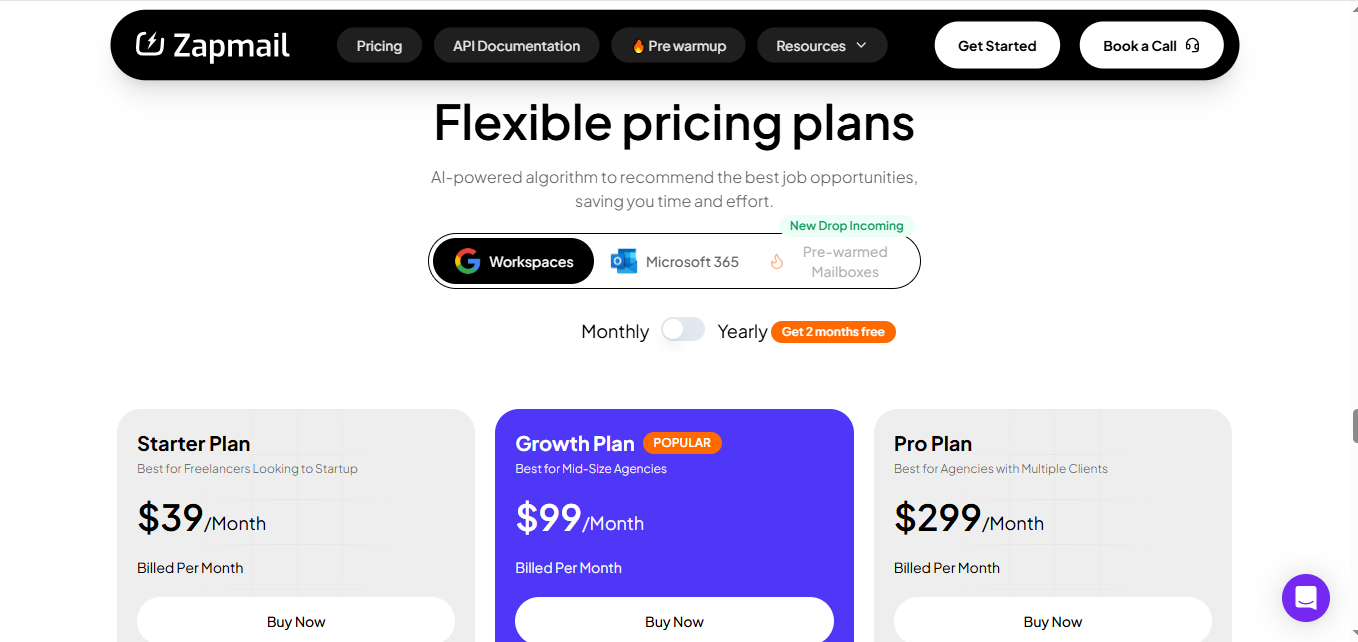
Zapmail pricing is plan-based, where each plan includes a fixed number of pre-warmed inboxes and you pay more as you scale.
This image shows the Zapmail pricing
Mailbox Cost
Starts at $2.5 per mailbox/month
Starter plan: $39/month includes 10 mailboxes
Growth plan: $99/month includes 30 mailboxes
Pro plan: $299/month includes 100 mailboxes
Additional mailboxes cost around $3–$3.5 each
Domain Cost
Around $13 per year for a .com domain
Add-ons / Included
Pre-warmed mailboxes included
Automated DNS setup included
Integrations with outreach tools included
Placement test credits included based on plan
Zapmail pricing felt more ready-to-use since plans already include pre-warmed mailboxes and setup, so you can start without extra steps.
Pros
Let's you start sending immediately with pre-warmed mailboxes
Keeps setups isolated with one domain per workspace
Makes it easier to connect with multiple outreach tools quickly
Handles setup and configuration without manual work
This image shows the Zapmail user talking about its automated setup
Cons
Setup is tied to workspace structure (one domain per workspace), which may limit flexibility for some setups
Scaling means moving across plans, not just adding exactly what you need
4. Hypertide
Hypertide is a cold email infrastructure tool that automates inbox setup across Google, Microsoft, and Azure (Entra), so you can manage everything from one place without manual work.
This image shows the Hypertide- Email Infrastructure provider for Google, Microsoft and Entra mailboxes
If you’re comparing it with Inboxkit, both tools use Google, Microsoft, and Azure-based inboxes.
The difference is in automation and how the setup is delivered.
Hypertide focuses on fully automated setup within a few hours, with tenant-level isolation where each setup has its own domains, IPs, and users.
This helps keep your infrastructure separate and reduces the risk of shared reputation issues.
Inboxkit, on the other hand, follows a more structured setup process where configuration and scaling take more steps within its system.
So instead of relying on manual or step-by-step setup, Hypertide is built to automate the entire infrastructure process and deliver ready setups faster.
With Hypertide, the approach is more straightforward:
Set up inboxes across Google, Microsoft, and Azure automatically
DNS and configuration are pre-handled
Get isolated setups for better deliverability
So if you want a setup where everything is automated and ready within hours, Hypertide fits that approach well.
Hypertide felt more useful when I wanted a faster setup without relying on manual processes or extra steps.
Key Features
Automates inbox setup across Google, Microsoft, and Azure (Entra)
Uses tenant separation to isolate domains, IPs, and users
Delivers ready-to-use inboxes within 4–6 hours
Works with sending tools like Smartlead, Instantly, and Bison
Includes bulk warmup tools for managing setups
Allows managing multiple clients and inboxes from one dashboard
Supports domain purchase or bringing your own domains
Pricing
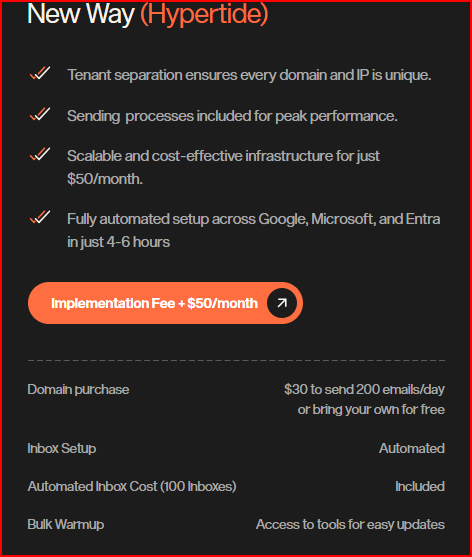
Hypertide pricing is based on orders; you pay a fixed monthly cost for a bundle of inboxes and sending capacity.
This image shows the Hypertide pricing
Base Plan → $50/month per order (+ one-time setup fee)
Includes automated setup, 100 inboxes, and ~5,000 emails/month sending capacity
Pros
Delivers ready-to-use inboxes within a few hours
Keeps setups isolated with tenant-level separation
Makes it easier to manage multiple clients from one place
Combines multiple providers into one workflow
Cons
Requires a one-time setup fee before getting started
Fixed structure per order limits flexibility in scaling small changes
Sending capacity is capped per order
Requires warmup before starting campaigns
5.Mailforge
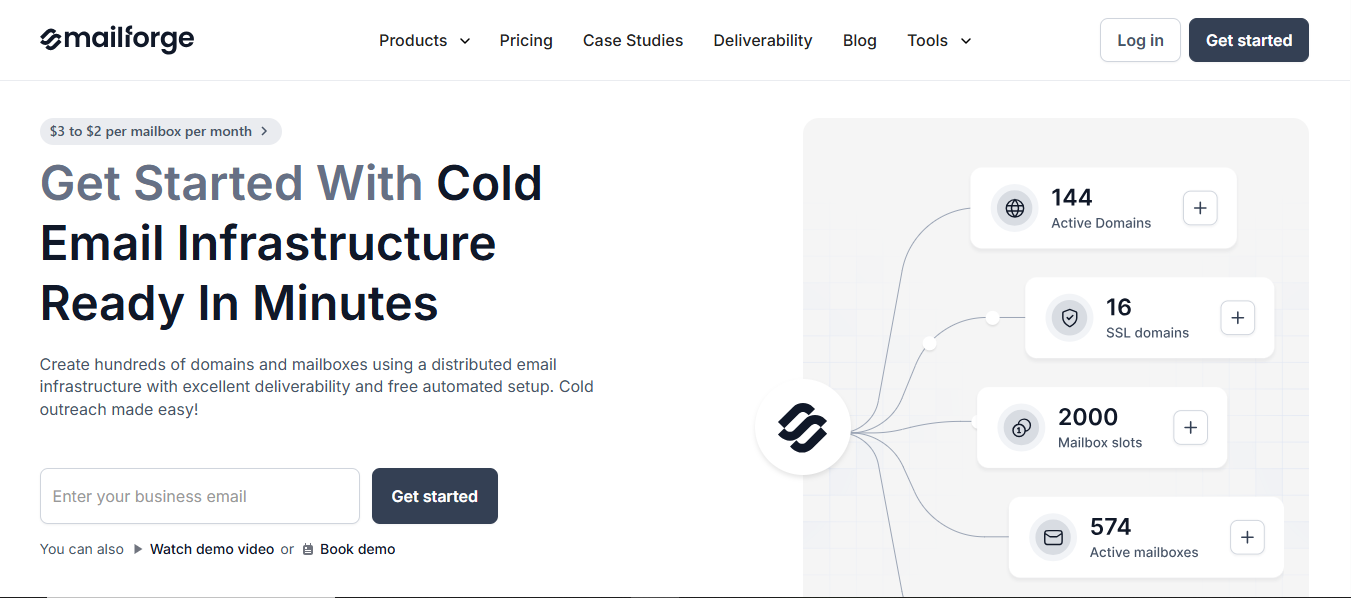
Mailforge is a cold email infrastructure tool that helps you create domains, set up mailboxes, and handle DNS automatically without manual work.
This image shows the Mailforge - Email Infrastructure with Share IPs
If you’re comparing it with Inboxkit, both tools solve the same core problem: setting up email infrastructure for outreach.
The difference is in how they approach it.
Mailforge uses its owndistributed infrastructure with shared IP setup, designed specifically for cold outreach.
The focus is on keeping things simple; you can set up domains and mailboxes in minutes, DNS is handled automatically, and you don’t have to deal with technical steps.
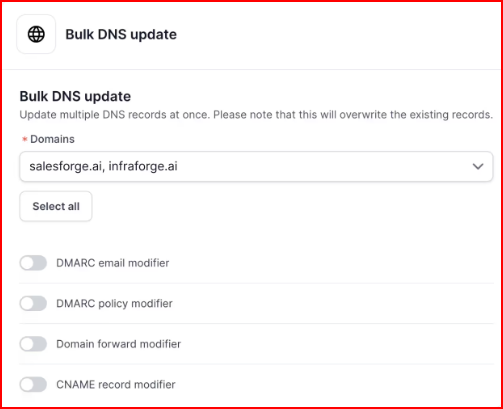
It also supports bulk DNS update when you’re working with multiple domains, lets you manage everything across different workspaces, and works with any sending software you’re already using.
This image shows the Mailforge bulk DNS setup
On top of that, options like domain transferring and SSL with domain masking help keep your setup flexible and secure as you scale.
Inboxkit, on the other hand, uses Google, Microsoft 365, and Azure mailboxes, where the infrastructure depends on these providers.
With Mailforge, the approach is more straightforward:
Set up domains and mailboxes in minutes
DNS is handled automatically
Connect to sending tools and start sending
So if you want a setup that feels simple, quick to launch, and easy to scale, Mailforge fits that approach well.
Mailforge felt easier when I just wanted to get everything set up quickly and start without overthinking the technical side.
Key Features
Handles DNS automatically by setting up SPF, DKIM, and DMARC for you
Let's you update DNS for multiple domains at once when you’re scaling
Works with any sending software you’re already using
Allows you to manage everything across different workspaces
Supports domain transferring, so moving and managing domains is easier
This image shows the Mailforge user talking about how they like easy and bulk setup
Keeps your domains and mailboxes portable, so you don’t have to rebuild your setup
“Setting up new domains and mailboxes is quick, and they stay portable - if we ever change tools, we can take everything with us without drama.” - Colin Graham, Trustpilot
Reduces manual work by handling DNS and setup for you
Makes it easier to manage large setups with bulk DNS updates
Gives you the flexibility to use any sending tool without changing your infrastructure
Cons
You need to buy a minimum of 10 mailboxes to get started.
Some controls, like SSL and domain masking, come as add-ons
6.Infraforge
Infraforge is a private cold email infrastructure tool that lets you create domains and mailboxes using dedicated IP addresses, giving you more control over how your emails are sent.
This image shows the Infraforge – Private cold email infrastructure with dedicated IPs
If you’re comparing it with Inboxkit, both help you set up email infrastructure without manual work.
The difference is in control and ownership of the sending environment.
Infraforge is built around a private infrastructure model, where each mailbox can run on dedicated IPs, along with features like sender rotation, smart sending limits, and real-time monitoring, all designed to help you scale without hurting deliverability.
Inboxkit, on the other hand, is built on Google, Microsoft 365, and Azure mailboxes, so the infrastructure and sending environment depend on these providers.
So instead of relying on provider-based setups, Infraforge gives you more direct control over your infrastructure, IPs, and sending behavior, especially when you’re scaling heavily.
With Infraforge, the approach is more straightforward:
Set up domains and mailboxes with dedicated IPs
DNS and setup are handled automatically
Control sending with rotation, limits, and monitoring
So if you want more control over deliverability and infrastructure as you scale, Infraforge fits you well.
For me, Infraforge felt more powerful when I needed full control over how emails are sent instead of relying on provider-based setups.
Key Features
Uses dedicated IP addresses for each mailbox setup
Handles DNS automatically with SPF, DKIM, and DMARC
Includes Masterbox to manage all emails in one place
Gives API access to manage infrastructure
Pricing
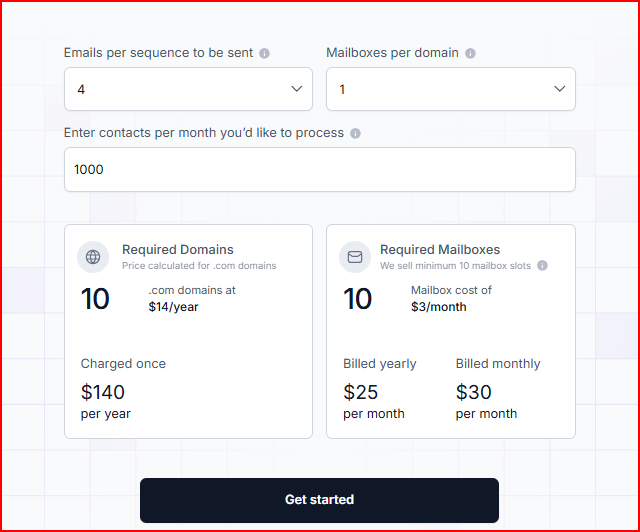
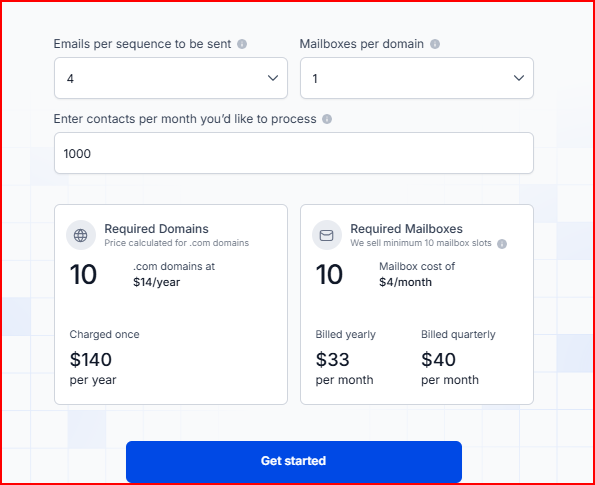
Infraforge pricing follows a modular model; you pay per mailbox and can add dedicated IPs separately based on your setup.
This image shows the Infraforge pricing
Mailbox Cost
Mailboxes start at $4 per month each
You need to take at least 10 mailbox slots
For example, 25 mailboxes would cost around $83/month (yearly billing) or $100/month (quarterly)
Domain Cost
Domains cost around $14 per year each
So if you need 8 domains, that comes to about $112/year
Add-ons
SSL & domain masking → $2/domain/month or $6/year
Dedicated IP → $99 per IP/month
Masterbox → $7/workspace/month (yearly) or $9/month (quarterly)
Expert sessions → $500 for two 1:1 calls
Infraforge pricing felt more flexible when I needed deeper control, since I could choose things like dedicated IPs and scale the setup based on how I want to run it.
Pros
Gives you full control over your sending setup with dedicated IPs
Helps manage deliverability better with sender rotation and smart limits
Catches issues early and saves from the deliverability drop
“Their monitoring and alerting tools are straightforward yet powerful, which gives me peace of mind that I’ll know if something goes wrong before it becomes a real issue.”- Infraforge user, Trustpilot
Makes it easier to scale large setups without relying on shared environments
Reduces the risk of affecting multiple mailboxes since the infrastructure is more isolated
Let's you manage everything in one place with monitoring and Masterbox
Cons
Some advanced controls, like dedicated IPs, come as add-ons
7.Inframail
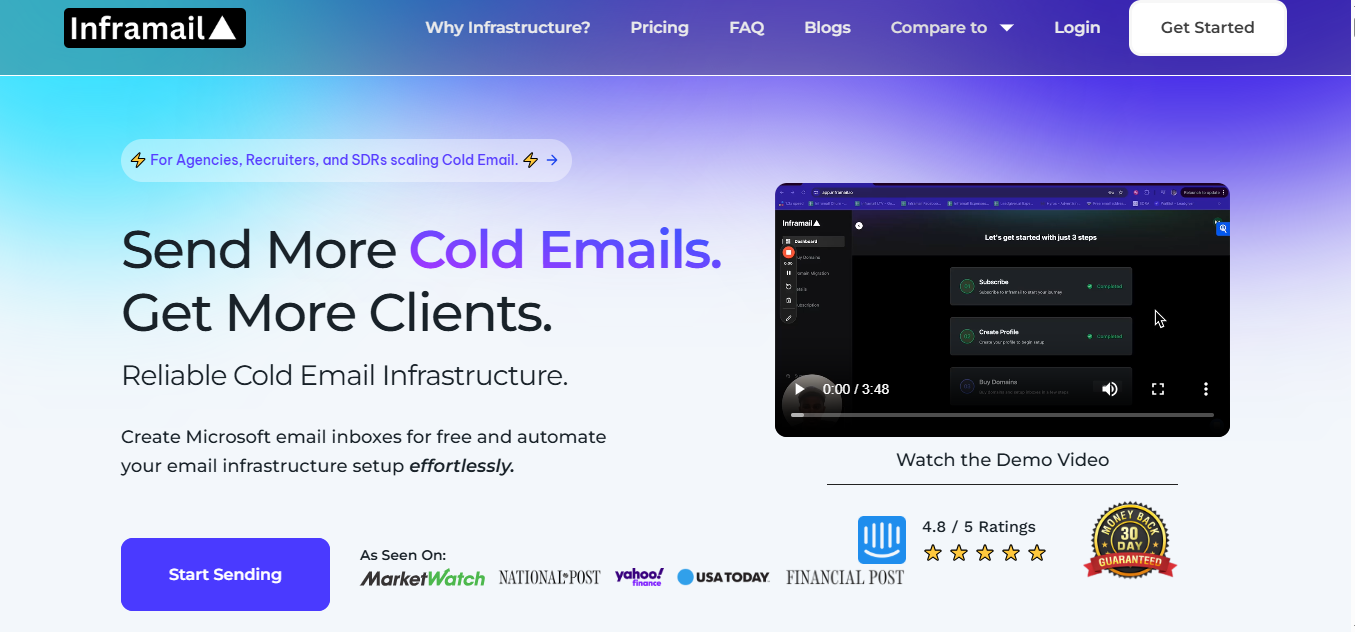
Inframail is a cold email infrastructure tool that helps you create and manage email inboxes at scale, with automation handling most of the setup work.
This image shows the Inframail – Cold email infrastructure for creating inboxes at scale
If you’re comparing it with Inboxkit, both tools help you set up email infrastructure without manual DNS work.
The difference is in how pricing and scaling are structured.
Inframail focuses on a flat pricing model with unlimited inboxes, where you don’t pay per mailbox.
It also runs on Microsoft-backed infrastructure with dedicated hosting, so you can create multiple inboxes quickly without worrying about per-inbox costs.
Inboxkit, on the other hand, follows a per-mailbox and plan-based model, where scaling means adding more mailbox slots and paying accordingly.
So instead of paying for each mailbox, Inframail is designed to let you scale inboxes freely within a fixed plan, especially useful when you're running large outreach setups.
With Inframail, the approach is more straightforward:
Create unlimited inboxes under a fixed plan
DNS and setup are handled automatically
Scale outreach without worrying about per-inbox cost
So if you want a setup where scaling inboxes doesn’t directly increase cost, Inframail fits that approach well.
For me, Inframail felt more cost-efficient when I needed to create a large number of inboxes without tracking per-mailbox pricing.
Key Features
Allows you to create unlimited inboxes under one plan
Handles DNS setup automatically with SPF, DKIM, and DMARC
Runs on Microsoft-backed infrastructure with dedicated hosting
Supports domain purchase and transfer within the platform
Works with sending tools like Instantly, Smartlead, and others
Provides automation for inbox setup and configuration
Pricing
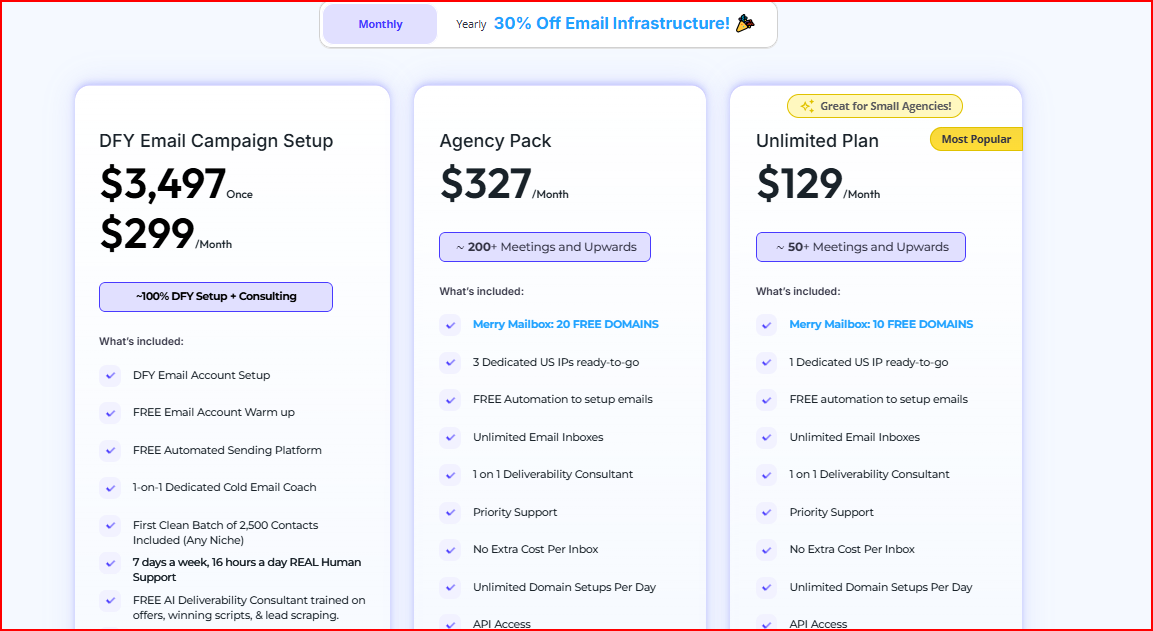
Inframail pricing is flat; you pay a fixed monthly cost and can create unlimited inboxes within that plan.
This image shows the Inframail pricing
DFY Email Setup Plan → $499/month (+ $3,497 one-time)
Done-for-you setup with inbox creation, warmup, contacts, and support included
Unlimited Plan → $129/month
Includes unlimited inboxes with 1 dedicated US IP and supports moderate sending volume
Agency Plan → $327/month
Includes unlimited inboxes with 3 dedicated US IPs and supports higher sending volume
Pros
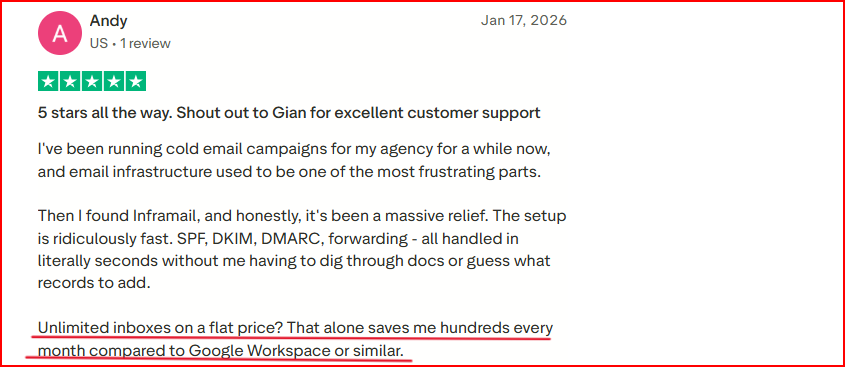
Lets you scale inboxes without worrying about per-mailbox cost
Makes it easier to create large setups quickly with automated configuration
This image shows the Inframail user talking about its flat pricing
Reduces cost when running high-volume outreach setups
Includes dedicated hosting, so your setup stays isolated
Cons
It requires a warm-up with a separate warm-up tool before sending campaigns
Doesn’t include domains in pricing
Plan limits are based on sending volume, not just infrastructure
8.Mailreef
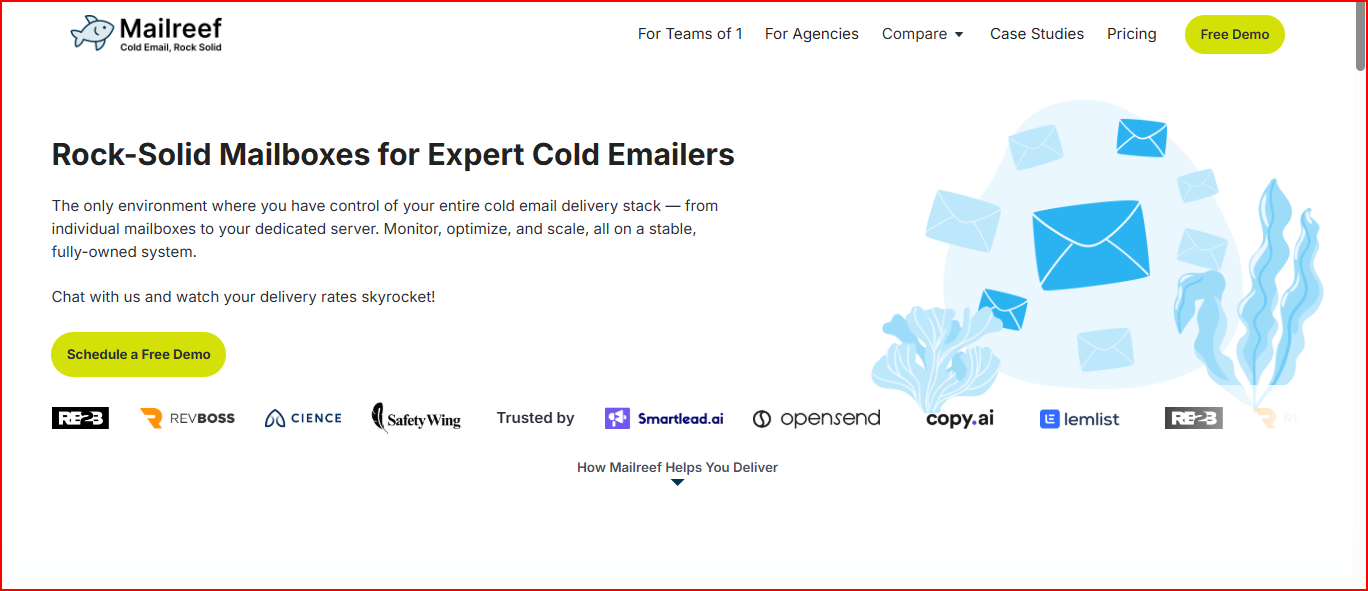
Mailreef is a cold email infrastructure tool that gives you a fully dedicated email setup, including your own mail server and dedicated IP, so you have full control over deliverability.
This image shows the Mailreef – Dedicated mail server infrastructure for cold email
If you’re comparing it with Inboxkit, both help you set up email infrastructure for outreach.
The difference is in ownership and control of the environment.
Mailreef is built around a fully dedicated server setup, where you control everything, from mailboxes to IP reputation, without sharing resources or relying on rotating systems.
Where Inboxkit uses Google, Microsoft 365, and Azure mailboxes, where the infrastructure depends on these providers.
So instead of using provider-based mailboxes, Mailreef gives you a fully owned environment, where your setup is isolated and fully under your control.
With Mailreef, the approach is more straightforward:
Control deliverability directly at the server level
So if you want a setup where you fully control your infrastructure and deliverability, Mailreef fits that approach well.
Mailreef felt more suited when control and stability mattered more than convenience.
Key Features
Runs on fully dedicated mail servers instead of shared environments
Uses dedicated IP addresses for each setup
Allows you to create mailboxes instantly with one-click setup
Supports unlimited inboxes within your server
Handles DNS setup automatically with SPF, DKIM, and DMARC
Lets you bring your own domains or purchase new ones
Includes server and mailbox monitoring
Works with sending tools like Smartlead and Instantly
Pricing
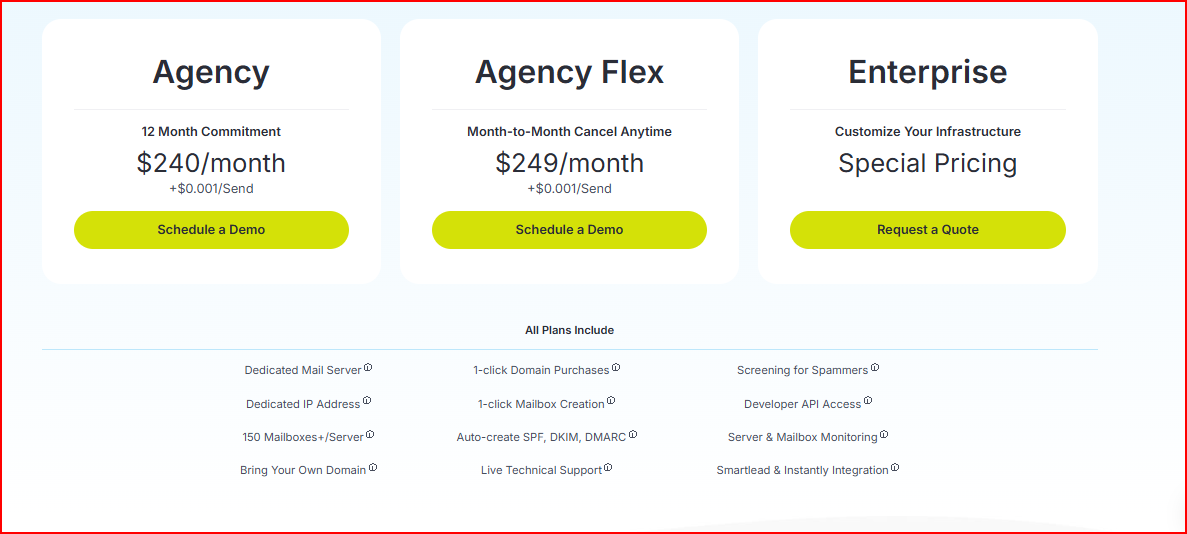
Mailreef pricing is server-based, where you pay a base monthly cost plus usage depending on how many emails you send.
This image shows the Mailreef pricing
Agency Plan → $240/month (+ $0.001 per email sent)
Requires 12-month commitment and includes a full dedicated server setup
Agency Flex Plan → $249/month (+ $0.001 per email sent)
Same setup as the Agency plan, but with monthly flexibility
Enterprise Plan → Custom Pricing
Fully customized infrastructure based on your setup needs
Mailreef pricing felt more infrastructure-focused since you’re paying for a dedicated server and sending volume rather than individual inboxes.
Pros
Gives you full control over your sending environment with dedicated servers
Keeps your infrastructure isolated, so other users don’t affect your deliverability
Makes it easier to maintain stability at scale without shared setups
Allows you to manage deliverability directly at the server level
Supports large-scale outreach with high reliability
Cons
Requires more technical understanding compared to plug-and-play tools
Pricing includes sending cost per email, which adds up at scale
9.Mailscale
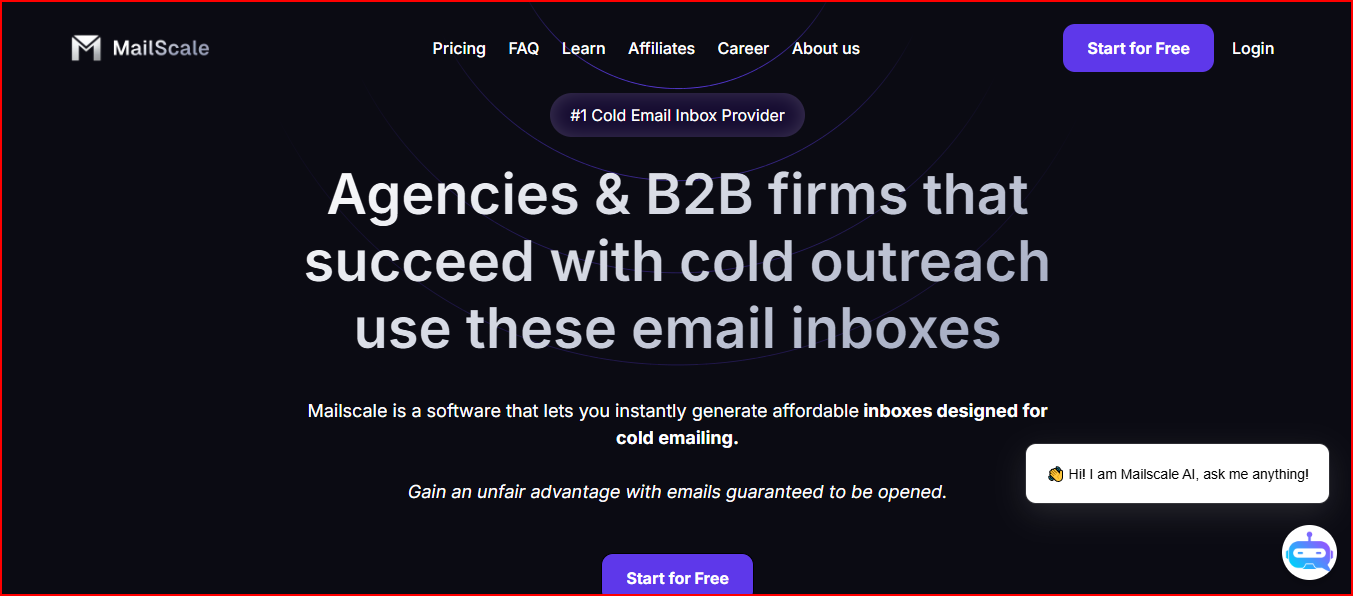
Mailscale is a cold email infrastructure tool that helps you generate large numbers of email inboxes quickly, without manual setup.
This image shows the Mailscale – Cold email inbox provider with the most affordable cost
If you’re comparing it with Inboxkit, both tools help you create inboxes for cold outreach.
The difference is in speed, cost, and how the infrastructure is handled.
Mailscale focuses on instant inbox creation at a lower cost, where you can generate dozens or even hundreds of inboxes in seconds, with the setup and deliverability handled for you.
Inboxkit, on the other hand, follows a more structured setup process, where creating and scaling inboxes takes more steps and depends on its system.
So instead of going through a setup-heavy process, Mailscale is designed to let you spin up inboxes quickly and scale outreach faster.
With Mailscale, the approach is more straightforward:
Generate multiple inboxes in seconds
Skip manual DNS and technical setup
Export and connect inboxes directly to your sending tool
So if you want a setup where speed and cost matter more than control, Mailscale fits that approach well.
For me, Mailscale felt more useful when I wanted to quickly create a large number of inboxes without spending time on setup.
Key Features
Generates multiple inboxes in seconds
Handles DNS setup automatically with SPF, DKIM, and DMARC
Works with almost any sending tool via SMTP/IMAP
Allows you to bring or buy domains inside the platform
Provides CSV export for easy integration with sending tools
Includes deliverability monitoring and support
Offers training and resources for cold outreach
Pricing
Mailscale pricing is not listed Publically, yet it provides some info about mailbox and domain prices.
Mailbox Cost
Starts as low as $1 per mailbox/month (based on plan)
Domain Cost
Domains cost around $10–$15/year
Bringing your own domain costs around $2 per domain
Pros
Lets you spin up dozens or hundreds of inboxes in minutes, which makes testing and scaling much faster
Cuts down setup time heavily compared to manual Google or Outlook configurations
Reduces cost significantly compared to traditional mailbox setups
This image shows the Mailscale user talking about its fast setup and cheap pricing
Cons
Requires warmup before starting campaigns
Requires managing a high number of inboxes to scale effectively, which can get hard to track
Deliverability depends on following best practices rather than infrastructure control alone
Bringing your own domains doesn’t guarantee the same deliverability setup
Personalized Outbound Strategy
Get The Right Outbound Strategy In Minutes
Enter your email to get a custom plan & stack recommendation for your
business
It's being carefully crafted by AI
Please check your mailbox in 5 minutes
Which Inboxkit Alternative should you choose?
Here’s a quick way to decide based on what you actually need:
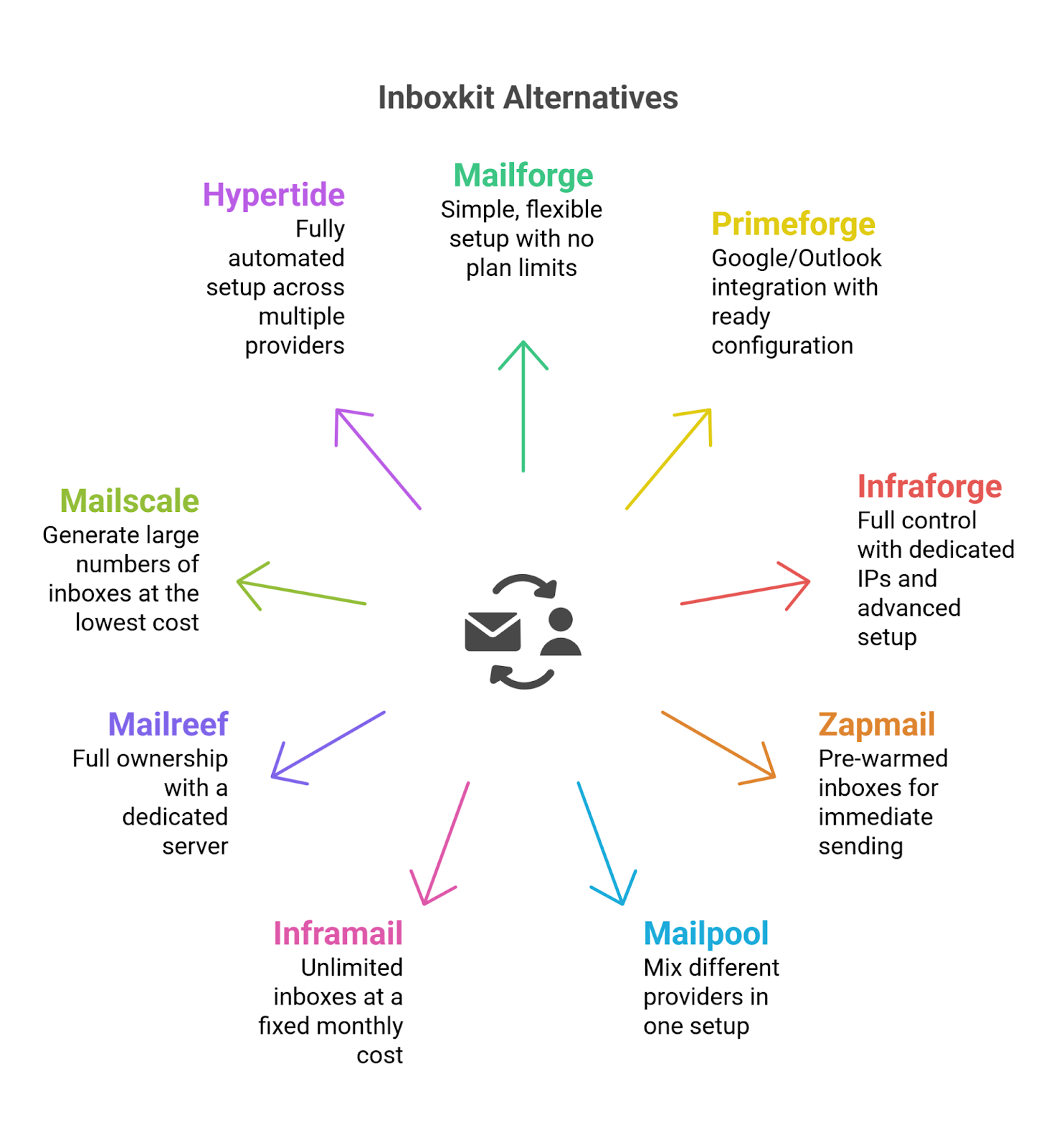
This image shows the Inboxkit Alternatives
Primeforge → Best if you want Google or Outlook inboxes with ready configuration
Mailpool → Best if you want flexibility to mix different providers in one setup
Zapmail → Best if you want pre-warmed inboxes ready to send immediately
Hypertide → Best if you want fully automated setup across multiple providers
Mailforge → Best if you want a simple, flexible setup with its own distributed infrastructure that scales without plan limits
Infraforge → Best if you want full control with dedicated IPs and advanced setup
Inframail → Best if you want unlimited inboxes under a fixed monthly cost
Mailreef → Best if you want full ownership with a dedicated server setup
Mailscale → Best if you want to generate large numbers of inboxes at the lowest cost
If you’re unsure where to start, Mailforge is the easiest option to begin with, it gives you a balanced setup without adding extra complexity.