Instantly is well known for helping teams scale cold email with unlimited sending accounts and built-in warmup.
But what if you need more than just sending emails?
The Growth plan starts at $47/month and covers the core email outreach features. You get unlimited email accounts and warmup, but things like lead generation and CRM features come separately.
So the price you see on the pricing page may not be the full cost of running your outreach.
Instantly is still a strong option for cold email. It has a 4.8/5 rating on G2 from thousands of reviews, and the ability to manage unlimited sending accounts makes it popular with teams running campaigns at scale.
For this comparison, I looked at what users like on G2, what they complain about on Trustpilot and Reddit, and what each platform actually offers for the price.
Here are the best Instantly alternatives in 2026, compared on features, pricing, limitations, and overall value.
TL;DR of Top Instantly.ai Alternatives for Cold Email Outreach
Salesforge: It runs email and LinkedIn in one sequence, with unlimited mailboxes and unlimited LinkedIn senders and no seat pricing. It is the only tool here that covers the sequencer, both channels, the reply inbox, and the warmup on a single plan.
Smartlead: It gives you unlimited mailboxes on every tier and a Master Inbox that does the same job as the Unibox. The agency white-label is stronger than Instantly's, though it is still email only.
Lemlist: It is the strongest tool here for personalization, with dynamic images, custom landing pages, and Lemwarm on every plan. The Email plan now prices on volume instead of seats.
Let's now understand what challenges users are facing while using Instantly.
Why People Leave Instantly Cold Email Software
Instantly does email well. You get unlimited sending accounts, automated warm-up, and inbox rotation. AI reply detection and campaign tracking come with it.
The problems start where email stops. Here is what keeps coming up on G2, Trustpilot, and r/coldemail.
There is no multichannel outreach: Instantly has no native LinkedIn automation and no direct messaging. A sequence cannot mix email with a LinkedIn touch. If you want multi-touch outreach, you need a second tool.
The warm-up is uneven across providers: One G2 reviewer said the warming feature is not as efficient for other inbox providers. On r/coldemail, users report mailboxes reading healthy while campaigns still land in spam. A warmup score is not the same as inbox placement.
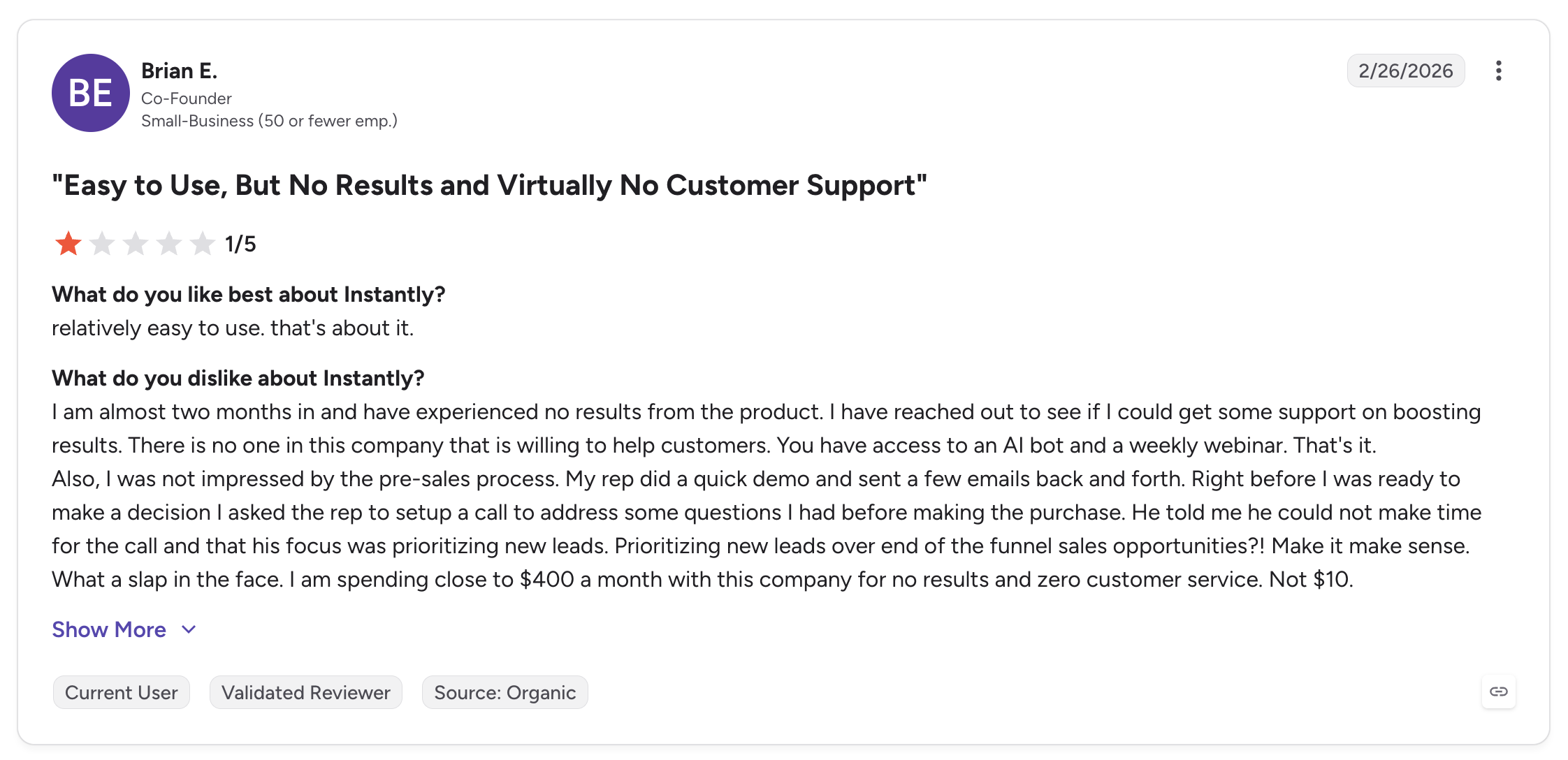
Support is hard to reach: This is the most repeated complaint on every review site. One co-founder wrote that after two months with no results, nobody at the company would help him. He got an AI bot and a weekly webinar, while paying close to $400 a month.
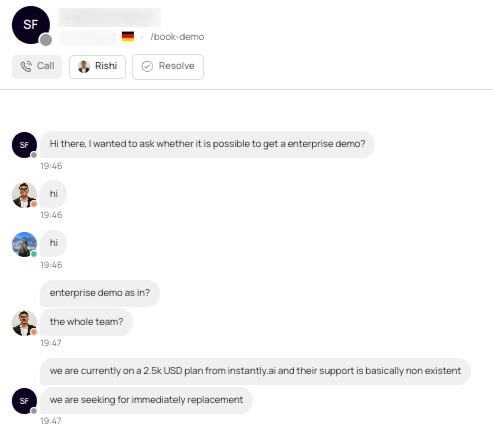
Before looking at the other limitations, let me share one point worth mentioning from a Salesforge demo chat. We received a similar complaint about Instantly’s support. Check the screenshot below.
Inbound to Salesforge chat, and company details are redacted for privacy.
The team was paying $2,500/month for Instantly.ai, but said its support was “basically non existent.” They were looking for an immediate replacement and reached out to Salesforge for an enterprise demo.
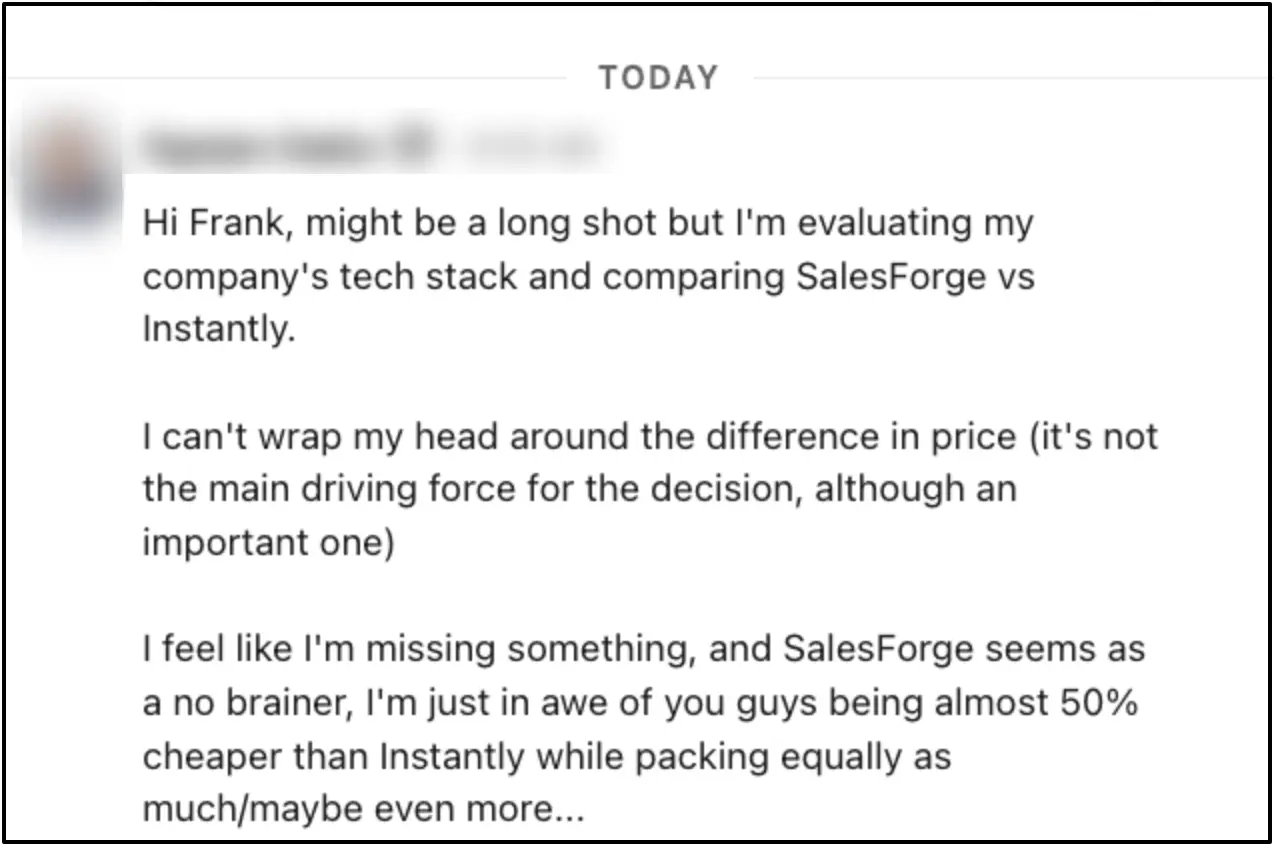
The pricing is hard to follow: Outreach, Credits, CRM, and Inbox Placement are four separate subscriptions. Reviewers say the structure makes it hard to know what a plan really costs. The $47 headline covers sending only, so a working setup runs $124 to $180 a month. One Salesforge customer noticed the same difference when comparing the two platforms, pointing out that Salesforge offers much more for the price:
A customer’s honest take after comparing Salesforge with Instantly:
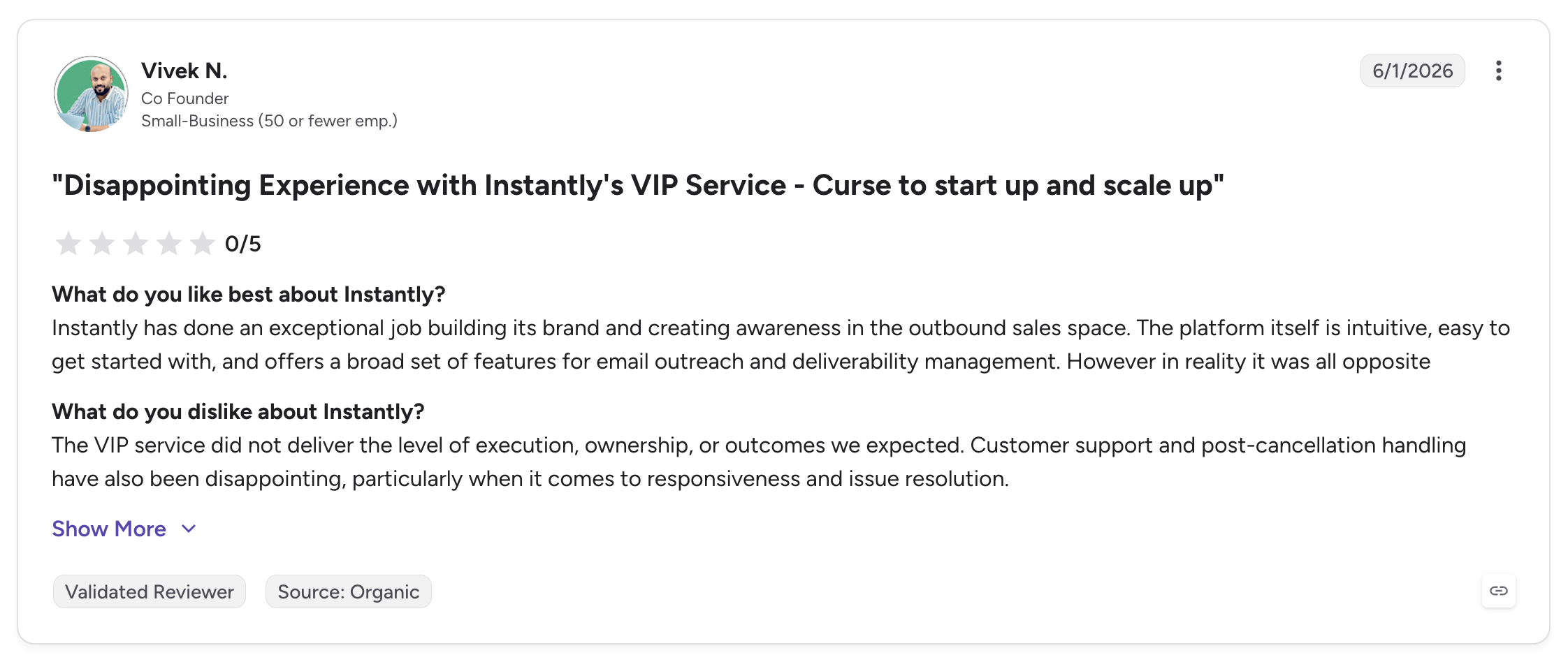
The VIP and Done-For-You services disappoint: One co-founder rated the VIP service 0 out of 5. He said it never delivered the execution or the outcomes his team expected. Domains bought through the Done-For-You service also stay with Instantly when you leave.
Integrations are limited: One reviewer tried to connect Instantly to the rest of their stack. Slack was the only one that worked properly.
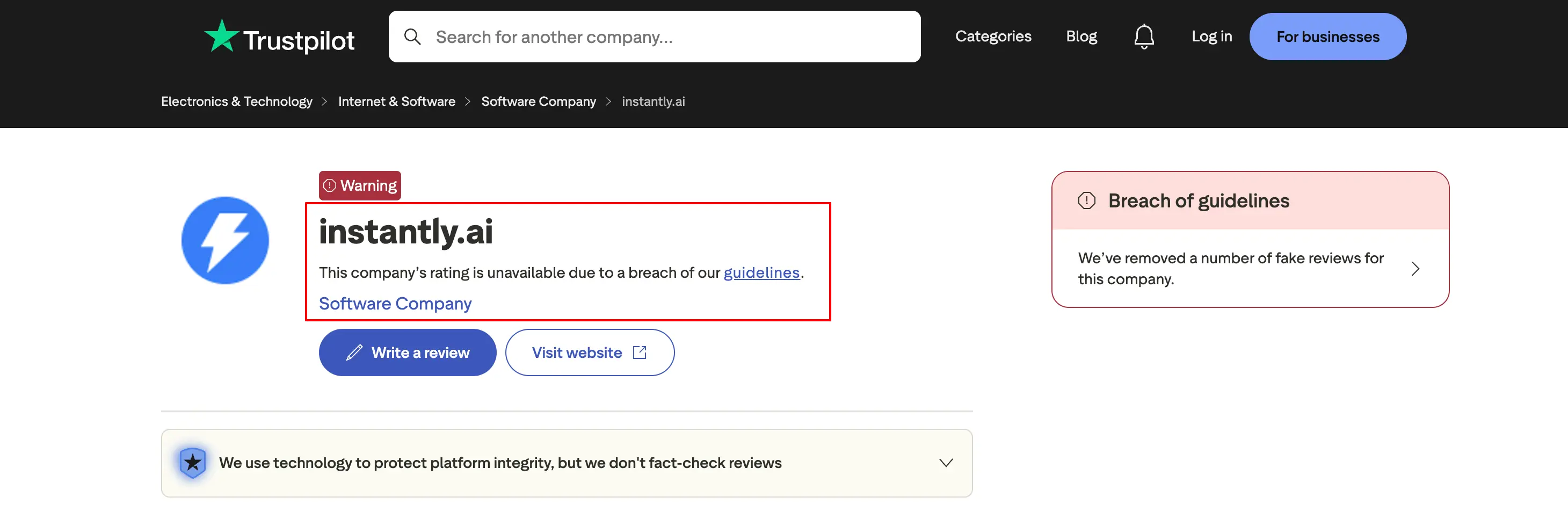
Trustpilot reviews are another concern: Trustpilot flagged Instantly’s profile for a guideline breach and removed a number of fake reviews. That makes it harder for potential customers to rely on those reviews when making a buying decision.
Trustpilot Flags Instantly.ai Reviews
Now, let’s look at how we ranked and selected these Instantly alternatives.
How I Ranked These Instantly Alternatives
Every tool here was checked against seven things.
Total cost with the features on: This is what you pay after the channel, the data, and the warmup are switched on, not the price on the homepage. Most comparisons stop at the headline number, and that is exactly where these tools start to differ.
Channel coverage: This checks whether the tool sends email only, or runs email and LinkedIn inside the same sequence. A LinkedIn tool sitting next to an email tool is not the same thing as one sequence that handles both.
Mailbox and sender pricing: Some tools charge per mailbox, some charge per seat, and some charge a flat rate. This one decides what happens to your bill as the team grows.
Deliverability controls: This covers the warmup, the inbox placement testing, and whether the health score matches where the email actually lands.
Domain ownership: This is simply whether the domains still belong to you when you leave the platform.
Reply management: The question here is whether every account feeds one inbox, or whether you end up checking a different inbox for every tool.
Agency fit: This looks at client workspaces and white-label options, and what each of them costs on top of the base plan.
Domain ownership is on this list because of Instantly. Nobody checks it until they try to leave, and by then the sender reputation built over months is tied to domains someone else controls.
A Quick Comparison of 7 Top Instantly Alternatives
Here’s a quick look at the seven tools before we discuss each Instantly.ai alternative in detail.
Best For: GTM teams and agencies that running email and LinkedIn together to scale their cold outreach.
G2 Rating: 4.6 out of 5
Salesforge is a multi-channel outreach platform that runs email and LinkedIn inside the same sequence. The biggest difference from Instantly is what it does not charge you for.
You can connect as many mailboxes as you need and add as many LinkedIn senders as you want, and neither one costs you anything extra. There is no seat pricing either, so growing the team does not grow the bill.
Compare that with Instantly, where you pay for Outreach, then pay again for Credits, and then pay again for the CRM. On Salesforge the sequencer, and its multiple channels, the reply inbox, and the warmup all sit on the same plan.
The reply inbox is called Primebox™, and every reply from every mailbox and every LinkedIn account lands there. It also catches replies that come back from a different address than the one you sent from, which is the case that usually slips through the cracks.
What Key Features You Get With Salesforge
Multichannel sequences with conditional logic: Email and LinkedIn steps run inside one sequence with real if/then branching. If a connection request gets accepted, the sequence sends a LinkedIn message. If it does not, it falls back to email.
Six native LinkedIn actions: Connection requests, messages, InMails, post likes, follows, and withdraw requests all run as steps inside the sequence. Each action is capped at 30 a day per profile to stay inside LinkedIn's safe limits.
LinkedIn account safety: Actions route through high-quality shared proxies, and authentication uses session tokens only, so your LinkedIn password is never stored. There is no Chrome extension injection and no DOM manipulation.
Connect unlimited accounts, mailboxes, and workspaces: There are no seat limits, so agencies can run any number of clients and operators. The Pro plan connects one LinkedIn account, and Growth makes LinkedIn senders unlimited.
AI personalization across 21+ languages: AI variables pull in company news, LinkedIn activity, and industry context for both email and LinkedIn copy. Localized campaigns run without hiring a copywriter for each region.
Free unlimited warmup through Warmforge: Every connected mailbox is warmed continuously using an aged Google Workspace and Microsoft 365 pool, with unlimited slots on both plans.
Primebox™ with Autopilot and Co-pilot: Every email and LinkedIn reply lands in one inbox. Autopilot handles replies end to end, and Co-pilot drafts them for you to approve first.
A/B testing and cross-channel analytics: You can test subject lines and message variants on the Growth plan, and the dashboard covers open rate, reply rate, connection acceptance, and meeting conversion in one place.
Agent Frank: He is an autonomous AI SDR who runs the whole workflow, prospecting, sequencing, replying, and booking meetings around the clock.
MCP CLI: Claude, Cursor, and custom agents can operate Salesforge directly, creating sequences, managing contacts, and triggering actions from inside an AI workflow.
Integrations: It connects natively to HubSpot, Salesforce, Pipedrive, HighLevel, Breakcold, Attio, and Folk on the CRM functionality, to Clay, Bitscale, RB2B, Databar AI, and Persana AI for data, and to Slack, Zapier, Make, and webhooks for automation.
What I Liked About Salesforge
Adding mailboxes and LinkedIn senders never changes what you pay for them, because the plans scale on active contacts and email volume instead.
The conditional logic is real. A connection request that gets accepted triggers a LinkedIn message, and one that does not falls back to email, all inside the same sequence.
The inbox warm-up comes with the plan rather than arriving as a separate subscription.
Co-pilot mode means nothing goes out without approval first, which makes the AI much easier to trust in week one.
The MCP CLI is rare in this category. You can run campaigns from Claude or Cursor without touching the dashboard.
What Are the Cons of Salesforge
The interface has a lot in it. New users need a few days before it feels comfortable, and someone sending their first cold email will feel that most.
The Pro plan connects only one LinkedIn account, so teams running LinkedIn at any real scale need Growth.
A/B testing is locked to the Growth plan.
Agent Frank has no self-serve trial, so you start with a demo and the setup runs through an Account Manager.
Everything in Pro, plus unlimited LinkedIn senders, A/B testing, and multi-language sequences
Agent Frank
From $499/month, billed annually
Autonomous AI SDR, 1,000 active contacts, Knowledge Base, dedicated Account Manager
There is a 14-day free trial and no credit card is required.
One thing worth being clear about is that Salesforge plans do scale with active contacts and email volume, so the bill grows as you grow. What never changes is the per-mailbox and per-sender cost, because there isn't one.
Salesforge connects to Mailforge natively, so domains that go live in the morning can be running a sequence the same afternoon.
2. Lemlist
Best For: Founders, small SDR teams, and growth marketers selling into high-value accounts.
G2 Rating: 4.5 out of 5
Lemlist is a multichannel outreach platform best known for personalization. It generates dynamic images, builds custom landing pages, and puts the prospect's name into video thumbnails. If your reply rate problem is really a copy problem, this is the tool that fixes it.
The pricing changed recently and most posts have not caught up. The Email plan now prices on volume, at $69 a month for 50,000 emails with unlimited users and unlimited senders. Multichannel Expert is the tier that still charges per seat.
Lemwarm is included on every paid plan, and it is one of the better warmup tools in the category.
What Features You Get With Lemlist
Image and video personalization: The tool generates a different visual for every prospect on your list.
Custom landing pages: You can build a personalized page for each prospect from inside the sequence.
LinkedIn automation: Profile visits, connection requests, and messages all run on the Multichannel Expert plan.
In-app calling: A dialer runs as a step inside the sequence, also on Multichannel Expert.
600M+ lead database: It comes with the plan, so there is no separate data subscription to buy.
Lemwarm: Warmup and deliverability protection come with every paid plan.
Condition-based sequences: You can branch the sequence on whether a prospect opened or clicked.
Multichannel inbox: Email and LinkedIn replies both land in one place.
What I Liked About Lemlist
The personalization is the strongest on this list by a wide margin.
The Email plan going volume-based means a five-person team can run it without five seat charges.
Lemwarm comes with the plan rather than arriving as an upsell later.
The lead database is bundled in, so there is no separate Apollo bill sitting next to it.
What Are the Cons of Lemlist
Multichannel Expert is per seat: At $109 a user, a five-person team pays $545 a month for it.
Extra sending addresses cost $9 each per month: You get three per user, and cold email at volume needs a lot more than three.
Credits do not roll over: Any enrichment credits you do not use disappear at the end of the month.
Not made for high volume: This tool is about quality, not quantity. If you send 1,000 emails a day, look elsewhere.
Condition-based sequences are locked: The branching logic only works on Multichannel Expert.
Best For: Lead gen agencies running cold email for multiple clients, and in-house SDR teams that want unlimited mailboxes.
G2 Rating: 4.6 out of 5
Smartlead is the closest one-to-one replacement for Instantly on this list. Every tier comes with unlimited email accounts and unlimited warmup, and inbox rotation spreads your volume across the connected mailboxes on its own.
If the sending engine worked for you and the pricing did not, this is the shortest move you can make. The whole thing works the same way, and the Master Inbox does the same job as the Unibox.
Where it does better than Instantly is agency work. The white-label client portal is stronger, and each client gets their own branded login to see their campaign numbers.
What Key Features You Get With Smartlead
Unlimited email accounts: Every plan includes them, right down to the $39 Base tier.
Unlimited warmup: It comes with the plan instead of costing you a separate subscription.
Inbox rotation: Sending spreads itself across every connected mailbox in the campaign automatically.
Master Inbox: Replies from all your accounts land in a single view.
Sub-sequence branching: Sequences split down different paths based on how the prospect responds.
White-label client portals: Each client gets a branded login, available on the Unlimited tiers.
API and webhooks: These unlock from the Pro plan upwards.
Global block list: Suppression applies across every campaign you run, not just the one you set it in.
What I Liked About Smartlead
The $39 entry price includes unlimited mailboxes, and almost nothing else at that price does the same.
Inbox rotation needs no setup. Connect the accounts and it spreads the volume across them.
The agency dashboard was made for running many clients rather than bolted on afterwards.
The API on the Pro plan is well documented and works cleanly with Clay.
What Are the Cons of Smartlead
Email only: There is no LinkedIn channel at all, which is the same gap that pushed you off Instantly.
White-label is a separate charge: It costs $29 a month per client workspace on top of your plan.
The Base plan caps at 2,000 active leads: An agency can fill that ceiling with one client.
Deliverability tooling is an add-on: SmartDelivery and SmartServers are both billed separately from the plan.
No native lead finder on the base plans: SmartProspect arrives as another line item on the bill.
Smartlead Pricing
Plan
Price
Includes
Base
$39/month
2,000 active leads, 6,000 emails, unlimited mailboxes, unlimited warmup
Pro
$94/month
30,000 active leads, 150,000 emails, API access, webhooks, global block list
Best For: SDR teams and founders who need a B2B database and a sequencer in the same tool.
G2 Rating: 4.7 out of 5
Apollo is a sales intelligence platform with a sequencer attached. That order matters, so it is worth saying plainly. The database is the product. The sending is a feature on top of it.
If bounce rates were the thing that pushed you off Instantly, this is the right swap.
SuperSearch advertises 450M contacts and Apollo advertises 275M, and Apollo is the one people trust more. The number that counts is the one that lands, not the one on the marketing page.
What Apollo will not do is replace Instantly as a sender. The sequencer works, but it was never made for the volume Instantly handles. Teams that move here usually keep a proper sending tool next to it.
What Features You Get With Apollo
275M+ contact database: It comes with 73M+ company records sitting behind it.
Buying intent signals: You can filter for companies that are already researching in your category.
Chrome extension: It reveals contact data anywhere on the web, LinkedIn included.
Email sequences: They run multi-step, and A/B testing unlocks on Professional and above.
Built-in dialer: Call recording comes with Professional, and international calling comes with Organization.
AI email writing: It drafts the email using the prospect's profile and company details.
CRM sync: It syncs two ways with both HubSpot and Salesforce.
Lead scoring: The AI scores your leads, and Professional makes it unlimited.
What I Liked About Apollo
The data is the best on this list, and nothing else here comes close on coverage or accuracy.
The Chrome extension is fast and it works cleanly on LinkedIn profiles.
The intent signals let you time the outreach instead of just firing it off blind.
The free plan is good enough for real testing rather than just being a demo.
What Are the Cons of Apollo
Per-seat pricing: Organization has a three-user minimum, so a two-person team pays for three.
Credits expire monthly: Unused credits do not roll over, so a slow month means money you paid for and never used.
The sending engine is weaker: Apollo replaces your database rather than your sequencer, so plan to keep both.
Bounce rates of 10% to 20% get reported: The data is the best on this list and it is still not perfect.
Reporting on the lower tiers is thin: The advanced dashboards only unlock on Professional and above.
Apollo Pricing
Plan
Price
Includes
Free
$0
10,000 email credits/month, 2 active sequences, basic filters
Basic
$49/user/month
Unlimited sequences, CRM sync, advanced filters, 5,000 data credits/year
Professional
$79/user/month
AI email writing, US dialer with recording, advanced reporting, 10,000 data credits/year
Organization
$119/user/month
International dialer, custom reports, SSO. Minimum 3 users
5. Snov.io
Best For: Solo founders, freelancers, and small startup teams on a tight budget.
G2 Rating: 4.5 out of 5
Snov.io bundles the email finder, the verifier, drip campaigns, warmup, and a light CRM into a single subscription. At $39 a month on the Starter plan, it is the cheapest credible entry point on this list.
The trade-off is an honest one. Each part is good for the price, and none of them is the best in its category.
Smartlead handles inbox rotation better and Apollo handles data better, but the bundle wins on simplicity and cost.
One thing the marketing does not lead with is that LinkedIn automation is not included in any plan. It costs $69 a month as an add-on, and that price is per LinkedIn slot.
What Features You Get With Snov.io
Email finder: You can search across 500M+ B2B contacts using 15 different filters.
Seven-tier email verification: It catches catch-all domains, greylisting, and disposable addresses before you send.
Drip campaigns: You get multi-step sequences with conditional logic built in.
Unlimited senders and follow-ups: These come with every paid plan.
Email warmup: Starter gives you three slots, and Pro makes them unlimited.
Light CRM: You can track deals through the early pipeline stages.
Chrome extension: You can prospect straight from LinkedIn and company websites.
LinkedIn automation: It is available, but only as a $69 a month per-slot add-on.
What I Liked About Snov.io
One subscription covers finding the lead, verifying it, and then emailing it.
Emails returned by the finder come pre-verified, so they do not burn a second credit.
Every plan gives you unlimited senders, including the $39 tier.
Follow-ups to the same recipient in one billing period are free, so long sequences do not cost more.
What Are the Cons of Snov.io
LinkedIn automation is a $69/month add-on per slot: It is not included in any plan, so the all-in-one label does not quite hold.
Starter locks the campaign features that matter: A/B testing, spintax, and behavioral conditions all stay locked until you upgrade to Pro.
Two ceilings to watch: Credits limit how many lookups you can do and recipients limit how many people you can email, and the two run out at different rates.
Credits do not roll over: Unused credits expire at the end of the cycle.
Database coverage drops outside North America and Europe: Searches for SMBs and non-English markets often come back with nothing.
Best For: Small and mid-sized sales teams running email, LinkedIn, calls, and WhatsApp in one sequence.
G2 Rating: 4.6 out of 5
Reply.io has been around since 2014, and the sequence builder shows it. Email, LinkedIn, calls, SMS, and WhatsApp all run in one flow. The branching logic is deeper than most tools on this list.
Jason AI is their AI SDR. He finds the prospects, writes the messages, and handles the replies, and he runs in either an autopilot mode or an approval mode.
The pricing needs reading carefully. The Multichannel plan is $89 a user, and that price covers email only. LinkedIn costs another $69 a month per account, and calls and SMS add $29 a user on top. Real multichannel ends up near $187 a user per month.
What Features You Get With Reply.io
Five channels in one sequence: Email, LinkedIn, calls, SMS, and WhatsApp all run in the same flow.
Conditional sequence logic: You can branch on opens, clicks, and replies, and the logic goes deeper than most tools here.
Jason AI SDR: He prospects, messages, and books meetings on his own.
B2B database: The Multichannel plan gives you 50 live data credits a month.
Email validation: It runs inside the platform before you send anything.
Inbox rotation: Volume spreads itself across your connected mailboxes.
Anti-spam suite: It runs deliverability checks before a campaign goes out.
Agency accounts: You get unlimited client accounts starting at $166 a month.
What I Liked About Reply.io
The channel coverage is the widest on this list, and having WhatsApp and a dialer in the same sequence as email is rare.
The conditional logic in the sequence builder goes further than anything Instantly offers.
The agency plan charges a flat rate instead of per seat, which is unusual at this level.
Jason has an approval mode, so the AI is not sending anything unsupervised on day one.
What Are the Cons of Reply.io
LinkedIn is a $69/month add-on per account: It is not in the Multichannel plan, despite the plan name.
Calls and SMS add $29/user/month: Once you stack the add-ons, the real multichannel bill lands closer to $187 a user.
Jason AI SDR starts at $500 a month: He is sold as a separate product rather than included in any plan.
Per-seat on Multichannel: A five-person team pays $445 a month before a single add-on.
Warmup is not always included: Depending on your tier, you may need to budget for a third-party warmup tool.
Reply.io Pricing
Plan
Price
Includes
Email Volume
From $49/month
1,000 active contacts, 5,000 emails, sequences, A/B testing, warmup. Contact-based, not per seat
Multichannel
$89/user/month
Multichannel sequence builder, 10 mailboxes, 50 live data credits
Agency
From $166/month
Unlimited client accounts, centralized management
Jason AI SDR
From $500/month
Autonomous prospecting, messaging, and booking
LinkedIn add-on
$69/month per account
LinkedIn automation steps
Calls and SMS add-on
$29/user/month
Dialer and SMS steps
7. Woodpecker
Best For: Agencies, recruiters, and B2B teams working a tight, well-researched list.
G2 Rating: 4.3 out of 5
Woodpecker answers the complaint that pushes the most people off Instantly, which is the warmup score reading healthy while the campaign still goes to spam.
This platform cares about safety more than volume. Adaptive sending slows your rate down to protect the domain, and bounce protection stops a campaign when the numbers turn bad, before any real damage is done. Deliverability monitoring comes with the base plan instead of costing extra.
The pricing model is unusual. You pay per contacted prospect rather than per email or per seat, which rewards a tight list and punishes a broad one.
What Features You Get With Woodpecker
Adaptive sending: The send rate adjusts itself to protect the domain instead of running flat out.
Bounce protection: Campaigns pause on their own when bounce rates rise, before the domain takes damage.
Deliverability monitoring: Inbox placement tracking runs on the base plan and alerts you when things slip.
Free email warmup: It is included on every plan, including the cheapest one.
Unlimited email accounts and team members: Every tier includes both, right down to Starter.
Inbox rotation: Sending spreads across all your connected accounts.
Spam word checker: It scans your copy for trigger words before the campaign goes out.
Condition-based campaigns: You can branch the sequence on opens, clicks, and replies.
AI interest detection: It reads incoming replies and sorts them by how interested the prospect sounds.
What I Liked About Woodpecker
Bounce protection stops a campaign before the domain takes damage, rather than reporting the damage afterwards.
Deliverability monitoring sits on the entry plan rather than being locked behind a higher tier.
The $29 plan gives you unlimited team members and unlimited email accounts.
The platform sends from your real mailbox rather than routing through its own servers.
What Are the Cons of Woodpecker
Priced on contacted prospects: Starter caps at 500 a month, and a working SDR contacts that many in a week.
LinkedIn is a $29/month add-on per account: It is not included on any plan, not even the most expensive one.
API access costs $20 a month on top: That is an odd thing to charge extra for at this price point.
The agency panel is $27 a month per client: An agency with ten clients adds $270 to the monthly bill.
The lead database is thin: Put it next to Apollo or SuperSearch and it becomes clear this is not a data tool.
10,000 contacted prospects, 120,000 emails, priority support, team collaboration
Max
Custom
Unlimited sending, dedicated account manager
Why Your Mailboxes Decide More Than Your Sequencer
Here is what nobody tells you before you switch platforms.
The sequencer sends the email. The mailbox decides whether it arrives. Moving from Instantly to Smartlead changes the tool that presses send. It does not change your SPF record, your domain age, or your sender reputation.
Every tool on this list plugs into mailboxes you bring. Instantly, Smartlead, Lemlist, Reply.io, and Woodpecker are all sequencers. None of them is the infrastructure underneath.
This is why teams switch tools, wait two weeks, and land in spam again. They changed the sender, not the setup.
The DFY domain problem shows it best. If the platform owns your domains, the reputation built over months belongs to something you cannot take with you.
Mailforge gives you domains and mailboxes you own. SPF, DKIM, and DMARC are set automatically. The whole setup is live in about five minutes, and it costs $3 down to $2 per mailbox per month. Two hundred mailboxes run $484 a month on Mailforge against $1,680 on Google Workspace.
The warmup score problem has a fix too. Warmforge gives you a Heat Score, which is a live mailbox health score where 85 and above means healthy and ready to send. It also runs inbox placement tests, so you find out where your emails are actually landing rather than where a warmup pool says they are.
If you need dedicated IPs rather than a shared pool, Infraforge is the private version. On a shared IP, other senders affect your reputation. On a dedicated one, your reputation is yours alone.
The official recommendation is to run two ESPs, not one. If one path degrades, your sending continues on the other.
How to Pick the Right Instantly Alternative for Your Team
Here is the answer for each type of team.
If you want email and LinkedIn in one sequence without a per-seat bill, pick Salesforge.
If Instantly's sending engine worked and you just need a better agency layer, pick Smartlead.
If your emails need to look and read differently from everyone else's, pick Lemlist.
If the data quality was what broke, pick Apollo, and keep a proper sequencer next to it.
If you are one person on a tight budget, pick Snov.io, and budget the extra $69 if you want LinkedIn.
If you run calls and WhatsApp alongside email, pick Reply.io, and price the add-ons before you commit.
If you are done with warmup scores that do not match your inbox, pick Woodpecker.
And if you send under 500 emails a month from one mailbox, you do not need any of this yet. A basic cold email tool will do the job.
Pick the Best Instantly Alternative for Cold Email Campaigns
After going through all seven, one finding stands out.
No single tool here does every job Instantly does. Smartlead covers the sending. Apollo covers the data. Reply.io covers the missing channel. Buy all three and you are back where you started, with three bills instead of one.
Salesforge is the one that does. The sequencer, both channels, the reply inbox, and the warmup are all on one plan. Mailboxes and LinkedIn senders cost nothing extra, so your bill grows with your contacts and your volume, not with your team size.
You can get started with Salesforge.ai.
FAQs About Instantly Alternatives
1. What is the best Instantly alternative?
Salesforge is the best Instantly alternative for teams that want email and LinkedIn in one sequence without paying per mailbox or per seat. Smartlead is the closest one-to-one swap if you only send email and want Instantly's model with a stronger agency layer. The right answer depends on which part of Instantly stopped working for you.
2. Why do teams leave Instantly?
The same reasons repeat across G2, Trustpilot, and Reddit. Instantly has no native LinkedIn or multichannel outreach, so teams that want more than email need a second tool. The warm-up performs unevenly across inbox providers, and mailboxes can read healthy while campaigns still land in spam. Support is slow or bot-only when something breaks. The pricing is modular and hard to follow, with Outreach, Credits, CRM, and Inbox Placement all sold separately. Domains bought through the Done-For-You service stay with Instantly when you leave.
3. Does Instantly do LinkedIn outreach?
No. Instantly is email only. There are no LinkedIn steps in a sequence, no email-to-LinkedIn handoff, and no LinkedIn replies in the Unibox. Teams that want both channels either add a second tool or move to a platform like Salesforge that runs email and LinkedIn together.
4. What does Instantly actually cost per month?
The Outreach plan starts at $47 a month, but that covers sending only. Credits for the lead database and the CRM are separate subscriptions. A working stack lands between $124 and $180 a month, and teams running the full platform report $200 to $400.
5. Do I own the domains I set up through Instantly?
Domains registered through Instantly's Done-For-You service are retained by Instantly. Trustpilot reviews from January 2026 report friction when users tried to move those domains to another platform. If you buy domains and mailboxes through a provider like Mailforge, you own them outright and can take them with you.
6. Which Instantly alternative is best for agencies?
Smartlead has the most mature agency layer, with white-label client portals at $29 a month per workspace. Salesforge offers API access and whitelabel with no per-mailbox or per-seat pricing, which matters when you are running many client accounts at once.