
Most "InMail vs message" debates treat LinkedIn as the whole outreach plan. In my experience, that is the reason so many LinkedIn campaigns stall out by the second week. InMail credits run out, connection requests sit pending, and the prospects who never log in never see either one.
So in this guide, I compare all three channels I actually use to reach a cold prospect: LinkedIn InMail, a regular LinkedIn message, and cold email. I cover how each one works, what it costs, how much volume it can carry, and how I combine them so a prospect who ignores one channel still hears from me on another.
Here is the short version before I get into the details of each channel.
Credit counts and character limits come from LinkedIn's own InMail messages FAQ. The cold email volume figure is the conservative per-mailbox cap I use, which I explain in my guide on how many cold emails to send per day.
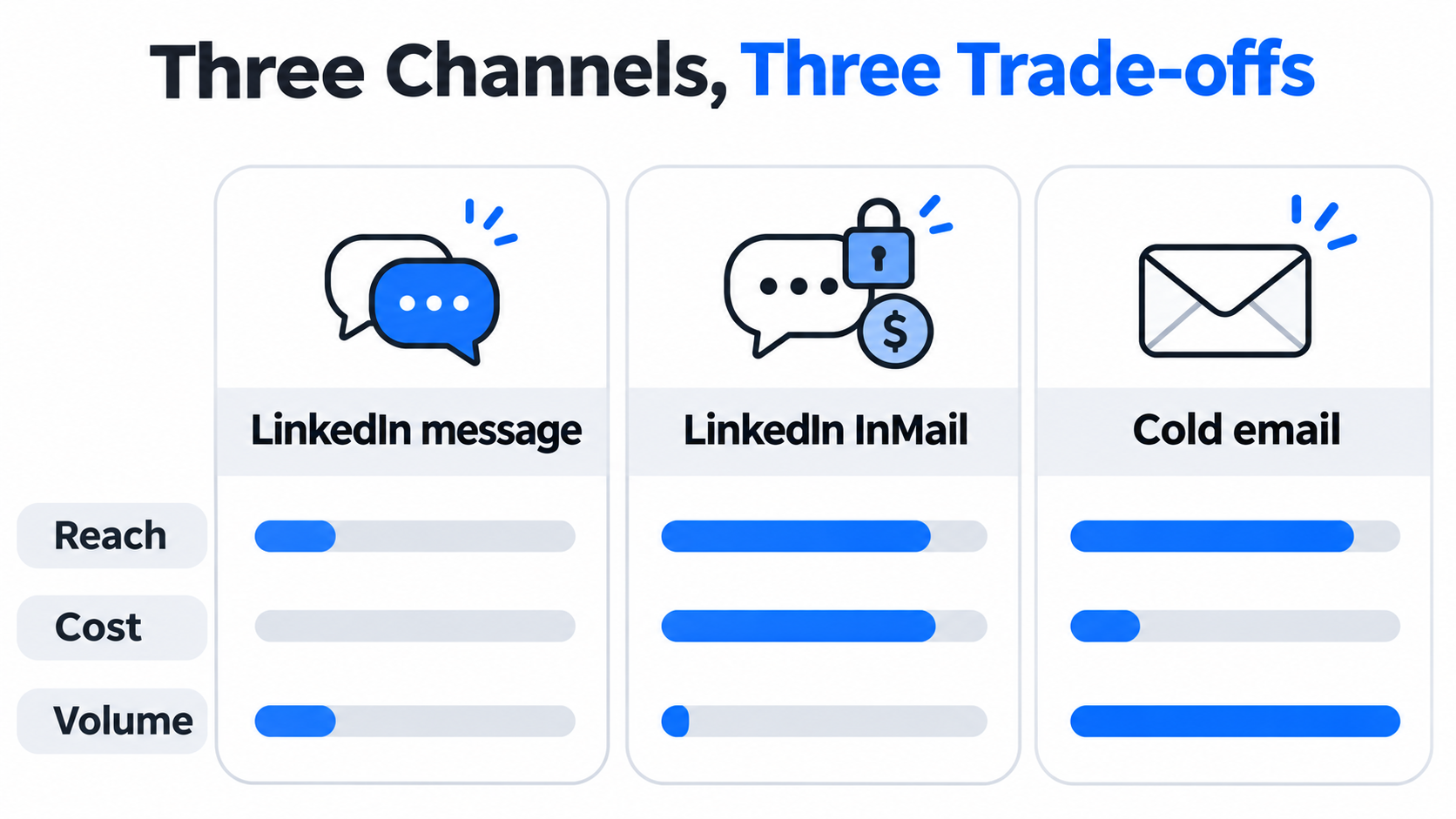
InMail is LinkedIn's paid way to message someone you are not connected to.
InMail lets you send a private message to any LinkedIn member, including 2nd- and 3rd-degree contacts, without an accepted connection request. It is built for situations where you cannot wait for someone to accept an invite, or where the person rarely accepts invites from strangers.
Each InMail uses one credit.
Your monthly allowance depends on your plan:
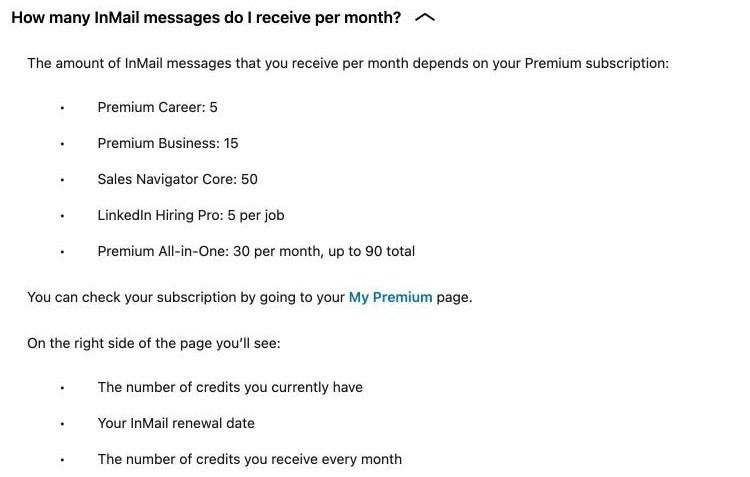
LinkedIn's InMail FAQ: monthly InMail credits by subscription
According to LinkedIn's Sales Navigator credit rules, a few details matter a lot for outreach planning:
The refund rule changes the economics. A tightly targeted InMail that earns any response costs nothing, while a spray of generic InMails drains the balance with nothing coming back.
InMails look closer to an email than a chat. LinkedIn allows an optional subject line of up to 200 characters and a body of up to 2,000 characters. In practice I keep the body well under 500 characters, because a long InMail reads like a sales letter on a phone screen.
Some Premium members turn on Open Profile, which lets anyone message them for free, even without InMail credits. When a prospect has an Open Profile, I always message them that way first and save the paid credit for someone else.
A regular message is free and unlimited, but only after the prospect becomes a connection.
A LinkedIn message is the standard chat you send to a 1st-degree connection. It costs nothing on any account and has no monthly allowance. The catch is getting to 1st-degree in the first place, which means sending a connection request and waiting for it to be accepted.
LinkedIn applies invitation limits to every account, free and Premium alike. It does not publish the exact number, but if you hit the limit, the account can be blocked from sending invites for about a week, and support cannot lift the restriction early.
Free accounts can also add a personal note to only five connection requests a month. Premium members get unlimited notes, which matters because a blank invite from a stranger is easy to ignore.
Once a prospect accepts the invite, they have already said a small yes to you. A message to that person reads like a conversation between peers rather than an unsolicited pitch, which is why practitioners in sales communities consistently say connect-then-message feels more natural than a cold InMail.
These are the differences that actually change how I plan a campaign.
Messages reach 1st-degree connections only. InMail reaches anyone on LinkedIn, which makes it the only LinkedIn option for senior buyers who ignore connection requests.
Messages are free. InMail requires a paid plan, and the cost per send depends on how many credits you get back through responses.
Messages are only limited by how many connections you can earn. InMail is capped hard by your monthly credits, so even a full Sales Navigator allowance gives you 50 new conversations a month per profile.
InMail lets you pitch on day one. A message makes you wait for an accepted invite, which can take days or never happen at all.
InMail has a subject line and a longer body, so it suits a structured first touch. Messages are short and conversational, so they suit follow-ups and quick questions.
An InMail is labeled as one, and many buyers read it as a sales pitch. A message from an accepted connection carries a bit of earned trust. That perception gap is often bigger than any difference in copy quality.
A note on reply-rate benchmarks: most figures that circulate online for InMail and message reply rates are recycled between vendor blogs without a clear original study. I treat them as rough directions, not targets, and I measure my own reply rate per channel instead.
The right channel depends on who the prospect is and how much volume you need.
For a deeper look at how the two platforms compare overall, see my LinkedIn outreach playbook, which covers profile setup, limits, and how to combine LinkedIn with email.
LinkedIn is precise, but it has a hard volume ceiling that email does not.
Here is the math I run when someone asks me whether LinkedIn alone is enough:
That last number is what the Mailforge pricing calculator returned when I entered 8,000 new contacts a month with a 2-step sequence. It works out to 9 domains and 25 mailboxes, at a mailbox cost lower than a single Sales Navigator seat.
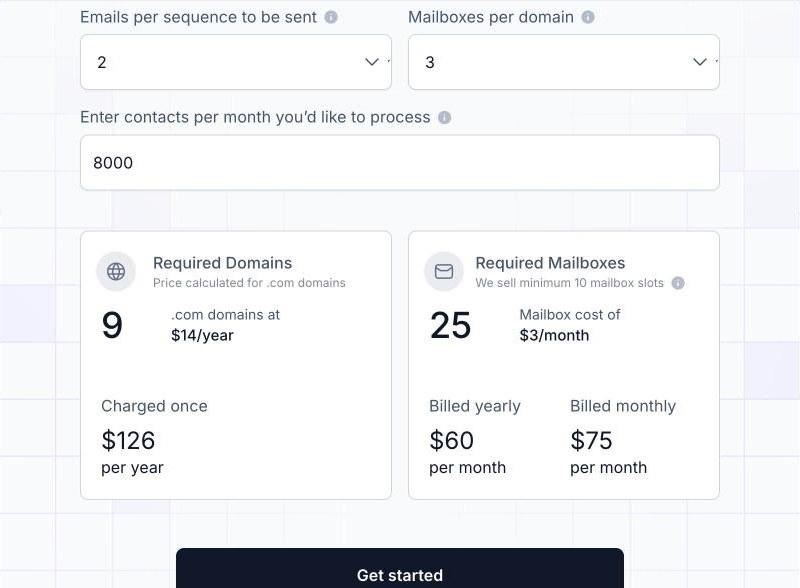
Mailforge pricing calculator: 8,000 contacts a month needs 9 domains and 25 mailboxes
The point is not that email beats LinkedIn. It is that LinkedIn gives you a few high-quality touches and email gives you reach. The best campaigns I run use LinkedIn for the warm, personal moments and email for coverage.
The email side only works if the mailboxes behind it are healthy and authenticated.
When I add email to a LinkedIn campaign, I do not send from my main company domain. I send from secondary domains on infrastructure built for cold outreach, so a bad week never touches my primary domain. Mailforge is what I use for that.
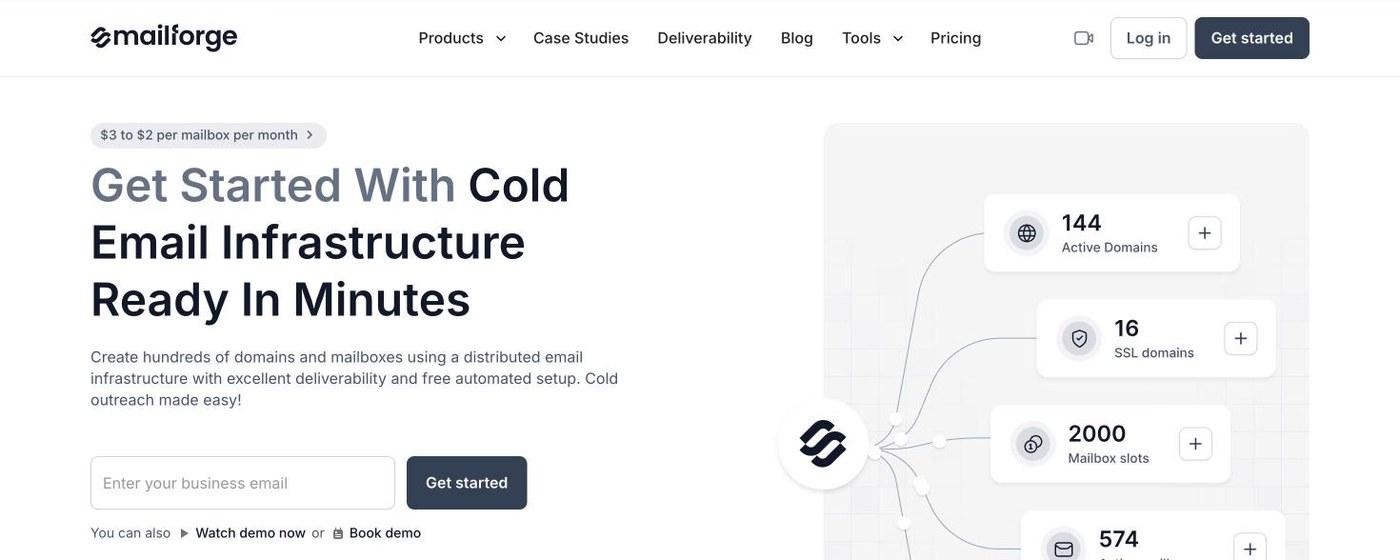
Mailforge: cold email infrastructure ready in minutes, from $3 to $2 per mailbox per month
Mailforge runs on shared IPs, similar in model to Gmail or Outlook, but designed for outbound rather than everyday business email. Mailboxes are spread across a pool used by 10,000+ businesses. It is the option I recommend when you are starting out, scaling quickly, or expecting a higher complaint rate while you test new segments.
The guided setup works out how many domains and mailboxes your target volume needs, then creates hundreds of them at once. My first full setup was live in about five minutes, which is quicker than writing the InMail copy for the same campaign.
Every domain gets SPF, DKIM, DMARC, and custom tracking set up automatically, and bulk DNS updates take a few clicks.
If you want to understand what those records do, I covered the best practices for SPF, DKIM, and DMARC records separately.
Domain forwarding sends each secondary domain to your main site or a landing page, so a prospect who checks the sender domain after a LinkedIn touch lands somewhere sensible. SSL and Domain Masking is available as an add-on for branded pages that do not reveal the primary domain. Domains can be transferred in and out freely.
Separate workspaces keep clients or projects apart, and domains and mailboxes move between them freely. Mailboxes work with any sending tool, and with Salesforge the login is shared, so domains flow straight into sequences with no export. For AI agents, the Forge MCP CLI handles provisioning from Claude, Cursor, or other AI clients.
If you want reputation fully under your own control later, Infraforge offers dedicated IPs, and Primeforge adds real Google Workspace and Microsoft 365 mailboxes for ESP matching. I usually pair Primeforge with Mailforge so I always have a provider that matches the prospect's inbox. I compared the models in shared vs dedicated email infrastructure.
Two disconnected campaigns for the same prospect is how deals fall through the cracks.
If LinkedIn runs in one tool and email in another, I end up messaging a prospect who already replied to my email, or chasing a LinkedIn reply I never saw. Salesforge fixes that by running both channels inside one sequence with one inbox.
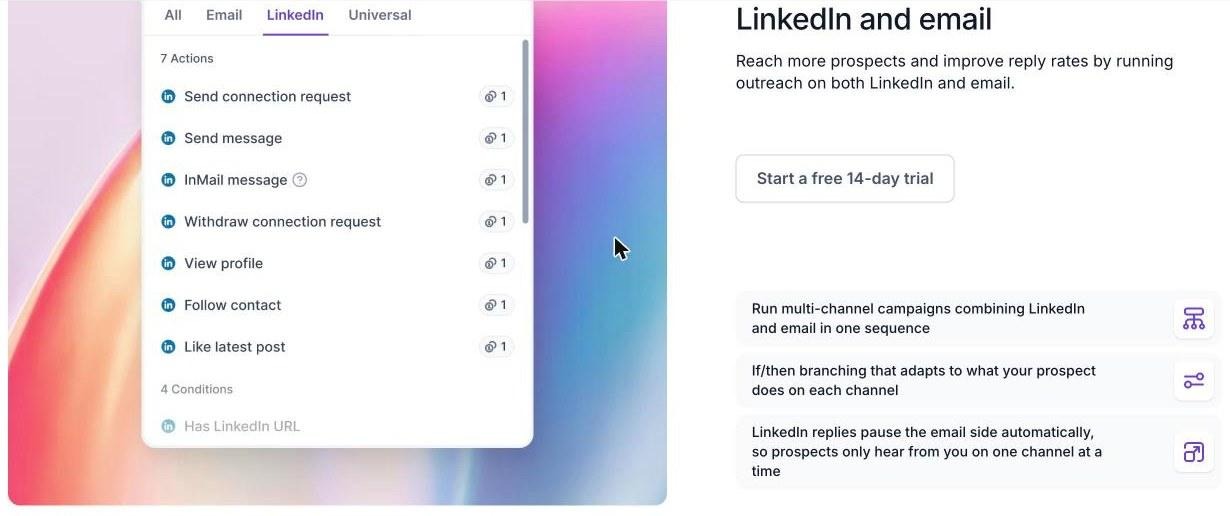
Salesforge sequence builder: native LinkedIn actions, including InMail, next to email steps
Inside a sequence, I can add connection requests, messages, InMails, profile views, follows, post likes, and withdraw requests. That lets a sequence work the way a good SDR does: view the profile, engage with a post, connect, and clean up invites that go stale. Each action type is capped at 30 per day per profile to stay within safe usage.
The branching is real if/then logic, not a fixed "email, then LinkedIn" order.
A typical flow I build:
A LinkedIn reply automatically pauses the email side, so the prospect only hears from me on one channel at a time.
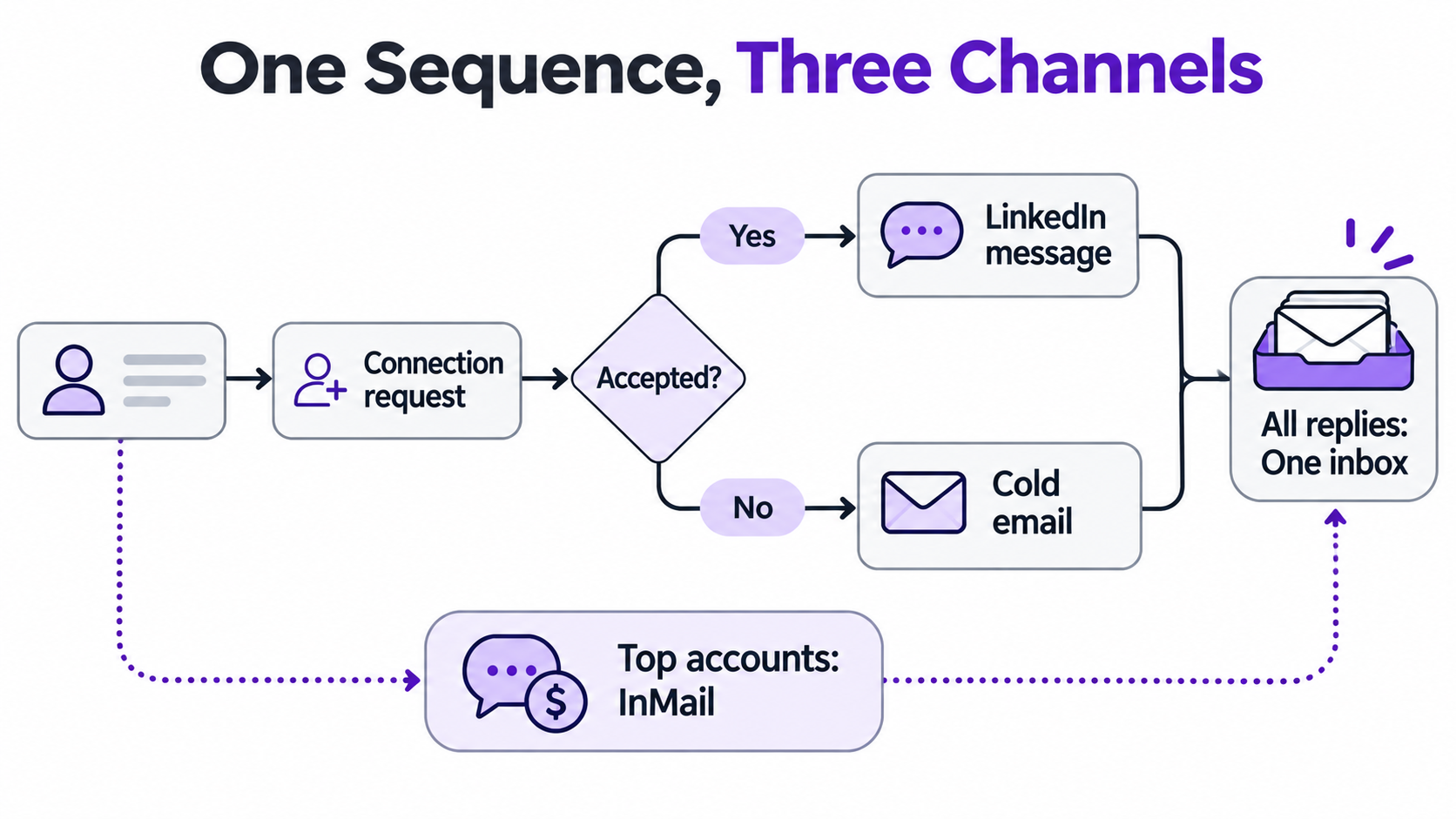
All LinkedIn and email replies land in Primebox™. In Co-Pilot mode, AI drafts replies for me to approve. In Auto-Pilot mode, AI handles replies end to end. Either way, I see the full conversation across both channels in one thread.
To add the email step, I need a verified address. The LinkedIn email and phone finder Chrome Extension, powered by Leadsforge, pulls verified business emails and mobile numbers from a LinkedIn profile in one click, from a 500M+ contact database. New users get 100 free credits on signup.
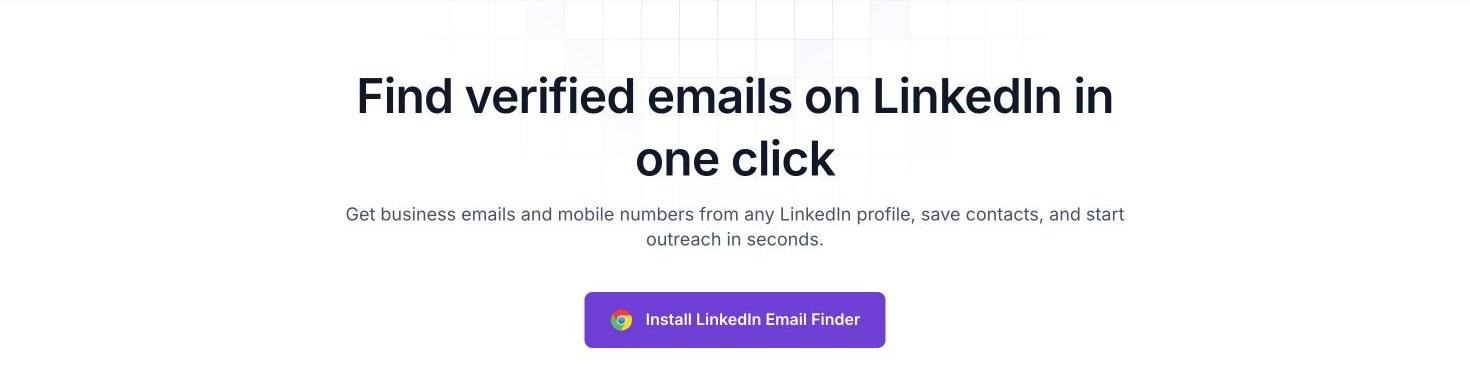
The LinkedIn email finder Chrome Extension, powered by Leadsforge
LinkedIn actions route through high-quality shared proxies, with custom proxy support if you want it. Login is by session token only, so the LinkedIn password is never stored, and there is no Chrome extension injecting into LinkedIn pages. Messages on both channels can use AI personalization across 21+ languages, pulling in company news and LinkedIn activity.
Unlimited mailboxes are included on every plan, and unlimited LinkedIn senders on Growth. A/B testing and channel-by-channel analytics show which channel is actually booking meetings. Native integrations cover HubSpot, Salesforce, Pipedrive, Attio, Clay, Slack, and Zapier, plus API access and an MCP CLI for agent-driven workflows.
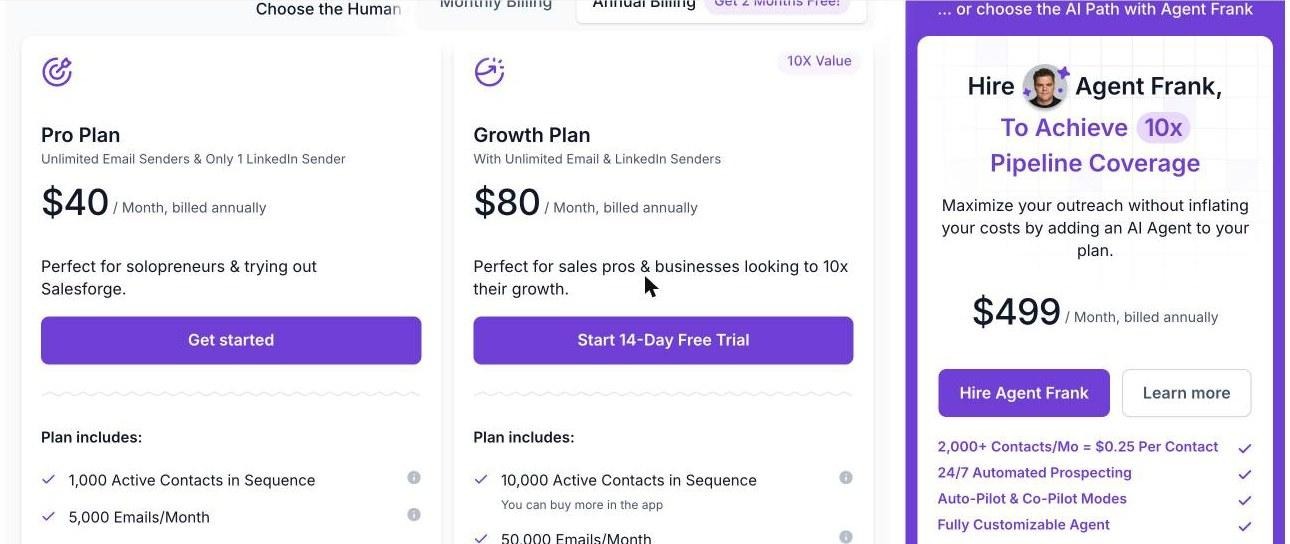
Salesforge plans: Pro, Growth, and Agent Frank
InMail steps use the credits on your own LinkedIn Premium or Sales Navigator plan, so the credit math earlier in this guide still applies.
Each channel needs its own tone, and the messages should read like one conversation.
These are short starting points. Swap in a real trigger, such as a funding round, a new role, or a recent post, before sending.
For more follow-up ideas, see my guide to writing a follow-up email after no response.
Most wasted credits and stalled campaigns come from the same handful of mistakes.
If you are still choosing tools, my roundup of LinkedIn automation tools covers the options for the LinkedIn side.
The fewer tools a prospect passes through, the fewer gaps there are.
The Forge Stack is the only setup I know that covers every layer of LinkedIn and email outreach in one place: Leadsforge to find and enrich contacts, Mailforge, Infraforge, or Primeforge for mailboxes, Warmforge for warmup with Heat Score™ tracking, Salesforge to run both channels, and Agent Frank as an AI SDR. Lists move from Leadsforge into Salesforge without a CSV, and mailboxes move from Mailforge into sequences without an export.
You can run it with your own team, hand the full workflow to Agent Frank, or bring in a Forge Expert agency to run it for you.
InMail and messages each have a job, and cold email covers what neither can.
A LinkedIn message is the warmest touch you can send, but only after someone accepts your invite. InMail gets you to anyone on day one, but on a fixed budget of credits, so I save it for top accounts with a real trigger. Neither one can carry the volume a pipeline needs.
That is why my LinkedIn campaigns always have an email channel running underneath them. I set up the mailboxes with Mailforge, then run connection requests, messages, InMails, and cold emails from one Salesforge sequence, with every reply in one inbox.
A LinkedIn message is free and can only be sent to your 1st-degree connections. InMail lets you message any LinkedIn member without being connected, but it needs a paid plan such as Premium or Sales Navigator and uses a credit for each send.
According to LinkedIn, Premium Career includes 5 credits a month, Premium Business 15, Premium All-in-One 30, and Sales Navigator Core 50. On Sales Navigator, unused credits roll over up to a maximum of 150 and expire after 90 days.
Yes. LinkedIn returns the credit for every InMail that receives a response within 90 days, including a "Not interested" reply. InMails with no response are not credited back, and you cannot buy extra credits.
Not by default. A connection request followed by a message is free and usually feels warmer, but you have to wait for the invite to be accepted. InMail works better for high-value prospects you need to reach quickly or who ignore invites from strangers.
LinkedIn allows an optional subject line of up to 200 characters and a message body of up to 2,000 characters. Shorter InMails are usually easier to read on mobile.
Use both. LinkedIn gives you a small number of personal touches each month, while cold email carries the volume. Running them in one sequence, with email infrastructure from a provider like Mailforge, means a prospect who ignores one channel can still be reached on the other.