Buying 50 cold email mailboxes for $69/month sounds like a good deal, especially if you're running campaigns for multiple clients.
That's what Winnr App offers. You get SMTP mailboxes with automated DNS setup and support for Instantly, Smartlead, and Salesforge.
However, the starting price doesn't tell you everything.
Email warmup costs an additional $0.60 per mailbox monthly.
Sending domains must be purchased separately unless you already own them.
Daily sending volume is recommended at 10-20 cold emails per mailbox.
If you're planning to send 1,000 cold emails daily, will 50 mailboxes be enough, or will you need to buy more?
In this Winnr App review, I'll look at its features, actual costs, sending limits, customer feedback, and drawbacks to help you decide if it's worth paying for.
Winnr App offers SMTP/IMAP mailboxes with bulk setup, automated DNS configuration, and support for major cold email sending tools.
Pricing starts at $69/month for 50 mailboxes, while warming costs an extra $0.60 per mailbox monthly.
Winnr recommends 10-20 cold emails per mailbox daily, so 50 mailboxes can support roughly 500-1,000 cold emails per day.
Winnr has a 4.7/5 Trustpilot rating from 26 reviews, with customers praising its support and deliverability.
The main drawbacks are separate domain costs, paid warming, and no free trial.
Winnr is best suited to agencies and businesses that need multiple SMTP mailboxes for cold outreach.
Mailforge is a direct alternative if you want shared cold email infrastructure with bulk mailbox creation and automated DNS setup.
What Do You Actually Get With Winnr App (And What You Don't)
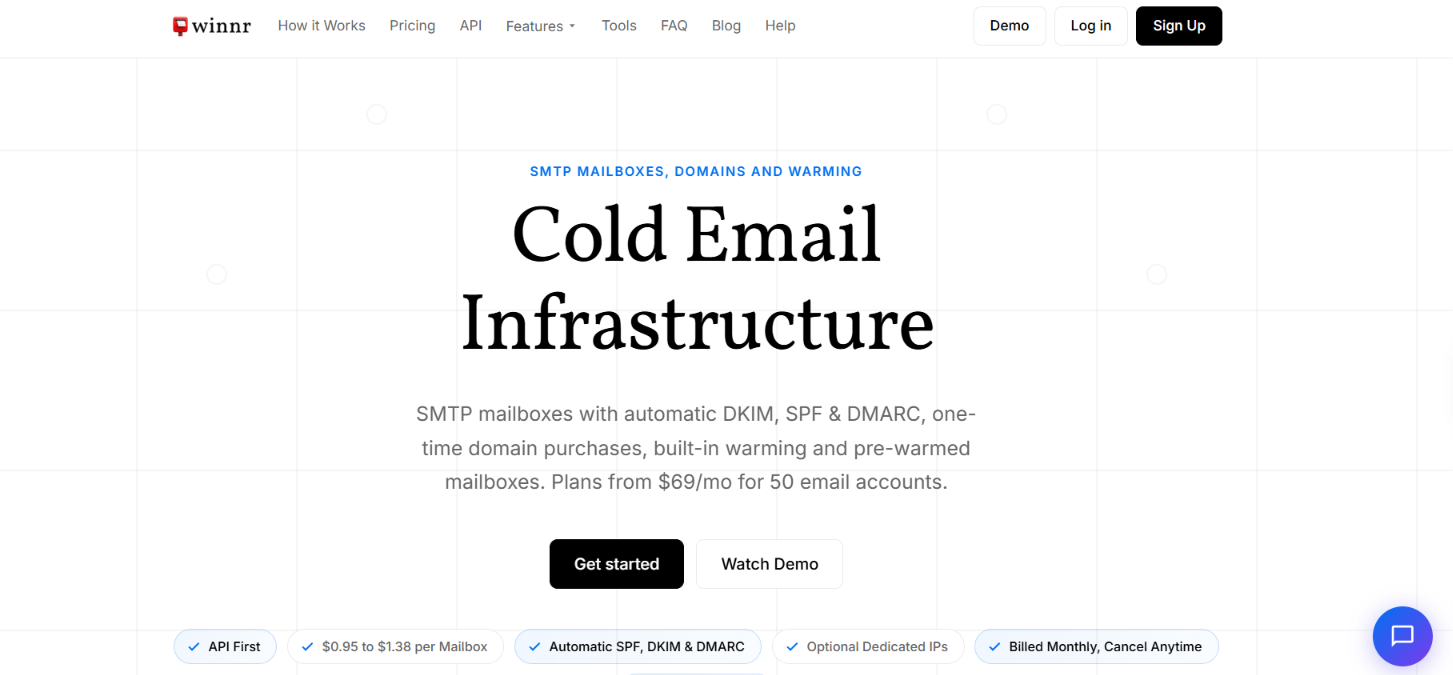
This image shows the Winner App homepage
Winnr gives you SMTP/IMAP mailboxes for cold email, rather than Google Workspace or Microsoft 365 accounts. You can buy domains through Winnr or connect your own. SPF, DKIM, and DMARC are set up automatically, and you can create multiple mailboxes at once instead of configuring them one by one.
The mailboxes can then be connected to tools such as Instantly, Smartlead, and Salesforge for sending campaigns. Winnr also includes a universal inbox, REST API, and MCP server.
There are a few things you still pay for separately. Warming costs $0.60 per mailbox per month, and domains cost extra unless you bring your own. Winnr also doesn't replace your cold email sending tool. You still need a separate platform to build and run sequences.
Mailforge is one of the closest alternatives to compare with Winnr because it also provides SMTP mailboxes for cold outreach with bulk setup and automatic DNS configuration.
Feature
Winnr App
Mailforge
Mailbox type
SMTP/IMAP
SMTP/IMAP
Infrastructure
Shared by default
Shared IP pool
Starting price
$69/month for 50 mailboxes
$3/mailbox/month
SPF, DKIM, DMARC setup
Automatic
Automatic
Bulk mailbox creation
Yes
Yes
Pre-warmed mailboxes
$3/address/month
Available
Universal inbox
Yes
No comparable feature listed
Developer access
REST API + MCP
API + MCP + CLI
Dedicated IPs
$20/IP/month on Enterprise
No, Mailforge uses shared IPs
Google/MS365 accounts
No
No
The biggest difference is what sits around the mailboxes. Winnr includes its universal inbox and offers warming inside the platform for an extra fee. Mailforge gives you features such as multiple workspaces, SSL, and domain masking.
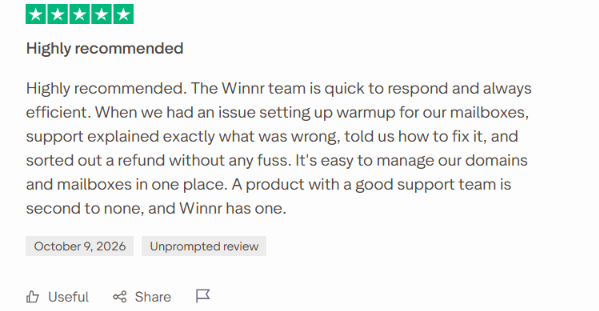
This image shows the Winner App user review about customer support
Users say Winnr responds quickly when they run into mailbox, warmup, or setup problems. Others mention good deliverability, simple mailbox setup, and lower costs compared with providers they used before.
One user reported sending 23,000+ emails from 115 mailboxes across 23 domains with a 0.3% bounce rate. Another reported 5% reply rates across several campaigns. These are results reported by individual users, so they don't guarantee the same results for everyone.
The review pool is still small. Winnr has only 27 Trustpilot reviews, and it is not currently listed on G2 or Capterra, so there isn't much third-party review data to compare yet.
How Does Winnr App Work?
Winnr handles the domain and mailbox setup for cold email. You can buy new sending domains inside Winnr or connect domains you already own. From there, the process looks like this:
Choose a plan. Startup gives you 50 mailboxes for $69/month, while Enterprise includes 200 for $189/month.
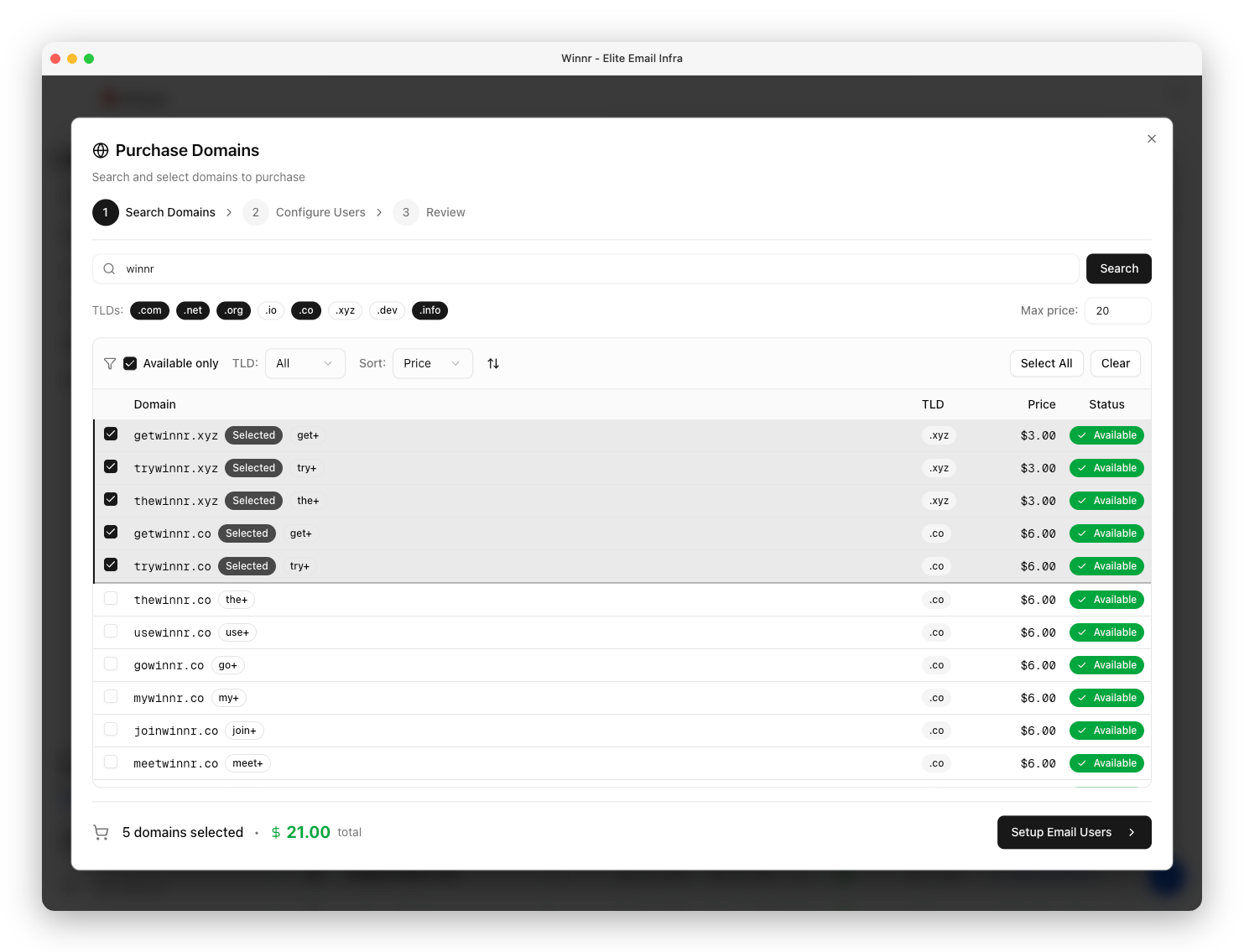
Add your sending domains. You can buy domains through Winnr or connect your own for free. Winnr recommends about five mailboxes per domain.
This image shows the Purchase your domains through Winnr App
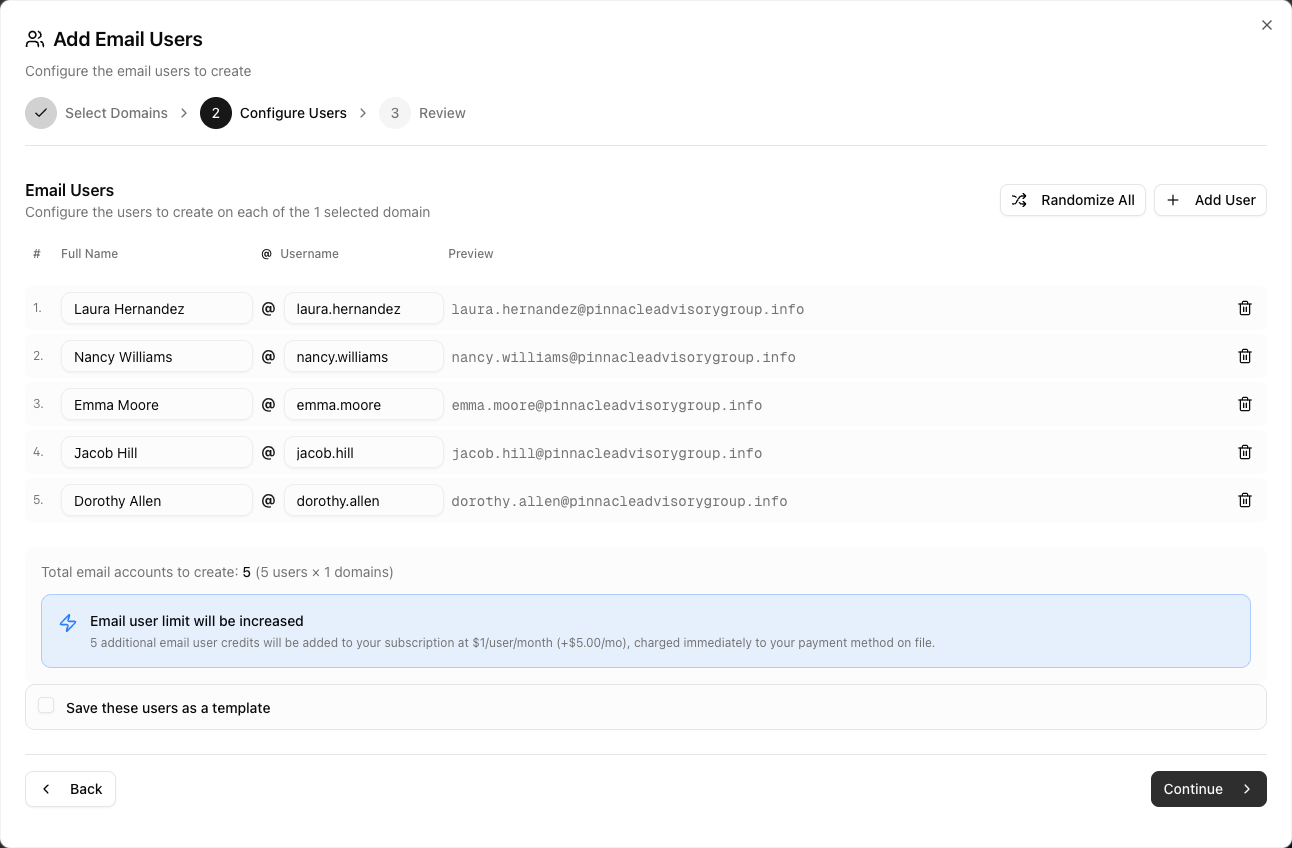
Create your mailboxes. Once a domain is active, you can add mailboxes individually or create them in bulk. Winnr provides the SMTP/IMAP credentials.
This image shows the Create mailboxes on Winnr App
Set up the DNS records. Winnr can configure SPF, DKIM, and DMARC for the domains you connect.
Warm the mailboxes. Built-in warming costs $0.60 per mailbox each month. Winnr recommends warming new mailboxes for at least two weeks and closer to four weeks on a new domain.
Connect them to your sending tool. You can export the mailboxes to 20+ sequencers, including Instantly, Smartlead, EmailBison, and PlusVibe.
Once the mailboxes are warmed, Winnr recommends sending around 10-20 cold emails per mailbox per day. The campaigns themselves are run through your separate cold email sending tool.
Top Pros of Winnr App
Low mailbox cost starts at $69/month for 50 mailboxes, which works out to about $1.38 per mailbox.
Fast bulk setup lets you create multiple mailboxes at once instead of setting up each account separately.
Automatic DNS setup handles SPF, DKIM, and DMARC for domains connected through Winnr.
Flexible domain setup lets you buy domains through Winnr or connect domains you already own for free.
Built-in warming can be turned on for individual mailboxes for $0.60 per mailbox per month.
Wide sequencer support lets you export mailboxes to 20+ sending tools, including Instantly, Smartlead, EmailBison, and PlusVibe.
Good developer access includes a REST API and MCP server for managing domains, mailboxes, warming, and inboxes programmatically.
Top Cons of Winnr App
No free trial means you need a paid plan before you can connect domains or create mailboxes.
Warming costs extra at $0.60 per mailbox per month, so warming all 50 Startup mailboxes adds $30 to the monthly cost.
Domains cost extra unless you bring your own. Winnr lists a .com at about $13 as a one-time purchase.
New mailboxes need time before cold sending because Winnr recommends at least two weeks of warming and closer to four weeks for a new domain.
Dedicated IPs require Enterprise and cost another $20 per IP each month.
It is not Google Workspace or Microsoft 365. Winnr provides SMTP/IMAP mailboxes on its own sending infrastructure, which may not suit users specifically looking for Google or Microsoft accounts.
Top Features of Winnr App
Once your domains and mailboxes are set up, Winnr gives you a few ways to manage them without handling each account separately.
You can warm mailboxes, check replies in one place, export accounts to your sending tool, or manage the setup through its API and MCP server. Here’s what each feature does.
Feature
What it does
SMTP/IMAP mailboxes
Creates cold email mailboxes on Winnr's own sending infrastructure.
Automatic DNS setup
Sets up SPF, DKIM, and DMARC for your sending domains.
Bulk mailbox creation
Lets you create multiple mailboxes at once instead of adding them one by one.
Built-in warming
Warms individual mailboxes for $0.60 per mailbox per month and tracks inbox rate, health score, and volume.
Pre-warmed mailboxes
Offers already-warmed mailboxes on aged domains for $3 per address per month.
Universal mailbox
Lets you read and reply to emails across your Winnr mailboxes from one inbox.
Sequencer exports
Exports mailbox credentials for 20+ sending tools, including Instantly, Smartlead, EmailBison, and PlusVibe.
REST API and MCP server
Lets you manage domains, mailboxes, warming, inboxes, and other infrastructure through code or supported AI tools.
Dedicated IPs
Gives Enterprise users the option to add a dedicated sending IP for $20 per IP per month.
Winnr App Pricing in 2026
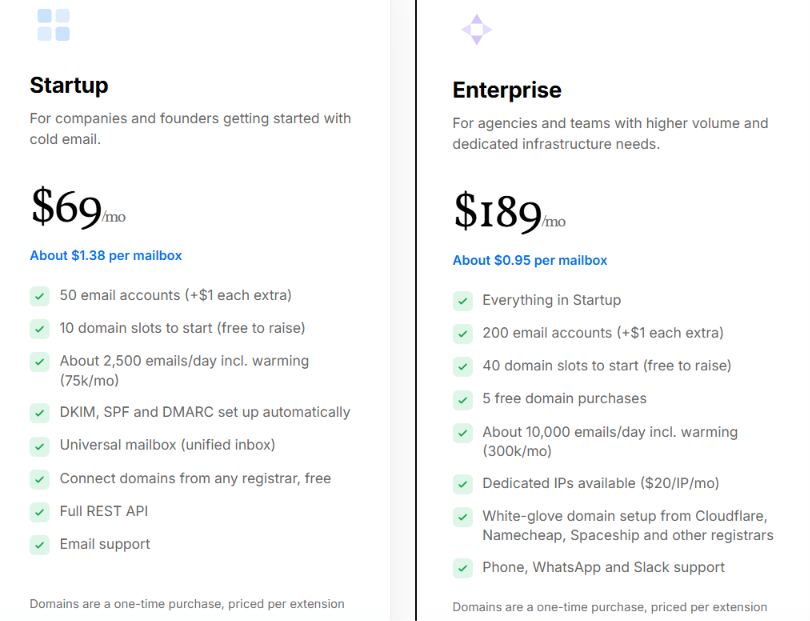
This image shows the Winnr App pricing
Winnr starts at $69 per month for 50 mailboxes, which works out to $1.38 per mailbox. There is no annual contract, and extra mailboxes cost $1 each per month. There are two plans:
Startup costs $69/month and includes 50 mailboxes, 10 starting domain slots, automatic SPF, DKIM, and DMARC setup, the universal mailbox, REST API access, and email support.
Enterprise costs $189/month and includes 200 mailboxes, 40 starting domain slots, five free domain purchases, white-glove domain setup, and phone, WhatsApp, and Slack support. Dedicated IPs are available for another $20 per IP per month.
The plan price doesn't include every cost.
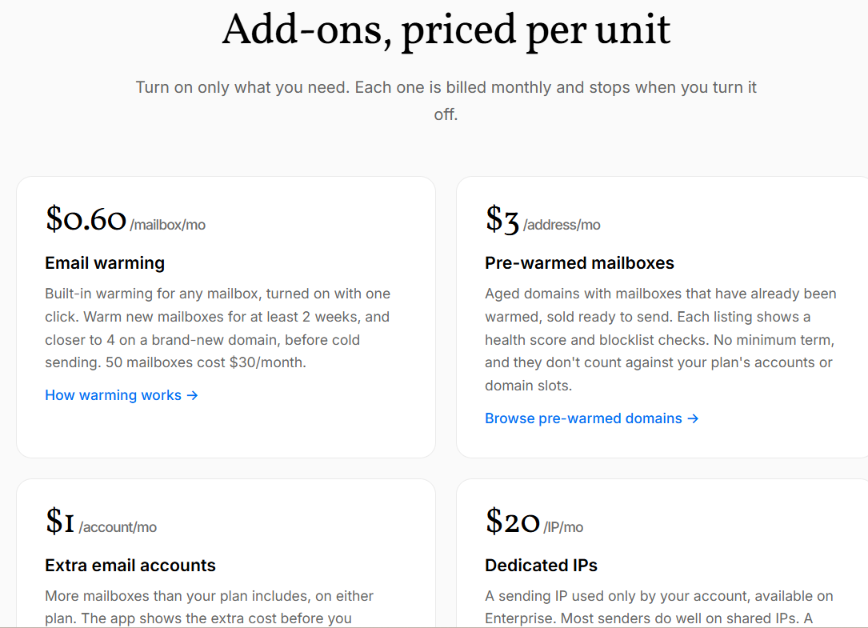
This image shows the Winnr App add-on pricing
Warming costs $0.60 per mailbox per month. So warming all 50 mailboxes on Startup adds $30, bringing your recurring monthly cost to $99. Domains are another expense if you don't already own them. A .com costs around $13 as a one-time purchase.
Winnr recommends roughly five mailboxes per domain, so 50 mailboxes would use around 10 domains. That would make a typical first month on Startup roughly:
$69 plan + $30 warming + $130 for 10 .com domains = $229
After the one-time domain purchases, the recurring cost would be around $99 per month if you keep warming all 50 mailboxes. You can also buy pre-warmed mailboxes for $3 per address per month. These are separate from your plan's included mailboxes and domain slots.
If you need more than 50 mailboxes, you can add them to Startup for $1 each. Startup remains cheaper up to 169 mailboxes. At 170 mailboxes, both plans cost $189 per month, while Enterprise becomes cheaper above that point.
Winnr does not offer a free trial, although you can create an account and explore the app before paying.
Who Should Use Winnr App and Who Should Look Elsewhere?
Winnr is mainly for people who need many mailboxes for cold email. It may not be the right choice if you only need a few inboxes or specifically want Google or Microsoft accounts.
Winnr is a good fit if you
Run cold email for clients and need to manage many domains and mailboxes.
Need dozens of mailboxes since the Startup plan includes 50 and Enterprise includes 200.
Already use a sending tool such as Instantly, Smartlead, EmailBison, or Salesforge and need mailboxes to connect to it.
Want to automate setup using Winnr's REST API or MCP server.
Want a dedicated IP option since Enterprise lets you add one for $20 per month.
You may want to look elsewhere if you
Need Google or Microsoft mailboxes because Winnr uses its own SMTP/IMAP infrastructure.
Only need a few mailboxes and do not need a 50-mailbox Startup plan.
Want warming included in the price because Winnr charges $0.60 per mailbox per month.
Want a free trial because Winnr requires a paid plan before you can create mailboxes.
Want one tool for sending campaigns and hosting mailboxes because Winnr provides the mailboxes, while campaigns run through a separate sending tool.
Winnr fits better if you need a large number of cold email mailboxes and already have a tool for sending campaigns. If you need only a few inboxes or want Google or Microsoft accounts, another provider may fit better.
Best Winnr App Alternative – Mailforge
Winnr works well if you are ready to start with 50 mailboxes. But that plan structure may not fit someone who wants to add cold email infrastructure in smaller batches.
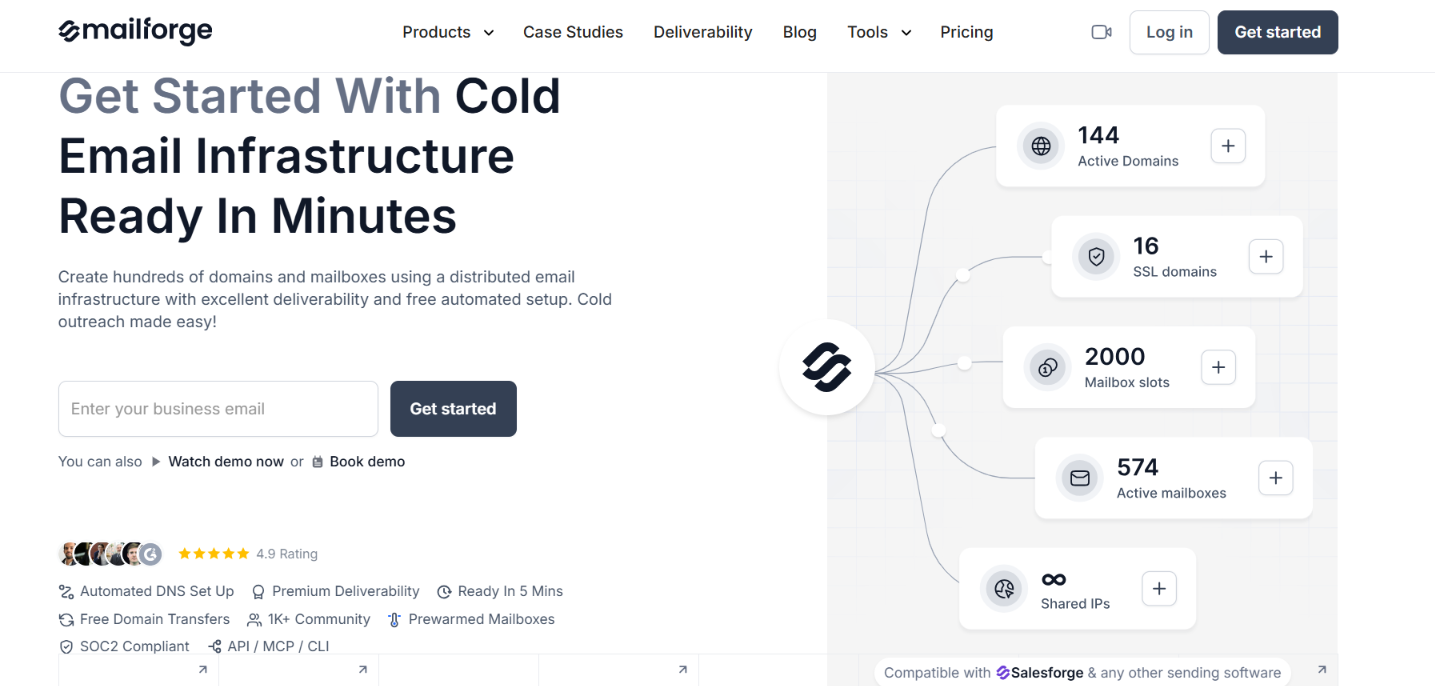
This image shows the Mailforge homepage
Mailforge gives you more control over how many mailbox slots you buy. The minimum is 10 slots, and you can add more based on the number of mailboxes you actually need.
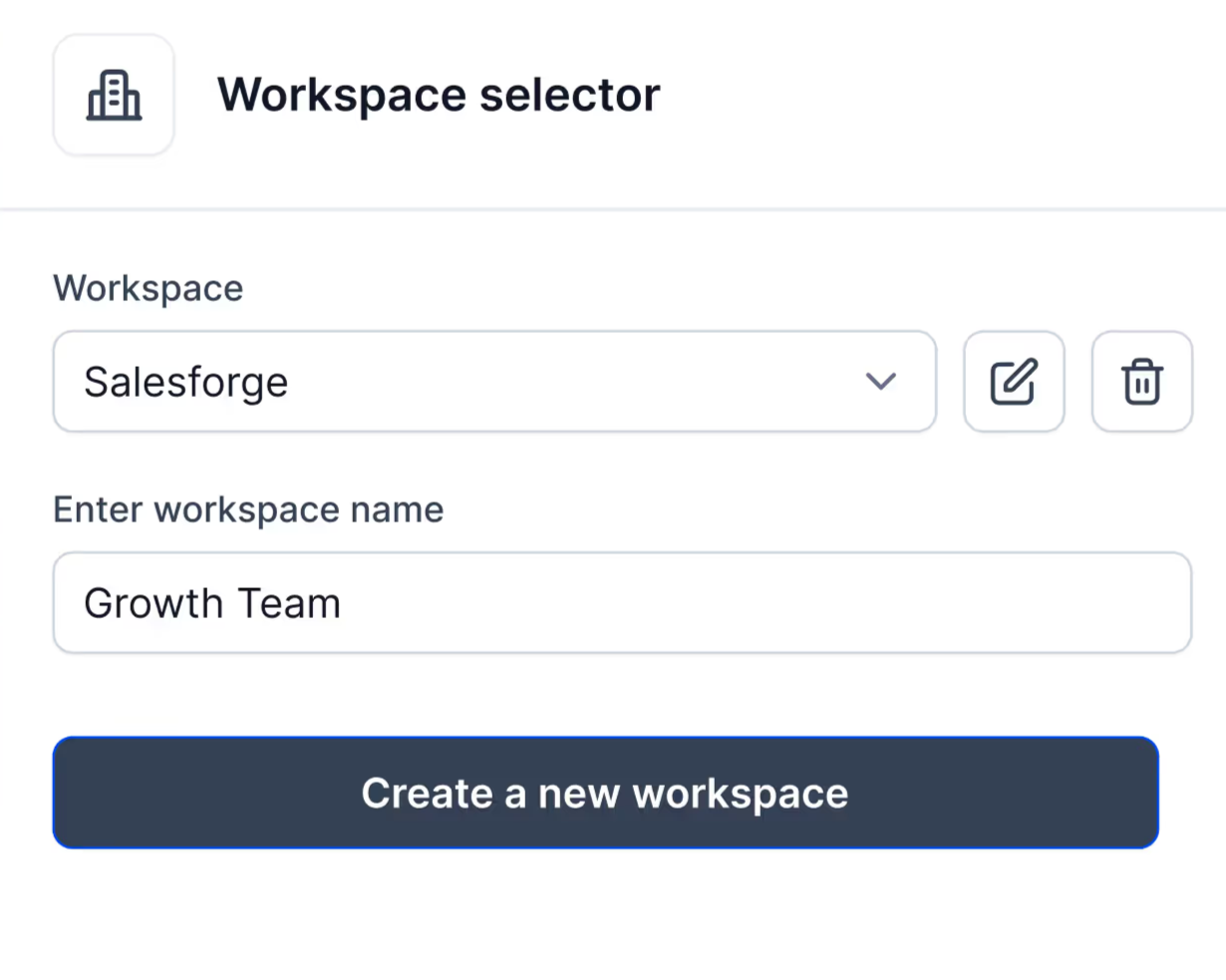
Mailforge also gives you more options for managing separate client setups. You can create different workspaces, move existing domains into Mailforge, and create mailboxes in bulk.
Multiple workspaces help you keep each client's domains and mailboxes separate.
This image shows the Multiple workspaces on Mailforge
Free domain transfers let you move domains you already own into Mailforge.
Automatic DNS setup handles SPF, DKIM, and DMARC for your domains.
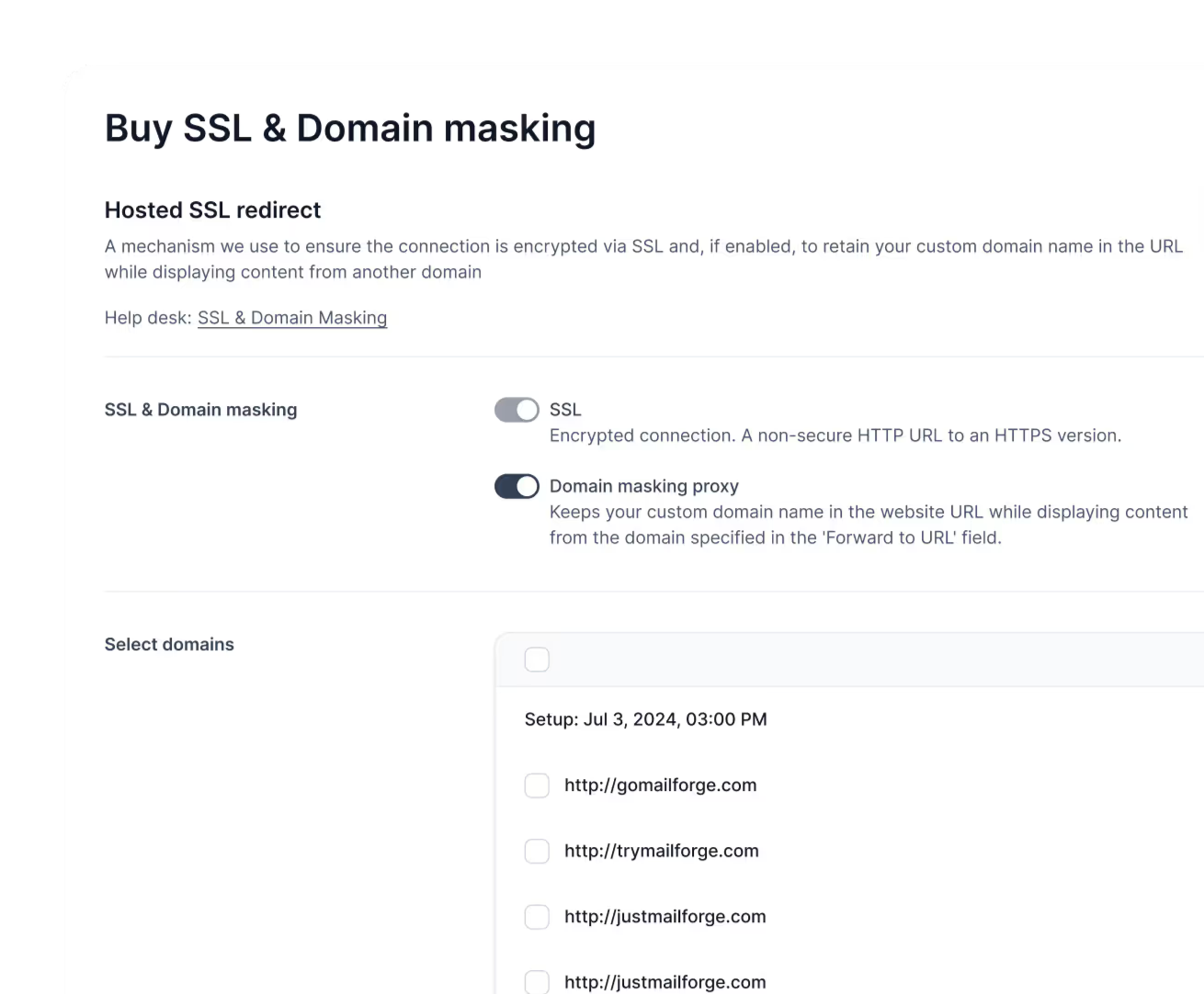
SSL and domain masking let you set up secure redirects without showing your primary domain.
This image shows the Buy SSL & Domain masking on Mailforge
API, MCP, and CLI access let you manage domains and mailboxes outside the dashboard.
Salesforge and other sending tools can be connected to your Mailforge mailboxes for running campaigns
The $3 mailbox price includes automated DNS setup, mailbox hosting, and maintenance. Domains are charged separately, while SSL and domain masking are optional add-ons.
Mailforge is not cheaper per mailbox than Winnr. Its advantage is the lower starting commitment. If you only need 10 or 20 mailboxes, you can start with that number instead of paying for a 50-mailbox plan.
Personalized Outbound Strategy
Get The Right Outbound Strategy In Minutes
Enter your email to get a custom plan & stack recommendation for your
business
It's being carefully crafted by AI
Please check your mailbox in 5 minutes
Is Winnr App Worth It in 2026?
Winnr is a solid option if you need a large number of SMTP mailboxes for cold email and want bulk setup, automatic DNS records, built-in warming, and API access in one place.
Its biggest strength is price at scale. The Startup plan gives you 50 mailboxes for $69 per month, but the final cost goes up once you add warming, domains, or dedicated IPs.
It is less suitable if you only need a small number of mailboxes or want Google Workspace or Microsoft 365 accounts.
If you want to start with fewer mailboxes and keep different client setups in separate workspaces, Mailforge is the alternative I would compare next. You can start with 10 mailbox slots, use shared cold email infrastructure, and manage your setup through API, MCP, or CLI.