
If you are searching for an honest Woodpecker review, you are probably not just looking for features.
You want to know one simple thing, does it actually work when you start sending real cold emails?
Woodpecker promises built-in warm-up, free catch-all verification, inbox rotation, and even pre-configured SPF, DKIM, and DMARC.
On paper, it sounds complete.
But what do real users say after using it?
Before writing this, I went through 100+ user reviews to see what people actually experience with Woodpecker.
In this review, I will break down what 100+ users like, what they question, how the pricing really works, and what happens when you scale.
No fluff. Just clear answers to help you decide if Woodpecker is the right fit for your outbound setup.
Key Takeaways of Woodpecker review
Start with Mailforge and set up scalable domains and mailboxes in minutes at just $3 per mailbox
Woodpecker.co is a cold email outreach platform built specifically for sending and managing cold email campaigns.
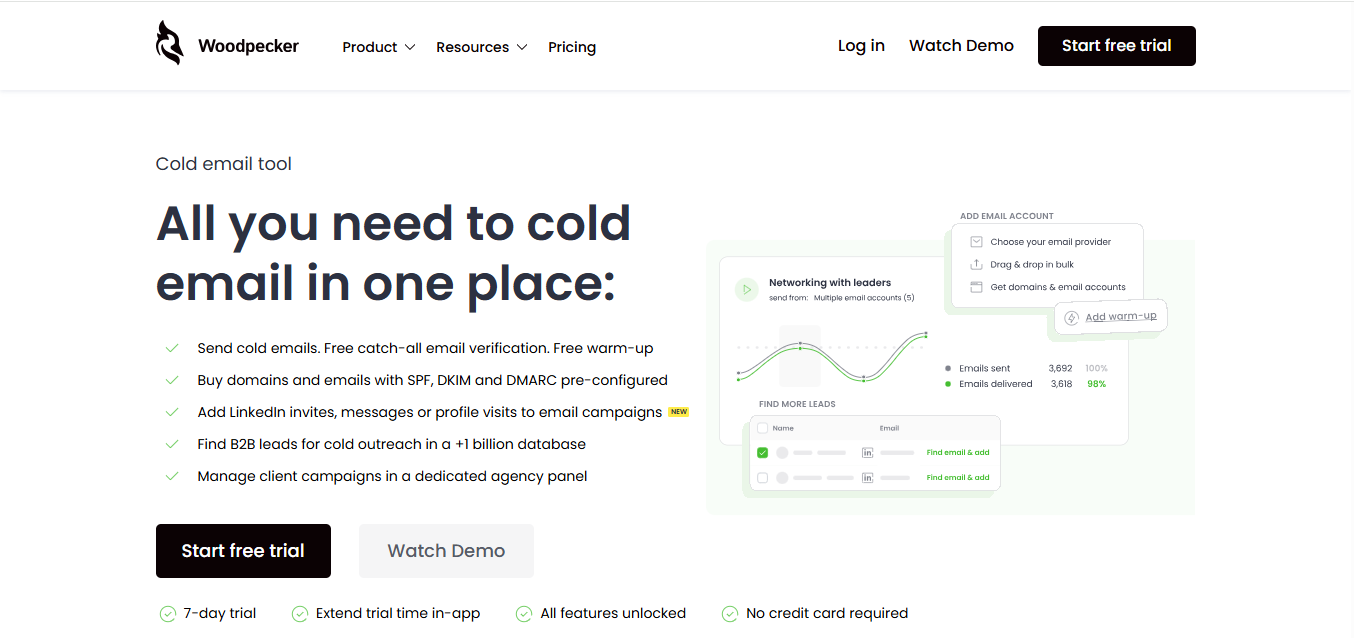
It allows you to send emails, verify addresses with catch-all verification, warm up inboxes, and control campaigns from one dashboard.
You can also purchase domains and email accounts with SPF, DKIM, and DMARC already configured.
For teams that need more, there are add-ons like LinkedIn outreach and an agency panel for managing client campaigns.
For campaigns, it supports condition-based workflows, A/B testing, AI interest level detection, and combined email and LinkedIn sequences.
There is also an agency panel if you manage outreach for clients.
Here are the main features:
Woodpecker checks catch-all email addresses in real time when you send.
It is powered by Bouncer and fully built into the platform, so you don’t need a separate tool.
Warm-up is included to help build your sender reputation.
If you need more warm-up slots, you can add them.
It includes inbox rotation, adaptive sending, a deliverability monitor, SPF and DKIM domain checks, a spam words checker, adjustable daily limits, and human-like sending patterns.
You can build condition-based campaigns, set up workflows, run A/B tests (up to 5 versions), detect interest levels with AI, sort replies, and combine email, LinkedIn, and call steps in one sequence.
Woodpecker offers an AI email writer, snippets, spintax, timezone-based sending, domain blacklisting, and email preview before sending.
You get access to a +1 billion B2B database with 400 free credits per month.
You can buy more credits if needed.
You can buy domains and email accounts directly inside the platform. SPF, DKIM, and DMARC are already configured.
You can also connect your own domain.
For agencies, there is a separate panel to manage clients.
It includes separate databases, bulk campaign actions, centralized billing, white-label reporting, and automated audits.
Woodpecker connects through API, webhooks, and MCP Server. It also integrates with tools like HubSpot, Pipedrive, Calendly, Zapier, and Google Sheets.
Here’s how pricing works for Woodpecker:
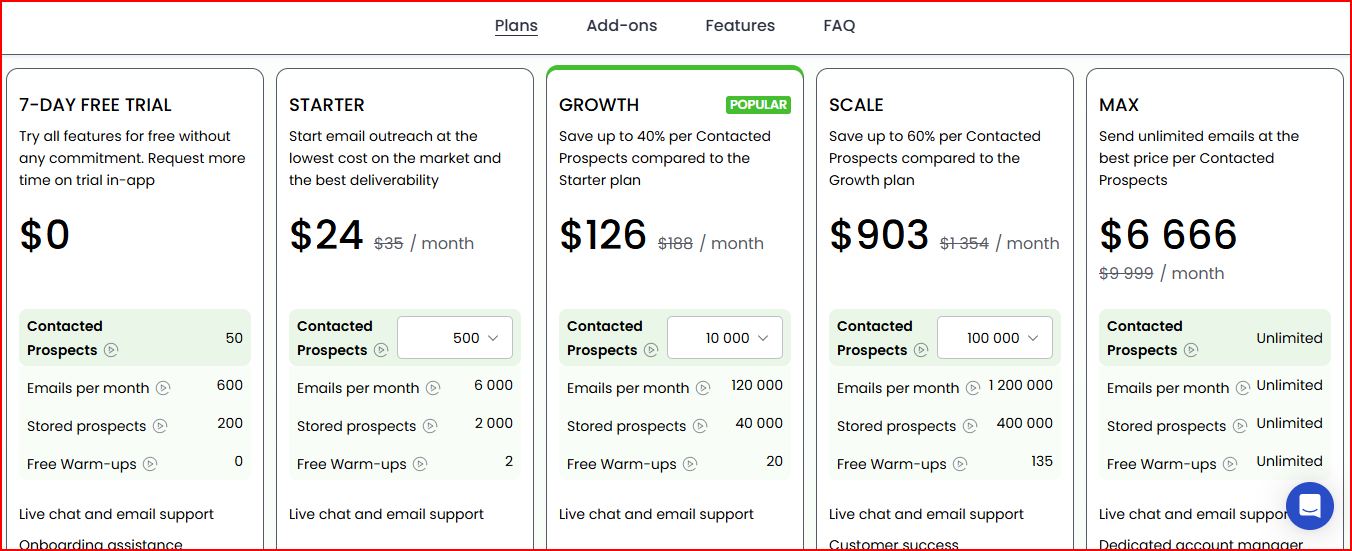
You get a 7-day free trial with all features unlocked. No credit card is required.
This plan allows 500 contacted prospects and 6,000 emails per month.
It includes 2 free warm-ups and support via live chat and email.
This plan increases limits to 10,000 contacted prospects and 120,000 emails per month.
It includes 20 free warm-ups and support.
This plan supports 100,000 contacted prospects and 1,200,000 emails per month.
It includes 135 free warm-ups and customer success support.
This plan removes limits on contacted prospects, emails, and warm-ups.
It also includes a dedicated account manager.
These are optional features that cost extra on top of your plan:
After going through lot of Woodpecker reviews, these are the few things I saw most users liked:
Many users said Woodpecker removes the hassle of managing cold email manually.
Instead of using spreadsheets or tracking follow-ups by hand, they can schedule, personalize, and track campaigns from one central dashboard.

For them, this saves time every week and makes outreach more organized.
A common point in reviews is how simple the platform feels.
Users mention the clean interface and smooth setup process.

Several people said the initial setup was easy, which helped them start campaigns quickly without confusion.
Users like that they can build campaigns that run automatically.
Once a campaign is set, emails go out without needing constant manual work.

This is especially helpful for users who are also busy with other tasks like cold calling.
Some users appreciate the flexibility.
They like being able to set specific sending hours and adjust campaign logic.

The option to combine email with LinkedIn outreach is also mentioned as useful.
A few reviews highlight strong open rates, response rates, and deliverability.
Users say they trust the platform when it comes to sending emails successfully.

Overall, the main themes are simplicity, automation, time-saving, and confidence in deliverability.
After going through many Woodpecker reviews, these are the main concerns users mentioned:
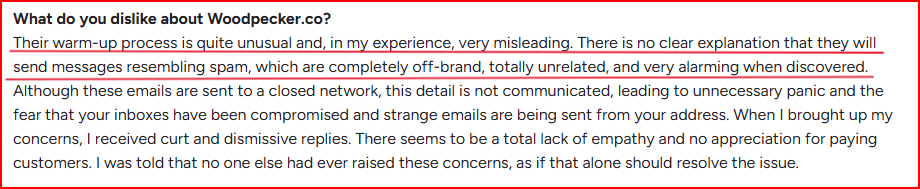
One user said the warm-up process felt unusual and misleading.
They were not clearly informed that warm-up emails might look like spam.
When they saw off-brand and unrelated emails being sent, it caused panic and concern about their inbox security.
Some users mentioned occasional bugs and slow performance, especially when managing multiple accounts or multiple campaigns at the same time.

While the interface is often praised, performance under heavier usage was a concern for a few reviewers.
A few users pointed out that each plan strictly limits the number of prospects you can contact.
For example, the Starter plan allows only 500 contacted prospects, Growth allows 10,000, Scale allows 100,000, and only the Max plan removes limits completely.

For users running large campaigns, these limits can feel restrictive.
Some users said certain tasks require manual effort.
Removing blacklist entries has to be done manually, and editing sender or account details must be handled one by one.

One user mentioned that active campaigns are not always easy to understand at a glance.
Sometimes it takes a moment to clearly see the current status.

Overall, the main concerns are warm-up clarity, performance when handling multiple accounts, sending limits, manual work, and campaign visibility.
Woodpecker.co is best for teams that want to run cold email campaigns inside a structured system without designing infrastructure themselves.
It makes sense if you:
In short, it fits teams that want a complete sending platform with structured limits and built-in deliverability support.
Woodpecker.co is not built for teams whose strategy starts with infrastructure design.
It may not be the right fit if you:
Woodpecker is campaign-first. Infrastructure is supported inside the system, but it is not the core design.
If your focus is infrastructure-first from day one, a solution like Mailforge is more aligned, because it is built specifically around scalable domain and mailbox infrastructure rather than campaign management.
Mailforge is a distributed cold email infrastructure platform designed to create and manage domains and mailboxes at scale.
It gives you automated DNS setup for every domain you add, including DMARC, SPF, DKIM, and custom domain tracking configured following industry best practices.
You can create hundreds of domains and mailboxes using a shared IP infrastructure built specifically for cold outreach.
It supports bulk DNS updates, domain transferring, multiple workspaces, SSL and domain masking, and works with any sending software.
Here’s the real difference, side by side especially if deliverability and scaling matter to you.
Woodpecker.co works as a campaign management platform with built-in deliverability tools.
It helps teams send outreach from one dashboard and operate within structured limits.
But once outbound becomes serious, meaning multiple domains, many mailboxes, higher sending volume, and long-term deliverability planning infrastructure becomes the real foundation.
At that stage, campaign features are not the main concern.
Domain setup, mailbox scaling, DNS automation, and infrastructure structure become the priority.
In such cases choosing infra focused like Mailforge help you to scale with high deliverability.
Mailforge is built specifically for scalable cold email infrastructure.
It automates DNS setup, supports unlimited mailboxes, and allows you to build the foundation first then connect it to any sending platform you choose.
Use Mailforge! Set up scalable cold email infrastructure in minutes and start sending with a stronger foundation.
