

Personalized Outbound Strategy
Get The Right Outbound Strategy In Minutes
Enter your email to get a custom plan & stack recommendation for your business
It's being carefully crafted by AI
Please check your mailbox in 5 minutes
$1 for a Google Workspace account is going to get your attention if you are buying inboxes for cold email.
That’s the price Mailbomb offers when you order 100 or more accounts. Microsoft 365 accounts drop to $2 each, and Mailbomb also handles the DNS setup and connects the accounts to your sending tool.
For agencies buying hundreds of inboxes, those savings can add up fast. But I could find very little feedback from Mailbomb users outside the testimonials on its own website. That makes it difficult to know how these accounts perform once you start sending at scale.
So, is Mailbomb worth choosing mainly because of its low prices?
In this Mailbomb review, I’ll look at what you get, how much it costs, its deliverability claims, and where it may fall short.

Mailbomb gives you Google Workspace and Microsoft 365 accounts for cold email. It handles the DNS setup, creates the accounts, and connects them to your sending tool, so you do not have to set up each account yourself.
You can also buy pre-warmed accounts. These come with SPF, DKIM, DMARC, and warm-up already handled, and Mailbomb says you can use them with any sending tool.
What you do not get, based on what Mailbomb publicly lists, is the same set of tools for managing and monitoring your mailboxes after setup. Mailbomb does not list features such as mailbox analytics, bulk DNS updates, or detailed mailbox controls on its website.
Primeforge provides these features along with Google Workspace and Microsoft 365 mailboxes, which gives you more control once your mailboxes are running.
Here’s how they compare:
Both cover the main job of getting Google and Microsoft mailboxes ready for cold outreach. Mailbomb says a normal order takes 1-2 business days, mainly because of DNS propagation.
Primeforge adds more tools for what happens after setup. You can manage domains and mailboxes, make bulk DNS changes, and connect mailboxes to your sending software. It also provides mailbox analytics, so you can check sending activity, replies, bounces, sending IPs, and blacklist status.
So, Mailbomb gives you a simpler way to buy and set up cold email accounts at a low cost. Primeforge gives you Google and Microsoft mailboxes too, but adds more tools to manage and monitor them as you scale.
The main features of Mailbomb are focused on getting Google Workspace and Microsoft 365 accounts set up for cold email, including the DNS work and connection to your sending tool.
You can get Google Workspace accounts with US IPs, with automated DNS setup and sending-tool integration included.
The price per account also drops as you order more, which can matter when you need accounts in bulk.
If you prefer Microsoft, Microsoft 365 Business accounts with US IPs are available as well. Automated DNS setup and sending-tool integration are included here too.
This gives you a choice between Google and Microsoft when building your sending setup.
You can also choose pre-warmed Google Workspace and Microsoft accounts instead of starting with new ones.
These come with short random domains and US names. SPF, DKIM, DMARC, and warm-up are already handled, and the accounts can be connected to any sending tool. Backup accounts are also listed as part of the offer.
A lot of the technical setup is handled for you. The done-for-you service covers DNS records, account creation, and connecting the email accounts to your sending tool.
This saves you from configuring every account manually.
You are not tied to a specific cold email platform. The accounts can be integrated with any sending tool.
The Google Workspace plans also mention OAuth, MasterInbox, CRM, and Slack in the integration details.
The pricing is designed around the number of accounts you order. Google Workspace and Microsoft 365 both have separate price levels for smaller and larger orders, with the per-account price dropping as the quantity increases.
That makes the bulk pricing easy to understand before you place an order.
Support is included after purchase, although the level depends on the package. Higher-volume plans list 24/7, priority, or dedicated support, while smaller plans list standard after-sale support.
Once you know which accounts you need, there is not much setup for you to handle yourself. Mailbomb takes care of most of the work after you place the order.
In short, you choose the accounts and provide the details Mailbomb needs. Its team handles the account and DNS setup from there.
Mailbomb uses volume-based pricing, so the more accounts you buy, the less you pay for each one. There are separate prices for Google Workspace, Microsoft 365, and pre-warmed accounts.
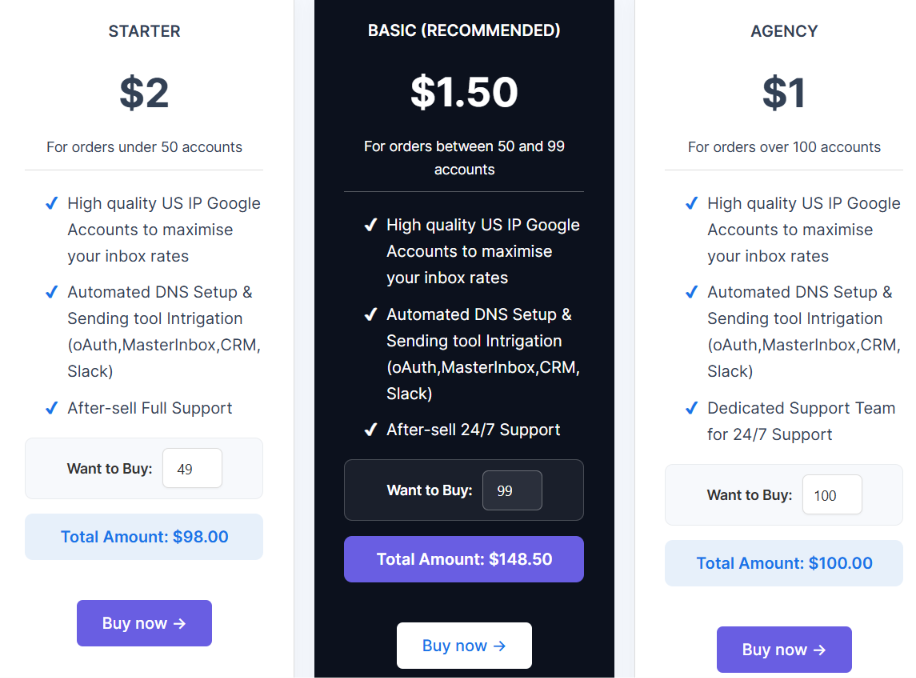
Google Workspace is the cheapest option. You pay $2 per account for fewer than 50 accounts, $1.50 for 50-99 accounts, and $1 at the highest tier. Automated DNS setup, sending-tool integration, and US IP Google accounts are included.
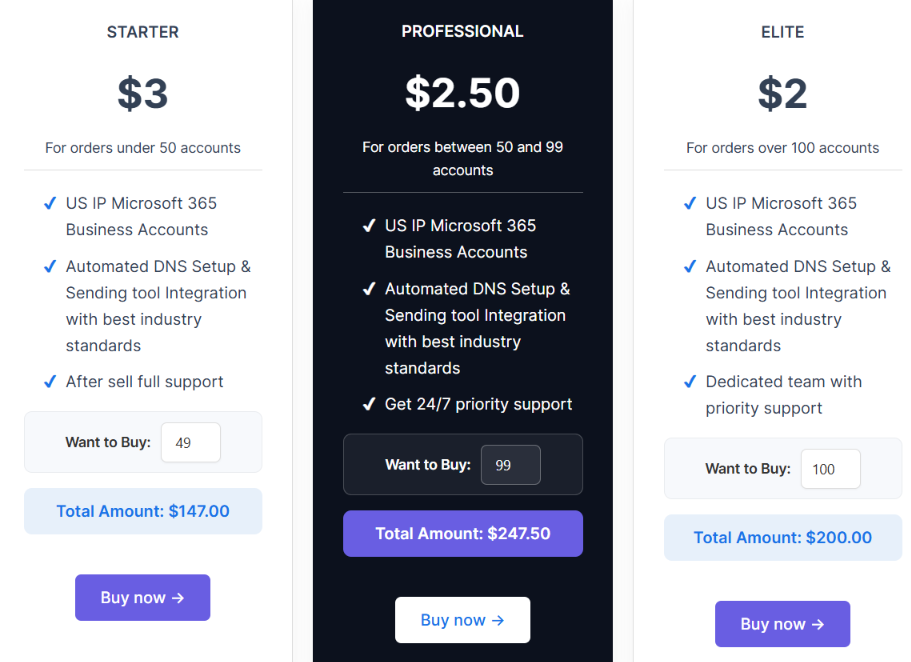
Microsoft 365 Business accounts are more expensive, starting at $3 per account. The price falls to $2.50 for 50-99 accounts and $2 at the highest tier. These accounts also come with US IPs, automated DNS setup, and sending-tool integration.
At 100 accounts, Mailbomb shows a total price of $200. So, for the same number of accounts, Microsoft costs twice as much as Google at this tier.
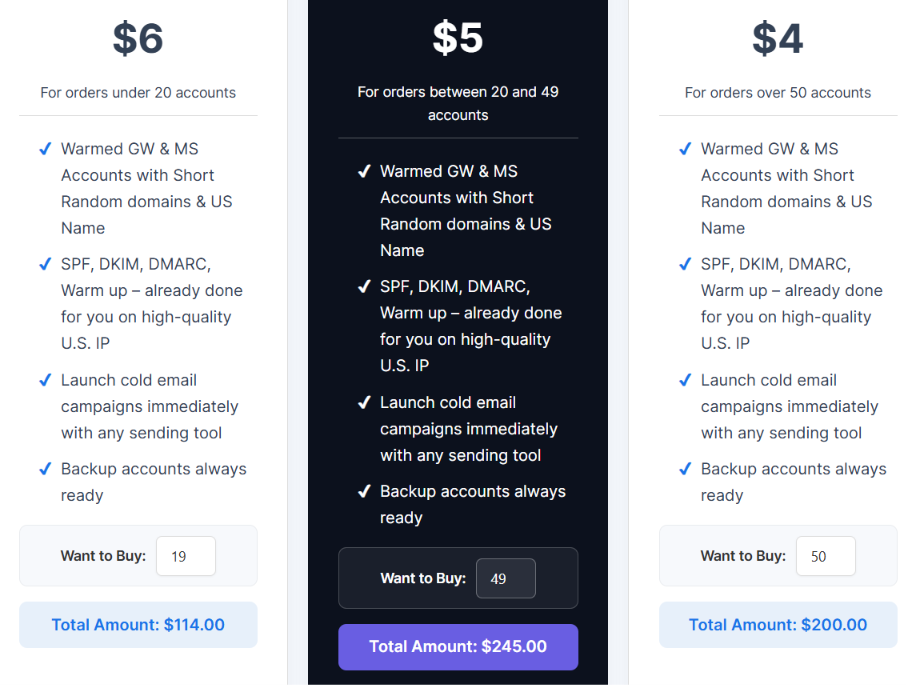
Pre-warmed accounts cost more because Mailbomb says SPF, DKIM, DMARC, and warm-up are already done. You can choose warmed Google Workspace or Microsoft accounts.
At the $4 rate, 50 pre-warmed accounts cost $200, which is the example Mailbomb shows.
So the choice comes down to what you are paying for. Standard Google accounts give you the lowest price per account. Microsoft costs more, while pre-warmed accounts have the highest price because the warm-up and authentication setup are already handled.
Yes, although the Google and Microsoft offers are currently presented as waiting-list offers. Mailbomb lists 9 Google Workspace accounts for 45 days and 9 Microsoft accounts for 45 days. It also lists 3 pre-warmed accounts with a 7-day free trial.
Mailbomb is built for teams that want to buy Google Workspace or Microsoft 365 accounts for cold email without setting up every account themselves.
So, Mailbomb is a good fit if you mainly want an easy way to get a lot of cold email accounts ready to use. If you want more control over your mailboxes after you buy them, you may want to compare other options.
If you like Mailbomb because it gives you Google Workspace and Microsoft 365 mailboxes for cold outreach, but you want more control over those mailboxes after you buy them, Primeforge is a closer alternative to consider.
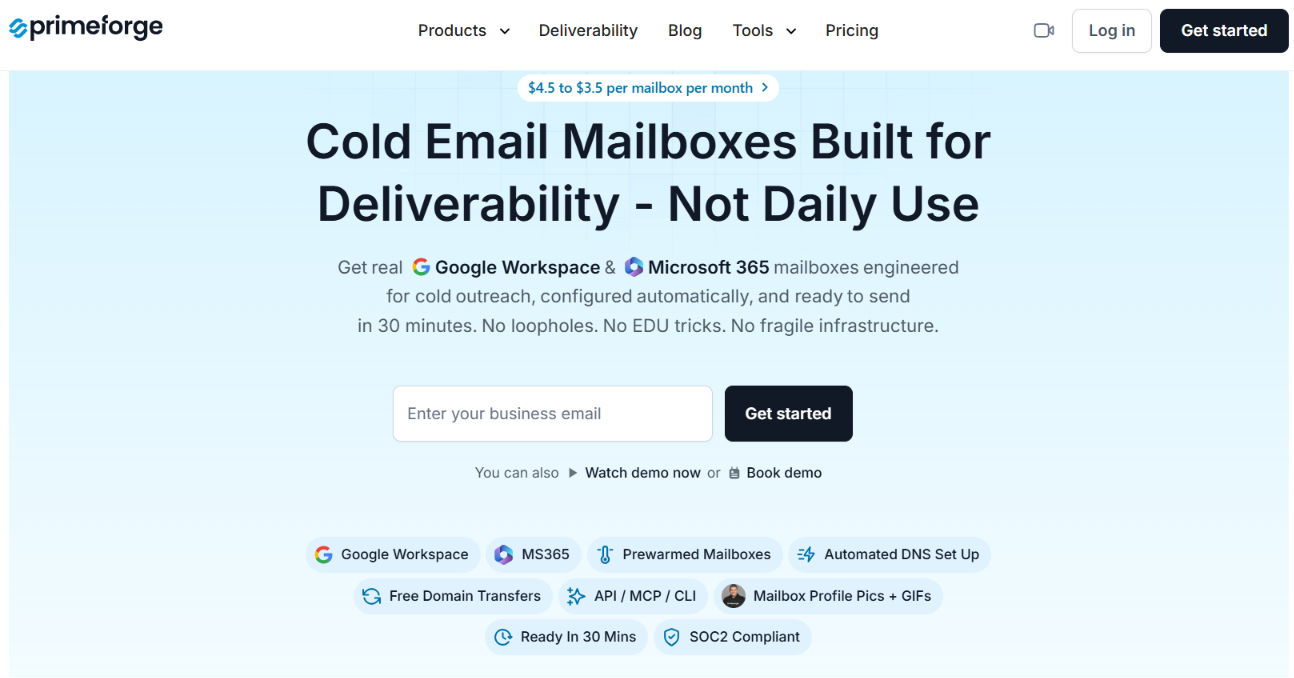
Primeforge also provides Google Workspace and Microsoft 365 mailboxes with US IPs, but gives you more ways to manage the setup yourself.
Here is where Primeforge gives you more:
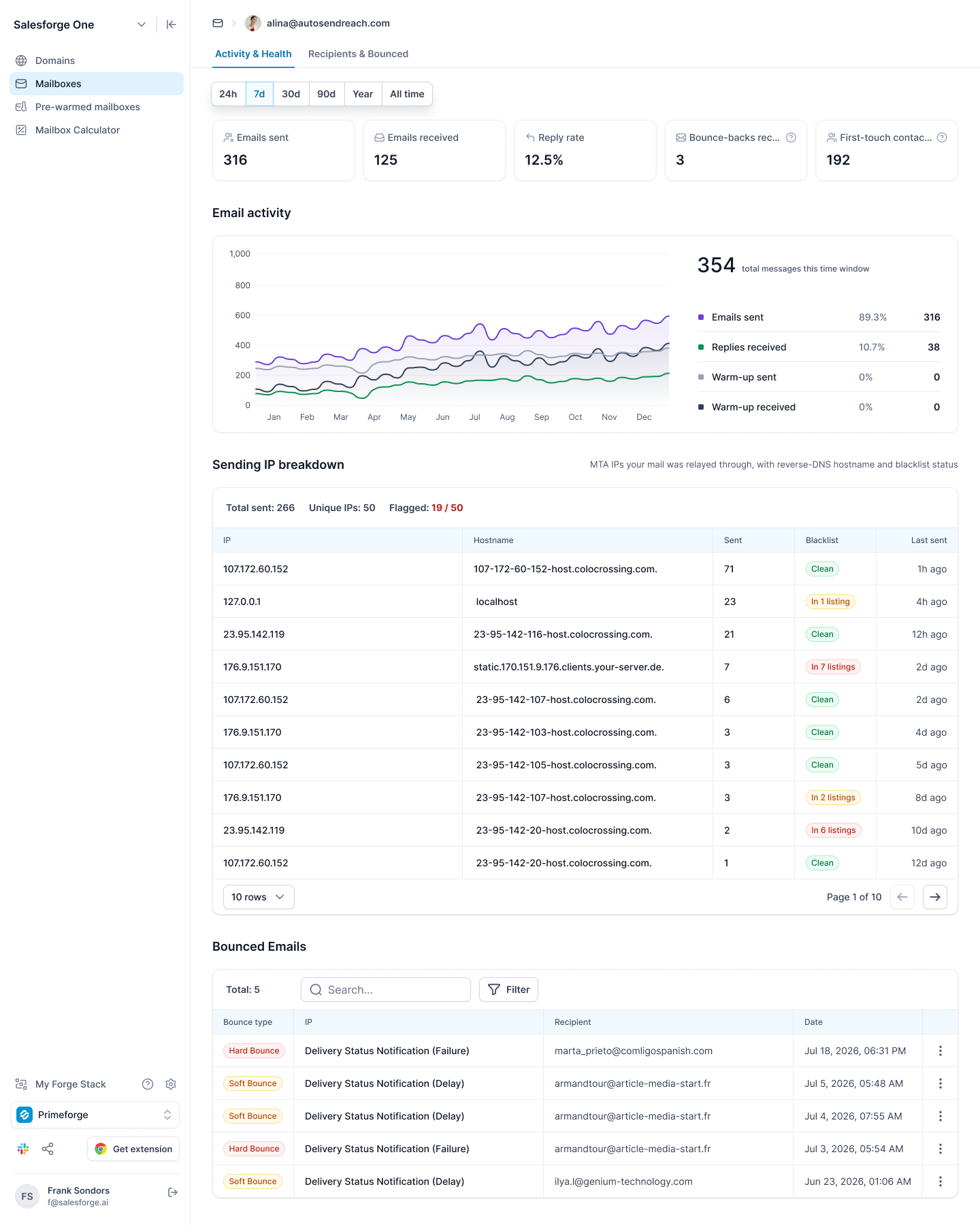
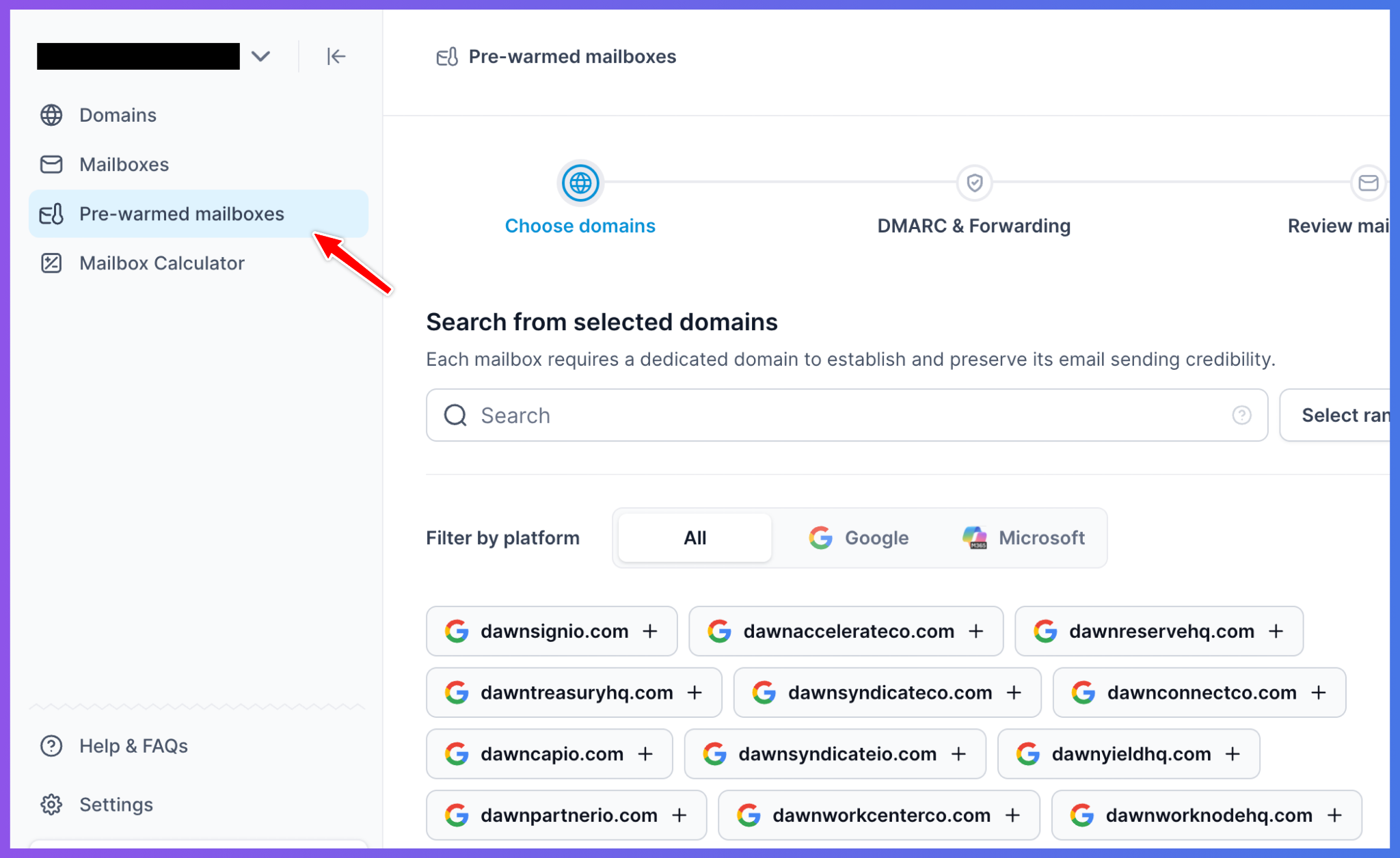
The trade-off is price. Primeforge's standard mailboxes cost $4.50 to $3.50 per mailbox per month, with a minimum of 10 mailbox slots. It also does not offer a free trial. Mailbomb prices range from $1 to $2 for Google accounts and $2 to $3 for Microsoft 365 accounts, depending on how many you buy.
So, Mailbomb is the cheaper choice if you mainly want to buy Google or Microsoft accounts in bulk. Primeforge costs more, but gives you more control over the mailboxes you buy and more ways to manage and check them after setup.
Enter your email to get a custom plan & stack recommendation for your business
Please check your mailbox in 5 minutes

Yes, Mailbomb is worth considering if you mainly want Google Workspace or Microsoft 365 accounts for cold email at a low per-account price. The setup is largely handled for you, and you also have the option to buy pre-warmed accounts if you want to skip starting the warm-up process yourself.
The main limitation is what happens after setup. Mailbomb does not clearly list the same level of mailbox analytics, API access, bulk DNS management, or mailbox controls that you get with Primeforge.
So, if keeping your cost per account low is the priority, Mailbomb does that well. But if you want to own your setup and have more tools to manage and monitor your mailboxes as you grow, get started with Primeforge.