
Personalized Outbound Strategy
Get The Right Outbound Strategy In Minutes
Enter your email to get a custom plan & stack recommendation for your business
It's being carefully crafted by AI
Please check your mailbox in 5 minutes

$2.50 a month. That’s the price Outreach2day charges for a cold email mailbox, including the warmup and sequencer most teams pay for separately.
If you’ve ever added up the cost of your sending stack, you’ll see why that number stands out. You pay for the mailbox, a warmup tool to keep it out of spam, and a sequencer on top. The bill grows with every inbox you add. Outreach2day bundles all three into one price.
A price that low usually comes with a catch. With Outreach2day, there are three things to know before you move a single campaign.
I’ll walk through each one so you can decide whether $2.50 is a real bargain for your setup or a cost that shows up later.
Here’s how Outreach2day compares with Mailforge.
Outreach2day sells cold email mailboxes for $2.50 each per month, with warmup, a sequencer, a reply inbox, deliverability reports, and placement tests included
At 100 mailboxes, that's $250 a month. Once I add domains and the one-time card fee, the first year works out to about $2.73 per mailbox
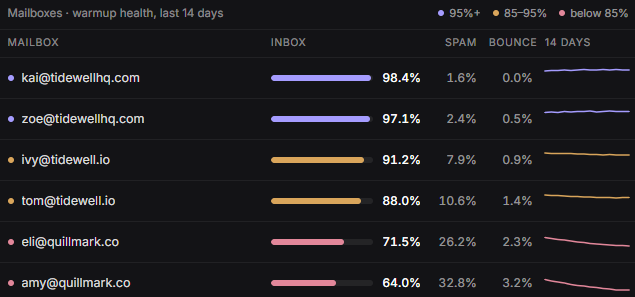
The reports are what I’d check every morning. Each mailbox shows its own warmup inbox rate, spam rate, and bounce rate over 14 days, so when a campaign’s results drop, I can see which mailboxes to replace instead of guessing.
If I already send through Instantly or Smartlead, I don’t have to give that up. I paste an API key once, and new mailboxes appear automatically; disconnected ones reconnect. Warmup and reports keep running on Outreach2day’s side.
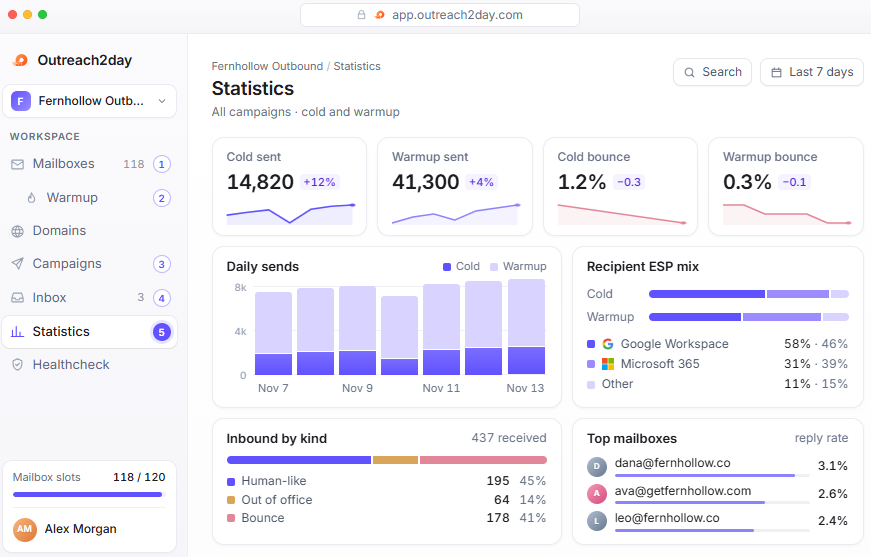
These are SMTP mailboxes on my own domains, with no Google Workspace or Microsoft 365 option. Outreach2day's own statistics show most cold sends go to Google and Microsoft inboxes
The placement tests help. I can check whether my mailboxes land in the inbox or spam at Google and Outlook before committing a campaign to them.
I also don’t get domains that renew automatically. Domains bought in the app last one year; renewal isn’t automatic, and when a domain expires, every mailbox on it stops working. If I buy 20 domains in the same week, all 20 expire in the same week a year later, and every mailbox on them stops unless I renew in time.
Outreach2day has a 4.3 out of 5 on G2 from 18 reviews.
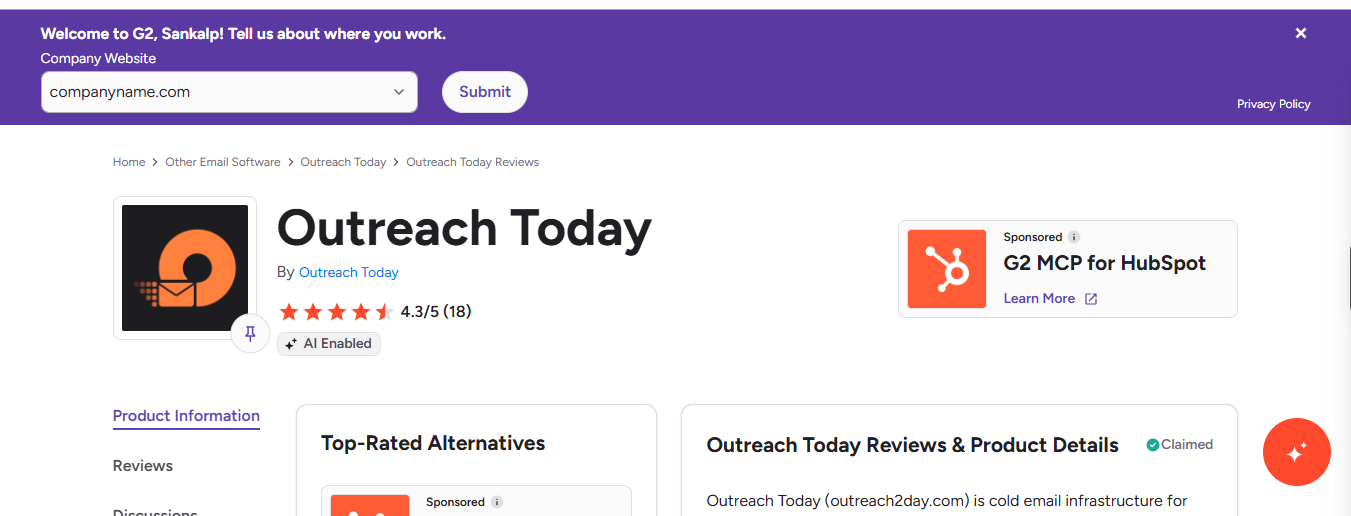
Seven were written this year, and five of those appeared within two weeks of each other, between October 23 and November 5, all with 5 stars. One of those five reviewers says he personally knows the person running the service.
I'd weigh their points with that in mind. The most useful criticism comes from a 2025 review and covers domain renewal and billing, which still work the same way.
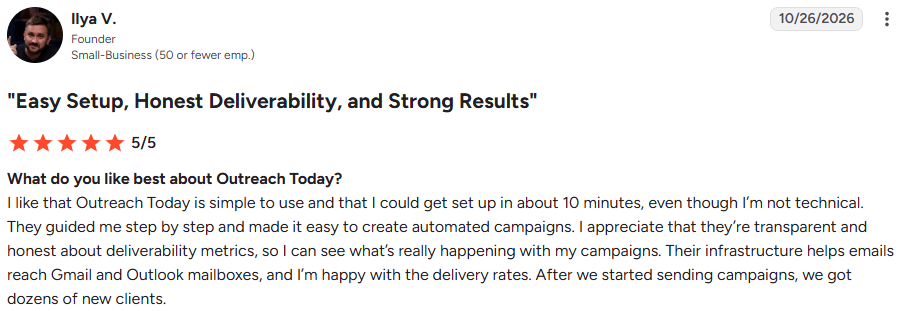
Ilya V., a founder at a small business (G2, Oct 26, 2026, 5/5), got up and running in about 10 minutes despite not being technical. The team walked him through each step until his first automated campaign was live.
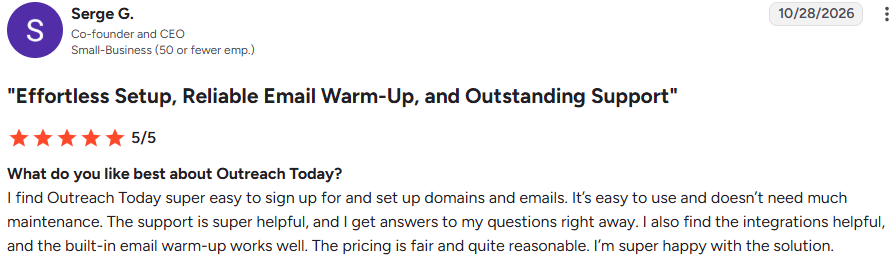
Serge G., co-founder and CEO of a small business (G2, Oct 28, 2026, 5/5), found it easy to add domains and mailboxes and says it needs little attention.
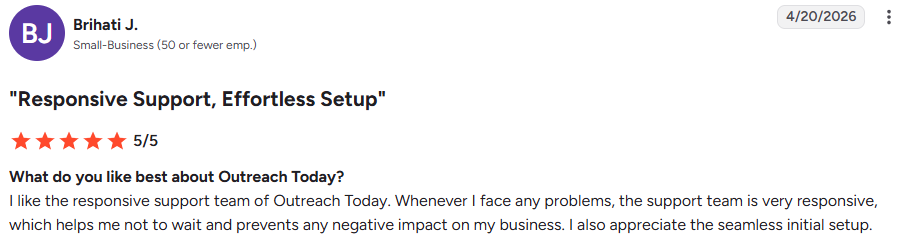
Brihati J. (G2, Apr 20, 2026, 5/5) also mentions a smooth first setup.
Sending still waits on warmup, which takes 14 days for each new mailbox.
Ilya says his emails reach Gmail and Outlook inboxes, the deliverability numbers are shown honestly, and his campaigns brought in dozens of new clients.
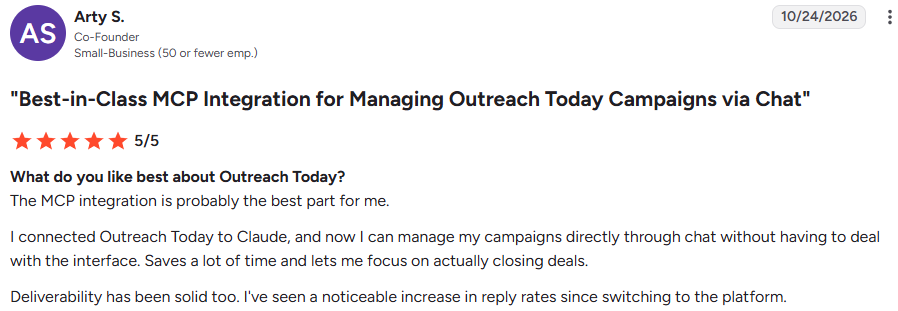
Arty S., a co-founder (G2, Oct 24, 2026, 5/5), says his reply rates have risen since switching.
None of them shares an inbox rate or reply rate, so I'd measure both in my own test.

Arty says the MCP is his favorite part. He connected Outreach2day to Claude and now manages his campaigns through chat instead of learning another interface.

Сергей, a portfolio quant analyst (G2, Oct 23, 2026, 5/5), runs many mailboxes and uses the API with Claude and ChatGPT to work faster. He also says it’s cheap for what it offers.
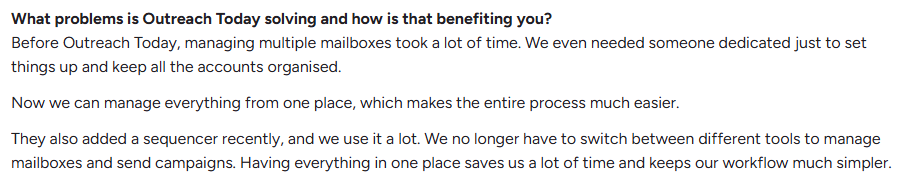
Viktor P., a CEO (G2, Sep 2, 2026, 5/5), used to need someone dedicated to setting up and organizing mailboxes. He now runs everything from one place, uses the newer sequencer heavily, and says support fixes problems quickly.
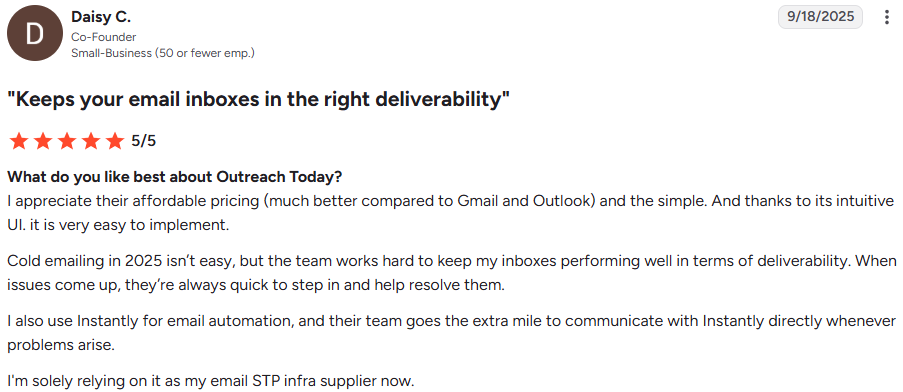
Daisy C., a co-founder (G2, Sep 18, 2025, 5/5), sends through Instantly. When problems come up there, the Outreach2day team contacts Instantly directly to resolve them.
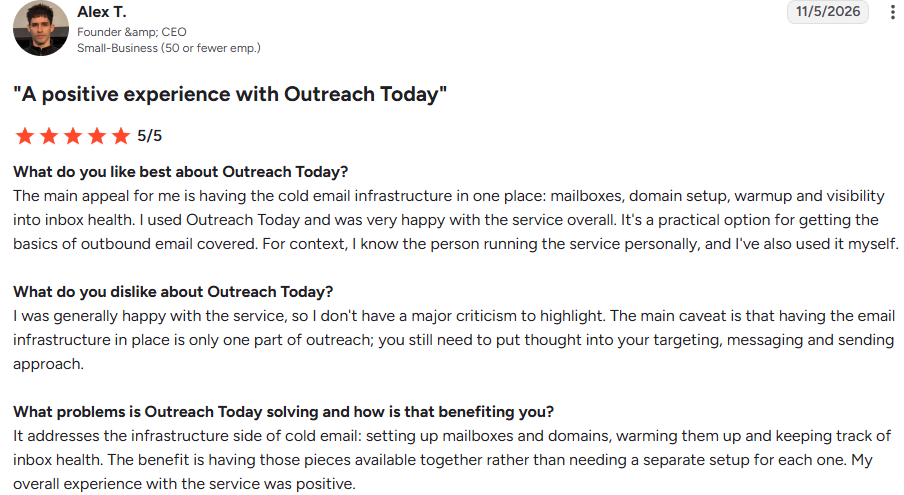
Alex T., founder and CEO of a small business (G2, Nov 5, 2026, 5/5), likes having mailboxes, domains, warmup and inbox health in one account. He’s also the reviewer who says he knows the person behind the service.
He adds a fair caveat: good infrastructure covers only part of outreach; your targeting, copy, and sending habits still determine the results.
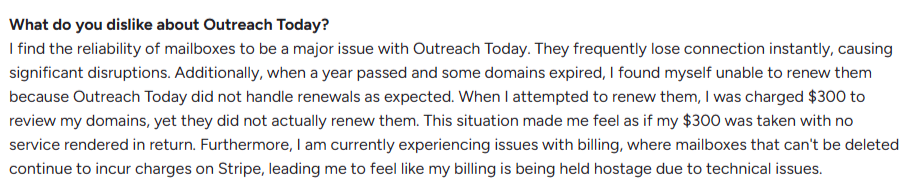
Philippe T., a founder (G2, Nov 26, 2025, 3/5), describes the most serious issue. His domains expired after a year without being renewed, and he was charged $300 to have them reviewed, but nothing was fixed.
He couldn’t delete mailboxes, and Stripe kept billing him, which he says made billing feel “held hostage.”
I can’t tell whether this was resolved. Both rules he ran into still apply, so I'd get them explained in writing before buying. I’d get both points explained in writing before buying.
Philippe also says his mailboxes often disconnected without warning. Recent reviews don’t mention this again, and the Instantly and Smartlead sync now reconnects mailboxes automatically. Still, it’s worth watching during your first month.

A mid-market IT services reviewer (G2, Oct 2, 2025, 4.5/5) wants better profile settings and more billing options.

Serge says the built-in sequencer could be easier to set up, Viktor mentions occasional frontend bugs, and Сергей wishes the FAQ explained more.
Ilya would like to reach the same person by email and LinkedIn. The sequencer only sends email.
Outreach2day doesn’t have a self-serve trial. The closest option is a free 10-mailbox test that you request from support, and those mailboxes warm up for 14 days before sending anything.
Here's what each screen shows during that first month.
Every mailbox has its own warmup page with a health score, sent count, inbox rate, spam rate, and bounce rate.
In the example, one mailbox at day 24 scores 97 out of 100, with 97.4% of warmup emails in the inbox. It’s been marked ready since day 14.
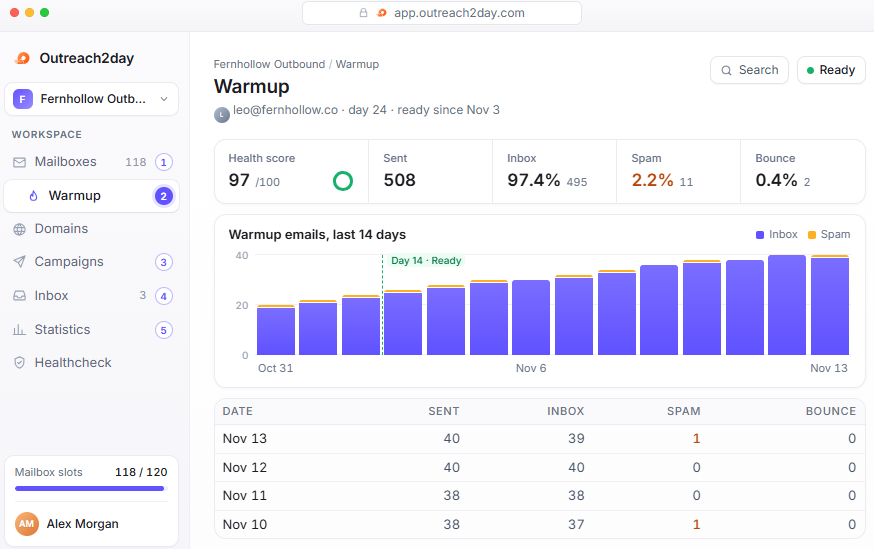
I’d watch the spam figure even when the score looks healthy. Eleven of 508 warmup emails landing in spam is a small number, but if it rises week after week, the mailbox is heading in the wrong direction.
The sequencer reports sends and replies for each step, not just the whole campaign. In one example, the first email gets a 2.0% reply rate, the first follow-up gets 1.4%, and the last gets 1.0%.
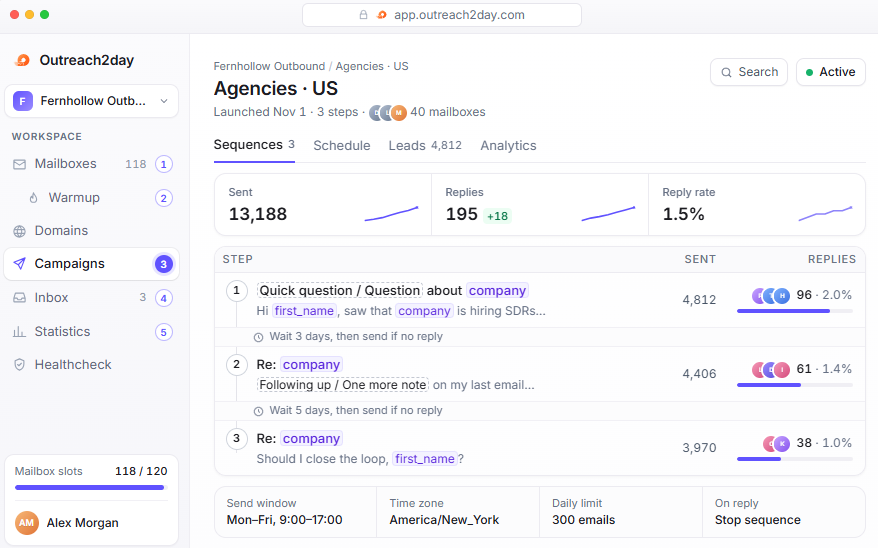
That tells me where to focus. The final step still gets replies, so I’d keep it and rewrite the middle one first. The campaign also has a send window, a daily cap of 300 emails, and stops automatically when someone replies.
Every reply from every mailbox lands in one inbox, with warmup emails hidden. Each one is tagged interested, neutral, or not interested, along with the campaign, step, and mailbox it came from.
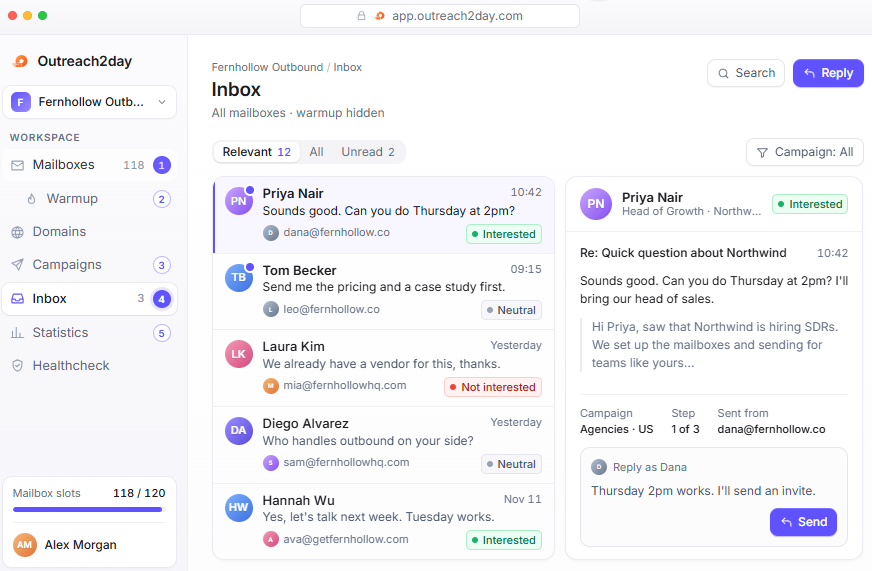
I can reply from the same mailbox that sent the email without switching accounts, which matters when a client’s reps share an inbox.
The warmup health table marks each mailbox green above a 95% inbox rate, amber between 85% and 95%, and red below 85%. In the example, two mailboxes on the same domain sit at 71.5% and 64%, with up to a third of their warmup emails going to spam.
When every mailbox on one domain turns red at once, I'd replace the domain.
Bounces from campaigns and warmup bounces appear as separate rates. In the example, cold emails bounce at 1.2% and warmup emails at 0.2%.
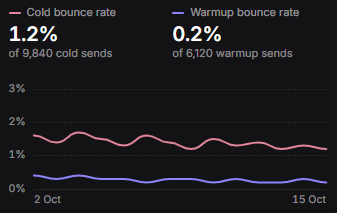
If my cold bounce rate rises while warmup stays low, the mailboxes are fine, and the problem is my list.
In one example, 64 of 123 incoming emails are human replies, 41 are out-of-office messages, and 18 are bounces.
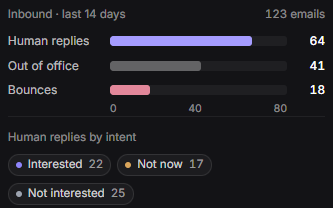
Without that split, I’d think my campaign had twice as many replies as it really did.
Placement tests send emails to 12 Google and 12 Outlook seed inboxes and show where each one landed. In the example, 11 of 12 reached the Google inbox and 10 of 12 reached Outlook.
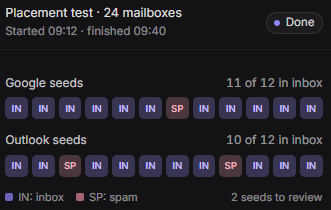
Mailboxes must be at least 21 days old to be tested. If I run the free 10-mailbox test, I’d keep it going for at least three weeks because that result shows whether the mailboxes reach Google and Outlook inboxes.
Each mailbox shows its warmup status: day 9 of 14, paused, or ready to send 25 cold emails a day.
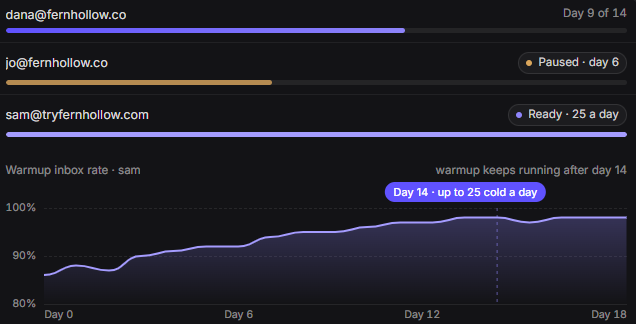
One mailbox in the example is paused at day 6. A paused mailbox misses its ready date, so I’d check this list every day during the first two weeks.
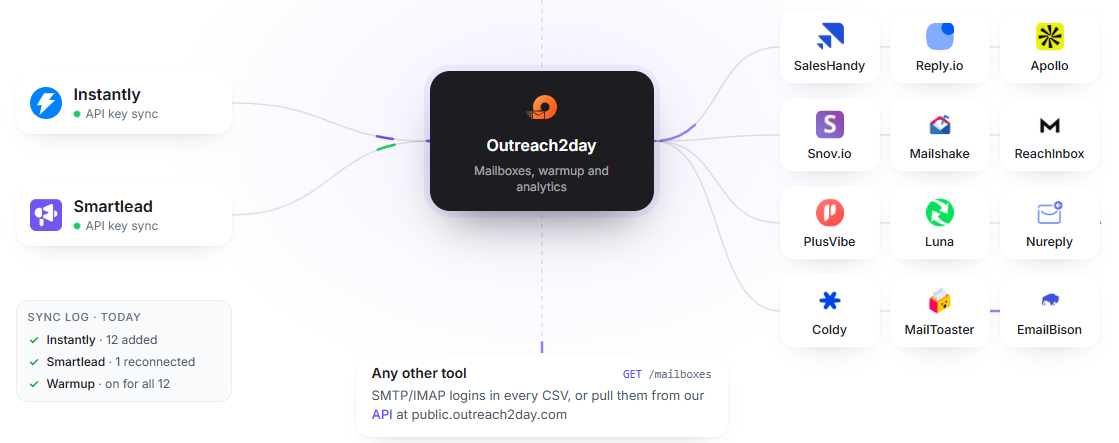
New mailboxes appear there automatically and reconnect if they drop, while warmup and reports keep running on Outreach2day’s side.
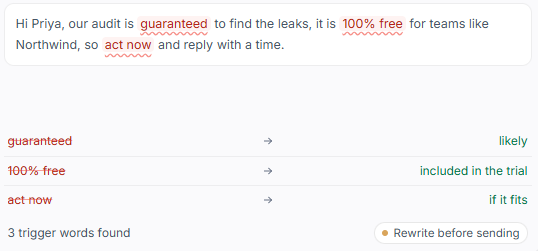
Before launching, I can paste an email into the spam checker. It flags phrases like “guaranteed,” “100% free,” and “act now,” and suggests simpler alternatives.
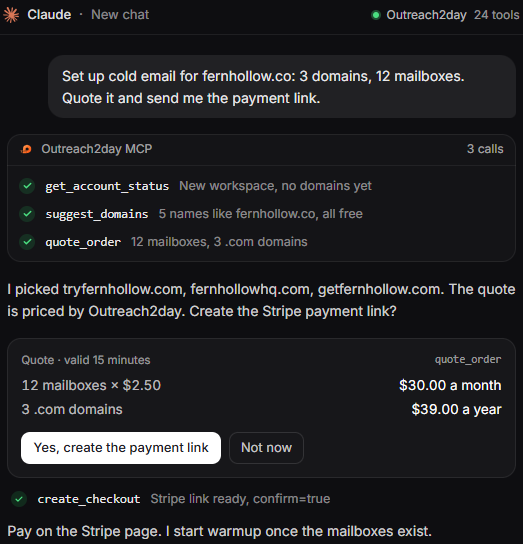
Through the MCP, I can ask Claude to set up 12 mailboxes across 3 domains. It suggests domain names, quotes $30 a month for the mailboxes and $39 for the domains, then sends me a Stripe link so I can pay myself.
The agent can’t charge my card, launch a campaign before 14 days of warmup, delete mailboxes, or show me passwords. Those limits are what make me comfortable handing the setup to an agent.
Outreach2day has one price: $2.50 per mailbox each month, at any volume. There are no plans or tiers, and workspaces and team members are free. The only other costs are domains and a one-time card fee.
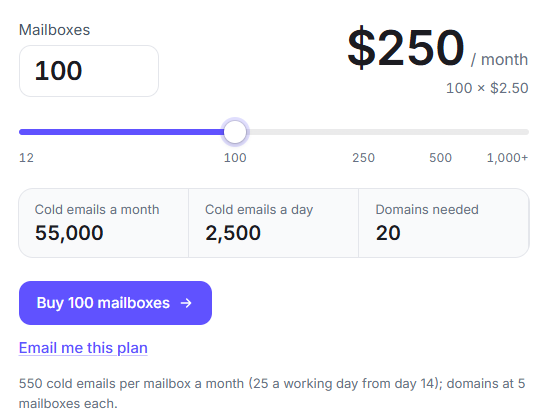
With five mailboxes on each new .com domain, here’s what I’d pay.
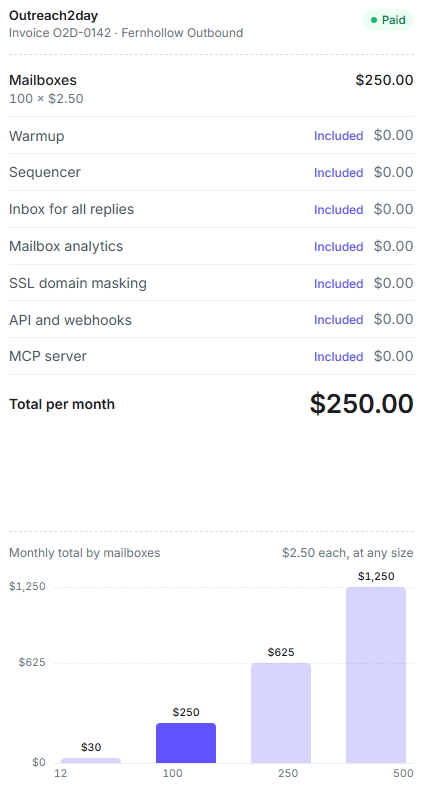
Connecting domains I already own brings the first checkout for 12 mailboxes down to $31.21, since I’m charged only for the first month and the card fee.
Outreach2day says it’s built for agencies and GTM teams, and that 3,600+ teams have used it since 2024. I'd consider it if I wanted everything on one bill and SMTP mailboxes were enough for my prospects.
I’d skip Outreach2day if the mailbox type mattered to my deliverability or if I couldn’t keep track of domain renewals myself.
Outreach2day and Mailforge both sell low-cost cold email mailboxes on shared infrastructure, set up on your own domains with DNS handled for you.
The difference is what each expects you to already have. Outreach2day bundles warmup, a sequencer, and reports into the mailbox price. Mailforge focuses on mailboxes and domains, and expects you to send through tools you already use.
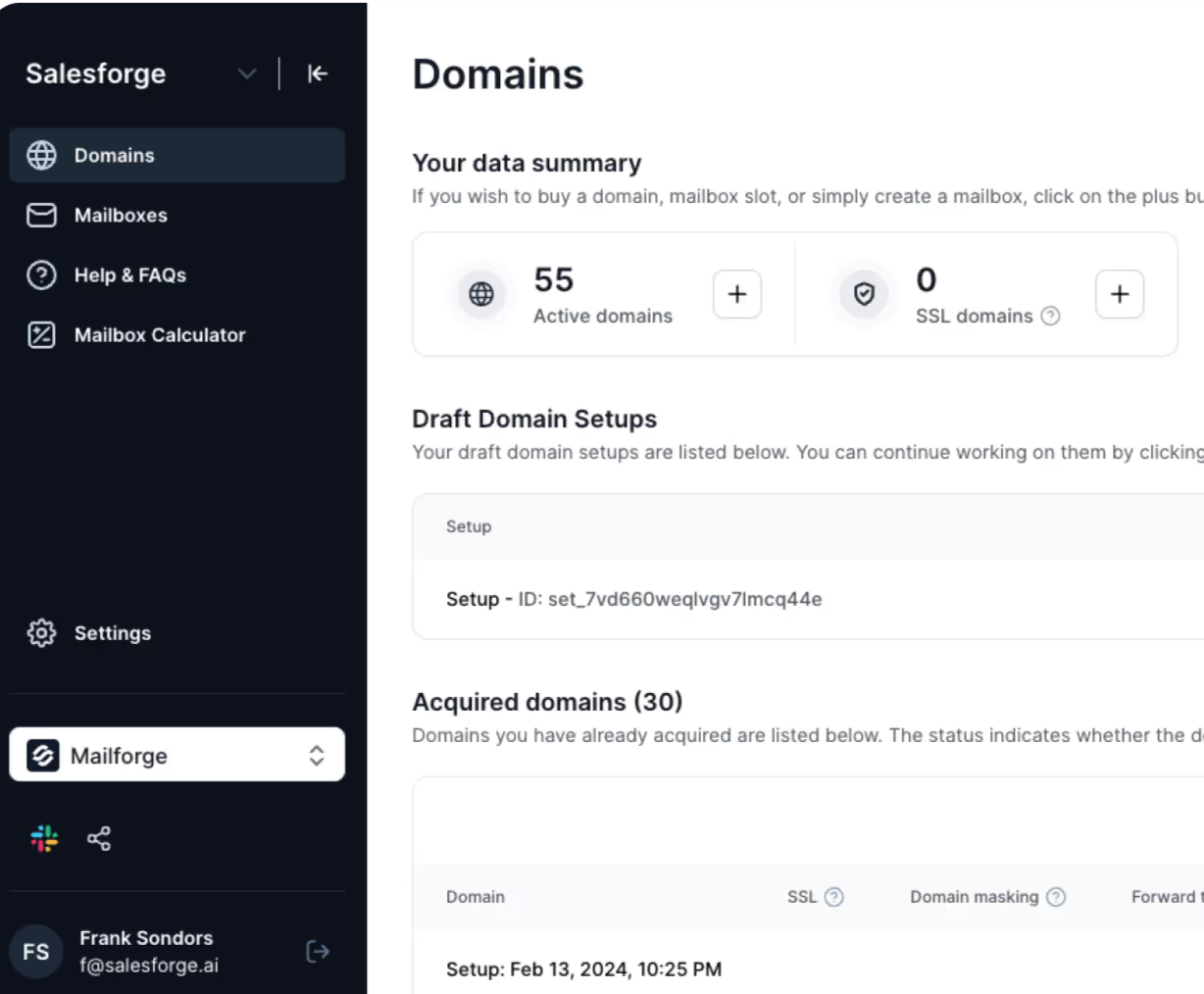
Outreach2day still doesn’t renew domains automatically. On Mailforge, I can turn on auto-renew for each domain. Every domain also shows its status, including expired and unpaid, so I'd spot a problem before it reached my campaigns.
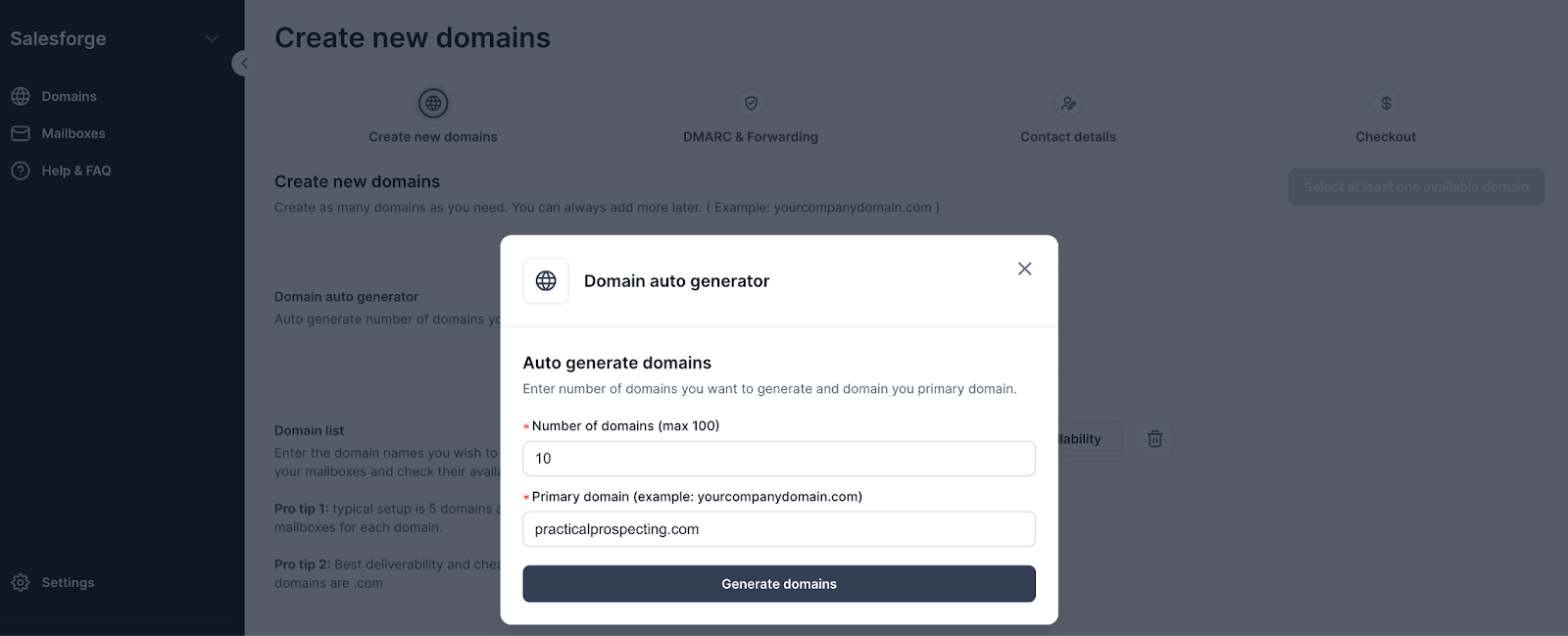
I enter my main domain, choose how many sending domains I need, and Mailforge generates them in bulk. Visitors who enter a sending domain are redirected to my real site.
Then I choose names, add a signature, and create every mailbox at once. The example sets up 60 mailboxes in one go.
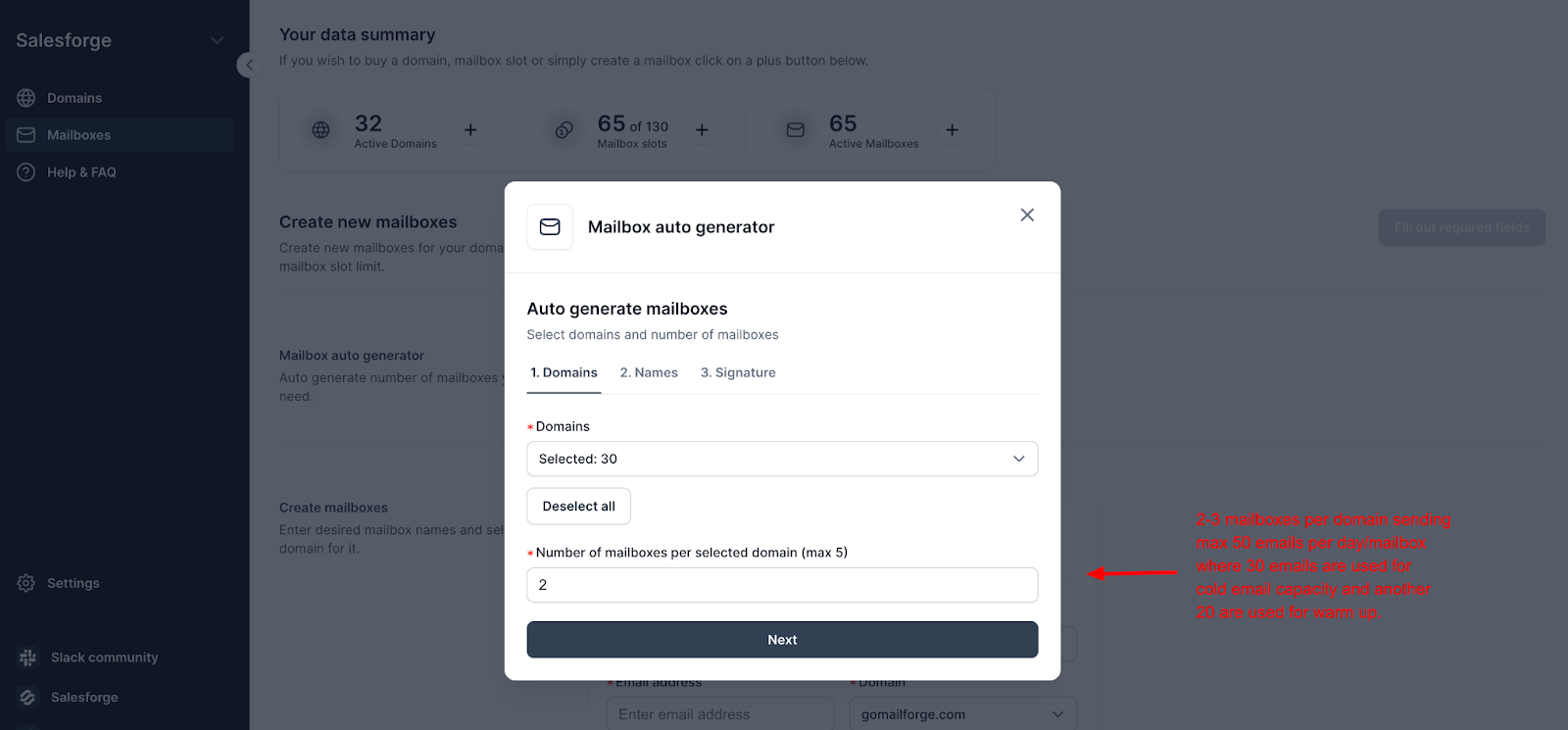
Mailforge puts up to 3 mailboxes on each domain, compared with 5 on Outreach2day. If one domain gets flagged, fewer mailboxes go down with it, and I have less of my sending to replace.
At $2.40 per mailbox with yearly billing, Mailforge’s mailboxes cost less than Outreach2day’s $2.50. The pricing calculator turns my sending plan into a mailbox count and monthly price before I buy.
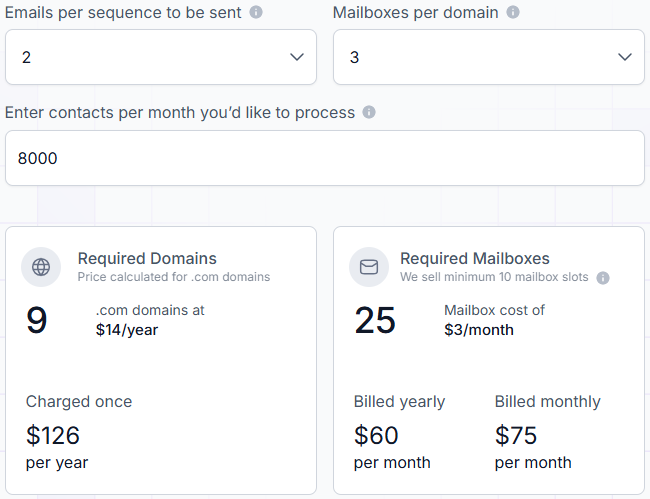
If I’d rather not commit, monthly billing is available at $3 a mailbox. The minimum is 10 slots instead of 12. On yearly billing, that's $24 a month against Outreach2day's $30. On monthly billing, both start at $30.
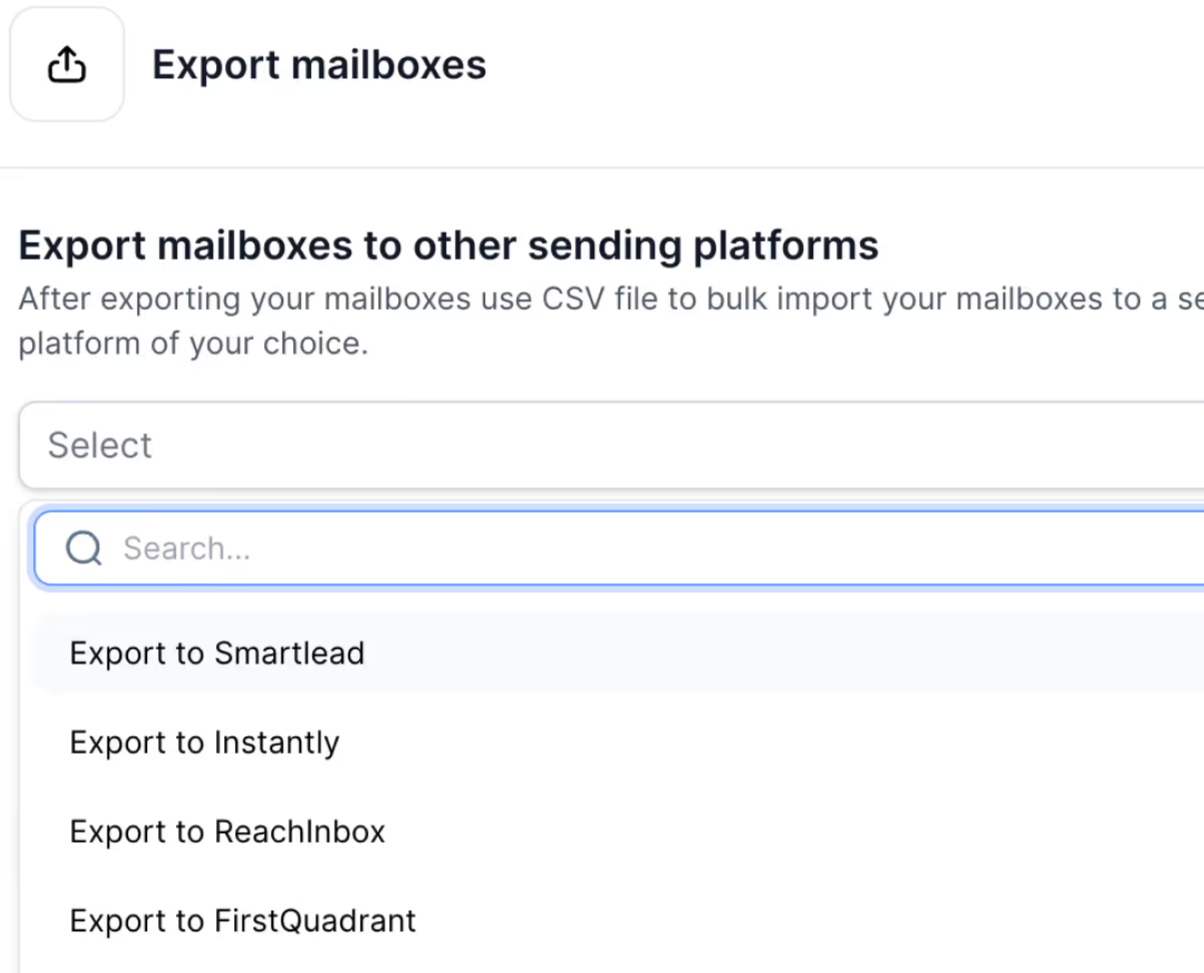
If my team already runs campaigns in Smartlead, Instantly, ReachInbox, or FirstQuadrant, I can export the mailboxes there directly or download a CSV for anything else. I’m not paying for a sequencer I won’t use.
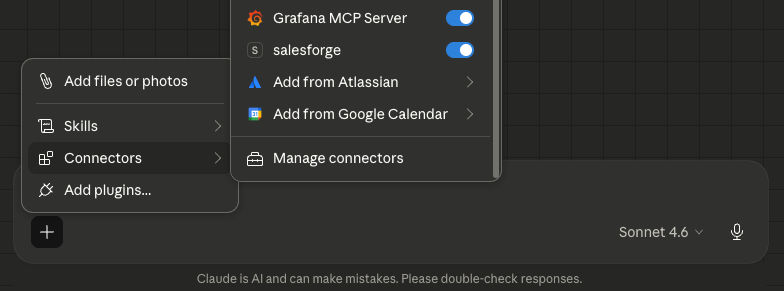
The Mailforge API checks domain availability in bulk, suggests alternative names, buys domains, creates mailboxes, updates DNS across many domains at once, and sets up forwarding. No rate limit is currently enforced.
Its documentation recommends adding an approval step before purchases and deletions, which I’d do for any agent.
Through the Forge MCP, I can ask Claude to list my active Mailforge domains or check which names are available. The Forge CLI can automate routine jobs, like listing domains, spotting unhealthy ones, and moving senders off them.
Enter your email to get a custom plan & stack recommendation for your business
Please check your mailbox in 5 minutes
If you're starting cold email with no sequencer, warmup tool, or placement testing, Outreach2day covers all of it for $2.50 a mailbox, replacing several subscriptions you’d otherwise have to choose, set up, and pay for.
Request the free test, run a placement test once the mailboxes are three weeks old, and add every domain’s renewal date to your calendar when you buy it.
If you already send through Instantly, Smartlead, or a similar tool, most of that bundle duplicates what you’re already paying for. What you need is mailboxes and domains you control, with fewer mailboxes per domain and renewals you don’t have to chase.
For that, set up your mailboxes on Mailforge, turn on auto-renew for your domains, and export them directly to the sending tool you already use.