
Personalized Outbound Strategy
Get The Right Outbound Strategy In Minutes
Enter your email to get a custom plan & stack recommendation for your business
It's being carefully crafted by AI
Please check your mailbox in 5 minutes

Sending.ac offers 350 Azure mailboxes for $199 per month, which works out to around $0.57 per mailbox.
For cold email agencies running hundreds of mailboxes, the pricing is attractive, especially since Sending.ac also includes automated DNS setup, isolated infrastructure, and deliverability monitoring.
It even claims to detect mailbox problems before they affect reply rates and offers mailbox replacement for eligible accounts.
However, the low cost per mailbox comes with a $199 monthly starting commitment. And there isn't enough independent user feedback to judge how reliable its monitoring and replacement claims are.
So, is Sending.ac worth it for cold email infrastructure, or should you look at other providers?
In this Sending.ac review, I'll break down its features, pricing, limitations, and alternatives to help you decide.
Sending.ac gives you Azure and Google inboxes for cold email. It handles DNS setup, mailbox connections, warm-up checks, and ongoing deliverability monitoring.
You still need a separate tool to find leads, create sequences, send emails, and manage replies. Once your mailboxes are ready, you can connect them to Smartlead, Instantly, PlusVibe, or EmailBison.
Primeforge covers the same infrastructure side of cold email differently. It provides Google Workspace and Microsoft 365 mailboxes, starts at 10 mailbox slots, and gives you full domain and mailbox ownership.
Here's how the two compare.
Sending.ac offers Azure and Google inboxes and adds daily checks to help you spot delivery problems. Primeforge provides Google Workspace and Microsoft 365 mailboxes and lets you start with fewer accounts.
Both handle cold email infrastructure, so you'll still need a separate sending platform to run your campaigns.
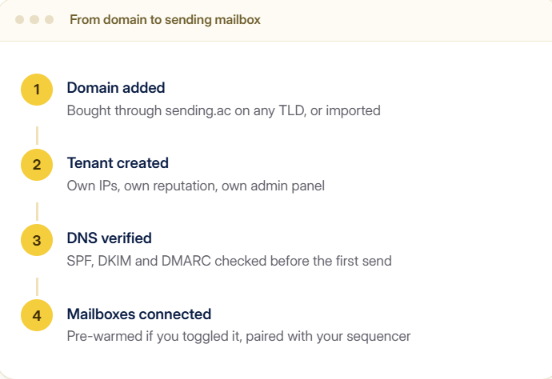
Sending.ac sets up the mailboxes you use for cold email and checks them while your campaigns are running. You still use a separate tool like Smartlead or Instantly to send emails and manage replies. Here's how it works.
You can choose between Azure and Google inboxes. The $199 Growth plan includes 350 Azure inboxes or 60 Google inboxes, while the $499 Agency plan includes 1,000 Azure inboxes or 160 Google inboxes. You can also enable the pre-warmed option for an additional one-time charge.
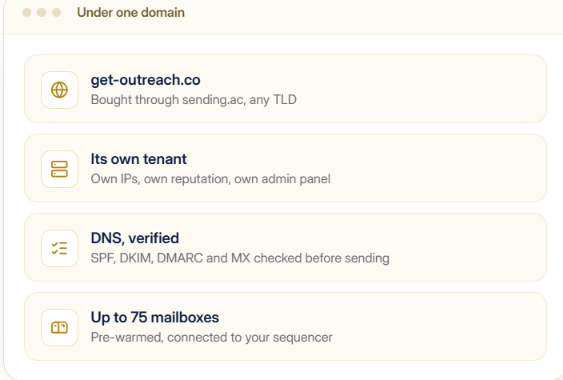
Sending.ac creates the mailboxes and sets up SPF, DKIM, and DMARC for each domain. Each tenant gets separate IPs, sending reputation, and admin access. You can have up to 75 Azure inboxes or 10 Google inboxes on one domain.
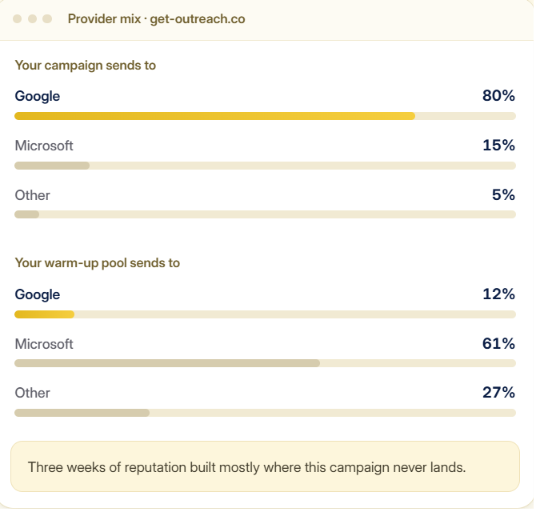
New mailboxes can take a few weeks to warm up. Sending.ac checks where those warm-up emails are going. If most of your prospects use Gmail but most of your warm-up emails go to Outlook, you can see that mismatch.
Connect the mailboxes to Smartlead, Instantly, PlusVibe, or EmailBison. You create and send your campaigns from that tool. Sending.ac manages the mailboxes and can reconnect them if the connection drops.
Sending.ac runs seven checks on each domain every day and keeps 28 days of results. It checks SPF, DKIM, DMARC, blocklists, inbox placement, MX, and reverse DNS. This helps you see which domain has a problem and what went wrong.
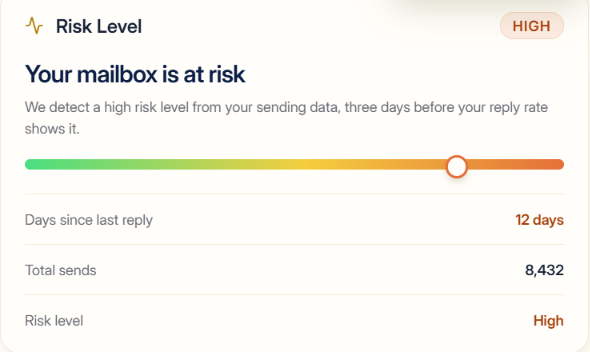
Sending.ac uses its Risk Level to warn you about mailboxes it believes are at risk. Some plans also include mailbox insurance. Sending.ac says eligible mailboxes can be replaced within 30 days at no extra cost.
You can also connect mailboxes bought elsewhere and use Sending.ac's warm-up checks and deliverability monitoring without moving those mailboxes.
Sending.ac includes mailbox setup, warm-up, and deliverability monitoring. Some features help you get started, while others help you find problems after your campaigns are running.
Of these, the daily placement checks and warm-up verification are useful for finding delivery issues without waiting for reply rates to fall.
Sending.ac starts at $199 per month. You can choose Azure or Google inboxes, and the number of inboxes included depends on the provider.
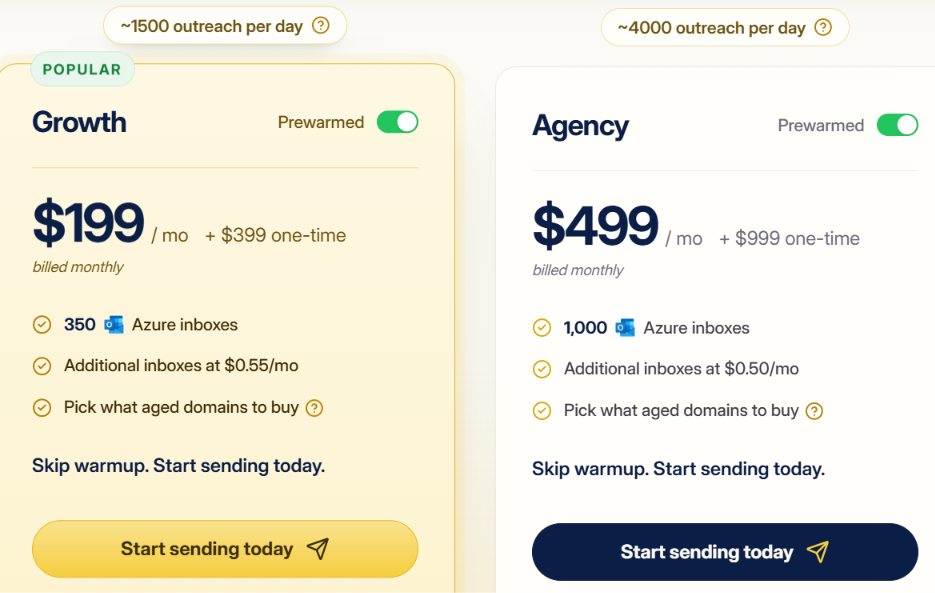
Growth is listed for roughly 1,500 outreach emails per day, while Agency is listed for roughly 4,000. You can have up to 75 Azure inboxes on one domain.
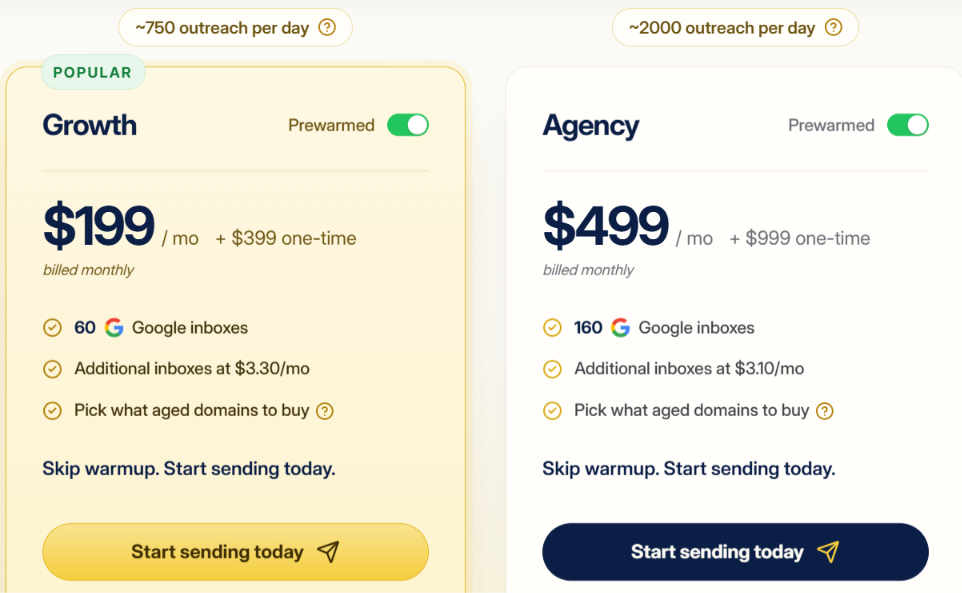
Growth is listed for roughly 750 outreach emails per day, while Agency is listed for roughly 2,000. You can have up to 10 Google inboxes on one domain.
The $399 and $999 charges apply when the Prewarmed option is enabled. Sending.ac says these plans let you pick aged domains, skip warm-up, and start sending immediately.
Monthly plan prices stay the same for Azure and Google, but the included inbox counts are different. Growth includes 350 Azure inboxes or 60 Google inboxes, while Agency includes 1,000 Azure inboxes or 160 Google inboxes. Yearly billing includes two months free.
Yes, mainly if you need a large number of cold email inboxes and want deliverability checks included. Sending.ac gives you a choice between Azure and Google inboxes and handles DNS setup, warm-up checks, and daily inbox placement monitoring.
The main issue is the starting price. Both Growth and Agency start with large mailbox packages, so someone who only needs 10 or 20 inboxes may end up paying for much more than they need. You also need a separate tool to send your campaigns.
Sending.ac is better suited to agencies and high-volume senders than smaller cold email setups.
Sending.ac is a better fit for larger cold email setups than for someone who only needs a handful of inboxes.
Sending.ac works better for larger mailbox setups. If you only need a small number of inboxes, another provider may cost less to get started with.
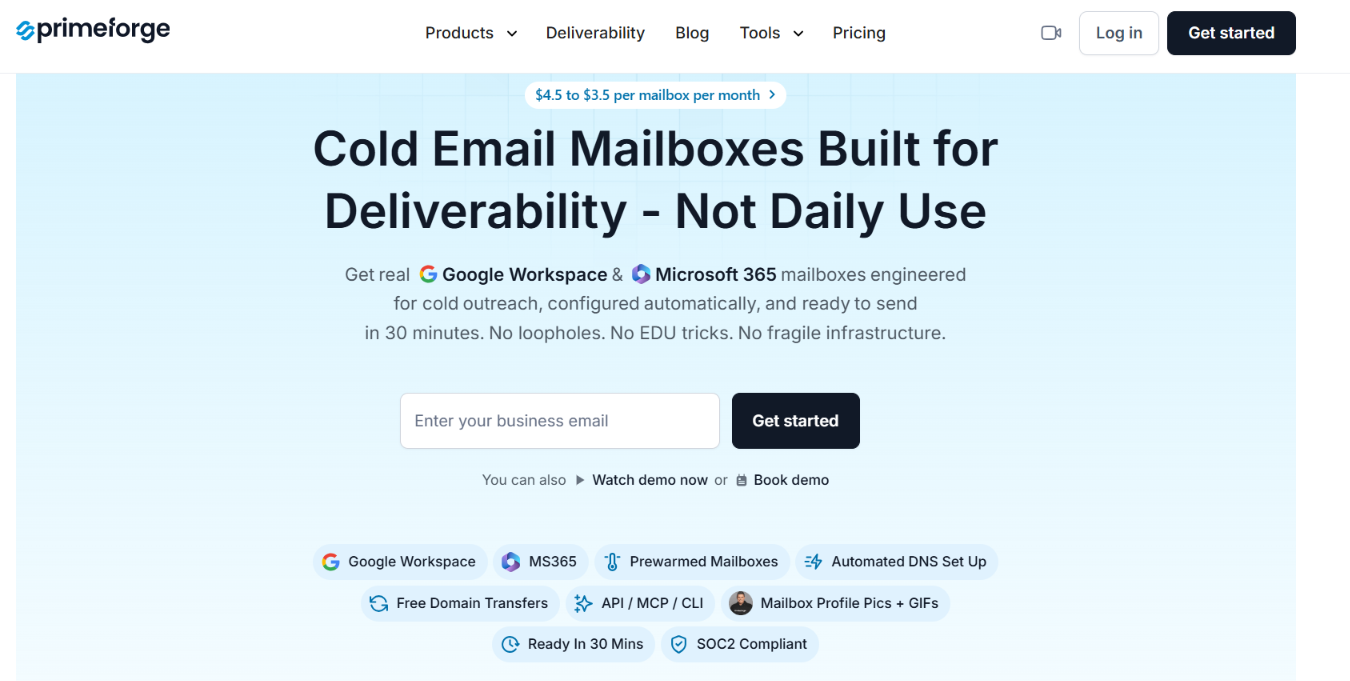
Primeforge is a better alternative if Sending.ac gives you more mailboxes than you need. You can start with 10 mailbox slots instead of buying a large package from the beginning.
It also gives you Google Workspace and Microsoft 365 mailboxes with full ownership of the domains and mailboxes you buy.
Sending.ac goes further on ongoing deliverability monitoring. Primeforge gives you more room to start small and add mailboxes as you need them.
Enter your email to get a custom plan & stack recommendation for your business
Please check your mailbox in 5 minutes

Sending.ac is easier to justify once you are managing enough mailboxes that checking domains and delivery problems manually becomes a job of its own.
For a smaller setup, the starting commitment can be harder to justify. Primeforge starts at 10 mailbox slots, so you can add Google Workspace or Microsoft 365 mailboxes without buying a large package upfront.
If you want to start with fewer mailboxes and grow from there, Primeforge is the better alternative to look at.