

Personalized Outbound Strategy
Get The Right Outbound Strategy In Minutes
Enter your email to get a custom plan & stack recommendation for your business
It's being carefully crafted by AI
Please check your mailbox in 5 minutes
Cold email automation usually starts breaking once outbound campaigns actually begin performing well.
More replies mean more follow-ups to manage. More campaigns mean more inboxes to maintain. As sending volume increases, outbound slowly turns into a system that constantly needs attention every single day.
I reached a point where scaling cold outreach no longer felt like growth.
It felt like managing infrastructure, inboxes, sequences, and operations full-time just to keep campaigns running properly.
Even with automation tools, there was still too much manual work involved every single day.
That is when I started testing Claude Code for cold outreach automation.
Instead of using it only for AI writing, I used it to automate the workflows around cold outreach itself.
I connected Claude Code with the Forge ecosystem to manage campaigns, inboxes, follow-ups, personalization, and outbound operations together inside one workflow.
The result was a much simpler outbound system that became easier to manage and scale.
By the end of this guide, you’ll learn:
With this, you can set up your cold email automation system more easily and get better results without managing every small task manually.
Here’s the simplified version of the full workflow explained in this guide.
Once this workflow is connected properly, cold outreach becomes much easier to automate, manage, and scale consistently.
Using a connected outbound stack like the Forge ecosystem makes this setup much easier.
The inboxes, warm-up, infrastructure, and outreach workflows already work together, so you do not have to manage multiple separate tools manually.
Claude Code does not replace your cold outreach tool.
You still need a Cold Outreach tool like Salesforge to actually run campaigns, send emails, manage sequences, rotate inboxes, and handle outreach execution.
Claude Code works more like an automation layer around the outbound workflow.
When connected with your cold outreach stack, it can help automate tasks like:
For example, instead of manually rewriting follow-ups for every campaign, Claude Code can generate updated follow-up sequences automatically.
If you want to target another ICP or industry, prompts can dynamically rewrite messaging without rebuilding the entire sequence manually.
And once multiple campaigns start running together, Claude Code becomes much more useful because it helps reduce the amount of repetitive work involved in managing outbound daily.
The actual sending, inbox rotation, campaign execution, and deliverability still happen inside your outreach stack.
Along with Claude Code, you still need a complete cold outreach system for sending, inbox management, warm-up, and campaign operations.
For my setup, I used Salesforge.
Here’s what the setup handled:
This made it much easier to automate and manage the full cold outreach workflow instead of stitching separate tools together manually.
Here’s the exact workflow used to automate cold email campaigns with Claude Code and the Salesforge ecosystem.

The first step is to send the infrastructure properly.
This included:
For my setup, I used Mailforge to create and manage mailboxes on shared IP infrastructure.
Everything was then connected with Salesforge so the inboxes were ready for warm-up and campaign execution.
After setting up the mailboxes, the next step is warming them up before sending cold emails.
This helps prepare the inboxes for real outreach and reduces the risk of sudden deliverability issues when campaigns start.
For this, I used Warmforge inside the Salesforge ecosystem.
It helped with:
Once the inboxes were warmed up properly, they were ready to be used inside Salesforge for cold email campaigns.
Once the inboxes and outreach setup are ready, the next step is connecting everything with Claude Code.
First, install Claude Code locally on your system.
After installation:
Inside Claude Code, open the MCP configuration file.
This is where external tool connections are added.
Add the MCP server details for your outbound workflow inside the config file.
After saving the file, restart Claude Code so the MCP connections load properly.
After MCP is active, connect your outreach platform inside the MCP config file using the API key and connection details.
For my setup, I connected Salesforge by generating the API key from Salesforge, adding it inside the MCP configuration file, connecting the Salesforge endpoint, and then restarting Claude Code again to activate the connection.
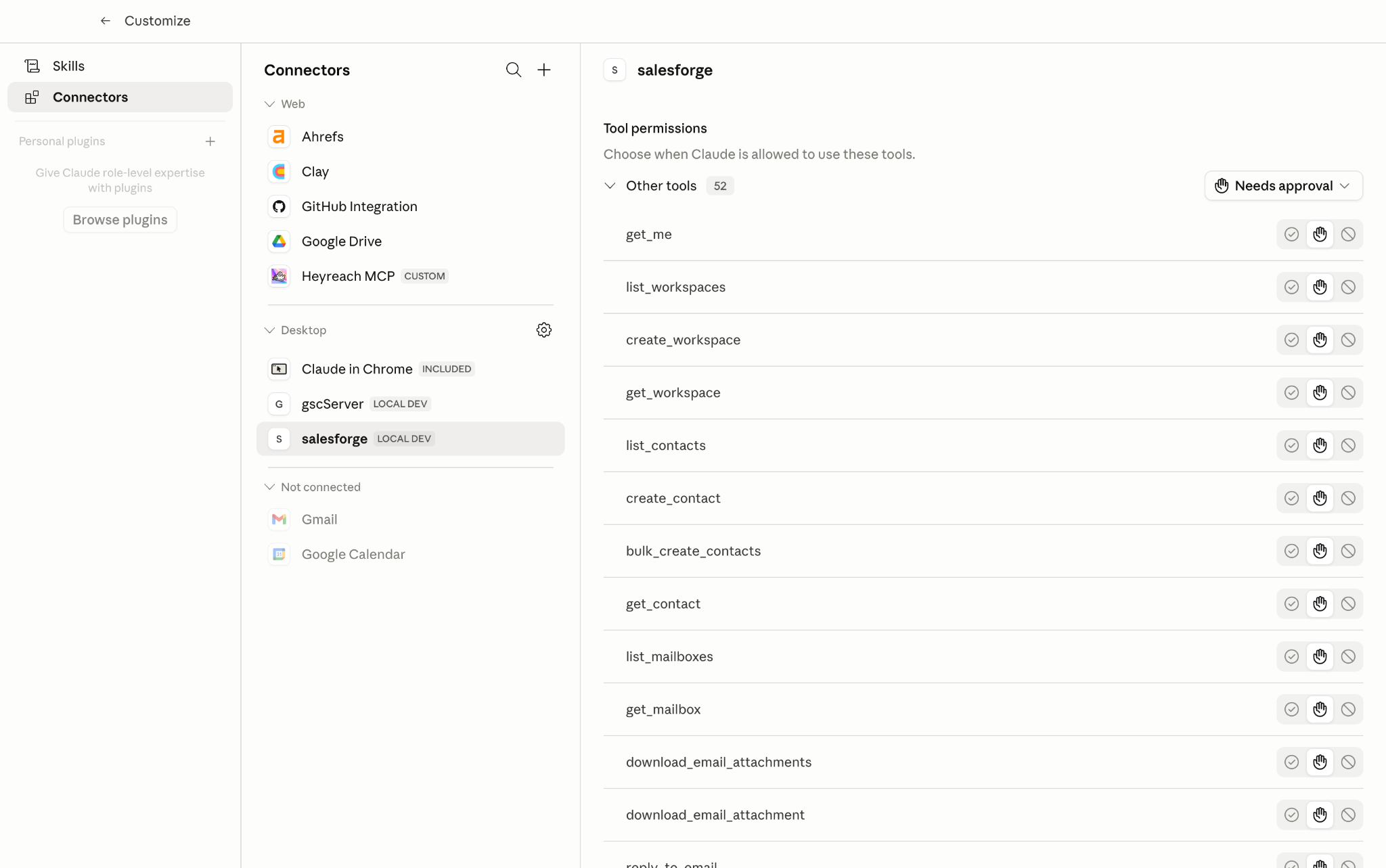
Once connected, Claude Code can access:
5 Best Practices for Secure Email API Integration
Next, connect the mailbox infrastructure already linked with your outreach setup.
For my workflow, I connected:
Since both were already connected with Salesforge, Claude Code could access the full outreach workflow through the same setup.
At this stage, Claude Code is connected with the actual outreach workflow instead of working separately from the sending system.
Before launching campaigns:
If everything syncs properly inside Salesforge, the workflow is ready for live cold email automation.
Once the outreach workflow is connected, the next step is generating personalized cold emails inside Claude Code.
Start by giving Claude Code:
Then create prompts for:
For example, you can ask Claude Code to:
After generating the copy, push the emails and sequences directly into the Outreach tool for campaign execution.
This removes most of the manual work involved in rewriting and managing outbound messaging across multiple campaigns.
Once the emails and sequences are ready, launch the campaigns inside Salesforge.
For my setup, Salesforge handled:
Claude Code can still be used during live campaigns to:
This made it much easier to manage multiple cold outreach campaigns without rewriting everything manually every time.
Once the campaigns are live, the next step is automating the sequence workflows.
Inside Salesforge, this includes:
Claude Code can then help generate:
This removes a lot of the manual work involved in managing sequences across multiple campaigns.
After the automation workflow is running, continuously monitor campaign performance.
This mainly includes:
In my workflow inside the Salesforge ecosystem:
When campaigns start slowing down, Claude Code can quickly generate:
This makes it easier to improve campaign performance without rebuilding workflows manually every time.
With this setup, the entire cold outreach workflow becomes much easier to automate, manage, and scale without constantly handling every campaign manually.
Always give Claude Code clear ICP details, offer context, tone instructions, and follow-up goals. Better prompts usually lead to better personalization.
AI can automate a lot of the workflow, but it is still important to review messaging quality, personalization, sequence logic, and campaign performance regularly.
Even strong sequences slow down over time, so keep updating subject lines, follow-ups, CTAs, and messaging angles regularly.
Do not increase sending volume too aggressively. Scale campaigns slowly while monitoring inbox health, reply quality, and placement signals.
Use tools like Warmforge to keep monitoring inbox warm-up, placement signals, deliverability health, and overall sending stability.
Claude Code can automate workflows, but you still need a proper outreach stack for sending, inbox management, warm-up, and campaign execution.
If prompts become too generic, the emails quickly start sounding repetitive and AI-generated.
Increasing sending volume too aggressively can hurt inbox performance and campaign stability.
Even good campaigns can fail if inbox health and deliverability are not monitored regularly.
Subject lines, follow-ups, and messaging angles usually need regular updates once campaigns start slowing down.
Enter your email to get a custom plan & stack recommendation for your business
Please check your mailbox in 5 minutes

Claude Code can make cold email automation much easier once it is connected with the right outreach system.
Instead of manually managing follow-ups, sequences, personalization, and campaign workflows every day, a large part of the outbound process becomes much easier to automate and manage.
At the same time, Claude Code alone is not enough for scaling cold outreach properly.
You still need:
That is why using a connected setup like the Forge ecosystem, which includes Salesforge, Mailforge, and Warmforge.
This makes the entire workflow much easier to manage compared to stitching multiple separate tools together manually.
Once everything is connected properly, cold outreach becomes much easier to automate, manage, and scale without constantly handling every operational task manually.