
HeyReach is one of the most popular LinkedIn outreach tools on the market, and it is genuinely good at the job it was built for.
In many conversations I have with HeyReach users, nobody complains about their automation. Their campaigns run smoothly and their accounts stay connected.
But there are some serious limitations with the product such as,
These gaps push teams to look elsewhere, usually once outbound stops being a LinkedIn-only motion.
In this blog I have evaluated the top 4 HeyReach alternatives on sequence depth, reply handling, account safety and what each one actually costs.
Let's get into it.
For a wider view of the category, I keep a separate breakdown of multichannel outreach tools covering options outside the LinkedIn-first lane.
Every tool here sends connection requests, so counting features tells you nothing. I judged five things instead.
An integration between two tools is not a channel. So I looked for email steps sitting inside the same builder as the LinkedIn steps, branching on what the prospect did.
That one distinction decides whether you run one campaign or two. My guide to email sequence software covers what a real sequence needs underneath.
If your LinkedIn replies sit in one place and your email replies sit in another, nothing got consolidated. So I checked whether both arrive together, and whether that view covers every account you connect.
LinkedIn restricts accounts that behave like software. I checked cloud versus browser sending, whether you get a dedicated IP or a shared one, and where the daily ceilings sit.
I also checked who supplies the proxies. That answer changes by plan more often than buyers expect.
The word covers three different things. Personalization writes better copy, reply drafting handles your inbox, and an AI SDR runs the whole motion for you. So I separated them rather than scoring a checkbox.
Marketing pages describe week one. I read the low-rated reviews and the vendor replies instead, because month six shows up there.
Each tool below earns its spot for a different reason. One closes the channel gap, one answers account safety, one simplifies the whole thing, and one comes at LinkedIn from the email side.
The first HeyReach alternative on my list is Salesforge, and it is the best overall because you get email and LinkedIn in one conditional sequence, and because adding senders never changes what you pay.
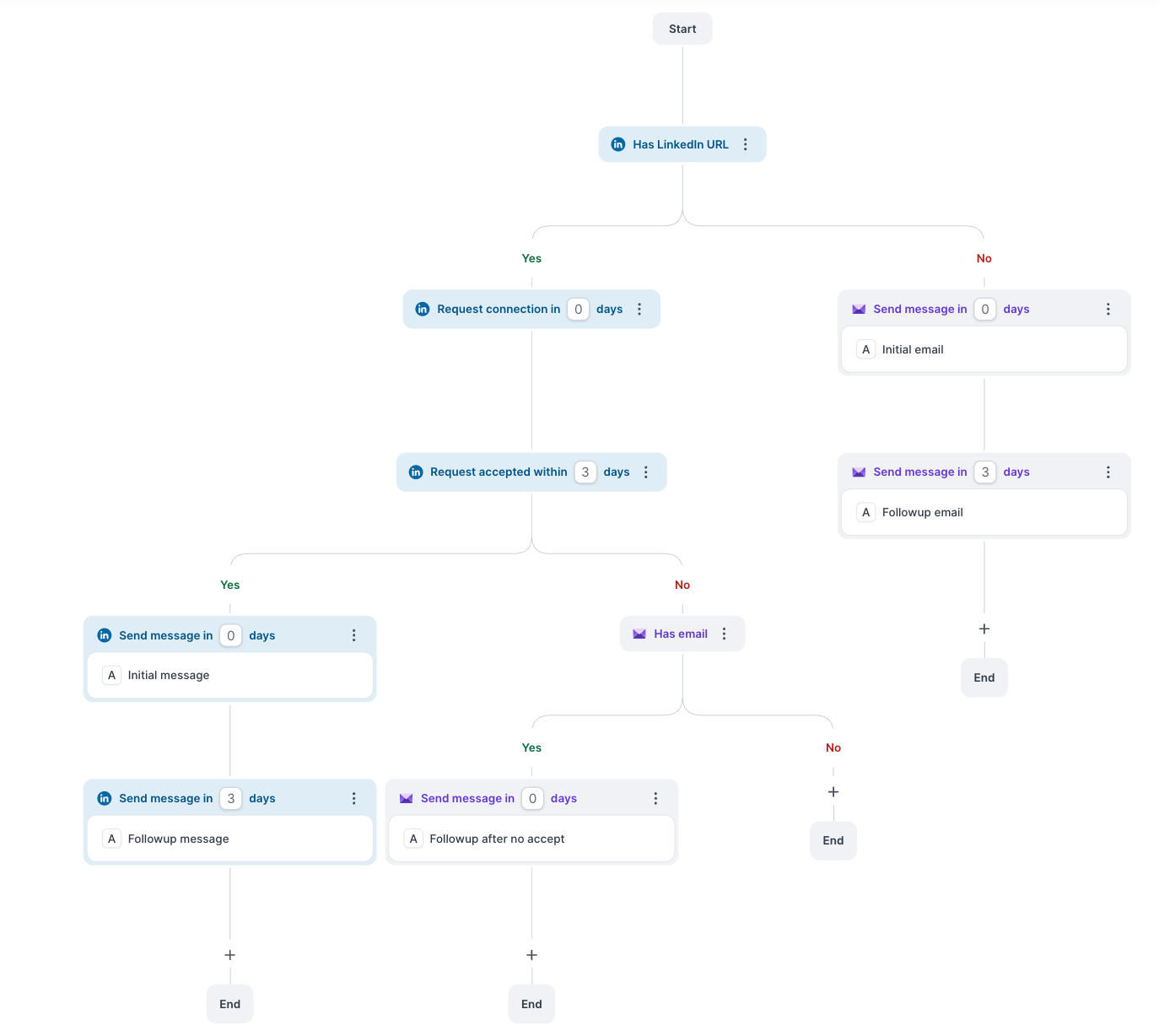
That first part is the thing HeyReach structurally cannot do for you. When a connection request stalls, the prospect moves to email on their own, inside the same flow, branching on what they actually did rather than on a fixed schedule.
It gives you 6 LinkedIn actions you can drop into a sequence. You can send connection requests, messages and InMails, and you can warm a prospect first with a profile view, a follow or a post like. Your email steps sit right beside them with the same branching logic, so you build one campaign instead of two.
Replies from both channels land in Primebox, and that is where the daily difference shows up. Co-Pilot drafts a response for you to approve, and Auto-Pilot sends it for you.
The deliverability layer comes included rather than sold separately. You get unlimited Warmforge warm-up on both plans, mailbox rotation spreads your volume across your domains, and ESP matching routes your sends so your mailbox matches the recipient's provider.
You can also connect unlimited mailboxes on every plan, which is the part that changes the maths at scale. More sending accounts means lower volume per mailbox, and lower volume per mailbox means better placement.
Then there is Agent Frank, an AI SDR you hire rather than a feature you switch on. He prospects against your ICP, writes, follows up and books meetings without you running the campaign. I cover where he sits against the field in my roundup of AI SDR tools.
If you work on the technical side, you can run campaigns from Claude or your own script through the Forge MCP server and CLI. Seven CRMs connect natively, so you can wire up Attio, folk, Breakcold or GoHighLevel without the Zapier layer most tools force on you.
If you want the full walkthrough, I wrote a longer Salesforge review separately.
Pro covers one LinkedIn sender, so Growth is the plan that compares against HeyReach. The trial runs 14 days and needs no credit card.
Start a free trial of Salesforge. No credit card required.
The next alternative is Expandi, and it earns its place on account safety, which is the one dimension where it beats everything else here including Salesforge.
Every LinkedIn account you connect gets its own IP, matched to the country you operate from. Nothing else on this list does that for you. If your worst case is waking up to a restricted account, this is the strongest answer you can buy.
Profile auto warm-up ramps your new accounts gradually rather than firing at full volume on day one. You set your own daily limit ranges, and safety checks stop you going over them. Everything runs in the cloud, so your campaigns keep going when your laptop is shut.
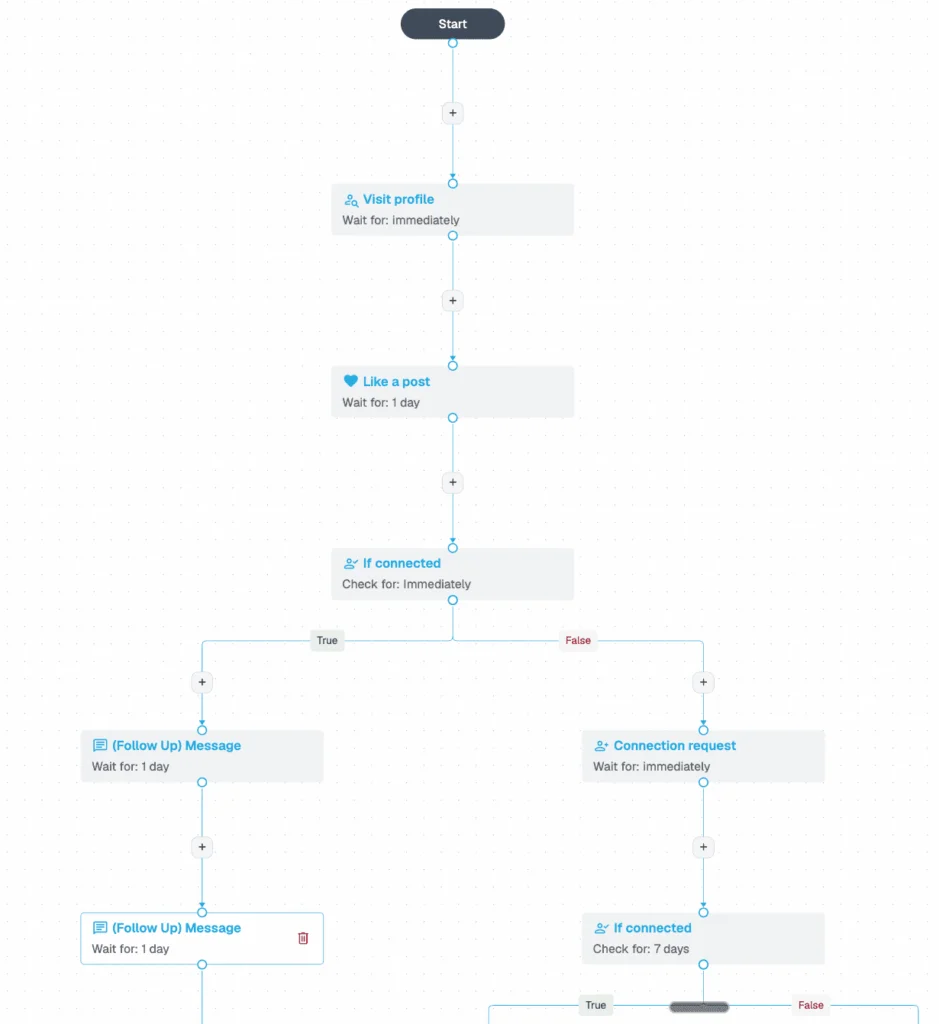
Smart Campaigns are the second reason to look. Your sequences branch on what the prospect does, so an accepted connection and an ignored one take different paths. It goes deeper than HeyReach does on logic.
You can also run email follow-ups as steps inside the LinkedIn sequence, which closes the gap that pushes most people off HeyReach in the first place. And you get 10 campaign types to work with, so you can run event invites or post engagement campaigns instead of only cold connection requests.
Expandi shipped an MCP server in October 2026 too, so you can have an AI assistant build your lists and draft your campaigns from a prompt. Nothing goes out without your approval.
Where it falls short is scale economics. Expandi bills you per seat, and each seat covers one LinkedIn account, so your cost climbs with every account rather than flattening out.
The trial runs 7 days with all features unlocked.
The third alternative is Dripify, and it is here because it changed more than any other tool on this list in the past year.
The old reputation was a LinkedIn-only drip tool with a thin email side. That is no longer accurate. You now get LinkedIn and email sequences running together on every paid plan, with an email finder and verifier built in, plus an open API and MCP server on the entry tier.
What it does best is get out of your way. You drag steps into a flow, your logic branches on what the prospect does, and you have 15+ actions and conditions to work with. I set up a first campaign without opening a help doc, which I cannot say for most of this list.
The daily quotas give you more room than HeyReach does. You can send 75 connection requests and 100+ messages a day, plus 30 Sales Navigator InMails and 200+ profile views. That is nearly double the connection-request ceiling, which matters if volume is what pushed you off HeyReach.
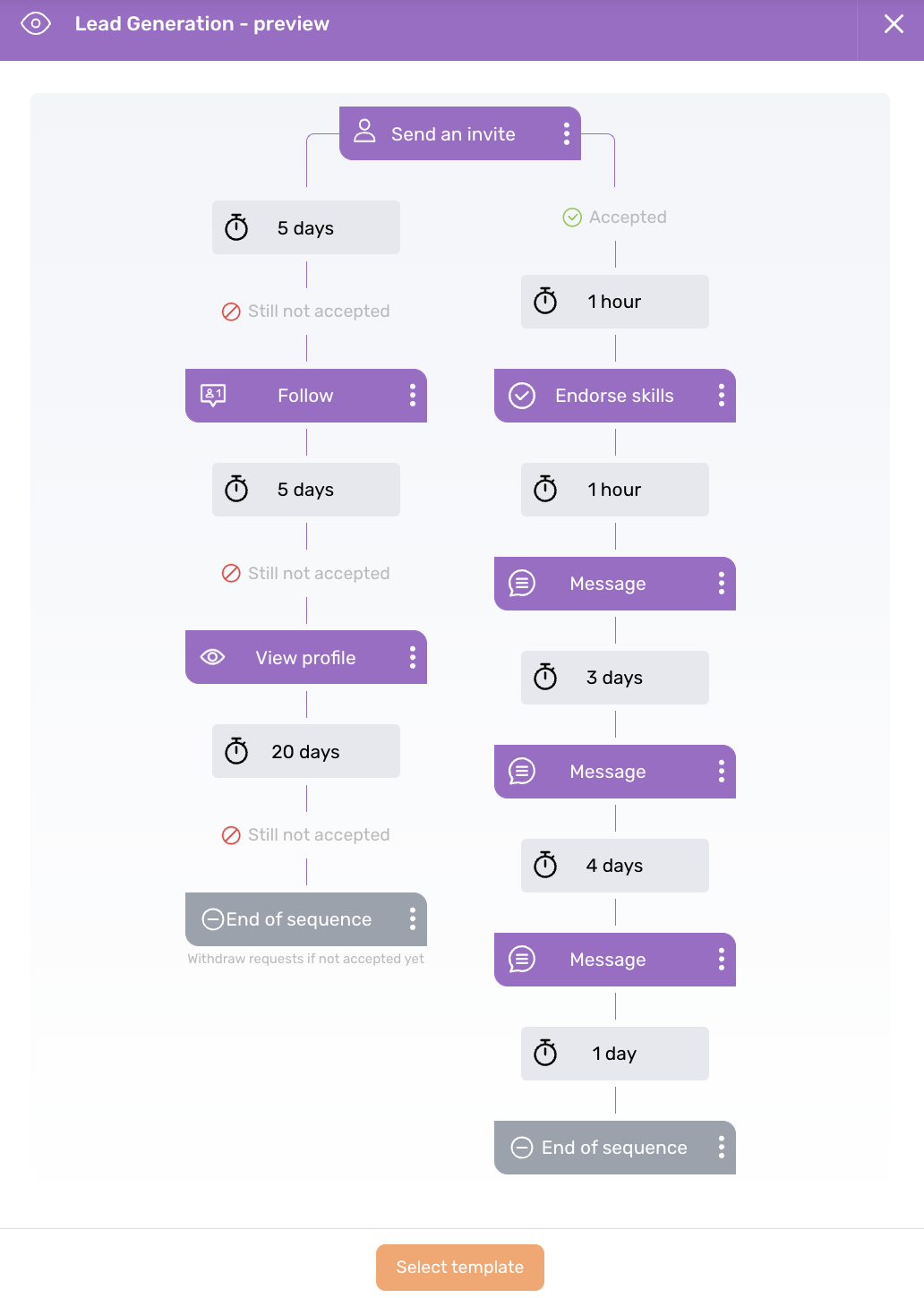
Your campaigns run in the cloud from a dedicated IP tied to your location, with randomized timing inside the working hours you set. Advanced adds adaptive activity control, which paces your sending against your account's own history rather than one fixed rate.
The August 2026 update was a solid one. You can now add up to 50 custom lead fields, track per-step email analytics with bounce handling, unfollow leads who never accepted, and A/B test up to three message variants.
The gap to know about is the inbox. Dripify handles your LinkedIn conversations today, and a unified LinkedIn plus email view is listed as coming soon. So your email runs in the sequence, but your email replies do not land in the same place yet.
The last alternative is lemlist, and it approaches the problem from the opposite end. This is an email platform that added LinkedIn, not a LinkedIn tool that added email.
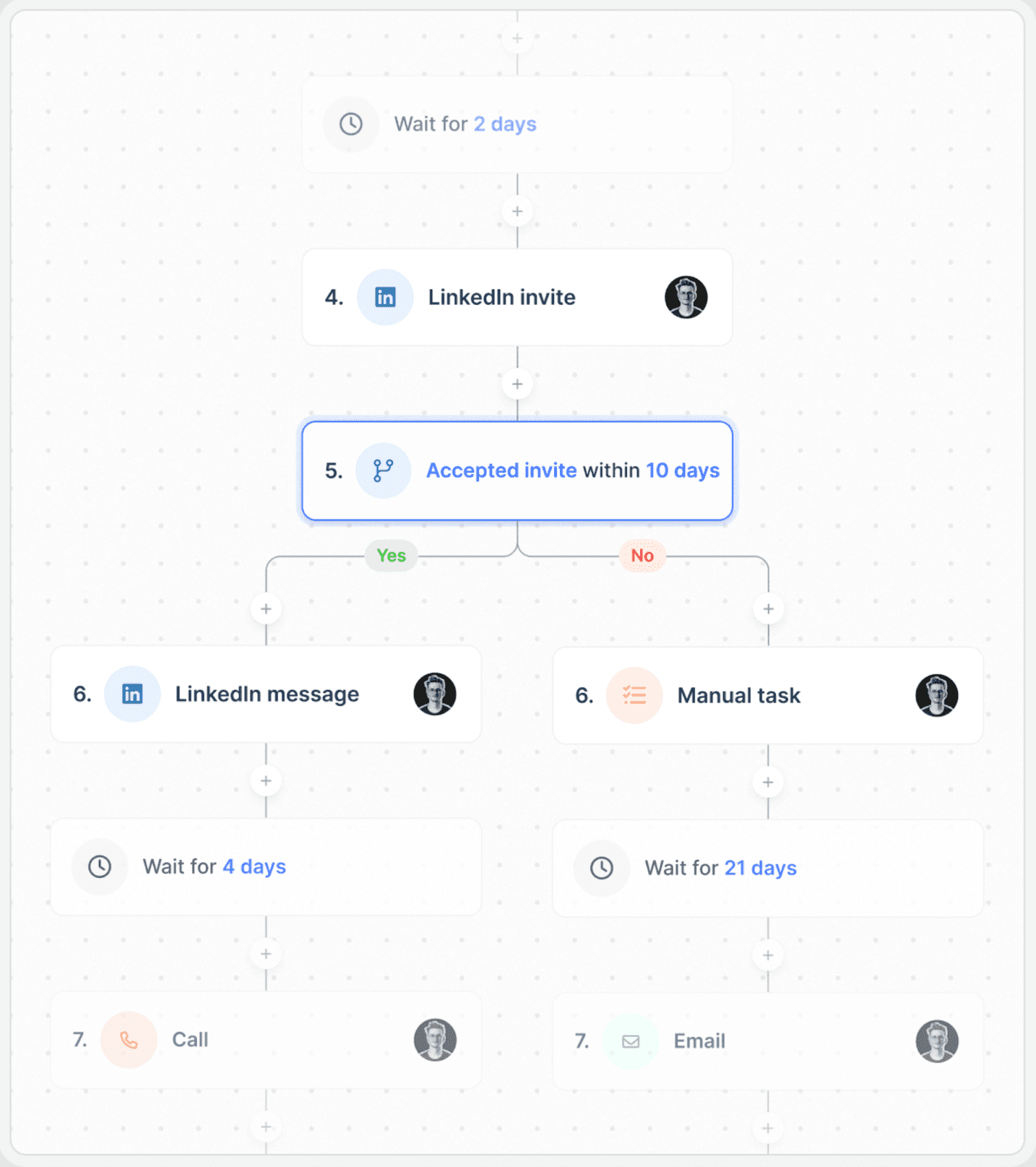
That shapes what it does best for you. You can run five channels in one workflow, so your sequence can move a prospect from email to LinkedIn to a call, and pick up SMS or WhatsApp if that is where they answer. If your prospects live on surfaces beyond the two HeyReach covers, nothing else here matches that spread.
The seat structure is the detail most comparisons miss. One Multichannel seat gives you five LinkedIn senders, so three accounts fit inside a single seat. That makes lemlist far cheaper at small sender counts than the per-account tools, and it is worth checking against your own headcount.
On LinkedIn you can visit profiles, send invites, messages and InMails, and record voice messages, including AI-generated voice notes. Your replies from every channel and every sender land in one unified inbox.
Deliverability is the other strength. You get lemwarm on every plan including the entry tier, backed by a Deliverability Hub with monitoring and alerts. If your real problem is email placement rather than LinkedIn volume, that matters more to you than sender limits.
You also get a 650M+ contact database with email and phone finding, plus intent signal agents and lemAgent for AI-assisted prospecting.
The catch is where LinkedIn sits. It is gated to the Multichannel plan, so the $55 headline price does not get you LinkedIn at all. LinkedIn is also the supporting channel here, not the main one, and it does less than anything built around LinkedIn first.
I compare it against the wider field in my guide to Lemlist alternatives.
Salesforge is the best HeyReach alternative for most teams, because it closes the channel gap without charging you per sender.
Your email and LinkedIn run in one sequence, both sets of replies land in Primebox™, and warm-up comes with the plan instead of a second invoice.
Expandi still wins on pure account safety, and lemlist wins if email is your primary channel. But if one channel stopped being enough, this is the version of your stack with fewer logins in it.
Start a 14-day free trial. No credit card required.
Salesforge is the strongest overall, because you get email and LinkedIn in one sequence without per-sender pricing. Expandi is better if account safety is your single concern. lemlist is better if email is your primary channel and LinkedIn supports it.
Four reasons come up repeatedly. HeyReach runs LinkedIn only, every account caps at 40 connection requests daily, pricing runs per sender below 13 accounts, and reviewers report slow support on complex tickets.
Yes. Every LinkedIn account you connect is limited to 40 connection requests per day. You can lower that number but you cannot raise it, and the limit applies on every plan.
For three LinkedIn senders, lemlist at $87 a month is cheapest, because one Multichannel seat covers five senders. Salesforge Growth at $80 a month is cheaper still and covers unlimited senders and mailboxes.
Expandi gives every account you connect its own country-matched IP, which is the strongest safety design here. Salesforge and Dripify both run in the cloud with daily limits you configure, which covers most teams.
Salesforge, Expandi, Dripify and lemlist all let you add email steps inside a LinkedIn sequence. HeyReach does not, and routes your contacts to Instantly or Smartlead instead.
No. Section 7.2 of HeyReach's terms states all fees are non-refundable, outside three narrow exceptions covering warranty, indemnification and mid-term modifications.