
Blog
6 Best Multichannel Outreach Tools in 2026

6 Best Multichannel Outreach Tools in 2026

Last Updated on: Oct 30, 2026
•
5 min read
Summarize with

There are a lot of multichannel outreach tools in the market right now, and every one of them promises the same things. Outreach across multiple channels. AI that writes your full sequences, personalizes them, and sends them for you.

But are those promises true?

That is why I made this list. I picked the six tools that genuinely do multichannel outreach, and I am reviewing each one here.

Let's get into it.

TL;DR: 6 Multichannel Outreach Tools Compared

Feature Salesforge – Best Overall Lemlist Reply.io La Growth Machine Apollo.io Saleshandy
Best for Teams running email and LinkedIn who refuse to pay per seat Teams who want four channels inside one sequence Teams who need calls and WhatsApp in the cadence LinkedIn-led outreach, with X DMs on the top tier Prospecting data and dialing in one workspace Email-first teams watching the entry price
How LinkedIn runs On Salesforge servers, no extension, paced per profile Through your own LinkedIn session, with daily caps you set Native sequence steps, prospecting through a Chrome extension On La Growth Machine servers, one mobile proxy per identity Chrome extension must stay open, post actions done by hand Not native, needs a paid Aimfox or HeyReach account
Calling Not available In-app calling on Multichannel Built-in dialer Manual call tasks, no dialer Parallel Dialer included Built-in dialer
SMS No Yes, on Multichannel Yes No No Not confirmed
WhatsApp No Paid add-on Yes No No Yes
X DMs No No No Yes, on Ultimate No No
Email and LinkedIn in one sequence Yes, with conditional branching Yes Yes, with conditional branching Yes, this is the core builder Email automates, LinkedIn waits on the extension Builder shows it, but the partner tool fires it
How you are charged Flat fee, unlimited users on Growth Per user on Multichannel, though the page is unclear Not published on three of four paid tiers Per identity, every sending profile billed separately Nothing published at all Flat fee, each tier caps users
Entry price, billed annually $40 a month $55 a month $166 a month on Reply Unlimited €60 a month per identity Not published $34 a month
What five users pay $80 a month, total $435 a month if per-user is right Cannot be worked out from the pricing page €600 a month Cannot be worked out from the pricing page $76 a month, and that covers ten users
LinkedIn senders included Unlimited on Growth, one on Pro Five per user on Multichannel Not stated One per identity you buy Not stated Whatever your Aimfox or HeyReach plan allows
Mailboxes Connect your own, unlimited on every plan Connect your own Buy inside Reply or connect your own Connect your own Google, Outlook or SMTP Connect your own Buy inside Saleshandy or connect your own, unlimited
Warmup Included, no extra cost Included on every seat Included with every mailbox Not offered Domain warming included Included through a free integration
Unified inbox Yes, across email and LinkedIn Yes, across every channel Yes Yes Not offered Yes
Free trial 14 days 14 days Free tier, no trial length given 14 days, no card needed Free tier, no trial length given 7 days, no card needed
G2 rating 4.6 4.6 4.6 4.6 4.7 4.6

Pricing in this category moves constantly, so confirm the numbers on each vendor's own page before you commit.

How I Picked These Multichannel Outreach Tools

Before the reviews, here is what got a tool onto this list and what kept others off it.

1. The Tool Has to Send the Channel Itself

A channel only counts when the software does the sending. That sounds obvious, and it is exactly where most of this category falls apart.

Plenty of platforms list LinkedIn, then quietly hand your rep a to-do item. Your sequence has not automated anything. It has written a reminder.

So the first filter was simple. Does the tool send it, or does it nudge a human to send it?

2. Email and LinkedIn Have to Live in One Sequence

Two separate campaigns running side by side is not multichannel. It is two tools wearing one login.

What I looked for was conditional branching, where a connection accepted on Monday changes what goes out on Wednesday. Every tool here does that, with one caveat I flag in the Saleshandy review.

3. LinkedIn Has to Run Somewhere Reliable

This decides whether your campaigns survive the weekend.

Cloud execution means the platform sends from its own servers, with your sessions and proxies running there. Extension execution means a browser has to be open on a machine that is awake, which is fine until someone shuts a laptop.

Account safety follows the same split. Tools that pace actions per profile and pull back when LinkedIn starts throttling protect you. Tools that just warn you to go slower are putting that job on you.

4. The Price Has to Make Sense at Five Seats

Every headline price in this category is written for one person. That is not who is buying.

So I rebuilt each quote at five users, on annual billing, on the plan a real team would land on. The spread is much wider than the entry prices suggest, and in a couple of cases it is a multiple rather than a difference.

5. Mailboxes and Warmup Have to Be Accounted For

Multichannel lowers how many emails each prospect gets, which genuinely helps deliverability. It does not build sender reputation for you.

A tool that bundles warmup saves you a subscription. A tool that leaves it out has a cost line that never appears on its pricing page, and you only find it after you have signed.

6 Best Multichannel Outreach Tools in 2026

Here are the six, and what each one does for your multichannel motion.

1. Salesforge: the Best Multichannel Outreach Tool Overall

The first best multichannel outreach tool on my list is Salesforge, because it runs multichannel outreach natively across email and LinkedIn without per-seat pricing.

Both channels sit in the same sequence with conditional branching, so a connection accepted on Monday changes what goes out on Wednesday. Neither channel is bolted on through an integration you pay for separately.

LinkedIn runs off Salesforge's own infrastructure, one session and one geographically matched proxy per profile. There is no extension to keep open and no machine that has to stay awake, which is what lets a multichannel sequence keep running overnight and over weekends. Each profile gets paced on its own, and sending pauses and rotates when the signals start looking wrong.
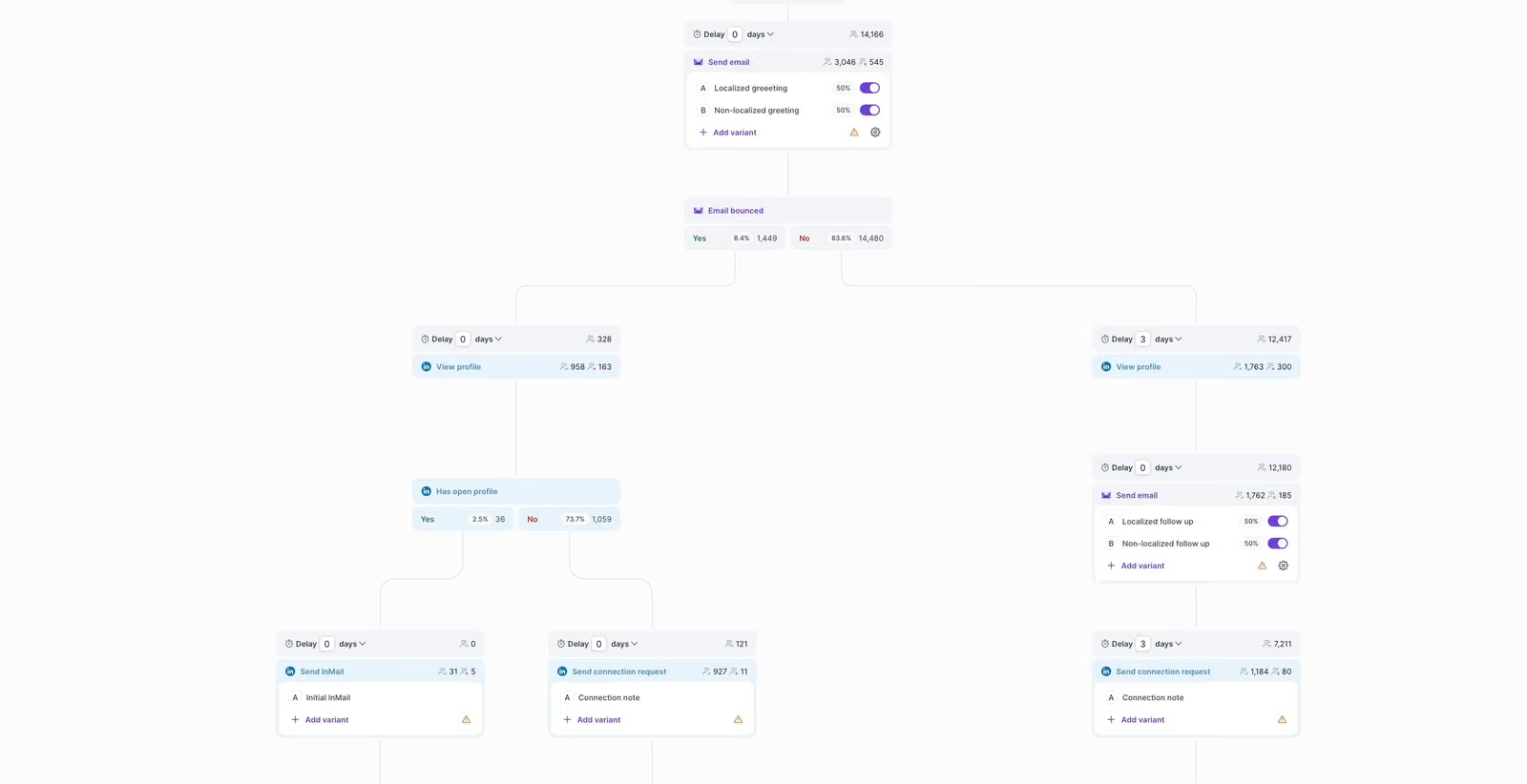
Salesforge: the Best Multichannel Outreach Tool Overall

The pricing is the other half of why it leads this list. Growth is $80 a month on annual billing and covers unlimited users, unlimited LinkedIn senders and unlimited mailboxes. Hire a sixth rep and the invoice stays exactly where it was, which is not true of most tools below.

Warmup is bundled through Warmforge at no extra cost, so the email half of your multichannel setup has sender reputation handled inside the same subscription. Replies from both channels land together in Primebox™, so your reps work one queue instead of two.

Now the honest part. There is no dialer, no SMS and no WhatsApp. If your cadence depends on picking up the phone inside the same sequence, this is not the tool.

That is a deliberate trade. For B2B teams selling to startups and mid-market buyers, email and LinkedIn carry the pipeline, and Salesforge would rather run those two properly than run five channels badly.

Worth a look if you want the detail: Salesforge review

Salesforge Pros

  • Flat pricing means a five-person team pays the same $80 a month that a solo founder pays, with no per-seat creep as you hire.
  • LinkedIn runs from Salesforge servers with pacing and a proxy per profile, so your campaigns keep moving overnight and over weekends.
  • Warmup is included rather than sold separately, which removes a subscription most competitors assume you will buy elsewhere.
  • Unlimited mailboxes and unlimited workspaces make this workable for agencies running several clients from one login.
  • Primebox™ pulls email and LinkedIn replies into one view, so nobody on your team answers the same prospect twice.

Salesforge Cons

  • The trial is 14 days, which gets tight when your mailboxes are still warming and you cannot send at real volume yet.

Salesforge Pricing

  • Pro: $40 a month billed annually, $48 billed monthly. One user, one LinkedIn sender.
  • Growth: $80 a month billed annually, $96 billed monthly. Unlimited users, unlimited LinkedIn senders.
  • Agent Frank: the AI SDR add-on: $499 a month billed quarterly.
  • Free trial: 14 days, warmup included.
Start a free trial of Salesforge. No credit card required.

2. Lemlist: the Best Multichannel Outreach Tool for Four Channels in One Sequence

Lemlist is on this list because it runs four genuine channels inside a single sequence builder, which is rarer than this category pretends. Email, LinkedIn, calls and SMS all execute from the same flow, with WhatsApp available on top as a paid add-on.

That breadth is what makes it a real multichannel tool rather than an email platform with a LinkedIn checkbox. A sequence can email on day one, call on day three and send a LinkedIn message on day five, all branching off what the prospect did.

Personalization is the part Lemlist built its name on. Dynamic images, custom variables and AI-assisted copy give you creative range that nothing else here matches, and it carries across channels rather than being email-only.
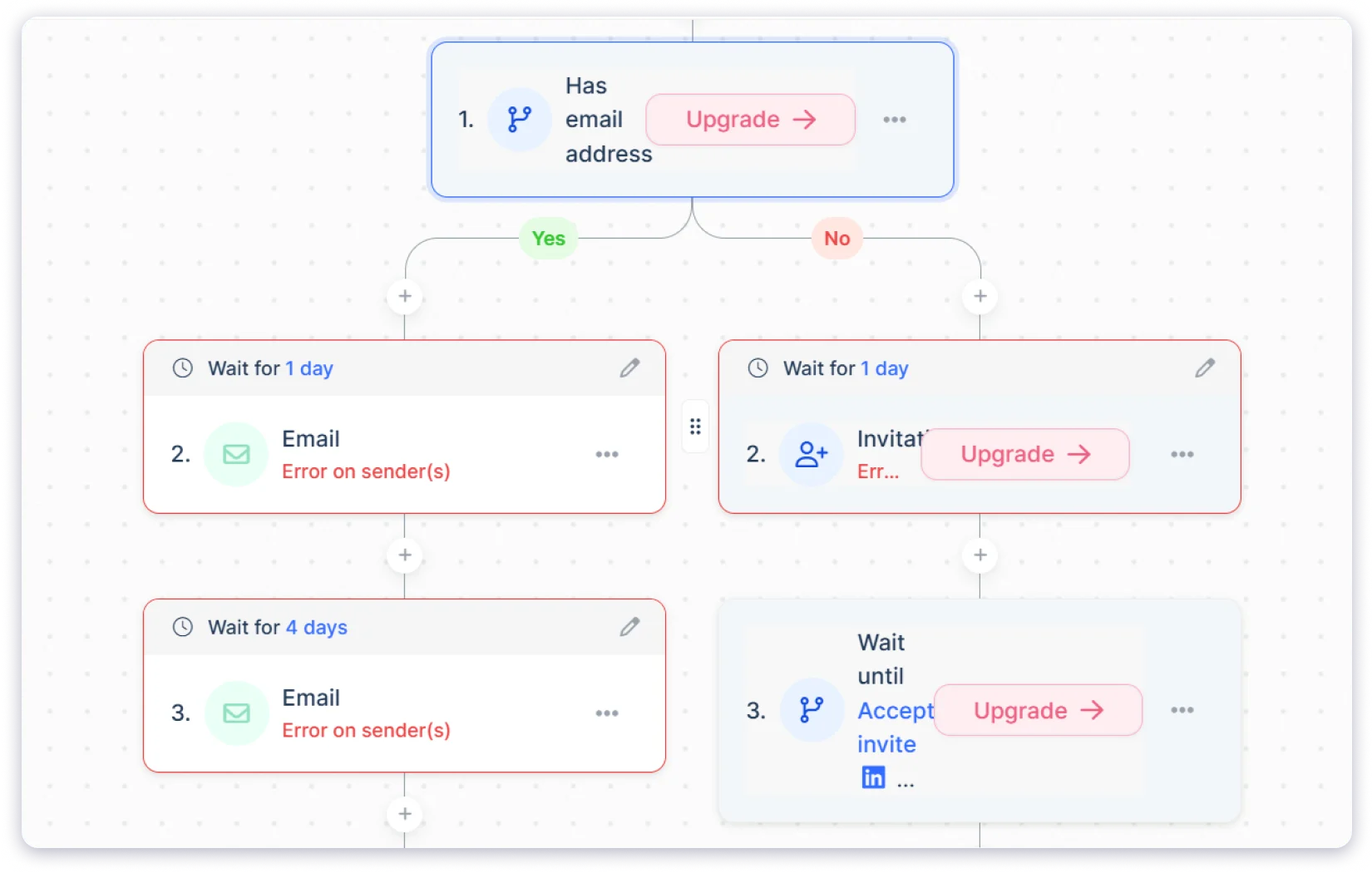
Lemlist: the Best Multichannel Outreach Tool for Four Channels in One Sequence

LinkedIn runs through your own account session rather than a dedicated cloud sender. The daily caps are conservative, around 20 invites and 30 messages, with a ramp-up setting that raises volume gradually on a newer profile.

The thing users mention most is how fast it feels to work in. One founder called the interface "clean, intuitive, and genuinely enjoyable" (see review).

The friction lands on the invoice. Multichannel reads as per user, which turns $87 into $435 across five seats, and the enrichment credits drain faster than almost anyone expects going in.

Worth a look if you want the detail: Lemlist review

Lemlist Pros

  • Email, LinkedIn, calls and SMS all run inside one sequence, which is the deepest native channel coverage in this comparison.
  • Personalization goes well past merge tags, with dynamic images and video that genuinely move reply rates on cold lists.
  • The lemwarm warmup tool comes free on every seat and every plan, with no upsell attached.
  • A unified inbox collects replies from every channel, so your reps are not switching between four tabs.
  • Five LinkedIn senders per user on Multichannel gives agencies enough room to run several client profiles at once.

Lemlist Cons

  • The Email plan says unlimited users while the FAQ says pricing is per user, so you cannot pin your own cost without asking sales.
  • Enrichment and intent data are sold as separate add-ons, and the credits run out well before month end for most teams.
  • LinkedIn connection notes are capped at 200 characters, which is a real constraint if your opener needs context.

Lemlist Pricing

  • Email: $55 a month billed annually, $69 billed monthly.
  • Multichannel: $87 a month billed annually, $109 billed monthly.
  • Lead enrichment add-on: $16 a month billed annually.
  • Buying intent signals add-on: $21 a month billed annually.
  • Enterprise: custom.
  • Free trial: 14 days.

3. Reply.io: the Best Multichannel Outreach Tool for Calls and WhatsApp

Reply.io earns its place with the widest channel coverage here. Email, LinkedIn, calls, SMS and WhatsApp all sit in one conditional sequence, branching off prospect behaviour rather than running as five separate campaigns.

That matters if your motion genuinely needs the phone and messaging apps alongside email. Most tools in this category cap out at two or three channels before handing you a task reminder.

It also sells the infrastructure underneath, which almost nobody else here does. You can buy domains inside the platform with DNS handled for you, add Google or Microsoft mailboxes, and pick pre-warmed options that are ready to send on day one. Warmup comes with every mailbox, reputation is tracked per inbox, and rotation spreads your volume once you scale up.

Then you try to work out what it costs. Starter, Professional and Ultimate carry no price at all, and only Reply Unlimited shows a number, starting at $166 a month.
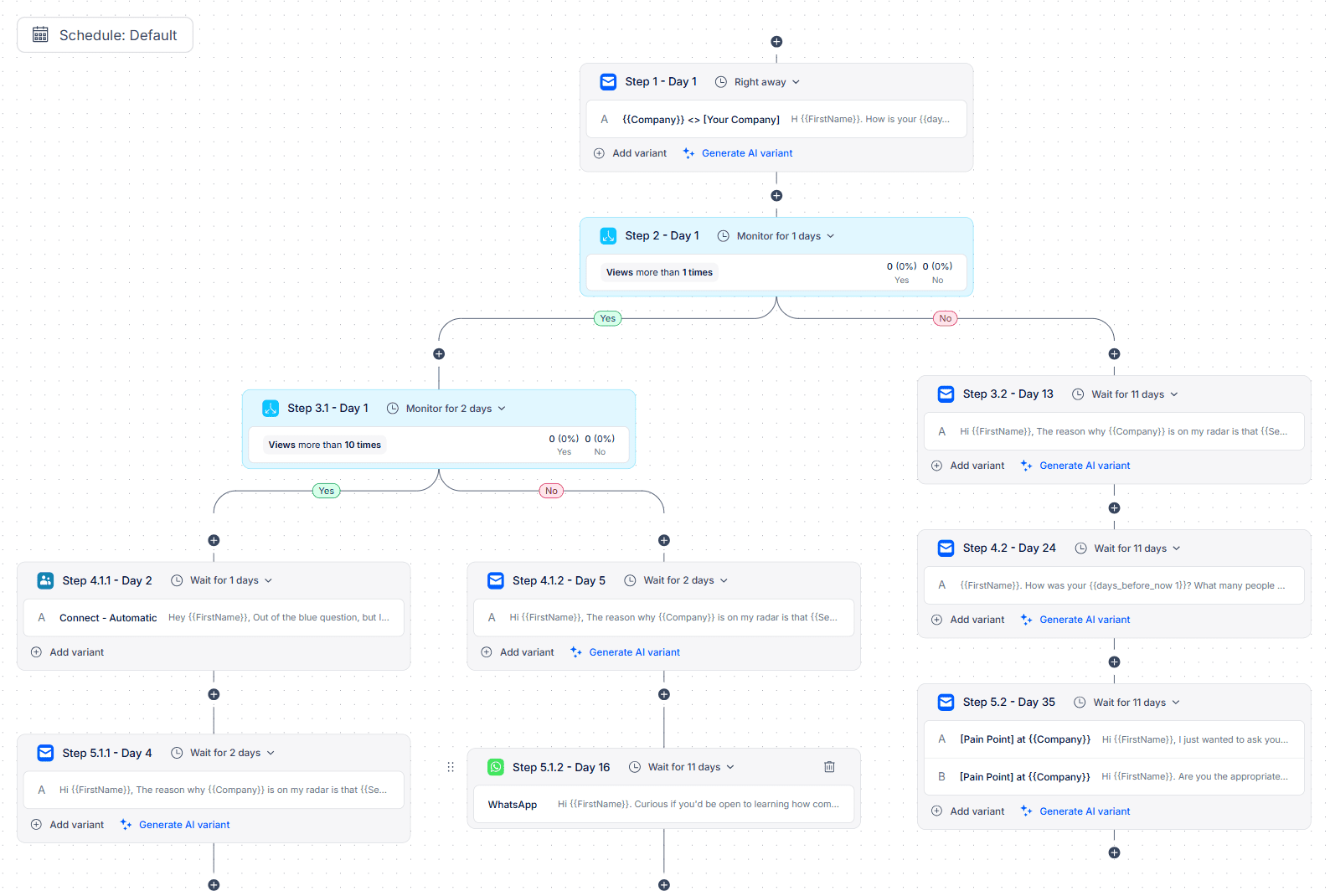
Reply.io: the Best Multichannel Outreach Tool for Calls and WhatsApp
Reliability is the other sticking point. The pattern across lower-rated reviews is a platform that feels heavy, summed up by one reviewer as "slow and buggy, some features are missing" (see review).
Worth a look if you want the detail: email sequence software

Reply.io Pros

  • Five channels run in one conditional sequence, which covers just about any outbound motion you would want to build.
  • Domains and mailboxes can be bought inside the platform, with SPF, DKIM and DMARC configured for you automatically.
  • Warmup ships with every mailbox, and pre-warmed domain packages let you start sending without the usual two-week wait.
  • Real-time monitoring watches for LinkedIn restriction risk and pulls back activity before your account gets limited.
  • Support comes up repeatedly as a strength, which counts for a lot on a platform with this many moving parts.

Reply.io Cons

  • Three of the four paid tiers show no price, so you cannot build a budget without booking a call first.
  • Reviewers describe the platform as slow and bug-prone, with sequence execution the most common complaint.
  • There is a lot packed into the interface, and new users take a while before they are genuinely productive.

Reply.io Pricing

  • Free: $0, with 200 data search credits a month.
  • Starter, Professional and Ultimate: not published.
  • Reply Unlimited: starts at $166 a month.
  • Free trial: not stated, though the free tier has no time limit.

4. La Growth Machine: the Best Multichannel Outreach Tool for LinkedIn-Led Outreach

La Growth Machine is here because it treats LinkedIn as the lead channel rather than an add-on to email, and it is the only tool on this list that sends X DMs.

The sequence builder puts LinkedIn, email, X and call tasks into one branching flow with A/B testing on individual steps. If your multichannel motion starts on LinkedIn and uses email as the follow-up, this is the structure that fits.

LinkedIn runs fully cloud-based with a dedicated mobile proxy per identity, and the platform waits a full 30 minutes after a connection is accepted before firing the next action. It also publishes real numbers, which is unusual. New accounts start near 20 invitations a day and ramp by ten. Settled accounts run up to 100 to 150 invitations a week alongside 120 messages a day.
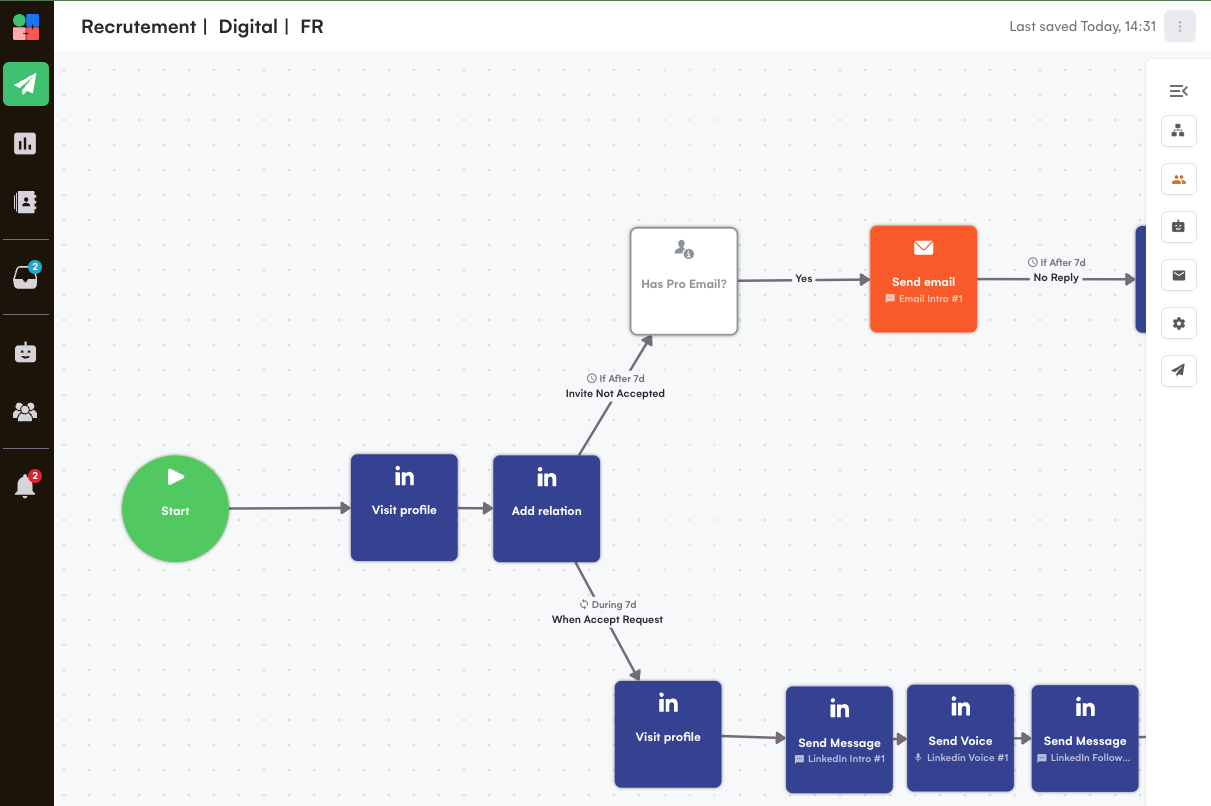
La Growth Machine: the Best Multichannel Outreach Tool for LinkedIn-Led Outreach

Pricing works per identity, where an identity is one sending profile. Five of those on Pro comes to €600 a month, which is the top of this list by some distance.

Email is the weaker half of the product. There is no warmup, no inbox rotation, and the customization is thin next to a dedicated email platform. One CEO put it bluntly, saying you "really just can't customize your emails all that much" (see review).
Worth a look if you want the detail: AI outreach tools

La Growth Machine Pros

  • LinkedIn runs fully in the cloud with a dedicated proxy per identity, so nothing depends on a browser staying open.
  • The published daily and weekly limits are specific rather than vague, which makes ramping a new account far less nerve-wracking.
  • Native X DM outreach on Ultimate is a channel none of the other five tools offer.
  • Pending invitations withdraw themselves after four weeks and sequences stop on any reply, so your account stays clean without manual work.
  • The visual sequence builder handles cross-channel branching more cleanly than most competitors manage.

La Growth Machine Cons

  • Per-identity pricing scales hard, and five sending profiles on Pro lands you at €600 a month.
  • There is no email warmup at all, so you need a separate tool before you send anything cold.
  • Bugs, sync errors and surprise logouts come up often enough in reviews to expect some setup friction.
  • Pro and Ultimate both display €120 on the pricing page, which makes the two tiers genuinely hard to tell apart.

La Growth Machine Pricing

  • Basic: €60 a month per identity. LinkedIn and email, 250 leads enriched monthly.
  • Pro: €120 a month per identity. Adds calls, 400 leads enriched, unlimited identities.
  • Ultimate: €120 a month per identity as listed. Adds X, 1,000 leads enriched, unlimited campaigns.
  • Agency: custom, minimum six identities.
  • Free trial: 14 days, no card, one identity.

5. Apollo.io: the Best Multichannel Outreach Tool for Database and Dialing

Apollo.io makes this list because it runs native email sequencing and a full dialer with a contact database sitting in the same workspace. Most teams buy prospect data and an outreach tool separately, and folding both into one login removes a tool and an export step from the stack.

That combination is why it carries the highest G2 rating here at 4.7. The Parallel Dialer is properly good rather than a checkbox, email sequencing automates cleanly, domain warming is included, and inbox rotation handles volume sending.

LinkedIn is where it struggles for a multichannel buyer. Actions fire through the Apollo Chrome extension, so the browser has to stay open and awake. Profile views and post interactions still need a person to finish them off, which makes them tasks rather than automated steps.
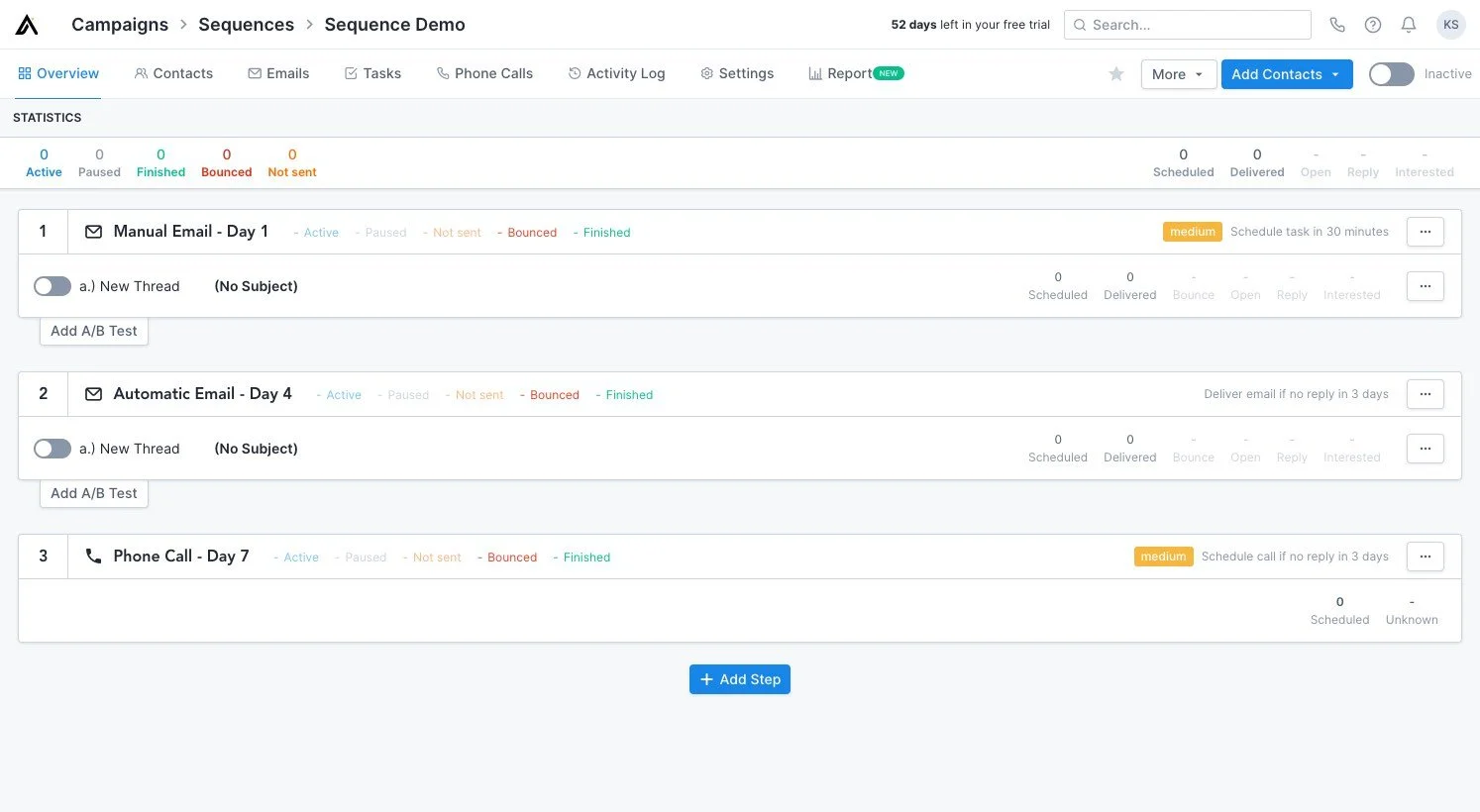
Apollo.io: the Best Multichannel Outreach Tool for Database and Dialing

Apollo is upfront that stacking too many LinkedIn tasks at once can get an account temporarily restricted. It just does not give you caps or throttling to stop that happening.

Users feel that in practice. One growth lead described the extension as unreliable, noting it "gets flagged by LinkedIn sometimes as automation" (see review).

Data accuracy draws the loudest criticism across thousands of reviews, with wrong titles, stale records and missing mobile numbers coming up again and again.

Worth a look if you want the detail: Apollo.io review

Apollo.io Pros

  • Database and outreach live in the same workspace, which removes both a tool and an export step from your stack.
  • The Parallel Dialer is a full calling product rather than a task list, so phone-heavy cadences actually work here.
  • Domain warming and inbox rotation are built in, keeping email deliverability inside the platform you already pay for.
  • Search and filtering are strong enough that plenty of teams prospect in Apollo even when they send somewhere else.
  • It holds the highest rating in this comparison at 4.7, across the largest review base by a wide margin.

Apollo.io Cons

  • Not a single price appears on the pricing page, so every buyer has to go through sales to learn what they will pay.
  • LinkedIn depends on the Chrome extension staying open, which means campaigns stall when the machine sleeps.
  • Profile visits and post interactions have to be completed by hand, so calling them automated steps is generous.
  • Data accuracy is the most repeated complaint by volume, especially around job titles and direct phone numbers.

Apollo.io Pricing

  • Free: Available
  • Basic: $49/mo/user

6. Saleshandy: the Best Multichannel Outreach Tool for Email-First Teams

Saleshandy is on this list for teams whose multichannel motion is email-led with calls and WhatsApp around it. Both of those run natively, on a flat plan that covers ten users at $76 a month.

As an email platform it holds up well. Unlimited email accounts on every plan, domains you can buy inside the product at $14 a year, DNS configured automatically, and warmup included through TrulyInbox. At $34 a month it is also the cheapest entry point here.
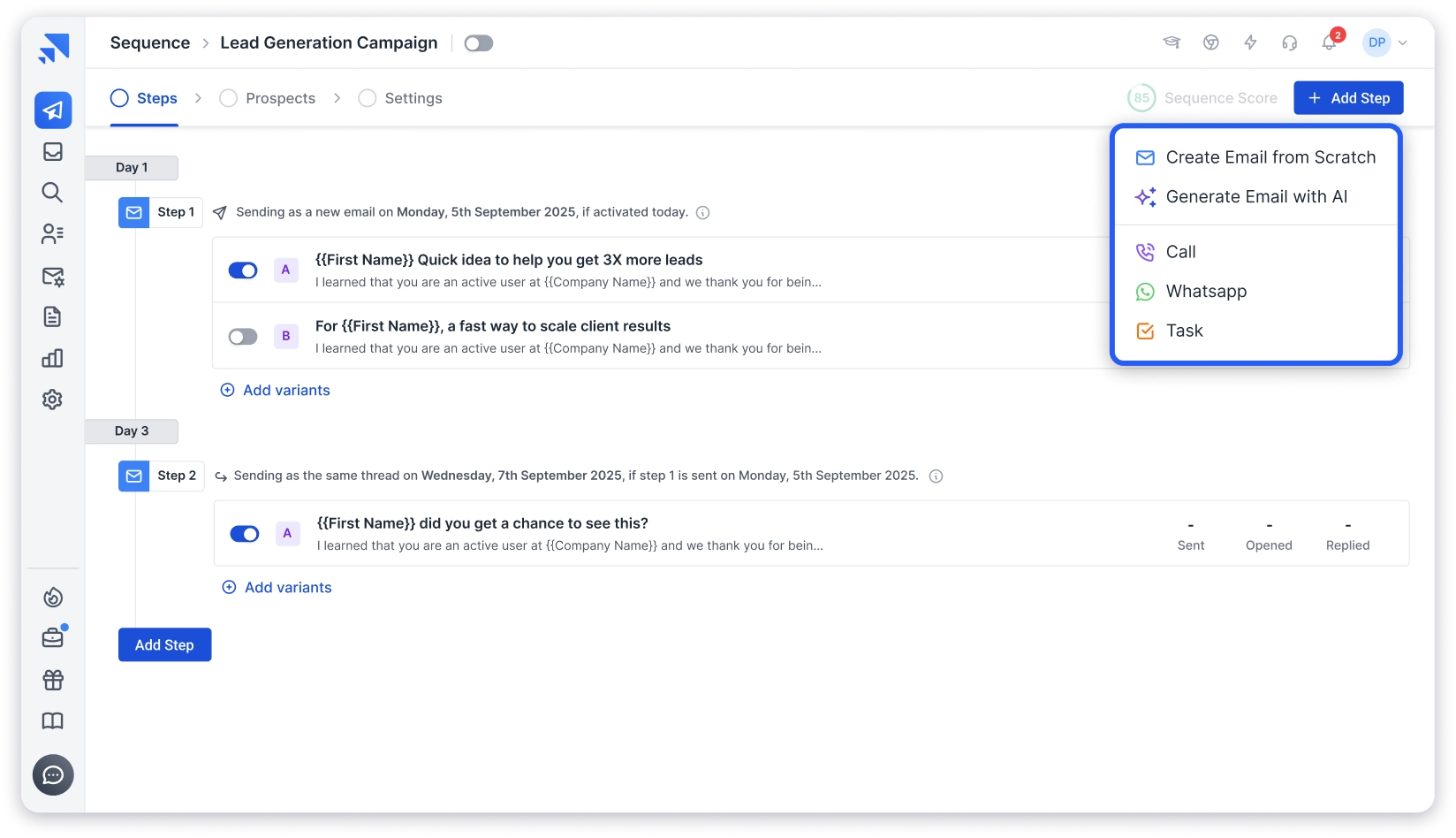
Saleshandy: the Best Multichannel Outreach Tool for Email-First Teams

The LinkedIn side is where it gets complicated, and this is the caveat I flagged in the criteria. You cannot send a connection request or a LinkedIn message from inside Saleshandy at all.

LinkedIn steps route out to Aimfox or HeyReach through an API key, and both of those are separate paid subscriptions. So the flat $76 is not what multichannel actually costs you here, and the marketing pages do not make that obvious.

Warmup is the other thing to watch. The sharpest reviews tie it to reputation damage, with one head of sales warning that "your clients won't receive the emails" (see review).
Worth a look if you want the detail: Saleshandy alternatives

Saleshandy Pros

  • Pro covers up to ten users at a flat $76 a month, which is strong value for a team whose main channel is email.
  • Unlimited email accounts on every tier means you can scale sending volume without being pushed up a plan.
  • Domains and mailboxes can be bought inside the platform at $14 a year per domain, with DNS handled for you.
  • A built-in dialer and native WhatsApp steps give you more channel coverage than the entry price suggests.
  • Support gets consistently good marks, and most users get a first campaign live quickly.

Saleshandy Cons

  • LinkedIn is not automated inside the product, so you are paying for Aimfox or HeyReach on top to run it.
  • The marketing pages present LinkedIn as a native channel, which is not what you get once you are inside.
  • The bundled warmup has been tied to domain reputation damage in several detailed negative reviews.
  • Analytics and reporting draw steady criticism, including graphs that simply fail to reload.
  • Seven days is the shortest trial in this comparison, which is barely enough to test a sequence.

Saleshandy Pricing

  • Starter: $34 a month billed annually, $41 billed monthly. One user.
  • Pro: $76 a month billed annually, $99 billed monthly. Up to ten users.
  • Scale: $149 a month billed annually, $189 billed monthly. Unlimited users.
  • Email infrastructure add-on: $2.99 per mailbox a month.
  • Enterprise: custom.
  • Free trial: 7 days, no card needed.

Final Verdict on Multichannel Outreach Tools

Salesforge is the best multichannel outreach tool for most B2B teams, because email and LinkedIn both run natively and the price holds flat as you hire. Five seats costs $80 a month while the per-seat options clear $400.

Lemlist takes it if you want four channels in one sequence. Reply.io takes it if calls and WhatsApp are non-negotiable. Apollo is the better buy when the database matters more to you than LinkedIn automation.

Start a free trial and run one sequence end to end before you decide.

FAQs About Multichannel Outreach Tools

What are multichannel outreach tools?

They run outreach across more than one channel from a single sequence, usually email and LinkedIn, sometimes calls, SMS or WhatsApp. The sequence branches on behaviour, so a LinkedIn acceptance can change what email goes out next.

Which multichannel outreach tool is cheapest for a team of five?

Salesforge at $80 a month on Growth, billed annually, because the fee is flat and covers unlimited users. Saleshandy Pro is $76 for up to ten users, but LinkedIn needs a separate paid tool, so your real total runs higher.

Does LinkedIn automation get your account restricted?

It can, and how the tool executes matters more than how much you send. Cloud platforms that pace actions per profile and pause on warning signals are safer than extensions firing in bulk. Starting around 20 connection requests a day and ramping slowly is the sensible approach on a fresh account.

Do multichannel outreach tools give you mailboxes?

Most do not. Salesforge, Lemlist, Apollo.io and La Growth Machine all expect you to connect your own. Reply.io and Saleshandy let you buy domains and mailboxes inside the platform with DNS configured for you.

What is the difference between native LinkedIn automation and an integration?

Native means the platform sends the LinkedIn actions itself. An integration passes the action to a separate tool you pay for on its own, which is how Saleshandy works through Aimfox or HeyReach.

Do you still need email warmup when you are sending across multiple channels?

Yes. Multichannel lowers how many emails each prospect gets, but it does nothing to build sender reputation. New mailboxes still need around 14 days of warmup before you send anything cold.

Which multichannel outreach tool covers the most channels?

Reply.io covers email, LinkedIn, calls, SMS and WhatsApp. Lemlist covers email, LinkedIn, calls and SMS, with WhatsApp as a paid add-on on top.

Scale outreach on trusted shared infrastructure

Set up domains, mailboxes, and DNS faster.
Start with
4.7 rating on G2
Add as a preferred
source on Google