

Personalized Outbound Strategy
Get The Right Outbound Strategy In Minutes
Enter your email to get a custom plan & stack recommendation for your business
It's being carefully crafted by AI
Please check your mailbox in 5 minutes
"I wanted to see how much of the email infrastructure Peeker AI actually handles on its own, so I tested it.
I looked into how it sets up inboxes, tracks deliverability, and manages things like flagged or underperforming inboxes.
In this Peeker AI review, I’ll break down how it works, what you get, its pricing, and its limitations, so you can clearly decide if it fits your setup."
Peeker AI is an email infrastructure and deliverability tool.
It provides inboxes, tracks their performance, and manages issues like burned or underperforming inboxes.
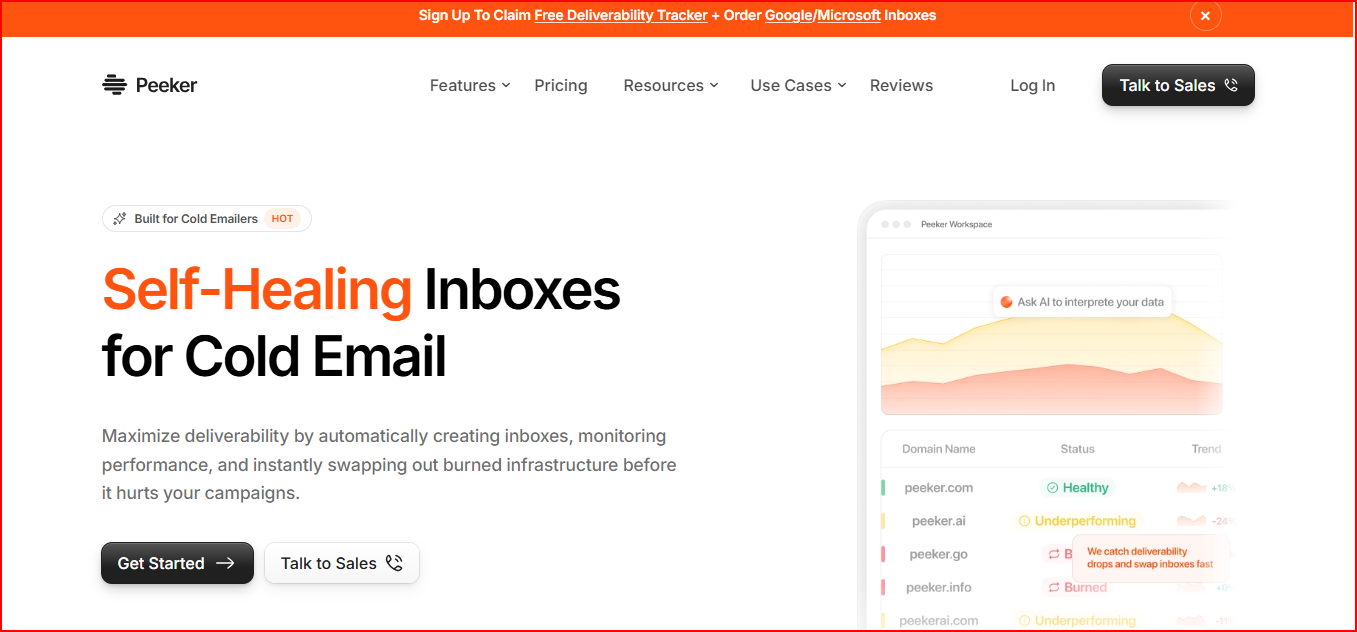
It gives you access to prebuilt inboxes (Google and Microsoft) with deliverability tracking, so you can see if your domains and inboxes are healthy.
Once your inboxes are set up and connected to your sending tool, most of the work is handled automatically.
It monitors performance, detects problems, and takes actions like swapping or reconnecting inboxes.
It is mainly used by cold email teams that manage multiple inboxes.
It helps them get visibility into deliverability without handling infrastructure manually.
Here’s how the process works step by step:
From what I noticed, setup is quick and once connected, there’s very little manual work.
But sending is limited to around 3–6 emails per inbox per day, so scaling depends on adding more inboxes.
Here are the main features you get with Peeker AI:
Peeker AI tracks how your inboxes and domains are performing in real time.
It helps you see if everything is working fine or if something is starting to underperform.
It continuously checks for burned or underperforming inboxes.
This helps you identify issues early without manually checking everything.
If an inbox gets flagged in spam, Peeker can replace it with a new one.
You don’t need to stop your campaigns or buy another subscription.
If an inbox gets disconnected, it reconnects it automatically.
This helps keep your sending running without interruptions.
Peeker provides ready-to-use inboxes like Google and Microsoft.
You can set them up in bulk and use them directly.
It connects with tools like Instantly, Smartlead, EmailBison, and Plusvibe, so you can plug it into your existing setup easily.
Peeker AI pricing depends on how many inboxes you want to use.
The cost per inbox decreases as you scale.
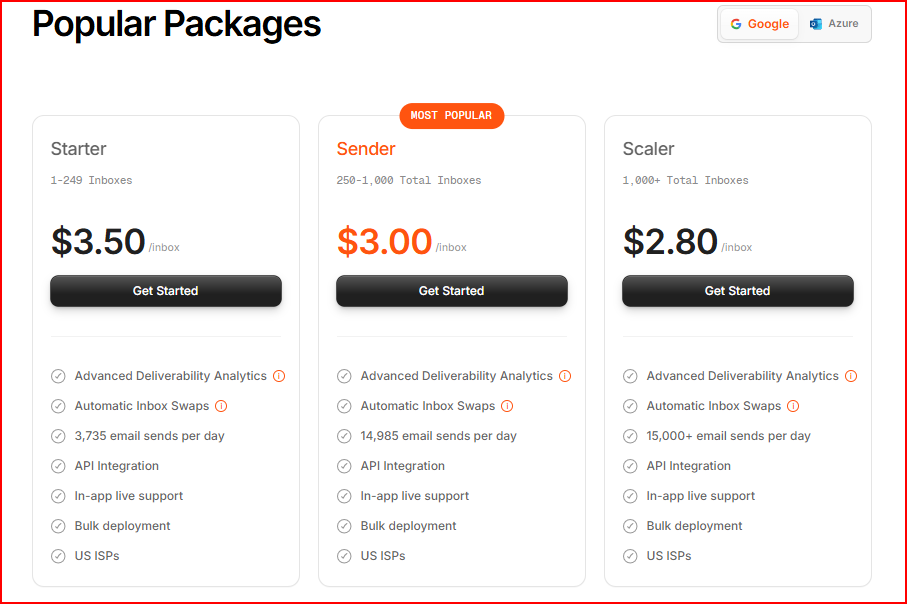
This plan is for 1 to 249 inboxes.
It includes deliverability analytics, automatic inbox swaps, API access, bulk deployment, and live support. It supports up to 3,735 email sends per day.
This plan is for 250 to 1,000 inboxes.
You get the same features as the Starter plan, with higher scale.
It supports up to 14,985 email sends per day.
This plan is for setups with more than 1,000 inboxes.
It includes all features and supports 15,000+ email sends per day.
All plans include advanced deliverability analytics, automatic inbox swaps, API integration, bulk deployment, and in-app live support.
These are the pros I noticed while using it:
These are the main limitations I faced:
If these limitations matter for your setup, it helps to look at a tool like Mailforge that focuses more on domain and infrastructure management.
Here’s how Mailforge is different.
Mailforge is a cold email infrastructure tool that lets you create and manage unlimited domains and mailboxes together in one place.
If you want a ready-to-use setup but still need control over your infrastructure, Mailforge works for that.
It is not just about inboxes.
You can set up domains, add mailboxes, and manage everything from a single dashboard.
Mailforge also handles DNS setup automatically.
This includes SPF, DKIM, and DMARC for every domain, so you don’t need to configure anything manually
You can manage everything at scale.
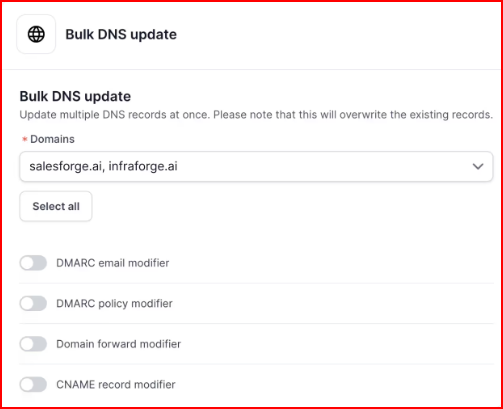
It supports bulk DNS updates, domain transfers, and multiple workspaces, which makes it easier to organize larger setups.
It also includes features like SSL and domain masking.
This helps you manage and secure your domains while keeping your setup structured.
When it comes to pricing, it is simple and easy to scale.
You pay separately for domains and mailbox slots.
Domains cost around $14 per year each, and mailboxes cost about 2$-$3 per month per mailbox when billed yearly.
This makes it easier to increase or reduce your setup based on your needs.
Mailforge also includes inbox hosting, maintenance, automated setup, and support as part of the subscription.
If you want a ready-to-use infrastructure but still need control over domains, DNS, and setup, Mailforge is a strong alternative to Peeker AI.
Enter your email to get a custom plan & stack recommendation for your business
Please check your mailbox in 5 minutes

Peeker AI does what it is built for.
It gives you ready-to-use inboxes, tracks their performance, and handles things like burned inboxes and reconnects automatically.
At the same time, it works within a fixed structure.
Sending is limited per inbox, scaling depends on adding more inboxes, and you don’t manage domains or setup directly.
If you want a ready setup but still need control over domains and mailboxes, Mailforge gives you that.
You can create domains, manage mailboxes, and handle DNS setup in one place.
It also keeps pricing flexible by separating domain and mailbox costs.
Try Mailforge and build a scalable email infrastructure in minutes at just ~$3 per mailbox.