

Personalized Outbound Strategy
Get The Right Outbound Strategy In Minutes
Enter your email to get a custom plan & stack recommendation for your business
It's being carefully crafted by AI
Please check your mailbox in 5 minutes
Buying hundreds of inboxes for cold email can get expensive quickly. Puzzle Inbox aims to make it more affordable, with standard Outlook 365 inboxes starting at just $0.35 each.
That price caught my attention, but the customer reviews made me take a closer look.
Puzzle Inbox has a 3.8/5 rating on Trustpilot based on 23 reviews. Some customers say the inboxes perform well, with one reporting that they use around 300 inboxes from the company. Others, however, mention bounced emails, poor deliverability, and inboxes being blocklisted.
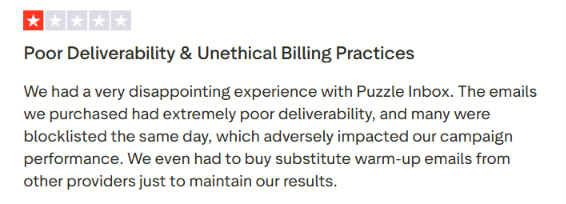
If you’re considering Puzzle Inbox for a large cold email setup, price alone shouldn’t drive your decision.
In this Puzzle Inbox review, I’ll break down what you get for your money, how its Google and Outlook inboxes work, what customers are saying, and what you should consider before buying.
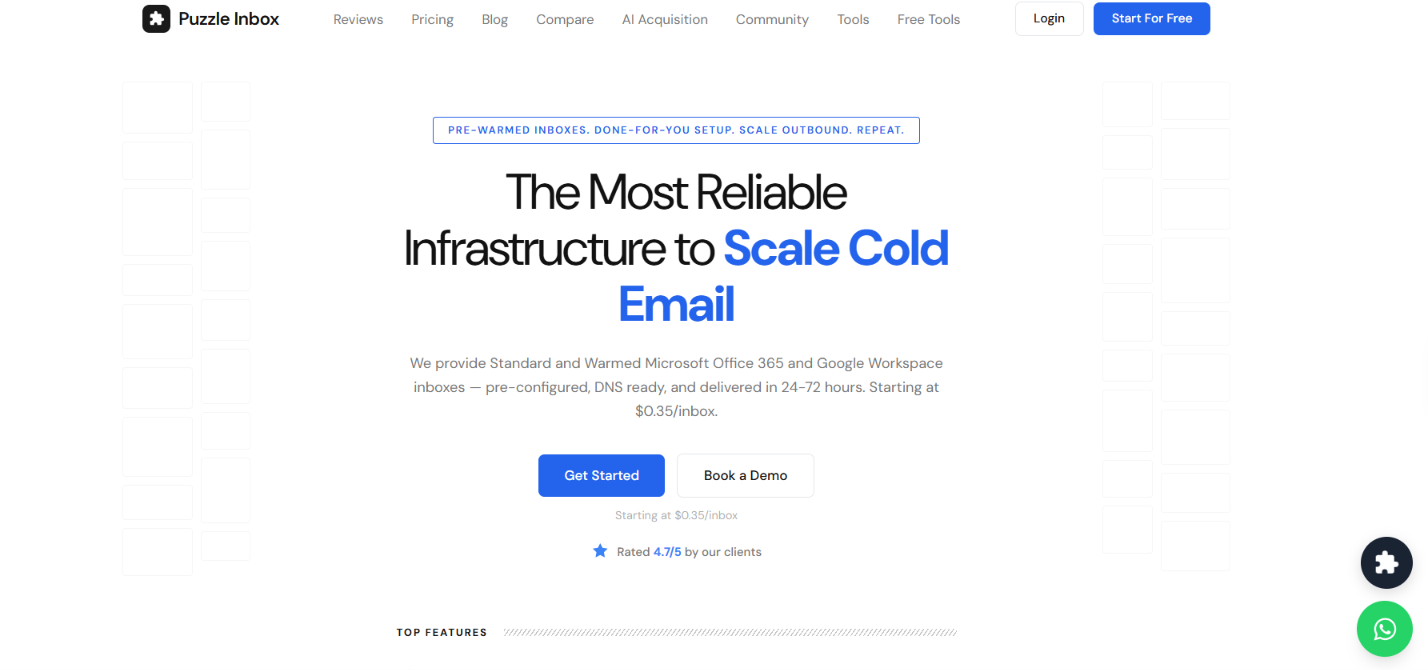
Puzzle Inbox handles most of the work involved in setting up Google Workspace or Outlook 365 inboxes for cold email. You choose the inbox type, and Puzzle takes care of the domain and DNS setup, including SPF, DKIM, DMARC, and OAuth. It also offers both standard and pre-warmed inboxes.
The differences become clearer once you move beyond the initial setup. Primeforge also offers Google Workspace and Microsoft 365 inboxes, along with bulk DNS updates, full ownership of domains and mailboxes, existing domain connections, mailbox analytics, and editable mailbox settings.
Here’s how the two compare based on the features they currently offer.
Puzzle Inbox clearly covers the main setup work. Its dashboard also lets you manage inboxes, monitor deliverability, and track warm-up status.
The main difference is what happens after setup. Primeforge gives you more tools around the individual mailboxes and domains, including bulk DNS changes, detailed mailbox analytics, editable mailbox settings, API access, and the option to connect domains you already own. Puzzle Inbox does not clearly list these capabilities.
Puzzle Inbox has 23 Trustpilot reviews and a 3.8/5 rating. Positive reviews mostly mention good deliverability, quick support, and easy setup. One customer with around 300 inboxes said the support was fast and transparent, while another said the warmed inboxes were solid for reply rates.
The negative feedback is mainly around deliverability, the dashboard, cancellation, and billing. One user reported bouncing emails and deliverability problems with some Google inboxes. Another said the dashboard did not work during their campaign. Puzzle Inbox disputed parts of the cancellation and billing complaints.
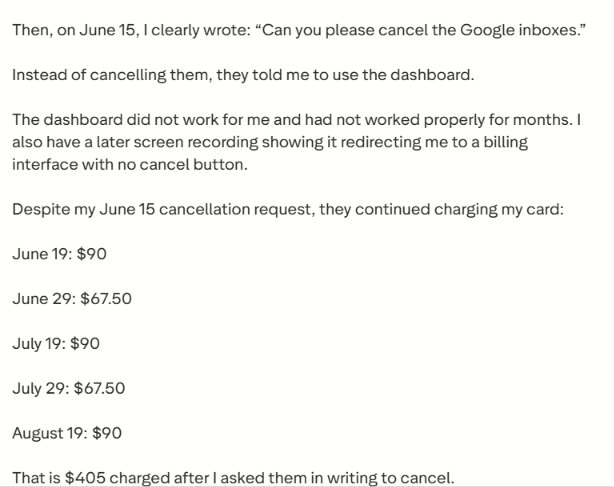
So, while most reviews are positive, there are still a few complaints worth considering if you plan to buy a large number of inboxes.
Puzzle Inbox follows a simple process. You choose the inboxes you need, Puzzle sets them up, and then you connect them to your cold email sending tool.
First, you choose between Google Workspace and Outlook 365 inboxes. Both are available as standard or pre-warmed inboxes.
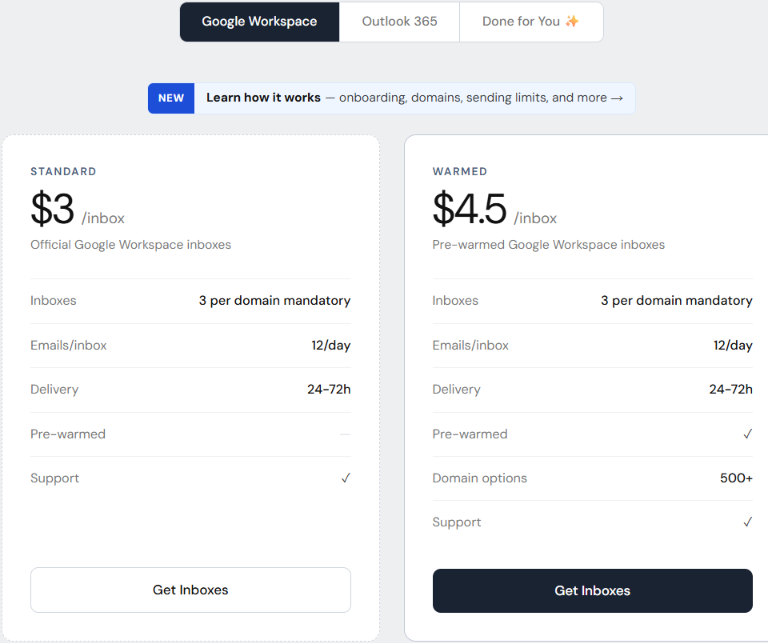
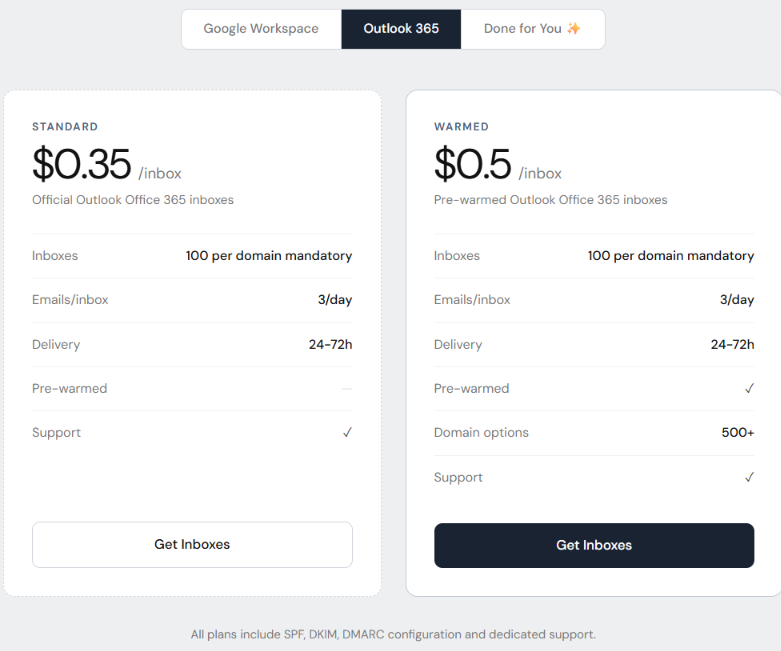
There are minimum inbox requirements per domain. Google Workspace requires 3 inboxes per domain, while Outlook 365 requires 100 inboxes per domain.
Once you place your order, Puzzle handles the technical setup for you. This includes the domains, DNS records, SPF, DKIM, DMARC, and OAuth configuration.
Puzzle says inboxes are typically delivered within 24-72 hours. If you choose pre-warmed inboxes, they arrive already warmed, so you do not have to start the warm-up process from zero yourself.
Once the inboxes are ready, you connect them to your cold email tool and start using them for your campaigns. Puzzle says its inboxes can be connected using the provided email and password through its OAuth connection process.
You then need to stay within Puzzle's listed sending limits. Google Workspace inboxes are listed at 12 cold emails per inbox per day, while Outlook 365 inboxes are listed at 3 per inbox per day.
If you need to send more emails, Puzzle's approach is to add more inboxes rather than increase the sending volume from each inbox.
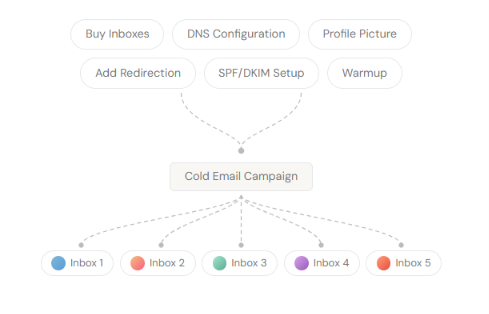
After setup, you can manage your Google Workspace and Outlook inboxes from Puzzle's dashboard. Puzzle says the dashboard lets you monitor deliverability and track warm-up status across your inboxes.
So, most of the infrastructure work happens before the inboxes reach your sending tool. Puzzle handles the setup, while you use your cold email software to run the actual campaigns.
Puzzle Inbox combines the inboxes, setup, warm-up, and basic inbox monitoring you need to get a cold email setup running. Most of the technical work is handled before the inboxes are delivered, so you do not have to configure each account yourself.
Here’s what you get:
The pre-warmed inboxes save you from starting the warm-up process from scratch. They come with an established sending reputation, while standard inboxes do not include pre-warming.
The dashboard is where you keep track of the setup after that. It brings your Google Workspace and Outlook inboxes into one place, where you can monitor deliverability and check their warm-up status.
Yes, Puzzle Inbox is set up to support high-volume cold email, but the volume comes from using more inboxes rather than sending more emails from each inbox. Google Workspace inboxes are limited to 12 emails per inbox per day, while Outlook 365 inboxes are limited to 3 emails per inbox per day. So, if you want to increase your daily sending volume, you need to add more inboxes.
For example, at Puzzle's listed limit, 100 Google Workspace inboxes can send up to 1,200 emails per day. With 500 Google inboxes, that goes up to 6,000 emails per day.
Puzzle supports 500+ inbox orders in one workflow, and you can manage Google Workspace and Outlook inboxes from the same dashboard. This makes the setup suitable for agencies and outbound teams that need to spread a large sending volume across many inboxes.
One thing to consider is Outlook 365. Puzzle currently says it does not recommend Outlook 365 for cold email because Outlook deliverability has declined over the last 3-6 months. For 2026 outbound, Puzzle recommends Google Workspace instead.
So, Puzzle Inbox can support high-volume cold email, but its approach is to spread that volume across a large number of low-volume inboxes, rather than send heavily from a smaller number of accounts.
Puzzle Inbox charges per inbox, and the price depends on whether you choose Google Workspace or Outlook 365.
For Google Workspace, a standard inbox costs $3 per month, while a pre-warmed inbox costs $4.50 per month.
Outlook 365 is cheaper. A standard inbox costs $0.35 per month, while a pre-warmed inbox costs $0.50 per month.
The pre-warmed option costs more because the inboxes already have an established sending reputation, so you do not have to start the warm-up process yourself.
To understand what that means, here are a few examples based on how many Google Workspace inboxes you need:
So, if you need 100 Google Workspace inboxes, you would pay $300 per month for standard inboxes or $450 per month for pre-warmed inboxes. Each Google Workspace inbox can send up to 12 emails per day, so 100 inboxes would give you a listed sending capacity of up to 1,200 emails per day.
Puzzle also requires three Google inboxes per domain. If you need 100 inboxes, you would therefore need at least 34 domains to accommodate them.
For larger orders, Puzzle offers bulk pricing for 500+ inboxes, with lower per-inbox rates available at higher volumes.
Puzzle Inbox is built mainly for teams that want the inbox setup handled for them and plan to scale by adding more inboxes.
If you are buying Google Workspace or Microsoft 365 inboxes specifically for cold email, Primeforge is another option worth considering.
Like Puzzle Inbox, Primeforge handles the technical setup and gives you Google Workspace and Microsoft 365 mailboxes that you can connect to your cold email sending tool. But Primeforge adds more features for running and maintaining the sending infrastructure behind your campaigns.
For example:
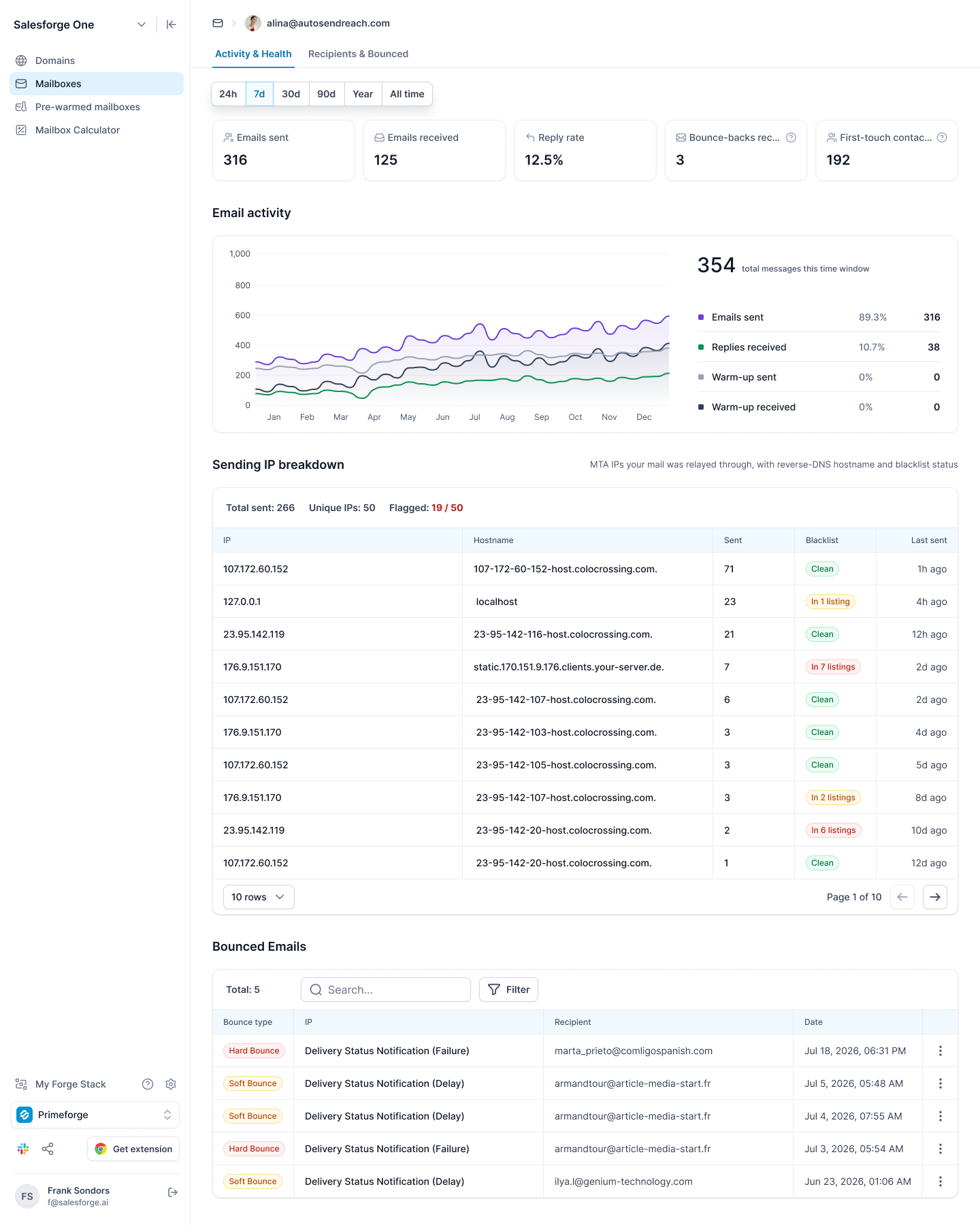
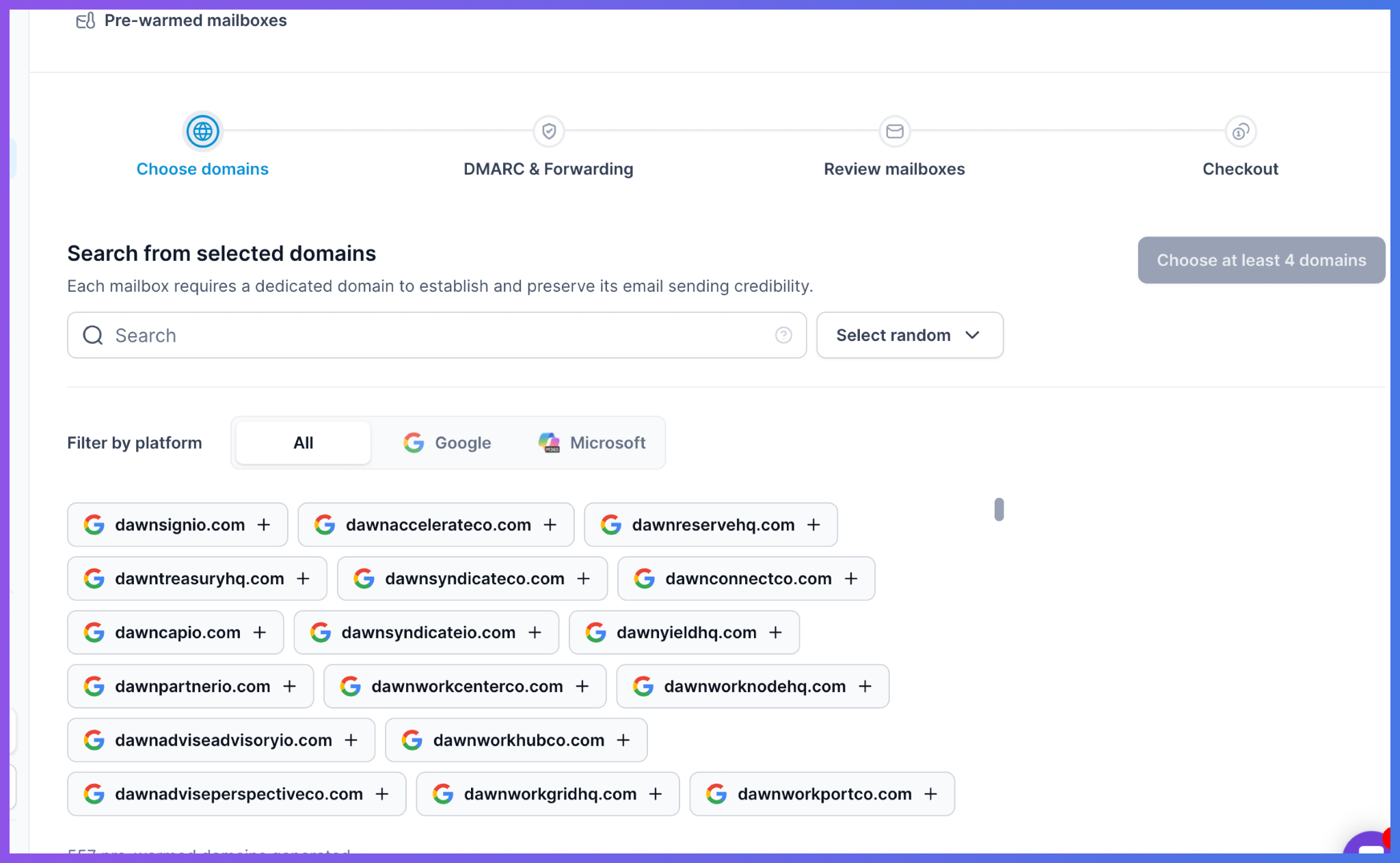
This is where Primeforge stands out as an alternative. It goes beyond selling Google and Microsoft inboxes by giving cold email teams better visibility into their sending accounts and the tools to manage their campaign infrastructure as they add more domains and mailboxes.
Enter your email to get a custom plan & stack recommendation for your business
Please check your mailbox in 5 minutes

Yes, Puzzle Inbox is worth considering if you want Google Workspace or Microsoft 365 inboxes for cold email without setting everything up yourself.
It handles the DNS setup, offers standard and pre-warmed inboxes, and lets you increase your sending volume by adding more inboxes. So, if you mainly want a ready-to-use setup for cold outreach, Puzzle Inbox can fit that need.
If you want an alternative built specifically around running Google and Microsoft mailboxes for cold email, Primeforge is also worth considering. You get full ownership of your domains and mailboxes, can use domains you already own, and have more tools to handle a large sending setup as it grows.
So, if you want to build and scale your cold email setup with Google Workspace or Microsoft 365 mailboxes, give Primeforge a try.