Summarize this article
Table of contents
Get insights delivered straight into your inbox every week!

11 Best Saleshandy Alternatives and Competitors for Cold Email in 2026

Running multiple campaigns and workflows can start feeling restrictive for some users.

Some teams also prefer tools with different campaign controls or outreach automation features.

Because of this, many teams begin exploring other cold email platforms.

To help with this, I spent 3 weeks testing 11 Saleshandy alternatives for cold email in 2026.

In the sections below, I will walk you through each tool so you can see which one fits your outreach workflow better.

Table of contents

TL;DR: 11 Best Saleshandy Alternatives

  • Salesforge is the most complete alternative because it combines prospecting, cold email, LinkedIn outreach, and AI automation in one platform

  • Instantly helps scale cold email campaigns by allowing teams to connect multiple email accounts and use built in warm up.

  • Lemlist focuses on personalized outreach so teams can send customized cold emails and LinkedIn messages.

  • GMass turns Gmail into a cold email tool so campaigns can be sent directly from the inbox.

  • Woodpecker helps automate cold email campaigns while protecting sender reputation and deliverability.

  • Snov.io combines lead generation, email verification, and outreach automation in one platform.

  • QuickMail focuses on reliable cold email automation with inbox rotation and deliverability monitoring.

  • Mailshake helps sales teams run outreach campaigns using email, LinkedIn, and phone activities.

  • Reply.io supports multichannel outreach with automation across email, LinkedIn, calls, and SMS.

  • Yesware works inside Gmail or Outlook and focuses on tracking email engagement and follow ups.

  • Lemlist helps run personalized cold outreach campaigns with email warm up and deliverability tools.

Saleshandy Infrastructure Limitations

Here are a few Saleshandy infrastructure limitations I noticed during my 30-day testing:

  • Saleshandygood at campaign automation and sequencing, but infrastructure options are limited compared to other tools built for cold email infrastructure.

  • Infrastructure setup options are limited compared to tools built specifically for cold email infrastructure.

  • Features like warm-up are part of the outreach workflow, not a full infrastructure control system.

  • The platform focuses more on campaign execution and tracking rather than managing the entire sending infrastructure setup.

Quick Comparison Table of 11 Best Saleshandy Alternatives

Tool Cold Email Automation Multichannel Outreach Scaling (Mailboxes / Volume) Lead Database Deliverability / Warm-up Starting Price
Salesforge AI sequences + automation Email + LinkedIn Unlimited mailboxes and senders Built-in database Unlimited warm-up via Warmforge $40/mo
Instantly Automated email campaigns Email Unlimited mailboxes, ~30 emails/day per inbox recommended Built-in B2B database Unlimited warm-up network $37/mo
Lemlist Email sequences + personalization Email + LinkedIn Multiple mailboxes supported No built-in database Built-in Lemwarm warm-up ~$59/mo
GMass Mail merge campaigns Email ~500 emails/day Gmail limit per account No database Basic spam checks ₹921/mo
Woodpecker Automated cold email campaigns Email (+ LinkedIn add-on) Campaign scaling based on contacted prospects per plan Lead finder credits Warm-up + deliverability monitor $24/mo
Snov.io Email + LinkedIn campaigns Email + LinkedIn Unlimited senders and mailboxes Built-in prospect database Deliverability toolkit + warm-up $29/mo
QuickMail Automated outreach sequences Email + LinkedIn Unlimited email senders with inbox rotation No database Auto-warmer + deliverability insights $9/mo
Mailshake Email sequences + follow-ups Email + LinkedIn + Phone 1–10 mailboxes per account depending on plan Built-in data finder Warm-up + spam analyzer $29/mo
Reply.io AI outreach sequences Email + LinkedIn + Calls Unlimited mailboxes and email sequences Real-time contact database Deliverability suite + warm-up $89/mo
Yesware Inbox-based email campaigns Email 1 mailbox per user No database Basic tracking insights $15/user/mo

Now lets understand each tool in detail.

1. Salesforge

Salesforge is a Multichannel cold outreach platform that helps you find prospects, send outreach campaigns, and manage replies from one place.

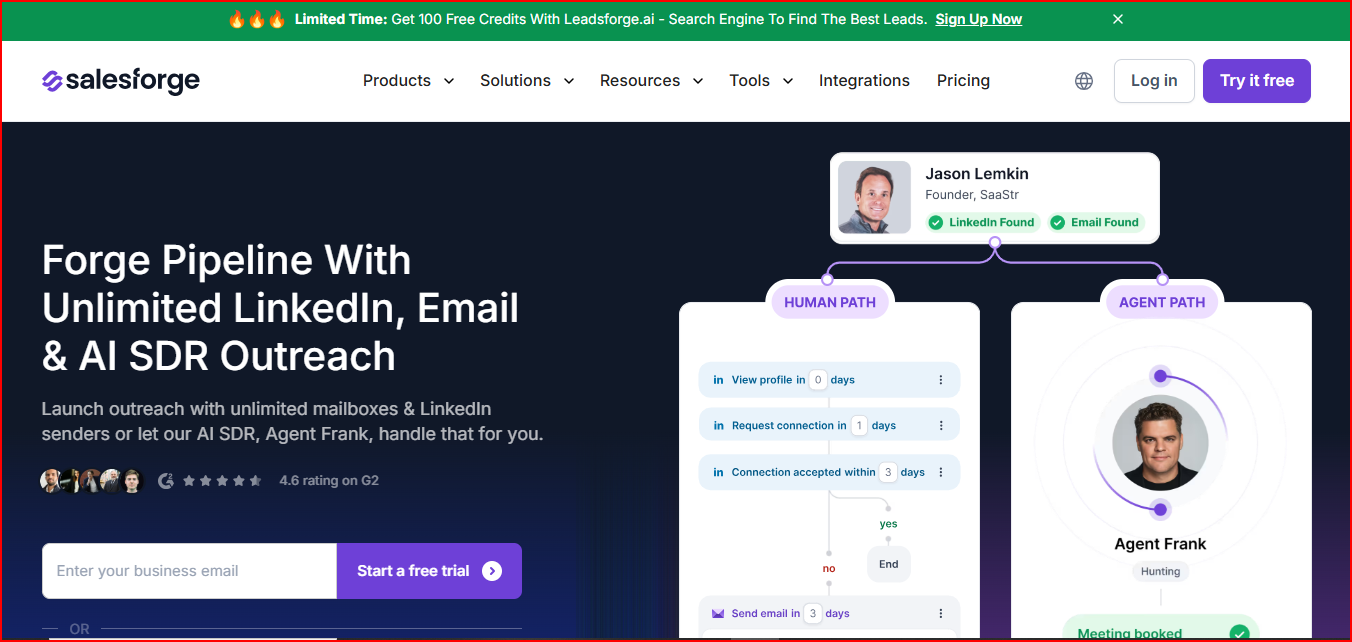
Salesforge- Multichannel Sales Outreach tool
This image shows the Salesforge- Multichannel Sales Outreach tool

You can run outreach across email and LinkedIn from a single dashboard

This helps teams manage conversations and campaigns without switching between tools.

Salesforge also lets you connect unlimited mailboxes and LinkedIn senders

This makes it easier to scale outreach across your team.

The platform also includes an AI SDR called Agent Frank

It works along with Salesforge and prospects, writes outreach messages, sends follow-ups, and books meetings.

Salesforge also supports email deliverability through unlimited warm-up powered by Warmforge

This helps build sender reputation and monitor mailbox health.

You can also connect your own mailboxes or add infrastructure using Mailforge, Infraforge, or Primeforge.

Key Features

  • Run multi-channel outreach across email and LinkedIn from one platform.

  • Add unlimited mailboxes and LinkedIn senders without seat-based pricing.

  • Manage all replies in Primebox™ unified inbox across email and LinkedIn.

  • Capture replies even when prospects reply from a different email address.

  • Use AI analysis inside Primebox™ to help categorize replies.

  • Warm up mailboxes using unlimited warm-up powered by Warmforge.

  • Monitor mailbox health and sender reputation during warm-up.

  • Use Agent Frank to automate prospecting and outreach.

  • Send outreach messages in 20+ languages.

  • Connect infrastructure from Mailforge, Infraforge, or Primeforge.

  • Integrate with tools like Slack, Salesforce, Clay, HubSpot, Zapier, and webhooks.

Pricing

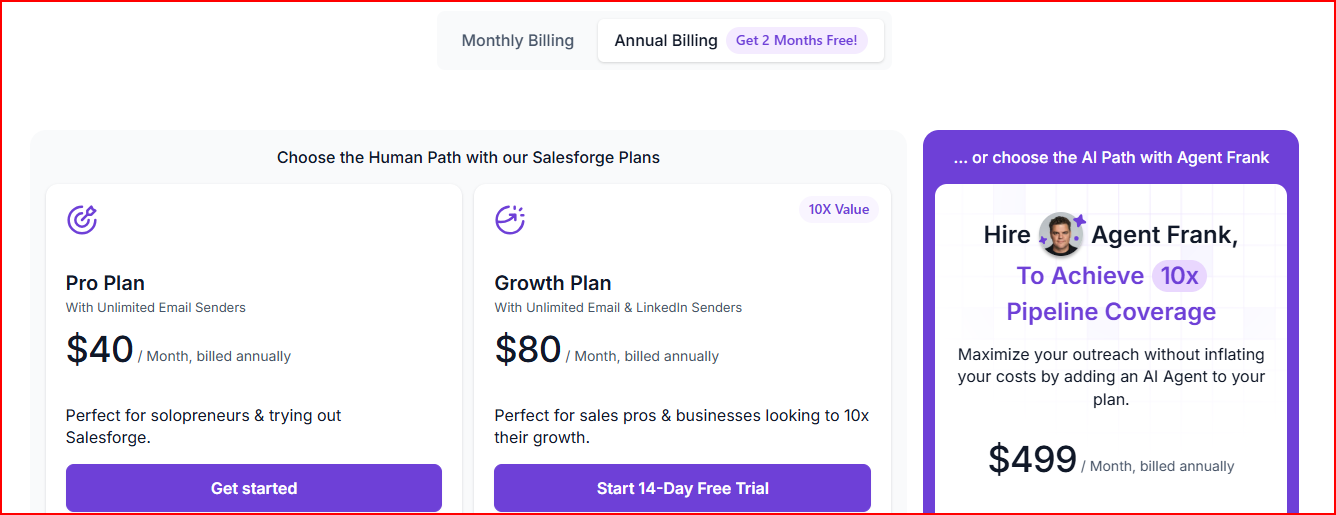
Salesforge pricing
This image shows the Salesforge pricing

Pro Plan - $40/month (billed annually)

  • Good for solopreneurs testing the platform. You get 1 user, 1000 active contacts in sequences, and 5000 emails per month.

  • You can also connect unlimited mailboxes and use unlimited premium warm-up.

Growth Plan - $80/month (billed annually)

  • Built for teams scaling outreach. You get unlimited users and 10,000 active contacts in sequences.

  • The plan includes 50,000 emails per month and unlimited LinkedIn senders.

Agent Frank (AI SDR) - $499/month (billed annually)

  • Agent Frank can find prospects, send outreach, follow up, and book meetings automatically.

  • The AI also supports outreach in more than 20 languages.

Pros

  • It reaches prospects through both email and LinkedIn from one place, which help you to increase outreach coverage

  • Scales outreach faster because you can connect unlimited mailboxes and LinkedIn senders

  • Keep all prospect conversations organized by managing email and LinkedIn replies in one inbox

  • Avoids missing replies because the system captures responses even if prospects reply from a different email address

  • It helps you to maintain sender reputation and mailbox health using unlimited warm-up powered by Warmforge

  • It reduces manual outreach work because the AI SDR Agent Frank can handle prospecting and follow-ups

Cons

  • Domains and mailboxes must be purchased separately before running outreach campaigns

  • Email infrastructure is not included by default, as many outreach tools do. In the platform and requires buying tools like Mailforge, Infraforge, or Primeforge
Personalized Outbound Strategy

Get The Right Outbound Strategy In Minutes

Enter your email to get a custom plan & stack recommendation for your business

It's being carefully crafted by AI

Please check your mailbox in 5 minutes

2. Smartlead

Smartlead is a cold email outreach platform built to run and scale outbound campaigns while improving email deliverability.

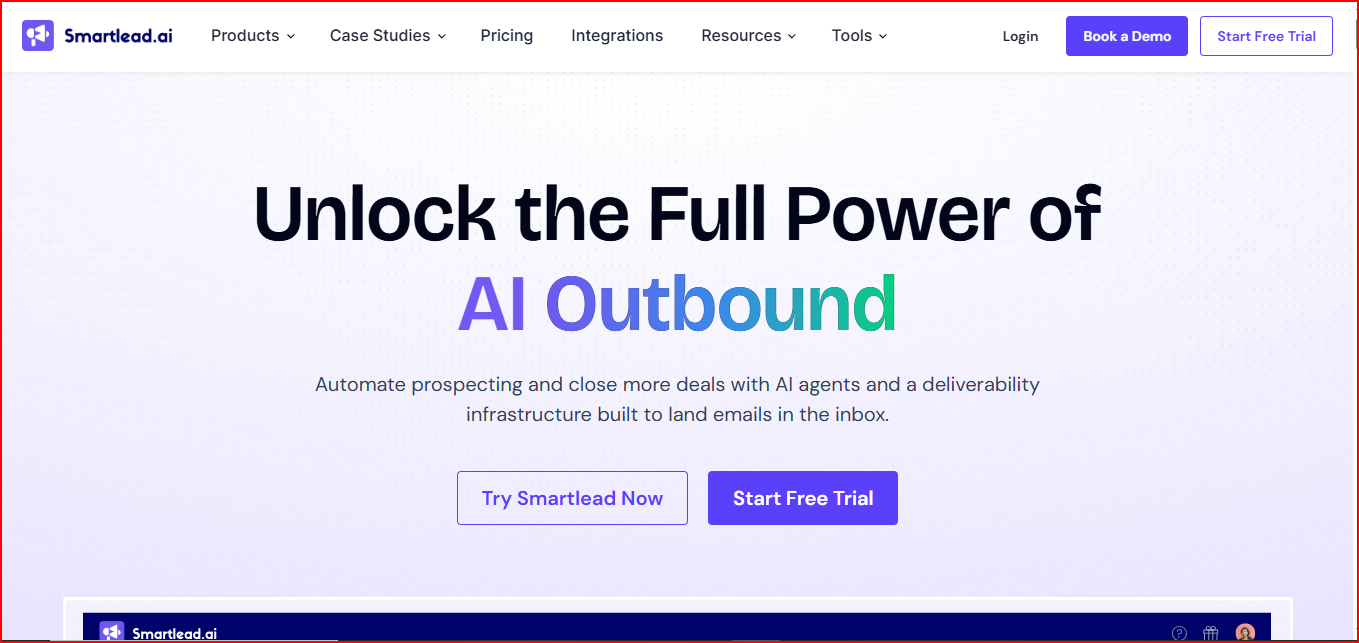
Smartlead - Automated Outreach Tool
This image shows the Smartlead - Automated Outreach Tool

The platform also uses AI agents to automate prospecting, write personalized emails, and manage follow-ups

These agents can also update CRM records and improve outreach workflows.

You can run campaigns using unlimited mailboxes and unlimited lead storage

This helps teams scale outreach without worrying about account limits.

Smartlead also includes a deliverability infrastructure called SmartInfra

It automatically manages DNS setup, sender rotation, and warm-ups.

The platform also provides a Master Inbox where teams can manage replies from all campaigns in one place.

Key Features

  • Use dedicated infrastructure and IPs to control sender reputation.

  • Monitor deliverability signals like bounce rates and spam flags in real time.

  • Use a private warm-up network designed to improve inbox placement.

  • Simulate human-like interactions such as opens, reads, and replies during warm-up.

  • Set up done-for-you mailboxes with domains, DNS, SPF, DKIM, and DMARC configured automatically.

  • Spread campaigns across Google and Outlook mailboxes to avoid deliverability bottlenecks.

  • Use AI agents to research leads, write personalized emails, and optimize outreach automatically.

  • Manage all campaign replies inside the Master Inbox.

  • Automatically categorize replies by intent and trigger next steps.

  • Track deals inside an integrated CRM with drag-and-drop boards synced with outreach campaigns.

Pricing

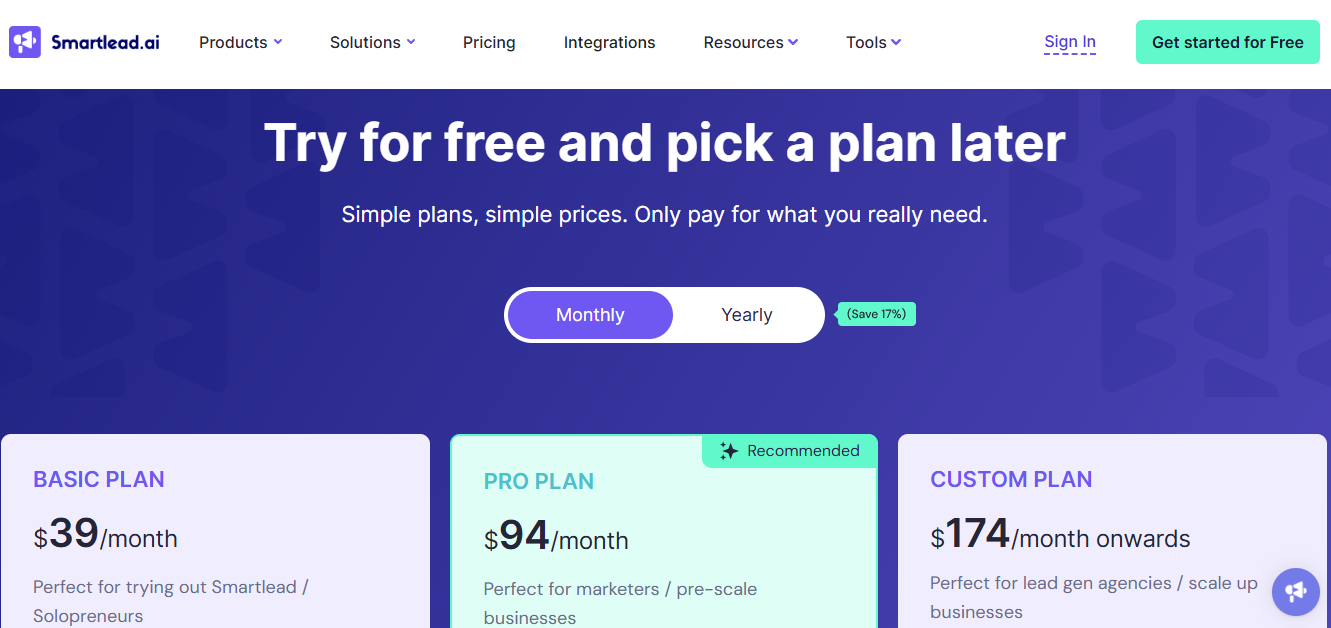
Smartlead pricing
This image shows the Smartlead pricing

Base Plan - $39/month

  • Includes 2,000 contacts storage, 6,000 emails per month, and 2,000 verified prospect emails.

  • Includes access to warm-up pool and CRM.

Pro Plan - $94/month

  • Includes 30,000 contacts storage, 90,000 emails per month, and 30,000 verified prospect emails.

  • Designed for teams running larger outreach campaigns.

Smart Plan - $174/month

  • Includes unlimited contacts storage with 150,000 emails per month and 50,000 verified prospect emails.

  • Includes premium tier access.

Prime Plan - $379/month

  • Includes unlimited contacts storage with 500,000 emails per month and 170,000 verified prospect emails.

  • Includes SmartServers and OAuth infrastructure support.

Pros

  • You can scale cold email outreach easily by connecting unlimited mailboxes and storing unlimited leads

  • It improves inbox placement because the platform manages DNS setup, warm-ups, and sender rotation automatically

  • It maintain stronger sender reputation using dedicated infrastructure and IPs

  • Helps you to identify deliverability issues early because the system monitors spam signals and bounce rates in real time

  • Save time on prospecting and outreach using AI agents that research leads and write emails

  • Manage replies from multiple campaigns easily using the Master Inbox

Cons

  • Sending limits increase only with higher plans, so costs grow as outreach volume increases

  • Mailboxes and domains are not included in the main plans and may require add-ons like SmartSenders

  • Multiple modules such as SmartInfra, SmartAgents, SmartSenders, and Master Inbox can make the platform harder to set up initially

3. Instantly

Instantly is a cold email outreach platform that helps you find leads, run email campaigns, and manage conversations from one place.

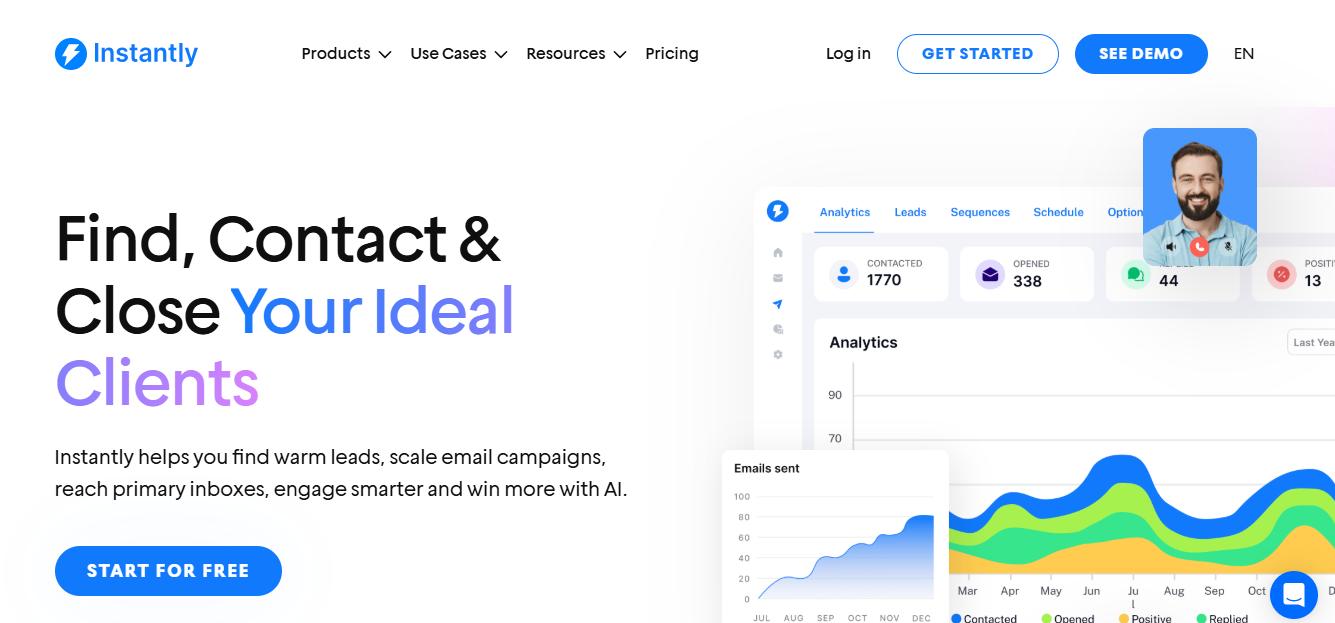
Instantly- complete email outreach tool
This image shows the Instantly- complete email outreach tool

It allows you to connect unlimited email accounts and run outreach campaigns at scale

This helps teams send more campaigns without worrying about mailbox limits.

Instantly also includes AI tools to enrich leads, personalize emails, and optimize campaigns for more replies.

The platform provides a Unibox where you can manage conversations across all inboxes. 

AI labels automatically categorize replies so you can track interested prospects easily.

Instantly also includes campaign analytics that tracks opportunities, pipeline, conversions, and revenue generated from outreach campaigns.

Key Features

  • Find leads using advanced filters and buying signals

  • Enrich and personalize leads using AI prompts

  • Optimize campaigns using AI-powered outreach suggestions

  • Manage conversations from all inboxes inside Unibox

  • Automatically categorize replies using AI labels

  • Track campaign performance using pipeline and revenue analytics

  • Access 600+ email templates and 200+ outreach strategies inside the sales accelerator

  • Learn outreach strategies through community discussions and training resources

Pricing

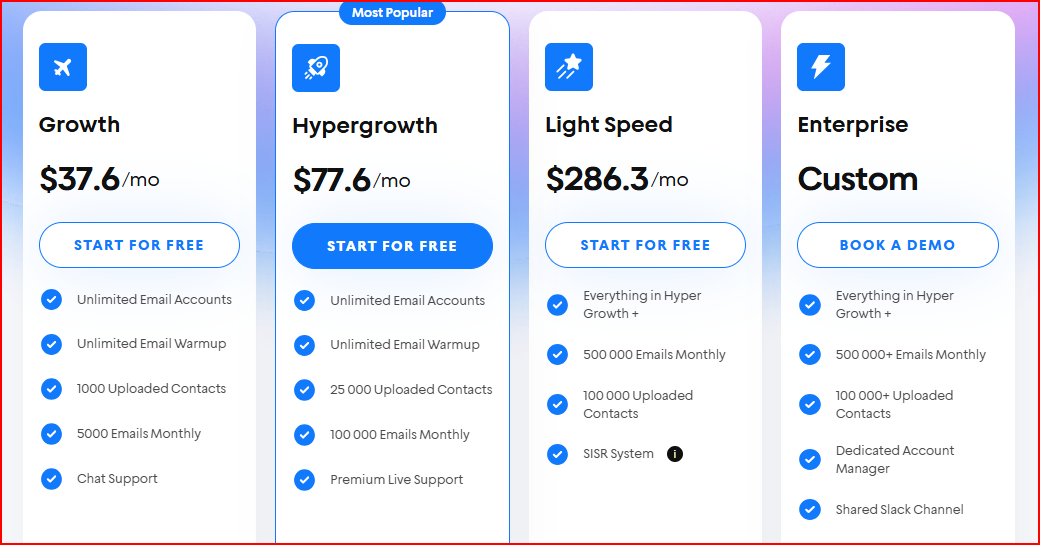
Instantly pricing
This image shows the Instantly pricing

Growth Plan - $37.6/month

  • Includes unlimited email accounts, unlimited warm-up, 1000 uploaded contacts, and 5000 emails per month.

  • Includes basic outreach automation and chat support.

Hypergrowth Plan - $77.6/month

  • Includes 25,000 uploaded contacts and 100,000 emails per month.

  • Includes premium live support and advanced outreach features.

Light Speed Plan - $286.3/month

  • Includes 500,000 emails per month and 100,000 uploaded contacts.

  • Includes additional system features such as SISR.

Enterprise Plan - Custom Pricing

  • Includes 500,000+ emails per month and 100,000+ uploaded contacts.

  • Includes dedicated account manager, private deliverability network, and Slack support.

Pros

  • It helps you to maintain a better sender reputation using unlimited email warm-up

  • Improve reply rates using AI lead enrichment and campaign optimization

  • Manages conversations across multiple inboxes using the Unibox

  • Track real business results using campaign analytics for pipeline and revenue

Cons

  • Each email account should send only around 30 cold emails per day, so scaling requires adding many inboxes.

  • The entry plan allows only 1,000 uploaded contacts and 5,000 emails per month, which can limit early campaign volume.

  • Some features, such as reply handling or advanced testing are not fully available in lower plans.

4. Lemlist

Lemlist is a sales engagement platform that helps teams find leads and run multichannel outreach campaigns.

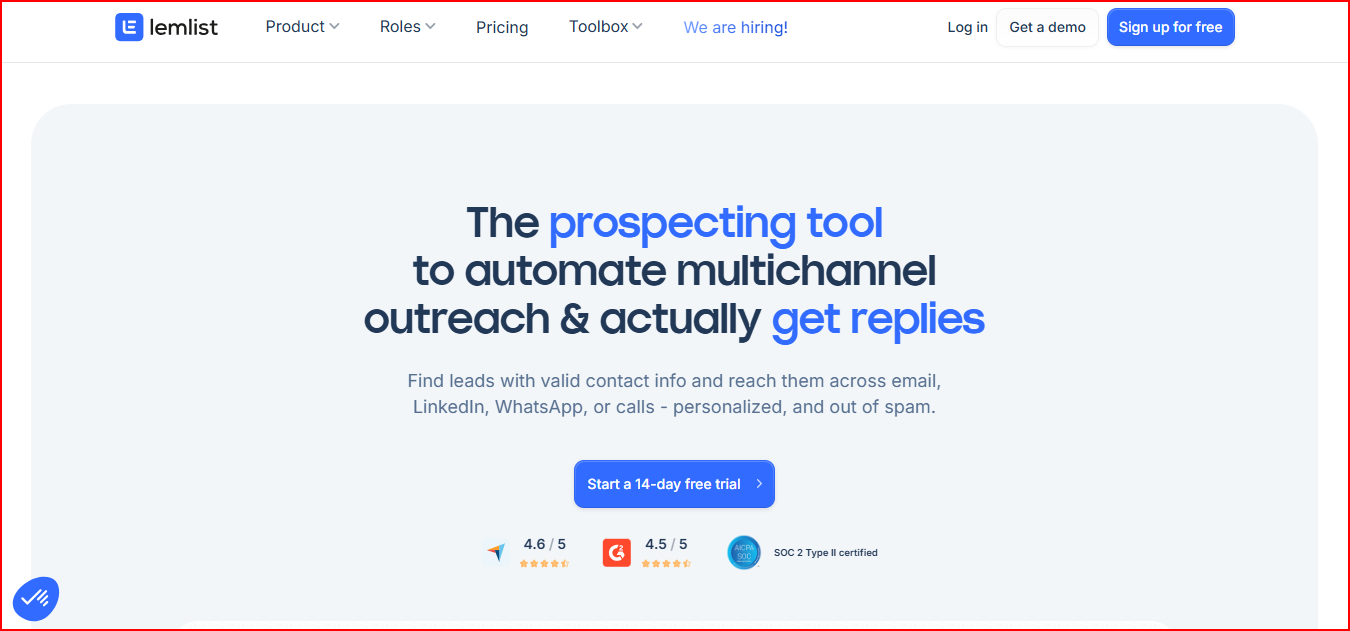
Lemlist - Automated Multichannel outreach tool
This image shows the Lemlist - Automated Multichannel outreach tool

You can find prospects using a large lead database with verified emails, phone numbers, and contact details.

The platform allows you to run outreach across email, LinkedIn, WhatsApp, and calls from one sequence

This helps teams reach prospects on different channels without switching tools.

Lemlist also includes AI personalization that uses lead details from sources like LinkedIn and websites

This helps create messages that feel more relevant to each prospect.

The platform also focuses on deliverability using warm-up automation and inbox rotation through its deliverability tool called lemwarm.

Key Features

  • Get verified contact details using email finder and phone number finder

  • Run outreach across email, LinkedIn, WhatsApp, and calls from one sequence

  • Personalize outreach using AI that pulls lead insights from LinkedIn and websites

  • Track interactions across channels inside a unified inbox thread

  • Rotate inboxes automatically to protect email deliverability

  • Use lemwarm deliverability booster to warm up mailboxes and improve inbox placement

  • Automate follow-ups and outreach steps inside multichannel sequences

  • Integrate with tools like HubSpot, Salesforce, and other CRM systems

Pricing

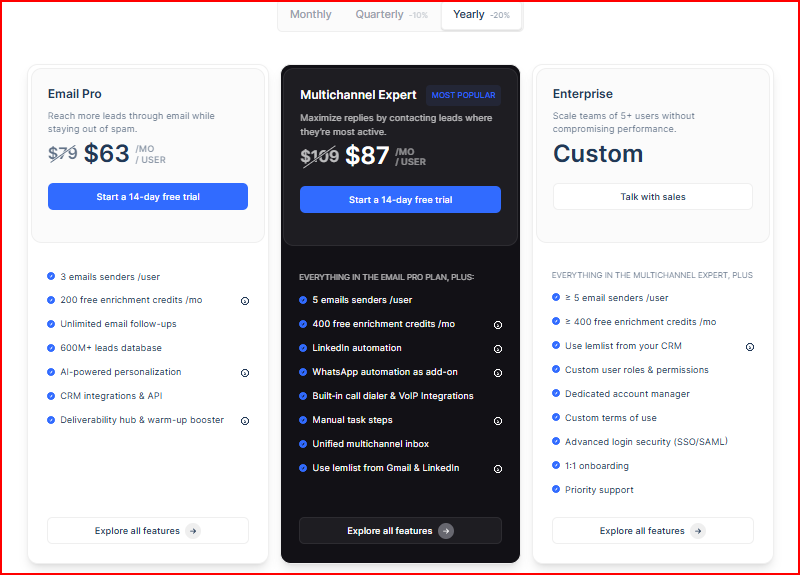
Lemlist pricing
This image shows the Lemlist pricing

Email Pro - From $63/month per user

  • Allows teams to run email outreach campaigns with AI personalization and deliverability tools.

  • Includes 3 email senders per user, enrichment credits, and access to the lead database.

Multichannel Expert - From $87/month per user

  • Includes everything in Email Pro plus LinkedIn automation and multichannel outreach.

  • Also includes 5 email senders per user and a unified multichannel inbox.

Enterprise - Custom Pricing

  • Built for larger teams that need advanced security, dedicated support, and CRM-level integrations.

  • Includes custom roles, dedicated account manager, and priority support.

Pros

  • Makes it easier for your team to reach prospects across email, LinkedIn, WhatsApp, and calls in one sequence, which improves reply chances.

  • Helps create more personalized outreach at scale, so messages feel relevant to each prospect.

  • Keeps conversations easier to manage because interactions from different channels appear in one thread.

  • Supports better inbox placement with automated warm-up and deliverability monitoring.

  • Brings lead discovery and outreach together, which helps move prospects from first contact to booked meetings faster.

Cons

  • Costs can grow quickly as your team expands because pricing is charged per user.

  • Scaling outreach may feel limited since each user can connect only a few sending email accounts.

  • Running larger campaigns requires careful sending because mailboxes need lower daily sending limits to protect deliverability.

  • Using every outreach channel can increase costs because some channels require paid add-ons.

5. GMass

GMass is a cold email and email campaign tool that works directly inside Gmail.

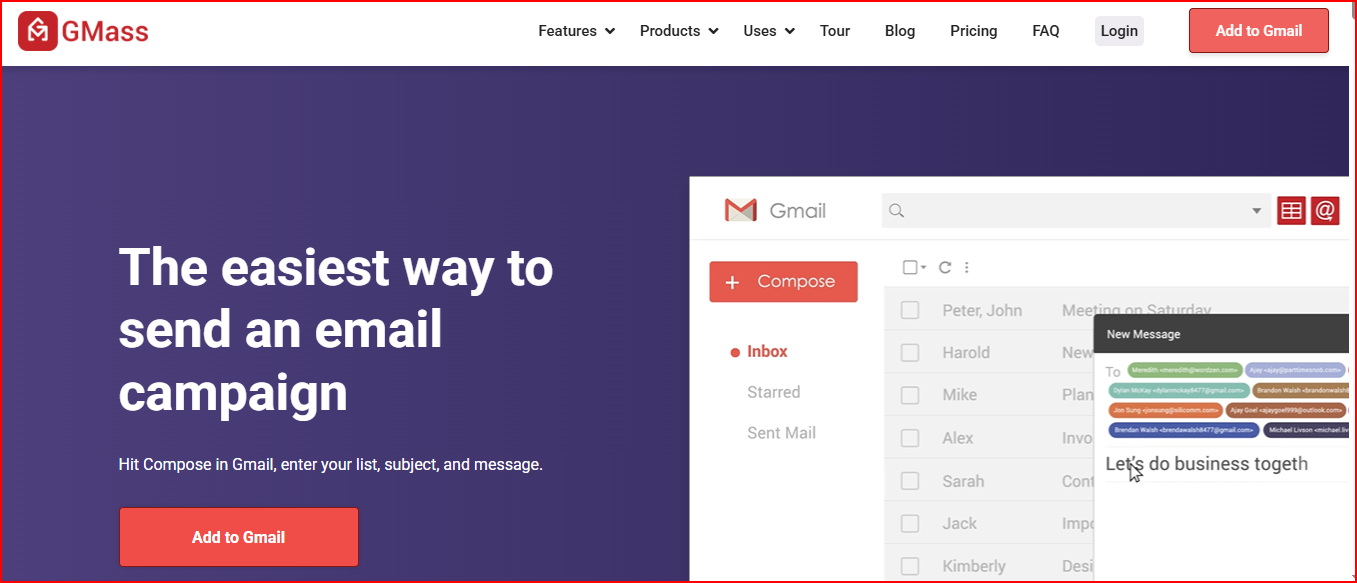
Gmass- Email campaign tool inside Gmail
This image shows the Gmass- Email campaign tool inside Gmail

It turns your Gmail account into a platform where you can send cold emails, newsletters, or personalized mass emails.

Campaigns can be created directly from the Gmail compose window. Just enter your list, subject, and message to start sending.

GMass also connects with Google Sheets for mail merge personalization, which allows sending customized emails using spreadsheet data.

The platform also supports automatic follow-ups, reply tracking, and email campaign reports, all inside Gmail.

Key Features

  • Send cold email campaigns directly from Gmail without using a separate platform

  • Personalize emails using mail merge with Google Sheets

  • Verify email lists and check spam triggers before sending campaigns

  • Track opens, clicks, replies, and bounces using built-in campaign reports

  • Send automated follow-up sequences until a recipient replies

  • Schedule campaigns to send later or repeat automatically

  • Segment contacts based on behavior such as opens or clicks

  • Organize responses using automatic reply categorization

  • Build email lists using search results inside Gmail

Pricing

Standard - $29.95/month (or ~$249/year)

  • Designed for individuals running email campaigns from Gmail.

  • Includes unlimited emails, unlimited contacts, and unlimited campaigns.

Premium - $39.95/month (or ~$349/year)

  • Includes everything in Standard with additional campaign capabilities and support options.

Professional - $59.95/month (or ~$599/year)

  • Includes the full feature set with advanced automation, inbox rotation, and high-priority support.

Pros

  • Turns your Gmail inbox into a full cold email sending tool, so campaigns can start without learning a new platform.

  • Makes sending personalized outreach easy by pulling contact data directly from Google Sheets for mail merge.

  • Improves reply chances by automatically sending follow-ups until a prospect responds.

  • Helps send larger campaigns because the platform extends Gmail’s normal sending limits using its distribution system.

  • Keeps campaign tracking simple since opens, clicks, replies, and bounces appear directly inside Gmail.

Cons

  • Outreach still runs inside the Gmail interface, which can feel limiting when managing multiple campaigns.

  • The platform focuses mainly on email only, so it does not support multichannel outreach like LinkedIn or calls.

  • Scaling outreach depends on how well Gmail accounts are configured, which can require extra setup.

  • Managing outreach across many senders can become difficult because campaign control stays inside Gmail rather than a dedicated outreach dashboard.

6. Woodpecker

Woodpecker is a cold email outreach platform that helps teams find leads, send campaigns, and manage replies in one place.

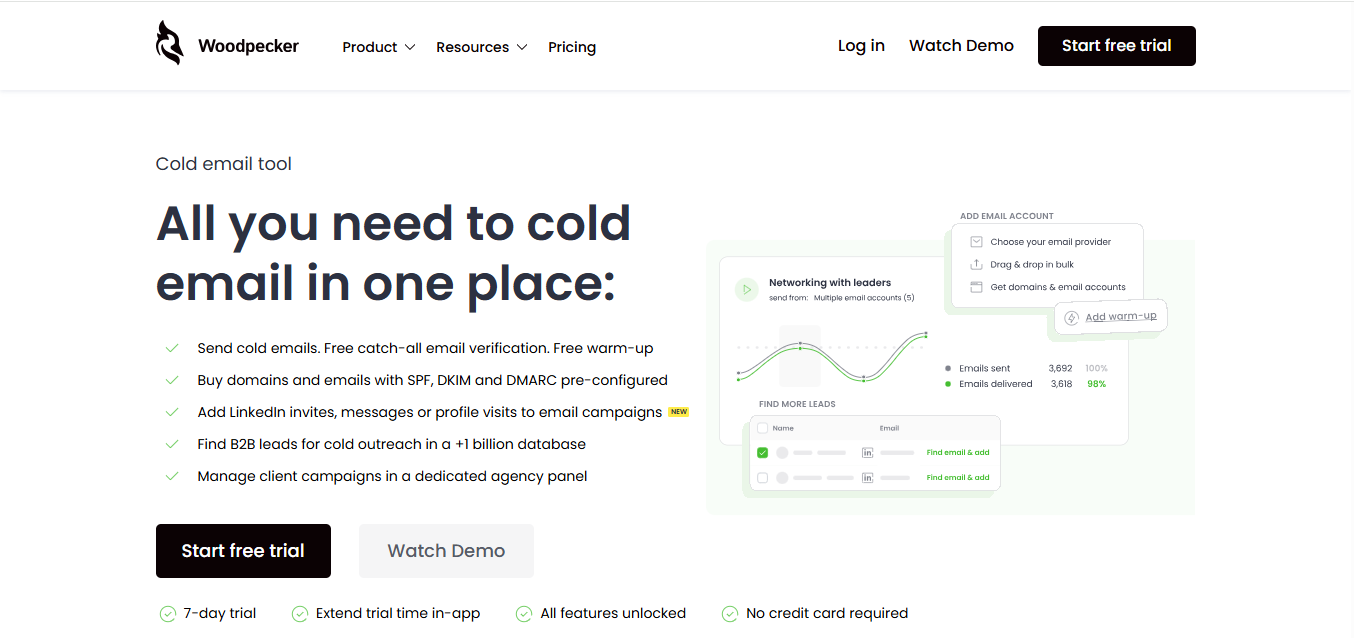
Woodpecker - all-in-one Cold Email platform
This image shows the Woodpecker - all-in-one Cold Email platform

It allows you to run cold email campaigns while protecting deliverability with tools like email verification, warm-up, and inbox rotation.

Woodpecker also allows you to add LinkedIn actions, such as profile visits, invites, and messages, into email campaigns.

The platform also provides access to a large B2B lead database with more than 1 billion contacts for prospecting.

It also includes features that help manage outreach workflows such as centralized inbox, condition-based campaigns, and deliverability monitoring.

Key Features

  • Send cold email campaigns with automated follow-up sequences

  • Verify email addresses automatically to avoid sending to invalid contacts

  • Warm up inboxes to build sender reputation before campaigns start

  • Rotate inboxes automatically to protect email deliverability

  • Add LinkedIn actions like profile visits and messages to email campaigns

  • Manage replies inside a centralized inbox

  • Monitor sender health using deliverability monitoring tools

  • Control sending limits using adaptive sending technology

Pricing

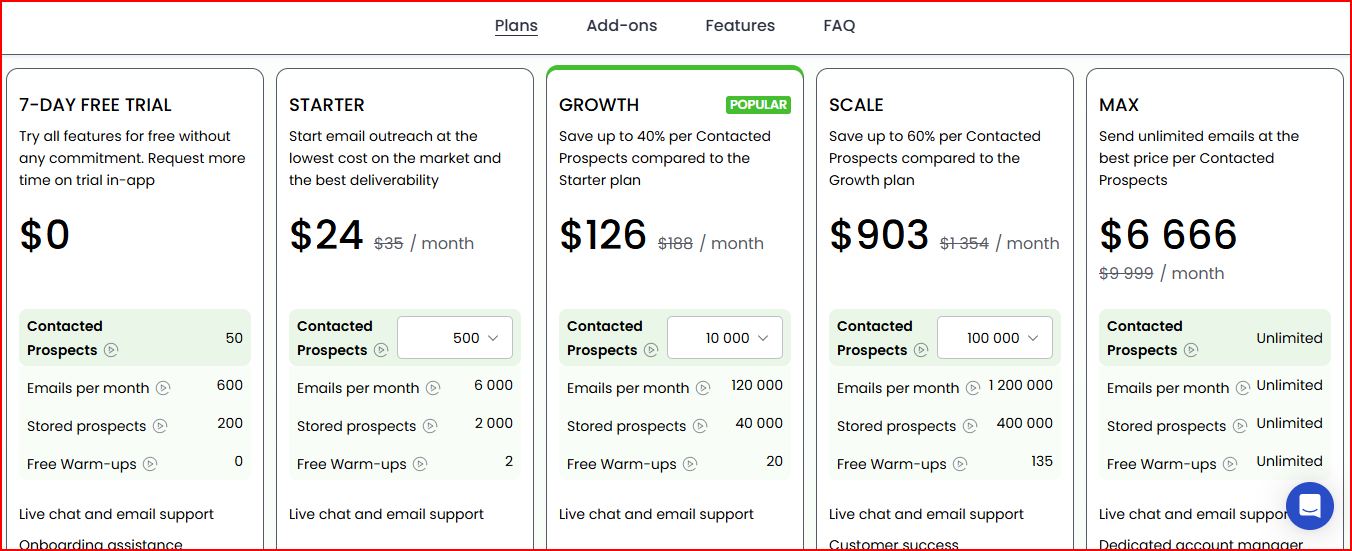
Woodpecker pricing
This image shows the Woodpecker pricing

Free Trial - $0

  • Includes 50 contacted prospects and 600 emails per month during the trial period.

  • Provides access to all platform features for testing.

Starter - $24/month

  • Includes 500 contacted prospects and 6,000 emails per month.

  • Includes basic outreach features and support.

Growth - $126/month

  • Includes 10,000 contacted prospects and 120,000 emails per month.

  • Includes additional warm-up slots and higher campaign capacity.

Scale - $903/month

  • Includes 100,000 contacted prospects and 1,200,000 emails per month.

  • Includes expanded sending capacity and customer success support.

Max - $6,666/month

  • Includes unlimited prospects, unlimited emails, and unlimited warm-ups.

  • Includes dedicated account management.

Pros

  • Helps launch cold email campaigns quickly with guided onboarding and simple campaign setup.

  • Improves deliverability by combining email verification, warm-up, inbox rotation, and sending protection.

  • Reduces bounce rates because email verification checks addresses before sending campaigns.

  • Allows combining email outreach with LinkedIn actions inside the same campaign workflow.

  • Keeps outreach organized by managing responses inside a centralized inbox.

Cons

  • Scaling outreach can become expensive because higher plans are required for larger sending volumes.

  • Some capabilities such as LinkedIn automation or additional warm-ups require add-ons.

  • Outreach management focuses mainly on email-first campaigns, with LinkedIn features available only as extensions.

7. Snov.io

Snov.io is a lead generation and multichannel outreach platform that helps teams find prospects and run automated campaigns.

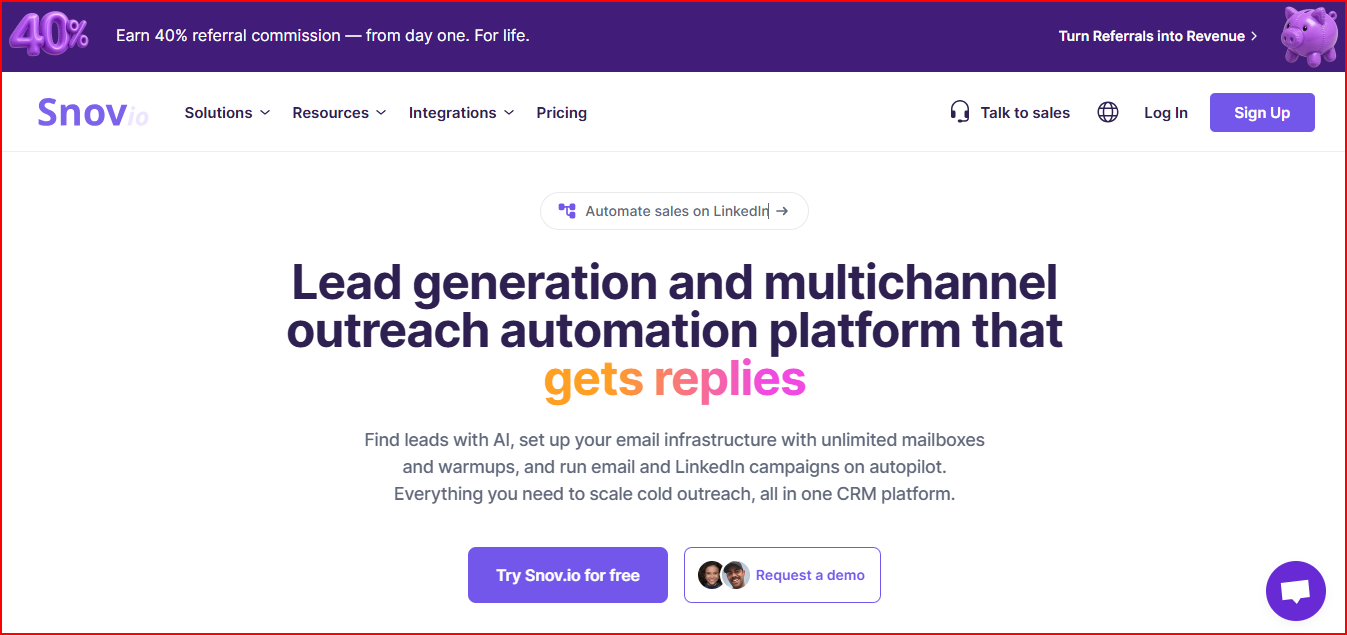
Snov.io- Lead generation and Outreach tool
This image shows the Snov.io- Lead generation and Outreach tool

The platform allows teams to find leads using AI search and verified contact data.

It also helps verify email addresses before starting outreach.

Snov.io also helps prepare email infrastructure with domains, mailboxes, and automated inbox warm-ups.

The platform supports multichannel campaigns across email and LinkedIn.

Campaigns can include automated follow-ups and reply tracking.

Snov.io also includes a built-in sales CRM where teams can track leads, deals, and outreach activity in one place.

Key Features

  • Verify email lists to protect sender reputation and reduce bounce rates

  • Set up domains and mailboxes with SPF, DKIM, and DMARC configuration

  • Warm up inboxes automatically using a large warm-up pool

  • Run outreach campaigns across email and LinkedIn in one sequence

  • Track replies and conversations inside a shared inbox

  • Monitor deliverability using placement checks and reputation diagnostics

  • Manage leads and deals inside the built-in sales CRM

Pricing

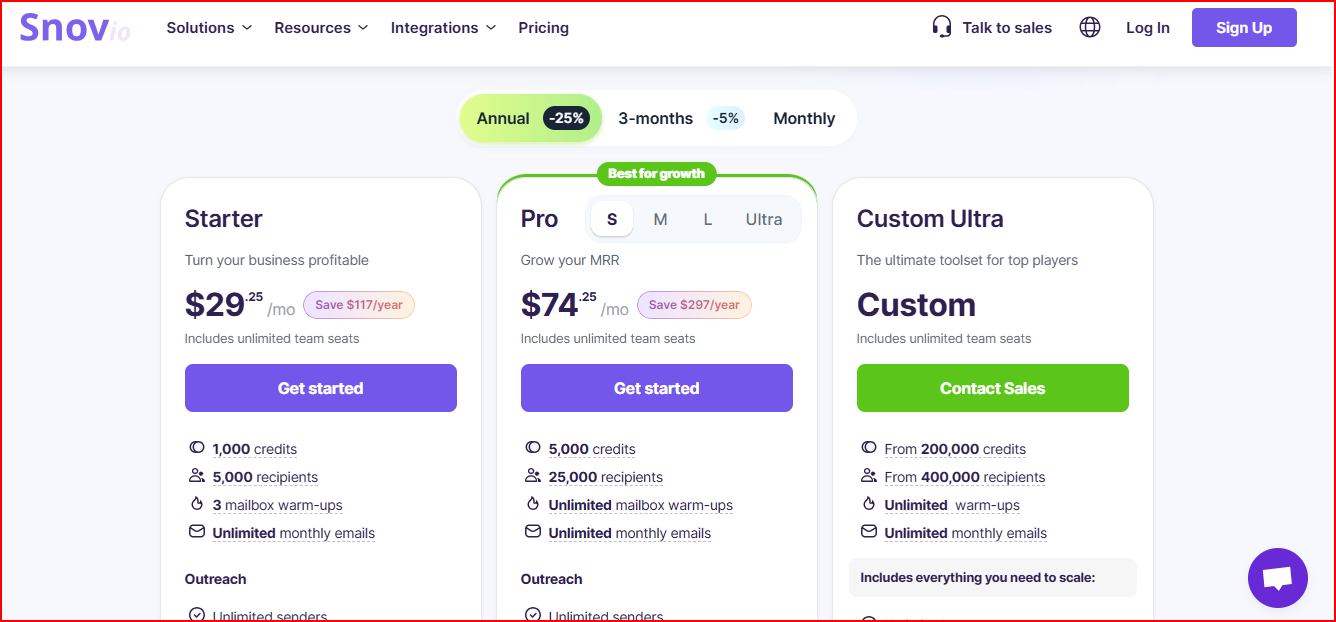
Snov.io pricing
This image shows the Snov.io pricing

Starter Plan - $29.25/month

  • Includes 1,000 credits, 5,000 recipients, and 3 mailbox warm-ups.

  • Allows running unlimited campaigns, follow-ups, and emails.

Pro Plan - $74.25/month

  • Includes 5,000 credits and 25,000 recipients.

  • Adds features such as reply sentiment analysis, A/B testing, and advanced campaign controls.

Custom Plan - Custom Pricing

  • Designed for larger outreach operations.

  • Includes 200,000+ credits, unlimited warm-ups, and higher campaign capacity.

Pros

  • Helps move from finding leads to running outreach in the same platform, which speeds up prospecting.

  • Makes it easier to verify email addresses before campaigns, which helps reduce bounce rates.

  • Supports email and LinkedIn outreach in one campaign, which improves response opportunities.

  • Keeps outreach activity organized with a built-in CRM that tracks leads and deals.

  • Helps maintain deliverability with automated warm-up and reputation monitoring.

Cons

  • Outreach setup can feel complex because the platform combines prospecting, outreach, and CRM in one system.

  • Scaling campaigns may require higher credit usage depending on lead search and verification volume.

  • LinkedIn automation requires a paid add-on, which increases the total outreach cost.

8. QuickMail

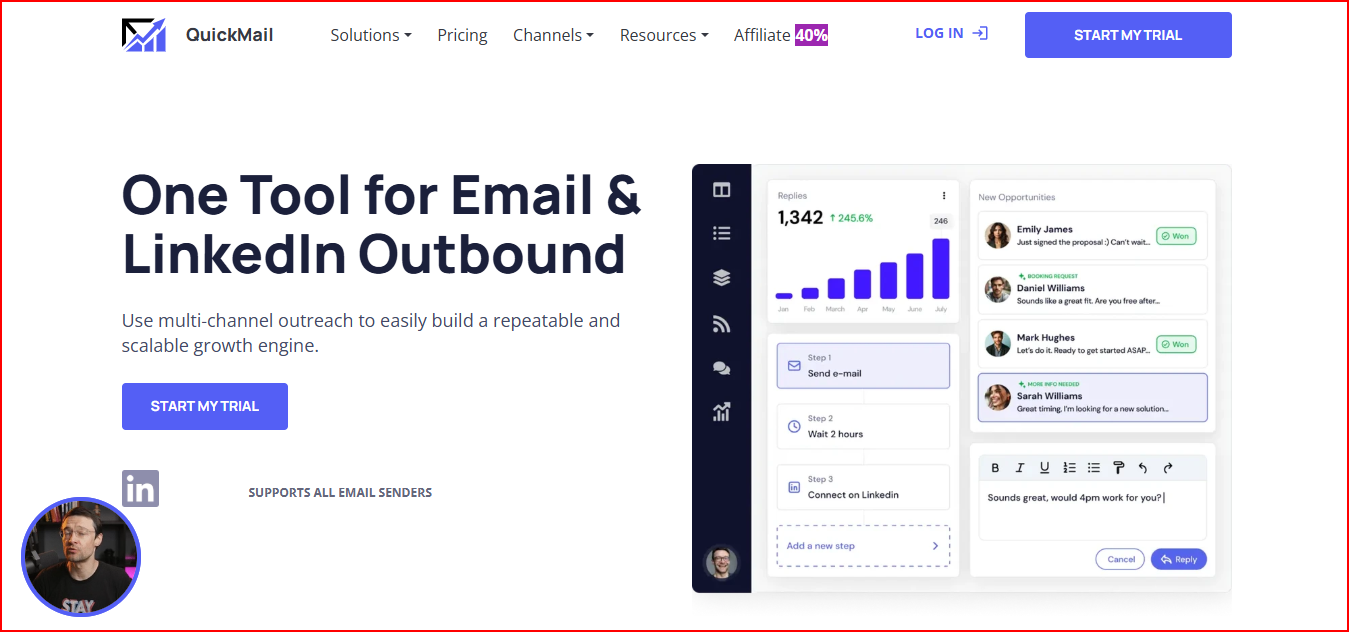
QuickMail is a multichannel outreach platform that helps teams run cold email and LinkedIn campaigns from one tool.

QuickMail- Email and LinkedIn Outreach tool
This image shows the QuickMail- Email and LinkedIn Outreach tool

The platform allows teams to connect unlimited email accounts and LinkedIn profiles.

Sending can rotate automatically across these accounts to scale outreach safely.

QuickMail also focuses on deliverability using features like Deliverability AI, smart inbox rotation, and automated insights.

All campaign replies from email and LinkedIn appear in one shared inbox, so conversations stay organized.

The platform also includes analytics and testing tools that help track campaign performance and compare results over time.

Key Features

  • Connect unlimited email senders and LinkedIn accounts for scaling outreach

  • Automatically rotate sending across inboxes to protect deliverability

  • Manage all email and LinkedIn replies inside one shared inbox

  • Improve deliverability using Deliverability AI and blacklist monitoring

  • Optimize email copy using Reword with AI

  • Track performance using advanced campaign analytics and testing tools

  • Integrate with tools like HubSpot, Pipedrive, Zapier, and webhooks

Pricing

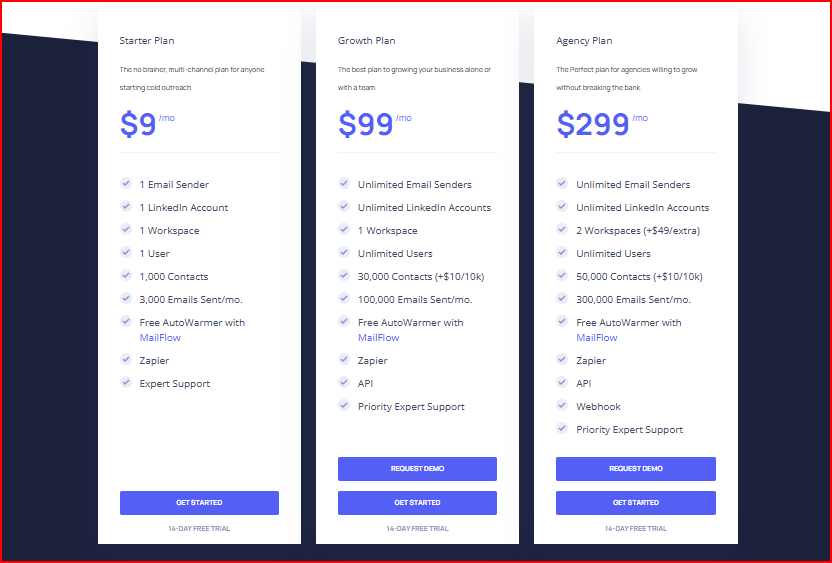
QuickMail pricing
This image shows the QuickMail pricing

Starter Plan - $9/month

  • Designed for users starting cold outreach with 1 email sender and 1 LinkedIn account.

  • Includes 3,000 emails per month and 1,000 contacts.

Growth Plan - $99/month

  • Includes unlimited email senders and unlimited LinkedIn accounts.

  • Allows 100,000 emails per month and 30,000 contacts.

Agency Plan - $299/month

  • Built for agencies managing larger outreach campaigns.

  • Includes 300,000 emails per month, unlimited users, and multiple workspaces.

Pros

  • Makes it easier to run email and LinkedIn outreach from one platform, which expands prospect reach.

  • Helps scale campaigns safely by rotating sending across unlimited email and LinkedIn accounts.

  • Keeps conversations organized by showing replies from both channels in one inbox.

  • Helps maintain deliverability using AI insights, inbox rotation, and blacklist monitoring.

  • Provides detailed campaign analytics that help optimize outreach performance over time.

Cons

  • Personalization is limited to basic merge fields, which restricts deeper dynamic personalization at scale.

  • The platform is built primarily for email-first outreach, so multichannel automation depth is limited compared to larger sales engagement tools.

  • Managing many campaigns and sequences becomes harder because campaign organization and navigation get cluttered at scale.

  • Advanced automation workflows are limited, which reduces flexibility for complex outbound strategies.

  • Large outbound operations often require additional external tools for deeper deliverability monitoring and campaign optimization.

9. Mailshake

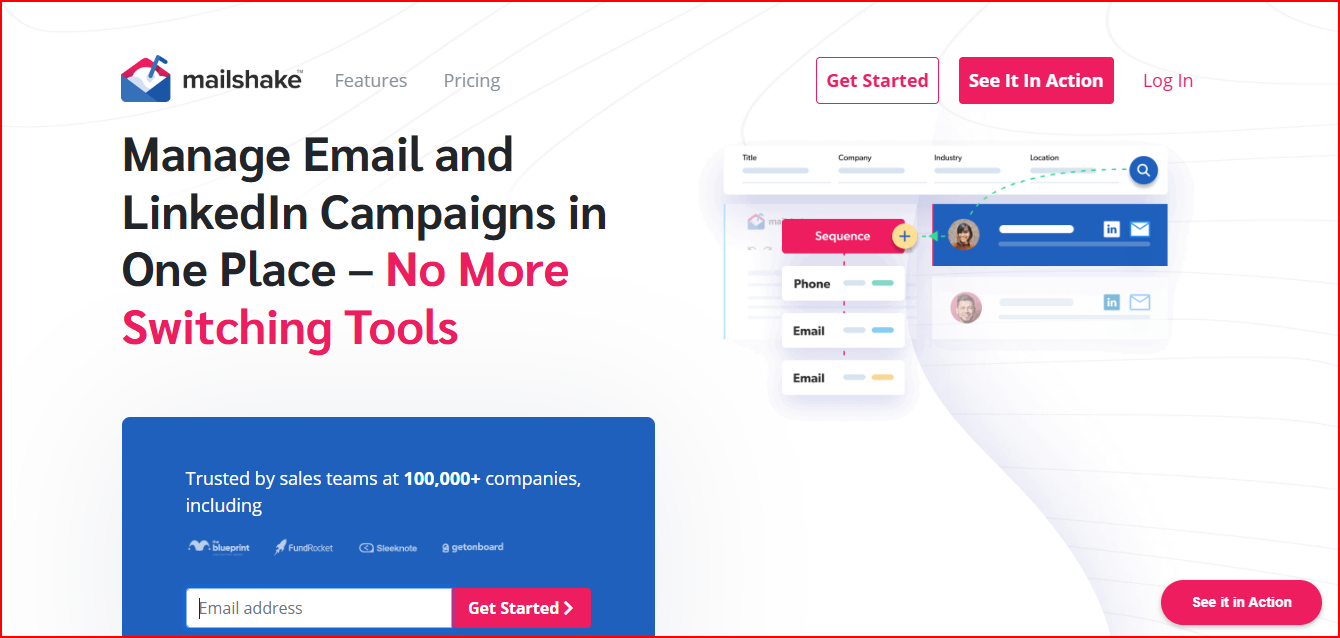
Mailshake is a sales engagement platform that helps you run cold email and LinkedIn outreach campaigns from one dashboard.

Email and LinkedIn Outreach platform
This image shows the Email and LinkedIn Outreach platform

You can create automated email sequences with follow-ups.

Once a campaign starts, the system keeps sending follow-ups automatically.

Mailshake also supports multichannel outreach across email, LinkedIn, and phone calls

This helps reach prospects through multiple touchpoints without switching tools.

The platform includes a feature called Lead Catcher.

It highlights prospects who open, click, or reply, so you can focus on leads that show interest.

Mailshake also provides email warm-up, list cleaning, and deliverability tools.

These help protect sender reputation while running campaigns.

You can also connect email providers like Gmail, Outlook, and SMTP services and integrate with tools such as HubSpot, Pipedrive, and Zapier.

Key Features

  • Send personalized cold email campaigns with automated follow-ups

  • Allows multichannel sequences across email, LinkedIn, and phone

  • Identify engaged prospects using Lead Catcher

  • Track outreach performance using pipeline analytics and engagement metrics

  • Generate email copy using SHAKEspeare AI writer

  • Clean email lists to reduce bounce rates before sending

  • Set up domains and mailboxes using the email setup assistant

  • Run A/B tests on campaign messaging

Pricing

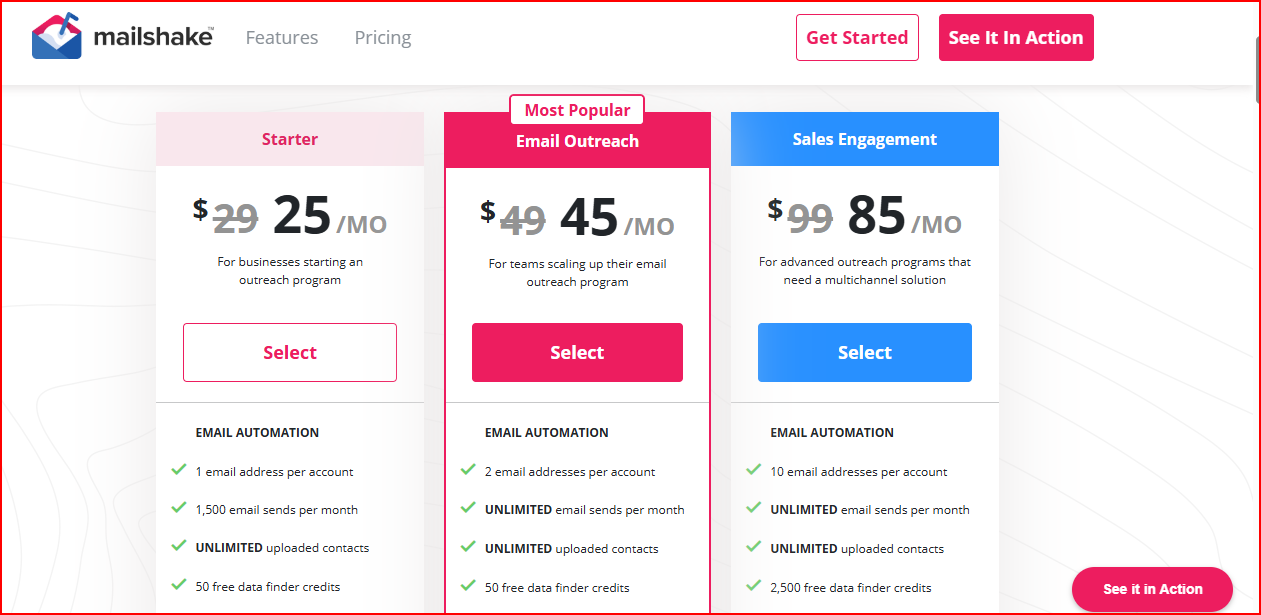
Mailshake pricing
This image shows the Mailshake pricing

Starter Plan - $25/month

  • Includes 1 email account and 1,500 emails per month.

  • You also get unlimited campaigns, email warm-up, and email verification.

Email Outreach Plan - $45/month

  • Allows 2 email accounts and unlimited email sending.

  • Includes email rotation, advanced scheduling, and CRM integrations.

Sales Engagement Plan - $85/month

  • Allows 10 email accounts and multichannel outreach.

  • Includes LinkedIn automation, power dialer, and unified inbox.

Agency Plan - Custom Pricing

  • Built for agencies managing multiple campaigns.

  • Includes unlimited email accounts and advanced outreach management.

Pros

  • Identify high-intent prospects faster because Lead Catcher automatically surfaces people who opened, clicked, or replied.

  • Launch outreach campaigns quickly since Mailshake focuses on simple campaign setup and ready-to-use email templates.

  • Improve reply chances automatically because the platform pauses follow-ups when a prospect replies.

  • Keep sender reputation healthier with built-in email warm-up and list cleaning tools that remove risky addresses.

  • Manage conversations without switching inboxes because replies from campaigns appear inside a unified inbox.

Cons

  • Scaling outreach becomes expensive because each additional sending inbox usually requires another paid user seat.

  • Starter plans hit limits quickly since the entry plan allows only about 1,500 emails per month.

  • Prospect data quality can be inconsistent because the built-in data finder sometimes returns incomplete or low-quality contacts.

  • Advanced automation is limited compared to newer outreach platforms with deeper workflow control.

  • Customization options are restricted, which makes complex outreach workflows harder to build. 

10. Reply.io

Reply.io is a sales engagement platform that helps you automate cold outreach across email, LinkedIn, calls, and other channels.

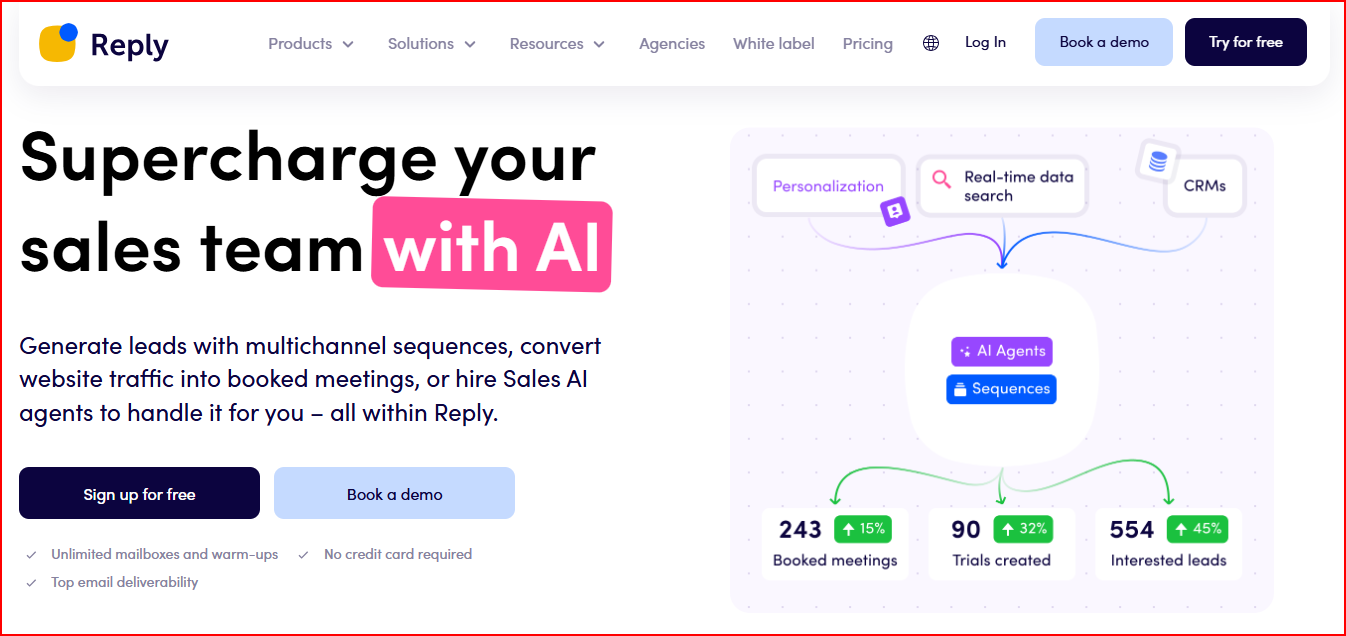
Reply.io- Multichannel Outreach tool
This image shows the Reply.io- Multichannel Outreach tool

You can build multichannel outreach sequences that combine emails, LinkedIn touches, calls, or SMS in the same campaign.

Reply also includes a large B2B contact database with more than 1 billion contacts.

This helps you find prospects and start outreach without using separate lead generation tools.

The platform also focuses heavily on email deliverability.

It includes tools like inbox warm-up, email health monitoring, and spam prevention features.

Reply also offers an AI SDR called Jason AI.

The AI can find prospects, generate outreach messages, and book meetings automatically.

You can also manage all campaign replies in a unified inbox and connect Reply with tools like HubSpot, Salesforce, Zapier, and other CRMs.

Key Features

  • Allows you to run multichannel outreach sequences across email, LinkedIn, calls, and SMS.

  • Access 1B+ B2B contacts to find prospects directly inside the platform.

  • Use AI audience suggestions to build targeted prospect lists faster.

  • Automate outreach using AI-generated sequences and personalization.

  • Manage conversations across campaigns inside a unified inbox.

  • Improve deliverability with 30+ deliverability tools and inbox warm-up.

  • Track campaign performance using team performance and channel reports.

  • Integrate with CRMs like HubSpot, Salesforce, and Pipedrive.

Pricing

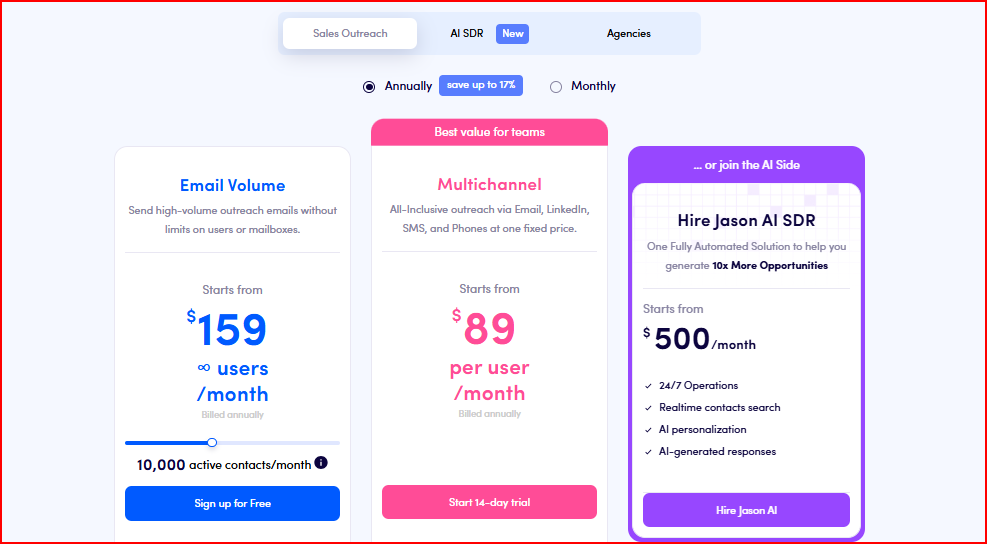
Reply.io pricing
This image shows the Reply.io pricing

Multichannel Plan - $89/user/month (billed annually)

  • Includes multichannel outreach across email, LinkedIn, calls, and SMS.

  • Allows 10 mailboxes, unlimited emails, and unlimited active contacts.

Email Volume Plan - $159/month (billed annually)

  • Includes unlimited users and unlimited mailboxes.

  • Supports 10,000 active contacts per month and unlimited email sending.

Jason AI SDR - Starting at $500/month

  • AI agent that can find prospects, personalize outreach, and generate replies automatically.

  • Runs outreach 24/7 with AI-generated responses and prospect research.

Pros

  • Find prospects and start outreach faster because lead search and campaign automation are in the same platform.

  • Increase reply chances with behavior-based sequences that adjust outreach based on prospect actions.

  • Reduce manual outreach work since AI can generate messages and continue conversations automatically.

  • Book meetings faster from campaigns because scheduling is built directly into outreach workflows.

Cons

  • Learning the platform can take time because Reply combines prospect data, automation, AI tools, and analytics in one system.

  • LinkedIn automation and calling are not included by default, which increases the cost when using full multichannel outreach.

  • Deliverability setup may require extra tools or configuration, especially for teams new to cold outreach infrastructure.

  • Some workflows require extra steps inside the interface, which can slow down campaign editing and sequence management.

11. Yesware

Yesware is a sales email outreach tool that works directly inside your Gmail or Outlook inbox.

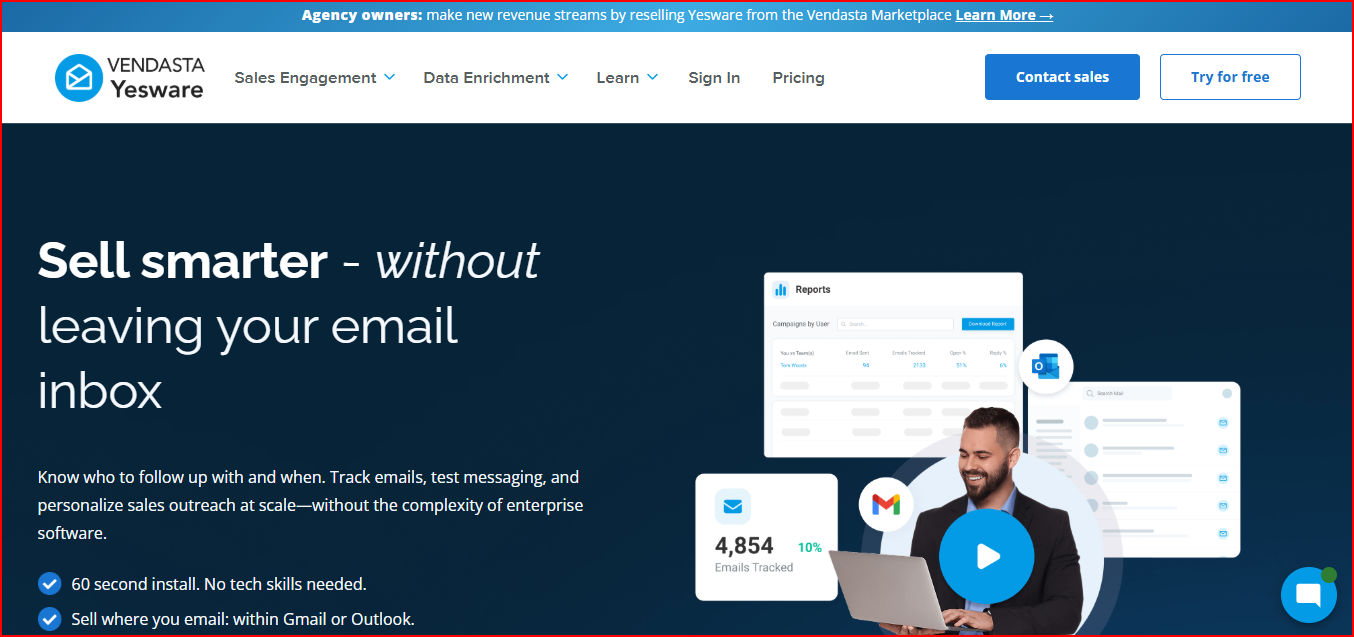
Email Oureach tool inside Gmail and Outlook
This image shows the Email Oureach tool inside Gmail and Outlook

Instead of using a separate outreach dashboard, Yesware runs inside the email client you already use.

This makes it easier to manage outreach without switching tools.

The platform mainly focuses on email tracking, templates, and follow-ups.

It shows when a prospect opens an email, clicks a link, or downloads an attachment.

Yesware also lets you create simple outreach campaigns with automated follow-ups.

This helps keep conversations going without sending every email manually.

The platform also provides engagement insights and reporting.

These insights help understand which emails work better and which prospects are more interested.

Yesware also integrates with CRMs like Salesforce, so outreach activity can be logged automatically.

Key Features

  • Track email opens, clicks, and attachment downloads in real time.

  • Create email templates to send outreach faster.

  • Run email campaigns with automated follow-ups.

  • Personalize emails for multiple prospects at once.

  • Log outreach activity automatically to Salesforce CRM.

  • See engagement insights through email and campaign reports.

  • Manage outreach directly from Gmail or Outlook inbox.

Pricing

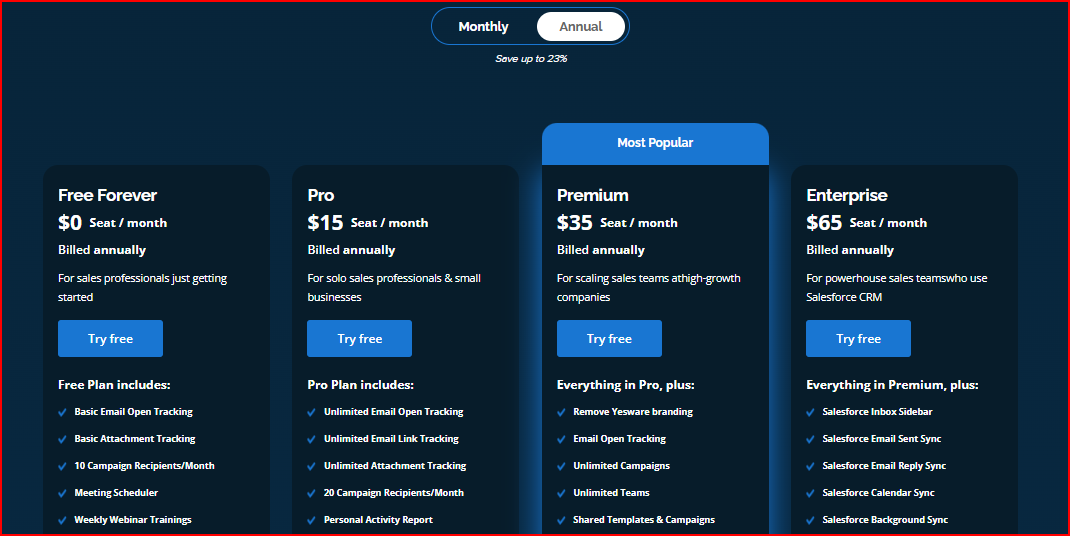
Yashware pricing
This image shows the Yashware pricing

Pro Plan - $15/user/month

  • Includes email tracking, templates, and campaign automation.

  • You can track opens, clicks, and engagement data from your inbox.

Premium Plan - $35/user/month

  • Adds campaign analytics and team reporting.

  • Helps track which emails and templates perform better.

Enterprise Plan - Custom Pricing

  • Built for larger teams that need advanced reporting and onboarding support.

  • Includes dedicated onboarding and enterprise support.

Pros

  • Identifies hot prospects faster because you can see exactly who opened or clicked your email.

  • It helps send follow-ups at the right time, which increases the chances of getting replies.

  • Run outreach without learning a new tool since everything works directly inside Gmail or Outlook.

  • Keeps outreach organized inside the inbox, so conversations and follow-ups stay easier to manage.

Cons

  • Scaling outreach becomes difficult for large campaigns because sending is still tied to the email inbox.

  • Managing outreach across many mailboxes becomes hard to control and track as the team grows.

  • Running multichannel outreach becomes limited since most activity happens only through email.

  • Advanced automation workflows are more limited compared to modern sales engagement platforms.
Personalized Outbound Strategy

Get The Right Outbound Strategy In Minutes

Enter your email to get a custom plan & stack recommendation for your business

It's being carefully crafted by AI

Please check your mailbox in 5 minutes

Final Thoughts

Saleshandy works well for running cold email campaigns. 

But while reviewing these tools, it became clear that many teams eventually look for better scaling, stronger deliverability, or more automation.

  • Salesforge brings prospecting, cold email, LinkedIn outreach, and AI automation together so outbound teams can scale campaigns from one platform.

  • Instantly allows teams to run large cold email campaigns by connecting many email accounts and using built in warm up.

  • Lemlist focuses on personalized outreach so teams can send customized cold emails and LinkedIn messages.

  • GMass turns Gmail into a simple cold email tool so campaigns can be sent directly from the inbox.

  • Woodpecker helps automate cold email campaigns while monitoring deliverability and protecting sender reputation.

  • Snov.io combines lead generation, email verification, and outreach automation in one system.

  • QuickMail focuses on reliable cold email automation with inbox rotation and deliverability monitoring.

  • Mailshake helps sales teams run outreach campaigns using email, LinkedIn, and phone activities.

  • Reply.io supports multichannel outreach with automation across email, LinkedIn, calls, and SMS.

  • Yesware works inside Gmail or Outlook and focuses on tracking email engagement and follow ups.

  • Lemlist helps run personalized cold outreach campaigns with email warm up and deliverability tools.

Choosing the right tool depends on how your outreach is structured. 

If the goal is to simply send cold emails, many of these tools can help. 

But if the goal is to find prospects, run outreach, manage replies, and scale campaigns without juggling multiple tools, Salesforge brings that together in one place.


It gives you the most complete outbound workflow.

Start with Salesforge and manage prospecting, cold email, LinkedIn outreach, and replies from one platform