
Have you ever sent an email campaign and found your emails landing in spam folders?
Even when an email looks fine, authentication issues, poor sender reputation, or spam-triggering content can affect its delivery.
Email testing tools help identify these problems before a campaign goes out. They can check spam scores, email authentication, inbox placement, and rendering across different email clients.
I looked at popular email testing tools to compare their features, pricing, and testing capabilities.
In this guide, I'll cover what each tool offers, who it is best for, and which options are worth considering for different email testing needs.
Here are the top email testing tools and what each one is best for:
A good email testing tool should help you identify email issues before sending a campaign. Here are the key features to consider:
The right choice depends on your testing requirements and budget.
Not every tool offers all these features. Some focus on inbox placement, while others specialize in email rendering, authentication, or transactional email testing.
Here's a quick side-by-side look at what each email testing tool offers.
Below, I go through each tool one by one, covering who it's for, its main features, pros and cons, and pricing.
Best For: GTM teams and agencies that want warmup and testing in one place.
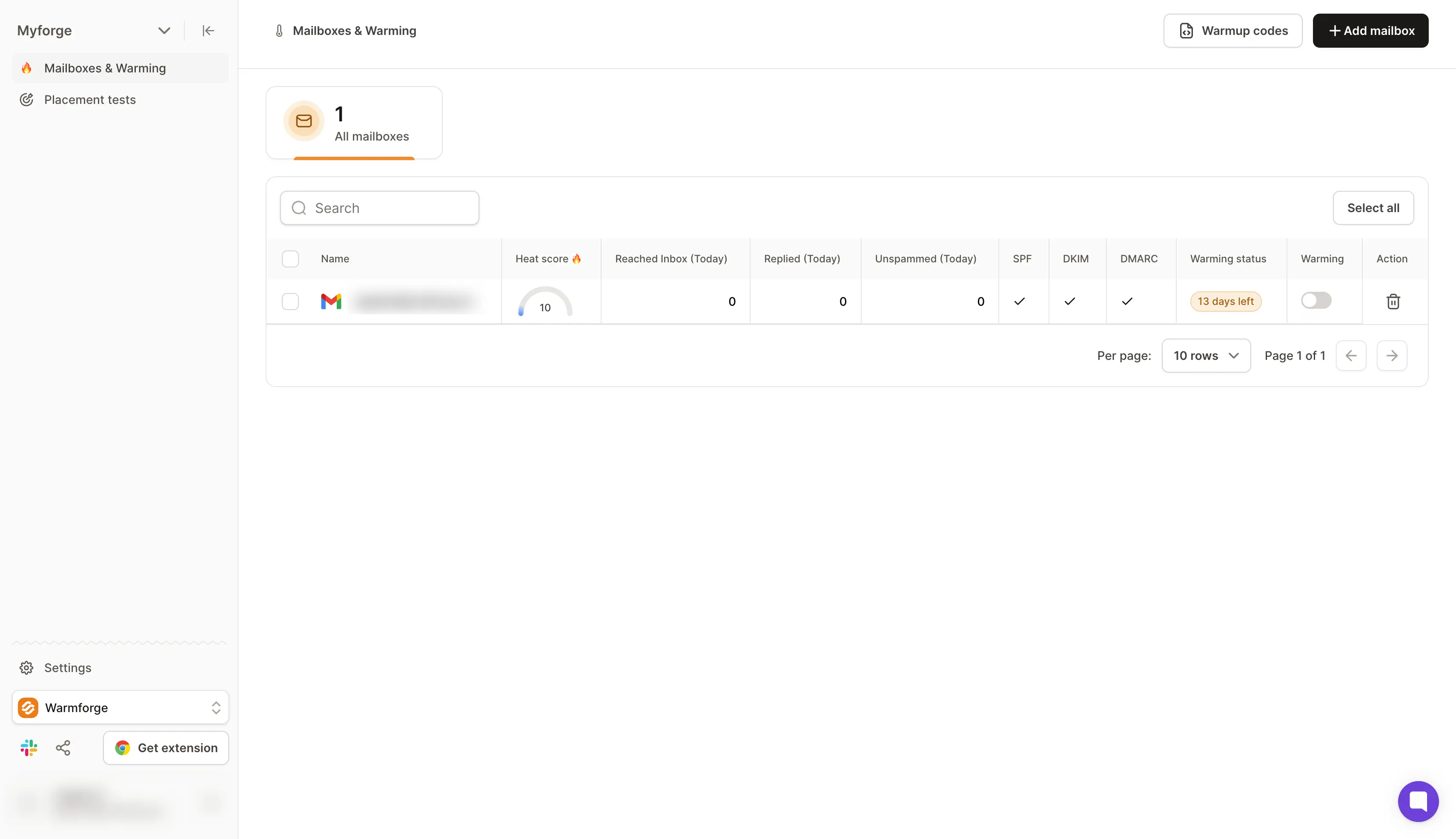
Warmforge is an email deliverability tool that puts warmup, inbox placement tests, and mailbox health checks in one dashboard. If you are running many mailboxes, it lets you test deliverability and see where your emails land before a campaign goes out.
What sets Warmforge apart are its two features. The first is the inbox placement test, which shows your inbox placement rates at Gmail, Outlook, Yahoo, and other mailbox providers.
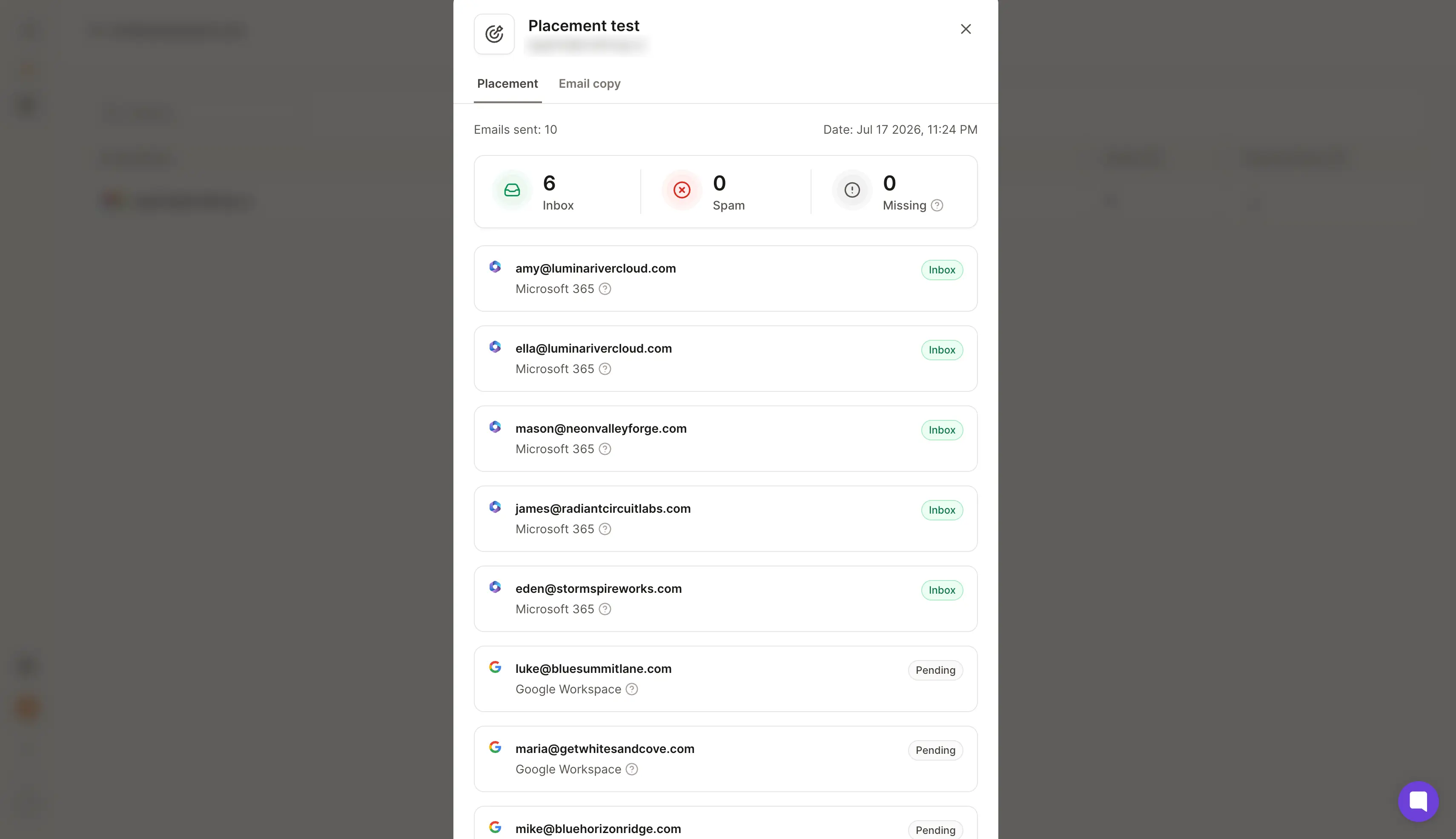
You can see whether an email reached the primary inbox, the promotions tab, or spam. The second feature is MCP and CLI access, so Claude, Cursor, or your own AI agents can run warmup and placement tests for you.
The main limit is how many tests you get for free. Each warmup slot comes with one placement test a month, so if you want to test every new template, you'll need a Placement Test plan.
Pros:
Cons:
Pricing: Here's what each plan costs.
Overall, Warmforge lets you warm up every mailbox and run inbox placement tests from one dashboard. It's the one I'd pick if you send cold email from many mailboxes and want to see where your emails land before a campaign goes out.
Create your free Warmforge slot and run your first placement test
Best For: Teams that already warm up their mailboxes somewhere else and want detailed placement reports and DMARC data.
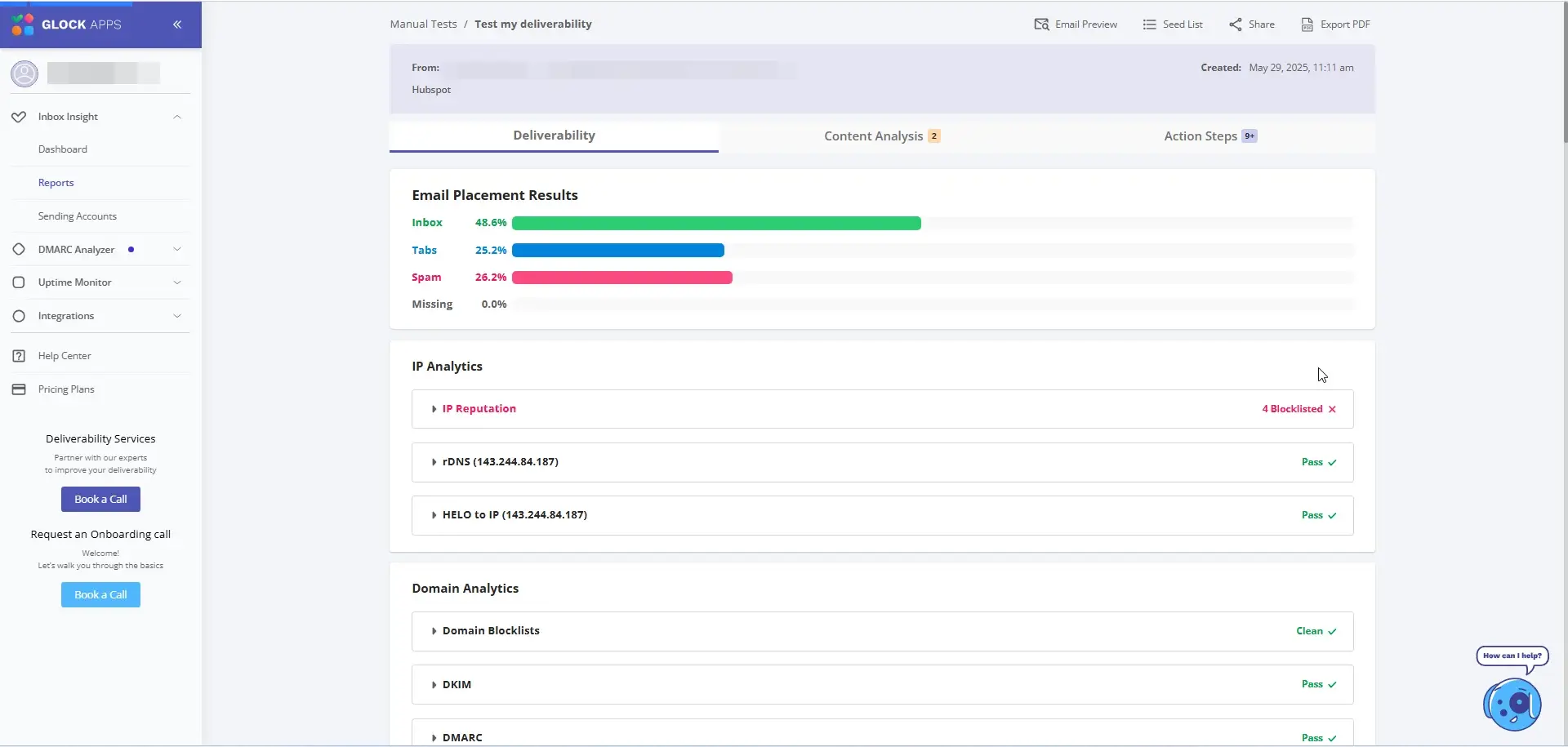
GlockApps is an email deliverability testing tool. You send your email to more than 100 real seed inboxes across different providers, and it shows you where each copy landed.
Two features impressed me most. The Inbox Insight report breaks down inbox, promotions, and spam results by provider, and it adds spam scores from spam filters like Google, Barracuda, and SpamAssassin.
DMARC reports are the other big plus, and even the free plan covers up to 10,000 messages a month. Together, they make it easy to spot which provider or spam filter is causing trouble.
The main limit is that GlockApps doesn't warm up mailboxes. You'll still need a separate warmup tool to build your sender reputation.
Pros:
Cons:
Pricing: Paid plans start at $59 a month, billed annually.
Overall, GlockApps is a great choice when you need to find out which provider is filtering your emails. If you want warmup and testing on one bill, it's not the right tool.
Best For: Solo senders and anyone who wants a quick, free check before hitting send.
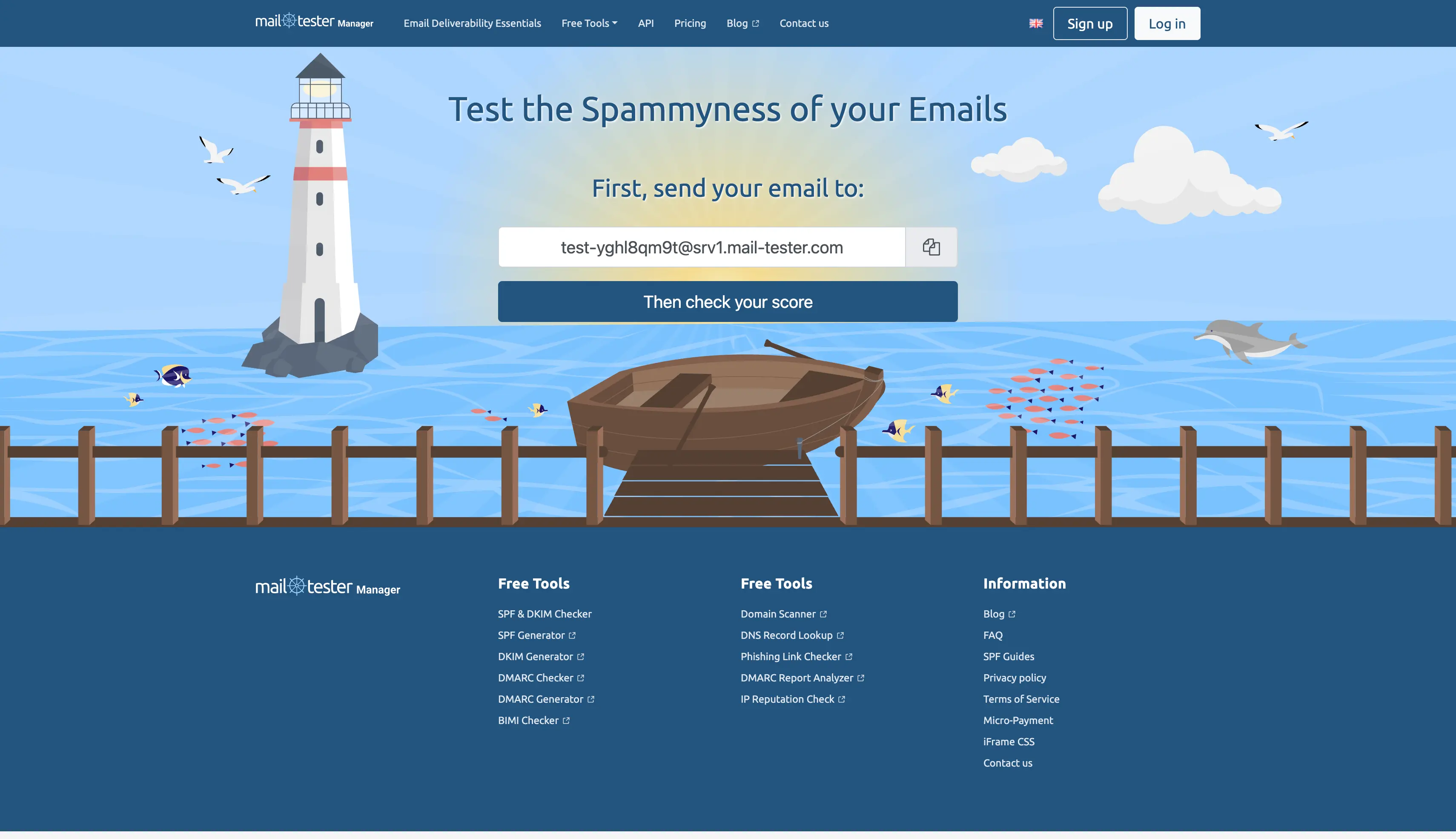
Mail-Tester is a free spam checker that scores your email out of 10. You send your email to a test address it gives you, and the full report shows up as soon as the email arrives, with no account needed.
The spam score analysis is what impressed me. It checks your message, mail server, and sending IP, covering SpamAssassin rules, SPF and DKIM records, and blacklists.
You get 3 free tests in any 24 hours. On a new mailbox, I treat a score of 8 or higher as ready to go. Anything lower means I fix the flagged issues first.
The main limit is that every test goes to just one address, so it can't show actual inbox placement at each provider. Mail-Tester's own FAQ says that a 10 out of 10 score can still land in spam, since every spam filter judges email a little differently.
Pros:
Cons:
Pricing: Prices below don't include VAT.
Overall, Mail-Tester is great for quick spot checks. Once you're running more than a few mailboxes, it shouldn't be your only test.
Best For: Teams that send from a tool outside the Forge stack and want warmup and testing from one vendor.
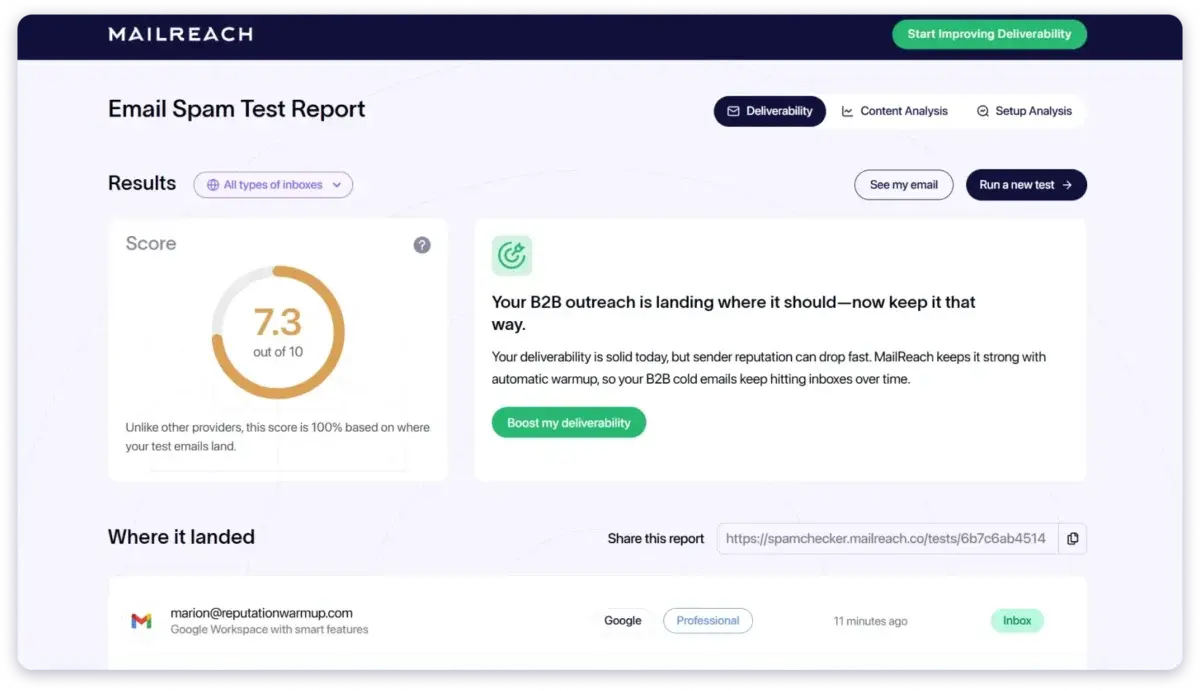
MailReach is an email warmup and spam testing tool that charges per mailbox. It supports any email provider with SMTP, so you can warm up mailboxes and test inbox placement under one subscription.
Its All-In-One plan is the main draw. You get warmup of up to 100 emails a day per mailbox, at least 20 spam test credits, and MailReach Co-Pilot, an AI assistant that gives you deliverability feedback.
If you want to try it first, there's a free spam test on the MailReach website.
The main limit is the per-mailbox price. One mailbox costs $25 a month on monthly billing, and that adds up fast once you pass 20 mailboxes.
Pros:
Cons:
Pricing: Here's what each plan costs.
Overall, among spam testing tools, MailReach is a good pick if you run fewer than 20 mailboxes and want one simple bill. Past 20 mailboxes, the total cost gets harder to justify.
Best For: Teams with a poor sender reputation and the budget for hands-on repair.
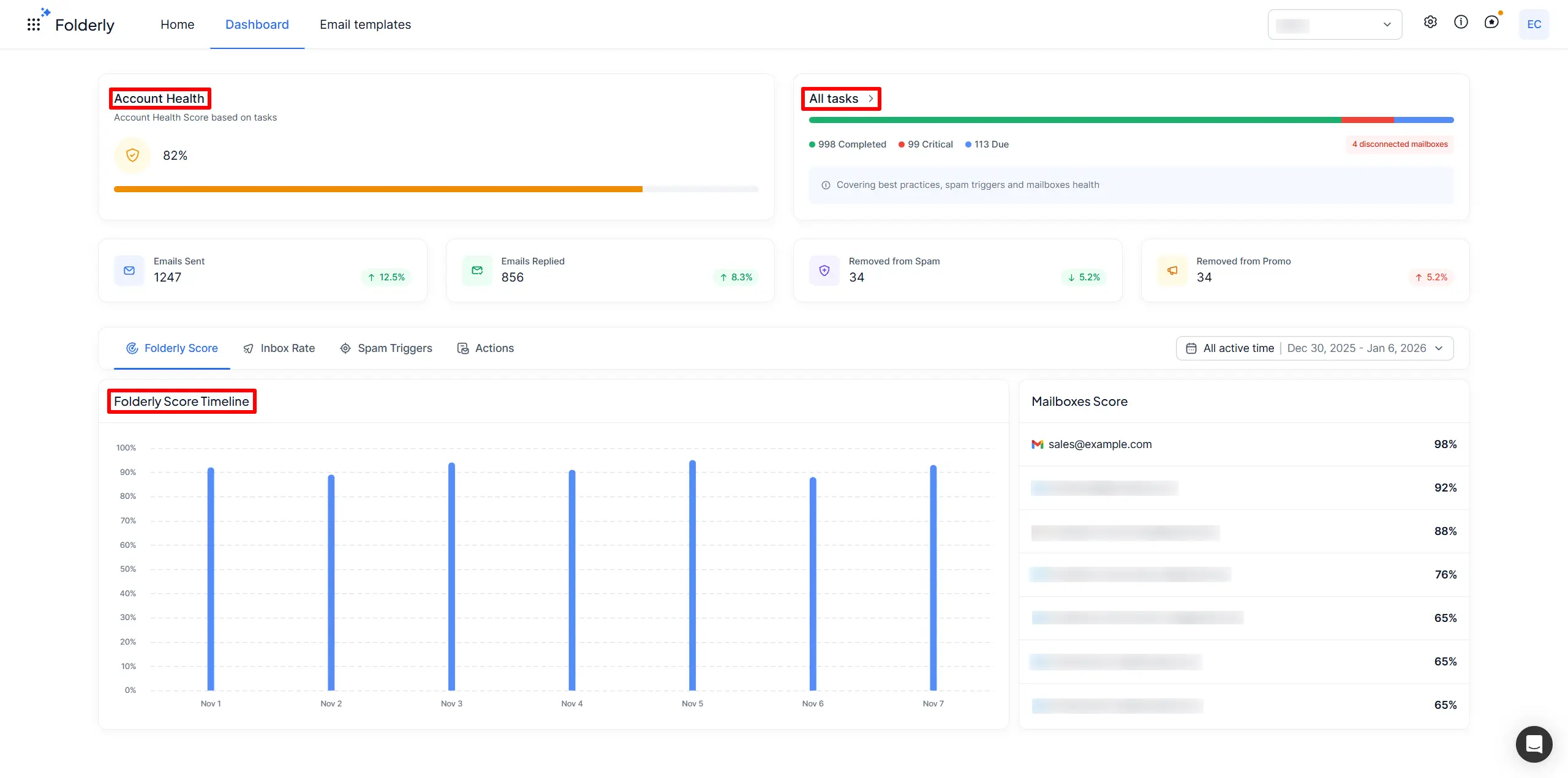
Folderly is an email deliverability platform that helps fix a damaged sender reputation. The suite has three main parts: the core Folderly product, Inbox Insights for placement tests, and Pulse for monitoring.
Pulse and Inbox Insights are the two features that impressed me most. Pulse is free and alerts you by email, Slack, SMS, and other channels when your emails start landing in spam folders.
Inbox Insights checks your placement, sending IPs, and DNS records before a campaign, and its free plan gives you 2 tests a month. If you'd rather hand the problem off, the core product is the closest thing on this list to managed deliverability services.
The main limit is the price. The core Folderly product costs $96 per mailbox per month on yearly billing, and Inbox Insights tests cost extra.
Pros:
Cons:
Pricing: Here's what each Folderly product costs.
Overall, Folderly is worth the money when your reputation is already broken and you want hands-on help. For routine testing on a healthy setup, it's more than you need.
Best For: Teams that already send cold email from Saleshandy.
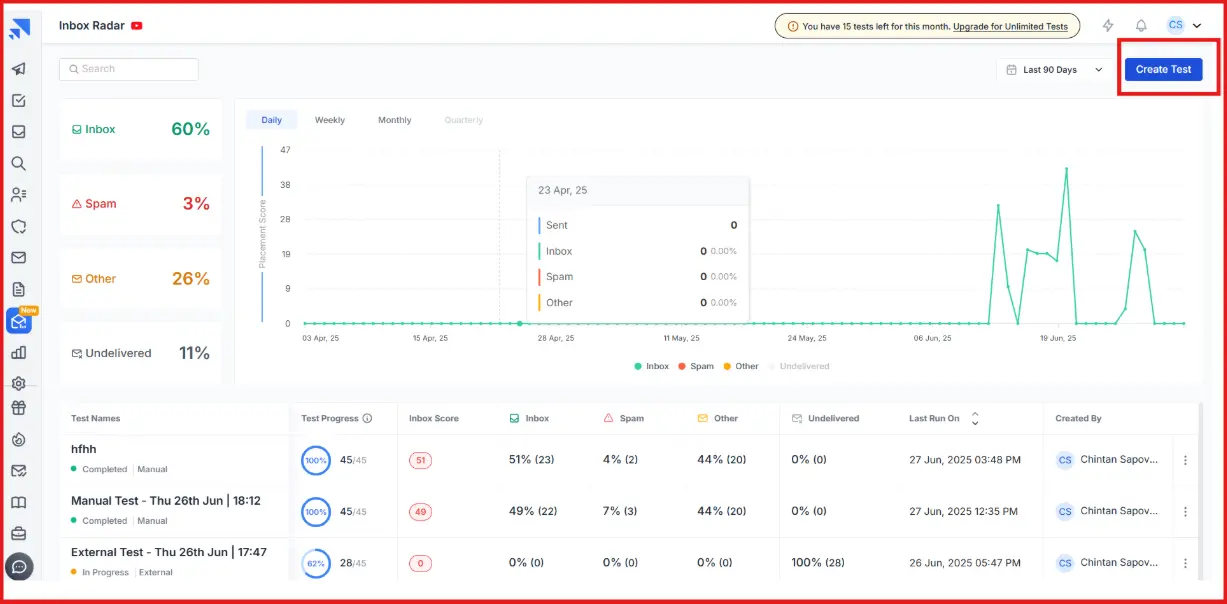
Saleshandy Inbox Radar is the inbox placement tester from Saleshandy, a cold email platform. Before you start a sequence, it shows you whether your emails land in the primary inbox, promotions, or spam.
Two features impressed me: ESP-to-ESP placement tests and reputation reports. The placement tests show inbox and spam results by your email service provider and by each recipient's provider.
Saleshandy says each test goes to a seed list of 50 email accounts across Gmail, Outlook, Yahoo, and more. Every report also adds account, domain, and IP insights, plus a spam and content report.
The main limit is that it's a separate cost. Saleshandy sells Inbox Placement Testing as an add-on, so you pay for it on top of your main Saleshandy plan.
Pros:
Cons:
Pricing: All prices below are billed annually.
Overall, Inbox Radar is an easy pick if Saleshandy is already your sending tool. If you want warmup and testing from the same vendor, look elsewhere.
Comparing the full Saleshandy suite? This guide to cold email tools compares it with other senders.
Best For: Anyone fixing a DNS record or a blacklist listing, and agencies that keep an eye on client domains.
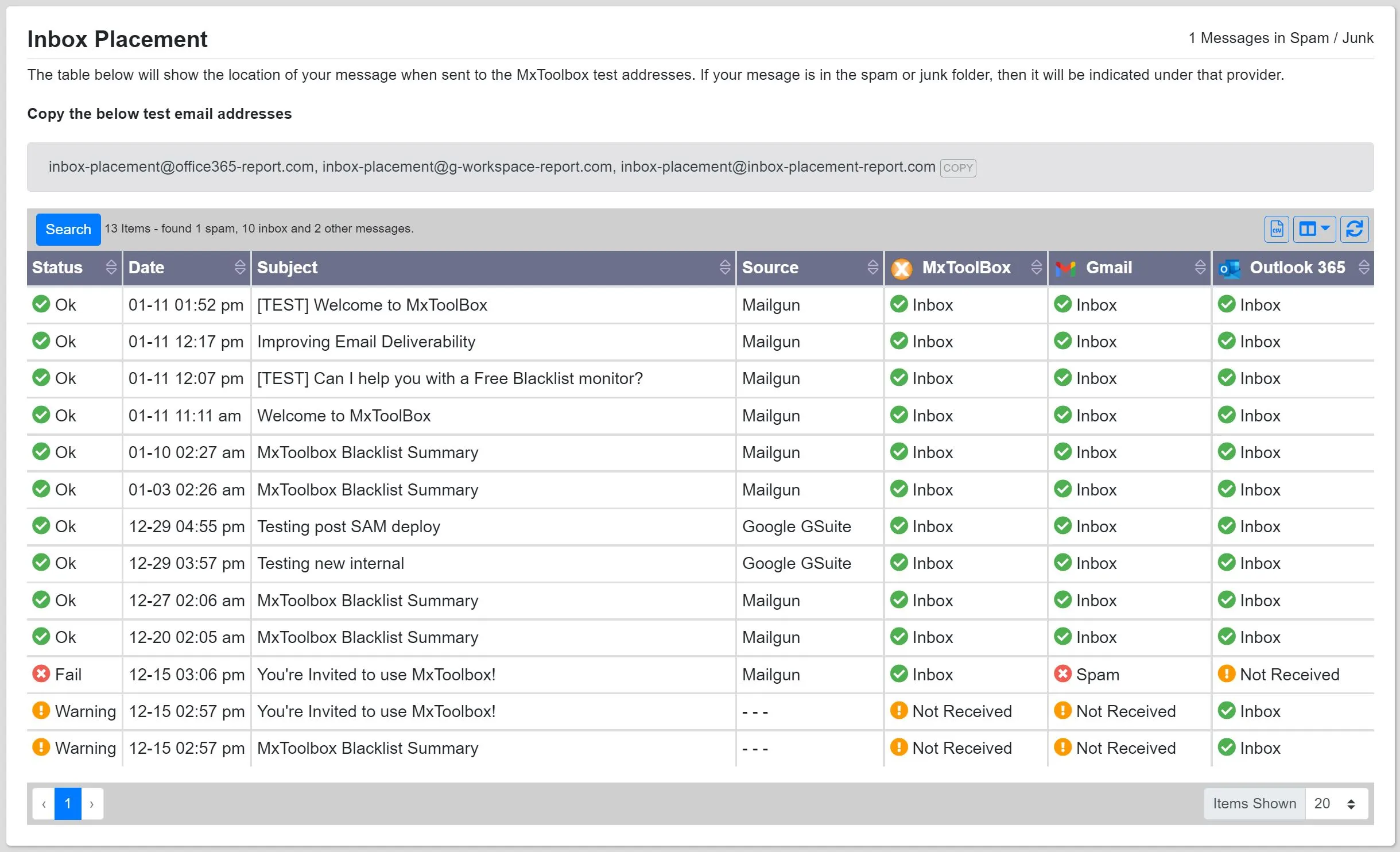
MxToolbox is a set of free DNS and blacklist tools for technical users, with a paid deliverability product called Delivery Center on top. When an authentication record fails or a blacklist picks up your domain, this is where you find out why.
Two features impressed me, and both are free: the Blacklist Check and the DNS lookups. According to its site, the Blacklist Check scans your domain or IP against more than 100 blacklists.
The DNS lookups show your MX, SPF, DKIM, and DMARC records one at a time. That makes technical validation of your sending domain much easier.
The main limit is the jump from free to paid. Free monitoring gives you one monitor with weekly checks against the top 30 blacklists, and full monitoring starts at $129 a month.
Pros:
Cons:
Pricing: Here's what each plan costs.
Overall, MxToolbox is a free tool worth keeping bookmarked. I wouldn't use it as my main placement tester, though.
You can check these inbox placement tools if you want overall email deliverability testing for your cold outreach campaigns.
Best For: Enterprise marketing teams that send designed HTML emails at volume.
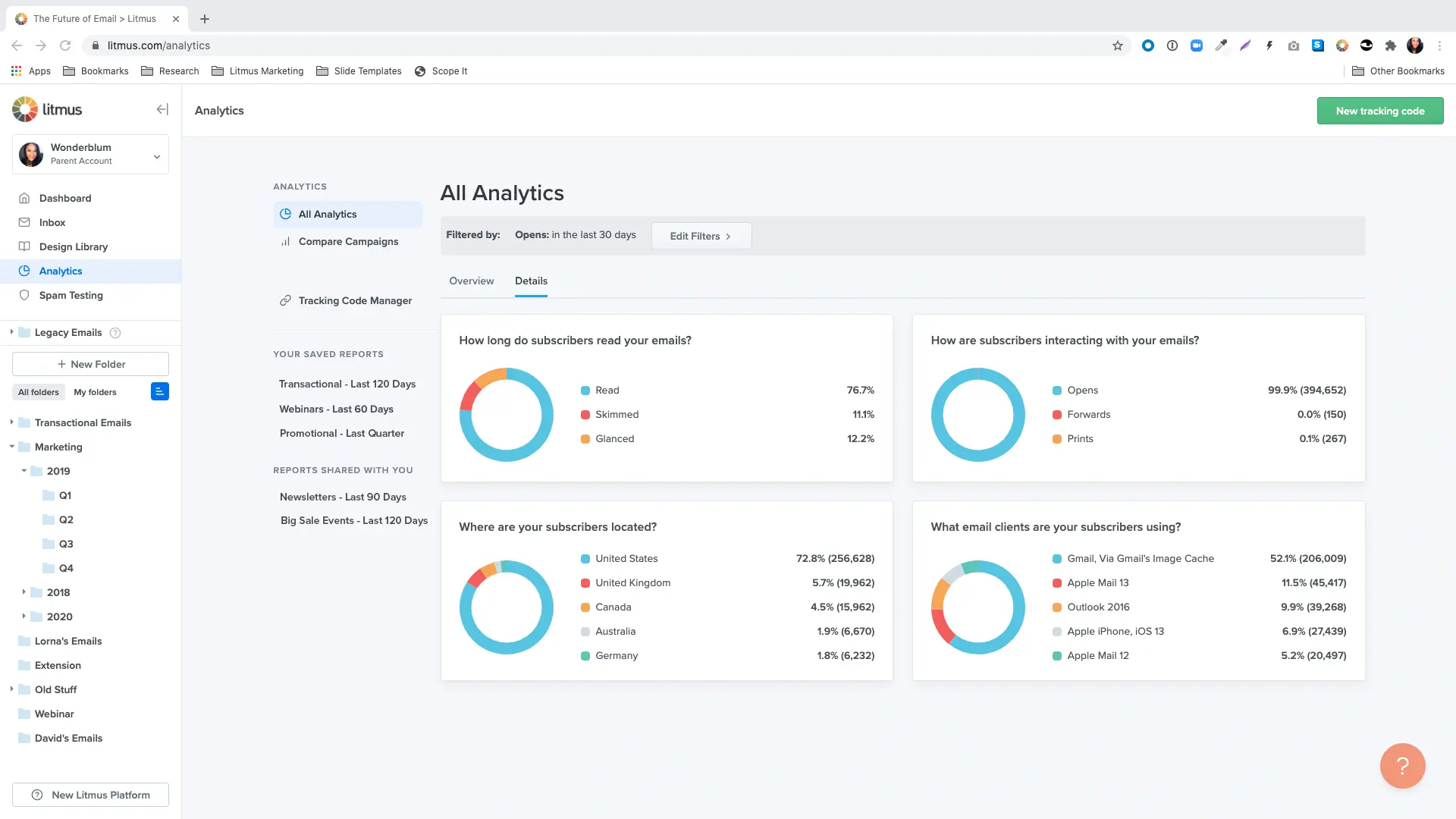
Litmus is an email testing platform for marketing teams that send designed HTML emails, and it's now part of Validity.
Before you send, it shows how your email will look in more than 100 email clients, including Gmail, Outlook, and Apple Mail, across different devices.
Its two key features are email previews and automated quality checks. The previews include dark mode testing, so you can see your email in both light and dark settings.
The quality checks catch problems like broken links and images before anything goes out. Plain-text cold emails don't need these rendering tests, though.
The main limit is the price, since Litmus now lists only an Enterprise plan and you have to contact sales for a quote. I haven't been on an Enterprise contract, so I can't speak to its support.
Pros:
Cons:
Pricing: Litmus only shares prices through its sales team.
Overall, Litmus is a strong choice for email marketers on large teams who send design-heavy marketing emails and need review steps. For plain-text cold outreach, you don't need it.
Best For: Small marketing teams that need rendering and accessibility checks without an enterprise contract.
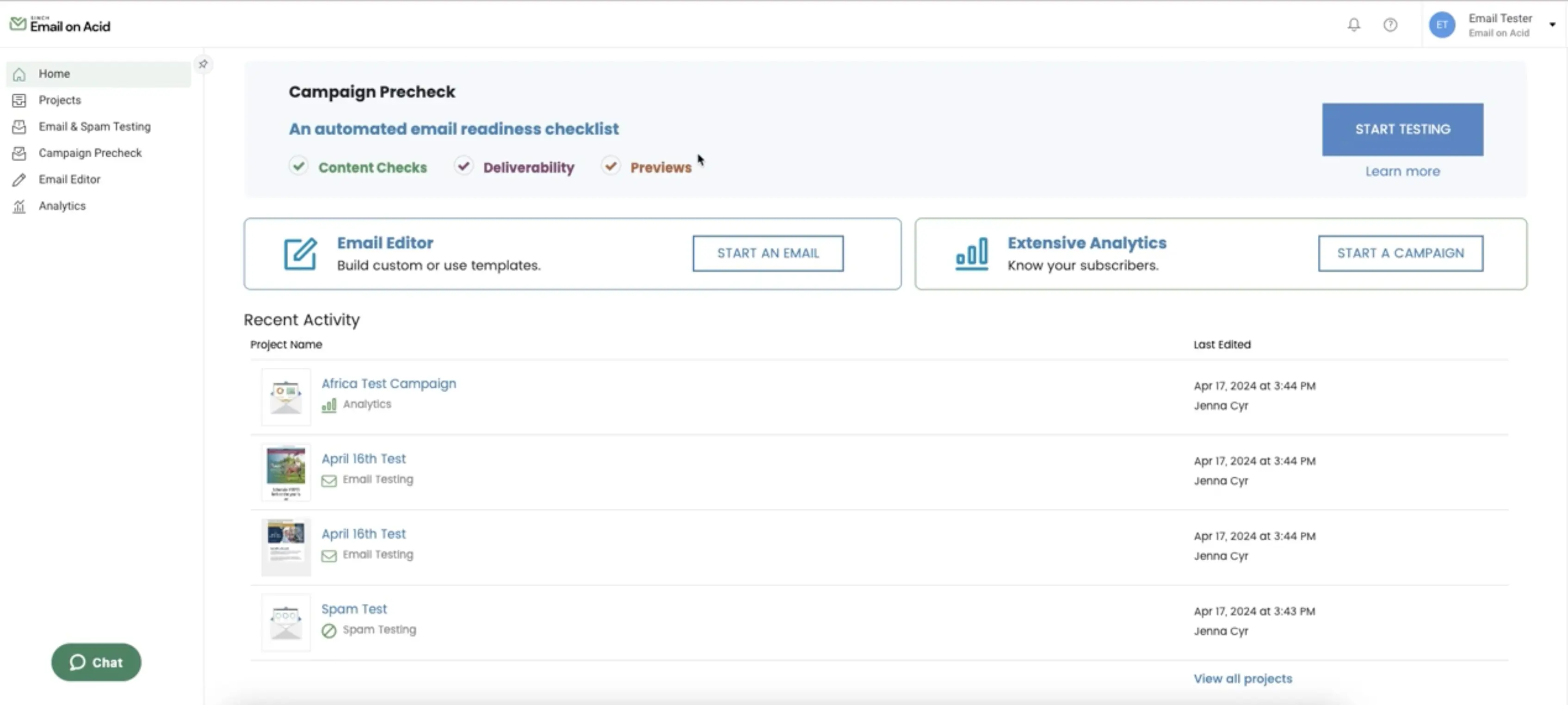
Email on Acid is an email preview and testing tool that is moving to Mailgun Inspect, its next version. It shows how your HTML emails look across 100+ email clients and devices, and you don't need an enterprise contract to use it.
Two features that impressed me are its email previews and quality checks. The Basic plan costs $99 a month and includes 1,000 previews, unlimited users, and API access.
Premium adds accessibility testing based on the W3C guidelines, HTML code analysis, link and image checks, and spam content checks.
The main limit is the move to Mailgun Inspect, since Email on Acid says your existing previews and tests won't transfer. Also, each screenshot of one email client counts as one preview, so testing across 50 clients uses 50 previews.
Pros:
Cons:
Pricing: Here's what each plan costs.
If you use all 1,000 previews, Basic comes to about $0.10 per preview. Every preview after that costs $0.15, so busy months add up quickly.
Overall, Email on Acid is a solid, affordable choice for testing HTML emails before your email marketing campaigns go out. For plain-text cold email, you can skip it.
Best For: Developers and testing teams that check app and transactional emails.
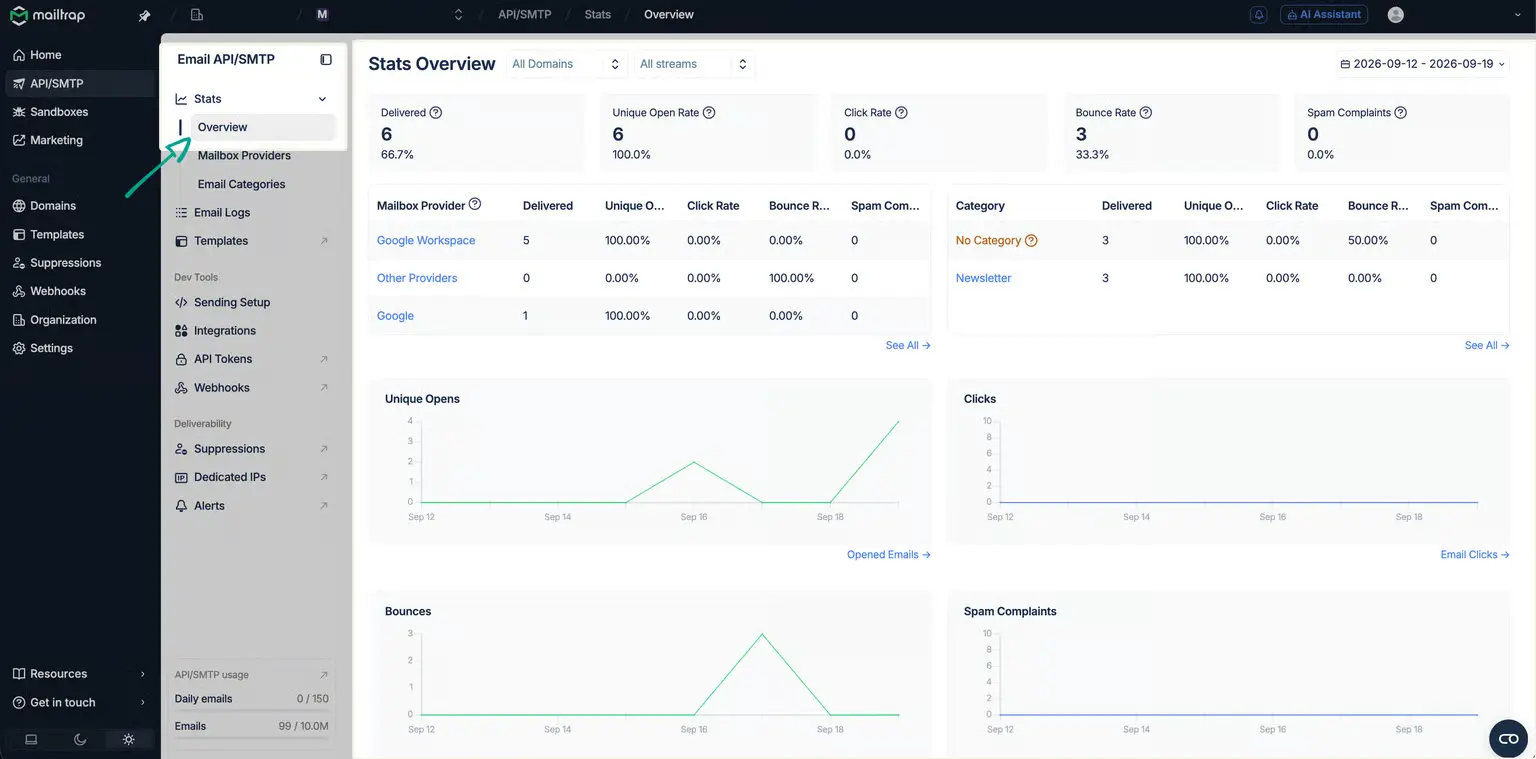
Mailtrap is an email testing tool for developers. Its Email Sandbox acts like a fake SMTP server that catches emails from development and staging.
That way, you can find bugs in app emails, like password resets, receipts, and contact form notifications, before real users ever see them. The free plan includes 1 sandbox and 50 test emails a month.
Inside the Email Sandbox, the key features are HTML rendering tests, spam score checks, and bounce simulation. That makes it safe pre-send testing, because nothing reaches a real inbox.
The main limit is that Mailtrap isn't a cold email testing tool. A sandbox can't show you how real emails land with real recipients.
Pros:
Cons:
Pricing: These are the Email Sandbox plans.
The Team plan comes to $408 a year on annual billing, compared with $504 on monthly billing. If you'll use it all year, annual billing is an easy saving.
Overall, Mailtrap is the right tool for testing app emails before release.
If you're trying to fix cold email placement, it won't help. For more options, see these Mailtrap alternatives.
After going through all 10 tools, here's how I'd match them for different situations:
These testing tools help most when you use them in the right order before email campaigns go out. Here's the routine I follow before I send from any new domain:
If you're reading this, a campaign probably didn't perform the way you hoped, and you want to know why before the next one goes out.
Among the deliverability tools here, GlockApps, Mail-Tester, MailReach, and MxToolbox each do something well. The free versions of Mail-Tester and MxToolbox are especially handy for quick checks.
My advice is simple: pick the tool that tests the part of your setup that broke. Modern email deliverability depends on authentication, sender reputation, and inbox placement. For cold email, problems usually come from one of those three, not from how the email looks.
For cold email teams with lots of mailboxes, I'd start with Warmforge. Here's why:
Warmforge is also part of the Forge stack, so it connects directly with the other Forge tools.
Create your free Warmforge slot and run your first placement test
If you're still choosing a sending tool, this roundup of cold email service providers pairs well with the testing tools above.
An email testing tool checks whether your email will reach the inbox, pass authentication, and look right before real people see it. Each tool tests a different part of the process. Some run placement tests, some check SPF, DKIM, and DMARC, some preview how emails look, and some catch bugs in a sandbox.
Warmforge is the best choice for cold email teams running many mailboxes, because warmup, placement tests, and health checks are all in one dashboard. GlockApps is a strong second pick for reports by provider. For a free spot check, Mail-Tester is hard to beat.
Mail-Tester is the best free option for a quick spam score. You get 3 free tests every 24 hours, and you don't need an account. MxToolbox's free blacklist and DNS lookups pair well with it, and Warmforge gives you 1 free warmup slot with a free placement test each month.
An inbox placement test costs about $0.28 to $0.33 on the entry paid plans of Warmforge and Saleshandy Inbox Radar. Warmforge Placement Test Pro is $32.50 a month on annual billing for 100 tests. Saleshandy Inbox Radar Starter is $34 a month on annual billing for 120 tests.
Test every new mailbox before its first send, then retest active mailboxes every week or two. Run a fresh placement test whenever you change a template, a domain, or your sending volume. Tools like Heat Score™ and Folderly Pulse can catch drops between tests.
You only need a rendering tool if your cold emails use HTML design, images, or logos. Plain-text emails look the same in every email client, so rendering tests add little. If you do send designed emails, Email on Acid or Litmus can run email previews and HTML validation to catch problems that placement tests miss.
You need around 10 to 15 mailboxes, based on a safe limit of 30 to 50 emails per mailbox per day. Spread those mailboxes across several domains so one problem doesn't take down your whole send.
An email testing tool checks the health of your setup, while a warmup tool builds sender reputation over time. Warmup sends and receives realistic emails so inbox providers learn to trust the mailbox. Warmforge and MailReach do both jobs in one product.
On Mail-Tester, a spam score of 9 or 10 out of 10 means your setup and content look clean. A score of 8 is usually fine, and anything below 8 needs fixing before you send. A good score still doesn't guarantee the primary inbox, so follow it with an inbox placement test.
Free email testing tools are enough for quick checks, but not for ongoing monitoring. Mail-Tester, MxToolbox's free lookups, and the free plans from GlockApps, Folderly, and Saleshandy Inbox Radar can catch most deliverability issues on a single mailbox. Once you send campaigns from many mailboxes, you'll want paid tools with blacklist monitoring and regular placement testing.
WordPress businesses can send a contact form notification to Mail-Tester to check its spam score and its SPF and DKIM setup. Developers can also point a staging site's SMTP server settings at Mailtrap's Email Sandbox, so test emails never reach real customers.
