

Zapmail sells you real Google Workspace and Microsoft 365 mailboxes that are pre-configured for cold outreach, hosted on US and EU IPs. Mailscale takes the opposite route: it runs its own self-hosted SMTP servers and IP pools, and lets you generate bulk inboxes in under a minute. Both can get you sending, but they trade off very differently on price, deliverability control, domain ownership, and how cleanly you can leave.
After running all three for client outbound, here is my honest take. Zapmail is the pick when you specifically need Gmail and Outlook trust signals. Mailscale is the cheapest headline price at high inbox counts, as long as you are comfortable with self-hosted SMTP instead of native mailboxes. But if you want cold-email-specific infrastructure with transparent per-mailbox pricing, no domain lock-in, a warm-up engine included, and room to add an entire outreach stack on top, I recommend Mailforge as the better long-term home for most teams.
I have spent the last few years setting up and babysitting cold email infrastructure for agencies and B2B teams. I have provisioned Zapmail mailboxes, tested Mailscale's SMTP inboxes, and scaled client sending on Mailforge. The differences only show up once you are past the demo and into month three, when domains start aging and invoices start renewing.
For context on what good infrastructure can do: LFG, a lead generation agency, generated roughly £397K in six months running Mailforge alongside Warmforge for warm-up. That outcome is about disciplined sending on stable infrastructure, not any single magic feature. This guide breaks down where Zapmail and Mailscale fit, where each one frustrates real operators, and why Mailforge is the option I keep coming back to.
Cold Email Infrastructure at a Glance: Zapmail vs Mailscale
Here is the quick version before I get into the detail. I have added Mailforge as the third column because it is the option I benchmark the other two against.
| Factor | Mailforge | Zapmail | Mailscale |
|---|---|---|---|
| Infrastructure type | Distributed shared-IP infrastructure built for cold email | Real Google Workspace and Microsoft 365 mailboxes | Self-hosted SMTP (its own servers and IP pools) |
| Entry price | $3/mailbox monthly, $2 annual (10-slot minimum, from $30/mo) | Starter $39/mo for 10 mailboxes (extras $3.50) | Solopreneur $79/mo for up to 15 inboxes |
| Around 200 mailboxes | About $484/mo per its calculator | About $599/mo (Pro $299 plus 100 extras at $3) | $249/mo (Enterprise, up to 200 inboxes) |
| Setup time | About 5 minutes, automated DNS | About 5 to 10 minutes via Google or Microsoft OAuth | 5-minute form, then domains and warm-up |
| Automated DNS (SPF, DKIM, DMARC) | Yes, plus custom tracking | Yes | Yes, handled in-platform |
| Warm-up | Free and unlimited via Warmforge when paired with Salesforge | Pre-warmed mailboxes as a paid add-on | 1 to 2 week warm-up, with a 95 to 100% deliverability guarantee |
| Domains and lock-in | Transfer in and out freely, no lock-in | Buy inside or bring; one domain per workspace | Buy inside ($10 to $15/yr) or bring at $2/domain (no deliverability guarantee on BYO) |
| Free trial | None (buy 10 slots to start); Salesforge has a 14-day trial | No standalone trial | 7-day free trial |
| SOC 2 compliant | Yes | Not stated publicly | Not stated publicly |
| Works with | Any sending tool, plus the native Forge Stack | 50+ tools (Instantly, Smartlead, Reply and more) | Any IMAP or SMTP sending tool |
Zapmail Overview: Real Google and Microsoft Mailboxes
Zapmail is a mailbox provider, not a sending tool. It sits at the infrastructure layer and gives you genuine Google Workspace and Microsoft 365 accounts that are provisioned, authenticated, and ready to plug into your sequencer. That native-mailbox angle is its whole reason for existing.
What Zapmail does well
The setup is fast and the mailboxes are real. Zapmail automates domain registration, mailbox creation, and DNS records (SPF, DKIM, and DMARC), and connects to more than 50 outreach tools through OAuth. It runs a workspace-isolation model, where each workspace gets its own domain, which helps contain reputation risk. It also offers AI helpers like its Instant Domain Genie and Smart Mailbox Namer, plus optional pre-warmed mailboxes that ship with about 12 weeks of sending history so you can start sooner. API access is available, though only on the top Pro plan.
Where Zapmail gets frustrating
The biggest catch is the renewal math. Zapmail's headline pricing is the first-year rate. Its own help center confirms that after year one, mailboxes move to renewal pricing, with the Starter plan moving to $59/mo plus a $6 per-mailbox add-on and Growth moving to $169/mo plus $5.50 per mailbox. That is a real jump, and it is easy to miss when you are budgeting off the pricing page. You are also limited to Google and Microsoft, so there is no SMTP option if you want to send higher per-inbox volumes.
Zapmail pricing
Zapmail runs three monthly tiers: Starter at $39/mo (10 mailboxes, extras at $3.50), Growth at $99/mo (30 mailboxes, extras at $3.25), and Pro at $299/mo (100 mailboxes, extras at $3.00, with API access). Annual billing adds roughly two free months, bringing the effective rate to about $2.50 per mailbox. Domains are separate, usually $13 to $15 per year. Around 200 mailboxes on monthly Pro lands near $599/mo.
Who Zapmail is for
Zapmail fits teams that specifically want real Gmail and Outlook mailboxes for ESP-matched sending, value pre-warmed accounts, and are fine paying a premium for native trust. If you are weighing it up, I have a broader rundown of Zapmail alternatives worth reading before you commit annually.
What reviewers say
Zapmail's support gets consistent praise on Trustpilot, where it holds about 4.5 out of 5. The critical reviews tend to cluster around billing and exit friction rather than the product itself.
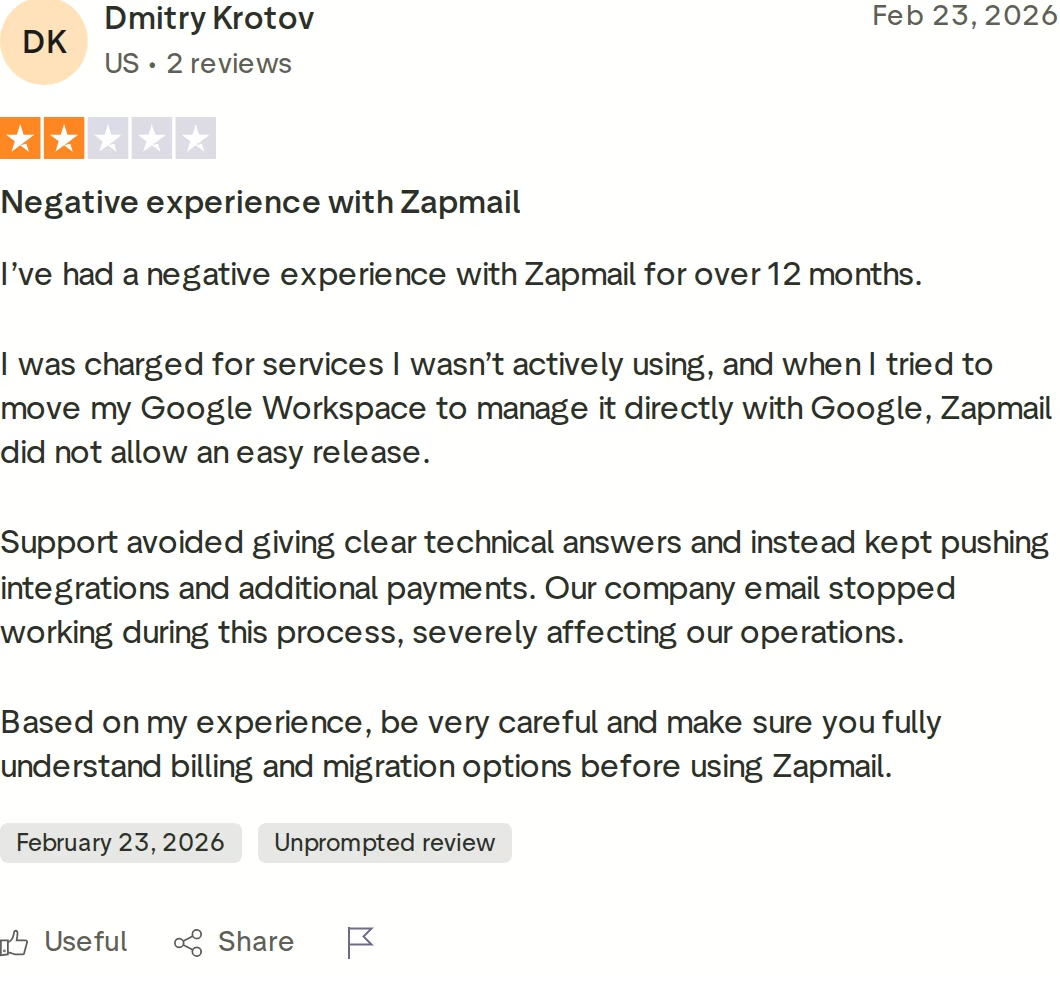
This reviewer describes being charged for services they were not actively using and running into trouble when they tried to move their Google Workspace to manage it directly with Google. It is a useful reminder to understand billing and migration terms before you scale on any provider.
Mailscale Overview: Self-Hosted SMTP at Volume
Mailscale takes the opposite approach to Zapmail. Rather than reselling Google or Microsoft accounts, it owns its full stack, including SMTP servers and IP pools, and generates inboxes you connect through standard IMAP and SMTP credentials. The pitch is speed and cost: spin up 50 to 1,000 inboxes in under a minute and plug the CSV into any sending tool.
What Mailscale does well
Setup really is quick. You fill out a short form, get or add domains inside the platform, and receive a CSV of ready-to-use inboxes. Because the accounts are standard SMTP, they connect with Instantly, Smartlead, Apollo, Reply, Lemlist, and most other tools. Mailscale also publishes a 95 to 100% deliverability guarantee to professional inboxes, and says it will help recover or replace domains within 30 days if placement drops below 80%. The Business plan bundles a cold email course, which is genuinely useful if outbound is new to you.
Where Mailscale gets frustrating
Self-hosted SMTP does not carry the same built-in trust as a real Gmail or Outlook account, so deliverability depends heavily on disciplined sending. Several Trustpilot reviewers report placement sliding after the first couple of weeks. The pricing also has hard tier breakpoints: needing one extra inbox past 15 pushes you from Solopreneur to Business, and past 50 pushes you to Enterprise. The most powerful features, like the self-healing IP mechanism, dedicated IPs, and a dedicated deliverability specialist, are reserved for the $1,000+ Unlimited plan. If you bring your own domains at $2 each, Mailscale notes it cannot guarantee deliverability on them. If SMTP is your path, it is worth understanding the work involved in scaling SMTP servers for high-volume sending.
Mailscale pricing
Mailscale now publishes pricing openly, which is a welcome change. There are four tiers: Solopreneur at $79/mo (up to 15 inboxes), Business at $119/mo (up to 50 inboxes, plus the cold email course), Enterprise at $249/mo (up to 200 inboxes, with extra inboxes at $1.50/mo each), and Unlimited from $1,000/mo (unlimited inboxes, dedicated IPs, self-healing, and a deliverability specialist). There is a 7-day free trial, and domains run $10 to $15 per year inside the platform. Notably, at 200 inboxes the Enterprise plan is the cheapest headline price of the three tools here.
Who Mailscale is for
Mailscale suits cost-sensitive teams that want the lowest per-inbox price at higher volumes and are comfortable running self-hosted SMTP rather than native mailboxes. I dug into the broader picture across 70+ Mailscale reviews if you want the long version.
What reviewers say
Mailscale holds about 4.2 out of 5 on Trustpilot. Alongside the positive setup feedback, the sharpest complaints are about billing and cancellation.
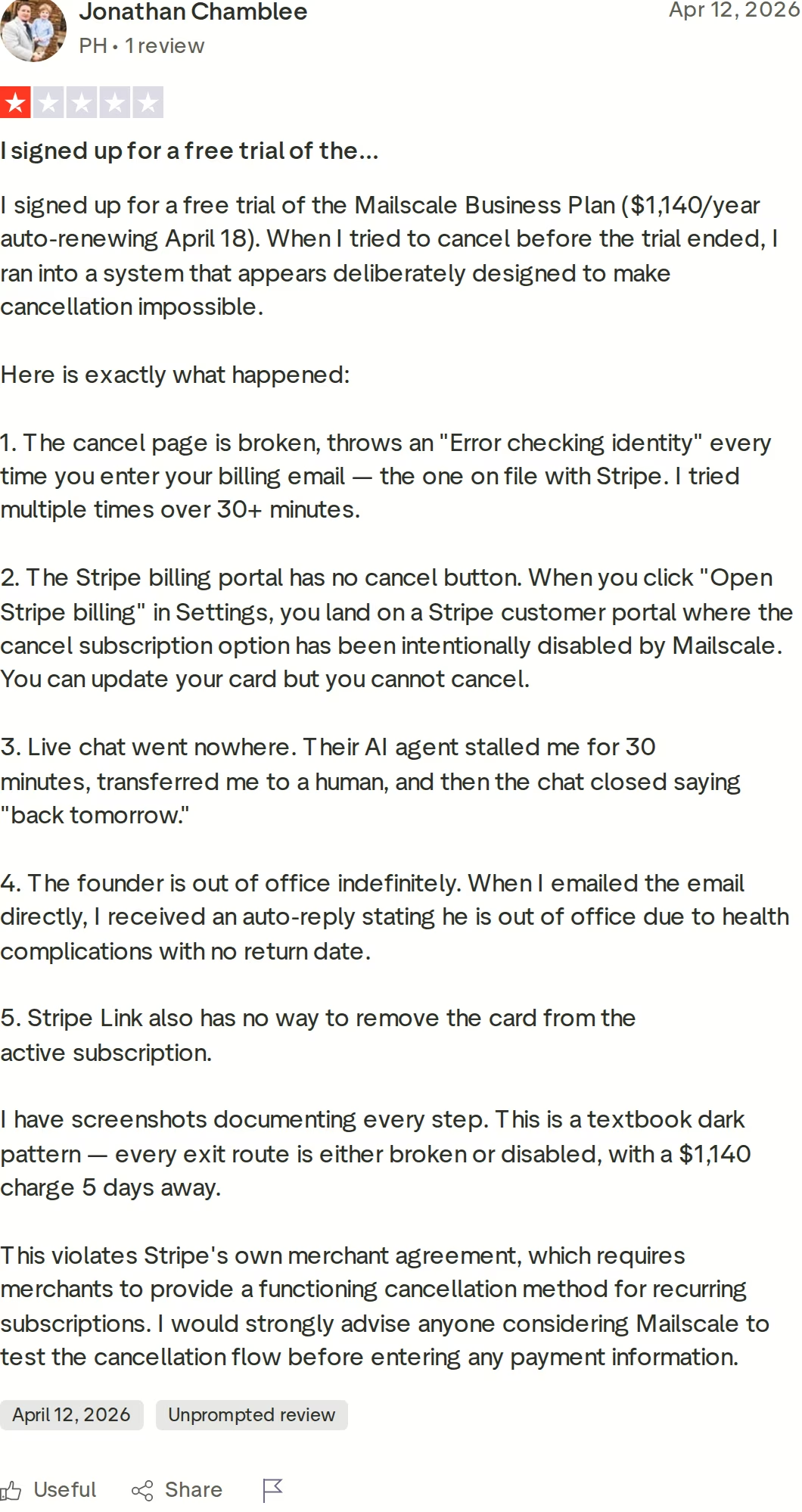
This reviewer describes signing up for a trial of the annual Business plan and then hitting a broken cancellation flow before the renewal date, including an error on the cancel page and a dead-end support chat. As with any provider, I would test the cancellation path before entering payment details.
Mailforge Overview: Cold Email Infrastructure, Built for Scale
Mailforge is distributed, shared-IP email infrastructure purpose-built for cold outreach. It is not a Google or Microsoft reseller, and it is not a heavy self-hosted SMTP setup you have to babysit. It gives you domains and mailboxes that are provisioned in about five minutes, with automated DNS, and that plug into any sending tool you already use.
What Mailforge does well
The setup is genuinely fast. Mailforge automates SPF, DKIM, DMARC, and custom tracking, supports bulk DNS changes, and lets you run multiple workspaces. It bills on mailbox slots, so you can delete and recreate mailboxes without extra cost, and it lets you transfer domains in and out freely, which means no lock-in. It is SOC 2 compliant and ships with an API, an MCP server, and a CLI for teams that want to automate provisioning. When paired with Salesforge, you get free and unlimited premium warm-up through Warmforge.
The Forge Stack advantage
Mailforge is the infrastructure layer of a larger ecosystem, and that is the part competitors cannot match cleanly. If you outgrow shared IPs, Infraforge gives you private, dedicated-IP infrastructure. If you specifically need Google or Microsoft mailboxes (the Zapmail use case), Primeforge covers that. Warmforge handles deliverability, and Salesforge adds multi-channel sequencing and an AI SDR. You can see how the pieces fit on the Forge Stack page. Mailforge itself does not send campaigns or run an AI SDR, so for those layers you add Salesforge rather than expecting the mailbox product to do it.
Mailforge pricing
Mailforge is $3 per mailbox monthly, dropping to $2 per mailbox on annual billing, with a 10-slot minimum (so from $30/mo). Domains are $14 per year, and there is an optional SSL and Domain Masking add-on at $2 per domain monthly or $6 per year. Its own calculator puts 200 mailboxes at about $484/mo, versus roughly $1,680 on Google Workspace direct. There is no free trial on Mailforge itself; you buy slots to start, while Salesforge offers a 14-day trial if you want to test the wider stack.
Honest limitations
I will not pretend Mailforge is right for everyone. It uses shared IPs, so you have less direct control over reputation than you would on a dedicated setup; that is exactly when I point people to Infraforge. It is not Google or Microsoft, so if your campaigns depend on native ESP trust, Primeforge or Zapmail-style mailboxes fit better. And there is no free trial, which is a real consideration if you want to kick the tyres before paying. Choosing between pooled and private IPs is worth thinking through, and I cover the trade-offs in shared vs dedicated email infrastructure.
Proof it works at scale
Beyond the LFG result, SalesCaptain runs outbound for 30+ clients on Mailforge, and UniteSync reached an 85.26% positive reply rate at a $2.86 customer acquisition cost using Salesforge, Mailforge, and Warmforge together. Mailforge now supports more than 10,000 businesses and holds a 4.6 on G2.
What Mailforge users say
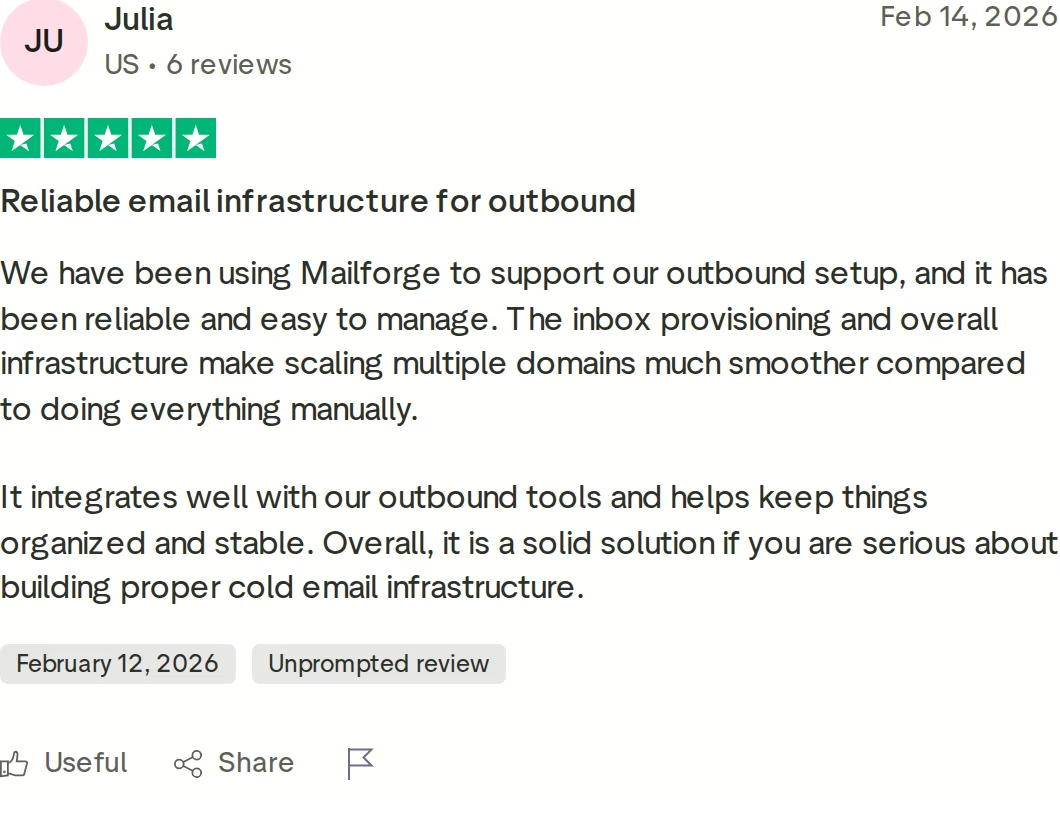
This reviewer describes Mailforge as reliable and easy to manage, with inbox provisioning that makes scaling multiple domains smoother than doing it by hand, and a solid fit for teams serious about proper cold email infrastructure.
Watch how the Forge Stack turns Mailforge mailboxes into booked meetings with an AI SDR.
Meet Agent FrankHead-to-Head Feature Comparison: Zapmail vs Mailscale
This is where the choice actually gets made. I have grouped the comparison around the things that change your results and your invoice, and I have noted where Mailforge lands on each.
Mailbox and infrastructure type
This is the core fork. Zapmail gives you real Google and Microsoft mailboxes, which carry native trust and benefit from ESP matching. Mailscale gives you self-hosted SMTP inboxes on its own IPs, which cost less per inbox but do not inherit Gmail or Outlook reputation. Mailforge sits in the middle as shared-IP infrastructure designed specifically for cold email, with the option to move to dedicated IPs on Infraforge or native mailboxes on Primeforge when you need them.
Deliverability and warm-up
Zapmail sells pre-warmed mailboxes as an add-on, so you pay extra to skip the warm-up wait. Mailscale recommends a 1 to 2 week warm-up and backs placement with a guarantee, though reviewers note variance once volume climbs. Mailforge pairs with Warmforge for free, unlimited warm-up when you run Salesforge, which keeps warm-up a built-in habit rather than a separate bill. Whatever you pick, your sending discipline matters more than any single feature.
Setup, DNS, and ease of use
All three automate the painful DNS work. Zapmail and Mailforge both get you live in roughly five minutes. Mailscale's form is quick too, but several reviewers flag that bringing your own domains can add a 48 to 72 hour wait and some manual steps. If you want to sanity-check the records yourself, my SPF, DKIM, and DMARC setup checklist walks through what good configuration looks like.
Pricing and how it scales
The models differ sharply. Zapmail charges per mailbox with a first-year rate that climbs at renewal. Mailscale uses fixed tiers with hard breakpoints, so one extra inbox can bump you a whole tier. Mailforge bills transparently per slot, with the same per-mailbox rate whether you run 10 or 500, and no surprise year-two increase. Cost is rarely just the headline number, which is why it helps to understand the full picture of IP costs to consider when scaling outreach.
Integrations and ecosystem
Zapmail connects to 50+ tools, and Mailscale works with any IMAP or SMTP sender, so both are flexible at the sending layer. The difference is what sits above the mailbox. Mailforge plugs into the same external tools, and it also connects natively to Warmforge for deliverability, Salesforge for multi-channel sequencing, Leadsforge for lead sourcing, and Agent Frank as an AI SDR. If you want one coherent stack rather than four separate vendors, that matters.
Support, compliance, and trust
Both competitors earn solid review scores, with the recurring complaints landing on billing and cancellation rather than core features. On compliance, Mailforge publishes SOC 2 status, which I have not found stated publicly for either Zapmail or Mailscale. On ownership, Mailforge's freely transferable domains are the cleanest exit story of the three.
Pricing Comparison
Here is how the three line up at common inbox counts. Treat these as directional, since add-ons and billing terms shift the totals.
| Mailboxes | Mailforge | Zapmail | Mailscale |
|---|---|---|---|
| 10 | About $30/mo ($20 annual) | Starter, $39/mo | Solopreneur, $79/mo (up to 15) |
| 50 | About $150/mo ($100 annual) | Growth plus extras, about $164/mo | Business, $119/mo (up to 50) |
| 100 | About $300/mo ($200 annual) | Pro, $299/mo | Enterprise, $249/mo (up to 200) |
| 200 | About $484/mo per calculator | Pro plus extras, about $599/mo | Enterprise, $249/mo (up to 200) |
| Domains | $14/yr each | About $13 to $15/yr (separate) | $10 to $15/yr inside, or $2 BYO |
| Free trial | None (buy 10 slots) | None | 7-day |
An honest read of this table: at 200 inboxes, Mailscale's Enterprise tier is the lowest headline price, Zapmail's Pro-plus-extras is the highest, and Mailforge sits in between. But these are not the same product. You are comparing real Google and Microsoft mailboxes against self-hosted SMTP against cold-email-specific shared infrastructure. The right question is which infrastructure fits your sending and what your total cost of ownership looks like once warm-up, domains, lock-in, and renewals are included, not which number is smallest on a pricing page.
Who Should Use Which
None of these tools is wrong; they solve different problems. Here is how I would decide.
- You might consider Zapmail if your campaigns depend on real Gmail and Outlook trust, you want pre-warmed native mailboxes, and you have budgeted for the year-two renewal rate.
- You might consider Mailscale if you want the lowest headline price per inbox at higher volumes, you are comfortable running self-hosted SMTP instead of native mailboxes, and you have tested the cancellation flow first.
- Choose Mailforge if you want cold-email-specific infrastructure with transparent per-slot pricing, automated DNS, free warm-up through Warmforge, no domain lock-in, SOC 2 compliance, and a path to add dedicated IPs, native mailboxes, or an AI SDR as you grow.
Final Verdict
Zapmail and Mailscale are both legitimate, and each wins on a specific axis: Zapmail on native mailbox trust, Mailscale on raw headline price at volume. If one of those is your single hard requirement, follow it.
For most teams, though, the decision is not about one axis. It is about infrastructure that stays predictable as you scale, keeps your domains portable, includes warm-up instead of charging for it, and gives you somewhere to grow. That is why I recommend Mailforge as the strongest all-round choice here. It is the option I have seen hold up across real client volume, and it is the only one of the three that comes with a full stack behind it.
The clearest picture of that stack in action is the campaign data from Agent Frank, the AI SDR that runs on top of Mailforge infrastructure.
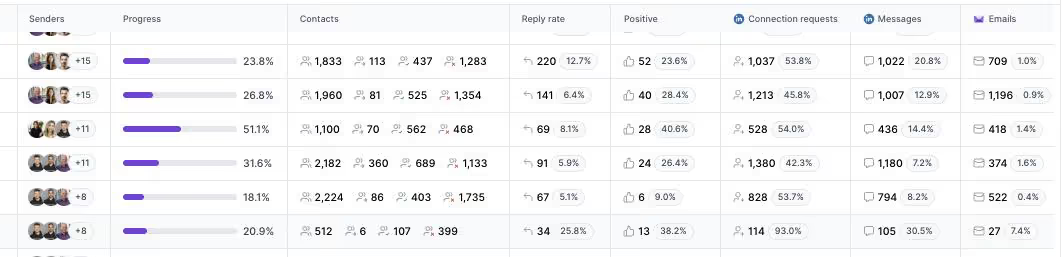
That is infrastructure doing its job quietly in the background while the outreach layer produces booked meetings. If you want that foundation, you can start in a few minutes.
FAQ
Is Zapmail or Mailscale better for cold email?
Neither is universally better; they are different infrastructure types. Zapmail gives you real Google and Microsoft mailboxes with native trust, while Mailscale runs self-hosted SMTP at a lower headline price. If you want cold-email-specific infrastructure with transparent pricing and a warm-up engine included, Mailforge is the option I would compare both against.
What is the difference between Zapmail and Mailscale?
Zapmail provisions genuine Google Workspace and Microsoft 365 accounts on US and EU IPs. Mailscale owns its own SMTP servers and IP pools and generates inboxes you connect over IMAP and SMTP. The result is similar (sending inboxes), but the trust signals, per-inbox cost, and deliverability behaviour differ.
How much do Zapmail and Mailscale cost?
Zapmail runs from $39/mo (Starter) to $299/mo (Pro), with a higher renewal rate after year one. Mailscale runs from $79/mo (Solopreneur) to $249/mo (Enterprise), plus a $1,000+ Unlimited tier. For comparison, Mailforge is $3 per mailbox monthly or $2 annual, with a 10-slot minimum.
Does Mailscale have a free trial?
Yes, Mailscale offers a 7-day free trial. Zapmail does not have a standalone trial, and Mailforge does not either (you buy slots to start), though Salesforge includes a 14-day trial if you want to test the wider stack.
Do Zapmail and Mailscale use real Google and Microsoft mailboxes?
Zapmail does; it provisions real Google Workspace and Microsoft 365 accounts. Mailscale does not; it uses its own self-hosted SMTP infrastructure. Mailforge is also not Google or Microsoft, but Primeforge from the same team provides native Google and Microsoft mailboxes if that is what you need.
Can I move my domains out if I leave?
It depends on the provider. Mailforge lets you transfer domains in and out freely with no lock-in. Mailscale domains are yours, and you can bring your own at $2 each. Some Zapmail reviewers have reported friction when moving a Google Workspace to manage directly with Google, so confirm the process before you commit.
Which is best for deliverability?
Deliverability comes down to disciplined sending more than any single provider. Zapmail benefits from native ESP trust, Mailscale offers a placement guarantee but shows more variance at volume, and Mailforge pairs with Warmforge for free, unlimited warm-up. Clean lists and sensible daily volumes matter across all of them.
What is the best Zapmail and Mailscale alternative?
For most teams I would point to Mailforge. It offers transparent per-mailbox pricing, automated DNS, included warm-up, SOC 2 compliance, no domain lock-in, and a full Forge Stack for dedicated IPs, native mailboxes, and AI-driven outreach as you scale.