
With over 1.4 billion members and 71 million companies, LinkedIn gives you access to a massive pool of potential B2B buyers.
And unlike most other platforms, you can narrow that pool down by job title, company, industry, seniority, and even the people responsible for making buying decisions.
That's what makes LinkedIn one of the best channels for B2B lead generation.
But finding the right people is only half the job. Getting them interested enough to respond is where things get tricky.
In this guide, I'll break down what LinkedIn lead generation actually means, what's changed on the platform in 2026, and 12 strategies to find and attract potential buyers.
Let's get into it.
Here's how the three main approaches to LinkedIn lead generation compare, plus how to scale your outreach once you hit LinkedIn's limits.
LinkedIn lead generation is the process of finding potential buyers on LinkedIn, getting their attention, and turning that attention into a sales conversation.
There are three main ways to do it. The first is inbound, where you share content that brings buyers to you. The second is outbound, where you reach out to specific people first, and the third is paid, where LinkedIn shows your offer to an audience you choose.
Most teams end up using a mix of all three. The right balance usually depends on whether you have more time or more budget, and my breakdown of inbound vs outbound sales explains how to decide.
So let's go through the strategies for each one, starting with inbound.
Inbound LinkedIn lead generation is about getting potential buyers to come to you. Instead of reaching out, you share useful content and show up in the right conversations, so people find you on their own.
It takes longer to see results than reaching out directly. But it's free, there's no weekly limit, and the leads it brings in already know who you are.
Here are the five inbound strategies I use most.
The easiest LinkedIn lead generation strategy to start with is posting content your buyers find useful enough to save or share. In my experience, it's also the one that pays off the most over time.
Saves and shares matter because they're the two actions LinkedIn's algorithm pays the most attention to in 2026. A like takes a second, but a save means someone plans to come back to your post, and a share means they're putting their own name next to it.
The posts that get saved are the ones people can actually use. That could be a step-by-step breakdown of how you solved a problem, a checklist, or numbers from your own work.
A post walking through "the exact 4-step follow-up sequence I use, with every message written out" is far more likely to get saved than one announcing a new feature.
It also helps to write for one specific group of people. A post aimed at sales leaders at SaaS startups will reach fewer people than a general one, but they'll be the right people.
Another strategy a lot of outreach specialists trust is commenting on posts from the people you'd like to work with, even though it barely feels like lead generation.
Over a few weeks, those people start to recognize your name. So by the time you send a connection request, you're not a complete stranger.
Pick 20 to 30 potential buyers and follow them. A few times a week, check their latest posts and reply whenever you have something useful to add.
Say a prospect posts about struggling to get replies from cold email.
Instead of writing "Great post!", you could reply with something like: "I had the same problem until I cut my emails down to three sentences.
Replies picked up within a couple of weeks. Have you tried shortening yours?"
Just never pitch in the comments, because it puts off the person who posted and everyone else reading. And since LinkedIn now orders the comments on a post by relevance to each viewer, a thoughtful comment can reach plenty of people beyond the person you're replying to.
If you'd rather bring a group of buyers to you in one go, LinkedIn events and live sessions are worth trying. They work well because everyone who signs up has already shown real interest in your topic.
You can host a webinar, a Q&A or a short live session directly on LinkedIn. Everyone who registers appears in your attendee list, which gives you a ready-made list of warm leads.
Pick a topic that solves a problem your buyers have, rather than a session about your product. Then create the event on LinkedIn, invite the connections it's relevant to, and post about it a couple of times beforehand.
The part most people skip is the follow-up. After the event, message everyone who registered, including people who didn't show up, because that's where the real conversations start.
The next LinkedIn lead generation strategy is offering a free resource in exchange for a conversation. Marketers call this a lead magnet, and it's one of the easiest ways to get lots of potential buyers talking to you at once.
The best ones solve one narrow problem really well. A template, a checklist, a calculator or a short report built from your own data all work better than a long ebook.
Write a post about the problem your resource solves, then invite anyone who wants it to message you. You could end your post with something like: "I put together the exact checklist I use to clean a lead list before outreach. Send me a message if you'd like a copy."
Send the resource to each person yourself, so every request turns into a conversation you can continue. Sending people to a form on your website adds an extra step and takes them off LinkedIn, so it's best avoided.
One inbound strategy that's become far more useful in 2026 is getting your colleagues posting from their own profiles.
That's because LinkedIn now favors personal profiles over company pages. A few people on your team posting regularly will reach far more of your market than your company page can on its own.
Start with three to five people who are happy to post. Give them topics to write about rather than ready-made posts, since copy-pasted content is easy to spot and doesn't perform well.
Then let each person post in their own voice and on their own schedule. Identical posts going out at the same time look staged, both to buyers and to LinkedIn.
Inbound is great for building interest over time. But if you want conversations sooner, reaching out directly is the faster route.
Outbound LinkedIn lead generation means finding specific people and reaching out to them first, instead of waiting for them to find you.
It's the fastest way to start conversations, and it's also where LinkedIn's weekly limit applies. So the quality of your list and your messages matters far more than how many people you contact.
If you want a deeper look at the messaging side, my step-by-step LinkedIn outreach playbook covers it in detail. Here are the five outbound strategies I rely on.
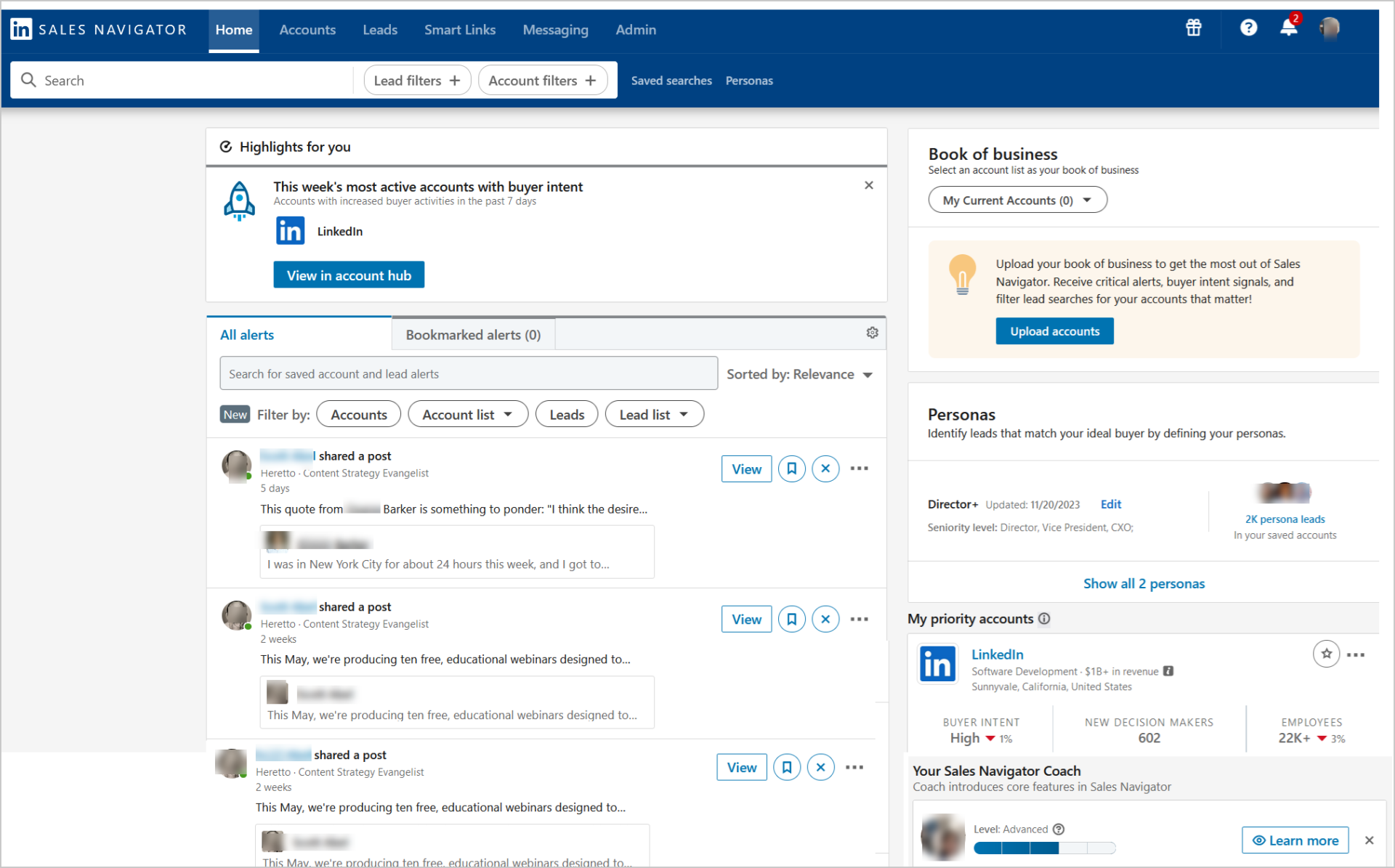
When it comes to outbound, most sales teams start with LinkedIn Sales Navigator. It's LinkedIn's paid tool for sales teams, and it's what I use to build almost every LinkedIn lead list.
It gives you far more search filters than LinkedIn's free search, so you can find the exact people who match your ideal customer. Just keep in mind that it improves your targeting, not your weekly connection limit.
Begin with the four filters that match your ideal customer, which are industry, company size, seniority and job function. Those alone will narrow thousands of results down to a list you can actually work with.
Then add filters that tell you about timing, like people who changed jobs in the past 90 days or companies that are growing their team. These help you reach people when they're most likely to need help.
Once a search gives you the right people, save it, and Sales Navigator will keep showing you new matches as they appear.
You can also save promising people and companies to lead lists, then turn on alerts. You'll get notified when someone changes roles, posts something or their company grows, and each of those gives you a natural reason to reach out.
If Sales Navigator isn't in your budget yet, Boolean search is a free way to get surprisingly close to the same results.
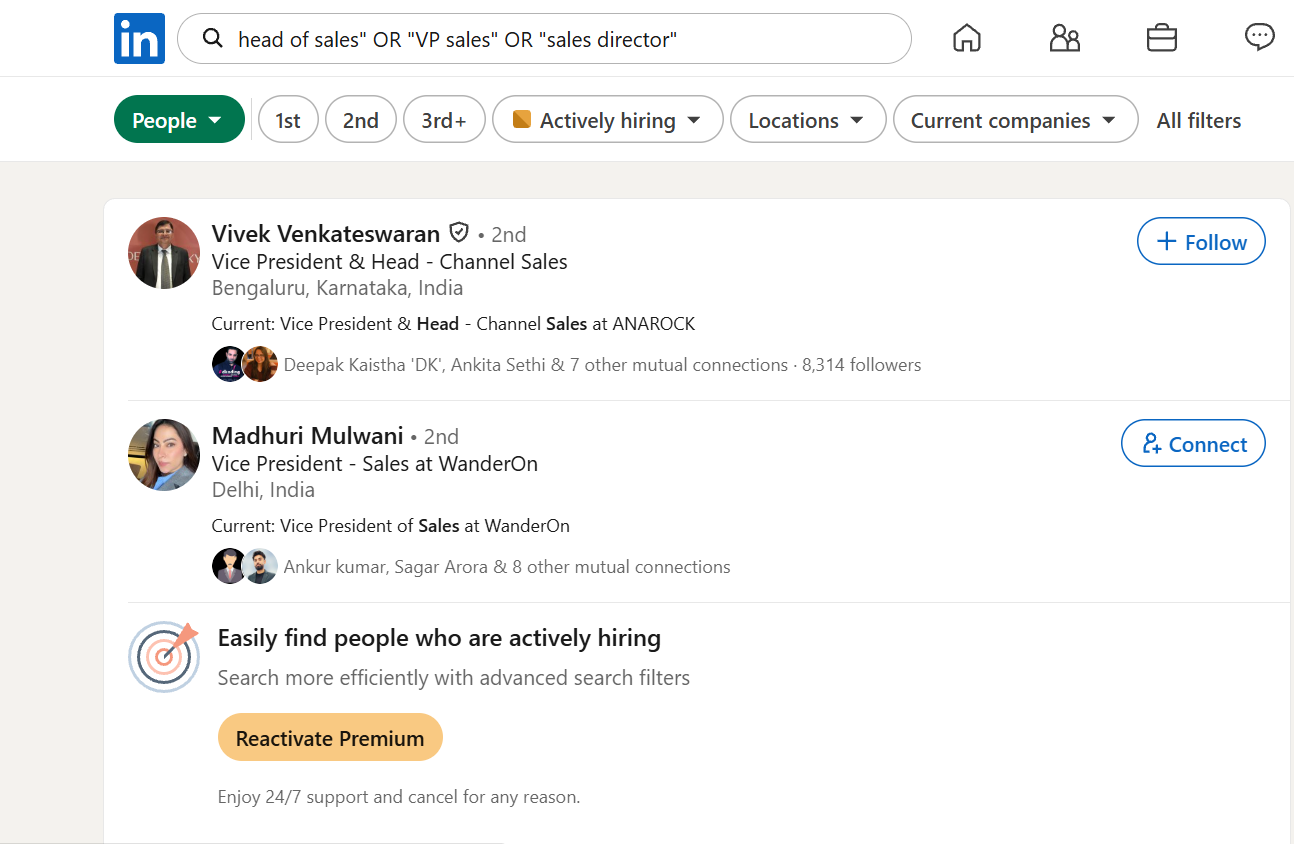
It works by combining keywords with the words AND, OR and NOT, plus quotation marks for exact phrases. You can use it in LinkedIn's regular search bar to find people whose job titles differ but who do the same job.
Say you want to find sales leaders at companies doing outbound. You could search for ("head of sales" OR "VP sales" OR "sales director") AND outbound NOT recruiter.
Paste that into LinkedIn's search bar, filter by People, then narrow it down by location or connection level. Saving two or three versions is worth it, since each one brings up slightly different people.
Once your list is ready, the next step is sending connection requests, and personalizing them makes a big difference to how many get accepted.
This is where most LinkedIn outreach goes wrong, usually because people send requests without giving any reason to accept. And with only around 100 requests a week, every one of them counts.
LeadRiver's April 2026 review of more than 50,000 connection requests found 30 to 37% acceptance typical for B2B outbound, so you can expect roughly a third of your requests to be accepted.
To beat that, give the person a genuine reason you're connecting. Mention a post they wrote, a recent job change, a mutual connection or something specific about their company.
LinkedIn allows notes of up to 200 characters, so one or two specific sentences is all you need. Job changes work especially well for me, because someone a few weeks into a new role is still deciding what to fix.
These are two I keep coming back to.
Neither one pitches anything. A connection request only needs to get accepted, and the real conversation comes after.
This is the point where LinkedIn lead generation turns into actual conversations, so your first message after someone accepts matters a lot.
LinkedIn messages also tend to get far more replies than cold email. 2026 benchmarks put the LinkedIn DM reply rate at 10.3%, against a cold email average of 3.43%.
That advantage disappears quickly if your message reads like a template, though. Keep it to two or three sentences, leave out links, and ask an open question rather than asking for a meeting straight away.
Here are three you can adapt to your own outreach.
Each one mentions something specific to the person, asks one easy question and skips the pitch. That's what makes them read like a real conversation rather than a sales message.
If one follow-up doesn't get a reply, move on to the next person. And for anyone sending messages at real volume, my roundup of LinkedIn automation tools shows which ones stay within LinkedIn's limits.
For senior buyers who rarely accept connection requests, LinkedIn InMail is the better way in.
InMail lets you message someone without being connected to them, and it gets strong results. 2026 benchmarks put InMail reply rates at 18 to 25%, with a higher cost but strong results for senior titles.
The catch is that you only get a limited number of InMail credits each month. So save them for the people you most want to reach, explain why you're messaging them specifically, and keep it to one short paragraph.
A good InMail might look like this: "Hi Sarah, I noticed Acme just opened three SDR roles, which usually means outbound is about to scale. I've been helping teams at that stage set up their first sequences. Would it help if I shared what's worked for them?"
Not sure when to use InMail instead of a regular message or an email? My comparison of LinkedIn InMail vs Message and the alternatives breaks it down.
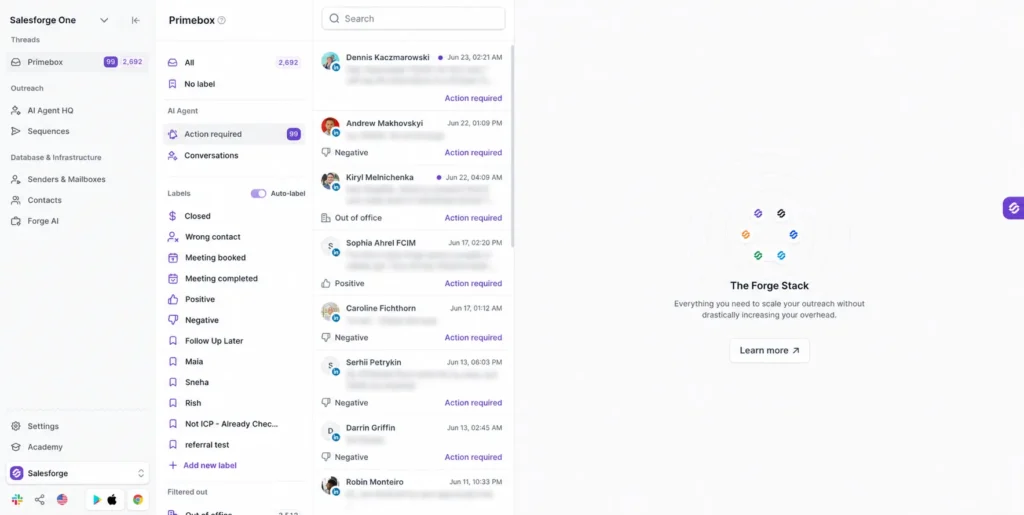
If you're running all of this for hundreds of prospects, Salesforge can handle your connection requests, messages and follow-ups for you, alongside your emails.
Inbound and outbound both cost you time. If you'd rather spend budget to get faster results, that's where LinkedIn ads come in.
Paid LinkedIn lead generation means using LinkedIn ads to put your offer in front of the exact audience you choose.
The big advantage is that ads aren't affected by the weekly connection limit. The downside is cost, which has gone up noticeably this year.
On the paid side, Lead Gen Forms are the easiest place to start. They're LinkedIn's built-in sign-up forms for ads.
When someone clicks your ad, the form opens with their name, job title and company already filled in from their profile. They can submit it in one click without leaving LinkedIn, which is why these forms convert so well.
Setting one up only takes a few minutes. Open LinkedIn Campaign Manager, create a campaign and choose Lead Generation as your goal, then target your ideal buyers by job title, company size and industry.
Ask only for the information you really need, and connect the form to your CRM, the tool where you track your leads. Leads left sitting in Campaign Manager are one of the most common ways ad budget gets wasted.
The last LinkedIn lead generation strategy on my list is promoting posts through Thought Leader Ads and Sponsored Content.
Sponsored Content is LinkedIn's standard ad format, where your post shows up in people's feeds with a small "Promoted" label. Thought Leader Ads work the same way, except you promote a post from a real person's profile instead of your company page.
That difference matters in 2026, since personal posts get far more engagement than company page posts. So a promoted post from your founder or a sales rep will usually outperform a standard company ad.
Pick a post that already did well without any budget behind it, since that's proof the message works. Then promote it to a narrow audience with a small daily budget, and increase spend once you can see results.
It's worth budgeting carefully, because prices have gone up. Several 2026 benchmark reports tracking B2B SaaS advertisers put year-over-year cost per lead growth at roughly 52 percent.
On July 1, 2026, LinkedIn activated a set of AI tools inside Campaign Manager, including an expanded version of its Accelerate campaign mode, which builds targeting, creative variants, bidding and placement for you. It's a quick way to get started, though you'll have less control over who sees your ads.
Rather than judging ads on cost per lead alone, track how many of those leads turn into real sales conversations. That tells you far more about whether LinkedIn ads are paying off.
That covers all 12 strategies. Before you start running them, there are a few things worth keeping in mind, especially with how much LinkedIn changed this year.
These four points apply whichever strategies you pick, and getting them wrong can undo a lot of good work.
LinkedIn doesn't publish an official limit. But the widely observed ceiling is about 100 invitations per rolling week, roughly 20 a day, and that's the number most people plan around.
What surprises a lot of people is that paying for LinkedIn doesn't raise that number. Premium, Sales Navigator and Recruiter Lite don't increase your weekly connection request capacity, because the limit is based on your account's reputation rather than your subscription.
So who you send requests to, and what you say, matters far more than how many you send. If you're planning to use a tool to send them for you, my guide on how to automate LinkedIn outreach explains how to stay within these limits.
LinkedIn changed how it decides who sees your posts this year, and it's the reason the inbound strategies above focus on usefulness over reach.
In March 2026, LinkedIn introduced "Generative Recommenders," recommendation systems powered by large language models, with relevance as the deciding factor. So a genuinely useful post aimed at a specific audience can now travel further than a popular post from a big account.
A few other shifts came with it. Personal profiles now generate far more engagement than company pages, and posts with external links are getting suppressed. LinkedIn also took action against automated comments and engagement pods in February 2026, so any tool or group promising to boost your engagement artificially now puts your account at risk.
Every strategy above sends people back to your profile, so it needs to show how you help within a few seconds.
With a limited number of connection requests each week, every one needs to go to the right person. That's why it's worth writing down your ideal customer before you send anything.
Describe them using industry, company size, the job titles involved in buying, and location. If you can, add a buying signal too, like a recent funding round or a new hire in a relevant role, since both suggest a company needs help right now.
And if you plan to email these people as well, my roundup of the best LinkedIn email finder tools will help you get their contact details.
With those in mind, the next question is which strategies you should actually focus on.
Trying to run all 12 strategies at once is the quickest way to burn out and see poor results. It's better to pick a few based on what you have more of, which is usually either time or budget.
You probably have more time than budget, so start with the strategies that don't cost anything.
Focus on posting content people want to save (strategy 1), commenting on your potential buyers' posts (strategy 2), and sending around 20 personalized connection requests a week (strategy 8). That fits comfortably within LinkedIn's limits and costs you nothing but time.
I'd hold off on ads until you know which message actually gets replies. Otherwise, you're paying to promote something you haven't tested yet.
With a small budget and a few reps, outbound becomes a lot more effective.
Get Sales Navigator for each rep (strategy 6), and have everyone send personalized requests and messages from their own profile (strategies 8 and 9). Three reps sending 100 requests a week gives you around 1,200 a month instead of 400.
It's also worth getting your reps posting (strategy 5), since their personal profiles will reach more people than your company page. My list of outbound sales tools covers what else is worth adding at this stage.
Agencies run outreach for several clients at once, so LinkedIn's weekly limit quickly becomes the biggest problem.
Use the outbound strategies across your clients' profiles, but plan for cold email from day one. At agency volume, LinkedIn on its own won't deliver the numbers your clients expect, which means you'll need plenty of domains and mailboxes to send from.
That's where Mailforge helps, since it gets your domains and mailboxes ready to send in about five minutes and handles the technical setup automatically.
Whichever approach you choose, you'll need a way to tell whether it's actually working.
It's tempting to track new connections and post likes, since they're the easiest numbers to see. But neither one tells you whether you're getting any closer to a sale.
These are the numbers I'd track instead.
Each number helps you spot where things are going wrong. If people accept your requests but don't reply, your list is fine and your message needs work. And if they reply but don't book meetings, it's usually your offer that needs a rethink.
If you add email to the mix, you'll also want to know whether your emails are landing in the inbox. My guide to email deliverability benchmarks covers what good looks like.
For some businesses, yes. If you sell a high-value product to a small market of a few hundred companies, LinkedIn on its own can realistically keep your calendar full.
But for most B2B teams, LinkedIn alone isn't enough, and the weekly limit is the reason why. One profile gives you around 400 connection requests a month, and only a fraction of those turn into real conversations.
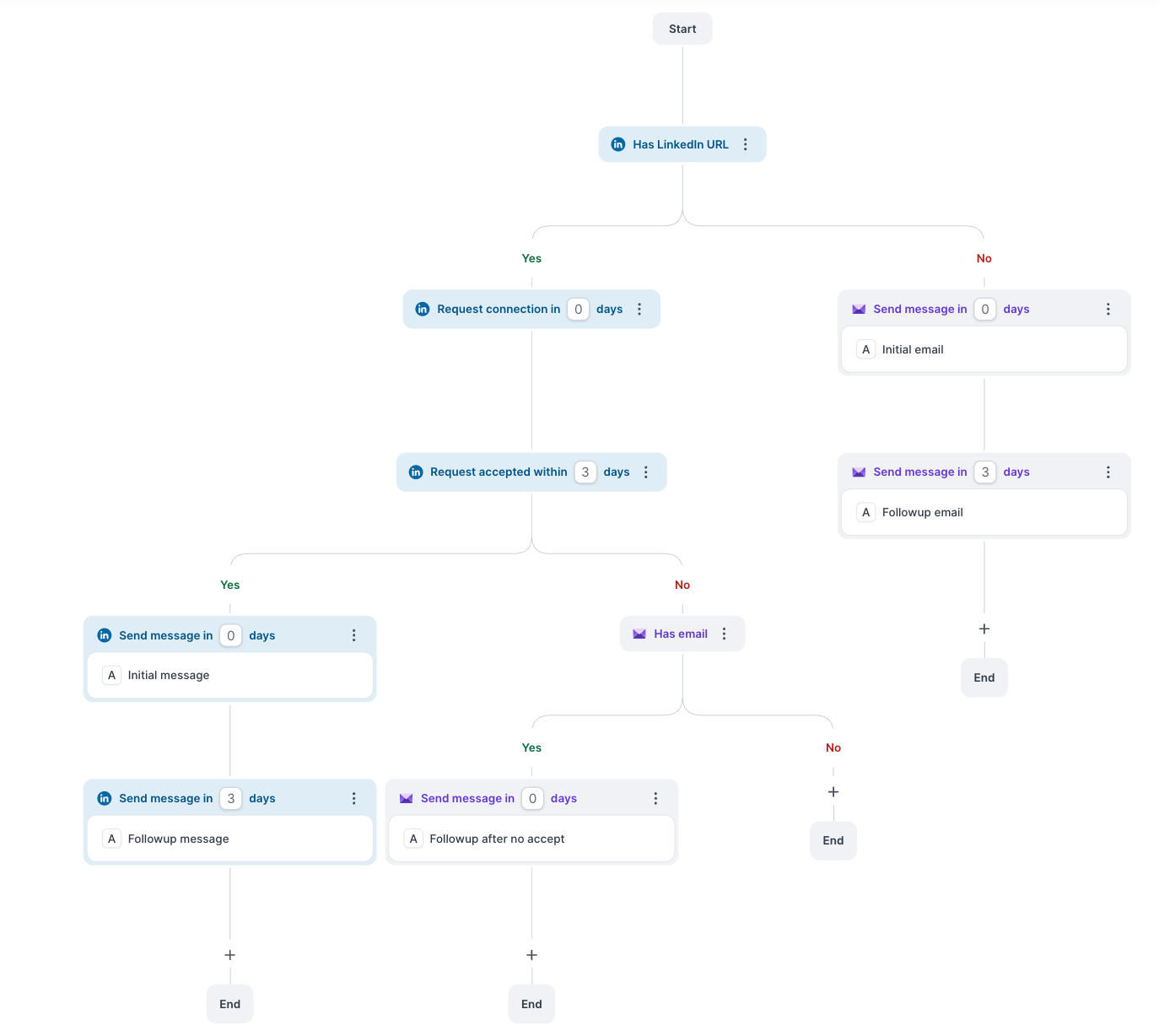
That's why most teams pair LinkedIn with cold email. Email doesn't have the same weekly limit, so it covers the volume LinkedIn can't, while LinkedIn adds the personal touch that cold email often lacks.
The numbers back this up. 2026 benchmarks put the typical reply rate at 7 to 12% blended across email and LinkedIn, against 3 to 5% on cold email alone. You can see how the email-only numbers compare in my breakdown of average cold email response rates.
The tricky part is managing both channels without things getting messy. Run them in separate tools, and it's easy to end up sending someone a connection request and a cold email on the same morning.
That's the problem Salesforge solves for me. It runs multi-channel campaigns combining LinkedIn and email in one sequence, and every reply lands in one inbox, from LinkedIn and email both.
It also adapts to what each prospect does. If the prospect accepts a LinkedIn connection on day one, the day two email gets replaced with a LinkedIn message.
On pricing, you get unlimited mailboxes, LinkedIn senders, users and workspaces on a flat fee rather than per seat, so adding more profiles doesn't push your bill up. And if you'd rather hand the work off completely, you can hire Agent Frank, Salesforge's AI SDR, who finds prospects, sends your outreach and books meetings for you.
He runs on Auto-Pilot if you want him working on his own, or on Co-Pilot if you'd like to approve his replies before they go out. If you'd like to compare a few options first, my roundup of the best multichannel outreach tools covers six of them side by side.
So treat LinkedIn as a great place to start, not the only place to finish. Use the strategies above, track what's working, and add email once you're ready to reach more people than LinkedIn's limits allow.
Start a free Salesforge trial, no credit card required, and run your LinkedIn and email outreach from one place.
LinkedIn lead generation is the process of finding potential buyers on LinkedIn and turning them into sales conversations. It usually involves a mix of posting content, reaching out to people directly and running LinkedIn ads.
Most accounts can send around 100 connection requests a week, or roughly 20 a day. LinkedIn doesn't publish an official number, and paid plans like Premium or Sales Navigator don't raise the limit.
Sales Navigator is worth it if you do outreach regularly and need precise targeting. It gives you advanced filters, saved searches and alerts, but it doesn't increase your weekly connection request limit.
Many LinkedIn lead generation strategies are free, including posting, commenting, connection requests and messages. Paid options like Sales Navigator, InMail credits and LinkedIn ads help you grow faster, but you don't need them to get started.
Yes, Lead Gen Forms tend to convert well because they fill in a person's details from their LinkedIn profile automatically. That makes signing up quick, though not everyone who submits a form will be a serious buyer.
Outreach can start conversations within days, since you're contacting people directly. Content-based strategies usually take a few months of consistent posting before they bring in a steady flow of leads.
Yes, but carefully. Automation tools can send connection requests and messages for you, but they still need to stay within LinkedIn's weekly limits, or your account can get restricted.